How to Find Image Sources For Proper Attribution or Research

There’s no shortage of amazing images online, but that doesn’t mean you’re always going to find the original. So many images you find on blogs and other websites originated from somewhere else. While it may not seem like a big deal, it seriously pays to know how to find the original. 

Here’s how to find an image source quickly and easily.

Why It Is Important to Find Image Sources

It’s always handy to know how to find proper image sources online. It won’t just make your life easier when it comes to finding high-quality photos; it could also help you avoid legal trouble. 

You Saw an Image and Want to Find It Again

Is there anything more annoying than seeing a cool image online, saving it to your desktop, and then forgetting where you found it in the first place? Worse still, you then have to waste hours trawling through your browser history to find it.

All of this wasted time and effort can be avoided when you know how to find image sources quickly. 

You Want to Use an Image in Your Blog Post and Attribute It Properly

Images are vital when writing blog posts. Research shows articles with photos get 94 percent more views than those without them. That’s because nothing puts readers off more than huge blocks of text. Images help break your writing up, make points clearly and improve the reading experience.

However, you can’t just use any old photo you find on the internet in your blog. You have to make sure you are legally allowed to use it and that you can attribute it properly. You’ll need to find the original image source for both of these tasks.

Once you’ve found the image source, you’ll be able to work out whether you’re allowed to use the image (I help you with this below if you’re still not sure), and you can attribute it correctly if you need to. 

While it’s very rare for small sites to get into legal trouble for using copyrighted images or not abiding by Creative Commons, it’s better to be safe than sorry. 

You Need a High-Quality Version of an Image

Low-resolution images suck. They look bad on your blog, and they look even worse when you scale them up for printed marketing materials — but pixelated images are exactly what you’ll get if you don’t find the original image source.

Why? Because reposted images are usually shrunk to reduce the file size and increase website load times. This is great for the website in question, but it’s not great for you. The original image, on the other hand, is usually much larger in size. Whether you want to use an image in a piece of marketing collateral or edit it yourself, it pays to be able to find the source. 

5 Ways to Find Image Sources

Finding an image source isn’t difficult. Here are five different ways you can use to find any image source today.

1. Use Google’s Image Search to Find Image Sources

Google Images Search is the de-facto place to find images online. You probably don’t need me to tell you that, though. What you may need me to explain, however, is how to use Google Images to find the source of an image. 
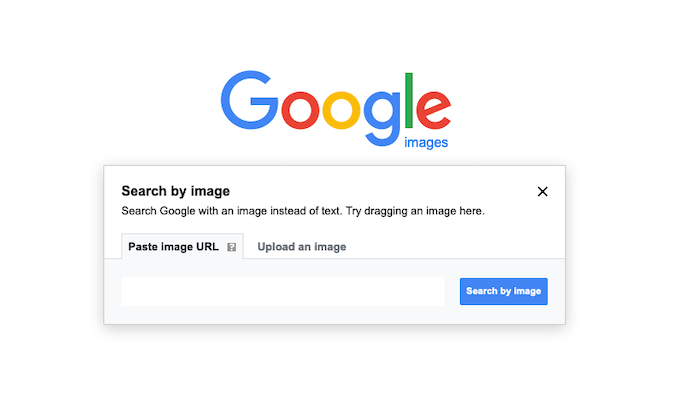
Ways to Find an Image Source - Image Search on Google

You can do that easily using Reverse Image Search. Head over to image.google.com, but instead of typing in a keyword, upload your image. Google will show a link to every page on the web with that picture, and it shouldn’t be too hard to find the original. 

You can even use Google’s Reverse Image Search on your iPhone by requesting the desktop version of the site in Safari. 

2. Use Other Reverse Image Tools to Find Image Sources

Ever found an image on Twitter or Facebook and wondered where to find the original image? While it sounds like a tall order, reverse image search tools actually make finding original sources using just the image far easier than you’d think. 

All you need to do is upload or copy and paste the image into the tool, and the search engine will find every instance of that image online. In most cases, it won’t be hard to find the original image. 

There are plenty of reverse image search tools out there, but here are a couple of my favorites.

TinEye

TinEye is a great reverse image search tool that helps locate an image source in seconds. You can search by uploading a URL if you have one or the image itself.

You can also use TinEye’s Chrome extension to right-click on any image while browsing and instantly get access to the platform’s data. 

Search By Image

Search By Image is an Android app that lets you reverse search for images on Google TinEye or Yandex. Search by uploading images from your phone or opening images from Facebook, Twitter and other apps.

3. Look Up the Image MetaData to Find Image Sources

You can find a surprising amount of information about an image in the file’s metadata. Sometimes it will even include the image’s source. 

You don’t need to be a technical whiz, either. First, download an image. For the purposes of this example, I’ll be downloading this image from the Good Housekeeping website.

Ways to Find an Image Source - Look Up the Image MetaData

On a mac, you can find the image’s metadata simply by right-clicking on the image and selecting “Get Info.” You’ll be served up a load of data that probably won’t make much sense, but you’ll clearly be able to see the image’s source.
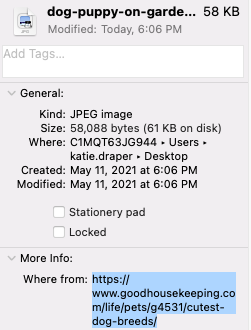
find image source - look for meta data

On Windows, just right-click the image and select “Properties.”

4. Use the Chrome Browser to Find Image Sources

If you use Chrome, you don’t need to visit Google Images to do a reverse image search. Instead, right-click on the image when you find one you want to search and click “Search Google for Image.”

You’ll be shown the full reverse image search results as usual. 

5. Use Visual Search by Bing to Find Image Sources

Bing has its own image search functionality called Visual Search that makes reverse image searches a breeze. 

You can drag your saved image into the search bar or upload it, and Bing will show every location it can find it online. You’ll also get a pretty in-depth rundown of the image’s attributes and any text that Bing can find in the image.

How Do You Attribute Image Sources Correctly?

How you attribute images depends on the type of image and where you found it. Most sites will be very clear about what you need to do when it comes to attribution, but it can help to know the following terminology. 

Creative Commons Images

This nonprofit organization allows the use and sharing of images and other creative materials through a series of licenses. Some won’t require attribution at all, some will let you edit images, and some will be incredibly strict. 

Attribution is a legal requirement of Creative Commons images unless the image has been published under a Creative Commons Zero (CC0) license. The Creative Commons outlines clearly what it classes an “appropriate credit” using the TASL method. You’ll need to include the following details:

  • title
  • author
  • source
  • license

Here’s an example from Creative Commons that shows exactly what they mean. 
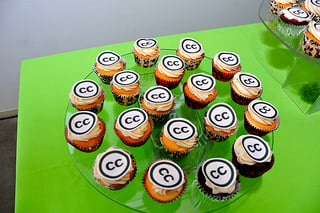
find image sources - how to attribute image example

Creative Commons 10th Birthday Celebration San Francisco” by tvol is licensed under CC BY 2.0

If you alter a Creative Commons image, you must include the changes in the attribution. 

Public Domain Images

When work is listed in the public domain, it means the copyrights to it have expired. It is free to use, share, and edit. You don’t need to attribute the image at all or ever reference the original source.

Royalty-Free Images

Royalty-free images usually aren’t free. Rather, you have to pay a fee to use the image once, but are then free to use it again as many times as you like without paying royalties. That’s what the royalty-free part means.

Royalty-free images usually don’t require attribution, but be sure to check the licensing agreements of the site you downloaded them from. There may be other restrictions, too, like not using them for a certain purpose or in a certain niche. 

5 Sites to Find Great Images

The costs of paying for images every time you use them quickly adds up for small businesses. It simply isn’t a sustainable practice. That doesn’t mean you have to go without images, however. 

There are plenty of places online to find high-quality royalty-free images. Here are a few of my favorites. 

Unsplash
Find Image Sources - Unsplash

Unsplash is probably the best stock photo platform in the world. You can use the images for free in almost any way you like.

Pexels
Find Image Sources - Pexels

Pexels is another large, free stock photo platform like Unsplash. It has its own license that governs what you can and cannot do with photos.

Burst
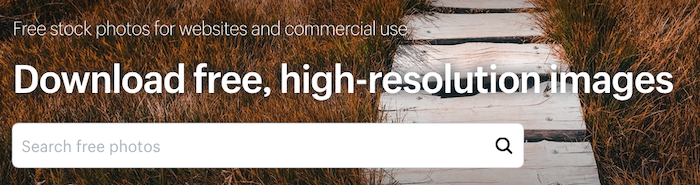
Find Image Sources - Burst

Burst is Shopify’s stock photo platform. You can download photos for free without being a Shopify customer. 

Flickr

Find Image Sources - Flickr

Flickr is a fantastic image repository where you can find thousands of images to use for commercial purposes for free. 

Canva
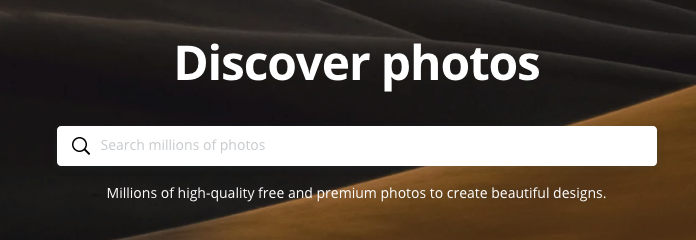
Find Image Sources - Canva

You may have used Canva to create a new logo or poster, but did you know it also has hundreds of free stock images you can use, too? You don’t even have to edit them to download them. 

Conclusion

Finding an image source can seem like a lot of work, but it’s well worth it to find a high-quality image or protect your site from legal issues. Use any one of the five strategies I list above, and you’ll be sure to find the original source of just about any image you can find online.

Once you’ve found your image, make sure you are using it in the best possible way on your blog or are using the best editing tools if you want to make the image even better.

Where do you find your favorite images?

How to Run Ads With iHeartRadio AdBuilder

How do you maximize your exposure?

If you ask ten marketers this question, you’ll likely get lots of similar answers: Google Ads, social media marketing, etc. What you’re asking is which platforms offer massive traffic and have strong conversion rates.

Now, imagine you’re a marketer for a local business. How do you maximize your exposure now? Those digital campaigns with tons of traffic aren’t necessarily the answer for a brick-and-mortar store trying to get their community through the door.

There are plenty of businesses that desperately need to expand their reach but haven’t had a breakthrough with digital. That’s why today, we’re going to take a look at the potential of audio ads. iHeartRadio AdBuilder offers some ease and functionality to the world of radio ads, and it just might be a solution for local business owners.

What Are iHeartRadio Ads?

One of the most significant issues small-to-medium-sized businesses (SMBs) have had with audio advertising is it’s not particularly intuitive. The idea behind iHeartRadio’s AdBuilder was to create a programmatic solution automating this process.

AdBuilder is a self-service platform designed to help marketers create and promote audio ads. Beyond buying ad space, AdBuilder supports SMBs by using algorithms to target specific audiences.

SMBs can decide how much they’re comfortable spending, which cities they’d like their ads to play in, and how to focus on well-defined target audiences. AdBuilder radio spots are professionally written and produced with on-staff voice talent.

How Much Do iHeartRadio Ads Cost?

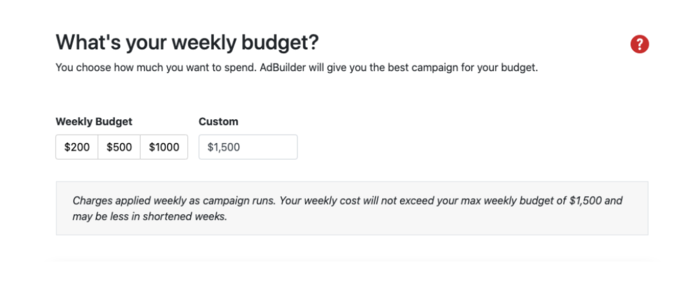
There’s no fixed cost with iHeartRadio Ads. What you pay is entirely up to you based on a series of options for your weekly budget. Depending on the market you choose, you see a minimum budget and a series of recommendations. You can also enter a custom amount of up to $30,000.

How Much Do iHeartRadio Ads Cost

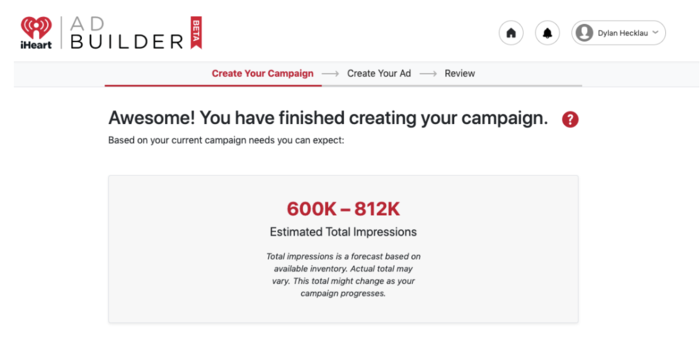
These costs purchase impressions, which are tracked on your account. Your weekly cost won’t exceed your max weekly budget and, even after your campaign is booked, you can modify dates and the budget for your campaigns.

iHeartRadio Impressions

Why Should You Run an iHeartRadio Ad?

Some marketers are looking for massive $30,000 nationwide campaigns; some want to spend $10,000. Some marketers have audio scripts ready; others have never written an audio script in their lives. The level of customization offered by iHeartRadio AdBuilder is unique and makes it worth checking out.

Of course, maximizing exposure is more than just a local business problem. Digital brands that want a specific type of customer or client can benefit from a national presence. Increased exposure means increased sales and can lead to higher quality engagement.

Whether you’re marketing for a local business or a national company, iHeartRadio AdBuilder may have something for you.

How to Set Up Your iHeartRadio Ad Campaign

Not only is iHeartRadio flexible, but it does its best to keep things simple. Setting up your campaign with them can be done in three steps.

  1. Provide Basic Information

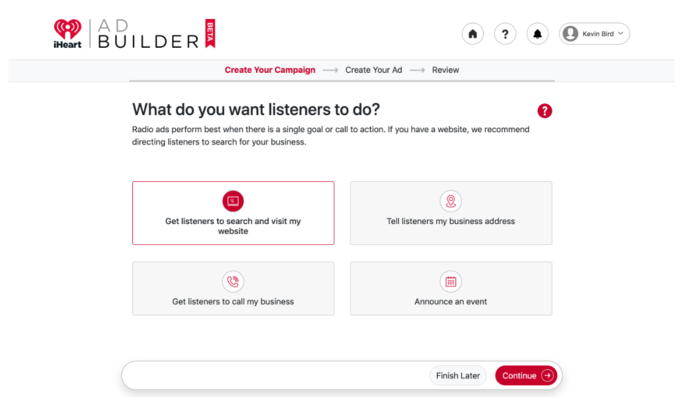
    Create an account and answer a few questions about your business and advertising goals. From there, you’ll determine your advertising goals, select target audiences, and pick a weekly budget. Their team of audio professionals produces a customized ad based on your goals and business.iheartradio ads setup

  2. Approve iHeartRadio’s Ad

    After they’ve produced your custom ad, you can listen to and approve the message. If needed, it can be revised (sometimes at no cost to you) and then be scheduled to play across iHeartRadio stations nationwide or locally.

  3. Your Ad Goes Live

    Once your ad is approved, it goes live and starts airing. The iHeartRadio AdBuilder optimizes your ad budget to reach target audiences at particular times of day, using user data to target listeners via specific stations. You also have access to data reports once your campaign has ended.

5 Tips for an Effective iHeartRadio Ad Campaign

1. Understand the Medium

Savvy marketers take the time to learn about the perks and limitations of audio-only advertising.

One of the most compelling pros of audio advertising is its simplicity. You don’t need an expensive camera or someone to craft a heavily researched, complex article. Your iHeartRadio ad is meant to be consumed in 30 seconds, so minimalism is an absolute must here.

That said, the simplicity of these ads can feel limiting to marketers used to creating long-form content. If you’re struggling to wrap your head around what compelling audio content sounds like, there are a few stages to focus on: Capture, Excite, and Guide.

Breaking down the marketing process into these three stages can help clarify the audio marketing experience.

Capture

The Capture stage is about finding the memorable aspects of your brand and using them to disrupt your audience’s patterns. It’s not just about being controversial or unusual. Truly captivating moments properly and cleverly address your target audience’s pain points.

This moment is a reinterpretation of your elevator pitch, but there’s much more to it in the audio space.

The use of a particular sound effect, a unique jingle, and a specific style of voice actor can contribute to this aspect of advertiser storytelling. There’s a time for mentioning your brand and your unique selling point, but it’s not now. The script here should be more focused on creating mental images and bringing up emotions.

Excite

Now that you have your audience’s attention, it’s time to convince them your brand is worth considering. Be selective about the selling points you include.

Could you streamline five of your best- selling points and shove them into the 30-second ad? Probably. Should you? Not necessarily.

When you captured your audience, you tapped into their emotions and got them excited about your brand. If you start rattling off stats, you’re probably going to lose the excitement. Use one of your unique selling points to showcase what makes you different to keep the enthusiasm up.

Guide

When you guide your audience, you try to get them to follow through on the action you want them to take. Transitioning from excitement to sales is always tricky, but the right kind of call-to-action (CTA) can make this process much more manageable.

By streamlining the messaging and leading potential customers to more in-depth, comprehensive marketing (a landing page, for example), you can focus on making the iHeartRadio ad compelling instead of just informative.

2. Pick Your Target Audience Carefully

It may not be exciting, but ask any successful marketer, and they’ll tell you well-executed research is essential when developing a marketing strategy.

Over the years, the phrase “target market” has been used interchangeably with “target audience.”

A target market is broad (generation, income level, etc.) and tailored to particular groups due to interest, budget, access.

On the other hand, target audiences are specific groups within those target markets. If your target market is Millennials, your target audience may be post-college, female Millennials making at least $50,000 a year.

Good ad campaigns are for target markets. Great ad campaigns are for target audiences.

The specificity makes the research valuable, and knowing who your target audience is can help you make more relevant, compelling ads. With audio, you must understand which stations they listen to and what time of day they’re likely to listen. iHeart AdBuilder does this for you automatically.

3. Analyze Your Campaign Results Regularly

As your marketing campaign grows and evolves, you need to analyze its effectiveness properly.

One of the most valuable tools marketers can use is setting clear, strict deadlines and tangible goals for marketing initiatives.

Don’t just aim for an increased conversion rate; aim for specific numbers in a few metrics. Properly labeling your campaign goals like this sets your brand up for potential success with every new initiative.

If a new campaign performs well, you can identify which KPIs improved. If the new campaign doesn’t meet the projected goals, you can see which metrics underperformed and react accordingly.

4. A/B Test Different Campaigns

Marketers don’t live in a vacuum. More often than not, everyone brings their unique experience and perspective to the table. That human element can make advertising come to life, but it can also create a sort of cognitive bias we can’t always identify internally.

That’s why I recommend brands and marketers test two radically different marketing campaign approaches, especially if this is their first major campaign.

Maybe there’s a comedic iHeartRadio ad you’d like to make, but you’re worried it won’t resonate with your target audience. Perhaps you’re worried your simple iHeartRadio ad won’t stand out in a sea of dynamic competitor ads. This is the time to test out all those ideas.

As long as you’re setting clear, tangible goals and tracking the data, every experiment is a learning opportunity. Test every assumption your campaigns make. Collect more and more data to develop a clearer sense of what your audience responds to.

Once you’ve identified winning strategies, start to optimize.

5. Use Strong, Clear CTAs

Connecting with a target audience is hard enough, but turning connection into conversion is one of the biggest challenges marketers struggle with, iHeartRadio ad or otherwise.

When crafting a compelling CTA, your focus should be on words provoking emotion or enthusiasm. Simple things like adding an exclamation point can make a massive difference.

Pair your CTA with a compelling reason for taking the next step forward. Now, this demands a bit of awareness on your behalf. For example, are you moving this potential customer into the sales funnel or simply further down the marketing pipeline?

Find statements matching the commitment necessary to convert once potential customers reach the next stage. You’ll know you’re doing this right when you have a low bounce rate.

As for the actual language you’ll want to use, here are some options you can work into your ad:

  • Sign up now.
  • Sign up for free.
  • Join free for one month.
  • Get started today.
  • Claim your free trial.

Conclusion

The most frustrating part of using a new marketing platform is the learning curve.

iHeart AdBuilder was seemingly designed with this problem in mind, taking the confusion and guesswork out of radio ads and replacing it with something both accessible and effective.

If your business needs a local boost, or you’re looking for a new way to reach your target audience, AdBuilder just might be the tool you need.

Are you considering radio ads? What kind of audiences are you hoping to target?

Biden Is the $6 Trillion Man

A blowout for the ages on everything but defense and security.

The post Biden Is the $6 Trillion Man appeared first on #1 SEO FOR SMALL BUSINESSES.

The post Biden Is the $6 Trillion Man appeared first on Buy It At A Bargain – Deals And Reviews.

ReadMe (YC W15) Is Hiring a Head of Product Management with API Experience

Article URL: https://readme.com/careers#head-of-product-management

Comments URL: https://news.ycombinator.com/item?id=27334621

Points: 1

# Comments: 0