What is PPC Management and How You Can Take Advantage Of It To Maximize Revenue

When it comes to getting traffic, you have two main choices: SEO or PPC management. Both options are an effective means of driving prospects to your website, and one isn’t necessarily better than the other.

When used correctly, these methods can deliver results. They just have different ways of achieving them.

Ad spending is projected to grow 7.61 percent yearly through 2026, proving companies see the value in PPC strategies. This article teaches you to get the most out of your PPC campaigns.

What Is PPC Management?

PPC management refers to the spending and strategy behind your paid ad campaigns, including:

  • the keywords you target
  • the SEM strategies you choose
  • the copy you use in your paid ads
  • the metrics you track and tools you use to track them
  • campaign optimization
  • A/B testing

You could manage your PPC ads yourself or consider using PPC management software for some areas. However, it’s a complex endeavor, and you may find you’re losing money if you don’t have a precise plan.

Therefore, many businesses choose to work with a digital agency to maximize their spending and conversions.

Once you choose to work with an agency, they take over your PPC management campaign for you and suggest changes to maximize the effectiveness of your ad.

Why You Need a PPC Management Strategy to Increase Revenue

When implemented correctly, your PPC management approach forms the backbone of a successful online marketing campaign; it’s a great way to get your business noticed in a crowded marketplace and generate fresh leads.

However, without a strategy in place, it’s a struggle to attract the prospects that are most likely to convert, but there are other reasons you need a plan.

A well-targeted PPC management campaign:

  • Raises your profile: Whichever niche you’re in, the competition is vast out there. Getting noticed means getting your business in front of the right people, and a well-drawn-up plan can enable you to achieve this.
  • Creates the right ads at the right time: To attract the right people, you need to send your ads to the sites where people are looking for products or services like yours. An effective strategy ensures you know who you’re targeting, why you’re targeting them, and when. This tailored PPC campaign management approach often significantly impacts your success rates. One agency found its client’s CTRs increased by 39 percent, and conversions increased by an incredible 78 percent.
  • Reduces your cost of conversions: When you know who your audience is, you spend less money. For example, when Hootsuite used an agency to assist with its PPC management, it streamlined its strategy and lowered cost per conversion by 28 percent.
  • Discovers new keywords: Whether you’re using PPC management software to discover new keywords or working with an agency, new keywords can equal more business. After some changes, Hootsuite found that 51 percent of its new custom came from additional keyword research.
  • Leads to more conversions: You can considerably increase conversion rates when you optimize your ads.

PPC Management Responsibilities

The main PPC campaign management responsibilities are analyzing and optimizing your PPC ads. This includes analyzing data, identifying trends, and improving the ads.

Other responsibilities cover creating a strategy for paid search, managing budgets, setting up ad groups and keywords, along with bidding strategies.

Then there is:

  • researching and implementing new strategies
  • creating reports on campaign performance and making recommendations
  • completing keyword and competitive analysis
  • keeping track of Google updates
  • managing the budget of campaigns, so they are in line with company goals
  • copy creation and channel targeting

Completing these tasks requires expertise and a wide range of skillsets to achieve the best returns, so some advertisers prefer to use an agency.

PPC Management Strategies to Increase Revenue

There’s more than one way to use ads as part of effective PPC campaign management. Below, we explain some of the most popular approaches, how to use them, and explain why you need them.

Let’s start with A/B testing your CTAs.

1. A/B Test Your CTAs

Not getting the results you want? Then try A/B testing.

A/B testing is the process of comparing two versions of an advertising asset. Aside from your PPC ads, you can split test your emails, web pages, videos, emails, and other types of content to see which one performs better.

As part of your PPC campaign management, you can test your PPC ads:

  • text
  • colors
  • ROI, etc.

However, you want to give special attention to your CTAs to understand which ones get your prospects clicking through and arriving at your marketing page.

HubSpot suggests taking a three-pronged approach to testing your CTAs.

  1. Be specific. You don’t want to run ads with a ton of individual differences, like an array of colors or text. You need to ask yourself some questions first to get meaningful results. For example, do you want to test the wording? Visuals? Placement? Test each ad for one element at a time.
  2. Vary your CTAs. Here, you want similar CTAs that provide the same information but are phrased differently. You could also test components like your CTA placement, color, size, text, etc. Even the most minor changes to a CTA can make a significant difference. Brad Shorr, Director of Content & Social Media for Straight North In Chicago, recently tested the following CTAs:

A. Get $10 off the first purchase. Book online now!.

B. Get an additional $10 off. Book online now.

There’s not a massive difference in the CTAs, but “B” won every time.

  1. Pick a date range, measure your results, and optimize.

2. Use Negative Matching Techniques

An essential part of your PPC management is not spending unnecessary money on ads. There’s a simple way to save money, and it’s called negative matching or negative keywords.

For example, drug development company Nuventra experienced a 70 percent cost savings per lead and a 500 percent boost in conversions when an agency used negative keywords as part of its PPC management.

If you’re not familiar with them, negative keywords are words and phrases you don’t want your ads to show up on. They’re a great way to get super specific with your targeting, and they can keep your ads from showing up on irrelevant searches.

For instance, if you have a PPC campaign for the term “athletic sneakers,” but you don’t want to show up on searches containing the phrase “running shoes,” then add “-running shoes” as a negative keyword.

As Google explains, excluding search terms lets you focus on the keywords most relevant to your customers, and the improved targeting can enhance your ROI.

For a simple way to implement negative keywords, try a free PPC management software tool like WordStream. You just:

  • add a broad term relevant to your sector
  • choose your industry
  • pick your country
  • wait for the keyword list to popularize
  • list any irrelevant keywords

You can also use Google’s keyword planner and the search terms report. Google advises that you “look for terms that don’t fit your business model among the queries where you’ve received traffic or in the keywords suggested to you in the course of planning.”

And, “In addition to reviewing the stats in these reports, also look for the intent behind a search.”

Alternatively, use a tool like Ubersuggest to find negative keywords.

3. Make Sure Your Ads Look and Sound Like Organic Results

PPC ads are often the first impression a customer has of your company. Therefore, t’s important to ensure they’re well-designed, well-written, and sound like organic results.

This means that your ad copy should be written in a natural, conversational tone and should not sound like you are trying to sell something. Further, natural-sounding copy is more:

  • engaging
  • persuasive
  • compelling

However, that’s not all you also need to think about. You need to look at natural language processing (NLP) and the role it can play in your SEO strategy.

NLP is becoming a much greater part of our everyday lives, and by 2026, the sector is set to be worth $27.16 billion. Considering its growth and its application to marketing, you can guarantee we’re going to see more of it, so you can’t ignore it.

If you haven’t heard of NLP, it’s a subcategory of AI; if you use predictive text, search on Google, or use a voice assistant, you’re already using it.

NLP is important to marketers because consumers don’t just use keyword-based questions. They use complete questions, which look more akin to long-tail search queries.

For instance:

U.S. States vs. How many states are there in the U.S?

Reconditioned smartphone vs. Where can I buy a reconditioned smartphone?

Keyword analysis vs. What is the best tool for keyword analysis?

There’s another factor to consider: the surge in voice search.

The growth in smart speakers like Alexa is undeniable. According to the analyst company Canalys, the smart speaker market was set to reach 163 million units by 2021.

This growth makes it even more vital that your PPC ads look and sound natural. Below are some tips to optimize your ads for voice search.

  • use short, concise sentences and phrases when writing your ad copy
  • add keywords that are relevant to what you’re advertising
  • include a call-to-action at the end of your ad copy so that people know what they should do next
  • understand user intent
  • answer your audience’s questions and address their pain points
  • use long-tail keywords

4. Use Display Advertising

Display advertising is a form of internet advertising that has become increasingly popular in recent years and includes text, banners, and images,

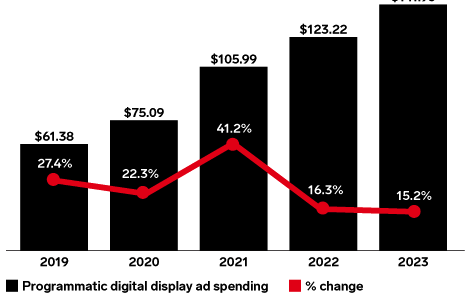
Although search ads are the most popular, display advertising is growing. According to research published by eMarketer, display advertising grew 41.2 percent in 2021, with ad spend climbing to $105.99 billion and it will continue to grow.

One of the best ways to include display ads as part of PPC campaign management is to have a detailed plan in place first. Decide what type of ads to run, what keywords to target, and how much your budget is.

If your finances are tight, focus your efforts on the best-performing ads and keywords. This approach allows you to get the most out of your advertising dollars without constantly tweaking your campaigns.

Finally, for this section, here are some best practices for display advertising:

  • include a mix of ad types to maximize engagement with your audience
  • use quality images to draw attention to your ads
  • create a call to action
  • A/B test your ads
  • include keywords

5. Optimize Your Site for Mobile

In 2020, there were 211 million mobile phone searchers in the United States alone. Fast forward to the fourth quarter in 2021, and 54.4 percent of global web traffic came from mobile.

Further, according to research from Adobe, while mobile shopping has hit a bit of a wall, 57 percent of consumers use their mobiles for browsing.

The message is clear: you need to accommodate mobile visitors.

Put yourself in your customer’s shoes for a moment.

You’re on your smartphone. You click on an email link or a search ad, keen to find out more.

However, the print is so tiny you can’t read it, the images aren’t clear, and you can’t see the information you want to complete the purchase.

What do you do? Wait until you’re on your laptop and click-through then? Maybe. If you remember. Most likely, you click away, don’t go back, and find a competitor.

You see, PPC management doesn’t stop with your online ads. It needs to continue into your landing page, website, or blog, so your prospects have the best experience.

How can you achieve this? By making your prospect’s destination user-friendly and optimizing your site by:

  • creating a responsive website design
  • using a fluid grid and fluid images to make sure content is readable on any device
  • optimizing site navigation so it’s easy to use with one hand
  • making certain text is readable on small screens without zooming in or out
  • ensuring the site loads quickly by minimizing images and removing unnecessary files

6. Create Text Ads

Text ads are the most common form of online advertising. They are usually short, with just a few lines of text and a link to the advertiser’s website.

Google defines text ads as, “a form of marketing communication that advertisers can use to promote their product or service on the Google Network.”

Text ads are shown on SERPs as sponsored links, which have been paid for by advertisers as part of a PPC management campaign and throughout Google’s Display Network (GDN), which includes:

  • websites displaying Google ads
  • mobile devices
  • apps
  • google online platforms such as YouTube and Gmail

To make the most of text ads:

  • include keywords
  • address your audience’s pain points
  • explain the benefits of your product/service
  • include affiliate and sidelink ad extensions
  • add numbers
  • detail the benefits

Finally, use CTAs that get customers to take the next step and purchase, like in this example by Pizza Pizza.
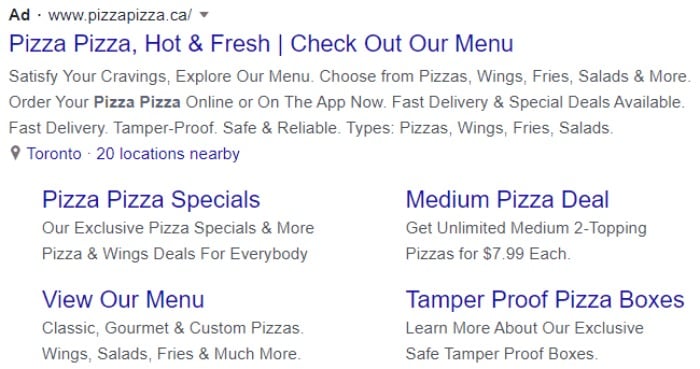
PPC Management Google text ad

7. Create Native Ads

According to the 2021 PageFair Adblock report, desktop adblocking grew 8 percent to 257 million users, while mobile ad blocking grew 10 percent to 586 million users. However, the research also found that Adblock users were more likely to accept less intrusive adverts.

That’s where native ads come in.

These ads don’t impact the user’s experience the same way some other ads do.

Native ads are advertisements that match the style and format of the other content on a website. In other words, they look like articles, videos, website banners, and other forms of content on a webpage. Examples are sponsored posts on social media or “sponsored stories” on Instagram.

Assuming you’re using Google, you can create native ads by:

  • signing in to Google Ad Manager
  • clicking delivery and selecting “native”
  • picking “new native ad single ad”
  • choose the type of ad (guided design editor for programmatic and traditional ads, the HTML and CSS editor, or the Android and iOS app code)

Best practices for native ads include:

  • knowing your audience and targeting them
  • using a compelling headline to draw readers in
  • creating an engaging visual
  • keeping them consistent with your brand
  • providing useful information or entertainment
  • including hyperlinks to drive people to your site
  • using a variety of formats
  • ensuring ads are responsive

PPC Management Frequently Asked Questions

Who should hire a PPC manager or agency?

If you don’t want to wait for your SEO strategy to kick in, then you might want to consider finding a PPC manager or agency to implement a PPC management campaign.

PPC is a proven way of getting targeted traffic to your site. However, even though you can manage various aspects of your advertising, like keyword analysis with PPC management software, you can still benefit from some expertise.

Regardless of the size of your budget, a PPC agency ensures you’re spending your budget wisely and implementing a solid strategy.

Can you manage your own PPC campaigns?

You could manage your PPC campaigns, but this often means a lot of trial and error and perhaps some financial losses along the way. Successful campaigns take skill and strategy and, therefore, may be more successful when you employ a digital agency to implement them for you.

What are the top e-commerce PPC marketing management tips?

You can identify the keywords that will resonate with your target audience; create an e-commerce ads campaign; segment your ads for better targeting; use remarketing; A/B test ads; advertise on a variety of channels, such as Facebook, Instagram, Twitter, and YouTube to reach new customers and widen the reach of your campaign; and use Google AdWords or Bing Ads for search engine optimization (SEO) purposes.

Does a PPC manager help you decide how much to spend on paid ads?

A PPC manager provides recommendations based on your aims and explains key information like your cost per acquisition, cost per click, and what you can achieve. However, the final decision on how much of your budget you want to assign to PPC is down to you.

{
“@context”: “https://schema.org”,
“@type”: “FAQPage”,
“mainEntity”: [
{
“@type”: “Question”,
“name”: “Who should hire a PPC manager or agency?”,
“acceptedAnswer”: {
“@type”: “Answer”,
“text”: ”

If you don’t want to wait for your SEO strategy to kick in, then you might want to consider finding a PPC manager or agency to implement a PPC management campaign.

PPC is a proven way of getting targeted traffic to your site. However, even though you can manage various aspects of your advertising, like keyword analysis with PPC management software, you can still benefit from some expertise.

Regardless of the size of your budget, a PPC agency ensures you’re spending your budget wisely and implementing a solid strategy.


}
}
, {
“@type”: “Question”,
“name”: “Can you manage your own PPC campaigns?”,
“acceptedAnswer”: {
“@type”: “Answer”,
“text”: ”

You could manage your PPC campaigns, but this often means a lot of trial and error and perhaps some financial losses along the way. Successful campaigns take skill and strategy and, therefore, may be more successful when you employ a digital agency to implement them for you.


}
}
, {
“@type”: “Question”,
“name”: “What are the top e-commerce PPC marketing management tips?”,
“acceptedAnswer”: {
“@type”: “Answer”,
“text”: ”

You can identify the keywords that will resonate with your target audience; create an e-commerce ads campaign; segment your ads for better targeting; use remarketing; A/B test ads; advertise on a variety of channels, such as Facebook, Instagram, Twitter, and YouTube to reach new customers and widen the reach of your campaign; and use Google AdWords or Bing Ads for search engine optimization (SEO) purposes.


}
}
, {
“@type”: “Question”,
“name”: “Does a PPC manager help you decide how much to spend on paid ads?”,
“acceptedAnswer”: {
“@type”: “Answer”,
“text”: ”

A PPC manager provides recommendations based on your aims and explains key information like your cost per acquisition, cost per click, and what you can achieve. However, the final decision on how much of your budget you want to assign to PPC is down to you.


}
}
]
}

Conclusion: PPC Marketing Management

For many businesses, effective PPC management is an essential part of growing their businesses and attracting qualified leads to their websites.

However, for the inexperienced, PPC campaign management often leads to costly mistakes if you’re unsure of the precise tactics you should be using.

You could use PPC management software tools to find keywords, monitor the results, and optimize when you’re starting.

Nevertheless, you may find it easier to leave the learning curve to others and enhance your chances of PPC success by outsourcing to an award-winning digital market agency.

Which PPC management techniques do you use, and how have they helped your business?

The post What is PPC Management and How You Can Take Advantage Of It To Maximize Revenue appeared first on Buy It At A Bargain – Deals And Reviews.

Covid Mask Mandates, Authority and Status

The post Covid Mask Mandates, Authority and Status appeared first on BUSINESS DEMO WEBSITES.

The post Covid Mask Mandates, Authority and Status appeared first on Buy It At A Bargain – Deals And Reviews.

Breaking: UEI to Replace DUNS in SAM

If you’re wondering what this all means, then you’re not alone. What is UEI? Who is SAM? What did they use the D-U-N-S number for, and what are they going to use now instead? 

What is the UEI?

It stands for Universal Entity Identifier. In the past, the federal government used the D-U-N-S number to identify entities in their system. But, that is not the case as of April 4.

The United States Government is changing its means of identifying unique entities. On April 4, 2022, they stopped using D-U-N-S Numbers from Dun & Bradstreet. They are switching to their own identification system. That is, the Unique Entity ID from SAM.gov.

As a result, the government can streamline the entity identification and validation process. If an entity does not already have a D-U-N-S number, they will not have to get one to register on the SAM website. Consequently, it should be easier and less burdensome to do business with the federal government.

What Does SAM Do? How Does it Relate to the United States Government?

SAM is the System for Awards Management. To be eligible for federal awards, a business must fill out a form to verify information in the SAM.  In the past, a D-U-N-S number was a necessary part of this process.

What is a D-U-N-S Number?

A D-U-N-S number (or DUNS number) is an identification number used by Dun & Bradstreet. It is assigned by D&B.  Furthermore, it is necessary to be in their system.

For years, the federal government has been using this number for their system as well. Now, they have decided to use their own identifier.

Dun & Bradstreet Isn’t an Official Government Organization

D&B is outside the government. As such, the US government realized it makes no sense to use the Data Universal Numbering System on government official websites. Instead of making D&B a partner, they made the unique entity identifier.

The idea is that this will allow them to better manage government data and organize information on their secure websites.

In short, the US government felt a Dun & Bradstreet number belongs to D&B. It is not an official government number. As such, it has the potential to be less secure. Of the solutions considered, the one chosen and accepted was that they create their own number to be used on government official websites.

How Will Federal Agencies Use This New number?

It will be used the same way the government used the D-U-N-S number. It will identify entities in the system for everything from grants access to submitting for government contracts. 

How Do You Get This New Number?

If you register on SAM.gov, then you’ll automatically receive a UEI. If you have not yet submitted your entity registration, then your number will come with your small business entity registration. The process is seamless. You won’t have to request a Unique Entity Identifier like you do a DUNS number.

What is the Start Date for the Transition?

This is effective as of April 4, 2022. If your company is registering in SAM on or after April 4, 2022, you no longer need to get a DUNS number from D&B as part of the registration process. Instead, you will receive a UEI within SAM. So, starting April 4, 2022, your organization will only use the new number in IAE systems. Even though the government will use this new number for their purposes, it is still an important part of the Fundability Foundation and Business Credit to have a D-U-N-S number.

Identifying Numbers, Uniqueness, and Fundability 

What does all of this mean for your business? Do you need to take any action? Not really. The new number will be assigned to businesses automatically at registration. Just be sure if you are already registered with SAMS, your information is updated and accurate. 

Since being a part of the D&B system is necessary for Fundability, you’ll still want to get a D-U-N-S number. You just won’t need to use it to apply for government awards.

There are other factors necessary for a Fundable Foundation also. In addition to a D-U-N-S number, you have to have an EIN. You also need a separate bank account. Credit Suite can walk you step by step through the process of building a foundation for your business that will help you get the funding you need to run your business. We can also help you find the funding you need to successfully complete any government contracts you may receive. Find out more today with a free Business Finance Assessment

The post Breaking: UEI to Replace DUNS in SAM appeared first on Credit Suite.

New comment by humrajchkboard in "Ask HN: Who is hiring? (April 2022)"

Chalkboard | Remote in the UK or EU | Permanent Full-Time | Mid – level and Lead Software Engineers | No sponsorship

PRODUCT: iOS and Android native mobile apps that give small/indie business people a second phone number just for work. It makes it easy for them to separate their personal lives from business with features like auto reply to missed calls, and extra tools to help them grow. Check out usechalkboard.com to learn more about us.

STACK: Swift and Kotlin for our mobile apps. GraphQL between our apps and the backend. Backend is Node.js, TypeScript, and PostgreSQL. We host with Heroku and Docker. Our Frontend is written in React.

FUTURE GOALS: We see a world with thousands of teams around the world using Chalkboard to communicate with customers and each other. On the move, in retail locations, out in the real world.

TECH PRINCIPLES: We have a mature test suite and endeavour to maintain it as part of our development process. All code changes are peer reviewed. We think the best features are a result of tight collaboration between product and engineering. We use the best tools for the job, but they need to be proven.

TEAM: Small but mighty experienced, there’s 14 of us (and growing fast!). We’ve got an engineering manager, product manager, product designer, and of course our seven other Swift, Kotlin, and JavaScript developers.

TO SUM UP: Join a financially secure start up, with a grand plan, a small but experienced team, quality tech, sound technical principles, and a well-written codebase. Help millions of small and local businesses to operate, grow, and thrive.

FOR YOU: up to £55k for our mid-level developers and up to £70k for our lead developers.

ↆ Below, you find much more info and apply to join the team
https://usechalkboard.com/careers#current-vacancies

🙂

Treble.ai (YC S19) Is Hiring VP of Engineering

Article URL: https://www.ycombinator.com/companies/treble-ai/jobs/Z7TVbjr-vp-of-engineering

Comments URL: https://news.ycombinator.com/item?id=31112047

Points: 1

# Comments: 0

New comment by katunderwood in "Ask HN: Who is hiring? (April 2022)"

EverWash | Philadelphia, PA | Full-time | 100% Remote or Hybrid | No Visa

Hiring for: React Native devs, C#/.NET devs, and UI/UX designers

Tech Stack: JavaScript/PHP/.NET/MySQL (web) and React Native/Objective-C/Java (mobile), hosted on Azure

EverWash is a Series B startup that works with car washes nationally to transition them to a more lucrative membership-based business model. Car owners can then subscribe for a low monthly fee (cancellable anytime, like a typical monthly subscription) to get unlimited car washes at participating locations. We’re at 700+ locations now and continuing to scale quickly. You can apply directly below:

React Native ($140-150K+, negotiable for more senior devs) – https://www.linkedin.com/jobs/view/2997255067

C#/.NET ($140-150K+, negotiable for more senior devs) – https://www.linkedin.com/jobs/view/3005559429/

UI/UX ($70-105K) – https://www.linkedin.com/jobs/view/2974739150/

Or email me at katarina@everwash.com with any questions or referrals. We pride ourselves on having an efficient interview process and developer-friendly practices. Thanks!

Handing Putin the Nuclear Advantage

The post Handing Putin the Nuclear Advantage appeared first on Buy It At A Bargain – Deals And Reviews.

Kamala Harris staff exodus: Harris’ chief of staff Tina Flournoy to leave position

Vice President Kamala Harris’ chief of staff Tina Flournoy will be leaving the administration and replaced by top adviser Lorraine Voles in the latest shakeup in Harris’ office, according to the White House.

Colorado Dem gov slams DeSantis for ‘socialist attacks’ on Disney, GOP gov hits back at ‘baseless allegations’

Polis criticized Florida in a Tuesday tweet over his support of the state legislation stripping Disney of its special self-governance powers and for DeSantis saying he was looking into legislation regarding Twitter’s poison pill to Elon Musk’s offer.

How to Get a Free Domain Name

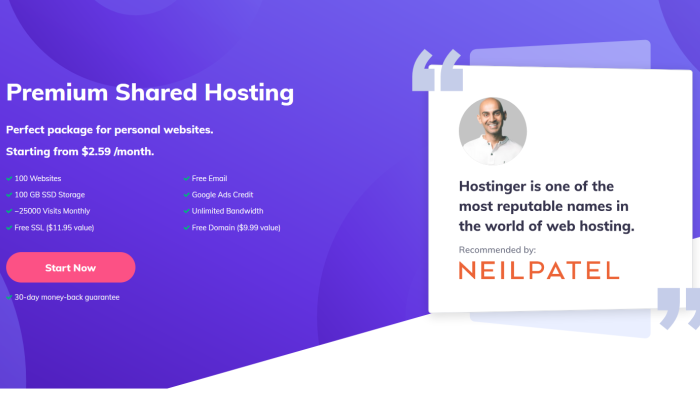
Hostinger NP offer splash page for How to Get a Free Domain Name

Disclosure: This content is reader-supported, which means if you click on some of our links that we may earn a commission.

If anyone’s going to see your website, it needs a domain. Simple as that.

If you don’t want to pay for a domain name, keep reading this post.

Your domain name is where your site lives on the internet. I use neilpatel.com, as you can see in your browser.

Obviously, you want something different. Something that’s your own.

In this post, I’ll walk you through how to get a domain name that aligns with your business and establishes your brand, and how to get it for free.

I’ve made this as simple as possible. Don’t worry if you aren’t familiar with this stuff. Just follow the steps and you will have a free domain name very quickly.

Your 2-Minute Cheat Sheet

Want a quick answer on how to get a free domain name? I’ll cut to the chase.

If you’re planning to start a blog or launch a website, you’ll need a web hosting company. When it comes to making a choice from the many available options, I suggest Hostinger.

Not only does the company provide excellent speed and uptime reliability, but it also offers a free domain name for the first year.

Get your domain and hosting set up in one fell swoop with Hostinger. You still have to pay for hosting (which you can lock in for under $3 per month), but you get the domain name for free.

You can create a Hostinger account and sign up by clicking here. With their easy guided setup, the whole process just takes a couple minutes.

After that, you’ll have hosting, a domain, and a basic website ready to go.

If your budget is really tight at the moment, you can also consider using a free subdomain.

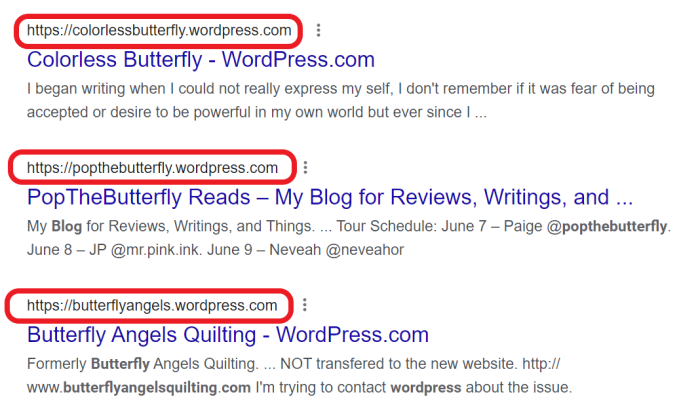
This is where website builders like WordPress and Wix come into play. The only catch is that, instead of having a simple .com site like mine (NeilPatel.com), you‘ll have something like yourusername.wixsite.com/yoursiteaddress or yourdomainname.wordpress.com

WordPress subdomain examples for How to Get a Free Domain Name

This isn’t an ideal situation. But it can be a viable option for when you want to experiment with free features of the website builder.

But if not having a clean .com is a non-starter, don’t worry. The process for getting set up with Hostinger and snagging your free domain is as simple as it can be.

Read on to follow the three easy steps to get a free domain name for your website.

  1. Go to Hostinger’s Website
  2. Select Your Hosting Type
  3. Claim Your Free Domain

You’ll be able to do all of this in one place with Hostinger. I will walk through some of your other options, but you may need to interface with multiple vendors to accomplish all of these steps.

Step 1: Go to Hostinger’s Website

The very first thing you need to do is head over to Hostinger by clicking here.

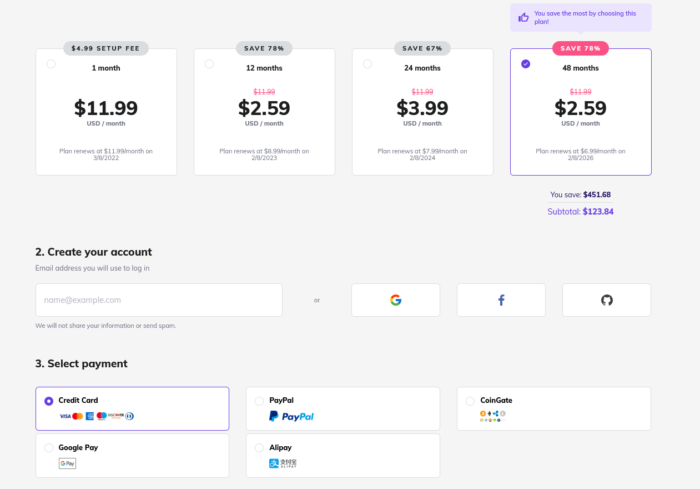
Click Start Now and you’ll be taken straight to the checkout page.

Hostinger offer checkout for How to Get a Free Domain Name

Conveniently, that checkout page is all set up with my recommendation. You’ll get premium shared hosting, which is the lowest-cost plan that also includes a free domain name.

My tip is select the longest term for the best rate. If you commit to four years of hosting upfront, you can lock in a really attractive rate of $2.59 per month.

Just click on the right-most box at the top to make sure you get the best deal.

Take a look at the add-ons below there to see if any are useful to you. None of them are absolutely necessary, but daily backups and priority support are helpful features and they’re reasonably priced.

After that, enter your payment information, click Submit Secure Payment, and then you’ll be onto setup.

Step 2: Select Your Hosting Type

With my offer for Hostinger’s shared hosting, you actually don’t have to select hosting type yourself. Premium shared hosting is all ready to go for you.

However, you may know enough about your website’s needs to also know that you might need more a powerful hosting type than shared hosting, like VPS or dedicated.

If you have no idea, read on to learn a little bit about the differences between those three types of hosting and who each one is best for.

Shared Hosting

I would recommend shared hosting if you’re starting a new website.

Not only are the plans under this category cheap, but they can also accommodate the needs of low-traffic sites quite efficiently. Your website is hosted on a server along with a bunch of other websites. You save money by sharing server resources with the other tenants.

It’s like living in an apartment versus having your own house. It costs less and you don’t have to worry about maintenance. If one of the sites on the shared server starts taking too many resources, it can cause problems for your site’s performance. This is why shared hosting isn’t appropriate for really big complex websites.

The flip side is that shared hosting is perfect for someone who doesn’t expect high traffic volumes and lacks technical knowledge. 

Cloud Hosting

Cloud hosting allows you to get better performance without having to pay the significantly higher price tags of the options that come after this one.

With cloud hosting, you get the same environment as shared hosting (that is, you’re sharing resources with the other sites on servers), but multiple servers work together via the cloud to prevent any one from getting bogged down because of a bulky, popular, or resource-hungry site.

That usually results in more reliable speed and uptime, since you’re not sharing the resources of just one server.

This is a good half-step up from shared hosting but not as powerful and reliable as the next option.

VPS Hosting

VPS hosting stands for virtual private server hosting. This category includes plans for websites that want better performance and can accommodate a higher price point.

The good thing about this hosting type is it guarantees useful resources to you exclusively. Technically, you still share a server with other websites, but you have a “virtual“ server that includes dedicated resources. 

You can consider this hosting type if you expect sudden spikes in traffic volumes.

Dedicated Hosting

Dedicated hosting gives you exclusive access to an entire server reserved for your website alone. You don’t have to share it with anyone.

Understandably, you get premium performance with this subscription plan, but you have to be ready to pay its premium price, too. 

This is a good option if you’re a large enterprise that regularly handles high traffic. It’s also great for those who want complete control over the hosting environment.

For this guide, I’ll suggest you choose the premium shared hosting plan that’s preselected. However, if you prefer other plans, you’ll be .

Step 3: Claim Your Free Domain

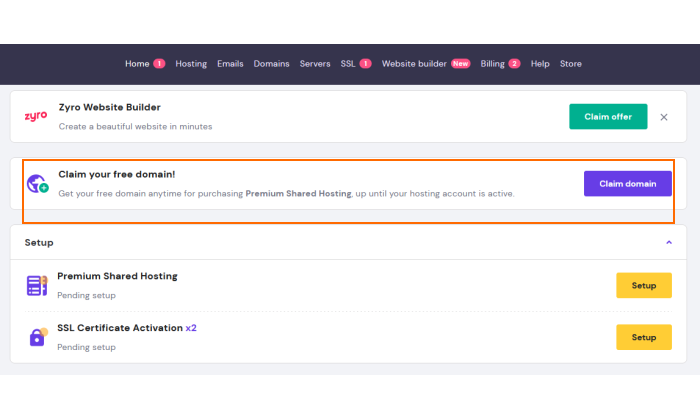
After you’ve completed checkout and payment, you’ll be taken to your Hostinger control panel, hPanel.

There, you’ll see front-and-center an option for claiming your free domain.

Click Claim Domain to search for your preferred domain name. Once you see it, click the purple box next to it.

I’d encourage you to select a .com extension as it looks more professional and helps you appear more reliable to your visitors. 

The only time that I’d consider an alternative domain extension is if the .com extension is already taken and you are absolutely set on the name.

Having a .com domain is particularly important for businesses—small blogs, personal sites, and side hustles may be able to save a few bucks by going for an alternative extension.

After that, you’ll just have to enter some basic information to register it. Fill out the form and submit it. Hostinger will take a few minutes to verify your registration information, then send you an email which will have a link to complete the verification.

With that, you’re all set on securing your free domain name!

There’s just one more thing I recommend.

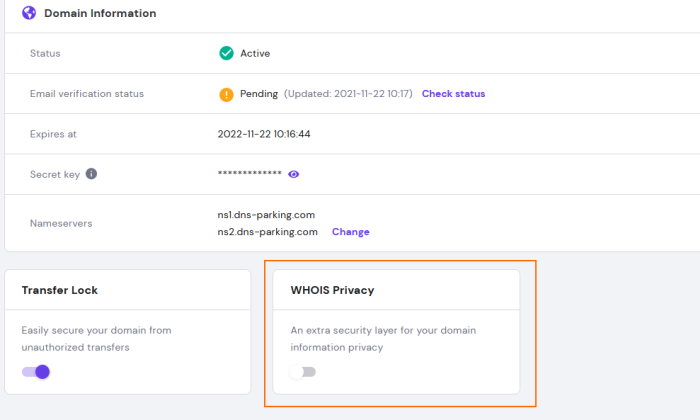
Make sure to enable WHOIS protection. After you’ve completed verification, you’ll be taken to the section of your dashboard for your new domain name. Then, just look for the slider button under WHOIS Privacy and click it so it becomes purple and enabled.

Hostinger enable WHOIS Privacy for How to Get a Free Domain Name

Doing this will conceal your name, email, phone number, and address from appearing on a public database.

And you’re done!

You now have an excellent hosting plan as well as a free domain. If you have not already started, then start now at Hostinger.

Other Methods

For the sake of comprehensiveness, I’ll also discuss two other ways of getting a free domain. Although I don’t recommend them, it’s always good to know all of the options.

Option 1: Using a Free Subdomain 

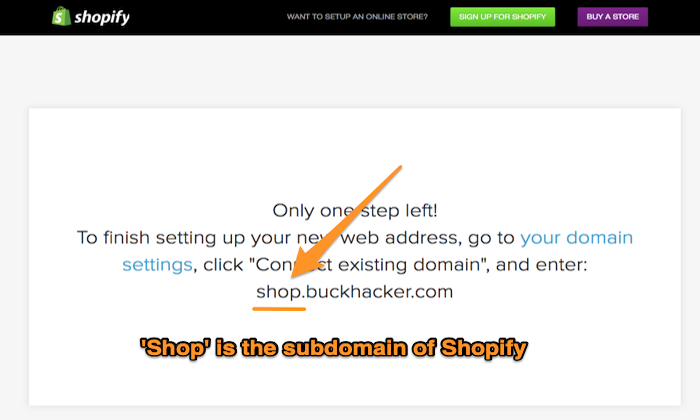
Several website builders offer subdomains, which is a personal domain that exists within an existing domain name. 

Remember that movie Inception where Leonardo DiCaprio dreams that he is in a dream? Something similar happens here. 

Shopify free subdomain for How to Get a Free Domain Name

You end up getting a domain name within a domain name. 

Site builders like Wix, Squarespace, and Weebly offer subdomains to their users. They have a free trial as well, so if you like their services, you can purchase their premium plans that include everything you require to build, launch, and manage a professional business website. 

Out of the several perks on offer like drag-and-drop site builder, web hosting, templates, and search engine optimization (SEO) tools, you also get a free domain name.

But why do I still say this method is not ideal?

Let’s discuss this with an example. 

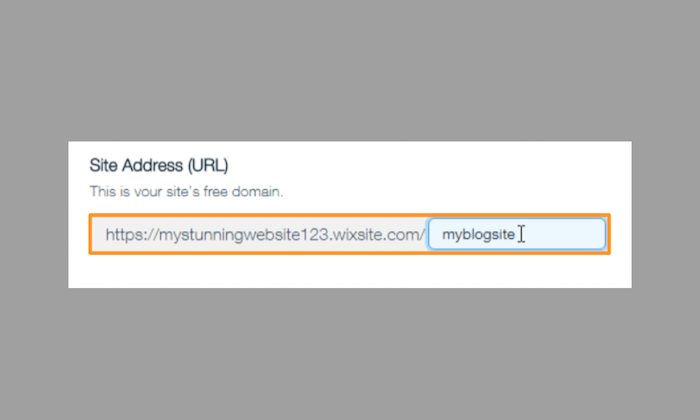
Imagine you use a free website builder like Wix. You won’t have to pay for a domain, yes, but your side will have the Wix subdomain. It’ll look something like this:

yourusername.wixsite.com/yoursiteaddress

Suppose your Wix username is “My Stunning Website 123,” and the domain name you want is myblogsite. Here’s what you’ll get:

Wix free subdomain for How to Get a Free Domain Name

Think about it: Does that look professional? Have you seen any credible website have a domain like this?

That is why I’d only suggest this method if you want to experiment with your website builder’s free features or new updates. 

WordPress is your other option, and luckily, is not as invasive as Wix. The format for a free WordPress subdomain is: yourdomainname.wordpress.com

This is a good option for situations when one cannot spend money, but it is not a viable long-term strategy. You want your domain name to be memorable and short–both of which aren’t possible when you use a subdomain.

The fact that your visitors won’t remember your domain or find it hard to remember is another disadvantage.

Option 2: Using a Free Domain Name Registrar (Not Recommended)

I’m only discussing this option for the sake of comprehensiveness of this article and wouldn’t recommend it. 

You can get a domain name from a free domain registrar, but it’s generally unsuitable. Especially if you want your domain to reflect a certain level of professionalism or trustworthiness. 

You see, the truly free domains use uncommon extensions. For instance, you’ll get .tk instead of .com.

Your prospective customers would much prefer working with a domain name that reads yourbusiness.com instead of your yourbusiness.tk. And, it’s much easier to remember a .com than some domain extension few people have seen before.

Plus, you don’t own the domain name, which also defeats the purpose of launching a blog or a website.

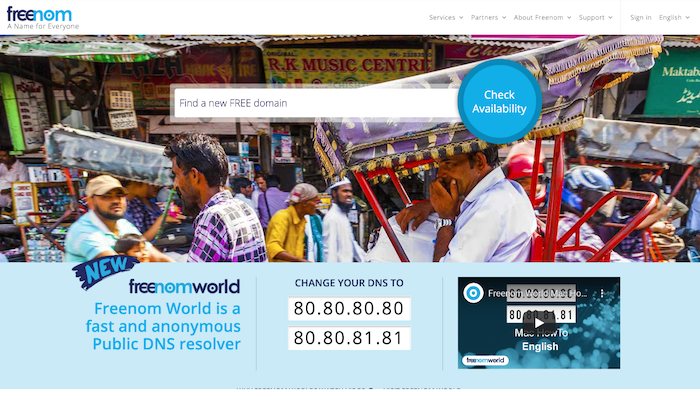
However, if you do decide to take this route, you can check out Freenom, GetFreeDomain.Name and Dot TK.

Freenom main page for How to Get a Free Domain Name

Several domain registrars will give you a free domain in exchange for running ads on your website. There is nothing wrong with running ads, but this just isn’t the best way to do it.

You don’t have any control over the ads (the kind of ads played, the length, etc.) or their placement. As a result, your visitors may not have the best experience on your website. This may even damage your SEO ranking as well.

In fact, even if you view the situation with a more optimistic viewpoint, it still isn’t viable.

Suppose you’re successful in driving high traffic to your website, and the ads get one million views. You won’t receive a single penny from those ads–all you get is a free domain.

Not a fair trade, right?

If you’re seriously toying with the idea of running ads on your website, I’d advise you to do so through a legitimate advertising network as it can be a great source of income. Don’t exchange ads for a free domain.

Important: Don’t Forget to Renew Your Domain!

Domains expire. This can take one year, two years, or three years based on the package you buy.

Setting up a website or blog is hard work. You put in a lot of effort to find the perfect URL, design a website, and publish relevant content on it, among several other things that help it rank high and attract customers.

Just imagine the horror when you get up and realize some random stranger has bought it. The reason? You forgot to renew your domain.

Tragic.

This is why you must understand the importance of renewing your domain. Many people have made this mistake in the past, and it cost them dearly.

For instance, during one presidential election cycle, Jeb Bush and his team forgot to renew their domain JebBush.com, which Donald Trump successfully purchased and redirected Bush’s visitors to his own presidential election website. It was a stellar business move on Trump’s part, but a disaster that Bush’s team could’ve easily averted.

Make sure domain renewal is marked on your calendar a month in advance. You can also put your domain on auto-renewal just to be safe.

Domain renewal for How to Get a Free Domain Name

Conclusion

Hostinger is the best way to get a free domain name–one that you won’t have to surrender even if you switch web hosts.

The other way is to use a subdomain by using reliable and reputable web builders like WordPress and Wix.

Within seconds you’ll have a reliable web hosting service as well as a new domain for free. Trust me, saving a few dollars isn’t worth the hassle of looking unprofessional, running a spammy website, or getting hacked.