How to Target Baby Boomers Through Paid Ads

The baby boomer generation may seem like an afterthought when you put together the target audience for your paid marketing campaigns, but they still hold a lot of the country’s wealth and remain a key purchasing demographic.

When Was the Baby Boomer Generation Born?

Baby boomers were born between 1946 and 1964. This generation still makes up a large portion of the population, with a 23.5 percent share as of 2019. In fact, they were the largest generation in history until millennials surpassed them.

The baby boomers have had a huge impact on social and economic policy and were the target audience for many marketing and advertising campaigns for decades.

The term “baby boomers” actually comes from the fact that there was a high birth rate following the soldiers’ return from World War II. As a result of their high numbers and growth to adult age during a time of economic prosperity, they’re also considered one of the most financially successful generations of all time.

What is Different About the Baby Boomer Generation?

This article focuses on the best strategies to deliver paid ads and marketing campaigns to boomers. To do this, you need to understand the generation’s personality traits, interests, and habits.

Keep in mind that the majority of this generation is reaching retirement age.

Their retirement may look much different than previous generations though. As many as 65 percent do not plan to retire. This is not just due to financial hardship; many enjoy their work, find their work time valuable, and think it’s important to stay active and involved to remain youthful.

They’re also more likely to spend money than previous generations. Their parents and grandparents were pretty tight with their pennies due to growing up in the Depression-era.

Compared to younger generations, boomers may be a bit slower to adapt to technology, and rightfully so. Many still use a landline and write checks rather than using debit cards.

They also don’t have the same trust in technology as younger generations. While younger generations accept that the internet poses a security risk (and are fine with it), many boomers haven’t felt the need to take the risk.

As a result, trust-building is far more important than design and aesthetics. Trust, brand loyalty, reputation, and security are critical to paid ad campaigns targeting baby boomers.

Why You Should Target Baby Boomers Through Paid Ads

Why even target this generation, to begin with? Why not focus on millennials and Gen-X instead?

It’s because this generation still makes up a large portion of the population.

They also possess a lot of the country’s money and are working past retirement age, which means they’re still spending.

Interestingly enough, they’re the only generation experiencing growth in the workforce, so their influence on the economy is still very real. Plus, 40 percent are starting to spend money online, which opens the doors to more opportunities.

The big question is, do you own a business that could potentially benefit from targeting baby boomers? What are their interests as of right now, and what types of products are they buying? Keeping in mind these individuals are between ages 57-75, what are some baby boomer marketing characteristics you should implement?

First, any business providing accurate and actionable financial opportunities could be one. We find more of this generation is still looking for opportunities at an older age, and the days of “sitting on the front porch retirement” are over.

Businesses selling products to help seniors stay in their homes or help make their lives easier will also have a better shot at selling to this generation.

It’s less about what you’re selling and more about how you sell it.

Strategies for Targeting Baby Boomers Through Paid Ads

First and foremost, keep ethics in mind at all times. There are so many slimy methods of marketing to people who are not as “tech-literate.” You don’t want to go that route. There are too many great ways to provide baby boomers with value while also growing your brand.

Marketing to baby boomers is all about trust, brand, reputation, simplicity, and transparency. Keep these five factors in mind as we go through the next few sections.

1. Target the Social Platforms Baby Boomers Use the Most

Most baby boomers are on Facebook, YouTube, and Pinterest, so you’ll want to focus on these three platforms.

Facebook has a vast assortment of ads and ad types you can use like carousel ads, videos, static images, sidebars, and pre-roll ads. Each of these has its time and place, but you want to make sure it’s not too intrusive. Keep in mind that “click-bait” will not work with boomers because they won’t trust you.

Remember, this generation grew up with infomercials, the ultimate bait and switch.

If you’re advertising on YouTube, think about what this person may be doing on YouTube when they see your ad. What are they watching? What are they looking up? One in three use YouTube to learn something. They’re not wasting the day away watching videos for entertainment like younger generations might.

Many of them also turn to YouTube to save time. They’re learning that they can quickly look something up on YouTube to get the information they want, rather than sifting through dozens of TV channels trying to find the right media source.

They want to save time and learn something.

2. Use Themes in Your Paid Ads That Appeal to Trends in the Boomer Generation

Marketing to baby boomers is all about appealing to their feelings and emotions. The same is true with any generation.

What are they feeling?

We know a majority likely have grandchildren, so they might be online looking for activities to do with their grandchildren or for gifts.

Many of them aren’t retiring any time soon, so they may be looking for solutions to make their working retirement more enjoyable. This could be something to save time or help them learn a new skill they can turn into a side-income during their retirement.

Lastly, Boomers don’t want to rely on their children as much as other generations. They value independence, they want to stay in their homes, and they don’t like when people classify them as “senior” or “elderly.”

3. Create a Simple-to-Use Paid Ad Strategy

The Baby Boomer target market didn’t grow up with technology, smartphones, retargeting ads, or artificial intelligence. No matter what way you look at it, they’re not going to possess the skills necessary to understand a complicated ad.

If you overcomplicate it, you’re going to lose interest.

You need to make sure the entire experience from front to back is simple, quick, trustworthy, and as transparent as possible. Take a walk through your entire funnel or sales process and look for areas where Baby Boomers may get tripped up.

Your price should be front and center, right at the beginning. Do not try to bait them in with videos to entice them, it won’t work. Your ad needs to be straightforward.

Essentially, “this is what I’ve got, this is how much it costs, and this is how you get it.”

3. Use Baby Boomer Language in Your Paid Ads

Avoid terms like elderly, senior citizen, golden years, aging, etc. They don’t relate to this language because most boomers don’t see themselves this way. They’re not looking to unwind and relax like previous generations. Boomers still possess a strong zest for life, so they may take offense to being called “old.”

This is where things get tricky. You can’t call them old, but you also don’t want to use language that is “too new.” While they’re not as out of touch as their predecessors, they’re still not up-to-date on trends and internet slang.

If they can’t understand your ad or what it is that you’re offering, they will move on. Simplicity is the goal. Advertising to boomers is actually easier because you don’t need to do anything fancy to get attention, but you still need to say the right things.

Millennials are so numb from marketing slapping them in the face that you need to be clever to grab their attention. The same doesn’t apply to boomers. For them, it’s all about trust. If they trust you, they’ll listen to you.

4. Use Different Content Types in Your Paid Ads That Appeal to Baby Boomers

This generation takes longer to make a purchase. They grew up when you had to shop in person or call and talk to a live representative to make a purchase. They wrote checks and money orders and did everything the slow way. They’re not going to respond to you talking a mile a minute about the latest and greatest product they’ve never heard before.

They’re also not going to take your word for it. You need to show them that it works. Including video as a part of your content is an important step in the right direction, as is social proof.

Boomers also value brand loyalty and think you should earn rewards for shopping specific brands and companies consistently. That’s why the majority are members of loyalty programs.

You could use this to your advantage by creating a loyalty program or offering a discount for signing up for a yearly service.

Examples of Paid Ads Targeted at Baby Boomers

Let’s take a look at some examples and break them down so you can see what we’re talking about in action.

example of paid ad for baby boomers

As you look at this first ad, do you think that it will work for people in the baby boomers years?

Probably not.

They likely won’t get it, understand why the person has a beard, or get what the objective is here.

We might realize they’re saying you need a great razor to clean yourself up so you’ll get kissed but it’s a reach. An ad like this may be too “modern” for the older generation.

example paid aid targeted at baby boomers

Here’s a perfect example where keeping it simple wins. There’s nothing creative about this ad. It’s plain and simple.

The ad tells you that it’s the best razor and here’s why. The only thing that could be better is a description of how many razors you get, how much they cost, and how long they last on average.

Transparency wins over cute and cliche.

example of an ad targeted towards baby boomers

How about this ad? Any idea why we think it’s a bad choice for boomers? They made the people look so old with a cane, the way they’re dressed, the use of the word “senior,” and the fact that they said, “make moving fun.”

This ad is patronizing and shows baby boomers in a way they don’t see themselves. The truth is, most are still quite active.

Conclusion

Understanding how to market to Baby Boomers is still a relevant topic and we believe it will be for another decade or so. This generation still holds a large economic share, they’re still active, and they show no signs of slowing down. The key is to focus on Facebook and YouTube.

If you’re lacking experience on these two platforms, we have a variety of resources to help you. No matter what, having a definitive buyer persona is the key to all marketing so start there and the rest will come.

What types of unique strategies are you using to target baby boomers? Let me know in the comments!
An Introduction to Pay-Per-Click (PPC) Paid Marketing

992532_An Introduction to Pay-Per-Click (PPC) Paid Marketing_031721

Your brand has the power to reach millions of people around the world, and it only takes a few minutes to do. The power of pay-per-click (PPC) marketing is incredible, with a huge reach and the ability to target specific audiences.

How can you make the most of it?

Investing in PPC can bring a great return for your business (it’s thought paid advertising returns $2 for every $1 invested), but it’s also an easy way to lose money if you don’t approach it in the right way.

To help make sure you’re getting your PPC right, here’s my introduction to pay-per-click marketing.

What is Pay-Per-Click (PPC) Marketing?

Pay-per-click is a common advertising model in internet marketing. It allows advertisers to place ads on search engines, social media platforms, and third-party websites, paying a fee whenever the ad is clicked.

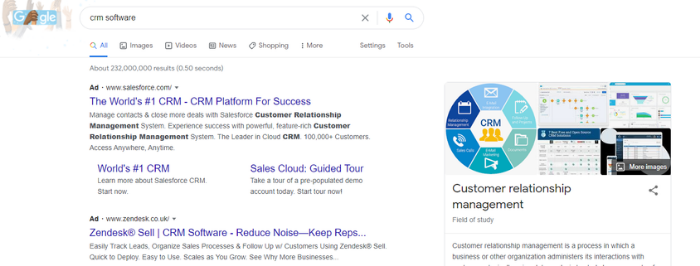
Example of a pay-per-click ad on Google

Generating over $134 billion in ad revenue, Google is the largest provider of PPC services. Its platform, Google Ads, is often the first stop for people beginning PPC marketing.

How Much is PPC Advertising?

Whenever you invest in advertising, you want to know how much it’s going to cost you. With PPC, this is a little complicated.

Online advertising isn’t like taking out an ad in a magazine, where you pay a fee and you get a full-cover page. Instead, with PPC, you pay when you get results (someone clicking your ad).

However, with offline advertising, you tend to pay a set fee regardless of the results you achieve. With PPC, you’ve got more control over how much each truly engaged consumer costs you.

This plays out through an auction system. Unlike a traditional auction, though, there isn’t one product with one winner—you’re bidding on how high up and how often your ad could be visible. “Losing” the auction doesn’t necessarily mean you get no PPC space—it means you get less.

Whenever a user searches for a certain keyword, say “PPC Marketing,” Google looks through its list of advertisers for this word and initiates an auction between them. A Google algorithm then chooses ads based on each advertiser’s maximum bid and the quality score of each ad.

The big takeaway from this is that it’s not just about how much you bid. The quality of your ad plays a huge part as well.

That said, if your max bid isn’t realistic, then your ads aren’t going to be shown often enough to be worthwhile. Different keywords have different average costs per click, and this should inform your bidding strategy.

Tools such as Ubersuggest and Google Ads Keyword Planner could give you a good feel for how much your ads are likely to cost, so they should play a role in your keyword research.

Is PPC Marketing Right for My Company?

Like any form of marketing, pay-per-click advertising has its pros and cons. Ideally, your company will use PPC as part of a complete digital marketing strategy, so you maximize its strengths and minimize its weaknesses.

Pros of PPC Marketing

  • Immediate results: As soon as your ads are approved, they will reach your target audience.
  • Highly targeted: You can be extremely specific about who sees your ads.
  • Easy to track: You can quickly track the success of your campaign and measure your ROI.
  • Potentially huge exposure: Paid ads are prominently displayed, with the potential to reach a virtually unlimited number of people.

Cons of PPC Marketing

  • Costly long-term option: You have to pay for every click, leaving you in the hands of advertising pricing. If you do this for months or years, it’ll add up.
  • Not building an asset: When you invest in content marketing or building an email list, you’re creating an asset you own. With PPC, your success is reliant on continued ad spend.

This is why my own digital marketing agency works to create a well-rounded digital marketing plan for your business. PPC has some amazing benefits, but you need good marketing in other areas as well.

PPC isn’t a replacement for organic SEO. The two should complement each other, with organic work taking a good amount of your focus because those clicks are free.

Six Steps to Starting a PPC Marketing Campaign

Starting your first PPC marketing campaign may feel surprisingly simple—you could do it in just six steps. Remember, ad quality plays a large part in your campaign’s success, so make sure you take your time and focus on each step.

1. Figure Out Your PPC Budget

How much do you want to spend on your pay-per-click marketing?

To begin with, you need to set an initial budget to allow you to test the waters. As a rough guide, you can look at some industry benchmarks to understand how much you’re likely to pay for each conversion.

Once you have an overall budget in mind, daily and lifetime spend caps for your campaigns.

This is an important part of creating a PPC campaign because your budget will greatly impact your ads’ success rates. Google Ads gives you good tools to help with this, and it’s worth following Google’s recommendations because its algorithms are designed to maximize your return.

You’ll be able to see an estimate of how many clicks your budget is likely to get you. From there, you can work out your potential return on investment based on your anticipated conversion rate.

If your budget doesn’t allow you to get meaningful results, it might be worth looking at some alternative marketing methods.

2. Set Your Campaign Goals

Different businesses will have different goals for their pay-per-click campaigns.

For example, if you’re doing a pre-launch for a start-up, your goal might be to drive traffic to the site and create awareness. If you’re selling a product, your main goal may be conversions.

The goals you set will have a big impact on your marketing campaign because each goal has a different value. A click isn’t as valuable as a lead or a conversion, and your cost-per-click should reflect this.

Setting up your campaign with the right goals allows you to better target the correct audience and accurately measure your return on investment. You’re paying for the click, not what the customer does afterward, when you use PPC—the click costs the same whether they purchase or not.

Consider who you want to click your ad and what actions you want them to take. When you understand this, optimize your entire campaign to encourage people to take those actions, which should bring down your costs.

3. Figure Out What Type of Campaign to Run

Another element to think about with PPC is what type of campaign you’re going to run. There are lots of options here, each giving you flexibility over how you reach your target audience:

  • Search ads: Ads showing at the top of search engines
  • Social ads: Ads on social media platforms
  • Remarketing ads: Ads that target people who have already visited your website
  • E-commerce ads: Ads on Google shopping that are focused on selling products
  • Instream ads: Commonly seen on YouTube, played before a video loads
  • Display ads: Dynamic ads showing on third-party websites, like in the image below

All these options give you the tools you need to target specific audiences. You need to find out where your audience hangs out and what they respond to. This will change depending on the buyer personas you’re trying to reach.

You don’t have to commit to one particular type of ad, and many businesses find a mix of different ad formats works best for them. However, it’s important to keep your eye on your ROI for each ad type so you can tweak your strategy accordingly.

4. Research Your Keywords

Keywords are one of the main tools you’ll use to target your audience, and your keyword research can make or break your campaign.

While you probably have a reasonable idea of how your customers search for your products or services, you need to narrow them down to those that result in people taking action.

A big part of this is understanding user intent. For example, who is more likely to make a purchase: someone searching “what is SEO?” or someone searching for “best keyword research tool?”

It’s probably the second one because of where that search fits into the buyer’s journey. Where people are in the buyer journey dictates how likely they are to make a purchase, so the keywords you choose need to reflect which stage you’re targeting.

Keywords that attract people who are further along in the buying process will generally cost you more, but they’re also more likely to lead to conversions.

5. Bid On Your Chosen Keywords

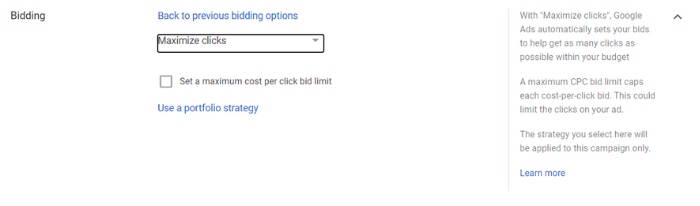
Most platforms give you different bidding options based on your goals. With Google Ads, this allows you to optimize for:

  • target CPA (cost per action)
  • target ROAS (return on ad spend)
  • maximize clicks
  • maximize conversions
  • maximize conversion value
  • target impression share
Pay-per-click marketing - Google Ads

Google will automatically bid on your behalf so it can optimize for your desired goal, but you still have some control over your bid. If you optimize to maximize clicks, for example, you can set a maximum bid. If you maximize for conversions, you can set a target cost per action.

It’s important to remember Google is there to help you get the most out of your ad spend. The algorithms are finely tuned to achieve this. It’s often wise to use Google’s recommendations, especially when starting out.

6. Create Keyword-focused Copy With Unique Landing Pages

Getting people to click your ads is only a small part of what you’re trying to achieve. It’s what happens when people land on your page that’s key.

No matter what your goals are, you need unique, engaging landing pages to achieve them.

Your landing pages need to offer a good user experience and be relevant to the ad the user clicked. People want quick access to the information they’re looking for, and if your landing page isn’t relevant to their keywords, they won’t hesitate to click back to Google.

In short, your PPC landing pages need to be optimized and A/B tested to make sure you’re getting the most out of them.

Conclusion

Pay-per-click advertising is an amazing way to reach a highly-targeted audience quickly. Through platforms such as Google, Bing, Facebook, Instagram, and many more, you can set up paid ads in seconds. Once approved, they could be seen by tens of thousands of people, depending on your budget.

While reaching your target audience is vitally important in marketing, the most important thing is what you do when you have people’s attention. This is why you need to give your paid campaigns the care and attention they need or find a company to do it for you.

When you find the right balance with PPC and have your ads perfectly optimized, it can bring you an excellent return on investment and become a vital part of your digital marketing weaponry.

Is pay-per-click advertising a great earner for your business?

Caper (YC W16) Is Looking for a COO

Article URL: https://recruiterflow.com/caper/jobs/73

Comments URL: https://news.ycombinator.com/item?id=26518112

Points: 1

# Comments: 0

DeepSource (YC W20) Is Hiring a Technical Lead (Language Engineering)

Article URL: https://deepsource.io/jobs/technical-lead-language-in/

Comments URL: https://news.ycombinator.com/item?id=26519802

Points: 1

# Comments: 0

Insurance Giant Chubb Offers to Buy Rival Hartford

One of the nation’s biggest, oldest and best-known property-casualty insurers has made a preliminary proposal to acquire another storied name in the industry.

The post Insurance Giant Chubb Offers to Buy Rival Hartford first appeared on Online Web Store Site.

The post Insurance Giant Chubb Offers to Buy Rival Hartford appeared first on ROI Credit Builders.

How to Build a Chrome Extension

Have you ever been stuck doing a repetitive task and wish you could automate your process?

Are you tired of spending time searching for an appropriate extension, only to be met with an empty search result page?

Luckily, if you’re a Chrome user, you can create a Chrome extension in just eight simple steps.

How do we know? We created our own Ubersuggest Google Chrome Extension to streamline our keyword research systems.

In this post, we’ll show you how to make a Chrome extension to help you innovate your tasks and get back to productive work.

What is a Chrome Extension?

Google Chrome extensions are programs you can install in your Chrome browser to change its functionality.

Chrome extensions can help you automate certain functions in your browser, modify existing behaviors, and improve your software’s convenience. There are even Chrome extensions that can improve your SEO.

Chrome extensions are built with HTML, JavaScript, and CSS scripts and are essentially small websites uploaded to the Chrome store.

The only difference between a Chrome extension and a regular website is that Chrome extensions contain a manifest file, which gives them a specific function to execute.

Another way to think about Chrome extensions is that they are a piece of code that changes your browser experience.

For example, the Grammarly Chrome extension allows you to edit and modify your copy as you write. The LastPass extension will enable you to keep your password manager within your browser.

Here are 13 of our favorite Google Chrome extensions for you to consider.

What Can Chrome Extensions Do?

A custom-built extension can perform a single task. This task needs to be narrowly defined and easy to understand for it to work properly.

You can include more than one component or functionality, as long as everything directs the extension towards a singular goal.

Chrome extensions work by using either page actions or browser actions.

A page action is an action that is specific to certain pages.

A browser action is relevant no matter where you are in the browser.

As well, your user interfaces need to be user-friendly and straightforward. These can range from a single icon, think of the Gmail icon, or you can override an entire page for your interface.

Your final deliverable will be a zipped .crx package that users will download and install.

Why Should I Create a Chrome Extension?

Google Chrome is the most widely used browsing software in the world. According to W3Counter, Chrome has 65.3 percent of the total market share.

You should also create a Chrome extension if you are looking to add a simple action to your browser experience.

The benefit of Chrome extensions versus regular applications is they are often easier to build and maintain. Because Chrome extensions are built around a singular function, they take less time and skills to create.

Building a Chrome extension often takes far less time than building an entirely new webpage.

If you want a simple and effective way to modify your browser, then building a Chrome extension is the way to go.

Chrome extensions can also improve your web traffic, see more in the video below.

What Makes a Chrome Extension Successful?

A successful Google Chrome extension will simplify a task or functionality and improve your productivity.

Let’s imagine you are an e-commerce web builder and you’re researching competitor shops. If you install the Koala Inspector extension, you’ll be able to see if Shopify built any website you land on. You can also see what theme was used, if any new updates have been made, and view product statistics.

Another Chrome extension, the News Feed Eradicator for Facebook, can help improve your productivity by blocking your news feed so you can focus on your tasks. It is a simple but effective function that can help you improve your daily workflow.

Both of these extensions execute a simple functionality that improves user experience. When building a Chrome extension, keep simplicity in mind. That’s the secret to a successful extension.

Your Step-by-Step Guide to Creating a Chrome Extension

Now it’s time to build your Chrome extension.

It’s important to note that you need to do this on Google Chrome. This might seem obvious, but not everyone uses Chrome as their default browser.

If you aren’t a regular Chrome user, be sure to install it before you begin these steps.

Also, be sure to check your work frequently as you move through this process. It’s much easier to fix coding errors in the moment than after you finish.

Build a Chrome Extension Step 1: Determine What Your Extension Needs

The first step in building your Chrome extension is to decide on a functionality.

What will it do? What will it look like?

If you want to create an extension for your Google AdWords campaigns, this is the time to decide on how it will work.

An icon is required for all Chrome extensions to be uploaded to the Google Chrome store. Be sure to create or outsource an icon before you begin.

Once you know what your Chrome extension will do, and what you want it to look like, you can start building it out.

Below, we’re going to show you how to build an extension that will let you change the background color of your current page.

Build a Chrome Extension Step 2: Create a Directory for Your Extension

To begin building your Chrome extension, you’ll need to create a new directory to house all of your extension’s files.

This is important because, for Chrome to load your plugin, it needs to be pointed towards a folder containing your extension files.

You can add all of the files you will need for your extension into this directory.

Build a Chrome Extension Step 3: Make Your Extension’s Manifest File

The next step is to create your extension’s manifest file.

This file will tell Chrome how to load the extension properly.

Create a file called manifest.json and add it to your directory.

Then, add any code you might need to your manifest file.

For our purposes, the code will look like this:

{

“name”: “Getting Started Example”,

“description”: “Build an Extension!”,

“version”: “1.0”,

“manifest_version”: 3

}

Build a Chrome Extension Step 4: Load Your Extension into Chrome and Check for Errors

Now it’s time to test your extension to make sure Chrome will run it.

Follow these steps:

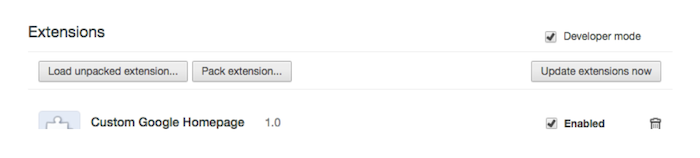
  1. Go to chrome://extensions in your Google Chrome browser
  2. Check the Developer mode checkbox in the top right-hand corner
  3. Click “Load Unpacked” to see a file-selection dialog
  4. Select your extension directory
example of google chrome extension loading screen

If your extension is valid, it should load immediately.

If it is invalid, you will see an error message at the top of your page. If this is the case, look for errors, correct them, and try loading your extension again.

The most common errors people make here are syntax errors. Double-check all of your commas and brackets and make sure they are formatted correctly.

Also, make sure the Enabled box next to your extension is checked so you can see it performing live.

Build a Chrome Extension Step 5: Develop Your Background Script

Next, you’ll need to add some background script to tell your extension what to do.

First, create a file named background.js inside your extensions directory.

Then, add your script.

For our color-changing extension, we’ll be using this script:

{

“name”: “Getting Started Example”,

“description”: “Build an Extension!”,

“version”: “1.0”,

“manifest_version”: 3,

“background”: {

“service_worker”: “background.js”

}

}

This file will alert Chrome that it needs to scan for additional instructions.

The extension we are building will also require a listening event for runtime.onInstalled within the background script.

Within the onInstall listener, the extension will set a value with the storage API. This allows multiple extension components to run and edit that value.

let color = ‘#3aa757’;

chrome.runtime.onInstalled.addListener(() => {

chrome.storage.sync.set({ color });

console.log(‘Default background color set to %cgreen’, `color: ${color}`);

});

Most API’s will need to be registered in the “permissions” field of your manifest. Like this:

{

“name”: “Getting Started Example”,

“description”: “Build an Extension!”,

“version”: “1.0”,

“manifest_version”: 3,

“background”: {

“service_worker”: “background.js”

},

“permissions”: [“storage”]

}

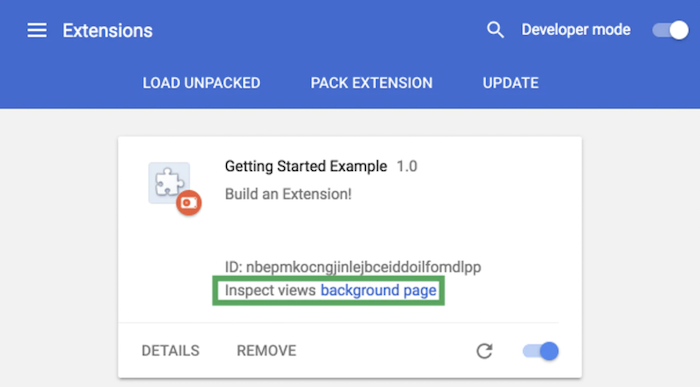
Next, go back to your extension management page and click Reload.

You should see a new field for Inspect views come up. There will also be an accompanying blue link that reads the background page.

example of chrome extension builder interface

Click the link and you will see the background script’s console log, which reads “Default background color set to green”.

Content scripts can also be added to run page-by-page scripts.

Content scripts should be added directly into your manifest file.

Build a Chrome Extension Step 6: Create Your User Interface

Your extension can have a range of user-interfaces, from pop-ups to tooltips, and more.

To begin designing your interface, you need to register a browser action in your manifest.

For our example, we’ll use a pop-up. The code looks like this:

<!DOCTYPE html>

<html>

<head>

<link rel=”stylesheet” href=”button.css”>

</head>

<body>

<button id=”changeColor”></button>

</body>

</html>

You’ll need to declare this code within your manifest in order for it to work.

To do this, add an action to your manifest and set popup.html as the action’s default_popup.

Your script should look like this:

{

“name”: “Getting Started Example”,

“description”: “Build an Extension!”,

“version”: “1.0”,

“manifest_version”: 3,

“background”: {

“service_worker”: “background.js”

},

“permissions”: [“storage”],

“action”: {

“default_popup”: “popup.html”

}

}

This specific pop-up references a CSS script, so you’ll need to add another file to your directory. Name it appropriately, and add this:

button {

height: 30px;

width: 30px;

outline: none;

margin: 10px;

border: none;

border-radius: 2px;

}

button.current {

box-shadow: 0 0 0 2px white,

0 0 0 4px black;

}

For our example, you’ll also want to add color to your popup buttons. Later on, this color will be used for the background of your page as well.

Create and add a file named popup.js with the following code to the directory.

// Initialize button with user’s preferred color

let changeColor = document.getElementById(“changeColor”);

chrome.storage.sync.get(“color”, ({ color }) => {

changeColor.style.backgroundColor = color;

});

This will grab the button from popup.html and request the color value. Include a script tag to popup.js in popup.html like this:

<!DOCTYPE html>

<html>

<head>

<link rel=”stylesheet” href=”button.css”>

</head>

<body>

<button id=”changeColor”></button>

<script src=”popup.js”></script>

</body>

</html>

From there, you can add badges to show the state of your extension. For example, a badge can tell a user if the extension is activated or not, on or off.

an icon showing on funtionality and a water drop below it

Toolbar icons fall under action in the default_icons field.

Place any desired images within your directory and then tell the extension how to use the images.

{

“name”: “Getting Started Example”,

“description”: “Build an Extension!”,

“version”: “1.0”,

“manifest_version”: 3,

“background”: {

“service_worker”: “background.js”

},

“permissions”: [“storage”],

“action”: {

“default_popup”: “popup.html”,

“default_icon”: {

“16”: “/images/get_started16.png”,

“32”: “/images/get_started32.png”,

“48”: “/images/get_started48.png”,

“128”: “/images/get_started128.png”

}

}

}

For images, 16×16 and 32×32 sizes are recommended. All icons should be square, or else they may end up distorted.

If you don’t supply an icon, Chrome will add a default one for you.

When designing your Chrome extension user interface, keep it simple and user-friendly.

Google says all extension interfaces should add to a browsing experience, not distract from it.

Before moving on, reload your extension and make sure everything looks right.

Build a Chrome Extension Step 7: Add in Some Logic

Logic furthers your user interface interaction.

Add logic scripts to whatever user-interface options you included.

Logic can tell your extension to perform certain actions, such as what to do when a button is clicked.

For example, if you used the popup.js script, you’ll want to include your logic at the end of it.

For our example, you can use this script:

// When the button is clicked, inject setPageBackgroundColor into current page

changeColor.addEventListener(“click”, async () => {

  let [tab] = await chrome.tabs.query({ active: true, currentWindow: true });

  chrome.scripting.executeScript({

    target: { tabId: tab.id },

    function: setPageBackgroundColor,

  });

});

// The body of this function will be executed as a content script inside the

// current page

function setPageBackgroundColor() {

  chrome.storage.sync.get(“color”, ({ color }) => {

    document.body.style.backgroundColor = color;

  });

}

function setPageBackgroundColor() {

chrome.storage.sync.get(“color”, ({ color }) => {

document.body.style.backgroundColor = color;

});

}

This code triggers a programmatically injected content script. This turns the background color of the page to the same color as your previously added button.

From here, your extension should be fully functional. Any new additions will be bells and whistles.

Build a Chrome Extension Step 8: Test Out Your Extension

Just like A/B testing in marketing, it’s important to continuously test your extension to ensure everything works.

Test it out yourself, or have someone else test it.

If you have another person test it, do it without giving them instructions to make sure it’s intuitive to use.

Make changes as needed, then test your extension again.

Even after you launch your extension, you can continuously optimize and improve it. That’s how we got the Ubersuggest Chrome extension 2.0.

Once you’re happy, it’s ready to use.

Can I Practice Making a Chrome Extension?

Once you upload your extension to the Chrome store it’s live and usable.

If you don’t want your Chrome extension to be publicly accessible, you can always make a GitHub repo that people can clone from.

This requires giving people access to your source code, so be sure to consider this before uploading anything onto GitHub.

You can also experiment with open source samples before diving into your extension.

Samples for Chrome Extensions are available on Google’s GitHub.

Conclusion

Creating a custom Google Chrome extension is a great way to improve your browser functionality and create optimal user experiences.

What’s more, your tool can drive traffic to your website, so modifying that experience can result in new leads for your business.

Remember, some of the most powerful Chrome extensions were built by people just like you!

It may be a learning curve to get your extension where you want it to be, but it’s worth it when you have an exciting new feature to show off to your friends—and prospective clients.

What kind of Chrome extensions have you built?

How to Target Generation X Through Paid Ads

Finding new audiences to target is a constant challenge for marketers. If you’ve never tried marketing for Generation X, you could be missing out on a valuable group of consumers.

Why should you customize ads for a Generation X target market? Your customers are individuals, but they also belong to a group based on what year they were born. As unique as each might be, they move through some experiences and stages of life together.

What makes Generation X so valuable? We’ll take a look at who these consumers are, what experiences might influence how they respond to advertising, and a few best practices to make sure you hit the mark with your ads.

How Old is Generation X?

1965 to 1980 are typically known as the Generation X years.

The name “Generation X” was adopted from a 1991 novel written by Douglas Coupland called Generation X: Tales for an Accelerated Culture. Some say the name also gained popularity due to the generation’s refusal to be defined. The X refers to the variable “x,” allowing them to be named but perhaps not limited by one definition.

What is Unique About Generation X?

Generation X has often been ignored as marketers instead targeted the larger baby boomer and millennial generations. However, a look at their spending tells us that this is a worthwhile audience to target in our marketing.

While stereotypes can be harmful, we can look at their shared experiences to consider what motivates them, what they value, and what they might worry about in their current life stage.

The oldest of this generation grew up during the Vietnam War and the Watergate scandal. Others remember the Berlin Wall coming down.

Generation X adopted computers and the internet, lived through Y2K, and lived through the AIDS epidemic. Gen X is the first generation to have exposure to the internet for most of their lifetime, though most didn’t have access in childhood.

People often characterize Generation X as self-reliant, adaptable, independent, and ethical, with “big picture” thinking. They are occasionally viewed as skeptical, but you could also call them critical thinkers. They’re currently considered to be financially stable but also deal hunters.

Why You Should Target Generation X Through Paid Ads

Why should you target Gen X in marketing? Spending power is one reason. They make up about 25 percent of the population but bring home about 31 percent of the income.

There are about 65 million Generation X, and they outspend millennials by 41 percent and baby boomers by 18 percent.

What brands does Generation X like right now? In their top 10 brands, you’ll find tech, retail, media and entertainment, automotive, and apparel companies. Other categories can include solutions for the worries they currently face, such as aging parents, preserving their health and wellness, protecting their families’ safety, or helping them plan for retirement.

SaaS platforms offer flexibility and affordable ways to make consumers’ lives easier and better, both of which appeal to Generation X.

Strategies for Targeting Generation X Through Paid Ads

It’s wise to remember that the oldest of this group may act more like baby boomers, while the youngest may act more like millennials. Generation X marketing strategies should include paid search ads, email marketing, social media, and occasionally even direct mail.

Your online presence matters. Gen X shoppers tend to be careful researchers of companies and products before making purchasing decisions.

Ensure your website is clear, up-to-date, accurate, and full of reassuring information and reviews. If they don’t like what they see online, they’re going to move on, probably to one of your competitors.

Generation X is tech-savvy enough to use Google regularly and frugal enough to search for coupons and promotions. You can target them with promotional paid ads that use the language they’re likely to use for this type of search. Ensure your ad copy uses terms like “discount” or “promo code,” and be clear and authentic about your promotion.

Missteps to avoid? A strong sell isn’t needed or welcomed and could be off-putting, so avoid overpromising. Additionally, 66 percent still shop in brick-and-mortar stores.

Run Paid Ads on Social Channels They Use the Most

Generation X consumers like social platforms, with nearly 78 percent of them being active on social media. Which platforms do they prefer? Statista shows:

  • 76 percent use Facebook
  • 70 percent use YouTube
  • 47 percent use Instagram
  • 40 percent use LinkedIn
  • 39 percent use Twitter

Don’t forget platforms like Pinterest and Etsy. Thirty-five percent of Pinterest users are between 30 and 49 years of age, and 27 percent are aged 50 to 64. The average Etsy seller is around 39 years old. The content on Pinterest leans heavily toward their interests, including DIY, cooking, and home projects.

Generation X - Pinterest DIY ideas

Create campaigns on each platform that target this group directly, and remember to use a range of ad types to ensure you’re capitalizing on these channels. For example, knowing they are heavy Facebook users, you’ll want to use all kinds of Facebook ads including images, dynamic ads, videos, and carousel ads to catch their attention.

Just remember that if they’re following brands on social media, they’re doing it to find out about promotions and discounts. Build some promotions and special offers into your social posting calendar just for followers and fans.

Create Ads That Appeal Specifically to Generation X

Generation X are loyal to their favorite brands but wary of invasive advertising. They don’t enjoy aspects of digital marketing that seem intrusive to their personal lives and aren’t fans of text messaging or retargeting.

They are more open to email marketing, and including offers and promotional codes in emails can be a great way to attract these customers.

Be authentic, and demonstrate that quality and service are essential elements of what you offer. You’ll need to create ads that speak directly to them, with ad copy and messaging that speaks their language. Use images that reflect real people and the daily lives of Gen X.

They’re mobile-friendly, and 90 percent of them own smartphones. Ensure your website and e-commerce store are optimized for mobile to deliver a great experience and convert visitors to customers.

Incorporate Reviews in Your Paid Ads for Generation X

Brand loyalty means building trust, and this generation wants social proof. Show and tell them they can trust you to deliver on your promises.

Share case studies, display testimonials, enable platforms that invite reviews, and share your best reviews via your advertising.

Enlist strategies to garner more reviews, then use them in your advertising. Use the insights you gain from studies to create ads that feel even more relevant and meaningful to your audience.

How can you inspire your customers to leave more reviews?

  • Offer multiple ways for them to leave reviews.
  • Make sure the review process is quick and easy for your customer to use.
  • Share positive reviews from other customers.
  • Offer incentives.
  • Respond to all reviews.
  • Work to find solutions with frustrated customers.

Watch for signs that your customer is happy enough to leave a positive review before asking. Good times to ask might be after they’ve expressed satisfaction, when they reordered a product, when they refer you to a friend, or mention or tag you on social media sites.

What can you do with the feedback you gain from customer reviews? Add snippets to your paid ad to help coax searchers choose your ad to click and use reviews, ratings, and testimonials in your ad creative.

Adding social proof to your paid search listings can help you stand out and increase click-through rate (CTR). This can increase your Quality Score, eventually lowering your costs per click (CPC) and increasing your sales.

Get creative and use customer reviews in paid social media ads, being careful to protect your customers’ privacy. Add a quote or line of a testimonial to your email marketing. Add them to your homepage to help attract organic traffic as well.

Create Paid Ads That Appeal to Generation X Emotions

Generation X is currently at an age where nostalgia can be an effective element in advertising. They like reboots and throwbacks.

Is it that they’re more emotionally connected to the past or nostalgic than other generations? Not necessarily. Generation X has access (and the first significant access) to all their memories and old favorites. They also have access to platforms that allow them to share this content and connect with others based on it.

Generation X is interested in past events, entertainment, pop culture, and music. Seventy-five percent of Generation X spends their YouTube time watching nostalgic content, such as videos relating to past events or people. They also like to watch video content to learn DIY skills and to follow news and current events.

This McDonald’s commercial featuring Jason Alexander from Seinfeld has over 2.5 million views on YouTube. While there may be a few younger viewers catching these classics, you can bet that many Generation Xers remember watching it when it first aired on TV.

How can you use this in your advertising? Stir up nostalgia with throwback elements that remind them of their favorite TV commercials, programs, or movies from when they were younger.

Build and Advertise a Loyalty Program in Your Paid Ads for Generation X

Creating a loyalty program can be an excellent way to reach Generation X. Known for brand loyalty, Gen X is likely to appreciate and respond to companies who reward their loyalty.

They like to stick with brands they trust, so relationship building is important. Often overlooked by marketers, Generation X can be won over by feeling part of an exclusive group.

Building these connections over time will help ensure Generation X shoppers stay loyal and not wander to competitors. If you can show them you care with excellent service and programs that make them feel important, they’ll stick around.

What should loyalty programs include? Generation X likes special treatment, limited offers, and extra attention on special occasions. They’re likely to appreciate birthday promotions, recognition on special anniversaries, and special discounts and events.

Examples of Paid Ads for Generation X

The best Generation X marketing examples will use platforms that they use and target their interests and values. Typically, effective ads with this group will target Generation X marketing characteristics and use elements of nostalgia to help build connections quickly.

Watch for crossover ads that use nostalgia to catch the attention of Gen X, like the Domino’s and “Stranger Things” commercial. In this ad, one of the main characters from a popular TV show of the past few years recreates a memorable sequence from Ferris Bueller’s Day Off, a 1986 movie well-known to this generation.

Younger consumers will recognize the “Stranger Things” actor. Nearly every Gen Xer will catch the reference and the cameo from one of the original actors.

When a company decides to tap into “Transformers,” “Teenage Mutant Ninja Turtles,” and “Robocop,” they’re targeting a specific audience.

These movies came out during formative years for Generation X and when used in ads, can create instant rapport between a Gen X consumer and the brand.

Conclusion

It’s true that each generational group behaves differently, has different motivations and views, and consumes media differently than the others.

Learn a little about how Generation X lives and what they love before writing your ad copy, then let your language and ad copy show that they are your focus. Often ignored, this “middle child” generation is likely to respond positively to being noticed and understood.

Learning more about these differences can help you target these groups with paid ads that are likely to resonate instead of blanket advertising that misses everyone.

Remember, you don’t have to master this yourself! Reach out for expert help with digital marketing so you can connect with valuable audiences in effective ways.

What could targeting Generation X with paid ads do for your business growth?

OneSignal (Messaging and Push Notification APIs) is hiring a full-stack developer

Article URL: https://onesignal.com/careers/cb3e1383-d52c-43e8-8e7b-b49cbadafc85 Comments URL: https://news.ycombinator.com/item?id=26507510 Points: 1 # Comments: 0

The post OneSignal (Messaging and Push Notification APIs) is hiring a full-stack developer first appeared on Online Web Store Site.

Insurance Giant Chubb Offers to Buy Rival Hartford

One of the nation’s biggest, oldest and best-known property-casualty insurers has made a preliminary proposal to acquire another storied name in the industry.

The post Insurance Giant Chubb Offers to Buy Rival Hartford first appeared on Online Web Store Site.

Biz2Credit Review

There are a lot of companies out there that claim to help you get business funding. It can be hard to tell which ones are legit and which ones are scams. Predatory lending is a big issue in the world of business loans, and you have to be on your toes.  You need to research any company before you decide to work with them. 

Biz2Credit is one option, and we’ve done the leg work for you in our in-depth review. 

An In Depth Look at Biz2Credit

It can be hard to navigate the business loan waters alone. Sometimes, a lifeboat comes along and throws out a life preserver. They can help you get your business safely where it needs to be. Sometimes, however, these businesses are sharks in disguise.  How do you tell the difference, and which one is Biz2Credit?  

Biz2Credit Review: Background

Biz2Credit has been around since 2007.  They are backed by Nexus Business Partners, as well as 225,000 small business customers.  The company has helped thousands of small business owners obtain over $2 billion in funding across the United States. 

What Does Biz2Credit Do?

They are not a bank. They do not directly fund loans. What they do is accept and process applications for loans, matching small business owners to the best lender and small business financing products to meet their qualifications and needs. How do they do this? Their proprietary platform innovatively matches business to the capital sources that best fit them. 

Biz2Credit Review: Products 

They offer a number of options for business financing that business owners can apply for. They will help you figure out which option is best for your business needs. Remember, details such as available amounts, rates, terms and requirements can change frequently. Always check with them directly for the most up-to-date information. 

Working Capital

You can get working capital loans that range up to $2 million with Biz2Credit.  They claim it only takes 4 minutes to apply and 24 hours for approval.  Funding happens in as little as 72 hours. 

You must have at least $250,000 in annual revenue, be in business at least 6 months, and have a 575 or greater credit score. 

Term Loans

They offer term loans of up to $250,000 with rates starting at 8.99%.  Final rates depend on many factors, including the borrower’s credit score. The timeline for the term loans is like that of the working capital loans.  The application process is fast, taking as little as four minutes.  Approval usually happens within 24 hours and funds are available by 72 hours in. 

To qualify, your business must have revenue of at least $250,000, you must be in business at least 18 months, and your credit score must be now lower than 660.

Biz2Credit Credit Suite

Check out our professional research on bank ratings, the little-known reason why you will – or won’t – get a bank loan for your business.

Commercial Real Estate Loans

These loans top out at $6 million.  Rates start at 10%.  The timeline is a little longer for these, with qualification approval coming in at around 48 hours.  Closing times for these loans vary. 

The qualification requirements for the commercial real estate loans are the same as for the term loans. You must have at least $250,000 annual revenue, a 660 or above credit score, and be in business at least 18 months.  One difference is, you also have to own commercial property. 

Biz2Credit PPP

During this past year, over the course of the COVID-19 pandemic, Biz2Credit has also worked with a lender to process applications for the Paycheck Protection Program.  Many who applied with them did so because they were one of the last accepting applications.  Like many lenders in the midst of the program, there were some definite rough spots, however they very well may be approved to help again if the program continues. 

Is Biz2Credit Legit? 

They are.  They have an A+ grade with the Better Business Bureau and an average of 3.86 starts out of 26 reviews.  On Consumer Affairs, they have close to 3.5 stars with 31 ratings. Reading through the reviews on Consumer Affairs, it seems that virtually all of the bad reviews are related to the PPP program. Almost every other review is 5 stars.  This definitely appears to be a legit business, and it seems they work with reputable lenders. 

How to Find More Legit Lenders Avoid Predatory Lenders

So, Biz2Credit is a great option.  Working with them can be a good step in finding the funding you need while avoiding predatory lenders, as it looks like they work with lenders that are reputable. But, what if they will not work for you? What if you do not meet their requirements or you need a different type of funding? How do you find a lender that can help without falling prey to the sharks? You have to know the signs of a predatory lender. 

Signs of a Predatory Lender

What are the signs of a predatory lender? There are many, and not all of them are an automatic stop sign. However, some are. All of these are definitely red flags that should cause you to take a closer look. 

Focus on Monthly Payment Rather Than Actual Loan Amount

If  a lender insists on one large payment at the end of the term, with only interest payments being made each month until that point, proceed with caution. 

Unnecessary Extras Without Your Knowledge

Another common practice of predatory lenders is adding unnecessary extras onto the loan. These are usually things the borrower does not need and is not even aware of their inclusion.  The most common of these seems to be insurance products that do not offer any benefit.

Confessions of Judgement

If a borrower signs a confession of judgement, they are basically agreeing to lose in a court battle if there is a dispute about repayment.  Many cash-advance companies, which make up a large faction of predatory lenders, have their borrowers sign one of these.

New York state law is friendly to this type of contract. Regardless of where a loan takes place, it may include a “New York confession of judgement.” 

 If you see one of these in your loan documents, do not sign it.  It only benefits the lender, not the borrower.
Biz2Credit Credit Suite

Check out our professional research on bank ratings, the little-known reason why you will – or won’t – get a bank loan for your business.

Punishment for Early Payment

Look closely at loans that have a penalty for prepayment.  The bottom line is, early payment is good.  Even though the lender may lose some interest, they should not be too opposed to early repayment. Alone, this should not be the reason you do not take a loan as it isn’t uncommon. But, it should make you tread carefully and be on the look out for other red flags. 

Seeking the Weak 

Business loan companies that specifically seek out underserved populations, such as minorities and immigrants, and those with bad credit are cause for concern. Especially if they are contacting business owners that fit into these types of categories unsolicited, or targeting them with marketing campaigns designed for them specifically.  In fact, those that fall into these categories are more likely than others to fall prey, according to a 2015 Center for Responsible Lending Report.

Starting with a Bad Deal

Some lenders try to earn trust by admitting they are offering a bad deal.  Then, they promise to fix it in the future. Usually this includes a claim that they will allow for a refinance later that will be better. Don’t fall for it. A bad deal is a bad deal.  

Loan Flipping 

While flipping a house can be very profitable, loan flipping is actually a classic predatory lending move. When the lender sees that you are struggling, they will offer a refinance. But, you end up paying points and fees again.  As a result, before it is over, you could owe more than your original loan.
Biz2Credit Credit Suite

Check out our professional research on bank ratings, the little-known reason why you will – or won’t – get a bank loan for your business.

The Best Way to Avoid Predatory Lenders Is to Work with a Business Credit Expert

In the end, even knowing all the signs doesn’t guarantee you will avoid the sharks. This is especially true if your credit isn’t great.  They can smell blood in the water. Biz2Credit seems to work with reputable lenders, but sometimes that’s not enough.  

In addition to researching lenders, reading reviews, and making phone calls, you need someone on your side to ensure you are set up in the best way possible to get the best funding options for you. 

Our experts at Credit Suite can not only help you find the funding you need, but so much more. They can help you assess your overall fundability so that you can see where your trouble spots are. Then, they can help you make the necessary changes, including helping you build business credit, so you can get the funding you need to run and grow your business.

The post Biz2Credit Review appeared first on Credit Suite.