7 Instagram Analytics Tools to Grow Your Audience

Instagram is known mostly for engagement. But how do you track it? Let’s cover some Instagram analytic tools you need to be using.

Here’s the deal: People love interacting with brands and other individuals. Without engagement, social media doesn’t exist, and engagement matters more on Instagram than most other platforms.

In fact, Instagram’s engagement has been measured anywhere from four to twelve times that of other social channels.

So while you can sell on Instagram, this channel is better known for its benefits at the top of your sales funnel.

The problem with that is your marketing efforts don’t always link back to sales.

That means you’ll have to develop other ways to measure performance to justify all of the time and money spent on Instagram.

So, how do you do it? Luckily, there are a few tools that can help.

I’m going to show you some of the best Instagram analytics tools and why they are worth your time.

1. Owlmetrics

Owlmetrics is basically a one-stop-shop for all things Instagram analytics.

This Instagram analytics tool tracks all of your Instagram account’s key data points, such as follower growth, engagement, hashtag activity, competitor accounts, and click-through rates, while giving you real-time insights in an easy-to-use dashboard.

But that’s not all it can do. It offers a wealth of data beyond Instagram Insights’ underwhelming offerings.

When it comes to tracking engagement, everybody knows that it’s the details that matter.

You’ll get insights on things like the most engaging photo and video filters, top tags by interactions, the best time to post, posts that have received the most engagement, sources of the most engagement, and so much more.

Plus, you’ll be able to keep close tabs on your hashtag performance. Hashtag usage is critical to a good Instagram strategy, so you’ll need to keep a close eye on how they’re benefiting (or hurting) your brand.
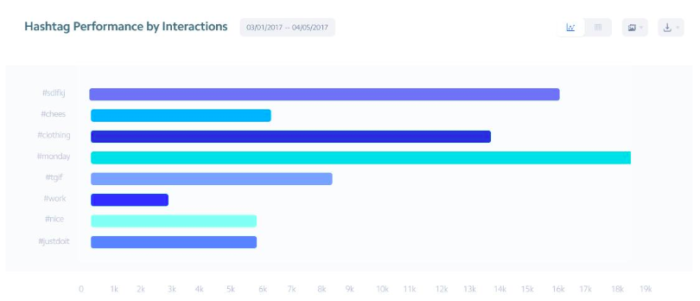
instagram analytic tools example

Altogether, their insights generate a goldmine of information for content strategizing. You’ll get daily data regarding your post engagement rates, top posts by engagement rate, and the best-performing types of posts.

With these real-time details at your disposal, you have all the information you need to post dynamite content every day.

You’ll also know exactly where your followers are spending the most time through click rates. You can find your total clicks, average clicks per post, and your clicks change rate.

Of course, the tool shows you these ultra-useful numbers in easily readable graphs, so if you’re not a numbers person, you’ll still be able to see areas of change.
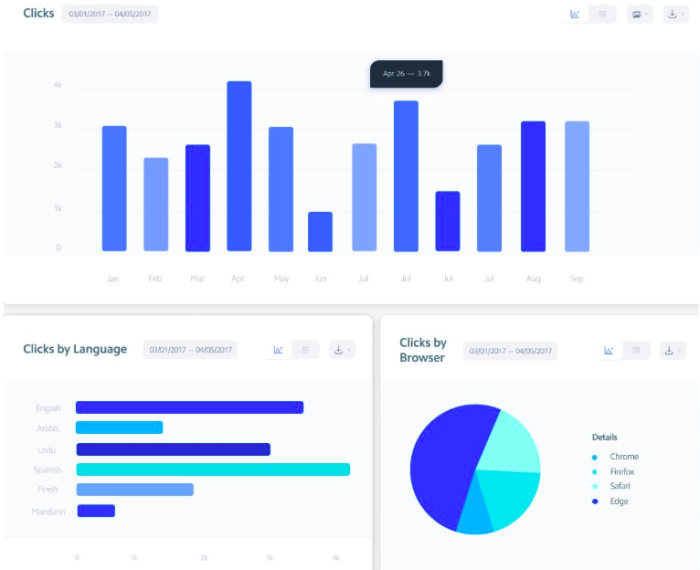
instagram analytics tool clicks

As you can see from these visuals, there’s no shortage of details for your clicks. You’ll see clicks by language, clicks by browser, clicks that are referred from another source, and clicks by location.

All of this contributes to gaining a better, more complete view of your audience.

And since you need an excellent connection with your audience if you want to make it on Instagram, the Owlmetrics audience insights can help you achieve just that.

It gives you all the details regarding your followers, including their age, gender, language, city of origin, and other basic demographics that paint a clearer picture of your audience to help you form better posts.

You also get definitive numbers that help you set and track goals for follower growth. You’ll see your total followers and the growth of total followers.

There’s also info about the followers you’ve gained and lost, with insights into your top gained followers and top lost followers. This will help you better curate your content to keep your existing followers and attract even more.
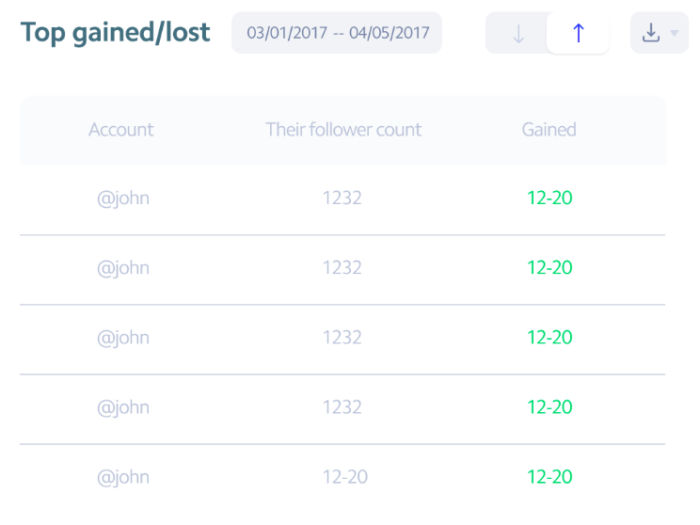
instagram analytics tool gained lost

One of the most beloved Owlmetrics’ features is its competitor tracking. You can learn a great deal about executing a quality Instagram marketing strategy by spying on the strengths and weaknesses of multiple competitive Instagram accounts.
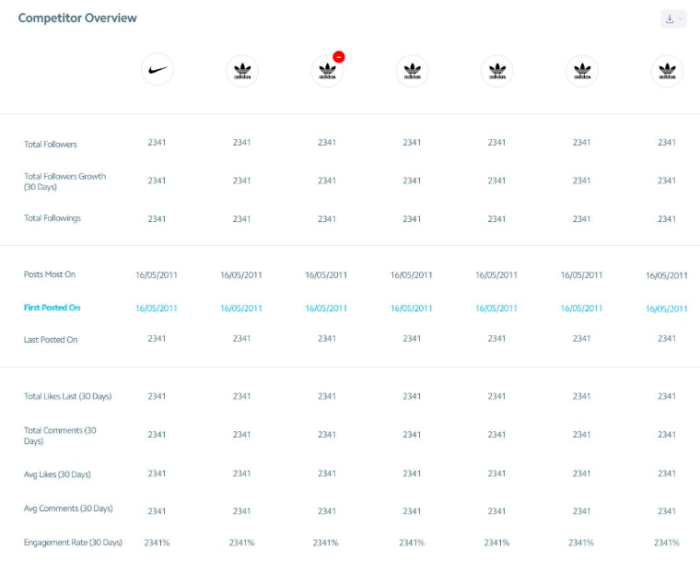
Instagram analytics tool competitor overview

As you can see, it gives you a detailed overview of the Instagram insights for competitors you choose in numbers and graph form.

These insights are updated in real-time, so you’re getting the most accurate numbers for high-performing businesses to compare to your own.
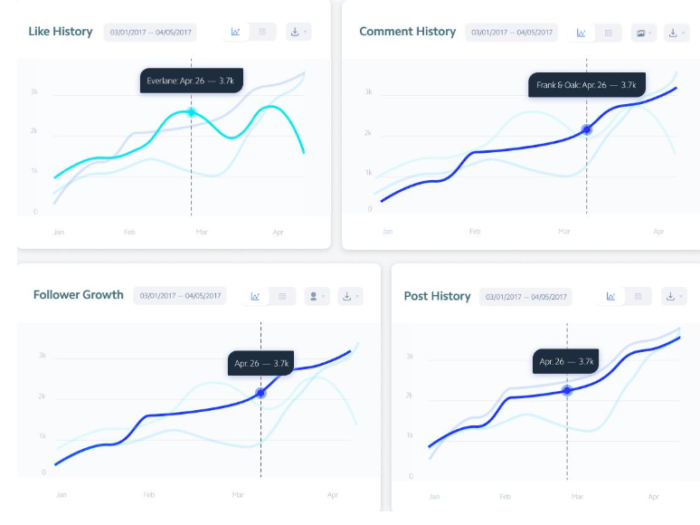
Instagram analytics tool overview graphs

To top it all off, you can schedule exports of any data to CSV, PPTX, and PDF for easier reporting, not to mention it integrates seamlessly into Slack so all your team members can be on the same page.

Your Instagram insights are clear, detailed, collaborative, and always in real-time.

2. Iconosquare

There’s going to be some analytics overlap in a few of these tools.

Iconosquare kicks off by helping you understand how your posting frequency relates to or drives either new followers or lost ones daily.
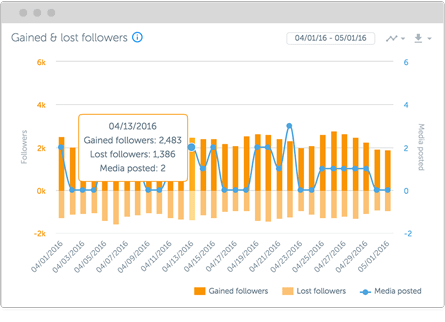
iconosquare instagram analtyics tools

Iconosquare also gives you a Buffer-like tool to manage how you post across several different accounts at one time.

That makes it a perfect tool for freelancers or agencies that want to save time when managing multiple clients (or even multiple departments within the same company) from the same dashboard.
instagram analytics tools

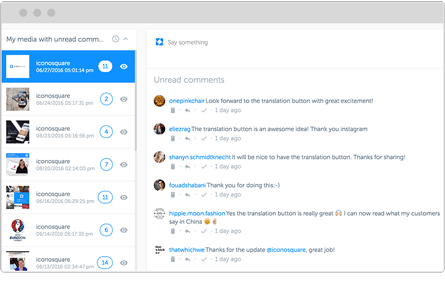
Iconosquare will even show you comments and interactions on each post so you can keep the conversation going without ever leaving.

But that’s not even the best part.

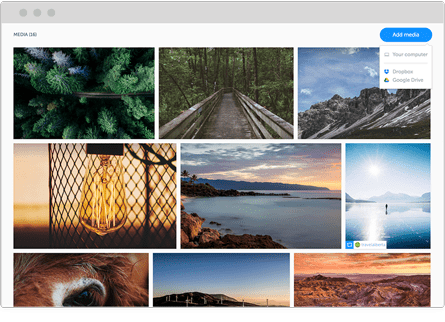
My favorite Iconosquare feature is that they offer a library of awesome content that you can pull from at the ready.

You can quickly search the media library and grab beautiful, high-resolution images to use within seconds.
iconosquare instagram analytics

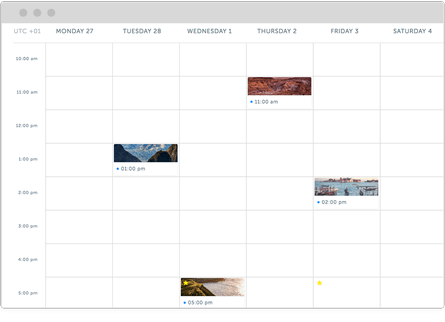
Iconosquare also features an editorial calendar view so that you can schedule posts out ahead of time. It’s easier to manage social media when you plan out content in advance.
iconosquare instagram analytics editorial view

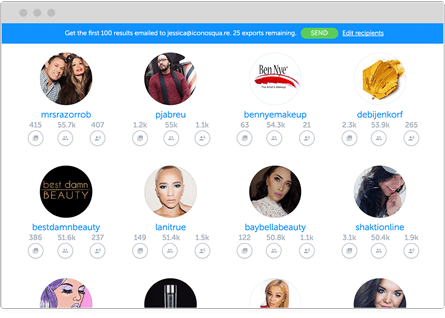
Next, you can use it to search for influencers who might help you get the word out about new campaigns and posts.

It will even let you compare influencers based on their own follower and engagement metrics, so you know what you’re dealing with before reaching out to them.
iconosquare instagram analytics, search for influencers

All of this sounds great, right?

But we haven’t even touched on their Instagram analytics yet.

You can measure tags and mentions and get access to in-depth engagement insights.

You can also see how your individual hashtags are performing, view the best days and times to post, and benchmark your engagement rates against the competition.
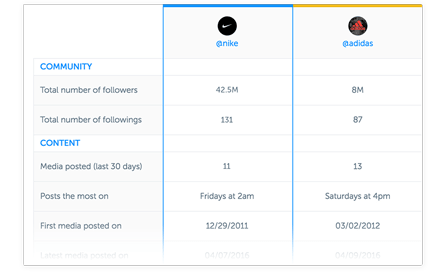
pasted image 0 553

Iconosquare has a 14-day, no credit-card-required free trial. Play around with the analytics before you commit to it with your cash.

3. Sprout Social

Sprout Social is similar to Iconosquare in that it combines Instagram analytics with content creation and management tools. They also have a powerful Instagram analytics platform.

It has a fully-featured editorial calendar for scheduling new content across multiple social account platforms (including Twitter and Facebook).
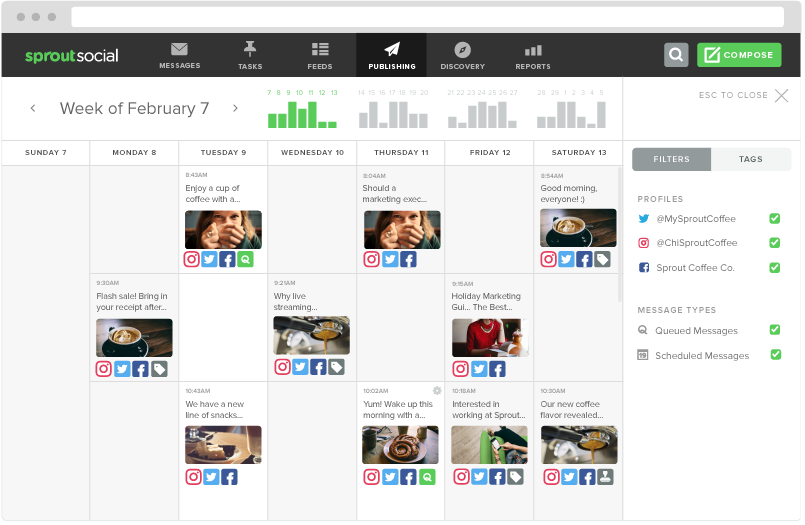
sprout social instagram calendar instagram analytics tool guide

Sprout Social is perfect for larger organizations with rigid guidelines, too, because it has a centralized media library to manage with built-in editing tools.

When a piece of content is ready, you can use the push notification tool to update the person responsible for taking the next step (like moving it from draft to preview and from scheduled to published).
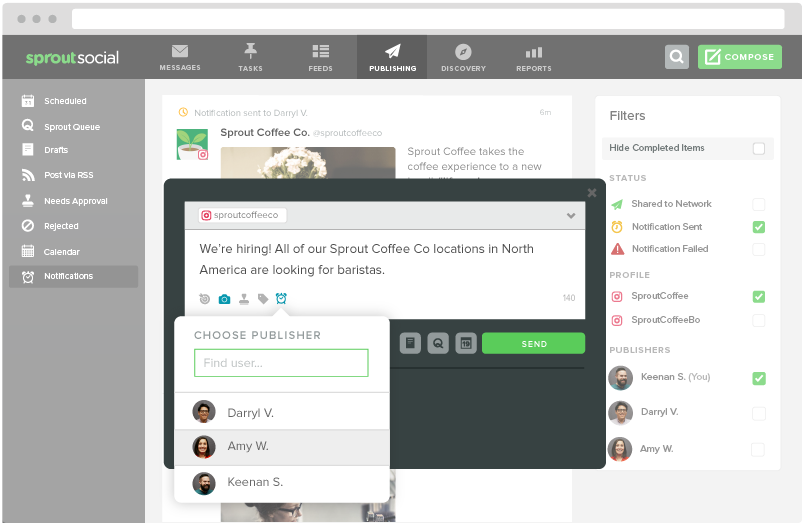
pasted image 0 519

Sprout’s tool set includes a social CRM that will funnel conversations into a central ‘smart’ inbox. Gaining access to this feature can help you boost conversions over time.

You can also dive deeper into individual hashtag performance or even locations that have been geotagged. Pay careful attention to how your performance compares across each.
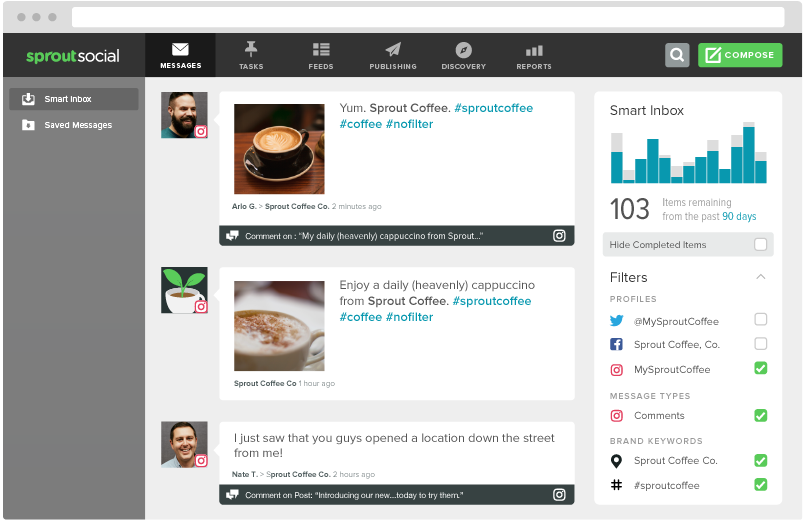
instagram analytics tool sprout social

Then you can compile all of this insight into “presentation-ready” reports that can be exported or downloaded by clients and bosses alike.
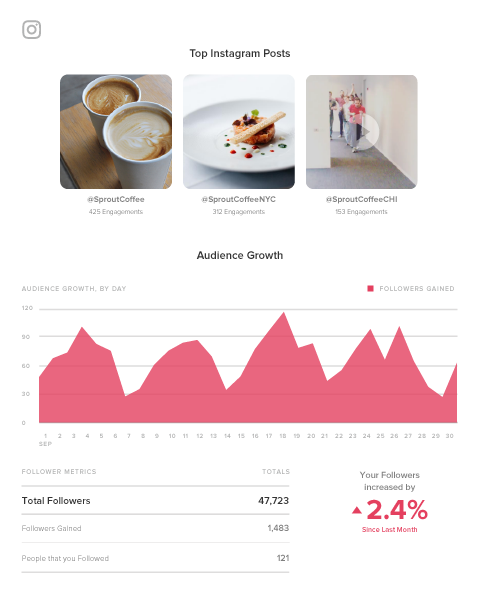
sprout social instagram analytics reports

You can also take a spin with the free trial to preview all of these features before paying a single cent.

4. Keyhole

Each Instagram analytics tool we’ve looked at so far will give you daily reporting features. You need those metrics to track your progress.

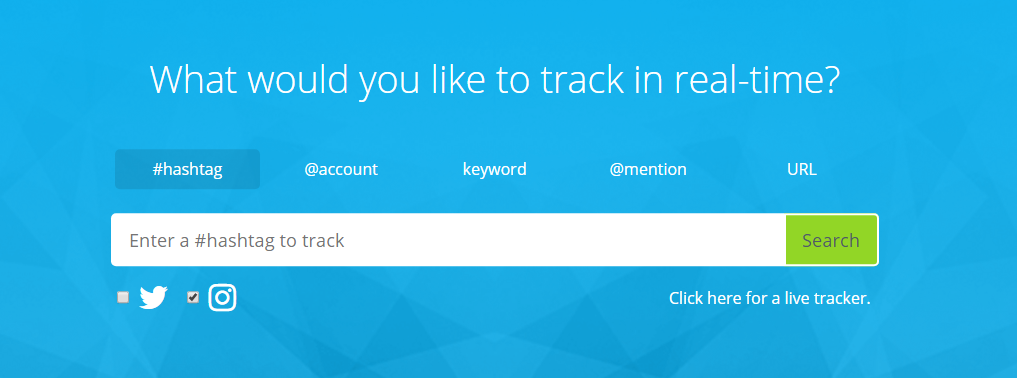
However, Keyhole prides itself on giving customers real-time feedback. For example, you can drop in a specific hashtag, keyword, or account to see what trends are starting to emerge.
instagram analytics tools keyhole

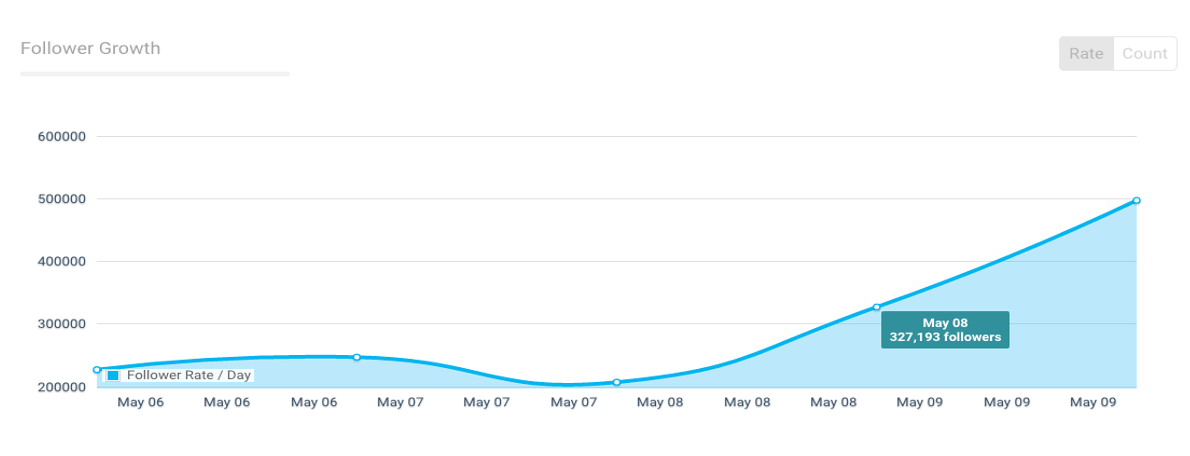
Keyhole will also help you figure out which of your own internal trends provide the best results, giving you at-a-glance data into what activities are driving the most follower growth over time.
instagram analytics tools keyhole

You can also create a feed that will automatically track your competitor’s Instagram accounts to see what’s working for them versus what’s not (then capitalizing on the former while avoiding the latter).

Plus, you can save time by selecting a few predefined KPIs to track. Keyhole will automatically report on those, organizing your data into an easy-to-read dashboard that you can share with team members.

5. SquareLovin

SquareLovin (spelled like McLovin) combines both aggregate data (like overall views and follower counts) with individual metrics on each post (by ‘scoring’ the overall engagement).
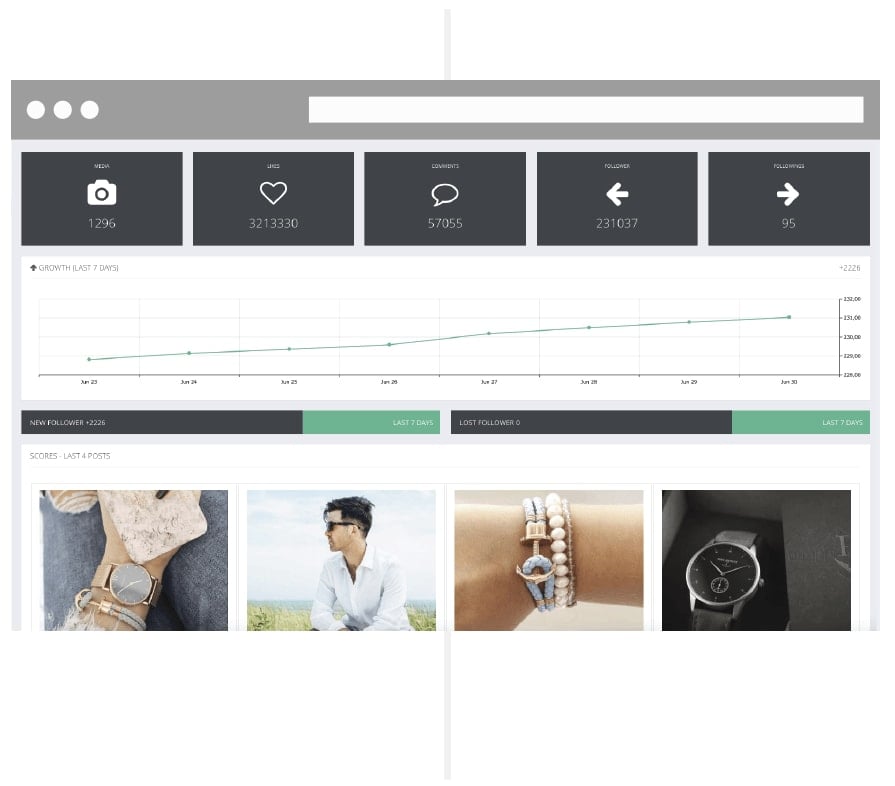
squarelovin instagram analytics tools

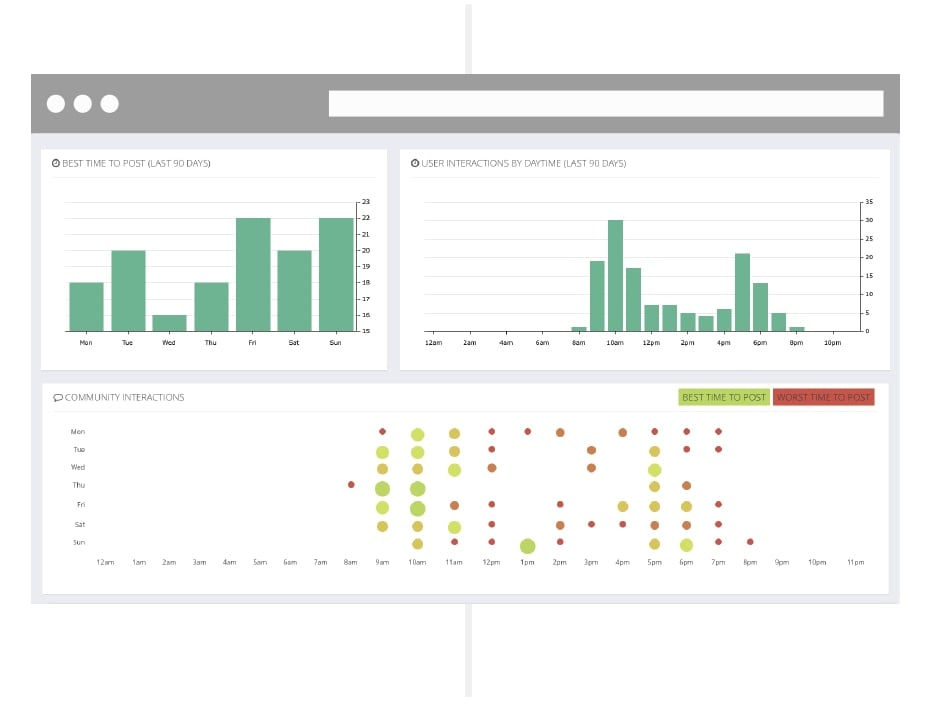
One of my favorite features, though, is the deep dive it gives you into the best-performing times to post.

Like some of the Instagram analytics tools on this list, Keyhole tells you the best time frames for posting based on metrics. However, this tool also explicitly lets you know when you shouldn’t post. This data can be just as valuable, especially if you’re posting all the time.

You might want to constantly test a few of the ‘best’ times to improve performance. However, this way, you’ll always know exactly what hours of the day to avoid like the plague.
instagram analytics tool 03

6. Minter.io

Many of the Instagram analytics tools already featured give you information about how your Instagram account or your individual posts perform based on your specific KPIs.

Minter.io takes the next step by providing tactical insight into the content decisions you’re making.

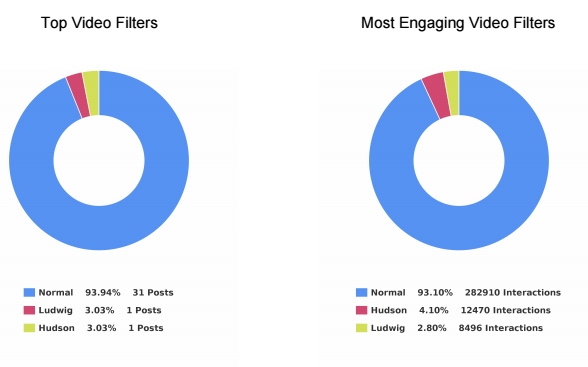
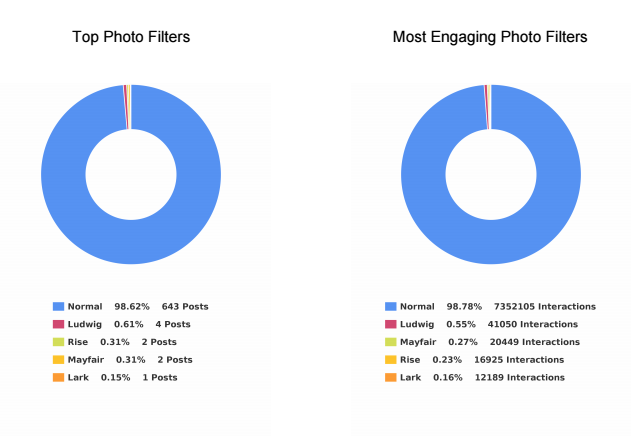
For example, this tool can help you figure out which photo filter performs best among your audience based on a comparison of multiple metrics. Instead of using a single piece of data to decide which filters to use, compare several data points.
pasted image 0 539

pasted image 0 555

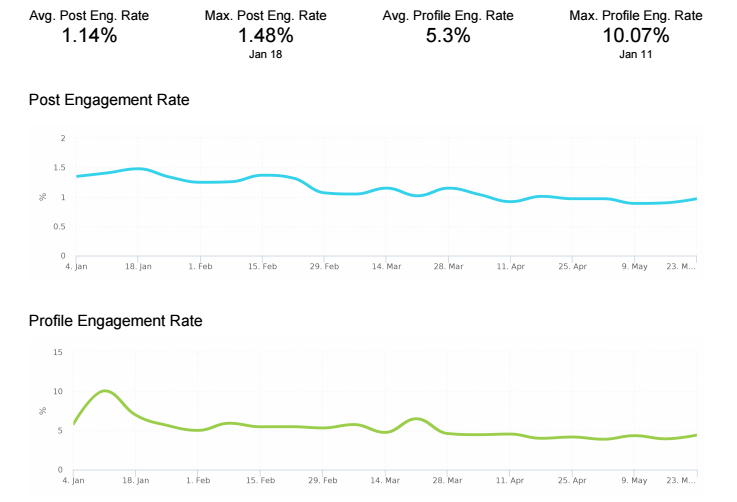
I also love how this tool can break down your post engagement into performance rates.

Here’s what I mean.

If you see that you have 1, 10, or even 100 comments on a post, you’re probably pleased with yourself. But when you stop to think about it, there’s not a lot of actionable insight to draw from comment numbers alone.

Let’s say one account has 100 followers, and another has 1,000 followers. Each account gets 10 comments on a single day.

Now, which one is performing better?

The first one, right? That’s because it’s getting a 10% engagement rate on that post instead of only a 1% engagement rate. That makes a huge difference at the end of the day!

Minter.io helps you track these performance metrics over time and create benchmarks to see if your audience’s quality is growing as quickly as the quantity.
instagram analytics tools engagement rate screenshot

All social platforms use internal algorithms to determine how many of your posts will be seen by your audience.

That means that, if your engagement is low, the social network might artificially ‘restrict’ how many of your own followers end up seeing your content on a given day.

That’s why we constantly talk about the importance of engagement in social media.

Minter.io will also help you pinpoint big players who are already part of your audience. It’s a great way to identify potential influencers who might amplify your brand message.

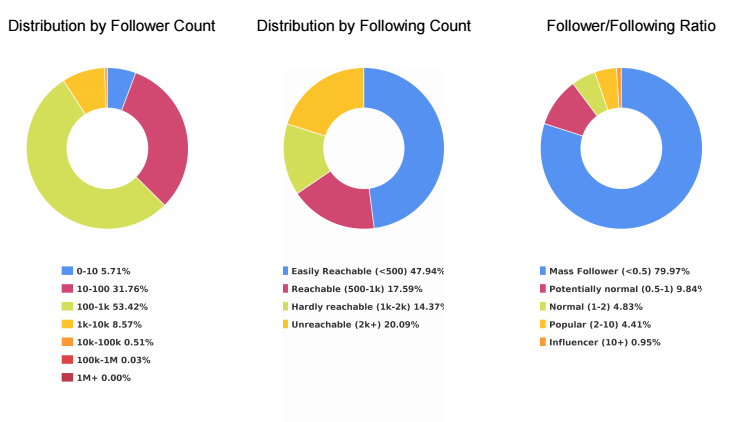
For example, followers are split down into several different ‘buckets,’ including:

  1. Mass Follower
  2. Potentially Normal
  3. Normal
  4. Popular
  5. Influencer

instagram analytics tools

Finally, this Instagram analytics tool also gives you insight into how active your followers are on the platform.

For example, you can see how many posts each of your followers push live each day so that you can mimic the frequency you know your followers are comfortable with.

If you’re only posting twice a day, but the bulk of your audience posts four times per day, you can easily start increasing your posting frequency without fearing any backlash from your community.
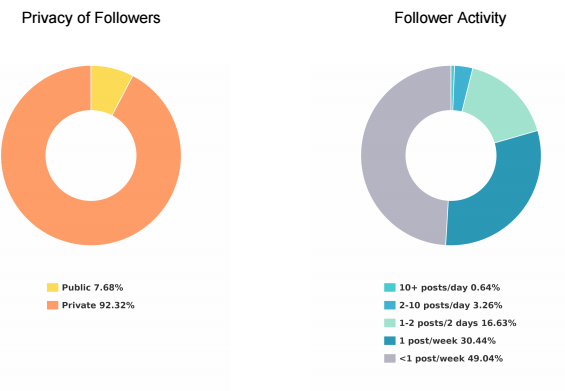
instagram analytics tool privacy of followers

7. SocialRank

SocialRank provides detailed audience metrics for both Instagram and Twitter.

Many of the other Instagram analytics tools listed above focus on hard data or your posts’ individual performance metrics.

SocialRank will do some of that, but it’s more concerned with identifying follower patterns so that you can better tailor your content updates to your audience.

That means it will provide details like the most popular words used in your followers’ bios and posts. You can even see the most popular emojis among your target market.

Let’s say you’re trying to find certain types of people, like bloggers or influencers. You can search prospects’ bios based on keywords.

You might also use it for local marketing. Filter your target users by location so you can reach out to potential candidates for local live events and other engagements.
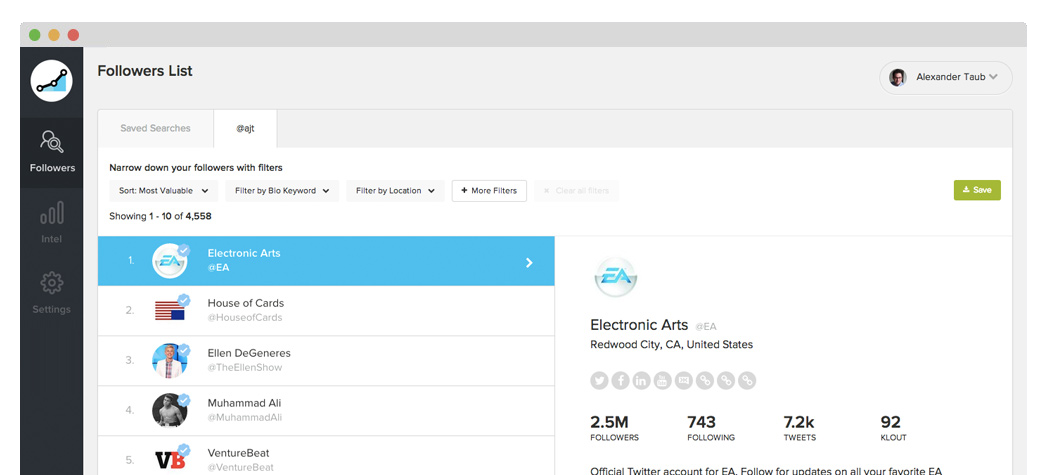
instagram analytics tool screenshot

Follower filters help you narrow down the audience into small segments based on some criteria, including the number followers they might have, specific companies, gender, and any combination of those.
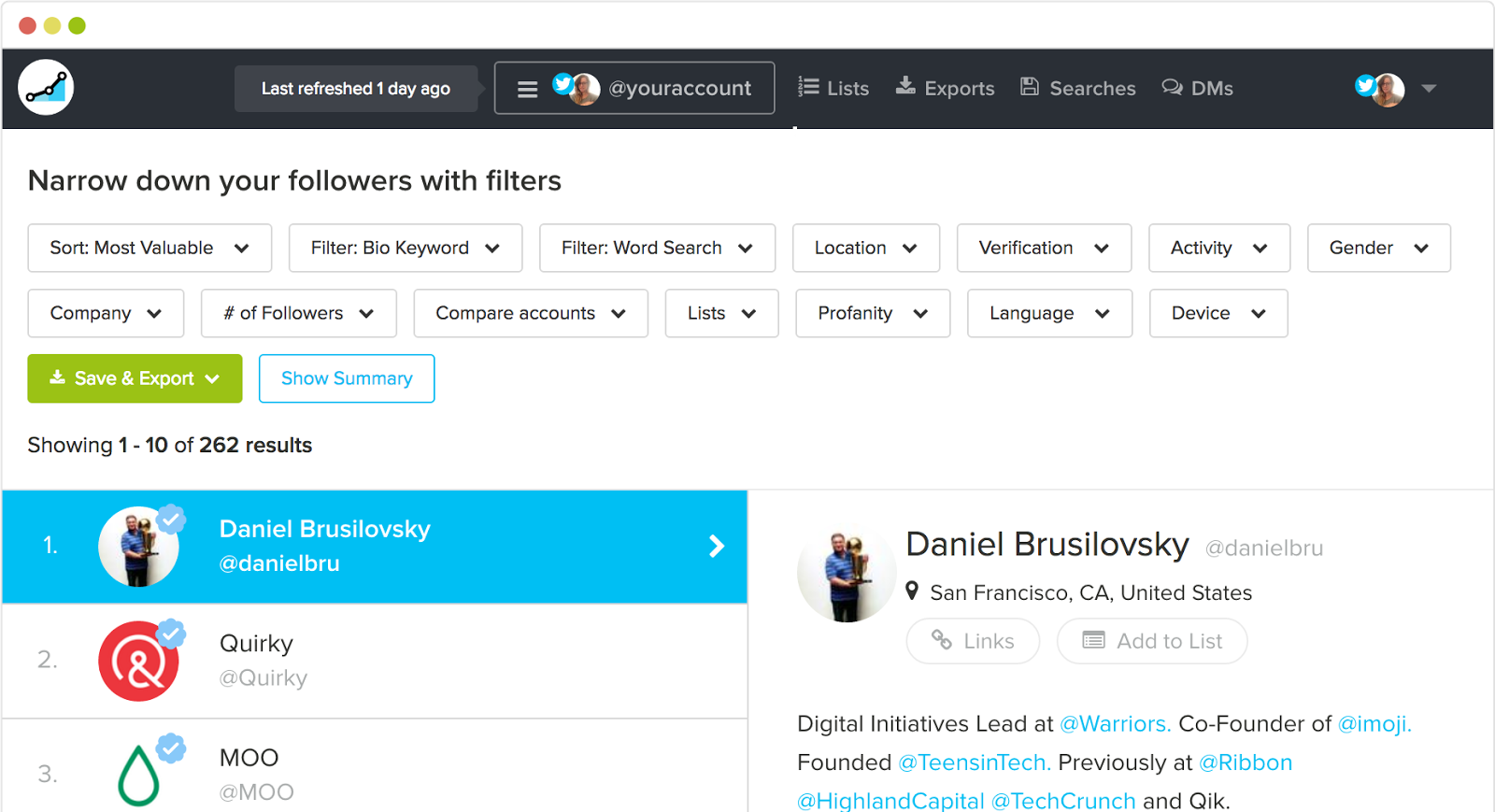
social rank instagram analytics tool screenshot

Once you pull up a segment, you can then rank or prioritize these people based on their own engagement with you or their own popularity (by follower count).
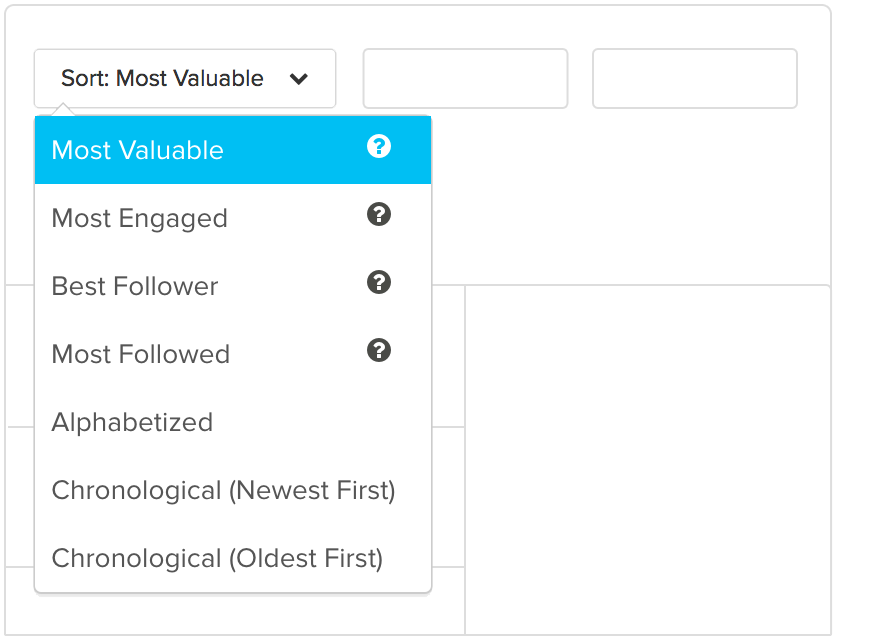
sort instagram analytics tool data

These filters come in handy when you’re trying to pull precise lists of followers.

For example, let’s say you’re opening a new location in a new city (or simply just visiting a new area for an upcoming conference).

You can overlay these filters together to find people who’re using certain hashtags (such as #craftbeer) and located within a specific city (like San Diego).
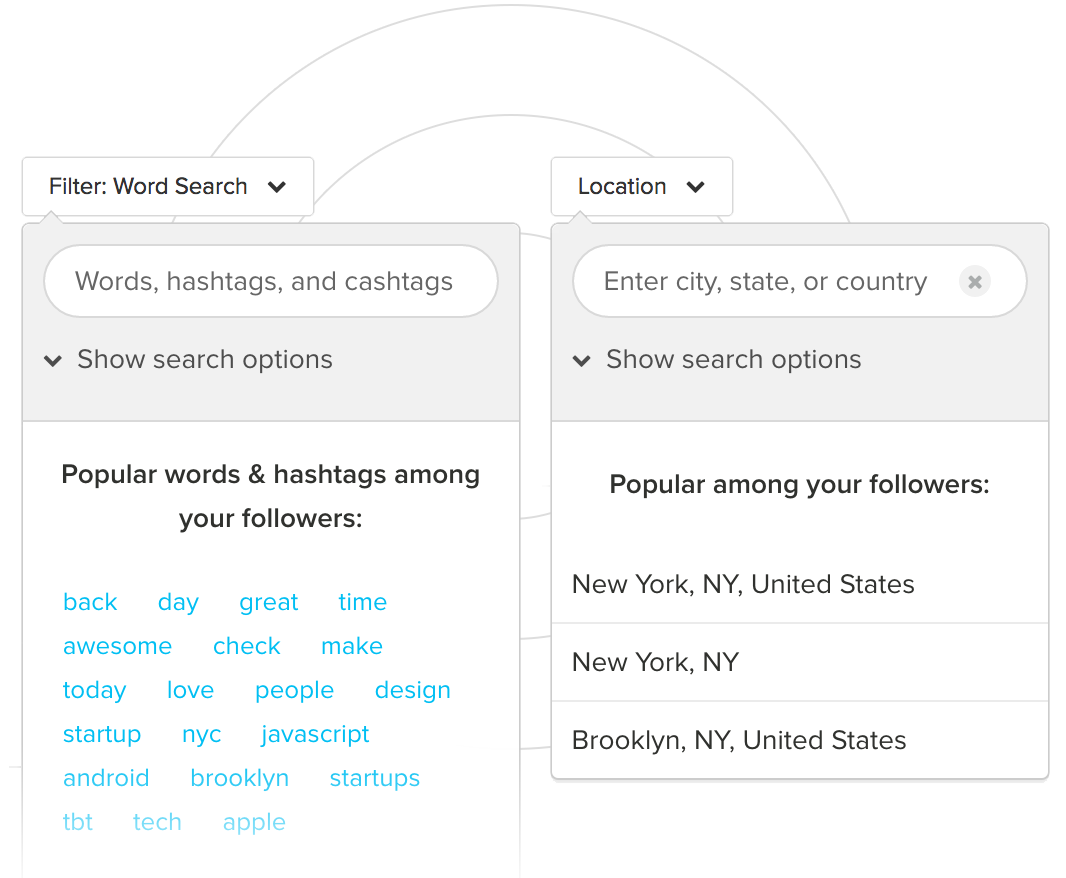
instagram analytics tool filter

Then you can pull these follower lists into an Excel or PDF document for easy sharing with your team.
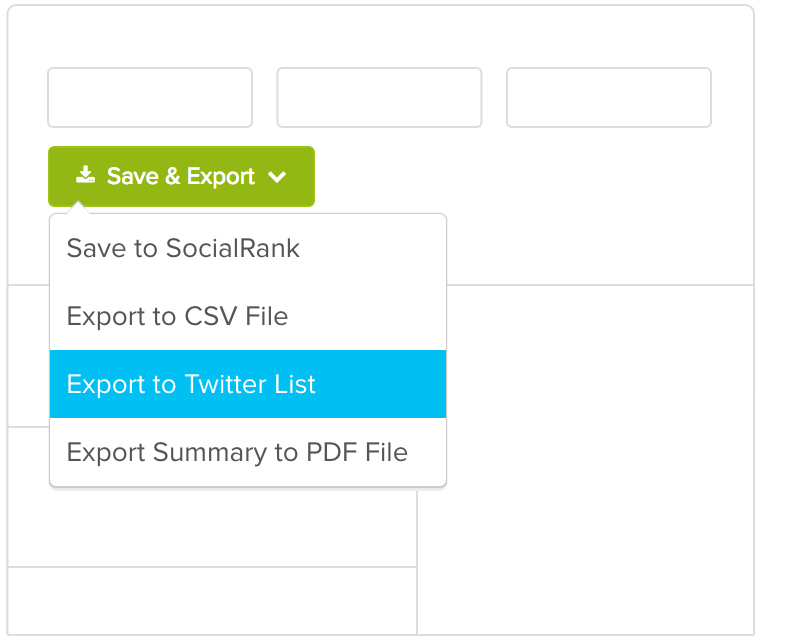
instagram analytics tool save and export

It’s incredibly powerful but not among the cheaper options listed here. I’d recommend using it for larger influencer or PR campaigns. It works best when you need deep audience insight to build buzz around your latest launch.

Conclusion

Social media is fairly simple at the end of the day.

First, you need to understand what your audience wants and is looking for. Second, you need to give it to them consistently.

In reality, it’s a lot tougher than it sounds.

But not if you’re using the right Instagram analytics tools to tell you what your audience is already interested in, talking about publicly, and reacting online.

Instagram is a powerful marketing tool to reach new audiences, increase your brand visibility, and deepen relationships with the people you already know.

Unfortunately, you can’t always track those things back to new Goal completions inside Google Analytics.

They’re ‘soft’ goals used to move people along your sales funnel instead of ‘hard’ goals that result in a new lead or sale.

That doesn’t mean they’re any less important. It simply means that you need to look for different ways to measure progress and results.

While Instagram’s built-in analytics are helpful, the Instagram analytics tools listed here go far beyond those metrics. You’ll be able to quickly identify your target customers, figure out what they’re interested in, and learn how to better serve them with new stuff.

After all, that’s what Instagram analytics tools are for, anyway. Not long, in-depth reporting that takes you hours to compile. You’re often better off with quick insights so that you can take action, update your marketing campaign, and grow faster.

What are your favorite Instagram analytics tools to track metrics?

The post 7 Instagram Analytics Tools to Grow Your Audience appeared first on Neil Patel.

Best Business Intelligence Software

Disclosure: This content is reader-supported, which means if you click on some of our links that we may earn a commission.

Business intelligence software has become a necessary tool in the era of big data.

Your organization collects tons of data about your customers, website, and total health of the company. But without BI software, making sense of that information is nearly impossible. This software exists so you can analyze various data sets and make data-driven decisions. 

For example, you can use BI software to predict consumer buying behavior or project the financial impact of an operations decision. Rather than waiting for a quarterly or annual report, you can leverage BI software for real-time data insights. 

Due to the complexity of business intelligence software, the vast majority of tools in this category are designed for large organizations, SMBs, and enterprises. 

The Top 6 Options For Business Intelligence Software

  1. TIBCO Jaspersoft
  2. Entrinsik Informer
  3. Zoho Analytics
  4. Sisense
  5. Chartio
  6. Tableau

How to Choose the Best Business Intelligence Software For You

Finding the right BI software for your business can be challenging if you don’t know what to look for. I’ve created a simple buying guide with features, factors, and elements that must be taken into consideration as you’re shopping around. Keep an eye out for the following aspects of BI software as you’re comparing solutions and narrowing down your options:

Data Reporting

Remember, the number one reason why companies invest in BI software is to make sense of their data. So it’s only natural that data reporting itself would rank so high on our list of factors to evaluate.

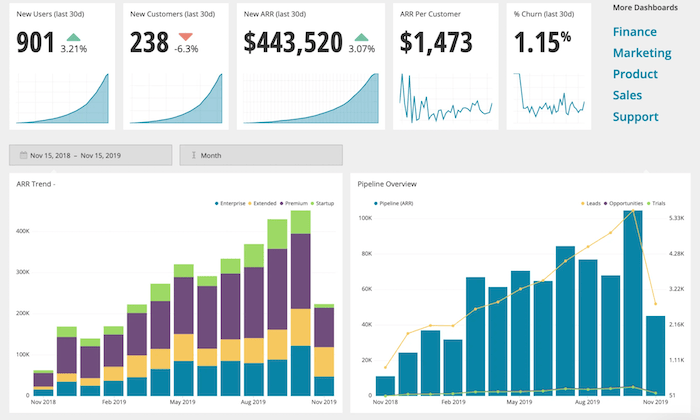
The best BI tools turn complex data into visuals that are easy to understand. You can view this information from real-time dashboards or turn them into individual reports. 

Being able to share these reports with decision-makers, stakeholders, clients, and other members of your team is also something that must be considered. Users that generate the reports won’t always be the people making sense of that information. So the reports must be easy enough to comprehend by the final decision-makers.

Data Sources

How are you going to integrate your existing data with your BI solution? Where is that data located?

Don’t make things more confusing for yourself. Make sure you find a business intelligence tool that makes it easy for you to connect with your existing data sources. It’s worth noting that not every business intelligence software on the market will integrate with specific databases. So don’t make assumptions; always double-check that your data is compatible with the software in question.

Your BI software should seamlessly integrate with help desk tools, CRM, ERP software, advertising networks, and more. The best tools should accommodate cross-platform access to every user as well. 

Development Tools

Some business intelligence software will improve the way you collect data as well. 

Your in-house developers or IT department might want to implement custom application development into your processes. Certain tools will have pre-built analytics apps for you to use. Other solutions offer developers an open API, making things easier for developers to customize apps with unique rules. 

Setup and Deployment

Unlike other types of business software on the market today, BI tools are a bit more complex. Getting started isn’t really as simple as clicking “sign up” and being done. 

These solutions are highly customizable and built specifically for your business. The deployment process could potentially take weeks, depending on the software you choose. You’ll be faced with options for on-premises deployment, hybrid server deployment, desktop software, and cloud software deployment. 

Cloud software is a great option for businesses on a tighter budget. This deployment method makes BI tools more easily accessible to smaller companies. But large organizations with complex data sets and custom needs would likely benefit more from on-site deployment. 

Ease of Use

Again, BI software can be complicated. 

If it’s your first time using this type of software, don’t overwhelm yourself with a solution built for seasoned veterans. 

Think about who will be using the software on a day-to-day basis. Is it your IT team? Sales reps? Product managers? Developers and tech-savvy individuals won’t have as steep of a learning curve as the average user. 

Just make sure you understand the difference between tools that require advanced technical knowledge and software for beginners. Beginners should avoid software that’s built for data engineers. 

The Different Types of Business Intelligence Software

Business intelligence software can be segmented into different categories based on its primary functionality or toolset. Here’s a quick overview and explanation of the most popular types of BI software available on the market today.

Data Visualization Software

As the name implies, data visualization software helps you analyze complex data sheets with visual tools. Visual reporting is arguably the best way to make sense of large sets of data. You can turn huge data sets into meaningful reports in a matter of minutes. This makes it much easier for decision-makers to analyze the insights.

Business Process Management (BPM)

Business process management software is a component of business intelligence. These tools are also a core component of operational management and intelligence. 

BPM software leverages automation and improves the efficiency of day-to-day processes. You can find business process management functionality within BI software.

OLAP (Online Analytical Processing)

OLAP software leverages tools that help analyze data from several sources. These interactive solutions provide a multidimensional view for each user (such as different department heads). OLAP tools will consolidate and aggregate different operational data.

Embedded BI Software

Embedded BI software is exactly what it sounds like. These tools are integrated directly within your applications for process management. They can also be embedded in operations portals, websites, portals, and other types of business-related systems. 

ETL Software

ETL (extract, transform, and load) software combines data from different sources into a single dashboard. Then the software will blend these various data sets and make sense of them in terms that the end-user can understand. 

Data Mining

You can use data mining tools to identify patterns in your data sets. Data mining software typically leverages tools like machine learning and AI to uncover these patterns for data-driven decision making. 

#1 – TIBCO Jaspersoft Review — Best For Embedded Analytics

TIBCO Jaspersoft is a developer-friendly business intelligence solution. The software uses embedded BI, which brings the power of business intelligence directly into your company’s applications.

The dashboards are ultimately displayed within the interface of the application to enhance the end-user experience and improve decision-making in real-time. 

More than 500,000 developers across different industries use TIBCO Jaspersoft to improve applications for millions of users. Here are some of the other reasons why this BI tool ranks so high on my list:

  • Customizable visual reporting
  • Production reporting for high volume distribution to the masses
  • Javascript API for embedding
  • Deploy using any method with an agnostic architecture that’s 100% open
  • Pre-configured multi-tenant support
  • Ad hoc self-service reporting
  • Big data connectivity for native reporting and real-time analytics

The tool is a bit unique in the sense that it’s built for developers but enhances the decision making for end users. If you don’t have a technical background, you won’t really be qualified to deploy this on your own. 

Try TIBCO Jaspersoft free for 30 days to see if it’s right for your business before buying.

#2 – Entrinsik Informer Review — Best For Analyzing Multiple Departments

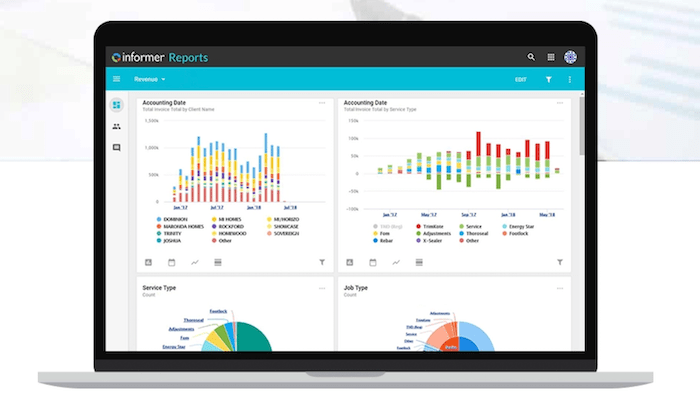
Entrinsik Informer is perfect for large organizations that collect data from multiple sources and need to make sense of that information within different departments. 

The software makes it easy for you to connect data from the cloud, spreadsheets, unstructured web data, traditional databases, enterprise applications, and more, and aggregate it within a single source. 

It’s a popular choice for manufacturing, insurance, distribution, education, and government organizations. Noteworthy features and highlights of Entrinsik Informer include:

  • On-demand self-service reporting
  • Powerful data visualizations
  • Ability to evaluate roles of end-users across your organization
  • Streamline data workflows
  • Faster access to data with curated subsets of information
  • Aggregated data flows for higher quality data
  • Robust governance and security features including team roles and custom security levels
  • Flexible architecture for endless extensibility

For businesses seeking a fast and simple way to discover intelligent data, this will be a top choice to consider. 

Users across your entire organization, such as department managers, business users, industry partners, data scientists, executives, database admins, and more, can all see unique information within Entrinsik Informer based on their needs and role. 

Schedule a free demo to learn more. 

#3 – Zoho Analytics Review — The Best For Data Visualization

More than 500,000 companies and 2+ million users rely on Zoho Analytics for business intelligence. It’s trusted by well-known brands like HP, Hyundai, Ikea, and Suzuki.

Compared to other solutions on our list, Zoho Analytics is definitely a bit more user-friendly. If you’re just getting your feet wet with BI software, this tool won’t have as steep of a learning curve. 

My favorite part about Zoho Analytics is the visual reporting. Non-technical users can easily navigate within the platform to create and view custom reports that are easy to comprehend. Other features and benefits include:

  • Ability to embed analytics in your product, website, portal, or application
  • Integrates with 500+ tools out of the box
  • Secure team collaboration features
  • Augmented analytics powered by AI
  • Blend data from multiple sources into single dashboards
  • Assess the health of your entire organization across each department
  • Customize reports with drag-and-drop dashboard
  • White-labeling capabilities with ability to fully re-brand the portal
  • Powerful HTTP-based web APIs for scalability and extensibility

You can even access your BI reports on the go with the Zoho Analytics app, available on iOS and Android. 

Zoho Analytics is the best beginner-friendly BI software on the market today. Plans start at $22 per month, and you can try it free for 15 days.

#4 – Sisense Review — The Best BI Software For Complex Data

Sisense is one of the most popular BI tools on the market today. It’s used by developers, business leaders, product managers, and data professionals alike.

The software is trusted by 10,000+ companies, including well-known brands like GE, Verizon, Motorola, Wix, Hewlett Packard, and the Salvation Army. 

Sisense has industry-specific solutions in categories like retail, healthcare, government, manufacturing, marketing, supply chain management, and more. They also have solutions that are tailored toward specific departments within your organization.

Noteworthy highlights of Sisense include:

  • Ability to create powerful analytics applications
  • Self-service analytics for each user
  • Cloud-native data analytics
  • Ability to embed analytics with full customization
  • Deploy on-premises, in the cloud, or hybrid deployment with Windows or Linux
  • Seamlessly integrate Sisense with your existing tools and branding
  • Secure access to information at the object, data, and system levels

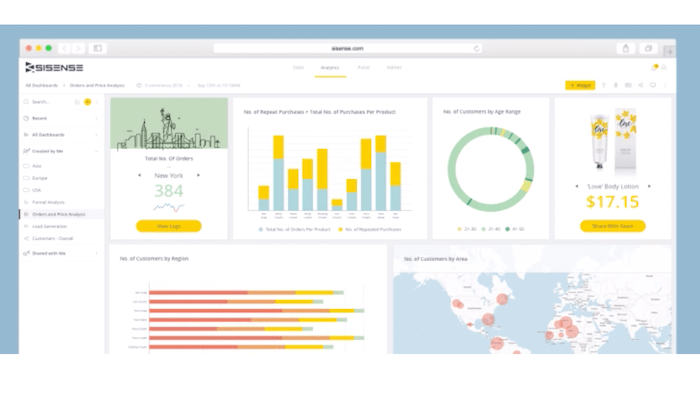
Users of any technical skill level can use Sisense to transform complex data sets into interactive dashboards. Watch the demo and request a free quote to get started. 

#5 – Chartio Review — Best For Simple Charts and Dashboards

Chartio is a cloud-based BI solution. It empowers users of varying technical backgrounds to analyze data from business applications.

The tool makes it easy for you to simplify data with charts and dashboards for more informed decision making.

Here’s a closer look at some of the top reasons why your business should consider using Chartio for business intelligence:

  • Easy to share visuals in embedded web pages, Slack, PDFs, and more
  • Tools for product managers, sales teams, and customer success
  • Self-service functionality for all users (C-suite, sales reps, etc.)
  • Easy to browse data with visual SQL
  • Connect all data from multiple sources (Google BigQuery, Amazon Redshift, etc.)
  • Create and save custom themes
  • Collaboration and team chat tools

Chartio also provides exceptional support. They view themselves as a strategic partner in your success. So they provide you with live training, extensive documentation, and access to experienced data advisors. 

Plans start at $40 per user per month. You can try Chartio free for 14 days with a no-obligation trial. 

#6 – Tableau Review — Most Versatile BI Software

Tableau is an industry leader in the business intelligence space. The software is trusted by individual analysts, small teams, large organizations, and everything in between.

They offer a wide range of BI tools, including Tableau Desktop, Tableau Online, Tableau Server, Tableau CRM, embedded analytics, server management, data management, and more. The list goes on and on.

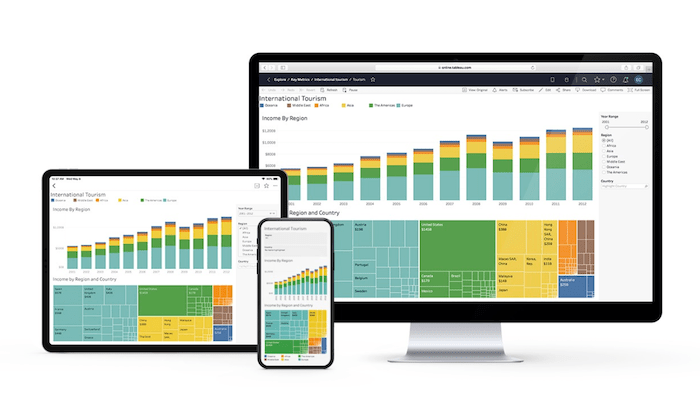
In addition to the extensive product offerings and use cases, Tableau also has industry-specific solutions, and tools based on different types of technology, making it the most versatile software in this category.

Top features of Tableau include:

  • Cross-platform support (desktop, browser, mobile) and embedded analytics
  • Team collaboration tools
  • Advanced analytics displayed in powerful visual interface
  • Easy to organize resources and content
  • Centralized data sources and custom permissions
  • Multiple deployment options (cloud, on-premises, hosted, Windows, Linux, Mac, multi-tenant)
  • Actionable insights in real-time
  • Easy to connect with data from multiple sources (Google Analytics, Salesforce, etc.)
  • Ability to map your data

Overall, Tableau is robust and feature-rich. The only real downside is that it can be tough to figure out with so many capabilities. But it can still be used by developers and non-technical users alike.

You can try Tableau for free with a 14-day trial.

Summary

Business intelligence software has rapidly gained popularity over the past few years. If your organization is ready to take your data analysis to the next level, I strongly suggest investing in a BI solution.

Which business intelligence tool is the best?

Just use the buying guide I outlined at the beginning of this article to help narrow down your options. Then start by exploring the top picks reviewed above. 

The post Best Business Intelligence Software appeared first on Neil Patel.

The Amount Of Dollar Checks Do You Want To Receive?

The Amount Of Dollar Checks Do You Want To Receive? Associate Marketing is without a doubt, among the simplest means to earn money online. It is an income sharing organization connection in between the associate that consents to advertise the solutions or items, as well as the vendor that provides them. The associate markets the …

The post The Amount Of Dollar Checks Do You Want To Receive? first appeared on Online Web Store Site.

Berbix (YC S18) is hiring mobile developers to transform identity online

Article URL: https://jobs.lever.co/berbix Comments URL: https://news.ycombinator.com/item?id=24909366 Points: 1 # Comments: 0

The post Berbix (YC S18) is hiring mobile developers to transform identity online first appeared on Online Web Store Site.

New comment by bbrookeshf in "Ask HN: Who is hiring? (October 2020)"

REMOTE- JAVA Software Engineer at Health Fidelity, Inc. https://healthfidelity.com/careers/open-positions/?gh_jid=23…. Health Fidelity is a healthcare tech company. Our mission is to improve the quality of care and reduce the overall cost of healthcare by making the decision-making process more data driven. Our products will have an impact on the national healthcare infrastructure, as well as patients’ quality of life.

The post New comment by bbrookeshf in “Ask HN: Who is hiring? (October 2020)” appeared first on ROI Credit Builders.

New comment by sangerSCB in "Ask HN: Who is hiring? (October 2020)"

Santa Cruz Bicycles | UI Designer| Salt Lake City, UT | Remote for now, Onsite later | Full Time | www.santacruzbicycles.com Santa Cruz Bicycles, Juliana Bicycles, and Cervelo Cycles’ SLC-based digital team is hiring a UI Designer to create new online experiences for customers across our brands. As the next member of our team you …

The post New comment by sangerSCB in “Ask HN: Who is hiring? (October 2020)” first appeared on Online Web Store Site.

The post New comment by sangerSCB in “Ask HN: Who is hiring? (October 2020)” appeared first on ROI Credit Builders.

New comment by bbrookeshf in "Ask HN: Who is hiring? (October 2020)"

REMOTE- JAVA Software Engineer at Health Fidelity, Inc. https://healthfidelity.com/careers/open-positions/?gh_jid=23…. Health Fidelity is a healthcare tech company. Our mission is to improve the quality of care and reduce the overall cost of healthcare by making the decision-making process more data driven. Our products will have an impact on the national healthcare infrastructure, as well as patients’ quality of life.

The post New comment by bbrookeshf in “Ask HN: Who is hiring? (October 2020)” appeared first on ROI Credit Builders.