7 Instagram Analytics Tools to Grow Your Audience

Instagram is known mostly for engagement. But how do you track it? Let’s cover some Instagram analytic tools you need to be using.

Here’s the deal: People love interacting with brands and other individuals. Without engagement, social media doesn’t exist, and engagement matters more on Instagram than most other platforms.

In fact, Instagram’s engagement has been measured anywhere from four to twelve times that of other social channels.

So while you can sell on Instagram, this channel is better known for its benefits at the top of your sales funnel.

The problem with that is your marketing efforts don’t always link back to sales.

That means you’ll have to develop other ways to measure performance to justify all of the time and money spent on Instagram.

So, how do you do it? Luckily, there are a few tools that can help.

I’m going to show you some of the best Instagram analytics tools and why they are worth your time.

1. Owlmetrics

Owlmetrics is basically a one-stop-shop for all things Instagram analytics.

This Instagram analytics tool tracks all of your Instagram account’s key data points, such as follower growth, engagement, hashtag activity, competitor accounts, and click-through rates, while giving you real-time insights in an easy-to-use dashboard.

But that’s not all it can do. It offers a wealth of data beyond Instagram Insights’ underwhelming offerings.

When it comes to tracking engagement, everybody knows that it’s the details that matter.

You’ll get insights on things like the most engaging photo and video filters, top tags by interactions, the best time to post, posts that have received the most engagement, sources of the most engagement, and so much more.

Plus, you’ll be able to keep close tabs on your hashtag performance. Hashtag usage is critical to a good Instagram strategy, so you’ll need to keep a close eye on how they’re benefiting (or hurting) your brand.
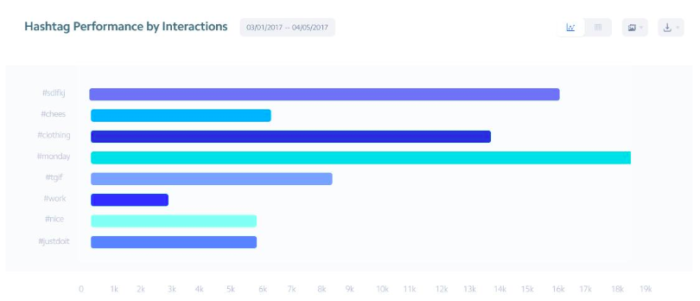
instagram analytic tools example

Altogether, their insights generate a goldmine of information for content strategizing. You’ll get daily data regarding your post engagement rates, top posts by engagement rate, and the best-performing types of posts.

With these real-time details at your disposal, you have all the information you need to post dynamite content every day.

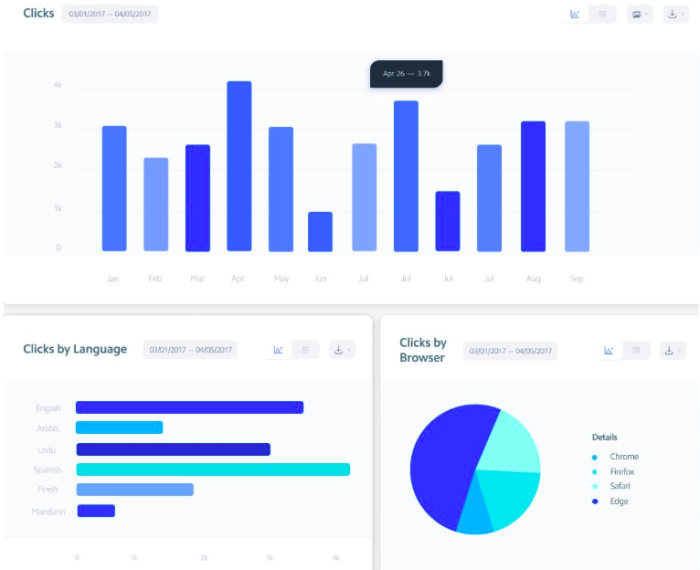
You’ll also know exactly where your followers are spending the most time through click rates. You can find your total clicks, average clicks per post, and your clicks change rate.

Of course, the tool shows you these ultra-useful numbers in easily readable graphs, so if you’re not a numbers person, you’ll still be able to see areas of change.
instagram analytics tool clicks

As you can see from these visuals, there’s no shortage of details for your clicks. You’ll see clicks by language, clicks by browser, clicks that are referred from another source, and clicks by location.

All of this contributes to gaining a better, more complete view of your audience.

And since you need an excellent connection with your audience if you want to make it on Instagram, the Owlmetrics audience insights can help you achieve just that.

It gives you all the details regarding your followers, including their age, gender, language, city of origin, and other basic demographics that paint a clearer picture of your audience to help you form better posts.

You also get definitive numbers that help you set and track goals for follower growth. You’ll see your total followers and the growth of total followers.

There’s also info about the followers you’ve gained and lost, with insights into your top gained followers and top lost followers. This will help you better curate your content to keep your existing followers and attract even more.

instagram analytics tool gained lost

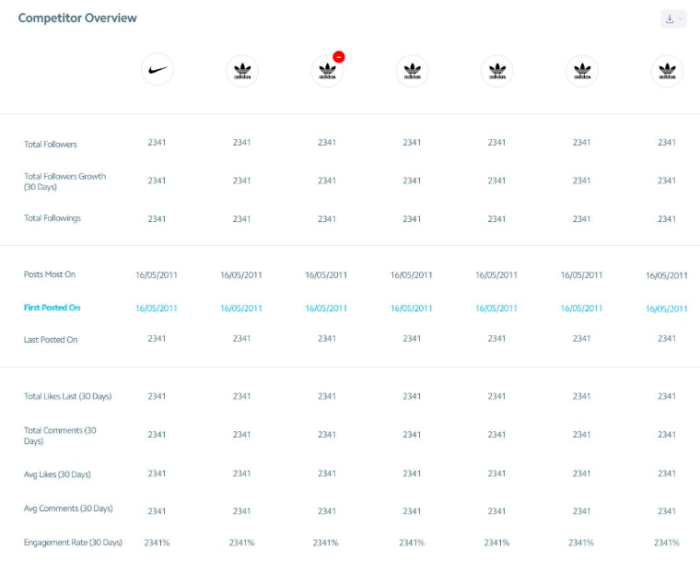
One of the most beloved Owlmetrics’ features is its competitor tracking. You can learn a great deal about executing a quality Instagram marketing strategy by spying on the strengths and weaknesses of multiple competitive Instagram accounts.
Instagram analytics tool competitor overview

As you can see, it gives you a detailed overview of the Instagram insights for competitors you choose in numbers and graph form.

These insights are updated in real-time, so you’re getting the most accurate numbers for high-performing businesses to compare to your own.
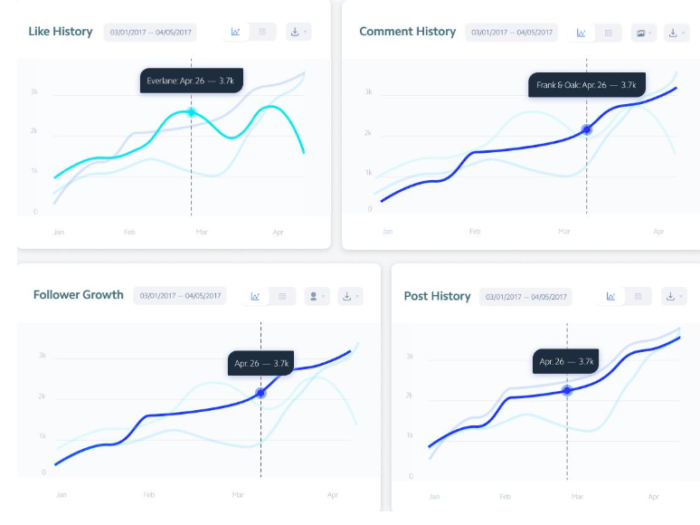
Instagram analytics tool overview graphs

To top it all off, you can schedule exports of any data to CSV, PPTX, and PDF for easier reporting, not to mention it integrates seamlessly into Slack so all your team members can be on the same page.

Your Instagram insights are clear, detailed, collaborative, and always in real-time.

2. Iconosquare

There’s going to be some analytics overlap in a few of these tools.

Iconosquare kicks off by helping you understand how your posting frequency relates to or drives either new followers or lost ones daily.
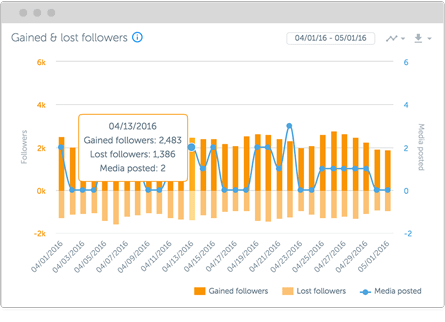
iconosquare instagram analtyics tools

Iconosquare also gives you a Buffer-like tool to manage how you post across several different accounts at one time.

That makes it a perfect tool for freelancers or agencies that want to save time when managing multiple clients (or even multiple departments within the same company) from the same dashboard.
instagram analytics tools

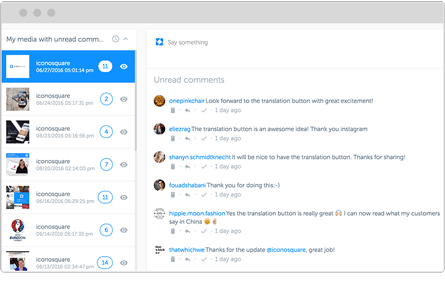
Iconosquare will even show you comments and interactions on each post so you can keep the conversation going without ever leaving.

But that’s not even the best part.

My favorite Iconosquare feature is that they offer a library of awesome content that you can pull from at the ready.

You can quickly search the media library and grab beautiful, high-resolution images to use within seconds.

iconosquare instagram analytics

Iconosquare also features an editorial calendar view so that you can schedule posts out ahead of time. It’s easier to manage social media when you plan out content in advance.

iconosquare instagram analytics editorial view

Next, you can use it to search for influencers who might help you get the word out about new campaigns and posts.

It will even let you compare influencers based on their own follower and engagement metrics, so you know what you’re dealing with before reaching out to them.
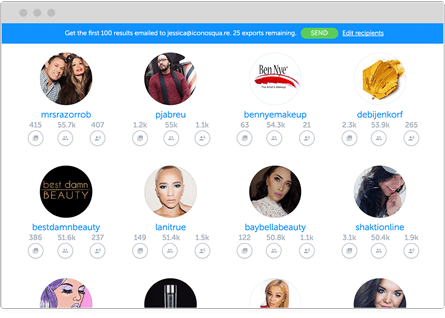
iconosquare instagram analytics, search for influencers

All of this sounds great, right?

But we haven’t even touched on their Instagram analytics yet.

You can measure tags and mentions and get access to in-depth engagement insights.

You can also see how your individual hashtags are performing, view the best days and times to post, and benchmark your engagement rates against the competition.
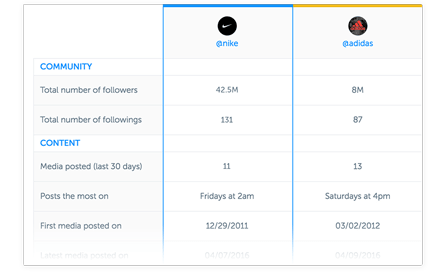
pasted image 0 553

Iconosquare has a 14-day, no credit-card-required free trial. Play around with the analytics before you commit to it with your cash.

3. Sprout Social

Sprout Social is similar to Iconosquare in that it combines Instagram analytics with content creation and management tools. They also have a powerful Instagram analytics platform.

It has a fully-featured editorial calendar for scheduling new content across multiple social account platforms (including Twitter and Facebook).
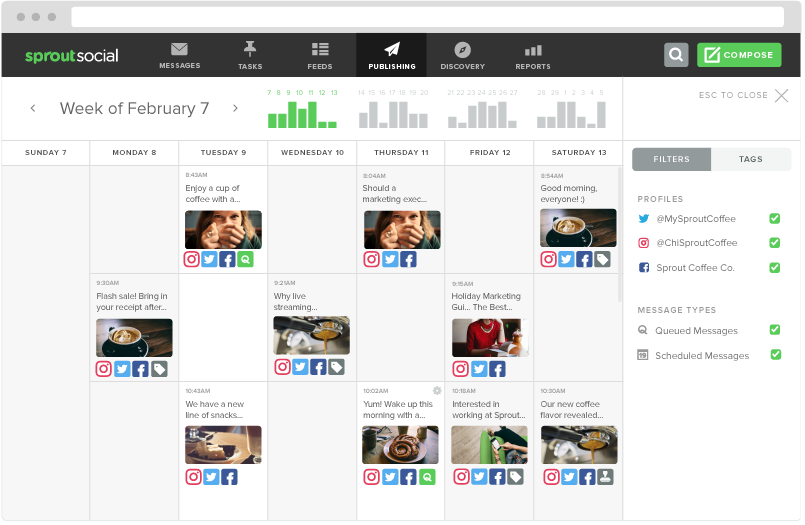
sprout social instagram calendar instagram analytics tool guide

Sprout Social is perfect for larger organizations with rigid guidelines, too, because it has a centralized media library to manage with built-in editing tools.

When a piece of content is ready, you can use the push notification tool to update the person responsible for taking the next step (like moving it from draft to preview and from scheduled to published).
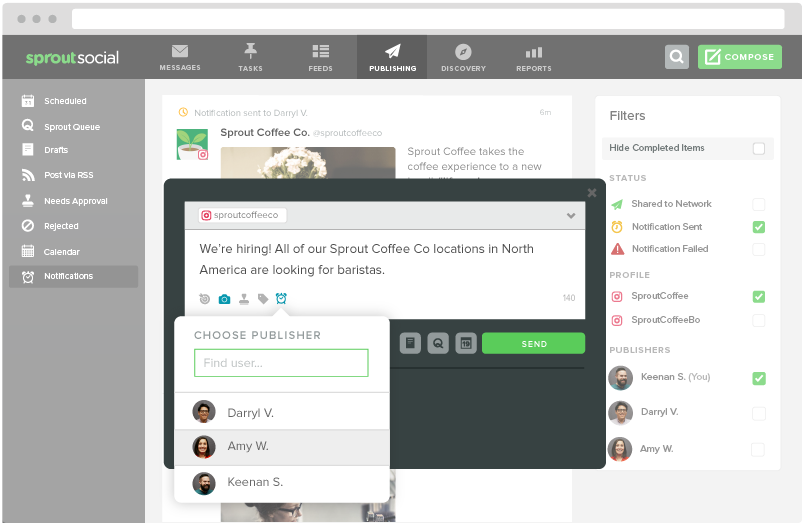
pasted image 0 519

Sprout’s tool set includes a social CRM that will funnel conversations into a central ‘smart’ inbox. Gaining access to this feature can help you boost conversions over time.

You can also dive deeper into individual hashtag performance or even locations that have been geotagged. Pay careful attention to how your performance compares across each.
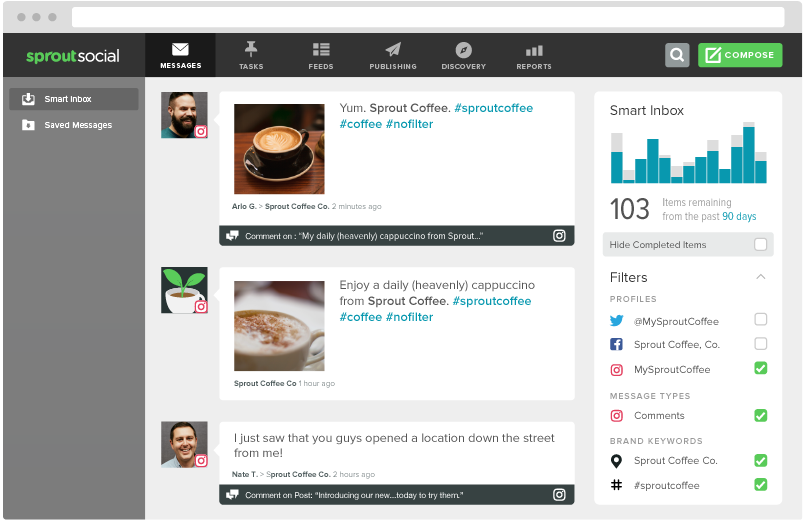
instagram analytics tool sprout social

Then you can compile all of this insight into “presentation-ready” reports that can be exported or downloaded by clients and bosses alike.
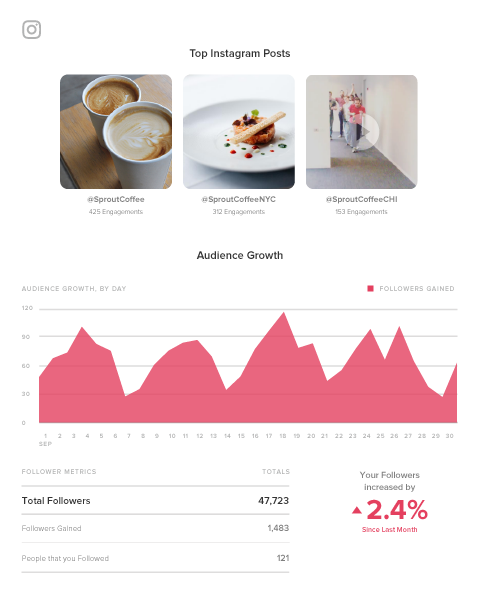
sprout social instagram analytics reports

You can also take a spin with the free trial to preview all of these features before paying a single cent.

4. Keyhole

Each Instagram analytics tool we’ve looked at so far will give you daily reporting features. You need those metrics to track your progress.

However, Keyhole prides itself on giving customers real-time feedback. For example, you can drop in a specific hashtag, keyword, or account to see what trends are starting to emerge.
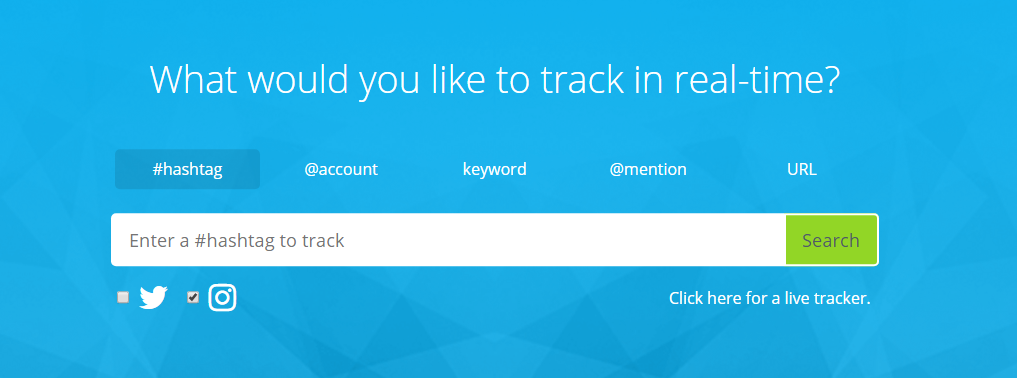
instagram analytics tools keyhole

Keyhole will also help you figure out which of your own internal trends provide the best results, giving you at-a-glance data into what activities are driving the most follower growth over time.
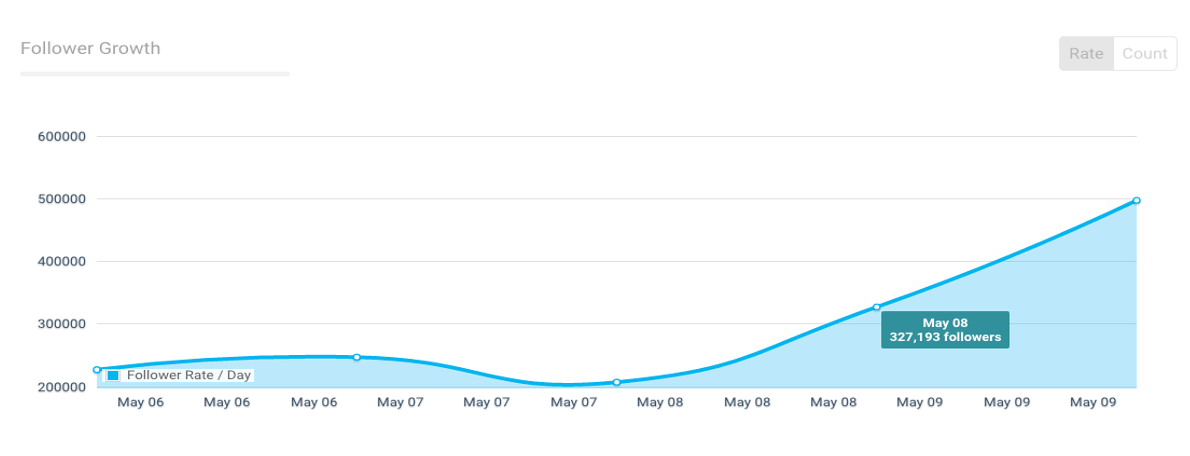
instagram analytics tools keyhole

You can also create a feed that will automatically track your competitor’s Instagram accounts to see what’s working for them versus what’s not (then capitalizing on the former while avoiding the latter).

Plus, you can save time by selecting a few predefined KPIs to track. Keyhole will automatically report on those, organizing your data into an easy-to-read dashboard that you can share with team members.

5. SquareLovin

SquareLovin (spelled like McLovin) combines both aggregate data (like overall views and follower counts) with individual metrics on each post (by ‘scoring’ the overall engagement).
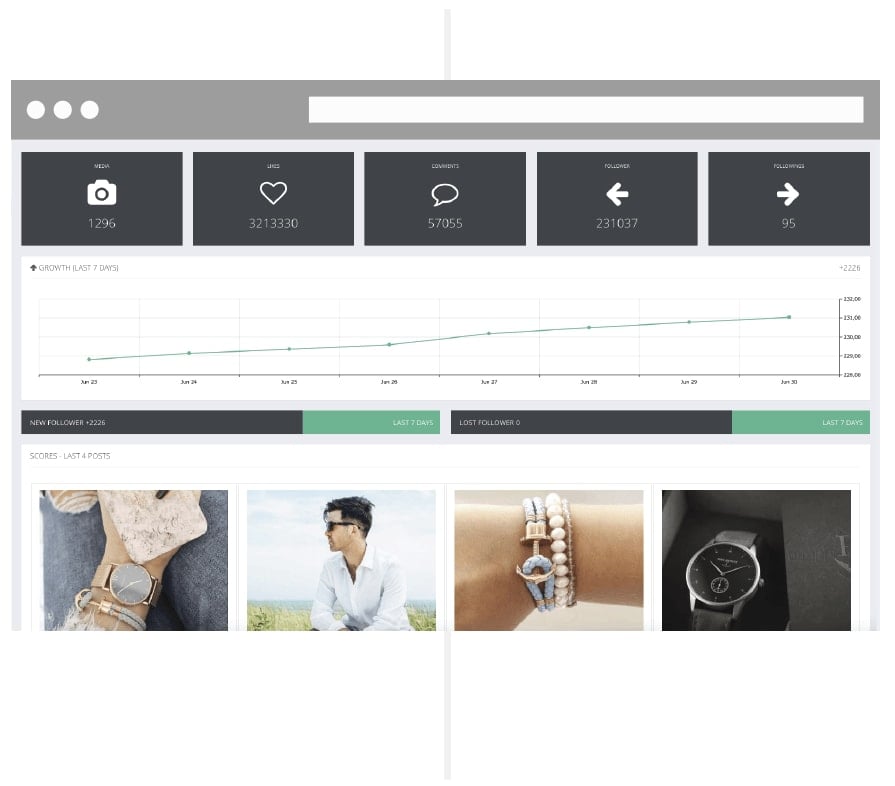
squarelovin instagram analytics tools

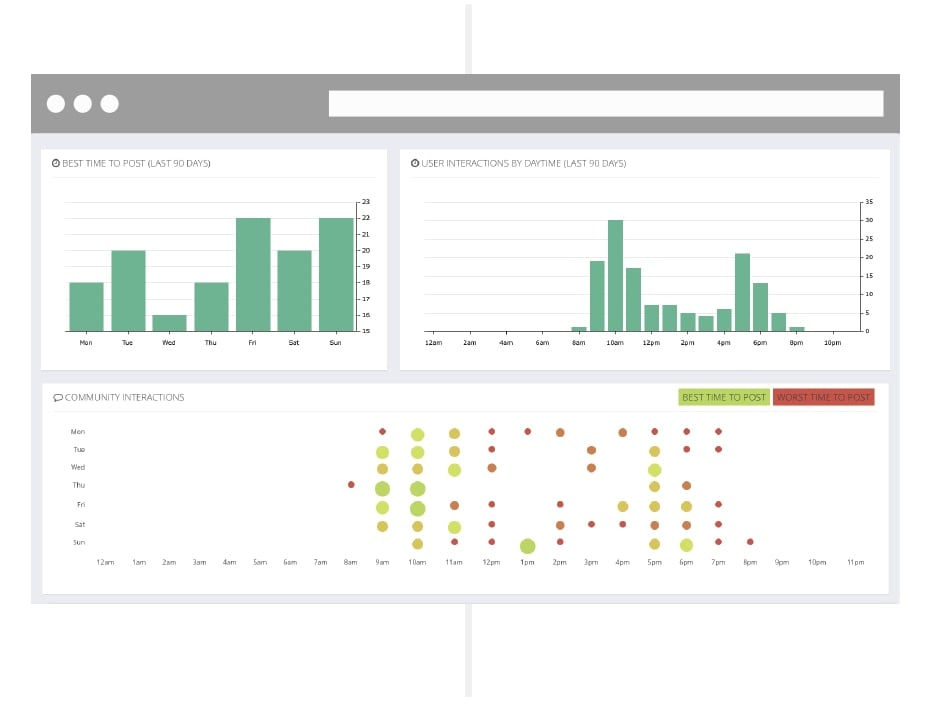
One of my favorite features, though, is the deep dive it gives you into the best-performing times to post.

Like some of the Instagram analytics tools on this list, Keyhole tells you the best time frames for posting based on metrics. However, this tool also explicitly lets you know when you shouldn’t post. This data can be just as valuable, especially if you’re posting all the time.

You might want to constantly test a few of the ‘best’ times to improve performance. However, this way, you’ll always know exactly what hours of the day to avoid like the plague.
instagram analytics tool 03

6. Minter.io

Many of the Instagram analytics tools already featured give you information about how your Instagram account or your individual posts perform based on your specific KPIs.

Minter.io takes the next step by providing tactical insight into the content decisions you’re making.

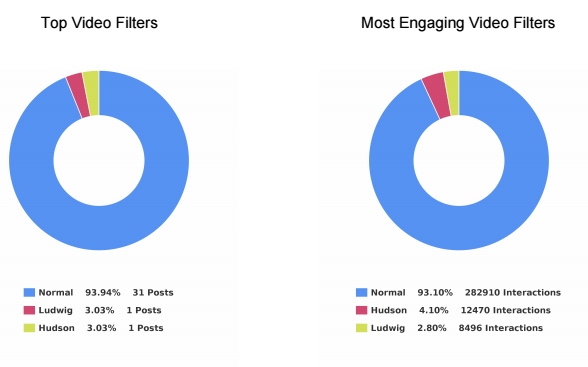
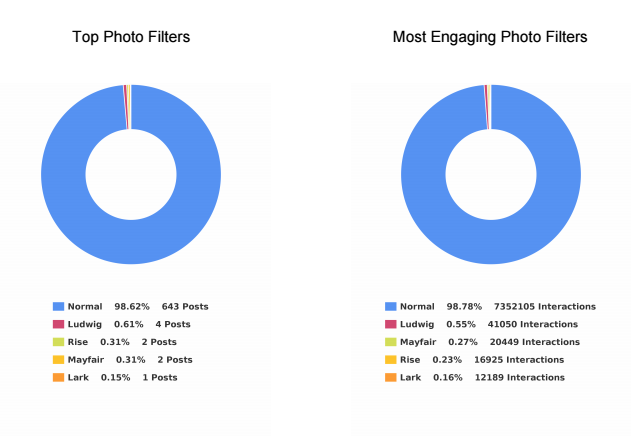
For example, this tool can help you figure out which photo filter performs best among your audience based on a comparison of multiple metrics. Instead of using a single piece of data to decide which filters to use, compare several data points.
pasted image 0 539

pasted image 0 555

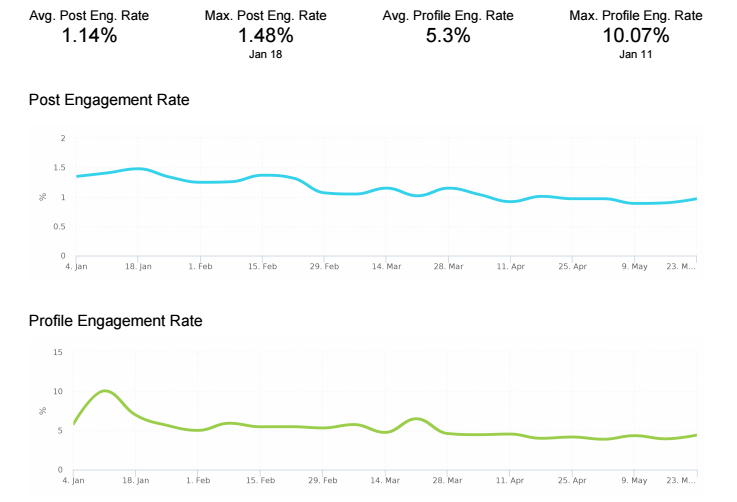
I also love how this tool can break down your post engagement into performance rates.

Here’s what I mean.

If you see that you have 1, 10, or even 100 comments on a post, you’re probably pleased with yourself. But when you stop to think about it, there’s not a lot of actionable insight to draw from comment numbers alone.

Let’s say one account has 100 followers, and another has 1,000 followers. Each account gets 10 comments on a single day.

Now, which one is performing better?

The first one, right? That’s because it’s getting a 10% engagement rate on that post instead of only a 1% engagement rate. That makes a huge difference at the end of the day!

Minter.io helps you track these performance metrics over time and create benchmarks to see if your audience’s quality is growing as quickly as the quantity.
instagram analytics tools engagement rate screenshot

All social platforms use internal algorithms to determine how many of your posts will be seen by your audience.

That means that, if your engagement is low, the social network might artificially ‘restrict’ how many of your own followers end up seeing your content on a given day.

That’s why we constantly talk about the importance of engagement in social media.

Minter.io will also help you pinpoint big players who are already part of your audience. It’s a great way to identify potential influencers who might amplify your brand message.

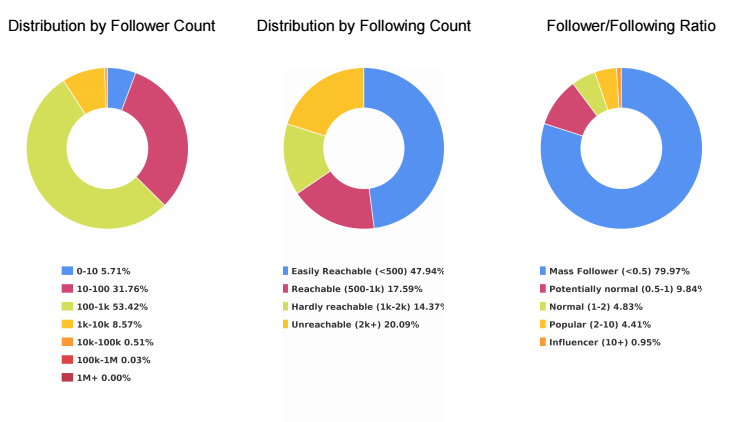
For example, followers are split down into several different ‘buckets,’ including:

  1. Mass Follower
  2. Potentially Normal
  3. Normal
  4. Popular
  5. Influencer

instagram analytics tools

Finally, this Instagram analytics tool also gives you insight into how active your followers are on the platform.

For example, you can see how many posts each of your followers push live each day so that you can mimic the frequency you know your followers are comfortable with.

If you’re only posting twice a day, but the bulk of your audience posts four times per day, you can easily start increasing your posting frequency without fearing any backlash from your community.
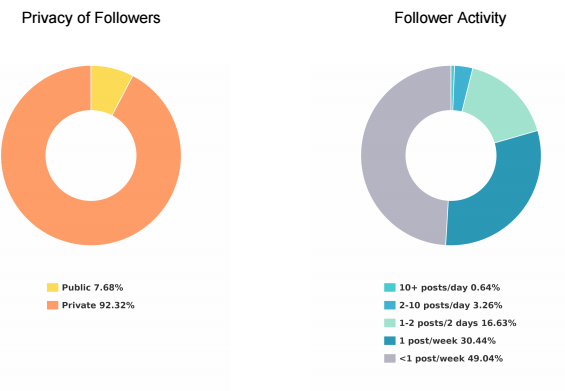
instagram analytics tool privacy of followers

7. SocialRank

SocialRank provides detailed audience metrics for both Instagram and Twitter.

Many of the other Instagram analytics tools listed above focus on hard data or your posts’ individual performance metrics.

SocialRank will do some of that, but it’s more concerned with identifying follower patterns so that you can better tailor your content updates to your audience.

That means it will provide details like the most popular words used in your followers’ bios and posts. You can even see the most popular emojis among your target market.

Let’s say you’re trying to find certain types of people, like bloggers or influencers. You can search prospects’ bios based on keywords.

You might also use it for local marketing. Filter your target users by location so you can reach out to potential candidates for local live events and other engagements.
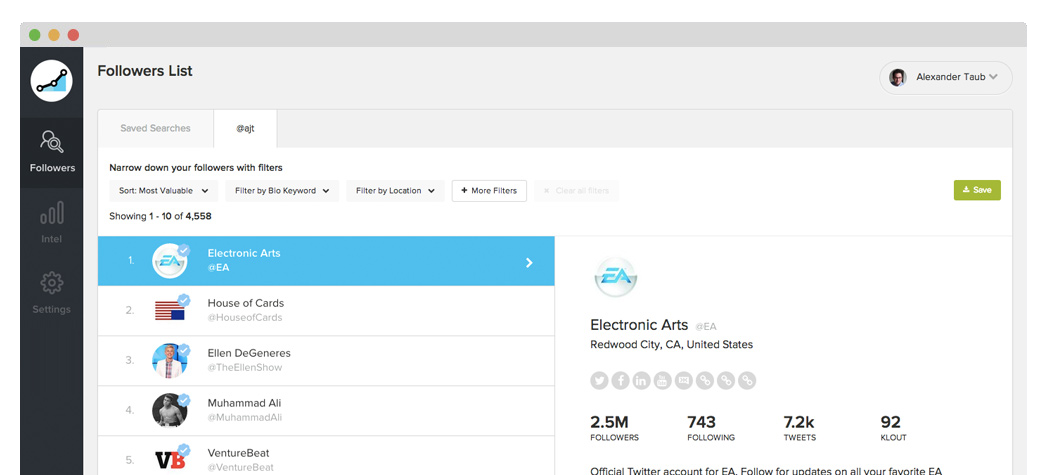
instagram analytics tool screenshot

Follower filters help you narrow down the audience into small segments based on some criteria, including the number followers they might have, specific companies, gender, and any combination of those.
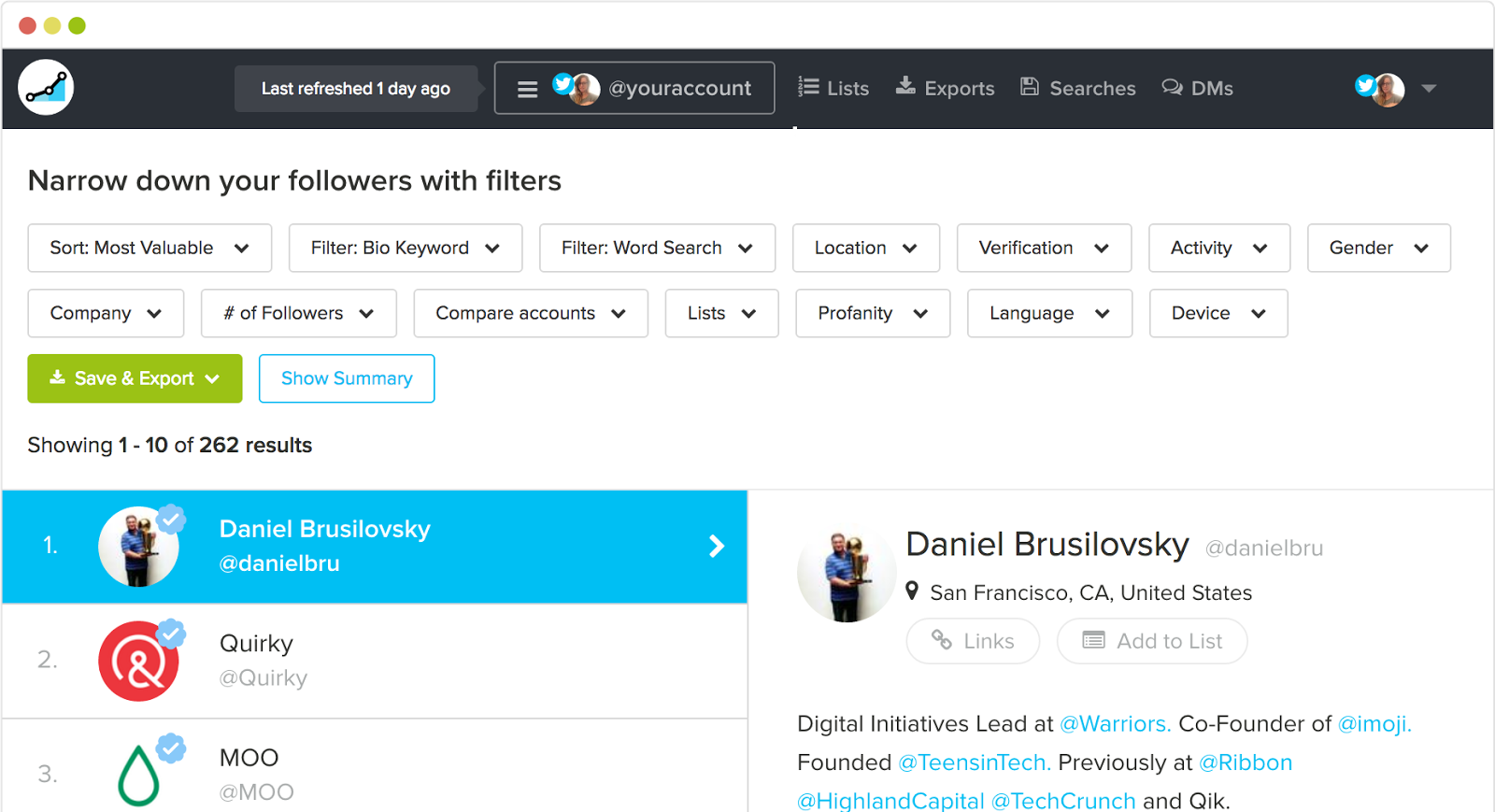
social rank instagram analytics tool screenshot

Once you pull up a segment, you can then rank or prioritize these people based on their own engagement with you or their own popularity (by follower count).
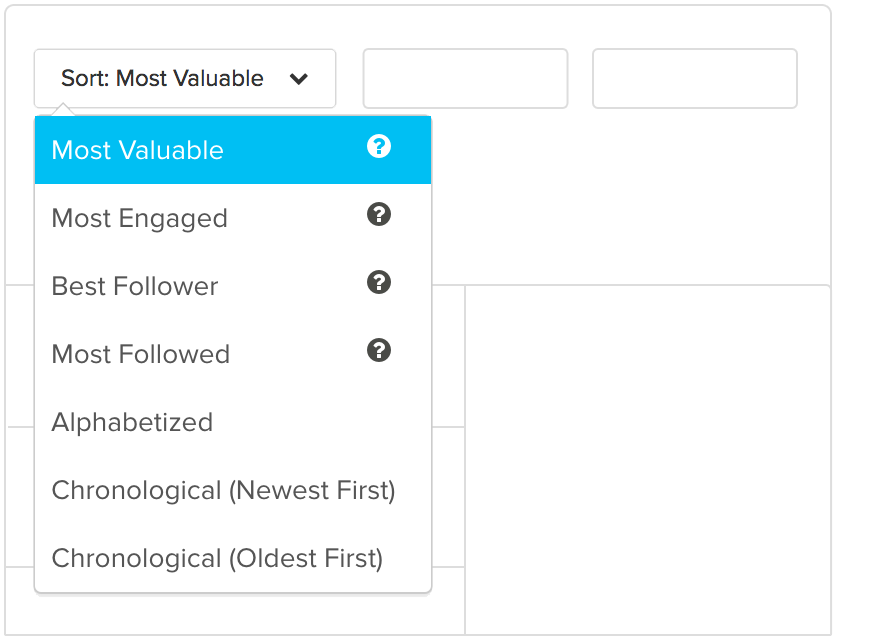
sort instagram analytics tool data

These filters come in handy when you’re trying to pull precise lists of followers.

For example, let’s say you’re opening a new location in a new city (or simply just visiting a new area for an upcoming conference).

You can overlay these filters together to find people who’re using certain hashtags (such as #craftbeer) and located within a specific city (like San Diego).
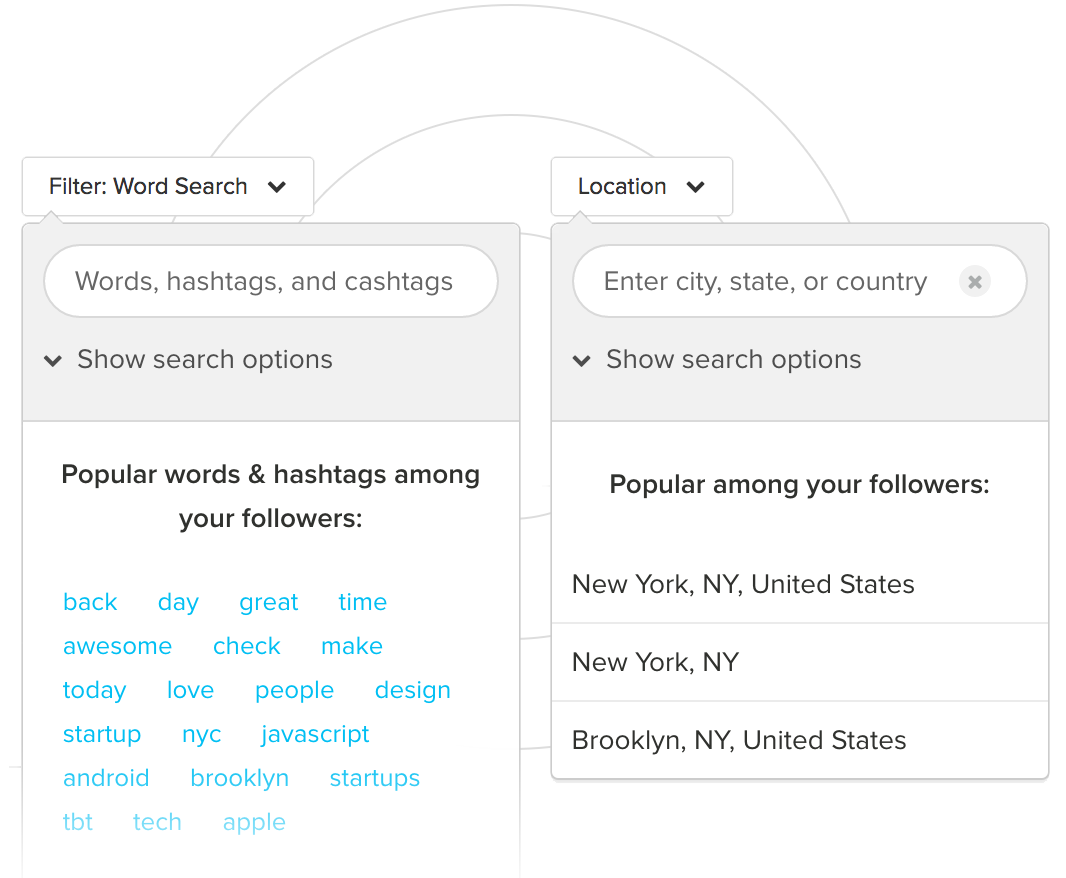
instagram analytics tool filter

Then you can pull these follower lists into an Excel or PDF document for easy sharing with your team.
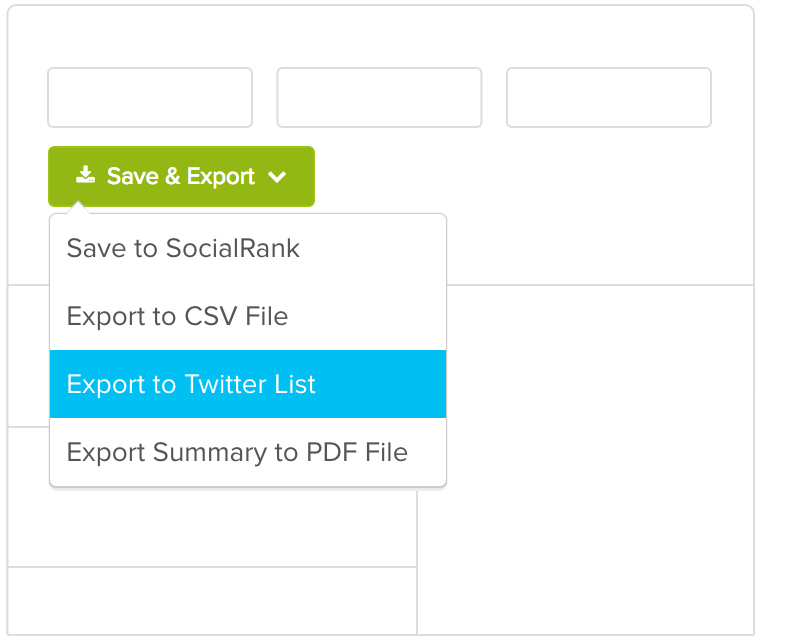
instagram analytics tool save and export

It’s incredibly powerful but not among the cheaper options listed here. I’d recommend using it for larger influencer or PR campaigns. It works best when you need deep audience insight to build buzz around your latest launch.

Conclusion

Social media is fairly simple at the end of the day.

First, you need to understand what your audience wants and is looking for. Second, you need to give it to them consistently.

In reality, it’s a lot tougher than it sounds.

But not if you’re using the right Instagram analytics tools to tell you what your audience is already interested in, talking about publicly, and reacting online.

Instagram is a powerful marketing tool to reach new audiences, increase your brand visibility, and deepen relationships with the people you already know.

Unfortunately, you can’t always track those things back to new Goal completions inside Google Analytics.

They’re ‘soft’ goals used to move people along your sales funnel instead of ‘hard’ goals that result in a new lead or sale.

That doesn’t mean they’re any less important. It simply means that you need to look for different ways to measure progress and results.

While Instagram’s built-in analytics are helpful, the Instagram analytics tools listed here go far beyond those metrics. You’ll be able to quickly identify your target customers, figure out what they’re interested in, and learn how to better serve them with new stuff.

After all, that’s what Instagram analytics tools are for, anyway. Not long, in-depth reporting that takes you hours to compile. You’re often better off with quick insights so that you can take action, update your marketing campaign, and grow faster.

What are your favorite Instagram analytics tools to track metrics?

The post 7 Instagram Analytics Tools to Grow Your Audience appeared first on Neil Patel.

Best Business Intelligence Software

Disclosure: This content is reader-supported, which means if you click on some of our links that we may earn a commission.

Business intelligence software has become a necessary tool in the era of big data.

Your organization collects tons of data about your customers, website, and total health of the company. But without BI software, making sense of that information is nearly impossible. This software exists so you can analyze various data sets and make data-driven decisions. 

For example, you can use BI software to predict consumer buying behavior or project the financial impact of an operations decision. Rather than waiting for a quarterly or annual report, you can leverage BI software for real-time data insights. 

Due to the complexity of business intelligence software, the vast majority of tools in this category are designed for large organizations, SMBs, and enterprises. 

The Top 6 Options For Business Intelligence Software

  1. TIBCO Jaspersoft
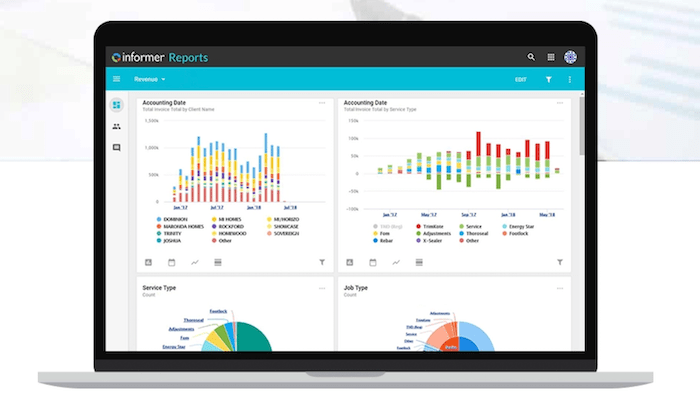
  2. Entrinsik Informer
  3. Zoho Analytics
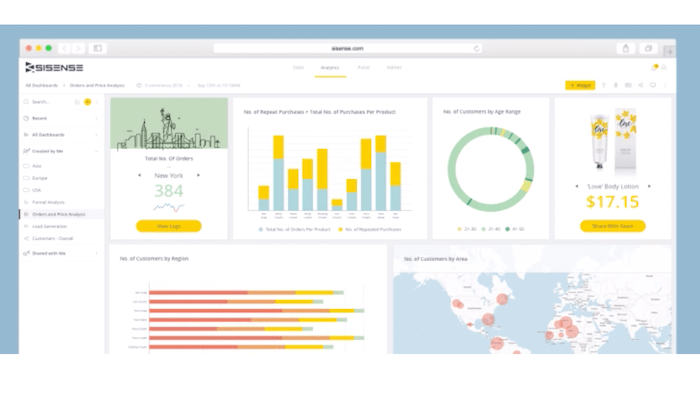
  4. Sisense
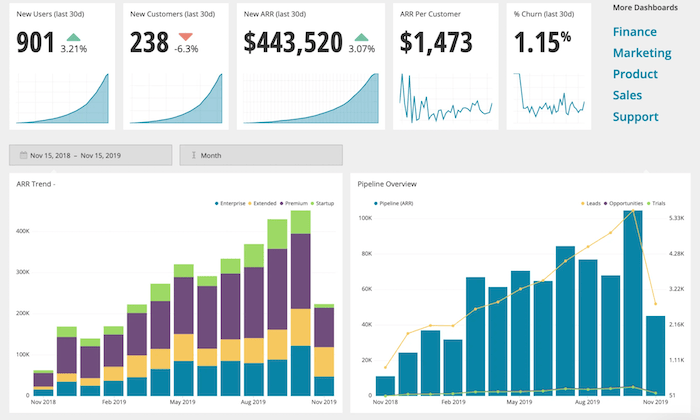
  5. Chartio
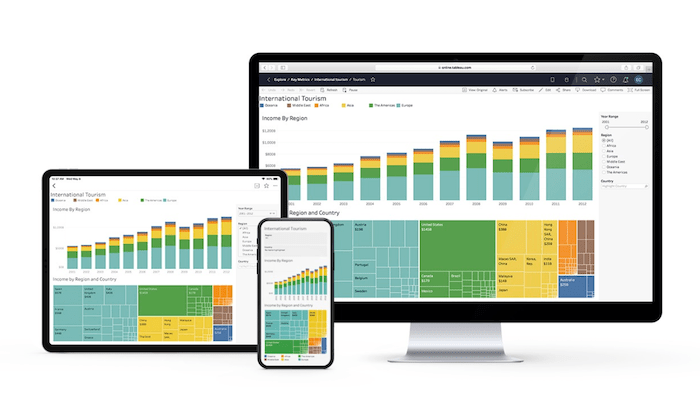
  6. Tableau

How to Choose the Best Business Intelligence Software For You

Finding the right BI software for your business can be challenging if you don’t know what to look for. I’ve created a simple buying guide with features, factors, and elements that must be taken into consideration as you’re shopping around. Keep an eye out for the following aspects of BI software as you’re comparing solutions and narrowing down your options:

Data Reporting

Remember, the number one reason why companies invest in BI software is to make sense of their data. So it’s only natural that data reporting itself would rank so high on our list of factors to evaluate.

The best BI tools turn complex data into visuals that are easy to understand. You can view this information from real-time dashboards or turn them into individual reports. 

Being able to share these reports with decision-makers, stakeholders, clients, and other members of your team is also something that must be considered. Users that generate the reports won’t always be the people making sense of that information. So the reports must be easy enough to comprehend by the final decision-makers.

Data Sources

How are you going to integrate your existing data with your BI solution? Where is that data located?

Don’t make things more confusing for yourself. Make sure you find a business intelligence tool that makes it easy for you to connect with your existing data sources. It’s worth noting that not every business intelligence software on the market will integrate with specific databases. So don’t make assumptions; always double-check that your data is compatible with the software in question.

Your BI software should seamlessly integrate with help desk tools, CRM, ERP software, advertising networks, and more. The best tools should accommodate cross-platform access to every user as well. 

Development Tools

Some business intelligence software will improve the way you collect data as well. 

Your in-house developers or IT department might want to implement custom application development into your processes. Certain tools will have pre-built analytics apps for you to use. Other solutions offer developers an open API, making things easier for developers to customize apps with unique rules. 

Setup and Deployment

Unlike other types of business software on the market today, BI tools are a bit more complex. Getting started isn’t really as simple as clicking “sign up” and being done. 

These solutions are highly customizable and built specifically for your business. The deployment process could potentially take weeks, depending on the software you choose. You’ll be faced with options for on-premises deployment, hybrid server deployment, desktop software, and cloud software deployment. 

Cloud software is a great option for businesses on a tighter budget. This deployment method makes BI tools more easily accessible to smaller companies. But large organizations with complex data sets and custom needs would likely benefit more from on-site deployment. 

Ease of Use

Again, BI software can be complicated. 

If it’s your first time using this type of software, don’t overwhelm yourself with a solution built for seasoned veterans. 

Think about who will be using the software on a day-to-day basis. Is it your IT team? Sales reps? Product managers? Developers and tech-savvy individuals won’t have as steep of a learning curve as the average user. 

Just make sure you understand the difference between tools that require advanced technical knowledge and software for beginners. Beginners should avoid software that’s built for data engineers. 

The Different Types of Business Intelligence Software

Business intelligence software can be segmented into different categories based on its primary functionality or toolset. Here’s a quick overview and explanation of the most popular types of BI software available on the market today.

Data Visualization Software

As the name implies, data visualization software helps you analyze complex data sheets with visual tools. Visual reporting is arguably the best way to make sense of large sets of data. You can turn huge data sets into meaningful reports in a matter of minutes. This makes it much easier for decision-makers to analyze the insights.

Business Process Management (BPM)

Business process management software is a component of business intelligence. These tools are also a core component of operational management and intelligence. 

BPM software leverages automation and improves the efficiency of day-to-day processes. You can find business process management functionality within BI software.

OLAP (Online Analytical Processing)

OLAP software leverages tools that help analyze data from several sources. These interactive solutions provide a multidimensional view for each user (such as different department heads). OLAP tools will consolidate and aggregate different operational data.

Embedded BI Software

Embedded BI software is exactly what it sounds like. These tools are integrated directly within your applications for process management. They can also be embedded in operations portals, websites, portals, and other types of business-related systems. 

ETL Software

ETL (extract, transform, and load) software combines data from different sources into a single dashboard. Then the software will blend these various data sets and make sense of them in terms that the end-user can understand. 

Data Mining

You can use data mining tools to identify patterns in your data sets. Data mining software typically leverages tools like machine learning and AI to uncover these patterns for data-driven decision making. 

#1 – TIBCO Jaspersoft Review — Best For Embedded Analytics

TIBCO Jaspersoft is a developer-friendly business intelligence solution. The software uses embedded BI, which brings the power of business intelligence directly into your company’s applications.

The dashboards are ultimately displayed within the interface of the application to enhance the end-user experience and improve decision-making in real-time. 

More than 500,000 developers across different industries use TIBCO Jaspersoft to improve applications for millions of users. Here are some of the other reasons why this BI tool ranks so high on my list:

  • Customizable visual reporting
  • Production reporting for high volume distribution to the masses
  • Javascript API for embedding
  • Deploy using any method with an agnostic architecture that’s 100% open
  • Pre-configured multi-tenant support
  • Ad hoc self-service reporting
  • Big data connectivity for native reporting and real-time analytics

The tool is a bit unique in the sense that it’s built for developers but enhances the decision making for end users. If you don’t have a technical background, you won’t really be qualified to deploy this on your own. 

Try TIBCO Jaspersoft free for 30 days to see if it’s right for your business before buying.

#2 – Entrinsik Informer Review — Best For Analyzing Multiple Departments

Entrinsik Informer is perfect for large organizations that collect data from multiple sources and need to make sense of that information within different departments. 

The software makes it easy for you to connect data from the cloud, spreadsheets, unstructured web data, traditional databases, enterprise applications, and more, and aggregate it within a single source. 

It’s a popular choice for manufacturing, insurance, distribution, education, and government organizations. Noteworthy features and highlights of Entrinsik Informer include:

  • On-demand self-service reporting
  • Powerful data visualizations
  • Ability to evaluate roles of end-users across your organization
  • Streamline data workflows
  • Faster access to data with curated subsets of information
  • Aggregated data flows for higher quality data
  • Robust governance and security features including team roles and custom security levels
  • Flexible architecture for endless extensibility

For businesses seeking a fast and simple way to discover intelligent data, this will be a top choice to consider. 

Users across your entire organization, such as department managers, business users, industry partners, data scientists, executives, database admins, and more, can all see unique information within Entrinsik Informer based on their needs and role. 

Schedule a free demo to learn more. 

#3 – Zoho Analytics Review — The Best For Data Visualization

More than 500,000 companies and 2+ million users rely on Zoho Analytics for business intelligence. It’s trusted by well-known brands like HP, Hyundai, Ikea, and Suzuki.

Compared to other solutions on our list, Zoho Analytics is definitely a bit more user-friendly. If you’re just getting your feet wet with BI software, this tool won’t have as steep of a learning curve. 

My favorite part about Zoho Analytics is the visual reporting. Non-technical users can easily navigate within the platform to create and view custom reports that are easy to comprehend. Other features and benefits include:

  • Ability to embed analytics in your product, website, portal, or application
  • Integrates with 500+ tools out of the box
  • Secure team collaboration features
  • Augmented analytics powered by AI
  • Blend data from multiple sources into single dashboards
  • Assess the health of your entire organization across each department
  • Customize reports with drag-and-drop dashboard
  • White-labeling capabilities with ability to fully re-brand the portal
  • Powerful HTTP-based web APIs for scalability and extensibility

You can even access your BI reports on the go with the Zoho Analytics app, available on iOS and Android. 

Zoho Analytics is the best beginner-friendly BI software on the market today. Plans start at $22 per month, and you can try it free for 15 days.

#4 – Sisense Review — The Best BI Software For Complex Data

Sisense is one of the most popular BI tools on the market today. It’s used by developers, business leaders, product managers, and data professionals alike.

The software is trusted by 10,000+ companies, including well-known brands like GE, Verizon, Motorola, Wix, Hewlett Packard, and the Salvation Army. 

Sisense has industry-specific solutions in categories like retail, healthcare, government, manufacturing, marketing, supply chain management, and more. They also have solutions that are tailored toward specific departments within your organization.

Noteworthy highlights of Sisense include:

  • Ability to create powerful analytics applications
  • Self-service analytics for each user
  • Cloud-native data analytics
  • Ability to embed analytics with full customization
  • Deploy on-premises, in the cloud, or hybrid deployment with Windows or Linux
  • Seamlessly integrate Sisense with your existing tools and branding
  • Secure access to information at the object, data, and system levels

Users of any technical skill level can use Sisense to transform complex data sets into interactive dashboards. Watch the demo and request a free quote to get started. 

#5 – Chartio Review — Best For Simple Charts and Dashboards

Chartio is a cloud-based BI solution. It empowers users of varying technical backgrounds to analyze data from business applications.

The tool makes it easy for you to simplify data with charts and dashboards for more informed decision making.

Here’s a closer look at some of the top reasons why your business should consider using Chartio for business intelligence:

  • Easy to share visuals in embedded web pages, Slack, PDFs, and more
  • Tools for product managers, sales teams, and customer success
  • Self-service functionality for all users (C-suite, sales reps, etc.)
  • Easy to browse data with visual SQL
  • Connect all data from multiple sources (Google BigQuery, Amazon Redshift, etc.)
  • Create and save custom themes
  • Collaboration and team chat tools

Chartio also provides exceptional support. They view themselves as a strategic partner in your success. So they provide you with live training, extensive documentation, and access to experienced data advisors. 

Plans start at $40 per user per month. You can try Chartio free for 14 days with a no-obligation trial. 

#6 – Tableau Review — Most Versatile BI Software

Tableau is an industry leader in the business intelligence space. The software is trusted by individual analysts, small teams, large organizations, and everything in between.

They offer a wide range of BI tools, including Tableau Desktop, Tableau Online, Tableau Server, Tableau CRM, embedded analytics, server management, data management, and more. The list goes on and on.

In addition to the extensive product offerings and use cases, Tableau also has industry-specific solutions, and tools based on different types of technology, making it the most versatile software in this category.

Top features of Tableau include:

  • Cross-platform support (desktop, browser, mobile) and embedded analytics
  • Team collaboration tools
  • Advanced analytics displayed in powerful visual interface
  • Easy to organize resources and content
  • Centralized data sources and custom permissions
  • Multiple deployment options (cloud, on-premises, hosted, Windows, Linux, Mac, multi-tenant)
  • Actionable insights in real-time
  • Easy to connect with data from multiple sources (Google Analytics, Salesforce, etc.)
  • Ability to map your data

Overall, Tableau is robust and feature-rich. The only real downside is that it can be tough to figure out with so many capabilities. But it can still be used by developers and non-technical users alike.

You can try Tableau for free with a 14-day trial.

Summary

Business intelligence software has rapidly gained popularity over the past few years. If your organization is ready to take your data analysis to the next level, I strongly suggest investing in a BI solution.

Which business intelligence tool is the best?

Just use the buying guide I outlined at the beginning of this article to help narrow down your options. Then start by exploring the top picks reviewed above. 

The post Best Business Intelligence Software appeared first on Neil Patel.
The Amount Of Dollar Checks Do You Want To Receive?

The Amount Of Dollar Checks Do You Want To Receive? Associate Marketing is without a doubt, among the simplest means to earn money online. It is an income sharing organization connection in between the associate that consents to advertise the solutions or items, as well as the vendor that provides them. The associate markets the …

The post The Amount Of Dollar Checks Do You Want To Receive? first appeared on Online Web Store Site.

Berbix (YC S18) is hiring mobile developers to transform identity online

Article URL: https://jobs.lever.co/berbix Comments URL: https://news.ycombinator.com/item?id=24909366 Points: 1 # Comments: 0

The post Berbix (YC S18) is hiring mobile developers to transform identity online first appeared on Online Web Store Site.

New comment by bbrookeshf in "Ask HN: Who is hiring? (October 2020)"

REMOTE- JAVA Software Engineer at Health Fidelity, Inc. https://healthfidelity.com/careers/open-positions/?gh_jid=23…. Health Fidelity is a healthcare tech company. Our mission is to improve the quality of care and reduce the overall cost of healthcare by making the decision-making process more data driven. Our products will have an impact on the national healthcare infrastructure, as well as patients’ quality of life.

The post New comment by bbrookeshf in “Ask HN: Who is hiring? (October 2020)” appeared first on ROI Credit Builders.

New comment by nerandell in "Ask HN: Who is hiring? (October 2020)"

Amazon | Engineers | London, UK | On Site (Remote during COVID 19) | Full-time | VISA Sponsored | https://www.amazon.com

Amazon Alexa Shopping team is hiring Software Development Engineers to be based in London. Our vision is to redefine the future of shopping by transforming the way our customers browse, find and buy from Amazon using Alexa.

If you are interested in being considered or if you have any questions, email me: (achandaw amazon (dot) com)

New comment by ixon_j_d_vries in "Ask HN: Who is hiring? (October 2020)"

IXON | DevOps | Overloon, Netherlands | REMOTE for now | https://www.ixon.cloud/

Keeping machines running, that’s why we do it. A machine builder’s job used to be done after delivering the machine. Nowadays, they remain involved throughout its entire lifespan. All to ensure that the machine runs as optimally as possible. But how? By connecting the machines to the cloud, in a platform in which all machine service and maintenance is managed. With the IXON Cloud platform and supporting hardware, we deliver the technology, so the machine builder can do what they do best: collaborate with clients, provide service, and share insights.

https://grow.ixon.cloud/o/systeembeheerder-linux-devops-32-4…

Ecommerce Consulting

In 2019, ecommerce sales were $3.53 trillion worldwide.  According to Statista, that number is projected to grow to $6.54 trillion by 2023. Online shopping was a popular past time before the pandemic, but ecommerce has grown by 20 percent in 2020 alone.  Are you ready?  With the right preparation, ecommerce retailers can achieve double-digit conversion … Continue reading Ecommerce Consulting

Ecommerce Consulting

In 2019, ecommerce sales were $3.53 trillion worldwide. 

According to Statista, that number is projected to grow to $6.54 trillion by 2023. Online shopping was a popular past time before the pandemic, but ecommerce has grown by 20 percent in 2020 alone. 

Are you ready? 

With the right preparation, ecommerce retailers can achieve double-digit conversion rates and consistent, year-over-year growth. Not sure how to achieve these results on your own? An ecommerce consultant can provide you with the step-by-step support you need to achieve these amazing results. 

3 Ways an Ecommerce Consultant Can Help Grow Your Business

The pandemic hasn’t been good for everyone. 

CB Insights found that the retail apocalypse that started in 2015 actually accelerated during the Covid-19 pandemic. Small, local businesses that neglected ecommerce suffered the most. Large companies with well-known ecommerce stores filed for bankruptcy in 2020. 

These are brands you’d probably recognize. 

Brooks Brothers, GNC, Neiman Marcus, Hertz, J. Crew — these companies were all leaders in their market at one point or another. But now, 30+ of these companies are on life support. 

Online customers are pessimistic and highly skeptical. They’re choosing to work with established companies like Amazon who are willing to offer free two-day shipping. 

How’s a consultant supposed to help you survive that? 

Here are three ways ecommerce consultants can help retailers address the problems they’re facing. 

1. Precise customer targeting

In many cases, 80 to 90 percent of your marketing work is done here. This is also the most difficult part to sell to you, the client. The response is typically along the lines of: “Oh, we know that already.” A good ecommerce client knows how to test that claim. 

They do it by asking questions.

Who’s your customer; how familiar are you with their desires, goals, fears, frustrations, and problems? What are their demographics and psychographics? Do you have the answer initially, as most sellers do, or consistently?

Customers change. 

What’s okay today won’t be tomorrow. 

Here’s why that’s important. Everything your ecommerce consultant does, the effort they invest to help your business grow, it all depends on this step. You can’t create a persuasive product offer or shopper incentive if you don’t know your customers as well as you think you do. 

Your ecommerce consultant will refine your audience. 

They’ll help you find the people who are willing to spend more money with your business over time. 

2. Creating profitable offers with features and benefits

CBInsights shared a list of the most common reasons for startup failure. They listed more than a dozen categories, but most of them weren’t all that important. Don’t get me wrong; they were important, just not the most important. Here’s what was the most important thing. 

No market need. 

Forty-two percent of startups failed because they created a product with features and benefits no one wanted. Those are startups, though; things are different with ecommerce stores. 

Only they’re not. 

Research shows 90 percent of ecommerce startups fail in the first 120 days; of the remaining businesses:

  • 36 percent fail in year two
  • 44 percent fail in year three
  • 50 percent fail in year four

The biggest reason? 

Ecommerce stores focus their attention on the wrong product. Customers refuse to buy those products, so eventually, the business fails. An ecommerce consultant helps you create the right product. If they’ve enabled you to do the upfront work needed to target your customers, you should have a pretty good idea of the products customers actually want. 

3. Use Customer Pessimism to Increase Sales and Average Order Values

You’re going to have two types of customers. Optimists and pessimists. Optimists are easy to sell to but harder to keep. Pessimists, on the other hand, are harder to sell to but easier to hold.  

A meta-analysis by Bart S. Vanneste shows how this works. 

  1. Trustors (your customers) start a relationship with trustees (you). 
  2. Trustors use what scientists call “perceived trustworthiness.” That’s the fuel or spark you need to take a risk. 
  3. Afterward, trustors change their impression of you to match reality.

Here’s where it gets tricky. 

  • Optimist trustors overestimate trustworthiness. At first, they give you more than you deserve. As they’re disappointed, their trust in you decreases over time. If they’re not happy with the results, their trust continues to fall. 
  • Optimist trustors overestimate trustworthiness. At first, they give you more than you deserve. As they’re disappointed, their trust in you decreases over time. If they’re not happy with the results, their trust continues to fall. 

A great ecommerce consultant knows how to build trust with skeptical or pessimistic customers. They’re able to use your customer’s natural distrust to increase sales and revenue using helpful tactics like warranties, return policies, guarantees, and promises. 

They’ll show you how to convert this trust to revenue, increasing your sales, upsells, and average order values. 

How to Get Started With an Ecommerce Consultant

Your ecommerce consultant should be a specialist with deep expertise in retail or ecommerce. Think about your needs and the specialty and experience of the consultant. Will you be working with an individual or a team? You are looking for proven knowledge and expertise that has produced successful outcomes for other clients. You want your consulting team to be able to generate the same results for you.

They should also have experience across a broad range of marketing disciplines and channels, including:

  • Analytics
  • Email marketing
  • CRM
  • Content
  • Branding
  • Direct Response
  • Email
  • Marketing automation
  • Market research
  • Mobile
  • Sales
  • SEO
  • PPC
  • Website

Once you’ve decided on the consultant you’d like to work with, ask them to answer these questions:

  • What do you need from me?
  • When do you need it?
  • What’s your role, and what’s my role?
  • Will I have a dedicated rep to contact?
  • What’s your process for communication?
  • How can we ensure a smooth experience?

You’ll want to see that your consultant follows a process. They should provide you with clear answers to each of these questions.

Measuring the ROI of Ecommerce Consulting Services

Measuring the ROI of ecommerce consulting is pretty easy. 

If you’re tracking the right metrics, you’ll be able to measure your ROI. While there are hundreds of metrics you can track, only a few of these metrics are essential. Ask your consultant to start with the essentials, then build from there. 

Here’s a shortlist you can use. 

  • Traffic (unique visitors): The number of qualified prospects who visit your site. If you’re using a tool like Google Analytics, you’ll want to make sure you’re filtering out traffic from bots or spam. Your visits should be focused on generating traffic from qualified traffic sources.
  • Conversion rate: It’s the number of conversions divided by the number of users. You can have several different conversion goals (e.g., leads, ecommerce, likes, etc.).
  • Revenue by traffic source: This shows you which traffic source is most profitable and clarifies where you should spend your marketing and advertising dollars. 
  • Cost per action: This tells you how much it costs to generate a lead, make a sale, or upsell a particular customer. It’s an important part of your breakeven calculation used to determine whether you’re profitable (or not).
  • Ecommerce churn rate: Churn measures the number of customers leaving your business in a particular period. It’s typically a SaaS metric, but it’s now commonly used as a metric for ecommerce. If your churn is going up (i.e., customers are leaving), your revenue is declining.
  • The number of returning customers: The formula is returning customers / by total customers * 100. Returning customers have a conversion rate of 60 to 70 percent. The more repeat customers you have, the greater your revenue. 
  • Average order values: This is a formula, it’s your total revenue divided by the number of orders taken. You can increase average order values using upsells, downsells, and cross-sells. 

Your ecommerce consultant should be able to help you track these metrics. If you’re just starting out, you’ll want to focus your attention on these seven essential metrics. 

7 Point Checklist For Finding the Right Ecommerce Consultant

What should you look for in a consultant? 

If you’re looking for high-quality consultants, what sort of questions should you be asking? Are there specific details you’ll need to focus on to make sure your store attracts the right people? 

Here’s a list of the qualities and characteristics you need to find the right consultant for your business. 

  1. A good reputation: You’ll want to look for reviews, references, and testimonials. You’ll want to find a consultant with positive reviews from the majority of their clients. If your consultant doesn’t have an established reputation, you’ll want to look for content that establishes credibility and authority. 
  2. No ethical grey areas: Your consultant shouldn’t have any issues with black hat SEO or questionable tactics. There shouldn’t be a history of unethical behavior, cheating, or suspicious behavior. 
  3. Clear goal setting: Your consultant should be comfortable working with your goals and objectives. They should understand your business well enough to be able to track and manage the key metrics and KPIs you need to grow. The right consultant should be able to help you set goals, objectives, and KPIs. They should be able to help you develop your goals and objectives.
  4. Consistent ROI: Your ecommerce consultant should be able to show you that they achieved consistent results over a three to five year period. Asking for case studies and the references that go along with them is a good start. But you’ll want them to provide you with detailed figures or evidence showing that they’ve either been able to do this for themselves or other clients just like you. 
  5. Experienced ecommerce sellers: You’ll want to focus your attention on consultants who have owned, managed, or grown an ecommerce store successfully. They need to have familiarity or experience with ecommerce. They should be able to show you the store, provide you with case studies, or outline the work they did for the ecommerce brand. 
  6. Focus on customers’ first, search engines second: Consultants should create high-quality content for customers first, search engines second. The emphasis should be on attracting the right customer at the right time, for the right price, whether you’re speaking to a cold audience, subscribers, customers, followers, fans, or a combination. 
  7. Deep ecommerce expertise: Your consultant should have experience in the same industry or space. Look for in-depth knowledge and expertise with your industry, business, product, or service. If they don’t have the expertise you need, they should be able to demonstrate that they have experience with a similar ecommerce topic or niche.

These are details that high-caliber consultants, including agencies like NP Digital, provide. If you’d like your company to grow, choose consultants who meet these criteria. 

Conclusion

Ecommerce sales continue to grow rapidly. 

You can achieve double-digit conversion rates and consistent, year-over-year growth. An ecommerce consultant can provide you with the step-by-step support you need to achieve these results.  

With precise customer targeting, good products, profitable features and benefits, and some customer pessimism, your ecommerce consultant can help you achieve double-digit conversion rates and consistent, year-over-year growth.

The post Ecommerce Consulting appeared first on Neil Patel.
Best Cloud Storage Services

Disclosure: This content is reader-supported, which means if you click on some of our links that we may earn a commission.

A decade ago, clouds were white puffy things we pointed at in the sky. 

Today, I suppose that’s still true. But “the cloud” means something completely different. It started as a buzzword, but now, it’s not uncommon to hear it in an afternoon conversation over coffee. 

In fact, it’s an incredibly common occurrence in our everyday lives. 

And it’s rise in popularity happened for a good reason—cloud storage is safe, affordable, and undoubtedly easy to use. Plus, it has countless uses, from backups and document archiving to team collaboration and file sharing. 

But choosing the best cloud storage services isn’t always easy, especially since there are so many options on the market. 

To make your decision a little easier, I looked at dozens of providers and narrowed it down to my top nine recommendations. 

Then, I reviewed them to help you make the right choice, depending on what you need. 

The top 9 options for cloud storage services:

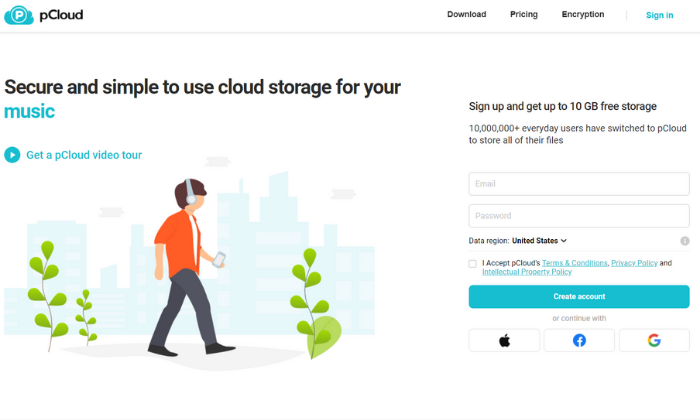
  1. pCloud – best cloud storage with lifetime access
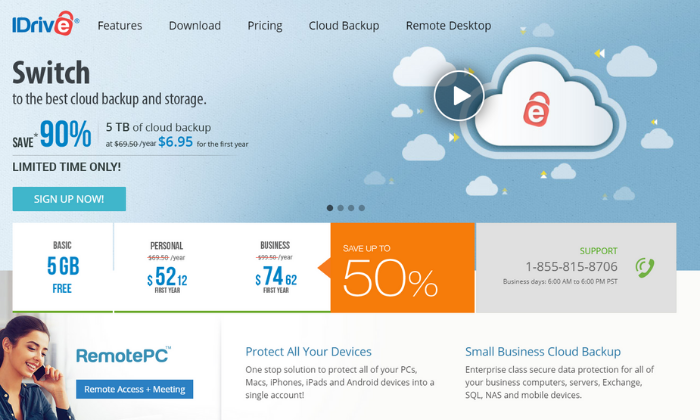
  2. iDrive – best device backups with unlimited users
  3. Zoolz – best high-volume (100TB+) data storage services
  4. Icedrive – best desktop and portable cloud storage software
  5. Degoo Cloud – best for photo storage and sharing
  6. SpiderOak One – best storage and backups for security
  7. OneDrive – best cloud storage for Windows/PC users
  8. iCloud – best cloud storage for Apple/iOS users
  9. Google Drive – best for Google users

How to choose the best cloud storage services for you

Every option on this list has its own set of perks, features, and benefits. They’re all great in one aspect or another. However, choosing between them isn’t always easy, especially if you don’t know what to look for. 

So, don’t forget to use the following considerations as you go through the process. 

Storage limits

Every cloud storage service offers various plans with differing storage limits and different price points, depending on how much space you need. 

You don’t necessarily need to know how much space you need before you decide. 

Thankfully, it’s easy to upgrade and add more storage space with most providers on the list. Some charge a small monthly fee to add more space and others may require you to upgrade to a different plan. 

With that said, I always recommend starting on the lowest plan until you meet those storage limits. From there, you can upgrade as you need to.

However, it is essential to choose a provider that can scale with you. 

For example, if you know you’re going to need hundreds of terabytes of space, you need a mass storage provider since you will quickly outgrow a standard cloud storage service. 

Security

Legal requirements for your industry and your personal preferences may require advanced security features and capabilities. 

And when it comes to cloud storage, not all providers are equally secure. 

Some practice No Knowledge, meaning they do not know your password, account details, encryption keys, or the files you store on their servers. 

Furthermore, end-to-end encryption is common but not utilized by every provider. And some may change their security processes while your files are moving, while they’re stored, or when you share them with other people. 

So, you need to be aware of the types and levels of security you need. 

This is especially important if you need advanced security for legal compliance, like HIPPA privacy laws in the healthcare industry.

Number of users

This consideration isn’t as crucial if you’re looking for personal cloud storage. However, if you need cloud storage for your company, you typically need to pay monthly per user. 

So, it’s important to understand how many users you have and how much space each account needs to have. 

Some providers, like iDrive, offer plans with unlimited users and an all-encompassing storage limit. So, you only need to upgrade when you reach the maximum storage capacity, rather than paying separately for new accounts. 

However, others don’t offer this, and you’re required to pay for the number of users you have. 

Your use cases

There are various types of cloud storage services, which we’ll talk in-depth about here in a second. However, this is an important consideration to think about when deciding which provider is best for you. 

Do you need device backups? Maybe you need easy file-sharing or access to files from multiple devices. Perhaps you want to archive sensitive information. 

There are many use cases, so it’s essential to understand your needs before making a decision. 

Operating system

iCloud is specifically for Apple devices. So, it doesn’t make sense if you don’t use the Mac operating system or have an iPhone. 

On the other hand, OneDrive is specifically for Windows users. 

Some providers offer solutions that work regardless of your OS. So, this isn’t a crucial consideration unless you plan to use a cloud storage service specifically for your operating system. 

You may even need more than one of these services. I use iCloud to back up my phone and for personal use, but I use pCloud and Google Drive to run my business. 

The different types of cloud storage services

There are countless different types of cloud storage services, including backups, archives, hybrid deployments, and standard file storage. 

The best type for you depends on what you want to do with your cloud storage solution. 

So, before we dive into my top recommendations, let’s take a moment to walk through some of the most common types.

File storage

With standard file storage cloud services, you can upload images, videos, text documents, audio, spreadsheets, and most common file types anytime and anywhere. 

Google Drive, Icedrive, pCloud, and OneDrive are all examples of this. 

They typically also include collaboration tools and advanced sharing capabilities to suit businesses and teams of all sizes. They make it easy for everyone to get access to what they need and collaborate in real-time. 

This is an excellent type of cloud storage service for individuals and businesses of all sizes without tight security requirements and the need to collaborate or share documents. 

Plus, you can keep your phone/computer storage space open for other things. 

Backups

Backups are an incredibly affordable way to create cloud-based copies of your files, device settings, servers, etc. if something happens to the original document or device. 

This process usually happens automatically, daily, or at the click of a button, depending on your preferences. 

Regular backups help protect you and your business if someone hacks into your system, files get deleted, or something physically happens to your device (i.e., your phone or laptop).

If something does happen, you can revert everything to the last backup you have. 

iCloud, SpiderOak, Zoolz, and iDrive offer backup services for various devices, including phones, computers, servers, setting configurations, and more. 

Archives

Archive storage is similar to backups, except it’s for files and data you don’t expect to access again in the future. 

Archiving is typically for legal compliance purposes and is usually very affordable since you don’t need any special features or collaboration tools to go with your storage space. 

Hybrid deployments

This is a combination of public and private cloud storage for businesses that need hyper-secure storage and general storage space. 

Private clouds are much more secure and aren’t shared with other users, hence being called private. And this comes with a bigger price tag. 

However, public cloud resources are shared with numerous users to keep costs low. But it also means there’s less built-in security. 

As such, it makes sense that you wouldn’t want to store sensitive information or patient data in a public cloud. 

So, specific industries may need a hybrid deployment to cover their sensitive documents as well as other files and backups that may not require as much security. 

#1 – pCloud Review — The best cloud storage services with lifetime access

Most cloud storage services charge monthly based on the amount of storage you need. However, pCloud offers lifetime plans, so you don’t have to worry about paying a fee every month. 

This is a great deal, especially if you plan to use the storage space for an extended period. 

On top of that, pCloud’s lifetime plans come with a wide range of features, including:

  • Shareable links and file requests
  • Brandable and customizable share links
  • TLS and SSL channel protection
  • Five copies on different servers
  • Automatic syncing
  • Offline access capabilities
  • Built-in video and audio player
  • File versioning up to 30 days in the past

pCloud also offers an add-on service for extra security and client-side encryption. You have the option to pay annually or for a lifetime subscription. 

There are two lifetime storage plans to choose from, including:

  1. Premium — 500 GB for $480 (only $175 for a limited time)
  2. Premium Plus — 2 TB for $980 (only $350 for a limited time)

If you prefer paying annually, you can do that as well. 

You can try pCloud for free for up to 10 GB of storage space. So, sign up for a free account or buy lifetime access to get started!

#2 – iDrive Review — The best storage + device backups with unlimited users

If you need cloud storage or cloud backups for a large number of people, it’s more affordable to choose a plan with unlimited users. With iDrive Business, you can have as many users as you want with flexible plans depending on the amount of space you need. 

iDrive’s personal plan is also affordable if you only need cloud storage for yourself. 

However, the business plans are where the service really shines. Those business plans come with a ton of powerful features, including things like:

  • Unlimited PC, Mac, iPhone, Android, and tablet backups
  • Continuous and automatic data backups
  • External hard drive backups
  • Remote management via a browser-based application
  • User and group management
  • Single sign-on
  • 24/7 priority support
  • Server backups
  • Business compliance

So, it’s an excellent option for businesses of all sizes needing backups and affordable cloud storage space. 

Pricing starts at $99.50 per year for 250 GB, with storage limits up to 12.5 TB if you need more. Alternatively, you can opt for monthly plans starting at $49.95 per month for 1.25 TB. 

You can try iDrive free for up to 5 GB to see if it’s right for you. From there, you can upgrade once you run out of space or need access to more features. 

Sign up for a free account and choose your plan to get started today!

#3 – Zoolz Review — The best high-volume cloud storage services

If you need a secure place to store large amounts of backup data (100 TB range), Zoolz is an excellent choice. They offer long-term storage plans in increments of one, three, and five years. 

The longer your term and the more space you have, the more you can save. 

Plus, Zoolz’ enterprise-grade mass backup storage plans come with a ton of security, management, and reporting features, including:

  • Automatic purging by days and versions
  • Smart duplication algorithm even for encrypted files
  • On-the-fly decryption for easy access
  • Military-grade AES encryption
  • Easy deployment via Active Directory Deployment
  • Advanced device management
  • Bandwidth and storage monitoring
  • Automatic system alerts
  • Continuous change monitoring
  • Server backups

If you don’t need mass storage, Zoolz offers standard cloud backup plans for businesses of all sizes starting at $15 per month (or $99 per year) for up to 1 TB of storage space. 

Speak with a cloud specialist to learn more and get started today!

#4 – Icedrive Review — The best desktop and portable cloud storage software

If you’re looking for cloud storage that feels more like a hard drive with cloud servers’ portability and flexibility, Icedrive is a smart choice. It utilizes drive mounting software so you can access your files as if they’re stored directly on your computer. 

You can also get up to 10 GB of storage space for free, making this one of the most robust free plans on this list. 

Icedrive offers several different storage apps for various devices, including web-based, mobile, and desktop. So, you can easily access your files from anywhere. 

The mobile app is available for iOS and Android devices with a clean and intuitive interface. 

With it, you can view documents in various formats, watch videos and listen to audio files with the built-in media player, and create a full device backup in just a few taps. 

Plus, the various apps come packed full of powerful features, including:

  • Client-side Twofish encryption
  • Password protection
  • Share timeout capabilities
  • Collaboration tools

Icedrive offers monthly, annual, and lifetime plans. Monthly plans start at $4.99 per month for up to 1 TB of data, which is incredibly affordable. Alternatively, you can pay $49.99 per year or $149 for lifetime access. 

Choose your storage requirements to get started!

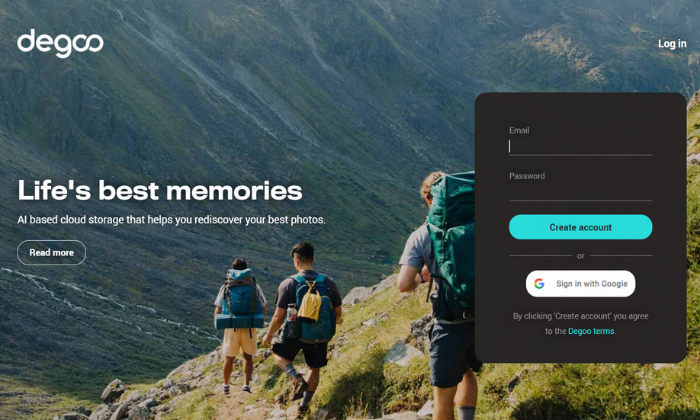
#5 – Degoo Cloud Review — The best cloud storage services for storing photos

If you’re interested in a better way to store your photos, Degoo Cloud is a photo storage service that lets you rediscover memories using AI and a built-in personal image feed. 

Plus, Degoo has over 23 million users worldwide. So, you’re in good company. 

On top of that, you get top-notch security. When you upload an image, you can encrypt it with a password. From there, the data gets broken down into pieces and scattered throughout several data centers in different countries. 

The company even claims it’s 100% NSA proof. So, you can rest easy knowing your photos are safe and secure. 

It’s also an excellent way to free up space on your phone. And you can choose when you want to upload your files to preserve your phone’s battery life. Alternatively, you can set things up to auto-upload into your Degoo account. 

Furthermore, Degoo works on virtually any device with iOS, Android, and web-based applications available. 

You have three different plans to choose from, including:

  • Free — 100 GB of storage, three devices, and Degoo ads
  • Pro — 500 GB of storage, ten devices, and no ads for $2.99 per month
  • Ultimate — 10 TB of storage and unlimited devices for $9.99 per month

Create a free account to get started with Degoo today!

#6 – SpiderOak One Review — The best cloud storage services and backups for security

If you want or need advanced levels of security, SpiderOak is an excellent choice. It offers everything you need to protect your data and stay compliant with local, state, and federal regulations (like HIPPA). 

Rather than a true cloud storage provider, SpiderOak provides data backups. However, you can share and access those files. 

So, it works similarly, but you can only store backups vs. uploading whatever you want. 

On top of that, SpiderOak practices No Knowledge, meaning the company has no knowledge of your passwords, the data you’re storing, or any of the metadata associated with the files you upload. 

No one but you knows what you store on the cloud. And the system is built with privacy and security in mind with end-to-end encryption. 

This means your files are encrypted before they ever leave your computer, and they stay encrypted the entire time they’re stored. 

Furthermore, you also get:

  • Point-in-time recovery to restore data to any point in time
  • File sharing (No Knowledge doesn’t apply to shared files)
  • Mobile apps for file viewing
  • Separate encryption keys for each file
  • File versioning
  • Access to deleted files

Pricing starts at $6/month for up to 150 GB and goes all the way up to 5 TB for $29/month. 

Sign up for a 21-day free trial to see if SpiderOak One is right for you and your business today!

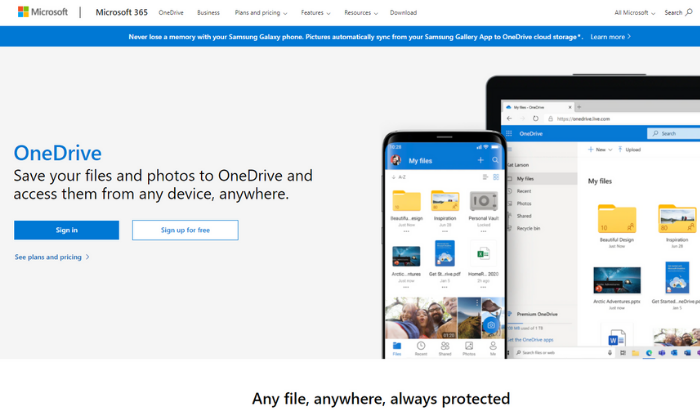
#7 – OneDrive Review — The best cloud storage services for Windows users

If you use Windows and none of the other options feel like a good fit, OneDrive is an affordable and easy-to-use option. There are family, individual, and business plans available to suit individuals and businesses of all shapes and sizes. 

Plus, you can access, edit, and manage your files from any device regardless of where you are in the world. 

Some plans also include access to Microsoft Office apps, like Word and Excel. So, it’s a great deal if you don’t already have those tools. 

Each business plan includes 1 TB of storage space, among various other features, including:

  • Secure file sharing
  • Access expiration dates
  • Accessing files on the cloud without having to download
  • Offline access
  • Mentions, comments, and tasks
  • File folder and access controls
  • Password protection
  • Multi-page scanning

Furthermore, you can get unlimited cloud storage space with the Business 2 plan. It also includes advanced security features so you can rest easy knowing your files are secure. 

OneDrive’s business plans include:

  1. Business 1 — $5/month paid annually for 1 TB of space
  2. Business 2 — $10/month paid annually for unlimited space and advanced security
  3. 365 Business Basic — $6/month for 1 TB plus essential Office apps
  4. 365 Standard — $15/month for 1 TB plus all Office apps and collaboration tools

Alternatively, you can get 5 GB for free or pay $1.99/month for 100 GB of personal storage space. 

Choose your plan to get started with OneDrive today!

#8 – iCloud Review — The best cloud storage services for Apple users

iCloud definitely isn’t the strongest competitor on this list. But it’s a good choice if you already use Apple devices and want an easy way to store and access your files from one device to another. 

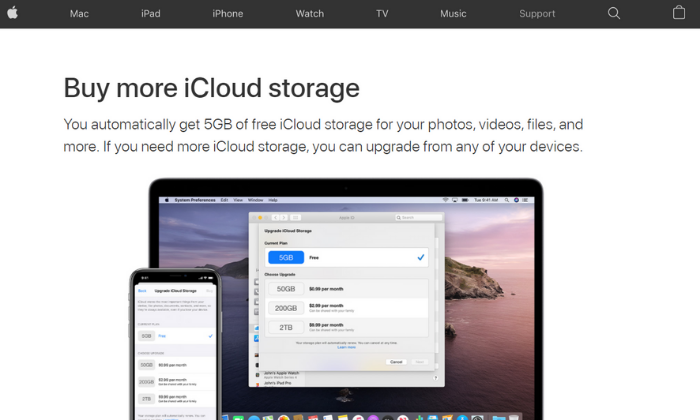
Plus, you automatically get 5 GB of storage for free. 

If you’re a light user, this may be enough for you. However, if you have a lot of photos or videos, you probably need more space. 

Furthermore, it’s incredibly easy to set up and upgrade to a higher plan. 

You can upgrade from any of your devices using your iTunes account. And there are various storage plans to choose from, including 50 GB, 200 GB, and 2 TB. 

You can also share this storage space with up to six people in your household. 

This space can also be used for device backups, including your Apple watch, home screen and app organization, purchase history, photos, videos, and device settings. This means you don’t have to start from scratch if you get a new device. 

You can simply use the backups stored in iCloud. 

In the US, paid plans start at $0.99/month and extend up to $9.99 per month. 

These prices vary in other countries and regions, so be sure to check out iCloud’s storage plan pricing for your country before upgrading. 

#9 – Google Drive Review — The best cloud storage services for Google users

If your organization uses G Suite (now called Workspace), Google Drive is included in your subscription. It’s packed full of powerful features and is incredibly affordable for businesses of all sizes. 

Workspace paid plans include business email accounts, cloud storage space, video conferencing capabilities, internal messaging, and various web-based tools for document creation, powerpoints, and more. 

So, you get everything you need to connect, collaborate, and share documents with your entire team. 

But if you’re not already using or planning on using Workspace for business email, you’re better off choosing Workspace Essentials (doesn’t include email services and starts at $8/month) or a different option on this list. 

Google Drive comes with various features, including:

  • Desktop, web-based, and mobile applications
  • Centralized user and data management
  • Data loss prevention services
  • AI-driven predictions for important content
  • Shared drives for easy team access
  • Cloud-based streaming
  • Advanced sharing and accessibility settings

Pricing for Google Workspace starts at $6/month per user with up to 30 GB of storage space per user. You can also upgrade to a higher plan for more space and additional features. 

Alternatively, there’s an enterprise plan with unlimited storage, advanced security features, and custom pricing. 

Choose your plan to get started with Google Drive today!

Wrapping things up

pCloud, iDrive, and Icedrive are my top recommendations for most users. Each service offers flexible plans at affordable prices to suit individuals and businesses of all shapes and sizes.

However, your storage and security needs also play a role in which option you should choose. 

So, don’t forget to use the considerations we talked about as you go through the process of choosing the best cloud storage services for you and your team. 

What’s your favorite cloud storage service?

The post Best Cloud Storage Services appeared first on Neil Patel.