Bounce Rate: What Is It and What Is a Good Number? 

It’s common knowledge that a high bounce rate is bad, and a low rate is good.

Every time you log into your Google Analytics account, it’s right there waiting for you.

Seeing that number creep up makes you wonder what is going wrong.

The problem is, those numbers can be misleading.

After all, how high is too high, really?

This post will show you how to fully measure and analyze your bounce rate. That way, you’ll know if it’s actually too high for your industry or if it’s perfectly normal.

I’ll also share strategies to audit your bounce rate and understand what’s driving it up.

I’ll also tell you some of my secrets for lowering your bounce rate.

But first, let’s talk about exactly what a bounce rate is and why you should care.

What is a Bounce Rate and Why Does it Matter?

A “bounce” occurs when someone visits your website and leaves without interacting further with your site. Your bounce rate shows the percentage of your visitors who bounce off your site.

What do we mean by “interacts further?” By default, Google counts people who only visit one page on your site as a bounce. If they visit at least two pages, you’re good!

The bounce rate in the overview report on Google Analytics is your site-wide bounce rate.
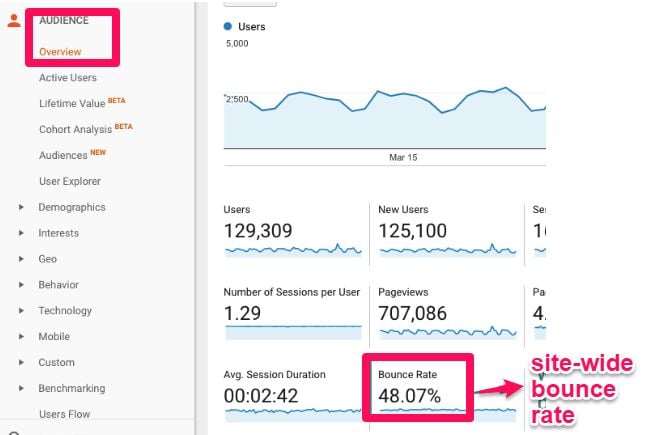
Google Analytics screen showcasing the bounce rate.

Note: Google is sunsetting this version of Google Analytics (now called Universal Analytics). As of July 1, 2023, it will stop processing new data, so make sure you’ve set up GA4 to start gathering data now.

It’s the average number of bounces across all your pages divided by the total number of visits across all those pages within the same period.

You can also track the bounce rate of a single page, segment, or section of your site.

Once we start looking at the different segment reports, I’ll show you how to see this info.

The bounce rate of a single page is exactly what it sounds like. It’s the total number of bounces divided by the total number of visits on a page.

This infographic answers the most-asked questions about bounce rates and tips to help you improve your bounce rate.
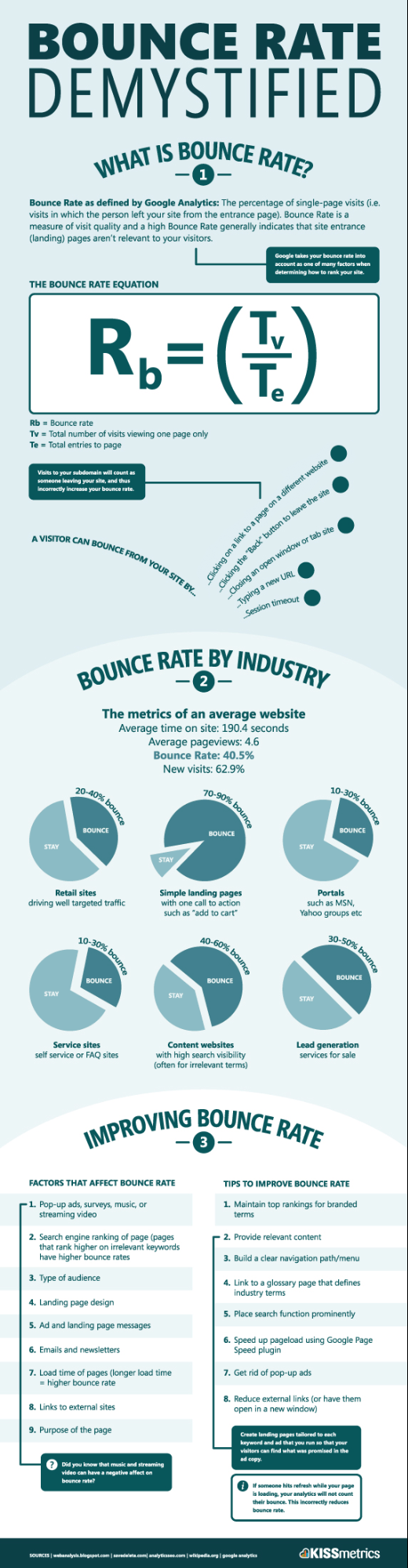
Infographic showing what a bounce rate is.

No matter your site type, you may want to implement a segmented bounce rate.

Why?

Your blog posts may have a very different average bounce rate than your product pages, demo pages, or even your About page.

We’ll get into the details later; just know that segmenting can help you better understand your website bounce rate.

So, why is bounce rate important?

In 2017, Semrush reported that bounce rate was Google’s fourth most important ranking factor.
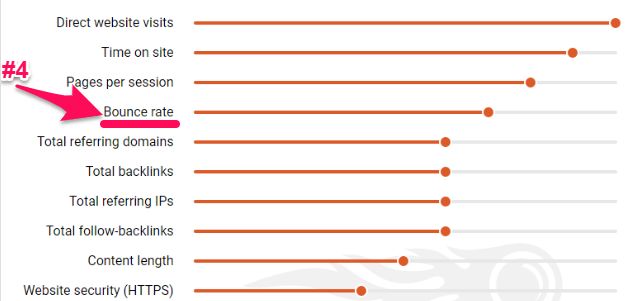
Bounce rate is google's 4th most important factor.

However, Google does not currently use bounce rate in its algorithm metrics, according to Google’s Gary Illyes.

Google’s algorithm may not directly take bounce rate into account, but it does indicate whether the user found your information helpful.

If a user clicks on your page and leaves without any interaction, that could signal to Google that your site isn’t what they’re looking for.

It looks like your result doesn’t match the searcher’s intent well. As a result, Google thinks, “Maybe this page shouldn’t be so high in the results.”

Can you see how these connect?

Understanding bounce rates can tell you if your marketing strategy is effective and if your visitors are engaging with your content.

The key is understanding your “target” and breaking down your bounce rate in a way that provides meaning.

What is a Good Bounce Rate?

Many different variables determine what a “good” bounce rate is.

Things like your business type, industry, country, and the types of devices your visitors are using all influence what a good average bounce rate would be for your site.

For instance, the average bounce rate across industries is around 47 percent. However, bounce rate varies by device, with mobile having an average bounce rate of 51 percent.

If you’re still unsure about the bounce rate you should target, Google Analytics can help you figure it out.

Google Analytics provides a quick visualization of the average bounce rate for what it believes is your industry. It does this by benchmarking.

First, you need to set up benchmarking in Google Analytics.

Under the admin section, click to view the property you want to see the bounce rate for. Then Open reports and select Audience > Benchmarking.
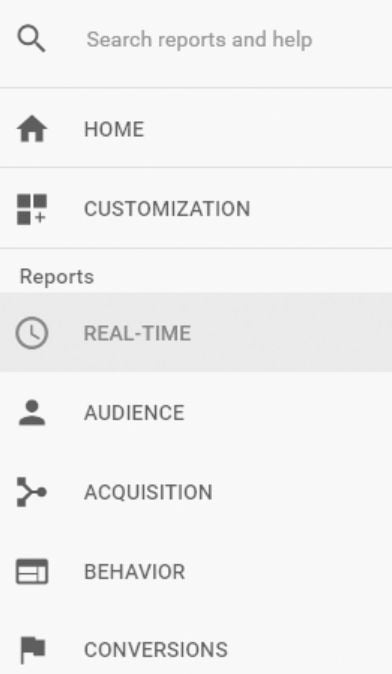
The sidebar of google analytics with the real time button highlighted

Now you can compare industry averages.

Just navigate to your behavior reports. Click on “Site Content” and then “Landing Pages.”

You’ll immediately see the average, site-wide bounce rate.
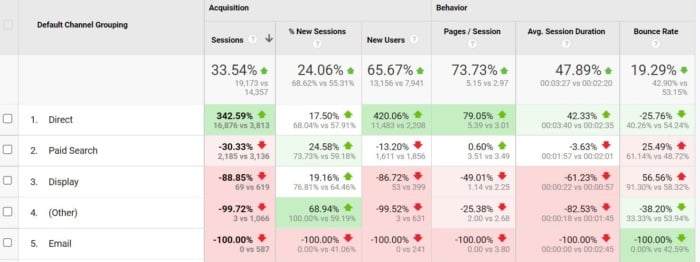
Statistics from google analytics

Of course, a site-wide average can be too broad to be a valuable benchmark.

You can drill down further to view bounce rate by channels, location, or devices.
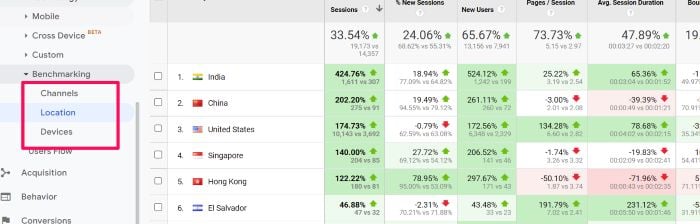
Statistics from google analytics

For example, you can now compare the industry average for your blog or product pages.

In the “Audience” section of Google Analytics, go under “Behavior” then “Benchmarking.” Then, select “Channels.”

Now you can choose your vertical and compare whichever period you want to review.

This should give you a better idea of your website’s bounce rate performance compared to the average by channel.

Ultimately, a “good” bounce rate will be different for every site. It may even be different for every page on your site.

I suggest you focus on your bounce rate trends over time and how you can improve the highest ones to boost conversions.

The focus should be on using this metric to find weaknesses in your site. Don’t worry about hitting a magic number.

Now, let’s look at how you can improve your bounce rates.

How to Analyze Bounce Rates

Your site-wide bounce rate is too broad to be anything but a vanity metric.

To really understand your bounce rate, you need to narrow it down and group it by different variables.

You won’t be able to start lowering your bounce rate until you really understand what’s causing it to be high.

You can modify the bounce rate metric you see in Google Analytics in a couple of ways.

As I already mentioned above, the first way is by segmenting your bounce rate.

We’ll look at nine segment options to help you assess and improve your bounce rate.

Segment Bounce Rate by Age

There are plenty of different demographics that Google Analytics tracks, which allows you to better segment and analyze your site traffic.

One of these is the age range of your visitors.

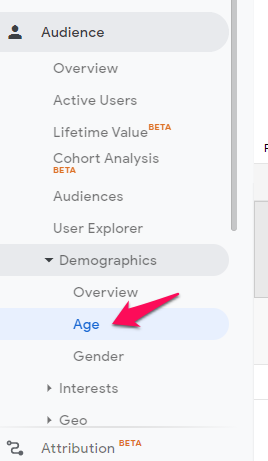
To look at bounce rate by age range, look under “Audience” and then “Demographics” on the left-hand sidebar. Then, click the “Age” option.

.bounce rate by age google analtyics

The resulting report should look something like this.
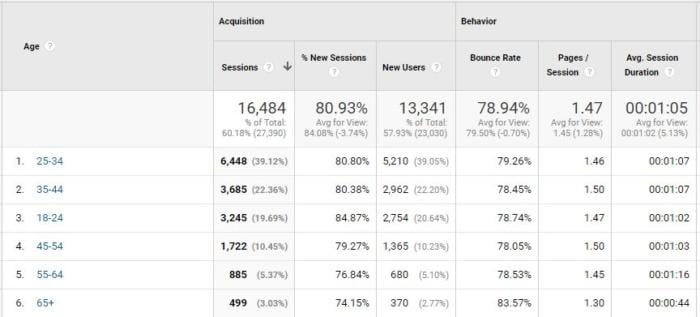
Statistics from google analytics.

Now you can easily see if your bounce rate is higher within a certain age range.

You can see in the example above that seniors (65+) have a much higher bounce rate than the rest of this site’s visitors.

If seniors are part of your ideal target market, make sure that you structure your web pages properly for marketing to them.

For example, avoid using jargon, trendy language, and slang.

Segment Bounce Rate by Gender

The “Gender” option is just below “Age” on that left-hand menu.
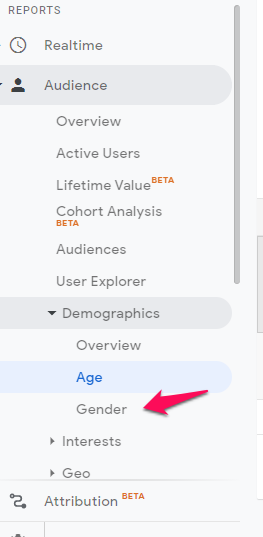
The sidebar from Google Analytics.

This report tells you your bounce rate for males and females.
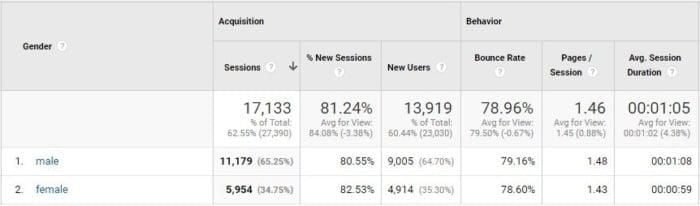
Statistics from google analytics broken into male and female.

You can now easily see if your site retains one gender over the other better.

If you have a higher website bounce rate with one gender, ensure you’re not accidentally creating the perception that you’re only targeting the other sex.

Segment Bounce Rate by Affinity

The next option in the “Audience” section is under “Interests” and then “Affinity Categories.”
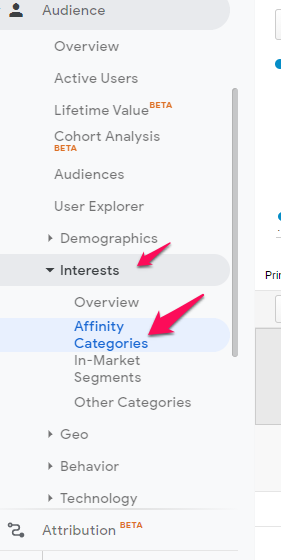
The sidebar from Google Analytics with the affinity categories button highlighted.

This group’s bounce rate is based on visitor interests.
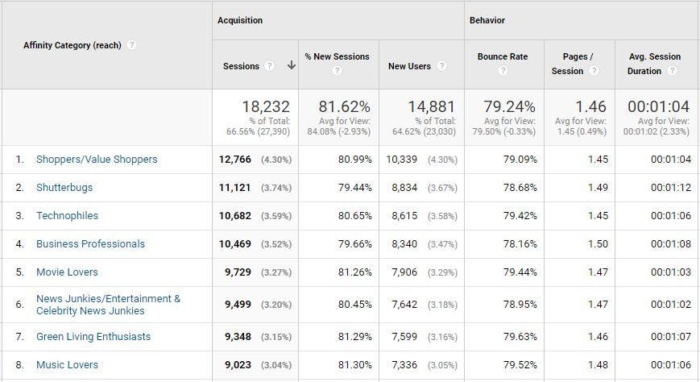
Statistics from google analytics broken into affinity categories.

Check out which affinity categories have the highest bounce rates to see if you’re losing out on key marketing groups.

You can see in the example above that this site engages best with business professionals and shutterbugs.

Engagement with music lovers, movie lovers, and green living enthusiasts is the poorest.

This knowledge can help you target those groups with your imagery and content.

Segment Bounce Rate by Location

Stay in “Audience,” and move to “Interests,” to find the “Geo” section. Within that, you can click on “Location” for another segment report.
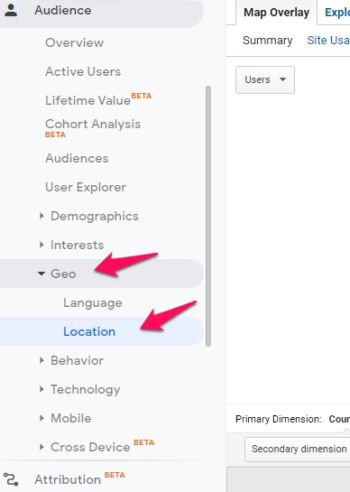
The sidebar of Google Analytics with the location button highlighted.

First, you’ll see a color-coded map showing where most of your visitors come from.

Below that, you’ll see the table version breaking down your visitors by geographic region.
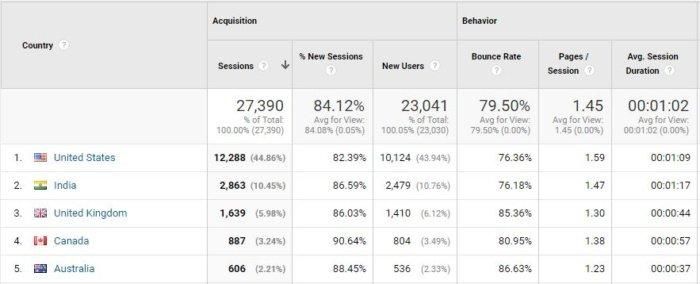
Statistics from google analytics broken into locations.

This gives you your bounce rate by country.

The example above shows Australia and the UK have much higher bounce rates than the other countries.

You can drill further into it to see if certain provinces are engaging worse than others. Then, you can adapt your marketing strategy to target areas where you want to see improvement.

Segment Bounce Rate for New Visitors

A good segment to check out is the “New Vs. Returning” breakdown. It’s also in the “Audience” section under “Behavior.”
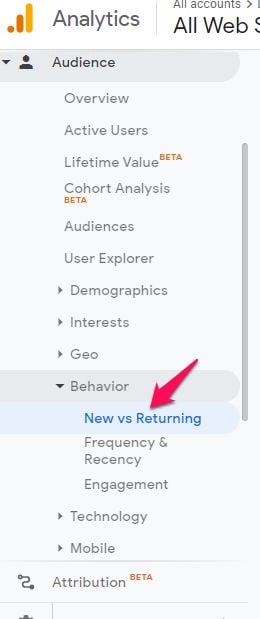
The sidebar from Google analytics with the new vs returning button highlighted.

Now you can see if your new visitors are bouncing more than returning visitors.
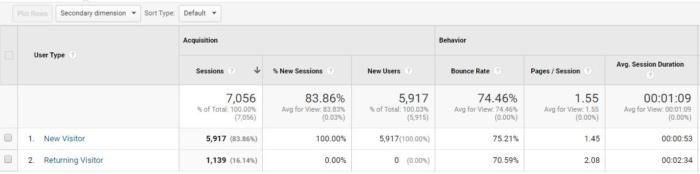
Statistics from google analytics broken into user type.

I would expect your new visitors to have a higher rate.

You can view the acquisition source as a secondary dimension to get more value out of this segment.

Just click on the “Secondary Dimension” drop-down list at the top of the table and select “Source” from the list that appears below.

We’ll talk more about acquisition below.

Segment Bounce Rate by Browser

The browser breakdown report is a good way to see if technical issues cause your visitors to bounce.

In the “Audience” section under “Technology,” select “Browser & OS.”
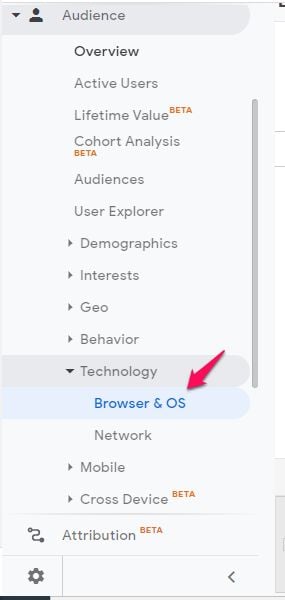
The sidebar of Google Analytics with the browser and OS button highlighted.

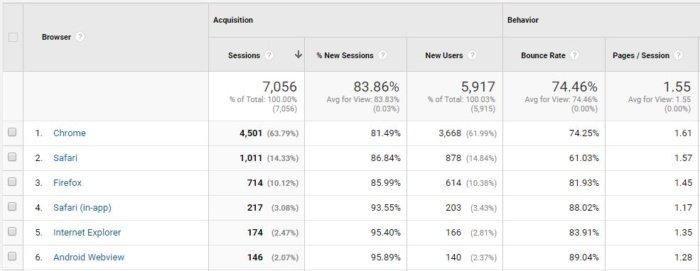
The report should look like this:

Statistics from google analytics broken into browser.

If one browser has a higher website bounce rate, it might indicate that you haven’t configured your site well for that browser.

You also need to consider versions of browsers.

If one has a noticeably higher bounce rate, your site might have bugs or UX issues with that browser.

Even if it’s an outdated browser, you will want to fix the issue if the browser is still bringing you traffic.

Segment Bounce Rate by Device

Underneath the “Technology” section, (still under Audience), you will see the “Mobile” section. Select “Overview” to see your bounce rate across devices.
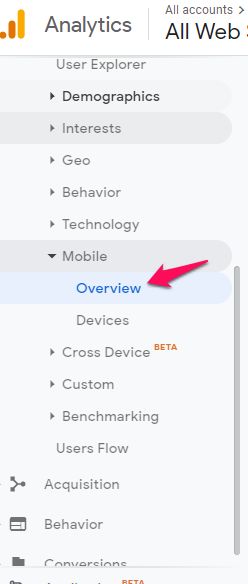
The sidebar from Google Analytics with the overview button highlighted.

This will give you a bounce rate comparison between desktop, mobile, and tablet.
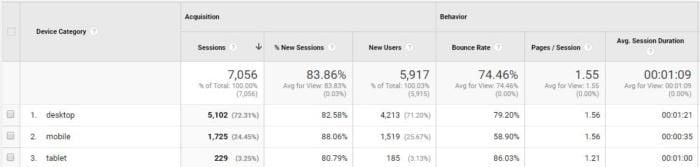
Statistics from google analytics broken into device category.

If you find your bounce rate is significantly higher on mobile or tablet, it may indicate that you haven’t properly optimized your site for those devices.

You can also view the “Devices” report. This further breaks it down by mobile brand and operating system.
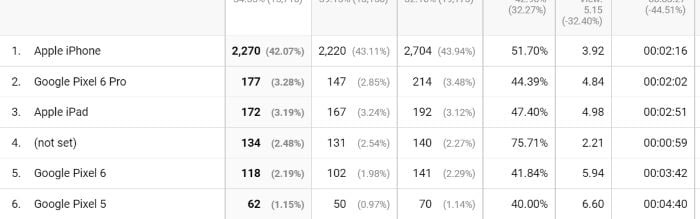
Statistics from google analytics broken into mobile type.

For example, if you find Apple users are bouncing at a higher rate than Android users, you might have some design issues.

Segment Bounce Rate by Acquisition

Now, let’s look at segmentation by acquisition rather than by audience.

Go to “Acquisition,” then “All Traffic,” and then “Source/Medium” in the left-hand menu.
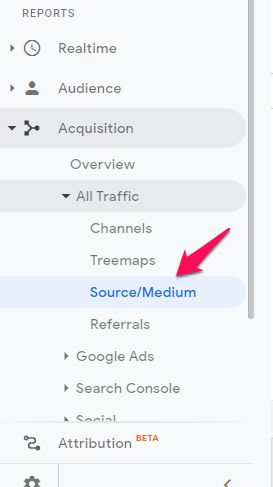
The sidebar of Google Analytics with the source/medium button highlighted.

The table at the bottom of your screen should look like this.
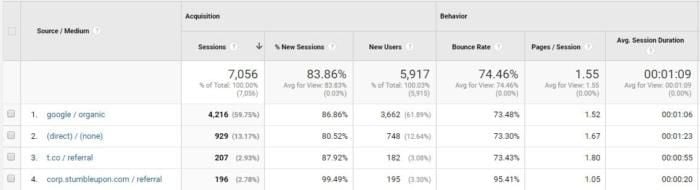
Statistics from google analytics broken into source category.

It will show you a breakdown of where your traffic is coming from and the associated bounce rates.

Take a look at the sources with the highest bounce rates to see if there’s a trend.

Here’s an example where you can see paid advertising campaigns have a much higher bounce rate:
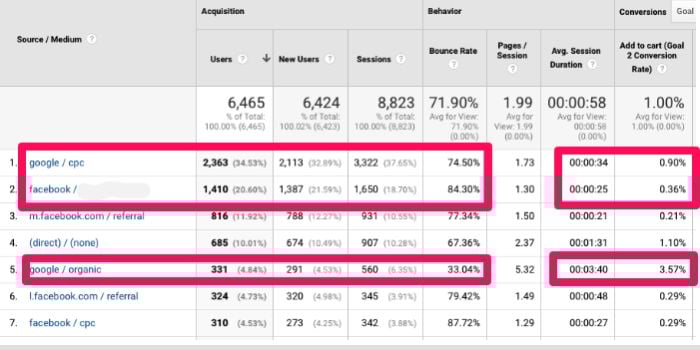
Statistics from google analytics broken into source categories.

Either your advertising targeting is too broad, or your landing pages are not lining up very well with your ads, resulting in a higher bounce rate.

How To Create Adjusted Bounce Rates in Google Analytics

You can adjust what Google Analytics considers an interaction, which directly impacts your bounce rate.

For example, you might feel that a visitor has interacted on your site if they watched a video.

In Google Analytics, you have the option to set an event like playing a video, clicking a button, or completing a download as an interaction.

Then, users who complete these “events” will no longer count toward your bounce rate.

However, you need to be careful with this. Make sure that automated events don’t skew your results.

If you’ve set up your videos to play automatically, you don’t want to count video views as interactions.

The simple way to modify how Google records interactions is by sending events into your Google Analytics that tell you when a user spends a certain amount of time on a page, scrolls through a certain percentage of a page or sees a specific element on the page.

You can send events from Google Tag Manager:

2. Adjust Your Bounce Rate Through the Timer Function

You can also decide that Google should consider a visit to have interacted on a page if they spend a minimum amount of time on it.

Create a new tag and give it a name, such as “UA — Adjusted Bounce Rate — Timer.”
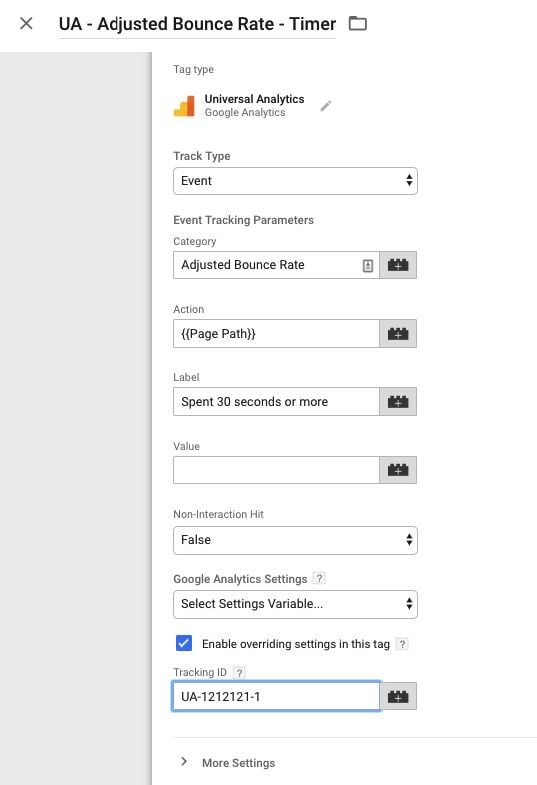
The timer function page of Google Analytics.

You can choose the length of time that you want to start with. I suggest starting with 30 seconds.

To do this, add a new trigger and name it “Timer — 30 seconds”.
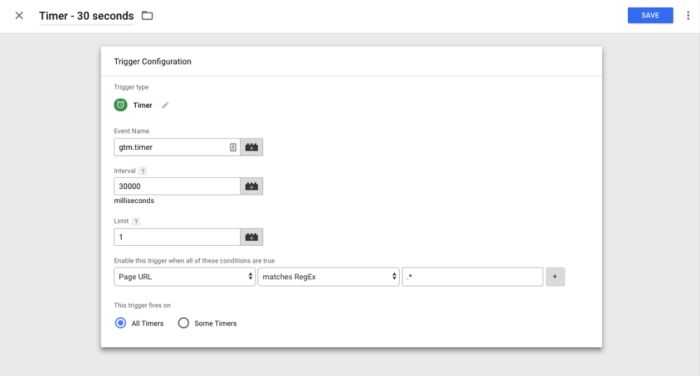
Setting a custom timer through Google Analytics.

The interval is in milliseconds. So, for 30 seconds, you need to enter “30000.”

Select a limit of one. Then, in the conditions section, set it for “Page URL matches RegEx*.”

This will make it so that Google Analytics includes all of your pages in the tracking.

Make sure you save, preview, and debug before publishing.

How to Decrease Your Bounce Rate

The main cause of a high bounce rate is users don’t find what they need. Here are several ways to improve your site and decrease website bounce rates.

Review Top Exit Pages

Exit pages are the pages people visit right before they leave your site.
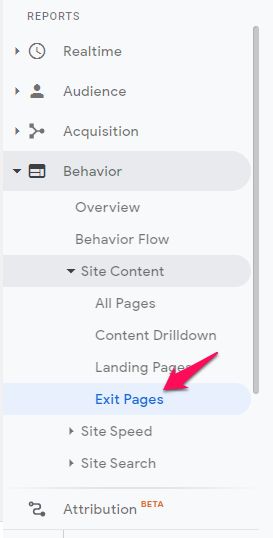
The sidebar of Google Analytics with the exit pages button highlighted.

This will show you who’s landing directly on that page and bouncing versus who’s arriving there from an internal link and exiting.

It can help you narrow down where you should spend your time testing and improving your site.

View Page Timings

Your pages may have high abandonment because they’re too slow.

You can check this with the Page Timings report.

In the “Behavior” section of the left-hand menu, click “Site Speed” and then “Page Timings.”
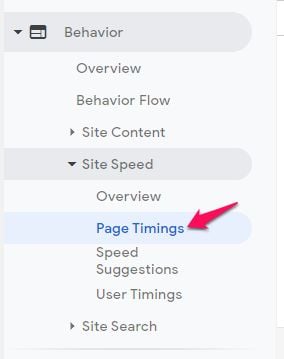
The sidebar of Google Analytics with the page timings button highlighted.

The report will tell you how fast each page on your site is loading.
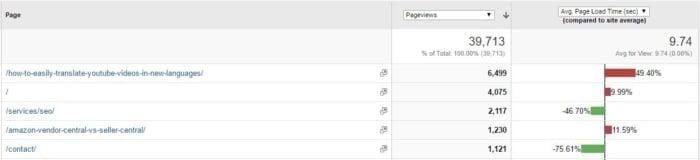
Statistics from google analytics broken into exit page categories.

You can sort by number of page views and average page speed. That way, you can improve your pages with the highest traffic yet slowest load times first.

It also shows you your overall site average speed.
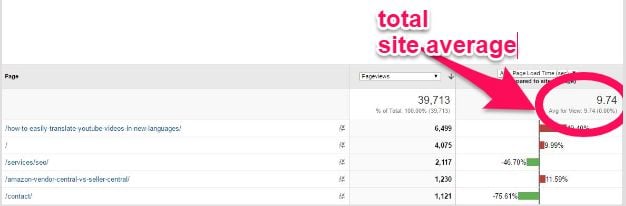
Statistics from google analytics with the total site average of exit pages highlighted.

Since Google’s Speed Update, site speed is becoming increasingly important—but it can also have a massive impact on bounce rate.

For example, the average page speed above means that our bounce rate is 123 percent higher than it could be.
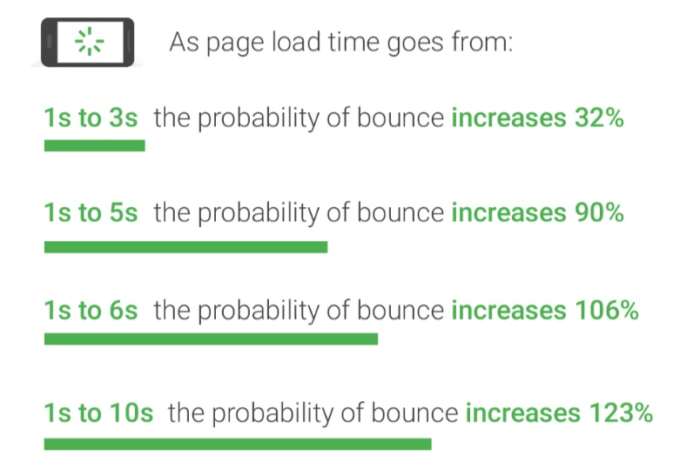
page load time impact on bounce rate

You can check out the other Site Speed reports for further analysis and options for improving your site speed.
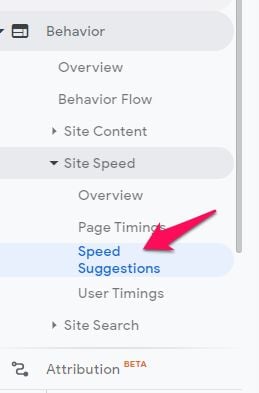
The sidebar of Google Analytics with the speed button highlighted.

The Speed Suggestions report will indicate potential issues and give you useful advice on resolving them, such as deleting unused Java or using smaller image sizes.

You can also use Google’s PageSpeed Insights for more strategies for improving site speed.

Utilize A/B Testing

These reports will help you pinpoint specific areas you need to target for improvement.

However, knowing which changes will improve your bounce rate the most can be hard.

For instance, you may have identified a weak landing page. But what do you need to do to improve it?

Do you need to make it longer? Do you need a different call to action? What will increase your conversion rate?

A/B testing is a great way to test your improvement strategies.

It allows you to test different call-to-action wording, landing page designs, and target audiences.

A/B testing makes it easy to see what’s working and what isn’t since it allows you to show one version of your website to half of your visitors and another version to the other half.

You can also use a significance calculator to better understand your A/B test results.
A/B testing significance calculator.

Make Your Pages Easy to Read

It’s easy to forget such a simple aspect of your pages, but readability is important.

Many free tools allow you to check your content’s readability and your website, like the Yoast plugin for WordPress or WebFX’s free readability tool.

Start by making sure the headline is big and bold. After that, be sure to use bullet points and subheadings to make the article easier to read.

Here are a few other ways to make your content easier to read:

  • Add subheadings, so content is easier to scan when reading.
  • Add bullet point lists (like this one) to make important information easier to find.
  • Include images, infographics, and charts to share important information.
  • Bold keywords a few times (don’t overdo this.)
  • Ask questions in your content, to give readers an invitation to participate.
  • Include an actionable conclusion that tells readers what to do next.

Also, be mindful of your font size and type, your sentence and paragraph length, and the amount of white space on the page.

Consider other elements on your page that might be distracting, like your color choices and ad placements.

Include Clear CTAs and Consider Their Placements

A great way to get people to engage and convert is by using compelling calls-to-action.

A call-to-action should compel someone to do something, such as sign up for a newsletter or purchase a product.

There are many ways to improve your call-to-action buttons. Consider your copy, color, button size, and page placement.
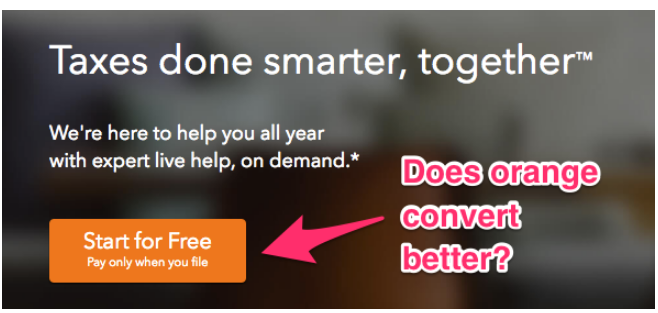
Example of a CTA.

Apple suggests ensuring all CTA buttons are at least 44 pixels tall.
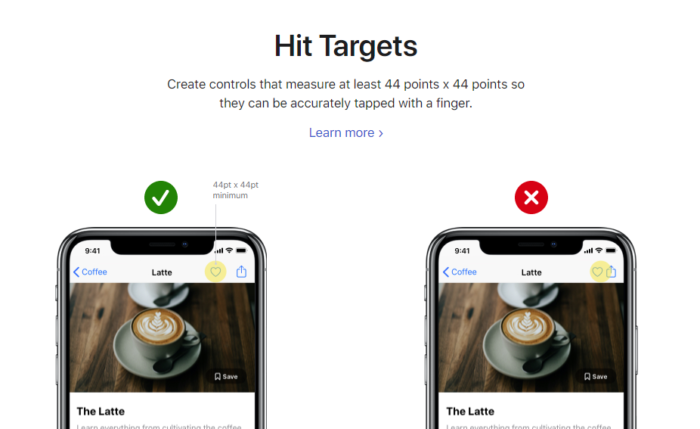
Apple's suggestion for CTA sizes.

Use Videos and Images to Engage Your Audience

Humans are visual creatures.

We love imagery. We also retain information better from images.

If you hear something or read something, the chances are good that you’ll only remember 10 percent of it. However, if you see a picture, you’re likely to remember 80 percent of the content.

Adding images and videos is a great way to engage your audience with your content.

Short, catchy videos are increasing in popularity and can boost engagement.
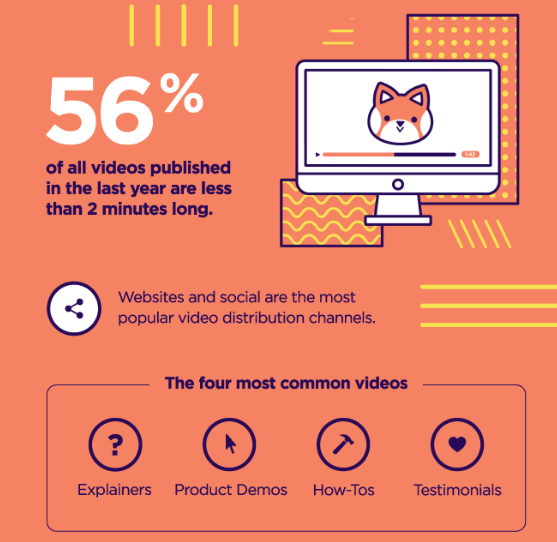
Use videos to increase engagement.

Infographics are also effective at drawing your visitors in.

In fact, over 41 percent of marketers say infographics were their most engaging form of visual content.

If you find that your audience isn’t engaging with a certain page, you may simply need to add more images, videos, and infographics.

Offer Live Chat Support

Live chat is the fastest method for offering customer service support.

If people come to your page and don’t immediately find exactly what they want, live chat can help engage them before they give up and try the next site.

There are lots of platforms out there today that can help you set up live chat services, such as Intercom.
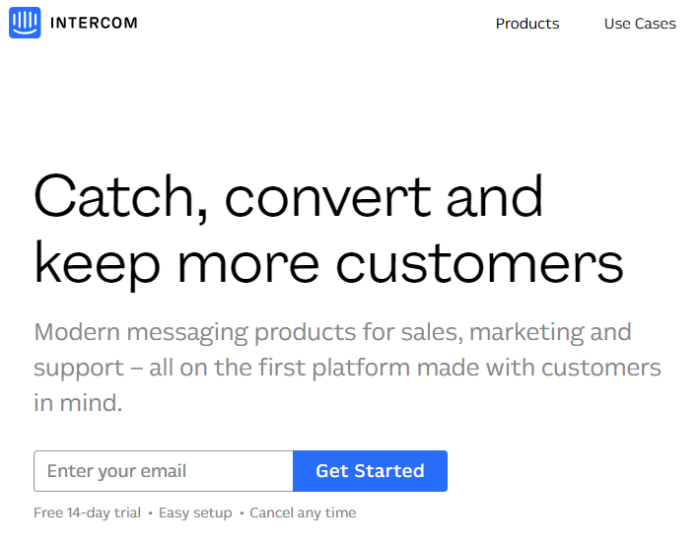
improve bounce rate with live chat support

Live chat is one of the best tools you can implement on your website this year to decrease bounce and boost conversions.

Target Keywords With High-Value Traffic

Just writing content isn’t going to drive your conversions up or improve bounce rate; it’s just going to attract random traffic that won’t convert.

When it comes to bounce rate, keywords are your best friend. The simplest way to improve bounce rate is to target high-traffic, high-value keywords.

Ideally, you’ll want to target terms with high traffic and low competition—but that isn’t always possible. If you can’t rank for those terms, look for traffic that shows buyer intent.

These keywords will put you in front of those high-value customers.

Attract the Right Visitors

More content isn’t always better.

In many cases, a high bounce rate happens when you attract the wrong traffic from the start.

If your content strategy isn’t working, the issue might be your targeting, not just your content.

It’s essential to create powerful content that reaches your audience, including a content strategy that considers each stage of the buying cycle.

Many content marketers mistakenly attribute a high bounce rate to poor quality content. But, the idea of “quality” is relative. Your definition of “quality” might not be the same as mine.

For example, you may see that higher bounce, but it’s attributed to the wrong content.

Let’s talk about lengthy articles (usually 2000+ words). In the digital marketing world, these are considered high quality. Why? Generally, they address every question or concern of the target audience.

On the other hand, this might not be true for industries like health, entertainment, and finance, where shorter articles tend to perform better.

Keep this in mind when creating content or greater campaigns.

It’s a chain reaction. If you create the right content and have proper channels for its distribution, to distribute it, you’ll put it in front of an audience that is interested in what it offers. The end result? You’ll see a better bounce rate.

Write Better Meta Descriptions

Some companies don’t take the time to optimize meta descriptions for their search users. This leads to a declining click-through rate over time.

It may not be important in their eyes, but it should be.

Meta descriptions are short descriptions that show up in the search results page and tell users what to expect when they click on a link.
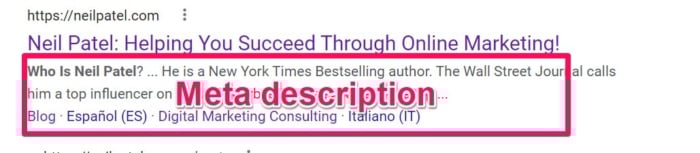
Example of a meta description of a google results page.

Aim to keep your meta between 150 and 160 characters (including spaces) in length. Longer metas will end in an (….) and can increase bounce rate because readers feel the content doesn’t match what they were looking for.

Before creating an attractive meta description, you’ve got to understand search results in and the description’s specific role.

So, how do you write an attractive meta description?

Let’s start with these tips:

  • Include the target keyword for the page. This shows users the page covers the topic they care about and entices them to click.
  • Use power words like fast, extra, value, and now to encourage clicks and conversions.
  • Include a CTA: Tell users what to do or what they will learn.

The Future of Bounce Rates

This post covered bounce rates as they appear in Universal Analytics, even though UA will be sunset next year.

That’s because the vast majority of my clients are still in the process of switching over to GA4.

It’s also worth noting that in GA4, bounce rate is considered the inverse of engagement. You don’t really need to understand how it works right now (especially if you’re still using the old version of Google Analytics); just understand that how it’s calculated will change.

Don’t worry; I’ll be here to update you with new strategies when the switch occurs!

FAQs

What tools can I use to measure bounce rate?

The most popular tool to measure bounce rate is Google Analytics. 

What is bounce rate?

Bounce rate is the percentage of users to a site who leave (or “bounce”) after visiting just one page.

What is a good bounce rate?

A bounce rate of about 25 to 40 percent is considered excellent.

How do I improve bounce rate?

You can improve bounce rate by creating engaging content types, adding internal links, targeting the right keywords, and creating a site navigation that’s easy to use.

Conclusion

Analyzing and improving your bounce rate can be intimidating. But improving your bounce rate means a more engaged audience and more conversions. If you follow the steps I’ve outlined in this post, your bounce rate will decrease in no time.

First, understand a “good” bounce rate and narrow down your analysis to pinpoint exactly what your bounce rate metrics are telling you.

Remember, site-wide bounce rate is simply a vanity metric. It’s too broad to provide actionable information.

Focus on the different segment reports like your top exit pages, page timings, and speed reports to understand what might be causing your bounce rates to be high.

To help people engage with your content, be sure to improve your site’s readability, add imagery, optimize your CTAs, and use live chat.

Do some A/B testing to see what works best for you and your audience.

Finally, monitor your reports with each change to see where and how you’re improving.

Remember: There is no magic number to hit. Aim to keep improving and offering your customers a better, more engaging experience.

What tools and tricks do you use to monitor and improve your bounce rate?

TaxProper (YC S19) Is Hiring

Article URL: https://taxproper.notion.site/TaxProper-is-Hiring-an-Operations-Analyst-781f129af8924b9096a28cb4960bea8d

Comments URL: https://news.ycombinator.com/item?id=32683137

Points: 1

# Comments: 0

Ribbon Health (YC S17) is hiring engineers to help patients find care

Article URL: https://www.ribbonhealth.com/blog/how-ribbons-value-driven-tech-philosophy-helps-patients-find-care/

Comments URL: https://news.ycombinator.com/item?id=32689563

Points: 1

# Comments: 0

Biden says Trump supporters not a threat to country after speech blasting 'MAGA Republicans'

President Biden on Friday said he does not consider any Donald Trump supporters to be a “threat” to the U.S., though he said the failure to condemn violence for political gains was “inappropriate.”

The president’s comments were in answer to a question from Fox News’ Peter Doocy who asked if Biden considered all Trump supporters to be a threat to the country less than a day after he blasted “MAGA Republicans” in a speech Thursday.

“You keep trying to make that case. I don’t consider any Trump supporters a threat to the country,” Biden said. “I do think anyone who calls for the use of violence, refuses to acknowledge an election…changing the way you count votes, that is a threat to democracy.”

Biden on Thursday said U.S. politics was in a battle between “equality and democracy,” claiming the GOP have assaulted those principles. 

“As I stand here tonight, equality and democracy are under assault. We do ourselves no favor to pretend otherwise,” he said. “There’s no question that the Republican Party today is dominated, driven and intimidated by Donald Trump and the MAGA Republicans. And that is a threat to this country.”

Check back on this developing story.

Biden touts 'rule of law' in polarizing speech, as border is overrun with illegal migrants

President Biden, in a divisive speech taking aim at “MAGA Republicans” Thursday night, touted the importance of the “rule of law” — even as hundreds of thousands of illegal migrants hit the border each month, many of whom are released into the country.

Biden used the address, outside Independence Hall in Philadelphia, to launch attacks against President Trump and his supporters while declaring that “equality and democracy are under assault.” He also said that American democracy only works if the “rule of law” is respected and slammed those who he claimed did not respect it.

“MAGA Republicans do not respect the Constitution,” Biden said, flanked by Marines and with a deep-red background behind him. “They do not believe in the rule of law. They do not recognize the will of the people.”

“This is a nation that believes in the rule of law,” he said at another point in the speech. “We do not repudiate it.”

BIDEN SAYS ‘MAGA REPUBLICANS’ THREATEN DEMOCRACY AS HE AND DEMS CRANK UP ANTI-TRUMP RHETORIC AHEAD OF MIDTERMS

“American democracy only works if we choose to respect the rule of law and the institutions that were set up in this chamber behind me, only if we respect our legitimate political differences,” 

However, Biden spoke as an overwhelming and ongoing migrant crisis continues to ravage the border since he took office. Currently, around 200,000 illegal migrants hit the border each month. There have been more than two million migrant encounters this fiscal year alone, after a record-setting 1.7 million last fiscal year.

While some are expelled under the Title 42 public health order — which the Biden administration is seeking to end, but has so far been blocked by a federal court — most migrants are released into the U.S. ahead of a court hearing that can be more than a year away. Asylum hearings can take five to eight years to complete, and the vast majority are ultimately denied.

The Biden administration has stopped border wall construction, ended asylum agreements that would see illegal immigrants sent to closer Central American countries to claim asylum, and stopped the Migrant Protection Protocols — which kept migrants in Mexico for their asylum process.

MAYORKAS CLAIMS SOUTHERN BORDER ‘IS SECURE’ AS HISTORIC MIGRANT CRISIS RAGES

Meanwhile, the administration has been narrowing Immigration and Customs Enforcement priorities to just recent border crossers, aggravated felons and national security threats — meaning the vast majority of those in the country illegally are not targeted for arrest or deportation. As a result, arrests and deportations have plummeted since Biden took office. A court order recently ordered the administration to halt the narrowed priorities.

Critics have accused the administration of not enforcing immigration law, including laws that require that illegal immigrants be detained on entry to the U.S. The Biden administration has claimed its mass-release policies are in line with U.S. laws, including allowing those who turn up at the border to claim asylum — even those who have passed through multiple countries, or have even flown to the continent from Africa and the Middle East. It has also claimed the border is “secure.”

The Federation for American Immigration Reform (FAIR), which calls for lower levels of immigration, tore into Biden for his touting of the rule of law on Thursday evening.

“If ever there was an administration that does not respect the rule of law, it is this one,” FAIR President Dan Stein said in a statement. “There is no more glaring example of lawlessness than the Biden administration’s gutting of immigration laws and border enforcement. This administration is not just refusing to enforce nearly every immigration and border enforcement law on the books, the president’s Secretary of Homeland Security, Alejandro Mayorkas, in a series of policy memos, has put it in writing. Moreover, the Biden administration is defying a federal court order to resume immigration enforcement.”

BORDER PATROL CHIEF SAYS BORDER CRISIS A RESULT OF BIDEN’S ‘NO CONSEQUENCES’ POLICY FOR ILLEGAL MIGRANTS

Stein accused the administration of “openly” refusing to remove illegal immigrants unless they are violent felons or terrorists.

“Time and again, when immigration laws are at odds with their own political objectives, our laws get chucked in the trash can,” he said. “That is the hallmark of an authoritarian dictatorship, not a constitutional republic.”

Meanwhile, former Trump-era acting Director of National Intelligence Director Richard Grenell contrasted Biden’s statements with support of jurisdictions which refuse to cooperate with federal immigration enforcement.

“Joe Biden talks about the rule of law but supports Sanctuary Cities,” he said.

Meanwhile, Florida Attorney General Ashley Moody, whose office this week revealed that the head of Border Patrol had testified that encounters increase when there are “no consequences” for illegal entry, also accused the Biden administration of flouting the law on the border.

That testimony came as part of a lawsuit that charges that the agencies under Biden’s direction are failing to follow established federal law, specifically the Immigration and Nationality Act, that requires officials to detain illegal aliens at the border until they are sent back to their country of citizenship.

“Not only are they completely ignoring public safety immigration laws to the detriment to the security of our nation, they are also building new programs that are unlawful to bring more people over here that are illegal,” she said on Fox Business. “This administration is absolutely no question sacrificing the safety of our nation for politics.”

Fox News’ Kelly Laco contributed to this report.

New comment by antoviaque in "Ask HN: Who is hiring? (September 2022)"

Open edX / OpenCraft | Full-time | TRUE REMOTE (async/worldwide) | Senior Open Source Developer on Open edX – React, Python/Django, AWS/Kubernetes

Do you care about contributing to open-source, and appreciate a good challenge? We do too! 🙂

Open-source

We are a team of veteran open-source developers, working on educational and community-based projects in an open-first environment – and we are looking for new members. By joining us, you will work full-time on open-source, pushing your changes to free software projects upstream through pull requests, contributing features, documentation, or help on public forums.

We care deeply about contributing our work upstream. You will see the results of your work reused and recognized across the educational community, increasing access to quality education for everyone, everywhere.

Remote-first

Unlike companies who reluctantly started to accept remote workers recently, we have embraced it from day 1. For the past 7 years, we have based and refined our way of working around remote-friendly workflows, from the ground up. No day-long video meetings, mandatory work hours, or risk of being forced back into an office one day — as long as you have a good internet connection, it’s none of our business when or where you work from. 🙂

We are all working remotely, from all continents (except Antarctica, at least so far – applicants welcome!). We use remote-friendly and timezone-agnostic workflows based on asynchronous principles and good documentation practices.

Online education

We are one of the main contributors to the Open edX project, the main open-source MOOC platform created by MIT, Harvard and many other top universities. It powers sites like edX.org, the MIT Open Learning Library, and the national online learning platform for France. We provide development and hosting for institutions like Harvard Medical School, Harvard LabXchange, Cloudera, Autodesk, and several governments. We are not affiliated with edX.org, but we contribute and work with them on various projects.

Our handbook, like much of our work, is publicly viewable and you can find it at https://handbook.opencraft.com/.

Apply for this Position

See the full details and apply at https://opencraft.com/jobs/open-source-developer/

Job description: https://docs.google.com/document/d/1VgA7geR5oAsHzTRnldm6KU7L…

New comment by Secrethus in "Ask HN: Freelancer? Seeking freelancer? (September 2022)"

SEEKING WORK | Remote or onsite (Open to the possibility) | Machine Learning Dev.

Hey! I am Huseyin. I have experience with Dataset collection and Model development. Also, I helped companies with DevOps and MLOps.
I worked in startup environments. I am looking for a job in a startup with 30-100 employees.

Tech Stack: AWS, Azure, Tensorflow, Pytorch, Python, Scraping, SQL.

Feel free to email me to discuss how we can solve problems together.
huseyin@evecen.com
evecen.com

New comment by fullstackdev02 in "Ask HN: Freelancer? Seeking freelancer? (September 2022)"

SEEKING WORK | Anywhere | Full-Stack Development, Backend Development, Application Security, Penetration Testing Location: Europe, USA, Australia, Singapore, Switzerland, Israel, Norway, Denmark, UK, Germany, Netherlands, Sweden, Finland, France, Canada, New Zealand Remote: Yes Willing to relocate: Possibly Technologies: MERN, NodeJS, React, ReactJS, Express, Redux, EJS, MongoDB, Mongoose, NextJS, GatsbyJS, Contentful Headless CMD, Java, Python, Django, … Continue reading New comment by fullstackdev02 in "Ask HN: Freelancer? Seeking freelancer? (September 2022)"

Launch Your Startup: 7 Essential Steps, Tips, Strategies, & Ideas

Everyone has ideas. Some of them may be worth running with, while others are probably not so good.

However, even if your project looks awesome on paper, there’s a big difference between that and creating a successful startup company.

Do you have what it takes to be an entrepreneur?

If your answer is yes, then you need a detailed guide on how to start a startup.

For those of you who haven’t launched a business before, it can sound like an intimidating task.

Don’t get me wrong – I’m not saying that getting your startup off the ground is an easy mission.

It takes hard work, dedication, money, some sleepless nights, and, yes, some failures before you succeed.

Nearly 20 percent of businesses fail in the first year, and just because you make it beyond 12 months doesn’t mean your startup is going to continue to thrive.

According to government stats, 30.6 percent of businesses fail after their second year, 49.7 percent fail after five years, and 65.6 percent fail after their tenth year.

Once you get your company off the ground, it doesn’t get any easier: you need to work just as hard to keep it going each year.

With that said, it’s useful to have a guide and a set of instructions to follow to learn how to launch a startup.

When I write about launching a startup, I’m talking from personal experience. I’ve created several startup companies like Crazy Egg, Hello Bar, and NP Digital.

I’m happy to share my knowledge and experience to help make things a little easier and less stressful for you as you go through this process.

Realistically, it takes hundreds of stages to launch your company, but I’ve narrowed down the top 7 steps into a blueprint for you to follow if you want to learn how to start a startup and learn how to create and develop your own business.

In the following article, I outline and discuss each step in detail so you have a better understanding of what I’m talking about.

Let’s begin with the basics.

1. Create a Business Plan

Have you heard the saying ‘if you fail to plan, you plan to fail?’ That was the thinking of Founding Father Benjamin Franklin.

Well, research appears to back that up. Study after study shows that businesses with a plan are more likely to succeed. In addition, you can find many articles spelling out the importance of a business plan.

However, the Small Business Development Center at Duquesne University explains it most succinctly:

“A business plan is a very important and strategic tool for entrepreneurs. A good business plan not only helps entrepreneurs focus on the specific steps necessary for them to make business ideas succeed, but it also helps them to achieve short-term and long-term objectives.”

It’s pretty straightforward, really. Having an idea is one thing, but having a legitimate business plan is another story.

A proper business plan gives you a significant advantage, but what should you include in a business plan? It helps if you think of it as a written description of your company’s future. Basically, you outline what you want to do and how you plan to do it.

Typically, these plans outline the first three to five years of your business strategy and detail your business’s purpose and aims. Ideally, your document should outline your business goals, strategies, and your plans for achieving them.

Here are the key steps to writing a successful business plan:

  • Outline your business goals
  • Describe your target market
  • Explain your product or service
  • Detail your marketing and sales strategies
  • Write down your financial projections and detail the funding
  • Summarize your overall strategy

If you need some help with your plan, the Small Business Administration has an easy-to-follow guide, along with some templates.

2. Secure Appropriate Funding

Without adequate funding, your business won’t launch or stay afloat long-term. According to Statista, in 2021, there were nearly 840,000 businesses that had been in operation for less than a year. Many of these startups won’t survive because they underestimate the cost of doing business.

Perhaps you’re wondering what level of financing you need? When it comes to raising cash, there’s no magic number that applies to all businesses. The startup costs vary from industry to industry, so your company may require more or less funding depending on the situation.

Costs also vary depending on whether you’re a brick-and-mortar store, e-commerce enterprise, or service business. If you’re unsure how much you might need, try the SBA’S startup cost templates to get a better idea.

Once you’ve got a clearer picture of the costs, where do you get the funding? These days, most startups get their funding from:

  • Online startup loans, which you can apply for online and pay back over time, with interest.
  • SBA microloans, providing up to $50,000 in loans for start-up businesses. The main advantage is the lower interest rates.
  • Lines of credit, which is a type of loan available in both secured and unsecured formats.
  • Invoice factoring/financing, a process in which a business sells its invoices to a third party, at a discount.
  • Friends/family/personal loans, which are unsecured loans.
  • Business loans, which you pay back over an agreed period.
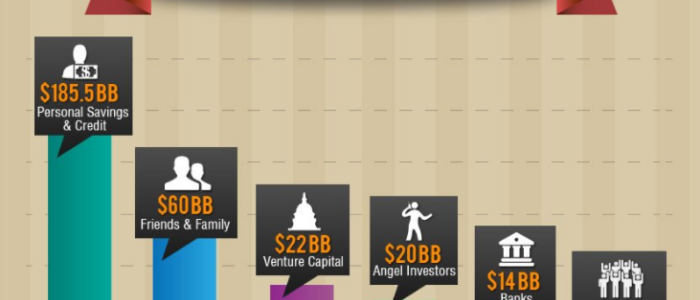
  • Angel investors, who have considerable wealth and give seed funding to start-up businesses.
  • Crowdfunding, where you raise money from a group of investors online.

Let’s circle back to our business plan for a minute.

All business plans contain a financial plan. This usually includes a:

  • Balance sheet, which displays your business’s assets, liabilities, and owner’s equity of the company.
  • Sales forecast, which predicts future sales.
  • Profit and loss statement, which details your earning and spending patterns. This figure helps calculate your net income.
  • Cash-flow statement, or financial statement detailing how much your business has spent and generated.

You use these financial statements to determine how much funding you need to launch successfully. Additionally, you may discover that the number is significantly higher than you originally anticipated.

For example, I’m sure you’ve heard someone say, “That would make a great app,” or “I should make an app for this.”

Do you know how much it costs to make an app? Depending on the complexity, you’re looking at anything between $40,000 – $300,000, and that’s just to make it.

It doesn’t include the cost of running it or customer acquisition costs.

This is the point I’m making: to secure the appropriate funding, you need to find out how much money you need.

To find this number, you must research and predict realistic financials in your business plan.

Let’s say you discover that your startup needs $100,000 to get off the ground.

What if you don’t have $100,000?

You’ve got some options, like bank loans and commercial lenders, and that’s the way many small businesses go. With this said, banks are less likely to give large amounts of money to new companies with no income or assets to default on, which may make it hard for your typical startup to get the funding they need.

Don’t worry, your dream isn’t dead yet. You can find investors. They could be:

  • Friends
  • Family
  • Angel investors
  • Venture capitalists
  • Crowdfunding

However, whichever method you use, proceed carefully because you don’t want to start giving away significant equity in your company before you launch.

Then, if you get lucky and find a potential investor, you need to know how to pitch your idea quickly and effectively. Here are some tips to help you do that:

  • Memorize your financial numbers; ensure you know them inside out.
  • Refer to your business plan and ensure your financial figures cover the costs.
  • Make sure your business plan is presentable so you can give potential investors a copy.
  • Practice and perfect your pitch.

One more thing: It’s imperative that your business plan has a proper executive summary to entice busy investors.

Once you secure the appropriate funding, you can proceed to the next step of how to start a startup business: finding the right people.

3. Surround Yourself With the Right People

No one makes it on their own. William Proctor might not have been a high-profile, successful businessman if he hadn’t met James Gamble.

Where would we go for advice if Larry Page hadn’t met Sergey Brin? Not Google, that’s for sure.

Then what if Ben Cohen never met Jerry Greenfield? We would’ve been denied one of the world’s most famous ice cream brands.

Even if you’ve already got a co-founder in place, you need some core staff.

Where do you start? According to Business News Daily, there are eight people your startup needs:

  1. CEO and COO. Between them, they develop a vision and put it into action.
  2. Product Manager, who is responsible for taking a product from its development stages and onto the market.
  3. Chief Technology Officer, who works with executive members to oversee the technical side of a business.
  4. Chief Marketing Officer, whose job involves creating a marketing strategy and executing it.
  5. Sales Manager, for managing customer relationships, selling products/service, and motivating the team.
  6. Chief Finance Officer, who manages the financial planning and decisions for a company.
  7. Business Development Officer. This is a varied role that involves drawing up a business plan, establishing funding, and building customer/relationship funding.
  8. Customer Service Officer, who assists customers with their questions, any complaints, and providing product information.

However, your business structure depends on the industry, so look at the above as definitive.

When you’re just starting up, hiring an entire team often isn’t realistic, and you find yourself wearing several business hats. That’s OK, to an extent. Just remember to play to your strengths and outsource if you can’t afford to recruit.

That said, there are some experts you should consider essential, including a:

  • Lawyer
  • Accountant
  • Financial advisor

Unless you’re an expert in law, finances, and accounting, these three people can help save your business some money in the long run.

They can explain the legal requirements and tax obligations based on how you structure your business. For example, it could be a:

  • Sole proprietorship
  • Partnership
  • Corporation
  • Limited liability company

While your lawyer, accountant, and financial advisors are not necessarily employees on your payroll, they are still important people to surround yourself with.

Finally, for this section, don’t forget the fundamentals for starting any company:

  • Register your business name.
  • Get a federal ID number from the IRS. The IRS lets you submit your business information online to get your employer identification number (EIN).
  • Get insured: Shop around and find an insurance agent who can get you plenty of coverage at an affordable rate.

Now that you’ve got staff, you need to start work on a website and find a place to base your business.

4. Find a Location and Build a Website

Now you’re ready for the next stage of your how-to start a startup plan: finding a physical location and setting up a website.

Whether it’s offices, retail space, or a manufacturing location, you need to buy or lease a property to operate your business.

Unless you’re working from a home office, your two main options are leasing or ownership. Leasing usually works as out more expensive long term; however, don’t just base your decision on costs. Leasing and ownership both have their pros and cons. Look at the whole picture before making a decision.

I appreciate that it may not be realistic for all entrepreneurs to tie up the majority of their capital in real estate.

Strategize for this in your business plan and try to secure enough funding so that you can afford to buy property. It’s worth the investment and can save you money in the long run.

Let’s move on to setting up a website.

Today, your company can’t survive without an online presence. Don’t wait until the day your business officially launches to get your website off the ground, either, and remember, it’s never too early to start promoting your business.

If customers are searching online for a service in your industry, you want them to know that you exist, even if you’re not quite open for business yet.

The beauty of an online presence is you can even start generating some income through your website before you find premises. If it’s applicable, start taking some pre-orders and scheduling appointments.

For those of you who aren’t convinced about the pre-orders business model, many startups are succeeding with it.

Here are some tips about how to launch and promote a successful website:

  • When designing a website, it is important to keep the user in mind. The layout of the website should be easy to navigate and use. The colors and fonts should be easy on the eyes.
  • Make your website visually appealing. Use eye-catching images and dynamic designs to make the website stand out from the competition.
  • Keep the content of the website fresh and up-to-date to keep users coming back to visit your site. Your website is an ideal place to keep your audience up-to-date with a glimpse inside your company, product launches, and, of course, the details of your business premises.
  • Another important thing to keep in mind is usability. Your site should be easy to use on all devices, from desktop computers to smartphones and tablets.

Finally, make sure that your website is fast.

I can’t stress this point enough.

I’ve got a video tutorial that explains how to speed up your website.

All of these items combined may sound tough, but it’s really not that difficult. Just focus on one task at a time, and you’ll get there.

Once your website is up and running, you need to expand your digital presence. To do this, use social media platforms like:

  • Facebook
  • Twitter
  • Instagram
  • TikTok
  • Linkedin
  • Snapchat

Your prospective customers are using these platforms, so you need to be on them, too. However, when choosing a platform, ensure you go where your core audience is. For instance, if you’re targeting a younger market, TikTok may be ideal.

5. Become a Marketing Expert

If you’re not a marketing expert, you need to become one.

You might have the best product or service in the world, but if nobody knows about it, then your startup can’t succeed.

To start spreading the word, you must learn how to use digital marketing techniques like:

  • Content marketing
  • Affiliate marketing
  • Email marketing
  • Search engine optimization (SEO)
  • Social media marketing (SMM)
  • Search engine marketing (SEM)
  • Pay-per-click advertising (PPC)

However, if you’re starting a small business in a local community, some of the traditional methods can still work well. Think:

  • Print advertising
  • Radio advertisements
  • Television
  • Billboards

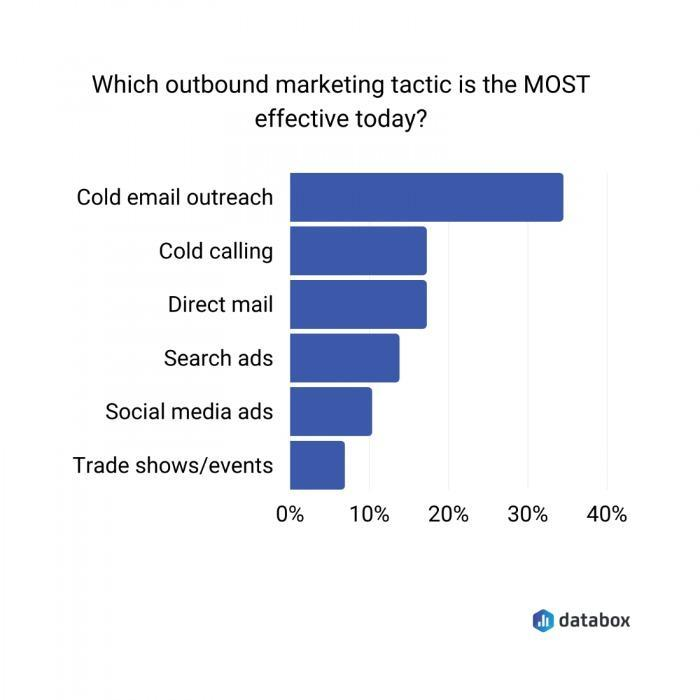
While some would argue that outbound marketing efforts are not as effective these days, research shows that methods like cold emailing and calling still work well.

Statistics about the most effective outbound marketing tactic.

For those of you who aren’t efficient marketers, there is no shame in hiring a marketing director or even a marketing team, depending on the size of your company.

Your marketing efforts will be one of the most important, if not the most important, components of launching your startup business. To improve your chances of success:

  • Allocate a marketing budget.
  • Determine how you’re going to distribute this money across different channels.
  • Have a plan and try to maximize your return on investment for each campaign.

Take these numbers into consideration before you spend your entire budget on something like banner ads.

The bottom line is this: Marketing needs to be a top priority for your startup company.

6. Build a Customer Base

If you’re following this plan in order, the good news is that you’re already on the right track to building a customer base.

Starting a website, growing your digital presence, and becoming an effective marketer are all steps in the right direction. However, now it’s time to put these efforts to the test. That means:

  • Opening your doors (or website) for business.
  • Getting a customer to make a purchase is the first step.
  • Retaining customers.

There are three keys to customer retention:

  1. Customer service
  2. Customer service
  3. Customer service

It’s no secret. The customer needs to be your main priority. They are the lifelines of your business, and they need to be treated accordingly.

Once you establish a steady customer base, you can use it to your advantage.

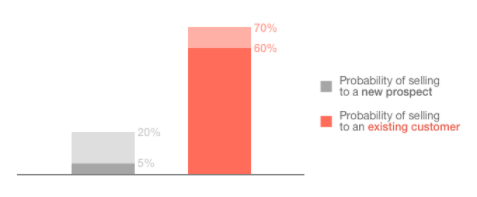
You’ll get more money from your existing customers than from new ones.

Chart explaining the difference between selling to an existing customer vs a new prospect.

It’s a more effective method than cross-selling.

Less than 0.5% of customers respond to cross-selling.

Over 4% of your customers will buy an upsell.

These strategies both double back to having effective marketing campaigns.

Overall, establishing, building, and maintaining a customer base will help you get your startup company off the ground.

7. Prepare for Anything

Expect the unexpected.

Launching your startup company won’t be easy, and you need to plan for some hurdles along the way.

Don’t let these speed bumps become roadblocks.

You can’t get discouraged when something goes wrong.

Preserve and push through it.

The difficulties that you face while launching your startup company help prepare you for the tough road ahead.

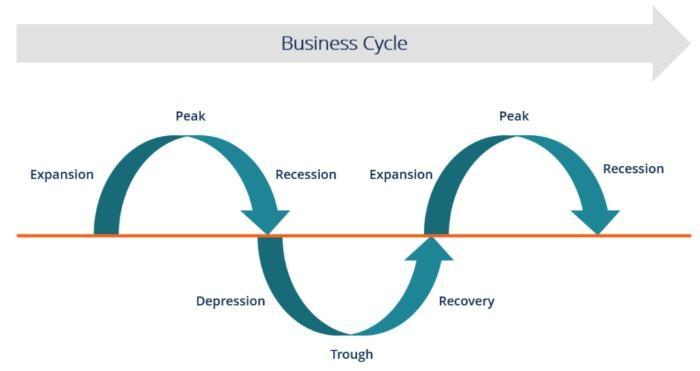
Even after your business is up and running, it won’t necessarily be smooth sailing for the entire lifecycle of your company.

A graph depicting the business cycle of a typical business.

As illustrated above, you face peaks and valleys while your company operates.

Mistakes and setbacks happen.

Some of these things will be out of your control, like a natural disaster or a crisis with the nation’s economy.

Employees will come and go.

You’ll face tough decisions and crossroads.

Sometimes, you’ll even make the wrong decision.

That’s OK.

Part of being an entrepreneur is learning from your mistakes.

It’s important to recognize when you’ve done something wrong, move forward, and try your best to make sure it doesn’t happen again.

Pay your bills.

Pay your taxes.

Operate within the confines of the law.

As long as you’re doing these things, you’ll be able to fight through any obstacle your startup company faces in the future.

FAQs

How Do I Start a Startup?

Check if your idea is viable. Do some research and ask around. Are people looking for a business/service like yours? Then ask yourself: How are other businesses in your sector performing? Have you spotted a genuine gap in the market? 
Then you’re ready to start drawing up a business plan.

Where Can I Acquire Startup Funding?

There are several sources, including personal financing, banks, crowdfunding, friends, family, angel investors, and venture capitalists.

Do I Need a Website to Launch My Startup?

In the vast majority of cases, yes. You also need a social media presence that is applicable to your audience. After all, social media is a free, efficient way to reach a huge volume of people that you couldn’t otherwise target.

How Can I Use Marketing to Launch My Startup?

It depends on your budget. Begin with strategies like social media, free press release distribution, and content marketing. As your business grows, you can allocate a budget for affiliates, email marketing, SEO, online ads, and influencer campaigns.

Conclusion

Let’s recap.

Launching a startup company is not easy.

First, you need to determine if your idea is worth turning into a business, then you must determine if you have what it takes to become an entrepreneur.

The percentage of entrepreneurs in the United States is growing strong, and each one of them is going to face challenges along the way.

With that said, having a proper blueprint to follow helps simplify the process. You can get learn the basics of how to start a startup by following the seven steps, and adapting them to suit your individual needs.

With that said, most successful businesses start with validating an idea, creating a comprehensive business plan, and raising adequate funding. Without proper financial planning, your startup doesn’t stand a chance.

Then, surround yourself with the right people and play to your strengths.

For instance, if you’re great at organizing and motivating, focus on that; If marketing just isn’t you, outsource it to a professional who excels in that area.

Don’t forget about lawyers, insurance agents, and accountants to keep your business in order, and make sure you have essentials like an online presence.

Launching your startup is an imperfect journey, and you must prepare for unforeseen circumstances. However, proper planning and execution help limit these hurdles and get your business off to a flying start.

How will you raise funding to get your startup company off the ground?

The post Launch Your Startup: 7 Essential Steps, Tips, Strategies, & Ideas appeared first on #1 SEO FOR SMALL BUSINESSES.

The post Launch Your Startup: 7 Essential Steps, Tips, Strategies, & Ideas appeared first on Buy It At A Bargain – Deals And Reviews.

Donald Trump's Vendetta Politics

The former President smears Elaine Chao because her family is ethnic Chinese.

The post Donald Trump's Vendetta Politics appeared first on #1 SEO FOR SMALL BUSINESSES.

The post Donald Trump's Vendetta Politics appeared first on Buy It At A Bargain – Deals And Reviews.