Wrights Express, or WEX, is a universal fleet fuel card provider associated with a number of stations across the U.S. They offer a number of fuel card rewards programs and benefits designed to cater to a business’s specific needs and gas station preference.
Historically, they have also been one of the only credit issuers that a company could get a business credit card from without a personal guarantee. Unfortunately, this is no longer the case.
WEX Now Requires a Personal Guarantee on Business Fleet Cards
As of Friday, May 13th, 2022, WEX now requires a personal guarantee on any business credit card they issue. This is a big change that is going to rock the fleet credit world. In fact, it may even be the biggest change with the most impact on business credit in the past 10 years.
What Does this Mean for Businesses?
It’s going to make it hard for a lot of businesses to get a credit card or account to manage company automobiles. Trucking company owners looking to add a business credit card to manage their fleet are going to be hit the hardest. They aren’t the only ones though. Any company that wants to use fleet credit is likely to struggle.
Why Will the WEX Personal Guarantee Requirement Cause Some Business Owners to Struggle?
Before the change, WEX was one of the few fuel card options for business owners that do not have good consumer credit. They could access a WEX fuel card on the merits of their business credit only. Then, they could take care of fleet related expenses using the business credit card regardless of consumer credit.
Approval Based Only On Business Credit History No Longer an Option
Now, this is no longer an option. With the added requirement of a personal guarantee, business owners with bad credit will have a harder time getting the fleet fuel cards that they need.
Why Did WEX Change Their Personal Guarantee Requirements for Business Credit Cards?
Most business credit cards already require a personal guarantee. There are a select few that do not, and with this change, the number is even fewer
The reasoning behind the WEX decision is that it helps prevent fraud. The addition of a consumer credit check and personal guarantee requirement is thought by WEX to be a way to help prevent fraud.
They see it as a layer of protection for both themselves and the small business owners they serve with business credit cards. Of course, in the end, this policy reduces risk for WEX and increases personal risk and personal liability for business owners. This is because by definition, a personal guarantee means if the business defaults, the business owner is responsible for the debt.
How Big Of An Impact Will This Change Have on the Ability to Get a Business Credit Card for Fuel?
Honestly, it’s big. Just to give you an idea, here is a list of brands affected in addition to WEX’s own brand.
WEX Associated Fuel Card Brands
7-Eleven
76®
Chevron and Texaco
Circle K
CITGO
DK
ExxonMobil
GetFleet
Gulf
Irving Commercial
Kum & Go
MAPCO
Marathon
Maverik
Meijer
Murphy USA
Phillips 66®
QuikTrip
RaceTrac
Royal Farms
Sheetz
Shell
Sinclair
Speedway
Stripes
Sunoco
Tesoro
Thorntons
Valero
Wawa
As you can see from this list, the ripples caused by this monumental change are far reaching. Add in the fact that often this type of credit card isn’t just for fuel purchases, and the impact is even larger. Sometimes they aren’t even limited to purchases at gas stations. In addition to fuel purchases, many fuel cards can be used to pay for fleet maintenance, car washes, and even snacks at gas stations.
What Can You Do?
The big question, if you fall into the rather large category of those needing to access business credit fleet fuel cards that do not have the best consumer credit, is what now? Well, now is the time to double down on both business credit and consumer credit.
Build Credit for Your Business
Building business credit is more important than ever. That’s because if you do have great company credit, your consumer credit may not weigh as heavily into the approval decision.
Business Credit Can Help With More Than Approval
Beyond that, it can affect the terms, limits, and rates you receive. A consumer credit score that is just okay along with a great company credit score is going to do a lot better than two just okay scores. This is true with most any credit card for businesses, not just fleet fuel cards.
Business Credit Still Matters
Whatever you do, do not let business credit go by the wayside simply because consumer credit is now going to come into play when you apply for a WEX fuel card.
The stronger it is, the more likely you are to get approval for WEX fleet fuel cards, and any other credit card for your business for that matter, even if your personal credit is lower than those who make approval decisions would like.
Still, it may be harder to get fleet fuel cards initially, before you have established business credit, if your consumer credit does not meet the WEX requirements for a personal guarantee.
WEX is Still Useful for Building Credit For Your Business
It’s important to note that WEX is still one of the few credit card providers for businesses that report to the business credit bureaus.
That means their fleet fuel cards are still useful not just for managing cash flow and expenses, but also for building business credit.
You just have to be more aware of your personal credit and ensure your company credit is as strong as possible before you apply for a fuel card from them.
Can You Still Access Business Gas Cards?
Yes! There are still options for Business Fuel Credit Cards without a personal guarantee, it may just require a little additional work to get there. You need to build business credit in the fastest, most effective way possible. That’s where Credit Suite can help.
Not only can we help you build your credit for your business, but we can also help you find the best business credit cards and accounts for your specific needs.
Millions of people visit Yosemite every year and the demand to visit national parks has risen. It’s caused the overcrowding to get worse, and visitations are reaching record numbers.
In this post, we’ll explore why agencies love Ubersuggest and take an in-depth look at the various uses for its reports and tools.
Why Agencies Love Ubersuggest For Client SEO Reporting
Ubersuggest is an SEO and website auditing tool that offers both free and paid plans to individuals and agencies alike. Its popularity has grown in recent years, now boasting over 50,000 users!
When it comes to digital marketing agencies, Ubersuggest is an invaluable tool for evaluating client websites. It offers a suite of reports and tools including keyword research and analysis, technical SEO, and even site speed.
Its breadth of reports makes it a great tool for agencies when first evaluating a client’s website. However, don’t be fooled by the variety of reports. These reports also offer significant depth that enables agencies to really dig into the data so they can offer invaluable insights to their clients.
8 Ways Agencies Use Ubersuggest
While we can discuss Ubersuggest’s various reports and tools, it’s most helpful to understand agency use cases. Below are eight ways agencies use Ubersuggest for their marketing clientele.
1. They Create Multiple Projects Per Account
Agency analysts are constantly juggling a handful of client SEO projects at a time. With Ubersuggest, your agency can create one project per client per account. This means you can manage up to 15 clients at one time within your agency account.
In the Dashboard section of the tool, click on “New Project” in the top right.
Enter a domain and website name.
Select the language/country for tracking purposes.
Add keywords to rank tracking either by manually entering them, copying and pasting, or uploading a CSV file.
Type in your client’s top competitors or choose from the pre-populated list.
Choose your tracking preferences and decide how much hands-on help you’d like from Ubersuggest’s team of specialists.
You’re all done!
Once you’ve created multiple client SEO projects, you can toggle between them for easy tracking.
2. Run Technical Audits
Did you know only 15 percent of websites operate at an acceptable page speed? While there’s more to technical audits than site speed, it plays a big part.
A technical SEO audit is an easy way to find low-hanging fruit for your client. Each audit will call out various technical SEO elements, including header and title tag duplicates, SSL certificate errors, lack of meta description, and poorly formatted URLs.
The best news of all is that you can run an SEO audit in as little as three minutes with Ubersuggest. Here’s how.
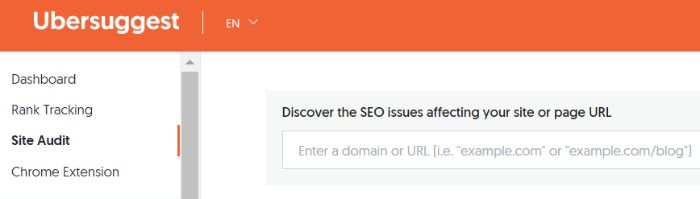
Go to our SEO site-auditor or select “Site Audit” from the left side of the Ubersuggest tool:
Enter the URL to be audited and then select “Domain” for a full site audit or “URL” for a page-level audit.
Click “Search.”
You’ll notice the audit is split into three sections:
Overview
Site Health
Site Speed
The Overview section will cover on-site SEO elements, search traffic, keywords, and backlinks.
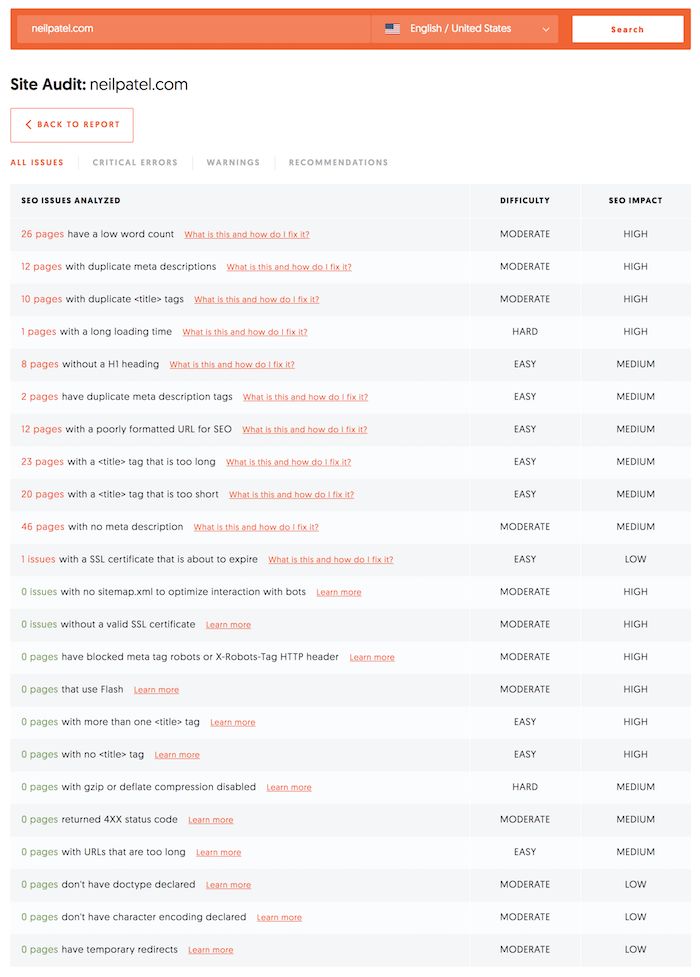
Site Health is a highly actionable section that breaks down your domain by page level. This will run you through the various issues and errors present on your client’s website so you can action them immediately:
This section provides key takeaways you can provide to your client so you can provide value upfront. This will improve their website as well as increase their trust in your services.
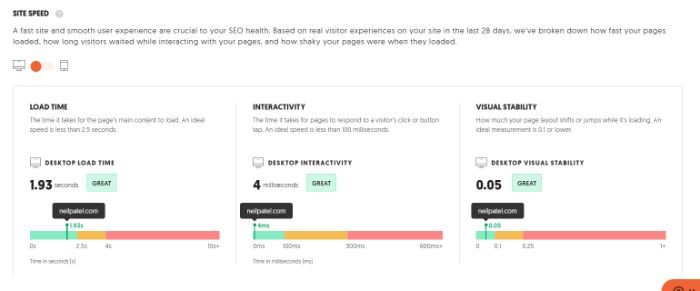
The Site Speed section is self-explanatory. It provides a loading time for both desktop and mobile, as well as a breakdown of the time it took to load each page element:
A technical audit is a great tool that gives you and your client actionable items to impact their overall site performance.
This has been proven to be an invaluable resource to agencies and their clients alike.
3. Complete Keyword Research
With a tool like Ubersuggest, you can ensure you’re targeting the right keywords for your client’s SEO.
Don’t believe us? Take the word of NinjaCat, a digital marketing performance management platform, which saw a 124 percent increase in its keywords ranking on page one.
Most marketing agencies understand the importance of well-researched and targeted keywords. As is so often the case with clients, though, keyword research is not a top priority. As such, your clients may be sticking with just a handful of keywords that aren’t fully optimized or ideal for targeting.
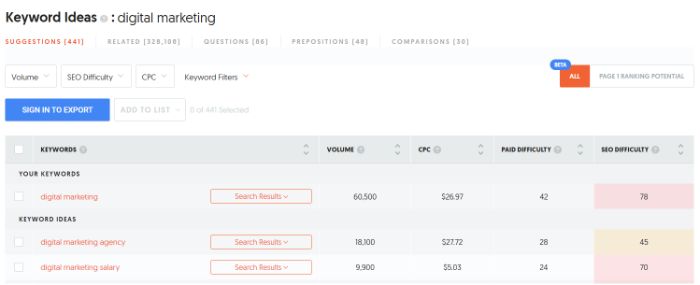
How can you help? With Ubersuggest, you can become the expert in your client’s SEO needs in minutes. Just ask your client for their list of current keywords and plug them into the Keyword Ideas report:
This Ubersuggest client SEO report offers all manner of keyword optimization angles, from new keyword ideas to related keywords to target to questions your client should aim to answer when writing a blog post. This will help you to narrow down high-traffic, low-competition keywords for your client to target.
The initial keyword audit isn’t all, though.
You can also sign up for notifications so you can know when keywords are growing in popularity and when it’s best to target them in your organic and paid campaigns.
4. Competitive Analysis
E-commerce sales in the U.S. grew 14.2 percent in 2021. Without a proper analysis of the competitive landscape, though, how can you be sure you’re capturing (and will continue to capture) your share of this growth?
The more your client knows about their competitors, the greater understanding they can get of their strengths and weaknesses. Only with this information can your clients then work to carve out their industry niche.
Where should you begin? With Ubersuggest’s Similar Websites report.
The Similar Websites report will show you which keywords competitors are currently ranking for. It will also provide a list of similar keywords that your client shares with their competitors, as well as keyword gaps, estimated traffic, and the number of backlinks to your client’s competitors.
With this information, you can build out a full one-to-one comparison of your client to their top competitors.
Where do they fall short?
Where do they excel?
What steps can they take to see improvement in their rankings, traffic, and conversions?
5. Rank Tracking
If you want your client’s website to be found, it has to rank on the first page of Google’s Search Engine Results Pages (SERPs).
To improve your client’s SEO, you need rank tracking.
Rank tracking enables you to keep a pulse on your client’s website rankings so you can track and react accordingly. Once your client has begun to implement changes to their website and their keyword strategy, it’s more important than ever to keep track of site performance and ranking.
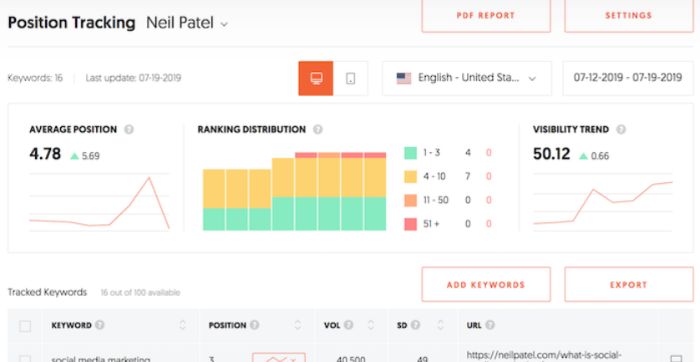
Ubersuggest’s Rank Tracking report will provide an overview of performance changes, including:
The number of keywords that have moved up in rankings over time.
The number of keywords that have moved down.
The total number of keywords changed.
A graph of the average position.
Current search results rankings for your tracked keywords.
Detailed information on your tracked keywords for each client.
To use this report, select the client dashboard and then select “Rank Tracking” from the left-side menu. You can then track ranking based on custom date ranges, region, and selected keywords:
The best thing about this report is you can keep a tab on overall site performance as well as keyword-level performance so you can identify your client’s SEO drivers and draggers.
6. Link Building
According to an analysis of 11.8 million Google search results performed by Backlinko, the #1 result in Google has an average of 3.8x more backlinks than positions two through ten.
In simplest terms, the more high-quality backlinks to your website the higher your site will rank above similar websites with fewer backlinks.
Link building is no longer about quantity, but quality—and it’s an important part of client SEO reports.
The higher the domain authority of the backlinks to your site, the greater bump in SERP rankings your site will see. This is why a solid link building strategy is key to success.
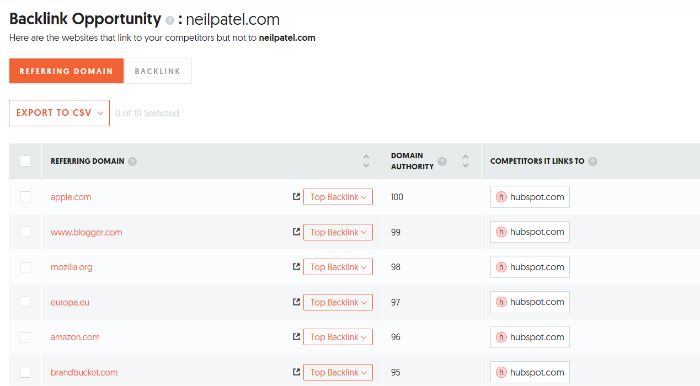
This report will give you an idea of what sites are currently linking to competitor websites.
With this information, you can gain an understanding of the types of content high-quality sites are looking to link to. In some cases, your client may need to create such content for this strategy to work.
As your client works to build their backlink profile, you can run the Backlinks Overview report. This will show them:
your clients’ domain authority
how many domains are linking back to them
number of backlinks to your client’s website
change in backlinks and referring domains over time
new and lost referring domains and more
As clients typically rely heavily on marketing agencies for backlink support and opportunities, both of these Ubersuggest reports are crucial to your decision-making process and goal completion analysis.
7. They Use the Chrome Extension
The Ubersuggest Chrome extension has over 300,000 users.
As busy as agencies can get, they’re more likely to use the tools that are most readily available. That’s why so many agencies love Ubersuggest for client SEO reports, especially when it comes to the Chrome Extension.
The Ubersuggest Chrome Extension enables you to make the most of your research time.
That’s because you can learn key information while performing live searches on Google, YouTube, and Amazon, including:
paid and organic analytics
mobile and desktop search numbers
related keyword suggestions
Beyond the search results, you can also perform an SEO analysis of your client’s website and their competitors in real-time. This information can then supplement the reports you pull from Ubersuggest to provide even greater insight to your clients.
8. They Use the Google Analytics Integration
Google Analytics is used by 85.9 percent of all websites whose traffic analysis tool is known. With that in mind, Ubersuggest has been optimized to integrate directly with the analysis powerhouse.
Google Analytics is an invaluable tool for client websites of every type. With Ubersuggest, you can connect your clients’ Google Analytics accounts to their ongoing SEO reports.
Alongside the other data provided by Ubersuggest and its various dashboard modules, you can also see:
organic visitors
historical traffic data
data for mobile and desktop browsers
You will also have the ability to see the data for the day, week, or month so you can truly tailor it to your analysis needs for any given moment in time.
From your client’s dashboard, click “Connect with Google.”
Select the account to sign in with, or select “Use another account” if the account you need isn’t listed.
Select the property and click “Connect.”
From here, you will see additional modules added to the dashboard with that property’s Google Analytics data.
How Agencies Use Ubersuggest Frequently Asked Questions
Where does Ubersuggest get its data?
Ubersuggest gets its data from various sources, most notably the Google Ads API and Google Suggest. Its integration with Google Analytics also provides an additional source of data for analysis. This makes it a great tool for conducting client SEO reports.
What is the main use for Ubersuggest?
As an SEO tool, Ubersuggest offers brands and agencies the opportunity to reverse engineer the SEO techniques of their competitors. You can see what works for your competitors using the suite of reporting tools and make educated decisions based on the data.
Can I use Ubersuggest for free?
There is a free version of Ubersuggest that allows users to perform three searches per day for keyword analysis, competitor analysis, and site performance. For agencies managing multiple client SEO projects, you will need the paid version.
Is Ubersuggest software?
Ubersuggest is a web-based SEO tool. You can access it on any computer as long as you have internet and your account login details.
{
“@context”: “https://schema.org”,
“@type”: “FAQPage”,
“mainEntity”: [
{
“@type”: “Question”,
“name”: “Where does Ubersuggest get its data?”,
“acceptedAnswer”: {
“@type”: “Answer”,
“text”: ”
Ubersuggest gets its data from various sources, most notably the Google Ads API and Google Suggest. Its integration with Google Analytics also provides an additional source of data for analysis. This makes it a great tool for conducting client SEO reports.
”
}
}
, {
“@type”: “Question”,
“name”: “What is the main use for Ubersuggest?”,
“acceptedAnswer”: {
“@type”: “Answer”,
“text”: ”
As an SEO tool, Ubersuggest offers brands and agencies the opportunity to reverse engineer the SEO techniques of their competitors. You can see what works for your competitors using the suite of reporting tools and make educated decisions based on the data.
”
}
}
, {
“@type”: “Question”,
“name”: “Can I use Ubersuggest for free?”,
“acceptedAnswer”: {
“@type”: “Answer”,
“text”: ”
There is a free version of Ubersuggest that allows users to perform three searches per day for keyword analysis, competitor analysis, and site performance. For agencies managing multiple client SEO projects, you will need the paid version.
Ubersuggest is a web-based SEO tool. You can access it on any computer as long as you have internet and your account login details.
”
}
}
]
}
Conclusion: How Agencies Use Ubersuggest For Client SEO Reporting
Ubersuggest is an easy-to-use tool with in-depth reports which enable you to offer a best-in-class client SEO report.
When you use Ubersuggest as an agency, you can manage multiple clients’ websites with just a few clicks.
Best of all, you can see how your recommendations are affecting your clients’ websites in real-time.
While client SEO changes can take time to have a huge impact on rankings, there are plenty of other metrics to track, including traffic, backlinks, and site speed.
Which of the above reports are you most excited to run?
Disclosure: This content is reader-supported, which means if you click on some of our links that we may earn a commission.
As an ecommerce seller, you’ll find yourself making a lot of choices.
Is the clothing niche more profitable than accessories? Which theme would be better: Wokiee or Porto? Is Shopify better than Wix, or is it the other way around?
Of all the questions, choosing the best ecommerce platform remains the most crucial. Although Shopify and Wix have overlapping features, Shopify edges forward in the race if you’re specifically looking for ecommerce functionality.
Still, it’s a close call between the two that boils down to your intent. Small businesses or brand-conscious entrepreneurs will love Wix with its easy-to-use, cheap features, and greater design flexibility.
But if you want a powerful online store, Shopify can do a lot more. So long as you’ve got a bigger budget and the technical knowledge to flatten the learning curve, Shopify is going to be the better long-term ecommerce solution.
Shopify or Wix: Which Is Better?
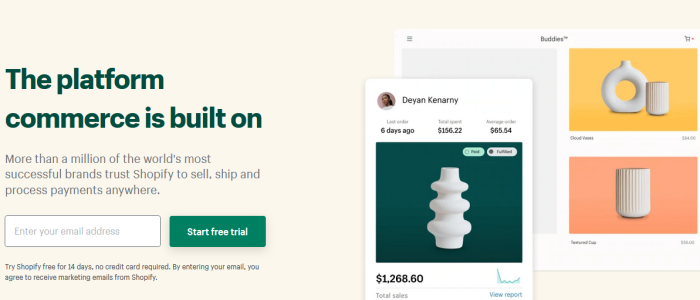
Shopify is a solid option for ecommerce applications with its fully responsive templates, AMP support on product pages, and dropshipping features. It also supports multi-currency selling functionality and offers useful integrations with other essential apps.
Overall, it’s a more professional choice for anyone who wants to build an online store. If this is exactly what you’re looking for, make sure you sign up for a free trial ASAP.
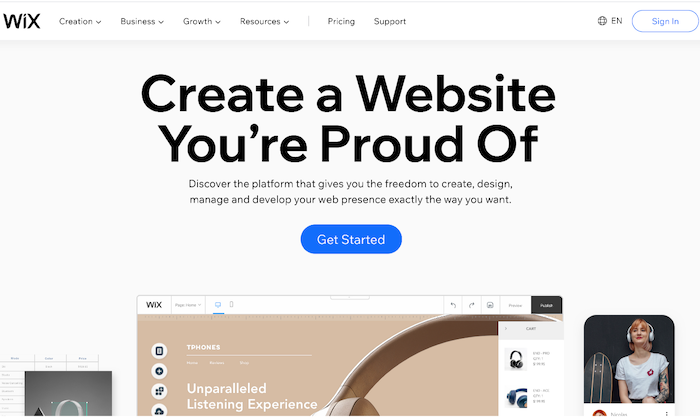
Wix has a drag-and-drop interface and a wide range of bundled templates, making it a great choice for those who want to build a general-purpose website. It also comes loaded with page layout tools, data capture, and email marketing features.
Plus, it’s cheaper, and you don’t have to worry about paying transaction fees. Ready to check out Wix? Give it a try with a free trial.
A Review of the Best Ecommerce Platforms
Shopify and Wix are hardly your only two options for starting an online store, and you owe it to yourself to look around.
My team reviewed dozens of ecommerce platforms and narrowed them down to the eight best options that tick off all the right things on an ecommerce seller’s checklist. Wix and Shopify both made the list.
Head over to my best ecommerce platforms guide for an in-depth look at where every product stands, along with a buyer’s guide to help you navigate your options.
Shopify Wins
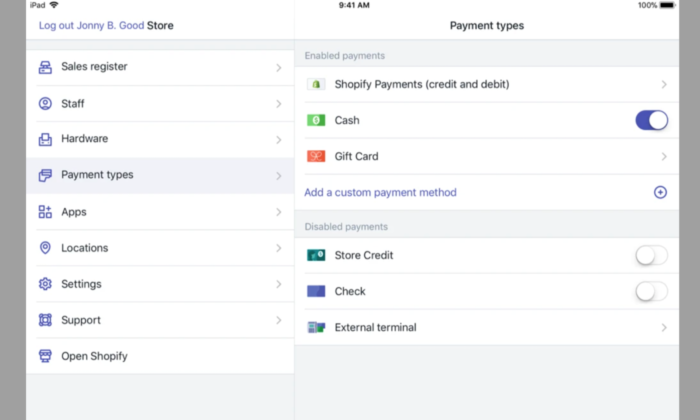
Useful Ecommerce Features: As it’s specially designed to be for ecommerce, Shopify sites come with many useful ecommerce features to cover every little aspect of the sales process. It has multiple payment gateways, inventory management tools, third-party platform integrations, and shopping carts. The platform is also scalable, allowing you to grow with your expanding business needs.
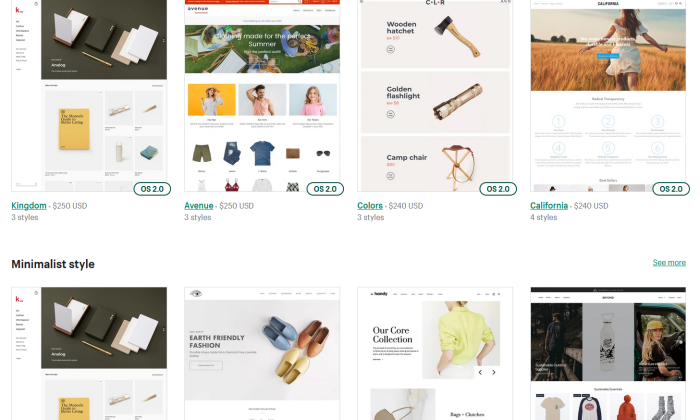
Fluid Themes and Greater Flexibility: Shopify offers 60+ professionally-designed and customized themes, giving you the liberty to add individual product pages based on your needs. Moreover, this customization and flexibility extend to changing page elements too. You can move, add, remove, or resize page elements to make your shop more on-brand.
Tweaking themes is also possible—provided you know HTML and CSS. If you’re tired of how your site looks, you simply have to choose a new theme, and you’ll have a brand new store within minutes!
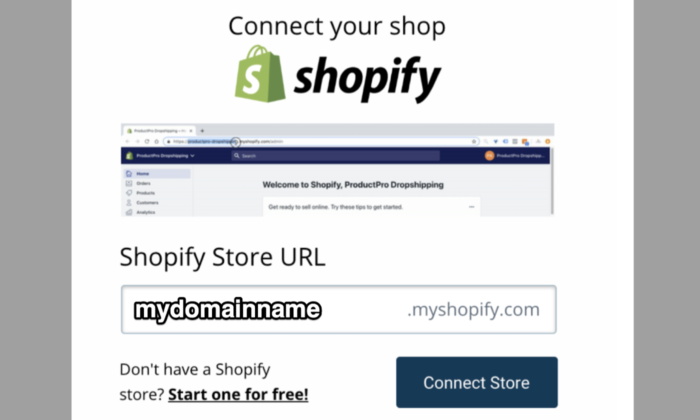
Custom Domain Name: Every Shopify user gets a custom domain name that allows them to brand their respective stores and online business more efficiently and effectively. You can handle your domain on the same site location as your domain store, which, in turn, allows you to make changes to either with ease while simultaneously managing your domain.
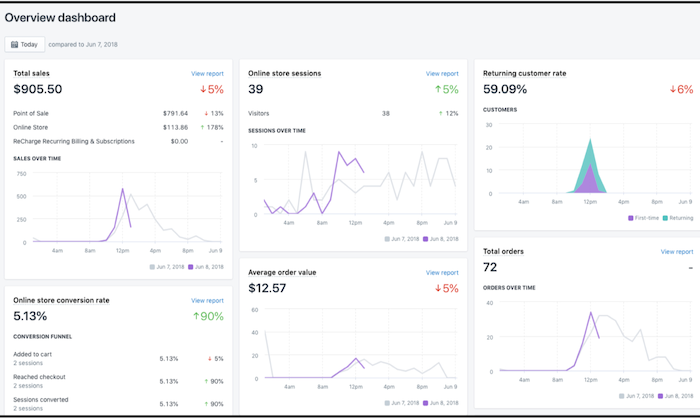
Excellent Built-In Analytics: Shopify goes the extra mile by offering you plenty of built-in analytics features like Google Analytics, customer behavior, stock levels, and conversion tracking to know exactly how your store is doing and which aspects need a bit of tweaking for better results.
You can also view online store sessions, total sales, top-selling products, returning customer rate, average order value, and behavior reports (phew!) on the platform to make better decisions.
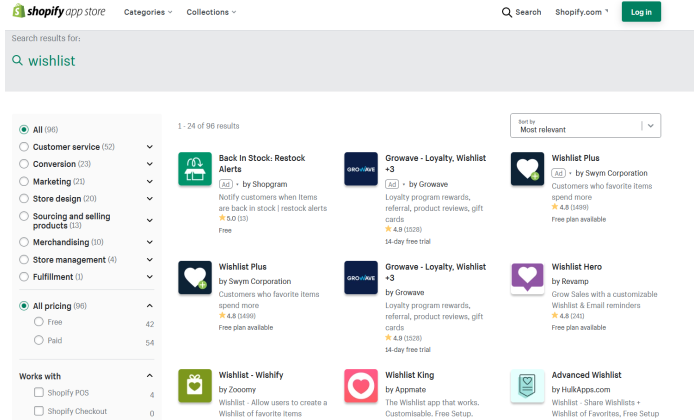
Shopify App Market: Nearly every ecommerce plugin and feature are developed for Shopify first due to its vast popularity. Whether it’s free or premium add-ons for marketing to content management, you get all kinds of unique features with this platform. Case in point: An augmented reality feature that allows you to use your smartphone to navigate the product and see every little detail.
What’s more, even other marketplaces like AliExpress and Oberlo offer compatible apps to make your store management easier.
Faster Checkout Options: Shopify has prioritized customer preference when designing login and checkout options. You can make the registering of users before heading to checkout mandatory, optional, or prohibited. Plus, registration is also incredibly easy as users only have to fill out basic information. As a seller, you can add users manually or import the list via CSV and sort them through a tag system.
More Payment Options: Shopify gives you several options to sell items anywhere in the world thanks to its Amazon FBA or a 3PL order fulfillment support, along with multiple-currency support through a complex, non-supported HTML, CSS, JavaScript, and Liquid hack. This may not be ideal, but it’s definitely there. You also get direct access to 100+ different payment gateways, including PayPal, Stripe, and Shopify’s fully integrated payment system.
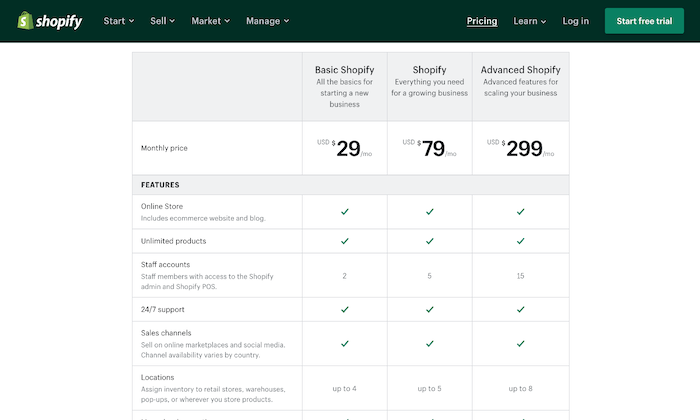
No Cap on Products and Inventory: Most web servers or external platforms restrict the number of products you can add to your store—but not Shopify. You can add unlimited products to your Shopify store. Even the lowest subscription package does not put any restriction on the number of products you can add to your inventory.
Shopify Losses
Learning Curve: Shopify developers claim the platform is the best for creating and managing online stores, but they don’t claim to be the easiest, and rightfully so. Although Shopify uses templates that eliminate the need to edit HTML code and CSS styling, its websites are harder to edit than Wix. It’s because the focus is on the products and how you present the page. If you want to make additional changes, you’ll have to learn to edit the backend code.
Limited Free Themes: While we love how modern and responsive Shopify themes are, it’s the limited number can restrict your options. You have to pay a one-time fee for most themes, ranging between $140 to $180, as only ten themes are free.
Expensive: Shopify gives you a wide range of subscription plans starting at $29 per month. However, not only is it more expensive, but you also don’t get a free plan (only a 14-day free trial). The basic plan includes only the barest of features, so if you want access to advanced features like fraud analysis and reports, you have to pay a higher price.
Further, unless you use Shopify Payments—something that isn’t available everywhere—you have to pay a transaction fee on top of the payment processor fee.
Lacks Email Hosting Facility: You don’t get an email hosting feature despite web hosting being included in all Shopify plans. So, you can’t host a domain-based email address like info@shopname.com. What you can do, however, is set up email forwarding. This will forward all emails sent to info@shopname.com automatically to your regular email account. You’ll have to set up other third-party email hosting connections to use the email forwarding function.
Wix Wins
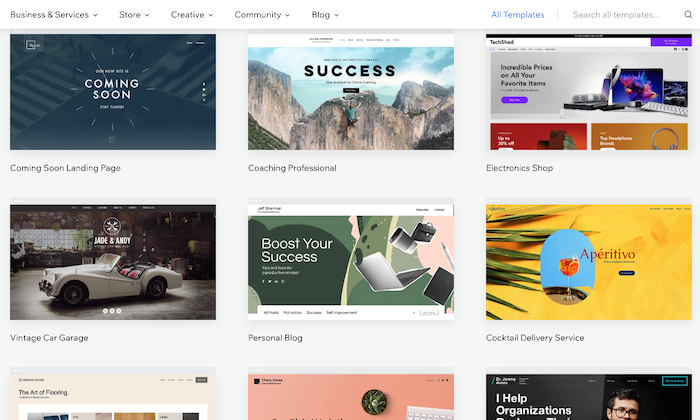
Massive Template Collection: The basic Wix editor lets you pick from 500+ beautiful templates for your site and populate it with any content of your choice. There are several built-in dynamic templates—from homepages to blogs to landing pages—suitable for novices and experts. People on a tight budget will be happy to know the platform offers 60 completely free, modern, and stylish ecommerce templates.
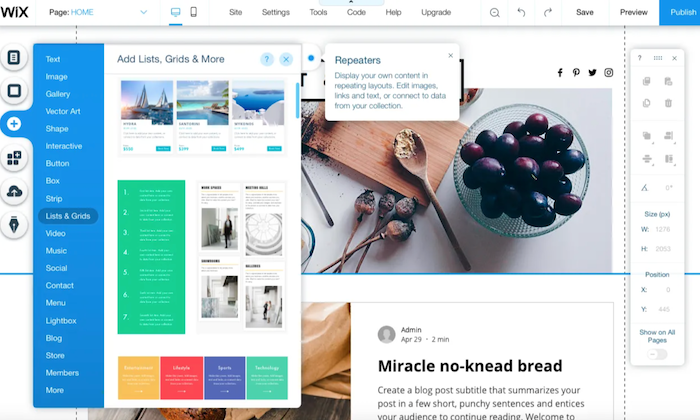
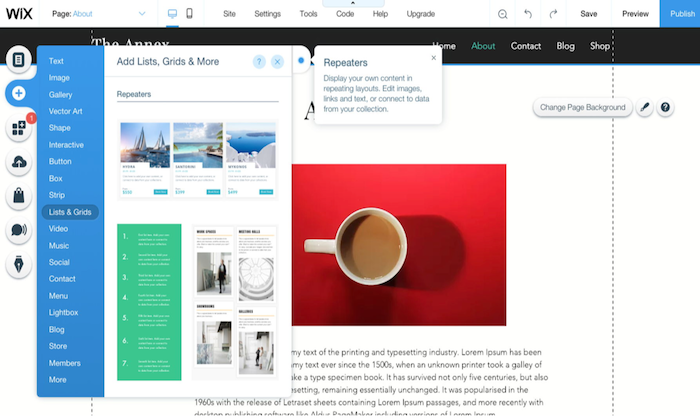
Intuitive Drag-and-Drop Interface: The drag-and-drop interface is the heart of Wix, making it incredibly user-friendly. Because of this, not only people with all levels of skills can use the platform, but it also gives you enough options to convert your side into a real powerhouse by extending its functionality. You can use the mobile editor to review and edit your site to optimize it for mobile devices.
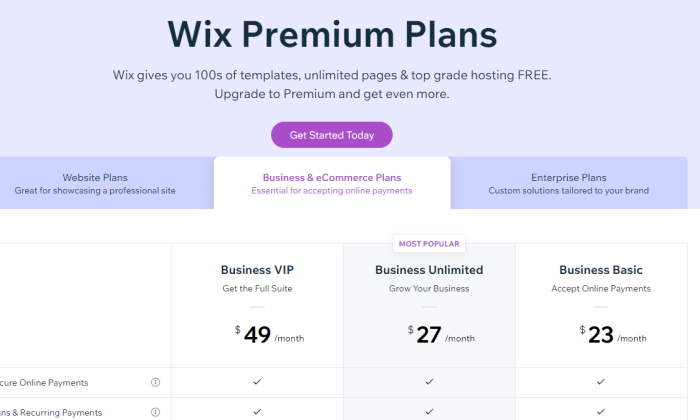
Free Plan: Wix is definitely the cheaper platform, with prices starting at $23 per month. There’s also an entirely free plan and a free domain name facility (for the first year) that further boosts its appeal. Plus, you don’t have to worry about paying any extra fees with the platform.
Built-In Video Function: Wix seriously lets your products shine, which is one of its biggest USPs. It has a built-in product video function that helps improve customer experience by allowing them to see the product live. You’ll also appreciate the product zoom feature and the fact you can build a distinctive checkout page to make the checking out process as hassle-free as possible.
Secure and Reliable: This is a platform that takes a lot of care in making sure its infrastructure is resilient and never vulnerable to attacks or data breaches. Between 24/7 monitoring, multiple site data backups spread across Wix’s servers, the highest levels of online security and data compliance, and zero-downtime maintenance, your site on Wix will always be secure and available to visitors.
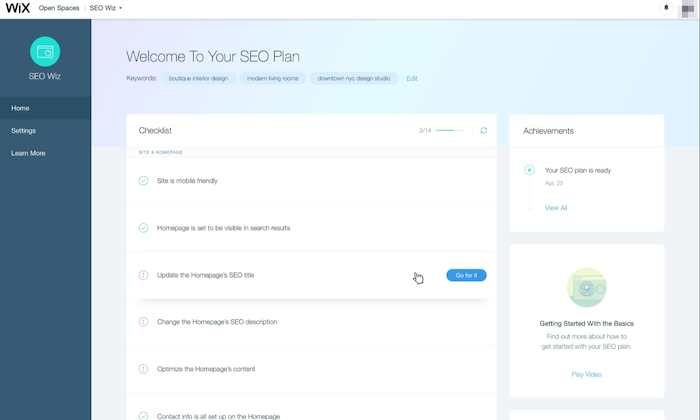
Efficient SEO Guidance: Wix helps you optimize your ecommerce site for SEO by highlighting areas that require your attention. It then does the hard work by letting you fill in keyboard tags and other metadata. You can also modify the URL of each page, so it best fits what Google needs to know.
Tons of Extra Features: Aside from the core functions, Wix is built with an entire ecosystem of useful tools and products to make website building easier. It offers your free HTTPS to ensure visitor interactions with your website remain secure, templates to create quotations for customers, and integrated payment options like PayPal and Stripe. There’s also a logo maker to make branding even easier!
Online Store Integration: You can include an online store with your website at no additional cost with Wix. As the interface is easy to use, the integration process is very straightforward, and you don’t even require an external shopping solution.
Wix Losses
Harder to Redesign: The intuitive drag-and-drop interface of Wix makes designing your site simple, but it’s the redesigning where you have to pay the price. You don’t have the flexibility to make any major changes by just selecting a new theme. Instead, the redesigning process is extremely manual. If you want to make any drastic changes to your online store, you practically have to rebuild your entire website. Besides that, you don’t have access to HTML and CSS, which makes the overall process more time-consuming and tough.
Limited Integration With Third-Party Apps: When we talk about app integrations, it isn’t even a fair fight as Wix has far fewer ecommerce developers creating apps for its platform. For instance, you won’t find a Google Shopping Feed or Facebook Product Feed. This means you can’t run Google shopping ads or run dynamic product ads on Facebook from the platform. Native integration with email marketing applications is also absent, making it troubling for owners who rely on email marketing for revenue. The only way you can integrate a Wix store to an email marketing add-on is to use either Zapier or write the code yourself.
Forced Wix Branding: They say there’s no such thing as a free lunch, and Wix very well proves it. If you decide to choose and stay on Wix’s free plan, be prepared to carry Wix branding—right at the top of your site. It isn’t too obnoxious, but it isn’t exactly discreet. What makes it more annoying is it appears before your website header!
Non-Transferrable Site: While some may justify Wix not wanting users to export websites created with their technology, it’s a con for those who want to migrate. And the fact that scalability isn’t Wix’s biggest forte, makes this an even bigger problem. If you want to recreate and transfer your website away from Wix, you have to pay some serious amount of cash. In short, if you sign up for Wix, they might just have you for life.
Comparing the Top Ecommerce Platforms
While Shopify and Wix are excellent ecommerce platforms, there are several other alternatives with their own advantages. Make sure you check our top picks for the best ecommerce platforms to find the right option based on your specific needs.
Ecwid – Best for integrating with your current platform
Summary
Shopify is the more obvious choice since we’re concerned with ecommerce functionalities in particular. But that doesn’t mean Wix has lost its charm.
Shopify is the best solution for sizable online stores that need all the bells and whistles of scaling and selling everywhere around the globe, while Wix is more appropriate for general-use cases and for owners who rely on content creation to acquire more traffic. It also offers more creative freedom as opposed to Shopify.
In the end, the choice is yours—just make sure you make the right one.
LAMA | Full-stack, scaling engineer | Remote | Full or Part-time
LAMA is a tool built to keep everything important in your adult life together and organized. Come join 2 technical female founders to build an app that is an essential tool for all young adults.
We’re looking for an experienced engineer who loves UX, data, and scaling challenges; who is intrigued by the fast-iterative promise of low-code platforms. You’ll have the opportunity to expand our existing MVP with creativity and panache. Help build the foundations of (y)our company with work-life balanced values.
G-Core Labs | Remote-first | Full-time | https://gcorelabs.com/ | https://careers.gcorelabs.com/jobs/Careers We build CDN, DNS, DDoS Protection, Video Streaming, Edge Computing and other infrastructure solutions. We are looking for: * Systems Engineers (to operate global infrastructure of more than 800 nodes all over the world) * Systems Engineers (to operate Clickhouse Cluster and Kafka Cluster) * … Continue reading New comment by gofort in "Ask HN: Who is hiring? (May 2022)"
Wix is best for beginners who want to whip up a basic website that does not need advanced features. It’s an entry-level tool with an intuitive drag-and-drop editor so you can churn out a website in minutes without much technical know-how. Create your own website today and let Wix do the heavy lifting.
A Review of The Best Website Builders
Website builders provide the tools you need to spin up basic or highly-versatile websites without touching any code. But it can be challenging to decide which website builder fits your needs if you’re clueless about what to look for.
With years of experience under my belt, I’ve learned the key differentiators you should look for when shopping for a website builder. Using this in-depth review of the top four website builders, you’ll be able to zero in on the best platform that will set up your website for future success. Both WordPress and Wix made it into the top four.
WordPress Wins
Full data ownership: With WordPress being open-source software, nobody is holding you by the neck. Hence, transferring from one host to another isn’t complicated. You own all your files and can take them to any hosting provider that supports WordPress.
Site transfers are facilitated by the built-in WordPress Import and Export tools, features you won’t find in Wix. In addition, Wix sites are hosted exclusively on Wix’s servers. Therefore, transferring your website files to a self-hosted WordPress requires a complex, cumbersome process.
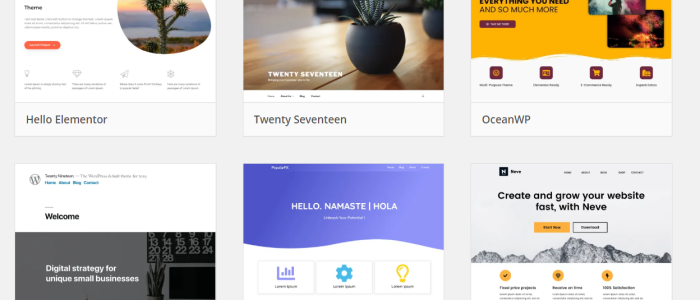
Limitless design options: WordPress is generous to a fault when giving users the power to design their websites. Free themes are available for starters, but if you’re looking for more functionality, you can choose from over 5,000 premium third-party themes that cost anywhere between $25 and $299.
You can also hire a developer to create a custom theme with unconventional features to make your website stand out. The best part is you can easily switch from one theme to another, unlike Wix that doesn’t allow it once your site goes live.
No WordPress-sponsored ads: WordPress is free, but you need to purchase a domain name and a hosting plan for it to work (here’s an easy step-by-step guide for getting those). But once your website is up and running, you’re free to monetize it any way you want. Meanwhile, Wix websites are free, and most basic plans are riddled with ads you don’t control. Wix only removes these ads once you upgrade to higher premium plans.
Unmatched customizability: An open-source software, WordPress offers great flexibility right out of the box. If you’re a programmer or somebody who knows how to code, you can tweak WordPress’s underlying codes to create a website exactly as you envision it. Beginners can also customize their WordPress sites as they please.
From switching templates after the website goes live to improving site security and adding forms to blog posts, WordPress allows you to modify your site in ways that are impossible with Wix.
And even if you love Wix for its drag-and-drop builder, WordPress also offers something better with third-party page builder plugins like Elementor or Divi.
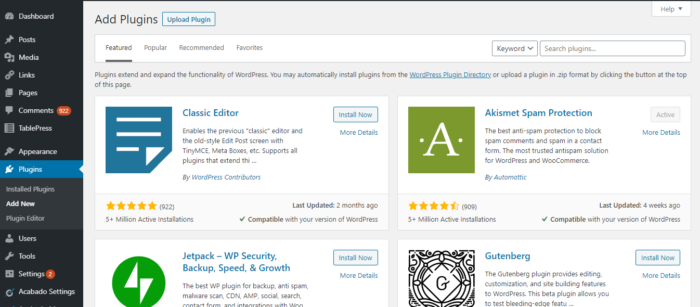
Massive selection of plugins: WordPress beats Wix for having the most number of plugins to enhance your website’s functionality. Whether you want to add a table, collect your visitors’ emails, or create a landing page, there’s always a plugin that will match your needs. There are over 55,000 free and premium plugins to choose from, so it’s easy to beef up your website without manipulating any codes.
Robust blogging platform: Even if it has evolved into a full-blown content management system, WordPress doesn’t forget its roots and continues to be the platform of choice for all things blog related. It offers the same blogging features as Wix but takes it up a notch with advanced features you’ll only find in WordPress.
These include a native commenting section so you can manage your readers’ comments without the need for additional plugins. You also have complete control over posts and pages’ visibility as you can set them to public, private, or password-protected.
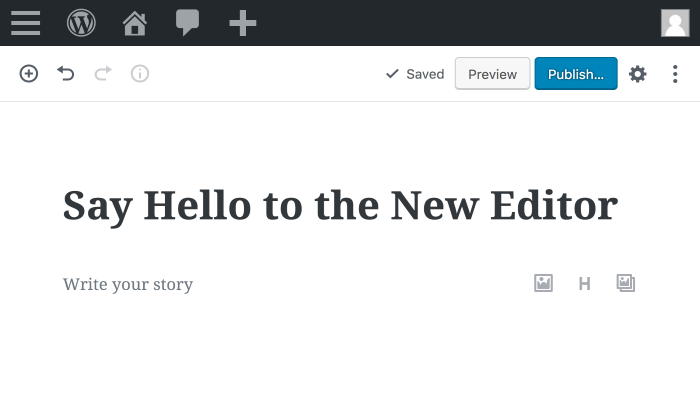
The new Gutenberg editor has its flaws, but the ease of adding, dragging, and dropping different elements without the need for scrolling up or down is second to none.
Better search visibility: WordPress gives you more control, so your website is more likely to rank on search engine results. Slow website? You can improve your site’s performance by applying speed-boosting strategies.
WordPress users can also install Yoast, the world’s most popular SEO plugin. This tool helps over five million websites improve how their articles appear on search results, insert internal links, and redirect old pages to new ones, all of which help boost their rankings in the long run.
Ahrefs, a leading all-around SEO tool, once analyzed 6.4 million websites, and the results show that WordPress sites have higher domain authority, backlinks, and traffic than their Wix counterparts.
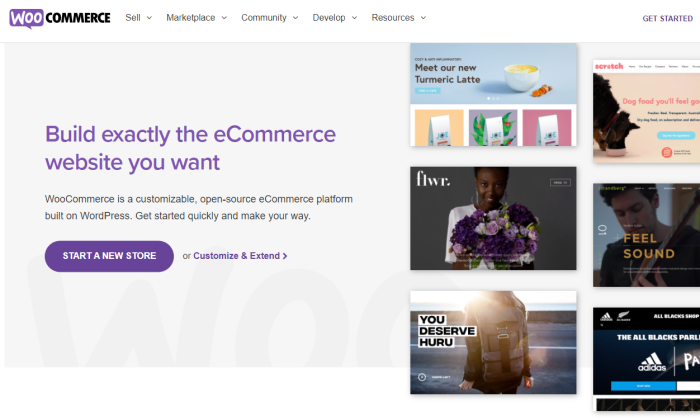
Scalable ecommerce functionality: WordPress lacks built-in ecommerce features, but you can easily integrate it with a powerful ecommerce solution like WooCommerce.
Used by over 40% of ecommerce sites, this plugin can help you display products, fulfill orders, receive payments in multiple currencies, and automatically calculate tax by region.
To further boost its functionality, you can also install additional WooCommerce plugins. For example, you can connect your store to a print-on-demand service that will process the orders on your behalf.
There’s also the free HubSpot for ecommerce plugin that lets you track your visitors and lead them into your sales funnel.
WordPress Losses
No phone support available: WordPress relies on its global community of volunteers. Hence, there’s no customer service hotline that you can turn to if you encounter technical hiccups.
However, over 39% of websites in the world are powered by WordPress, so whatever issue you’re dealing with, chances are you’ll find a troubleshooting guide in support forums, Slack channels, or YouTube. But having to go looking for solutions is annoying.
The cost of creating and maintaining a website varies: WordPress is free to download. However, it can’t stand on its own, so you need to pay for a domain name and a hosting plan before you can start a website.
A custom domain name starts at $10 per year, while a hosting plan can start as cheap as $2.95 a month. If your website gets a lot of traffic, you need to pay more for a hosting plan to avoid downtimes with each traffic spike.
Additional expenses include premium themes and plugins to enhance the functionality of your site. In total, you might spend anywhere between $200 to a few thousand every year.
Steep learning curve: WordPress is not the most intuitive, and it takes time to understand it. It doesn’t come with an official walkthrough, so you have to learn everything on your own.
WordPress’s Gutenberg editor, for instance, is not as intuitive as Wix’s drag-and-drop editor. It lacks the what-you-see-is-what-you-get (WYSWYG) framework, so you need to preview the page you’re working on to see what it will look like once published.
DIY security and maintenance: Website upkeep is not hands-off for WordPress users. The WordPress software itself rolls out updates every once in a while, and it’s your responsibility to ensure you’re using the latest version.
You also need to manually update themes and plugins to fix bugs and prevent them from affecting site performance.
As for backups and security, you can handle them yourself with the help of plugins. In exchange for fixed monthly fees, you can outsource all these to a WordPress maintenance service or choose a managed WordPress host to handle everything for you.
Wix Wins
No upfront cost: Anybody can register and create a Wix website for free. If you want more functionality and to remove the Wix ads, you can upgrade to one of the Wix website plans or the business and ecommerce plans.
Unlike WordPress, which is 100% free but comes with extra expenses, Wix’s pricing is much more straightforward.
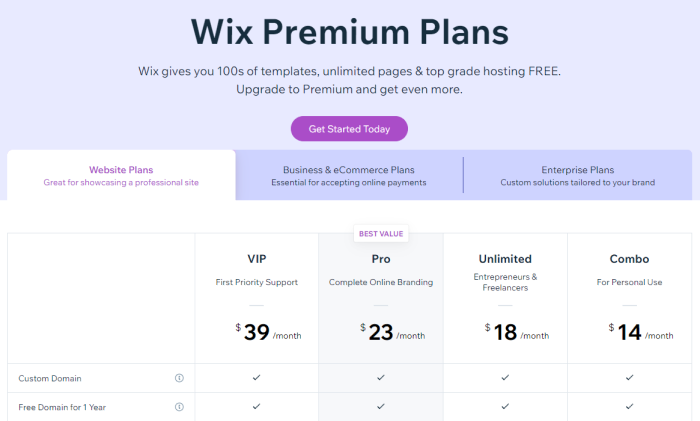
You don’t have to estimate anything as the pricing page has all the details. The Combo Plan starts at $14 per month and comes with everything you need to get started. You even get a free domain name for the first year, which you have to purchase on your own if you use WordPress.
If you want more features like chatbots or event booking, you can also add Wix apps that are either free or premium with prices ranging from $3 to $20.
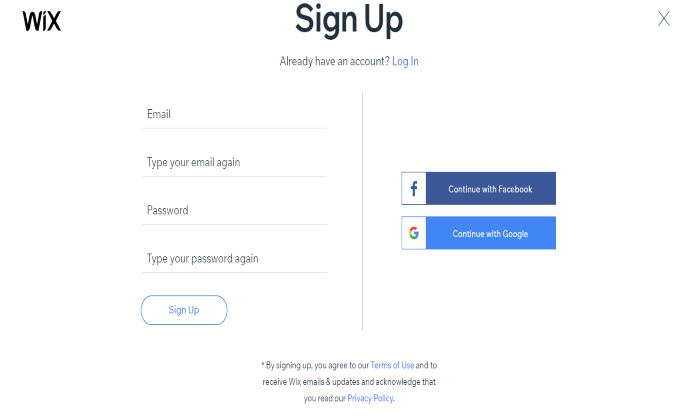
Effortless registration: Although the software itself is free, creating a website with WordPress requires the additional steps of domain registration and signing up to a hosting provider. With Wix, registration is as easy as signing up using your Facebook or Google account. Then, you can start building your website right away, either through the editor or with the help of an AI tool.
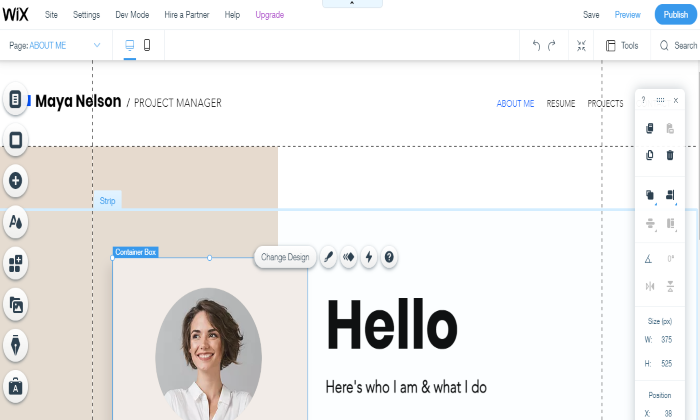
Intuitive drag-and-drop editor: Wix sacrifices flexibility so users can build websites fast with little to no learning curve. Beginners can easily customize their website templates with Wix’s drag-and-drop interface that lets you move things around and add as many features as you please.
Unlike WordPress’s Gutenberg editor, Wix’s operates on a what-you-see-is-what-you-get (WYSWYG) paradigm, so everything you see is exactly what will appear once the site goes live.
If you’re short on time, you can also let Wix’s Artificial Design Intelligence (ADI) tool automatically create a website based on your answers to a series of questions.
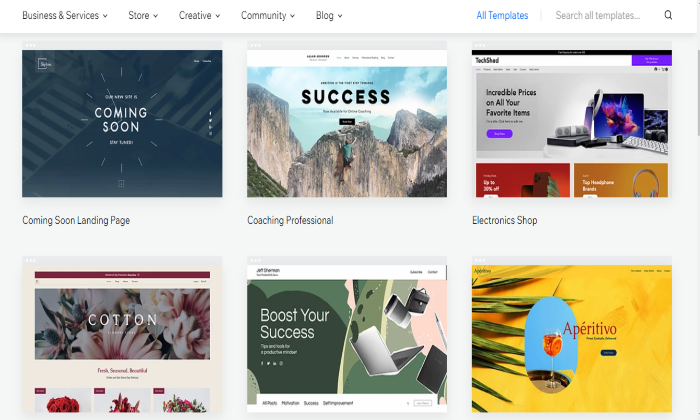
Wide selection of free templates: Wix offers the most free pre-made templates among all website builders. With over 500 templates to choose from, it’s easy to pick one that best aligns with your brand, whether you’re a non-profit organization, a photographer, a small business, or a school.
Each template is packed with built-in elements that you can drag and drop wherever you want. The editor also gives you the freedom to change the background image into a video, select a different color palette, change the font, and tweak other elements that matter to you.
Handpicked in-house and third-party apps: Wix’s over 250 apps are the counterpart of WordPress’s plugins that enhance a website’s functionality. WordPress plugins may outnumber Wix’s, but you have to sift through piles of clunky ones before finding what you need.
With Wix, however, quality matters more than quantity. Everything in the Wix App Market has already passed Wix’s guidelines, so you won’t have to perform a vetting process. In addition to that, all apps integrate well with Wix, so there’s no need to worry about incompatibility issues.
Multiple customer support channels: Unlike WordPress that mainly relies on its support forums, Wix employs a more personal approach to customer service.
Users can request a call-back through the Wix website so a company representative can talk to them directly. This way, they won’t have to waste time fixing the issue themselves and let a real person handle it.
If phone support is unavailable, Wix users can also reach out via email or search Wix’s online help center to find relevant articles and video tutorials.
Easy WordPress-to-Wix migration: If you jumped on the bandwagon but soon found out that WordPress lacks the simplicity you’re looking for, Wix offers an easy way out. All you need to do is enter the WordPress blog URL in Wix’s blog import tool, and with one click, your WordPress blog will be converted into a Wix blog.
With this import tool, you can choose only the blogs you want to move to Wix without building anything from scratch.
Hands-off security and maintenance: The benefit of having your website hosted in a closed ecosystem like Wix is its technical team handles all maintenance and security. This means you won’t have to lift a finger to create backups, update apps, or fix security glitches.
All updates are implemented and deployed by the in-house technical team, so you won’t even notice there’s an update taking place. In contrast, WordPress doesn’t handle any of these right out of the box, so you’re basically on your own.
Plus, Wix sites pass the highest levels of industry security compliance, from PCI DSS for ecommerce payments to SOC Type 2, and ISO 27001, 27701, 27018, and 27017.
Managed infrastructure and site data backups: Wix also delivers even more helpful features for reliability that you don’t have to handle yourself. Their data center infrastructure is robust enough to keep your site always available, even during routine maintenance. Plus, autoscaling allows your site to handle traffic spikes without missing a beat.
And, your site data is always kept up-to-date and backed up with redundant copies kept across all of those Wix data centers. You’re never left worrying if your site is available to visitors or if you can restore it should something go terribly wrong.
Wix Losses
Pricing page lacks transparency: At first glance, Wix’s pricing page seems to show how much you’d pay for each premium plan every month. However, the prices are actually what each plan would cost if you avail of the annual subscription.
If the Unlimited plan’s monthly cost is $12.50 per month, you’ll actually pay $150 upfront. If you opt for monthly payments, the cost is significantly higher.
It wouldn’t have been an issue had Wix placed a toggle button through which users can compare the prices if billed monthly or annually. To be fair, there’s a disclaimer at the bottom saying that the prices displayed are for yearly subscriptions, but the text is so small you won’t notice it right away.
Limited flexibility: Wix may be easier to use than WordPress, but that comes at the price of flexibility.
For instance, the free templates have good enough designs for inexperienced builders but are limiting for more advanced website creators. Not to mention that you won’t be able to switch to a different template once the website goes live.
Wix is also not open-source, so programmers and other tech-savvy users won’t be able to tinker with its underlying codes. Lastly, the over 250 apps inside its App Market can enhance the site functionality, but they pale in comparison to the thousands of WordPress plugins.
Underwhelming blog features: Wix wasn’t created with bloggers in mind, so if written content is your website’s main attraction, choose WordPress instead.
Although Wix offers basic blog features like categories, tagging, cover image, and post scheduling, it lacks other vital elements like native commenting.
For readers’ comments, Wix only offers Facebook comments, which are much more vulnerable to a slew of spammers. Also, the Wix plain blog editor doesn’t have the drag-and-drop functionality of WordPress’ Gutenberg, so the formatting options are limited.
Ad-free site not available in all plans: A free Wix website comes with Wix ads and a Wix subdomain. You won’t pay for anything, but it’s not good for branding. If you already have a custom domain, you can connect it to Wix for $4.50 a month (billed annually). However, the Wix ads remain at this level. You can only get rid of the Wix-sponsored ads if you upgrade to more expensive plans.
Difficult to get out of: Wix websites are hosted in their infrastructure, so once you create a website with them, it’s stuck in their hosting for life. It also lacks the Import and Export function of WordPress, so moving your website files from Wix to WordPress is tricky.
To give you an idea, your posts will be imported in the form of RSS files, while your images will need to be transferred manually. For most users, this complex procedure is enough to discourage them from making the switch.
Inferior built-in SEO functionality: Wix is not a terrible choice if you only get direct or social media traffic on your site. But when it comes to search engine visibility, Wix lags behind WordPress.
Wix is not up to snuff from a technical SEO standpoint as it relies on Javascript to display its URLs, making them more difficult to crawl. The Javascript also leads to code bloating, resulting in slower pages.
Wix also doesn’t have the basic features to set up a website to SEO success like hreflang and AMP support. Users have limited control over redirects and are restricted from editing the site’s robots.txt and sitemap. Creating shorter URLs is also impossible, so you’ll be stuck with https://www.neilpatel.com/post/keyword instead of the more concise and user-friendly https://www.neilpatel.com/keyword.
Comparing The Top Website Builders
Whether you’re a tech-savvy geek or a technophobe who wants to take a stab at creating websites, there’s a website builder that meets your needs. Here are my top four recommendations:
In terms of Wix and WordPress, if you’re a novice who needs a leg up in creating your first website, Wix can get you online fast. The ease of its drag-and-drop editor is second to none, while its wide range of free templates can give you a professional-looking website without breaking the bank.
So you’re thinking about getting into house flipping.
That’s understandable, especially since the nationwide median net margin on flips is around$32,371.
How many of these paychecks do you need per year to replace your current income?
That’s one of the benefits of house flipping over most other real estate investment strategies. Instead of providing gradual income like rent, flipping houses quickly generates large chunks of capital.
But don’t go and grab a sledgehammer and put in an offer on a dilapidated house just yet. There are several skills needed to flip houses – much more than being able to pick out color combinations or lay flooring.
While these are excellent skills to have, you also need to consider these questions:
Will you hire an agent to sell your flip or sell it yourself?
We’ve covered all of these questions as well as house flipping terms in this article so that you can learn what sets successful flippers apart from beginners.
Let’s get into it!
A House Flipping Definition
First off, what is house flipping exactly, and what does it entail? In its most traditional sense, flipping involves purchasing a house that needs repairs or updates, making renovations, and then selling it for a profit.
Each of these three stages of the flipping process must be approached thoughtfully in order to maximize profits. A mistake on one of them could eat into your return, or worse, jeopardize your profit completely.
Do You Need A License To Flip Houses?
Absolutely not. In fact, most real estate investors don’t have a real estate license.
Think about the three major steps of flipping houses.
While you will not have direct access to the MLS (Multiple Listing Service) without a real estate license, you can easily team up with an agent in your market to keep you up to date on the newest listings. Also, in a seller’s market, your best bet for finding profitable house flipping deals will be to look outside of the MLS (more on this later).
You definitely don’t need a real estate license to renovate a house. The only license relevant at this step is a general contractor’s license. Many counties require a contractor topull permits before making significant modifications to a house. To determine what is needed, contact your local building and permit office. Even if they require a contractor’s license to obtain the necessary permits, it is almost always best to hire a contractor and allow them to handle all of the paperwork.
Once you’ve renovated a house and are ready to sell it, you are most likely to get top-dollar by listing it on the MLS. While doing this requires a real estate license, it is not necessary for you to be the one that lists it. Even though you can save thousands of dollars in agent commissions by handling this yourself, you must evaluate what you want to spend your time on. Most house flippers focus on the buying and renovating side and then pair up with a skilled real estate agent to sell their houses once they are remodeled.
What You Need to Do to Buy a Foreclosed House
There is a common saying in real estate investing, “You make your money when you buy.”
And there is a lot of truth to this saying. It is tough to come back from paying too much for a flip house. Conversely, buying a home with plenty of margin for renovation and profit will make the entire process go much smoother.
But how do you find houses with enough margin to flip?
One of the best ways is foreclosures.
Aforeclosure occurs when a homeowner falls behind on their mortgage payments. Once the payments stack up to a certain amount, their lender decides to foreclose and sell the house to recover their money.
Because these sales often involve someone that is motivated to sell the house, whether it be the lender or the homeowner, they can often be purchased at a significant discount.
But to be successful, you must know where to buy a foreclosed home. Here are the three main methods.
Buying Houses in Pre-Foreclosure
The period between when the lender files a Notice of Default on a homeowner behind on payments and when the house is sold at a foreclosure auction is known as pre-foreclosure. This is often the best time for real estate investors to the house because discussions are typically solely between the buyer and seller. The only communication needed with the lender is to request a payoff statement. This will tell you how much it will take to satisfy the loan entirely, and in these cases, it often includes the principal balance, accrued interest from missed payments, and attorney fees from beginning the foreclosure process. Another perk to buying a house in pre-foreclosure is that this is the only time you can buy it without competing with other investors. When it goes to auction, anyone that wants it can come and bid on it.
Buying A House At A Foreclosure Auction
If the homeowner in foreclosure does not resolve the issue before the auction date, the house will be auctioned off to recoup the money owed to the lender. These auctions typically take place at the county courthouse. Sometimes they are held in a conference room, but they are often held on the courthouse steps. The bidding typically starts around the payoff amount. This is why it is better to buy the house before this point, because it can only be bid up from there. And that almost always happens.
There are three reasons why buying a house at a foreclosure auction is not recommended for a beginner investor.
It is often difficult to see the house before the auction, so you will usually be buying it sight unseen.
Prices often get bid to high prices, and rookie investors often get caught up in the hype and end up paying too much.
The attorney handling the auction will often require you to provide the funds for the purchase very quickly – usually the next day at the latest. This requires you to have cash available or access to another source of liquid capital.
Buying Bank-Owned Houses (REO)
Sometimes a house goes to a foreclosure auction, but no one is willing to pay what the bank is asking for it. In these cases, the house goes back to the bank, and it becomes what is known as an REO (Real Estate Owned). Banks do not want these properties on their books, so they will often turn around and list them with an agent shortly after the auction. If you are interested in trying to purchase an REO for your flip project, it is best to work with an agent that has experience with these transactions since negotiating with the bank can often be tricky.
House Flipping Tips and Strategies
There are several skills you must master to become a successful house flipper. Beyond that, there is a tremendous amount of knowledge that is only gained through experience and hard work. Here are the top house flipping tips and tricks that will significantly increase your success rate.
Market Research
Understanding your market is vital when running a house-flipping business. Are home prices increasing, or are they projected to fall soon? Is it more of a buyer’s or seller’s market? Only data can give you these answers. Here is the most critical information to gather when researching your market:
Number of houses on the market
Average number of homes sold per month
Average Days On Market (DOM)
Median Sales Price
Marketing For Deals
If your market is like most markets across the nation right now, it is a hot seller’s market, and finding a good deal is extremely difficult. But that doesn’t mean you should give up on your goal of flipping houses. It just means that you need to develop creative ways to locate profitable deals. This usually means finding houses to buy outside the traditional route of going through a buyer’s agent. Here are some ways to find off-market houses to buy:
Connect with wholesalers in your market
Direct mail – sending postcards to homeowners
Cold calling
Driving for dollars – Driving neighborhoods in search of distressed houses
SEO (Search Engine Optimization) – Building a website that ranks on Google for search terms like “We Buy Houses [Your City]”
Negotiating With Sellers
Many people hear the word “negotiation,” and their heart begins racing. But you’ll be relieved to know that most real estate deals do not involve quite the level of bare-knuckle bargaining that you’re thinking.
Here is the number one secret to negotiating a profitable real estate deal: Help the seller with their problem.
Any successful real estate investor will tell you that in order to strike up a profitable deal, there must be some underlying motivation causing them to need to sell. This could be the condition of the house itself, financial stress, or any other number of life issues.
If you can solve these issues for someone by purchasing their house, it is much more likely that you will be able to get it for a reasonable price, and they will be happy that you were able to help them!
Evaluating Properties
Determining the right price to pay for a flip house has two components: Calculating what it will be worth after renovations and properly estimating the rehab expenses.
After Repair Value (ARV)
The After Repair Value, or ARV, is the estimated price the home will sell for after it is fixed up. It is calculated by figuring out the average price per square foot of nearby, similar homes that have recently sold and multiplying that value by the square footage of the house in consideration.
Estimating Rehab Expenses
The ARV and the repair expenses will be the two most significant factors in determining the appropriate purchase price to make your flipping project successful. To correctly estimate the costs to renovate a flip house, you must take special care when viewing it. This takes a very attentive eye. Even though issues aren’t glaringly obvious on your walkthrough, they will begin to show themselves once you start the project. Having a realistic rehab budget upfront will allow you to set the right purchase price and make the entire process go much more smoothly.
Two professionals who can help you estimate repair costs when starting out are a contractor and a home inspector. A contractor will be able to pick out things that need to be fixed and give you an estimate on how much it will all cost. A home inspector will perform a detailed inspection and find issues that are not detectable on a cursory walkthrough. Having these two professionals on your team is vital.
Finding Reliable Contractors
If you plan to complete one or two flip houses per year, you can probably get by doing the bulk of the renovations yourself. However, if you want to do much more than that, you will need to build a solid team of contractors. Even when doing a flip yourself, there will often be times that you must call in a contractor because the project is too complicated or it requires a permit. Here is a list of the most common contractors that you will need:
Roofer
HVAC Contractor
Plumber
Electrician
Painter
Drywall Contractor
Framer
Handyman
Where To Buy Inexpensive Materials
Although you will undoubtedly make many purchases at the big box stores during your flipping project, you should not solely depend on them for materials. There are likely other stores in your area that offer materials at much lower prices. Some ideas to look for are salvage warehouses and local building supplies. The most critical time to find these discounts is when you make large purchases, such as flooring for a large section of the house or kitchen cabinets. One discount you can often get from the big box stores is on appliances. They often mark down returned appliances significantly. Just be sure that there is nothing major wrong with them before buying them for your flip house.
Working With A Listing Agent
Although you could try to list the house yourself and save the money typically spent on agent commissions, it is generally not advised. Like with the rehab projects on a flip house, you must determine what is worth your time and what is better to delegate. The time you spend marketing your home and showing it to prospective buyers could be spent generating more deals.
Not only that, but juggling all of the queries and offers from potential buyers can be complicated. Mishandling this process could result in you leaving a significant amount of money on the table – much more than you would have paid an agent to sell your house. Finding an agent that knows your market well and is experienced in selling homes will result in a much smoother sales process and more money in your pocket.
What are the Most Helpful Skills Needed to Flip Houses?
To be a successful house flipper, you will need to develop quite a few skills. And don’t worry, they don’t all have to be perfected upfront. It will be more of a process where they improve as you complete more projects. But here are the skills you should be working on.
People Skills
Most people thinking about getting into house flipping immediately think they need to start watching HGTV shows to get design ideas and find the latest trends, but success in real estate investing is largely due to how you interact with people. If you can’t effectively communicate with a homeowner to diagnose the problems they are facing and present a solution that involves you buying their house, you will be hard-pressed to get started on your house-flipping journey. But if you can refine this skill and learn the right questions to ask, your possibilities as a house flipper are endless.
Must Be Organized
Once you purchase a house to begin renovating, keeping everything organized is vital. The first step is to lay out a detailed scope of work upfront. This will give you a clear path forward instead of your project evolving as you go. Having a scope of work will also allow you to determine theproper order of your renovations.
Secondly, you must maintain constant communication with your contractors to ensure they are on schedule. Many home improvement projects happen in series, meaning one task can’t begin until another is completed. For example, if your drywall guy is behind and takes an extra week to get to your project, your painter won’t be able to start on time and will have to fit you into the next opening in his schedule.
Lastly, you must keep a watchful eye on materials to ensure you and your contractors have everything needed for the project. Many items may need to be ordered, so it is unwise to wait until something is needed to go to the store and buy it.
Home Renovation Knowledge
Eventually, a house-flipping project comes down to making design decisions based on what is practical, affordable, and will improve the house’s value. It would be difficult to make these decisions and have intelligent conversations with contractors without basic knowledge of how houses are constructed. If you don’t have much experience with home renovation tasks, your best options will be to begin on smaller projects that only require cosmetic updates or partner with someone with more experience with construction.
Handyman Skills
Even if you decide to hire contractors for the bulk of the renovation tasks on your house, there will likely be some times when it makes the most sense for you to do something yourself. Here are the some of the most common handyman tasks when flipping a house:
Caulking and touch-up painting
Patching drywall
Changing light switches and outlets
Changing light fixtures
Laying flooring
Installing trim
Changing doors and door hardware
Installing a new toilet
Are You Ready To Get Started Flipping Houses?
House flipping can be a fantastic way to supplement your income or start a new career. However, as you’ve seen in this article, there is more to it than most people think. And these house flipping tips and tricks are just the tip of the iceberg. For more information on how to get started, check out thiscomplete guide to flipping houses written by a professional house flipper. In addition to the topics we’ve covered here, his guide covers more info on funding deals, marketing, running numbers, and selecting appropriate upgrades for your project.
What are your favorite tips and tricks for successfully flipping a house? Let us know in the comments!
Jordan Fulmer is the owner ofMomentum Property Solutions, a house buying company in Huntsville, AL. They specialize inbuying houses in tough situations and renovating them to either sell or rent. Jordan also runs the SEO side of their business and regularly writes content about real estate investing, home improvement, SEO, and general real estate topics.
This website uses cookies to improve your experience. We'll assume you're ok with this, but you can opt-out if you wish.AcceptRejectRead More
Privacy & Cookies Policy
Privacy Overview
This website uses cookies to improve your experience while you navigate through the website. Out of these, the cookies that are categorized as necessary are stored on your browser as they are essential for the working of basic functionalities of the website. We also use third-party cookies that help us analyze and understand how you use this website. These cookies will be stored in your browser only with your consent. You also have the option to opt-out of these cookies. But opting out of some of these cookies may affect your browsing experience.
Necessary cookies are absolutely essential for the website to function properly. This category only includes cookies that ensures basic functionalities and security features of the website. These cookies do not store any personal information.
Any cookies that may not be particularly necessary for the website to function and is used specifically to collect user personal data via analytics, ads, other embedded contents are termed as non-necessary cookies. It is mandatory to procure user consent prior to running these cookies on your website.