What is an EIN? EIN stands for Employer Identification Number. As a result, referring to it as an EIN number isn’t exactly correct. Despite the redundancy however, the terms EIN and EIN number are used interchangeably by the general public. The important thing is, having one for your business is vital to building a Fundable Foundation. It’s like a Social Security Number for your business. You can get one for free from the IRS. But, what exactly does this entail? Here is how to get an EIN, step-by-step.
How to Get an EIN Number Step-by-Step
Here’s a quick and dirty rundown.
Go to IRS.gov.
Fill out the online application.
Submit
Get your number.
Sounds easy enough, right? Still, sometimes walking through the process and actually seeing it is a little easier.
How to Get an EIN Number: IRS.Gov
It’s easy to say “go to the IRS website.” However, it is a big site with links to what seems like an endless number of topics. So, specifically the first step to getting an EIN is to go here. You’ll see this:
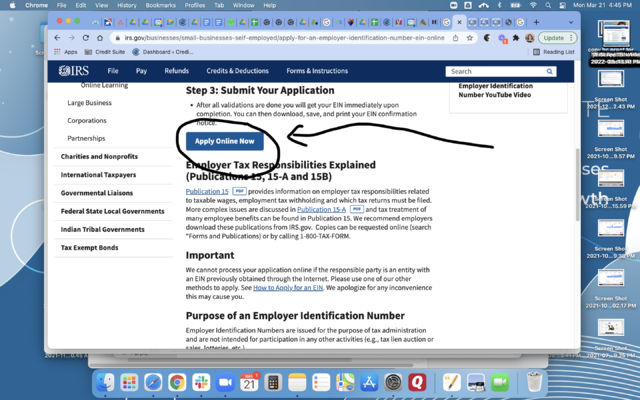
Read this page closely. Make sure you are eligible. If you are, you can continue to the online application by clicking the “Apply Online” button.
How to Get an EIN Number: Apply Online
After you click the button you’ll go to the application. It starts like this.
Read it, and if you are continuing, click “Begin Application.”
Next, you’ll see a screen asking you to choose your legal structure.
Choose Your Legal Structure
For Fundability purposes, you’ll want to incorporate. Hopefully, by this point you have already done so and you’ll choose “corporation.”
Then, you’ll be asked which type of corporation your business is.
Choose Your Business’s Corporation Type
Before you apply for an EIN, discuss with your attorney or tax professional which type of corporation is best for the specific budget and liability needs of your business.
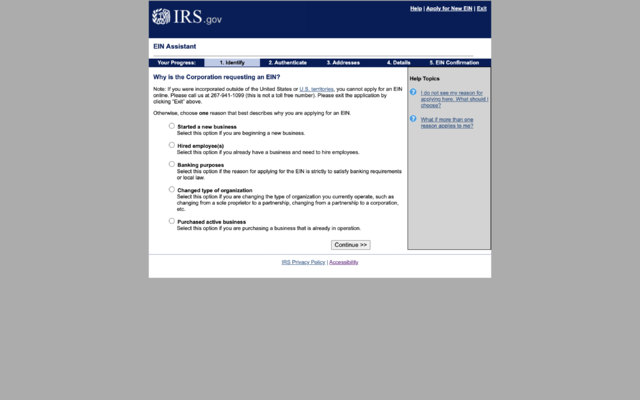
After choosing, you will be asked to confirm what you just entered. Then, the next screen will ask why you are requesting an EIN. If you enter “starting a new business,” you’ll be taken to a screen to enter your personal information.
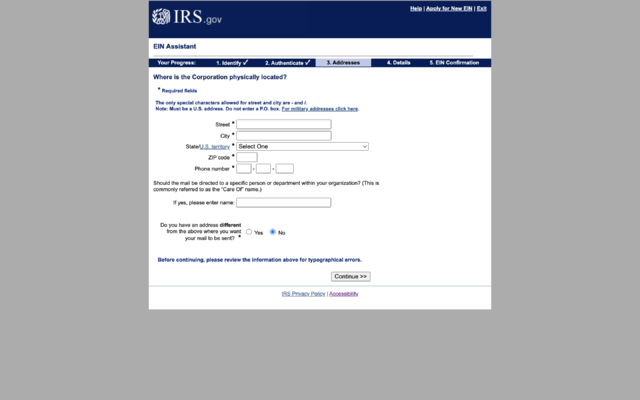
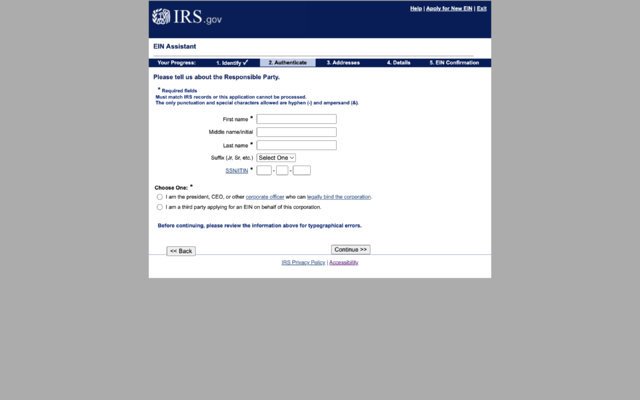
Enter Your Personal InformationEnter Your Business Address
After you enter your personal information and your affiliation to the business, you’ll have to enter your business address.
Let’s pause here for a minute. This is important. For Fundability, you MUST have a consistent, physical business address where you can receive mail. That may be your home, a virtual office, or another location. However, It should not be a P.O. Box or an UPS box. Consequently, if you ever change it, be sure you update the business address your EIN is linked to. The address needs to be consistent in all places.
The next screen asks for address verification. Sometimes, they will find your address listed slightly different in the database. Just choose how you want it listed. If the database is correct, I suggest using that one for the consistency mentioned earlier.
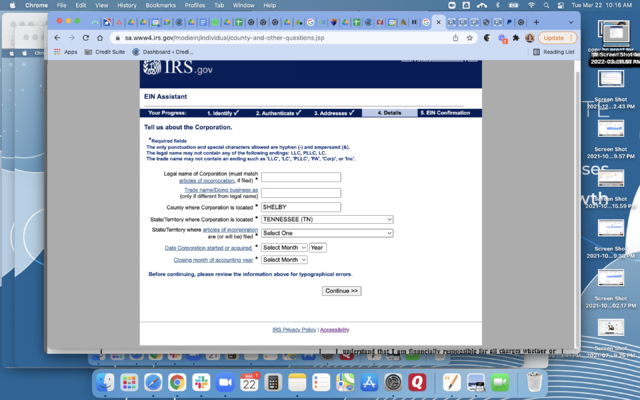
Lastly, enter the rest of your business details.
Enter Your Remaining Business Details
After that, you will get your EIN confirmation, if everything checks out.
When Can You Use Your EIN?
According to the IRS it can be used immediately for most of your business needs. These include:
Opening a bank account
Applying for business licenses
Filing a tax return by mail.
Yet, it will take up to two weeks before it is part of the IRS’s permanent records. Until then you cannot:
File an electronic return
Make an electronic payment
Pass an IRS Taxpayer Identification Number matching program.
It’s Not Hard
As you can see, the online process of applying for an EIN is pretty straightforward and fast. If you do not want to do it online, for whatever reason, there is a paper application that you can download, fill it out, and send in.
Of course, you can apply for an EIN anytime, but there are a few things that you can do first to make it easier to build fundability. For example:
Settle business contact information so it will already be correct when associated with your EIN
Ensure your business information is the same as it is everywhere else, down to the smallest ampersand
Incorporate, or at least choose your legal structure
If something changes, just be sure you change it everywhere. Want to know more about the steps to building Fundability, starting with a Fundable Foundation? Get a free business finance assessmentnow!
Businesses spend nearly 115 billion total on advertising across the Meta (formerly Facebook) platforms. Why? It works! And not only that; Meta has great tools that allow you to easily manage and track your business accounts.
Are you struggling to keep up with your Instagram and Facebook marketing?
DMs and comments falling through the cracks?
Do the multiple tabs for all your accounts and features like the Ad Manager drive you nuts?
Then you’re going to fall head over heels with Meta Business Suite, called Facebook Business Suite before Facebook changed its name to Meta.
It’s the platform’s newest creation, designed to iron out the time-sucking road bumps in social media management and make it easier for businesses to manage their Instagram and Facebook profiles.
Below, I’m breaking down everything you need to know about Meta Business Suite. We’ll unpack what it is, everything you can do with the tool, how it can benefit your business and a quick walkthrough on how to set up your account.
What Is Facebook Business Suite (now Meta Business Suite) and How Does It Work?
Meta Business Suite streamlines your Facebook and Instagram accounts into one easy-to-use dashboard.
Through the platform, you can manage all accounts you own or administrate with various tools to make controlling your business’s social media presence much easier.
The best part? It’s free and available on mobile and desktop.
All you need to do is link up your accounts, and you’ll instantly have access to an overview dashboard of your Facebook Pages and Instagram accounts.
You’ll be able to:
create a to-do list of notifications to manage
check insights on your performance and audience growth
create or see recent posts or stories
create or manage recent ads
see content calendar
view content inspiration
communicate with an inbox for Facebook and Instagram DMs and comments
access the Commerce Manager
check Business Suite updates
That’s only the tip of the iceberg.
There’s an entire “more tools” section with 12 other features to play around with, including:
appointments
ad manager
events manager
instant forms
media library
Facebook (Meta) Business Suite vs. Facebook Business Manager
Before Facebook became Meta, they offered both Facebook Business Suite and Facebook Business Manager. Both options are still offered under Meta.
The Business Manager is a backend tool used to share or limit access to your business accounts by assigning one of six different “roles” to those with access to your accounts.
The Business Suite offers front-end management, like merging notifications, scheduling posts, and managing your inbox.
Facebook (Meta) Business Suite allows you to combine and streamline your activity across the Meta social media and messenger platforms.
Leveraging Meta Business Suite Insights
Meta Business Suite makes it easy to track your business accounts and campaigns across the Meta social and messenger platforms.
Ad spend: You can track your ad spend across all Meta platforms. Based on how well you’re performing, you can adjust your spend accordingly. For example, if you’re spending a lot on Instagram ads but see via other insights that the ads aren’t performing well, you can redirect your budget towards the Meta platforms you’re more successful on.
Engagement: Meta (Facebook) Business Suite allows you to see engagement with your organic and boosted content. You can see what content performs best and use that to inform your future strategies and the content you publish on social.
Audience demographics: With Business Suite, you can see data about the users who interact with your profile and content. For example, you can see where they’re from, their other interests, their age, and more. You can use this information to continue creating content that targets your existing users, or adjust your strategies if your content isn’t reaching the right audience.
Everything you can do on desktop, you can also do on mobile. You can monitor your account activity, manage your inbox, and even get audience insights.
How to Use Meta Business Suite
Before you can start streamlining your social media management with Facebook (now Meta) Business Suite, you’ll need to follow a simple setup process.
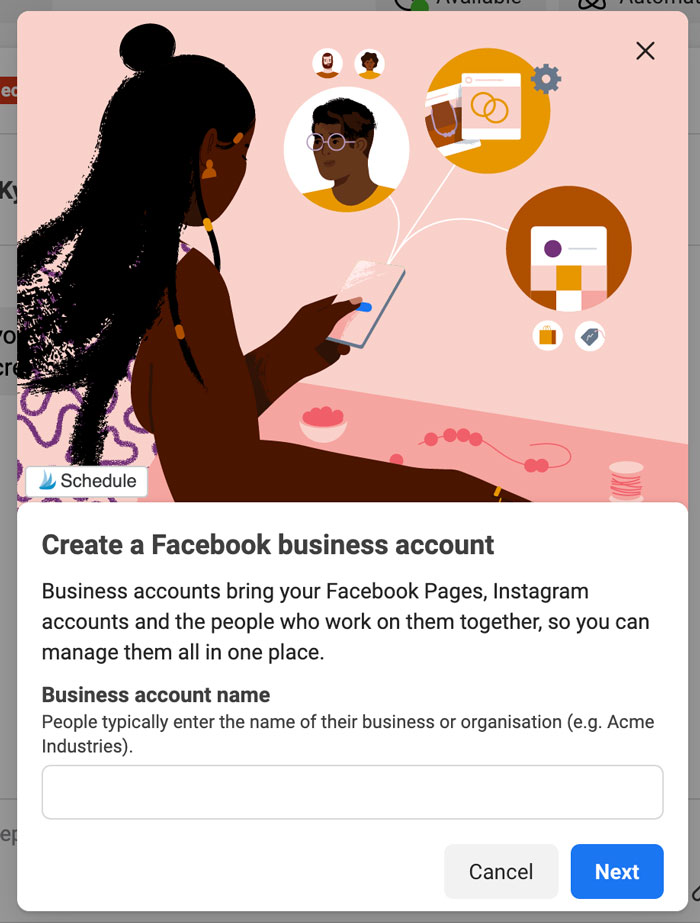
Step 1: Create a Facebook Business Account
Go to https://business.facebook.com/ and select “Create a Facebook Business Account.” Enter your business account name and select “Next” when you’re done.
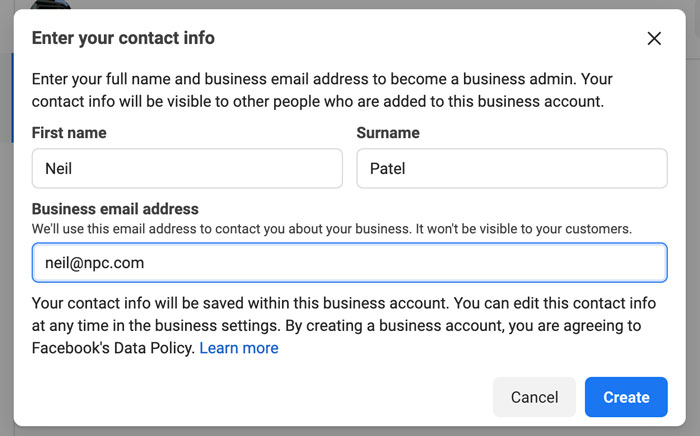
Step 2: Fill in Your Contact Information
Enter your full name and business email address. This information won’t be shared with your followers. Facebook will only use it to contact you.
Step 3: Select Your Facebook and Instagram Accounts
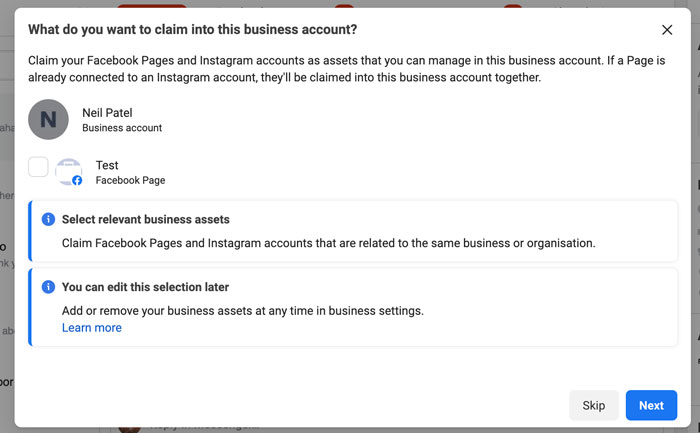
The Facebook and Instagram accounts you own are available for you to claim. If you’re managing an account someone else owns, you won’t be able to select it.
In order to select an Instagram account, it needs to be converted to a business or creator account. If you try to select a personal account, Facebook will ask you to switch before continuing the setup process.
Step 4: Add People to Your Business Account
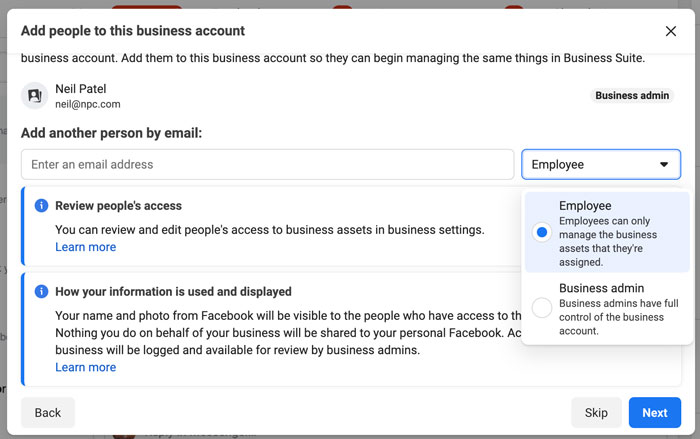
Here, you can select your page admins. Enter their email address and assign each contact as an employee (limited access) or business admin (full access).
If you’re running your accounts solo, you can skip this step.
Step 5: Review Your Business Account
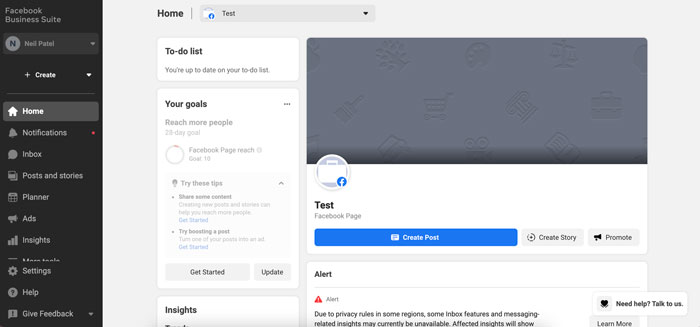
When you’re happy with your selection and who has access to your Business Suite, click on “Confirm.” Facebook will then take you to your dashboard overview, and you can start using all the tools inside the platform.
Tools to Use in Meta Business Suite
Curious about the tools inside Facebook Business Suite? Let’s take a deep dive and look at what you can do with the platform and how it can benefit your business.
Monitor Your Inbox
Are comments one of your biggest time suckers? Do you constantly find yourself hopping between apps on your phone or getting inundated with notifications on your desktop?
With the inbox tool in Business Suite, you can see all your Instagram and Facebook comments in one place.
Pop the kettle on, make some coffee, block out 30-minutes in your calendar and respond to everything at once.
What about direct messages (DMs)? You’ll find that here too.
Got the Facebook chat plugin on your website? You can manage all your messages here as well.
Sick of replying to the same question every single day? Business Suite lets you create automated replies for your frequently asked questions.
How’s that for efficiency?
Explore Insights
There are tons of free and paid tools that show you Facebook and Instagram analytics, but few compare the platform’s built-in option.
With Business Suite, you can see your latest statistics for all your accounts.
Gone are the days of toggling between the different apps or going in and out of individual posts.
On the Insights dashboard, you can see an overview of how your content is performing over a specific time period, and sort your posts by:
reach
likes and reactions
comments
shares
results
cost per result
link clicks
recent content
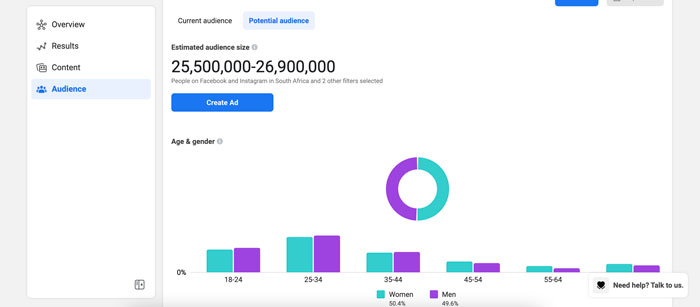
One of the most interesting features of Insights is the Audience section. It breaks down your current audience for both platforms, and you can see at a glance:
age and gender
towns and cities
top countries
There’s also a potential audience tab. It details your estimated audience size if you run an ad, as well as the top pages liked by your potential audience.
Not liking what you’re seeing? You can create a custom audience by clicking on the “filter” button and refining the results based on:
location
age
gender
interests
language
Create Posts and Stories
Are you using post-creation apps like Later or Planoly? Business Suite sets itself up as a rival by giving you the ability to create your posts and stories in one place and schedule each one out.
That’s not all.
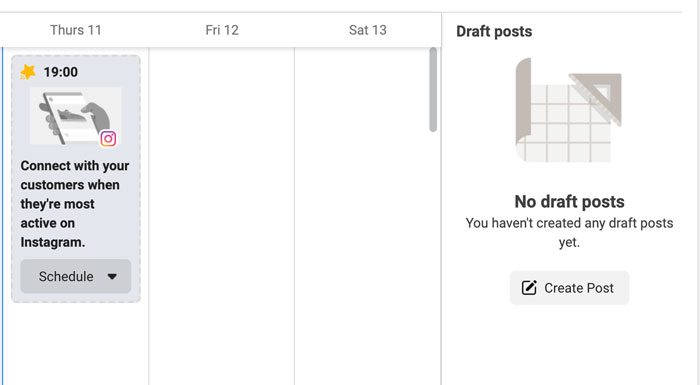
If you go to the Planner section on your dashboard, you’ll see a calendar view of your past and upcoming posts.
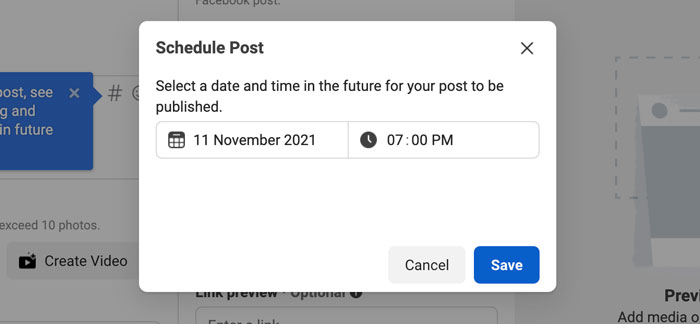
Facebook also recommends a timeslot of when your audience is most online. Click on it, and you can start creating a new post or story.
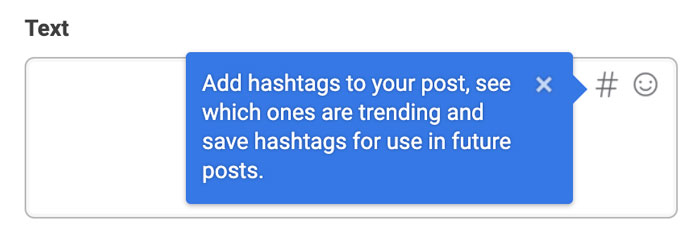
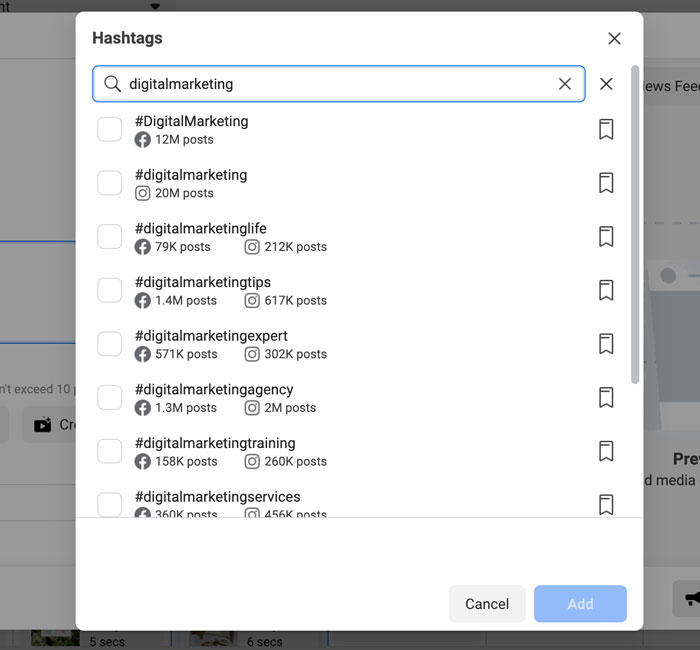
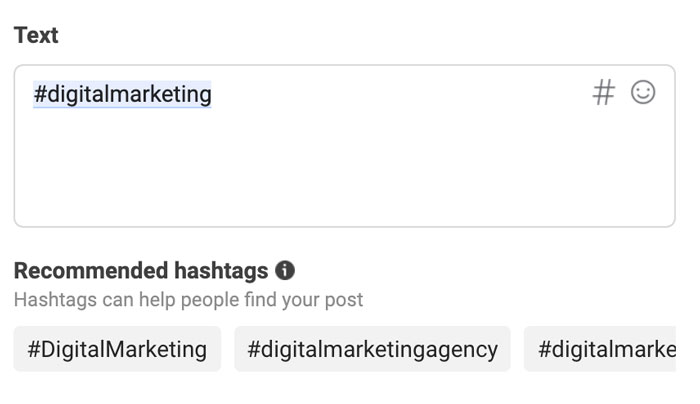
One of my favorite features in the “New Post” box is the hashtag tool. It shows you which hashtags are trending, the number of posts using a tag, and lets you save your favorites for later.
Plus, it shows you hashtag results for each platform and gives you recommendations based on what you’ve already selected.
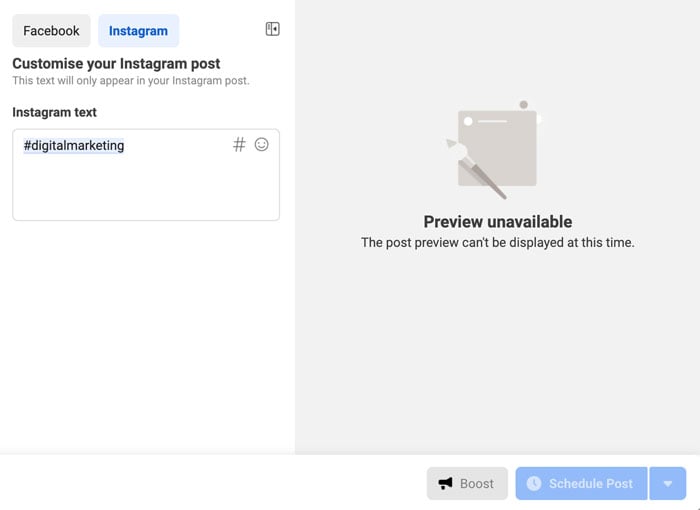
While in create mode, you can put together your Instagram and Facebook posts at the same time. Switch between the different tabs, and you can see exactly how your post will look on the two platforms.
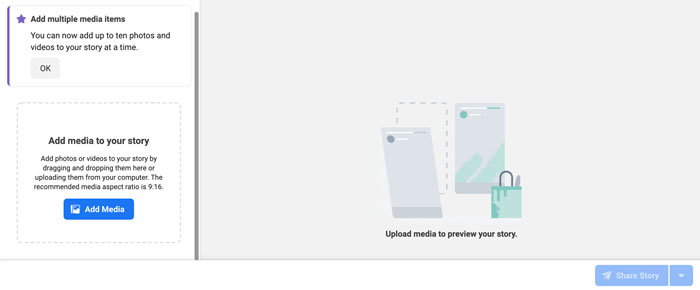
For Stories, it works the same. Upload up to 10 photos or videos at once and schedule each one out when you’re done.
Create Ads
Don’t want to have another tab open for Facebook Ad Manager? You can keep track of your ad performance and create ads from the Business Suite.
It’s another time-saver and allows you to see how you’re tracking towards goals.
On the dashboard, you can see:
reach
post engagement
link clicks
page likes
Switch between the different filter views to see your results over the last 90, 60, 30, and 7 days.
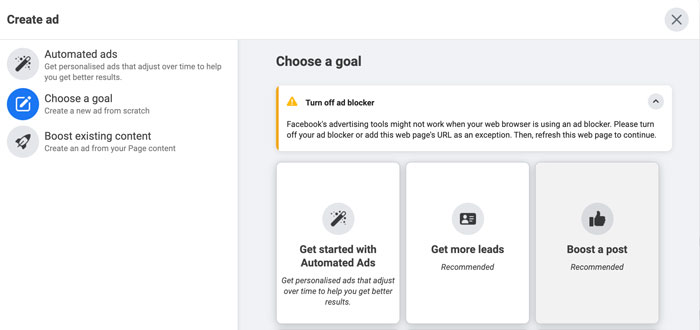
Click on the blue “Create Ad” button in the top right-hand corner to create an ad. A pop-up will load and take you through a step-by-step process for setting up a creative that converts.
First, you’ll select your ad goal. You can choose from:
automated ads
get more leads
boost a post
boost an Instagram post
promote a page
get more website visitors
get more messages
Next, start designing your ad creative. You’ll see a live preview as you adjust your text and media.
Turn on automatic adjustments if you want Facebook to tweak your ad for each viewer. For example, the platform might adjust the brightness or show the original aspect ratio if it thinks the ad will perform better.
Scroll down to select your audience or create a new one, placements, and set your campaign budget and duration.
When you’re done, click on “Promote Now” for your ad to go into review.
Create Appointments for Your Business
Remember those extra options I spoke about earlier?
One of the most important features of an online business is the appointments scheduler.
If you’re running a service-based business, take advantage of Facebook’s capabilities and empower your audience to book directly through the platform.
When people don’t need to log onto another site to complete the process, you’re removing an extra step and making it that much easier to close a sale.
The result? A boost in your bottom line!
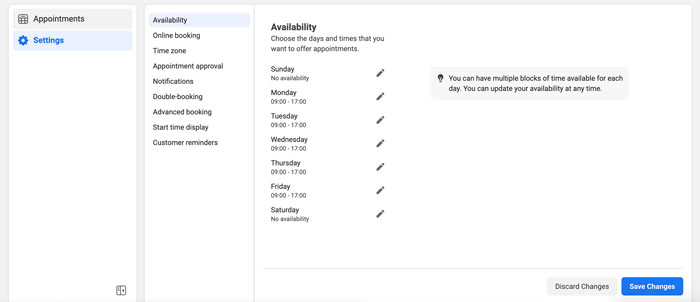
Inside Business Suite, you can manage your appointments, view requests, and adjust the settings to suit your schedule.
Generate Leads With Instant Forms
Does your business rely heavily on lead gen? Start using Facebook’s Instant Forms.
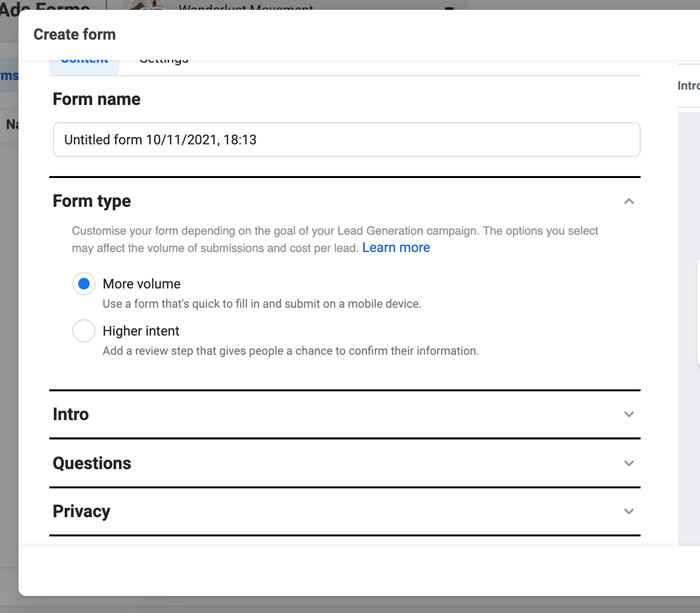
What are Instant Forms? Think of it as a mini CRM system. When you create an ad and set your objective to find leads, you can create custom forms users can fill out without leaving the platform.
Again, you’re removing the obstacle of trying to get them to go from one website to another. Thus, improving your chances of someone filling out the form and requesting a callback.
With Business Suite, you can manage your forms and set up the CRM system.
When you create a form, Facebook offers different options depending on your lead generation goal.
For example, you can create a “more volume” form (a quick option) or a “higher intent” (adds an extra step for users to review their information before submitting).
Frequently Asked Questions About Meta Business Suite
What is Meta Business Suite (formerly Facebook Business Suite) used for?
The Meta Business Suite is used for managing your Facebook Pages and Instagram accounts in one dashboard. You can reply to comments, create posts, schedule stories, run ads, and more.
How do you qualify for Meta Business Suite?
You need to have a Facebook page. If you have an Instagram account, you’ll need to convert it to a business account if you want to sync it to your Business Suite.
Is Business Suite on Facebook free?
Yes, Business Suite is free on Facebook to set up and use. All you need is a Facebook account and a Facebook Page to get started on the platform.
Is Facebook Business Suite the same as Meta Business Suite?
Yes, Facebook Business Suite is the same as Meta Business Suite. It was renamed “Meta Business Suite” when Facebook rebranded to Meta.
{
“@context”: “https://schema.org”,
“@type”: “FAQPage”,
“mainEntity”: [
{
“@type”: “Question”,
“name”: “What is Meta Business Suite (formerly Facebook Business Suite) used for?”,
“acceptedAnswer”: {
“@type”: “Answer”,
“text”: ”
The Meta Business Suite is used for managing your Facebook Pages and Instagram accounts in one dashboard. You can reply to comments, create posts, schedule stories, run ads, and more.
”
}
}
, {
“@type”: “Question”,
“name”: “How do you qualify for Meta Business Suite? “,
“acceptedAnswer”: {
“@type”: “Answer”,
“text”: ”
You need to have a Facebook page. If you have an Instagram account, you’ll need to convert it to a business account if you want to sync it to your Business Suite.
”
}
}
, {
“@type”: “Question”,
“name”: “Is Business Suite on Facebook free?”,
“acceptedAnswer”: {
“@type”: “Answer”,
“text”: ”
Yes, Business Suite is free on Facebook to set up and use. All you need is a Facebook account and a Facebook Page to get started on the platform.
”
}
}
, {
“@type”: “Question”,
“name”: “Is Facebook Business Suite the same as Meta Business Suite?”,
“acceptedAnswer”: {
“@type”: “Answer”,
“text”: ”
Yes, Facebook Business Suite is the same as Meta Business Suite. It was renamed \”Meta Business Suite\” when Facebook rebranded to Meta.
”
}
}
]
}
Conclusion: Meta Business Suite (Formerly Facebook Business Suite)
Meta Business Suite is perfect for creators, personal brands, and businesses to streamline their social media management across Facebook and Instagram.
It gives you everything you need to monitor your growth, stay on top of comments and DMs from your audience, schedule your content, create ads, and so much more.
If you’re only using these two platforms to run your business and you’re using other social media management tools, it’s worthwhile to take a peek inside Business Suite. You might find it’s a more robust tool, and you can nip another business expense from your monthly budget.
What are your thoughts on Meta (Facebook) Business Suite? Are you going to make the switch and use it to manage your Facebook and Instagram accounts?
API Debt Facility for Fintechs | Founding team members | London, UK
I am building an API-first debt facility for Fintechs. Lending FinTechs can borrow funds to lend to their users in real time without ever needing to raise an external debt facility from funds. The concept builds on top of “Banking as a Service” platforms that allow fintechs to create and manage banking accounts and credit cards on behalf of their users. We will aim to make financial capital readily available for their business model on subscription basis.
The offering has been well received among early stage FinTechs in London (consumer loans, BNPL, car financing, invoice financing) and leading angel investors. I am now looking to bring on board talented founding team members to build the first iteration of the product. Get in touch: https://bit.ly/li_prof13
Washington State University | Pullman, WA | Full-time | Remote or Onsite, VISA |
The Paul G. Allen School for Global Health (Allen School) at Washington State University (WSU) is seeking to fill two positions to support multiple research programs in the United States and abroad (including but not limited to Kenya, Tanzania and Guatemala). These positions are part of the new Allen School Data Core, and will support faculty research and major international programs researching zoonotic pathogens, antimicrobial resistance, and other pressing global health challenges.
Successful candidates will be based in Pullman, WA, with the possibility of remote work. Periodic travel to international sites will be required.
Feel free to contact me directly if you’re interested – this is a great opportunity for anyone interested in applying their data science or technical skills to scientific research.
UPS Advanced Technology Group | Multiple Roles (vision, MLOps, embedded, MechE) | Full-Time | Onsite | Atlanta, GA Hi HN! We’re the UPS Advanced Technology Group, a small, nimble, hands-on advanced R&D team within UPS. We’re building out a ML-centric hardware and software technology suite to solve a critical UPS operational challenge on a short … Continue reading New comment by julianbell in "Ask HN: Who is hiring? (April 2022)"
Rhode Island Treasurer Seth Magaziner has engaged in an intricate political dance as he vies for higher office, ditching his gubernatorial aspirations for the seat being vacated by Rep. Jim Langevin.
You probably know why you need tradelines on your business credit reports. However, there is a right way and a wrong way to get them there. Adding tradelines is important, but you should definitely avoid business tradelines for sale. Buying tradelines can hurt more than it helps.
Buying Business Tradelines for Sale Isn’t The Shortcut it May Seem
Honestly, there are no shortcuts in life or business. Think about it. Inevitably when you try to cut corners to make things go faster, you miss something important. More times than not, it ends up costing more time and money than it would have if you had just done it the right way to begin with. This is as true about building business credit as it is anything else.
Still, some people try shortcuts anyway. The top three “shortcuts” to building business credit are:
For many, buying tradelines seems like the easiest and least risky shortcut. However, these 6 organizations agree, it’s just not worth it.
#1 Federal Reserve
“The potential distortions in credit scores that piggybacking credit may introduce suggest that a reconsideration of existing regulations, industry practices, or both may be warranted to preserve the predictiveness of credit scoring models.”
“Opening a business credit account with any company is free. If you are paying for it, you are being ripped off. When the company who sold that tradeline to you gets taken down, all of their clients will get punished, too, with a mound of debt and a cursed credit file that will keep you from getting more credit to be able to pay it off.”
When commenting on a 2013 bust of a fraud ring, “A second kind of tradeline is the “authorized user” tradeline, where a credit card holder adds another, so-called “authorized user,” to a credit card account. This raises the credit score of the authorized user, who inherits some of the primary user’s credit history.
Some defendants created and sold fake lines of credit for false identities made up by other defendants. These fraudulent primary tradelines were then used to increase the credit limits on fraud cards, so that the defendants could reap even larger profits. Defendants used the authorized user tradelines to create new identities.”
#4 FICO
FICO’s opinion on piggybacking is obvious here: “A … shadier version of piggybacking has been promoted by some CROs who offer to “rent” to their credit-challenged customers the trade lines of established account holders, in an effort to boost their customers’ credit profiles and scores.”
#5 Equifax
Equifax: “… authorized user abuse occurs when low-risk primary card owners “rent” their tradelines with extensive credit histories, high credit limits and solid repayment profiles to others – most times, knowingly, to fraudsters.”
#6 Experian
Experian: “Buying tradelines may be viewed as deceptive by lenders and credit reporting agencies, and could even put you in danger of committing bank fraud.
Credit scores are designed to help lenders determine a borrower’s creditworthiness, and most use your credit scores and credit reports to determine whether to approve a credit application and what terms you qualify for.
If you pay money to improve your credit scores without doing any of the work or even getting a card to use, you could be falsely representing your creditworthiness to potential lenders.”
Buying Business Tradelines for Sale
So, what are business trade lines, and how does buying business tradelines for sale work? Legit business trade lines are lines of credit extended to businesses by vendors. A business gets goods or services and agrees to pay for them at a later date. Tradelines are often established between a business and a vendor, rather than a line of credit offered by a bank. They can help businesses build credit by rapidly building positive credit experiences.
There are many companies online which promise to sell ‘seasoned’ tradelines. If your company has poor or little credit, you can pay to have your business piggyback on the account of someone with well established, strong credit. This allows new business owners to seem more creditworthy than they really are. Sounds fishy right?
How Does Piggybacking a Tradeline Work?
A third party uses a creditworthy borrower’s accounts to improve their own credit. The borrower adds the third party as a user of his lines of credit. But, he or she does not actually provide the third party with credit cards or account numbers. The third party has no way to actually make charges against the account. As a result, that third party user never actually uses the credit.
The benefit to the third party is an improved credit rating. It appears they already have higher limit revolving accounts. In theory, showing you already have credit makes you more creditworthy for higher limit accounts. Some companies claim to be able to secure $100,000 – 250,000 credit lines once these accounts are reporting. Obviously, this buying of business tradelines for sale is dishonest.
A company offering the piggybacking service maintains a network of creditworthy ‘card holders’ or ‘vendors.’ They will add strangers to their accounts as users for a fee. A third party, looking to increase their credit score, contacts the company. Then, the company selects one of the business tradelines for sale to the client, and charges the client a fee per account.
It Works for Personal Credit, so What’s the Problem?
Consumer trades such as this are legitimate. A person with poor credit can use this strategy without issue. So, if you know someone with great credit, it is perfectly fine to ask if you can become an authorized user on their card. You never need to use the card, and it can still help to raise your personal credit scores.
But, in the business credit realm, things are much different. Consider what the following agencies have to say.
Lenders Know All About Business Tradelines for Sale
Lenders and CRAs know all the unethical methods out there. They know what to look for, and they are looking. For example, when they see a change in company ownership, or a new authorized user on a card, they dig deeper. Furthermore, sooner or later D&B will figure out you are using business tradelines for sale. If a tradeline sales company inquires into your credit report, D & B finds out.
Any time you buy a tradeline, the seller checks your credit. Of course they do, because they want to be sure they get paid. When this happens, here is what happens next:
D&B shuts down tradeline(s)
They red flag your entire profile, including legit trades alongside the illegitimate ones
You lose whatever time you think you gained by using business tradelines for sale
Plus, you’re out the cost of the tradelines
In addition, when a company has a reputation of being a tradeline seller, that company will be flagged as such. Any new inquiries by that flagged tradeline seller harms buyers, including older tradeline sales. There is no Statute of Limitations on this. That means, if you bought tradelines 50 years ago, D&B may still find out and it can still harm you.
Buying Business Tradelines for Sale is Not Worth It
Buying tradelines involves buying tradelines that belong to others and putting them on your credit report. While not technically illegal, it is dishonest. If a lender figures out you are doing it, you could be black balled. It isn’t worth it.
Still, adding tradelines to your business credit report is vital. You just have to do it the right way. Our Business Finance Suite helps you do just that. It walks you through the process step-by-step, so you get your own tradelines that you can actually use. Find out more today by getting a free Business Finance Assessment with a Credit Suite specialist.
This website uses cookies to improve your experience. We'll assume you're ok with this, but you can opt-out if you wish.AcceptRejectRead More
Privacy & Cookies Policy
Privacy Overview
This website uses cookies to improve your experience while you navigate through the website. Out of these, the cookies that are categorized as necessary are stored on your browser as they are essential for the working of basic functionalities of the website. We also use third-party cookies that help us analyze and understand how you use this website. These cookies will be stored in your browser only with your consent. You also have the option to opt-out of these cookies. But opting out of some of these cookies may affect your browsing experience.
Necessary cookies are absolutely essential for the website to function properly. This category only includes cookies that ensures basic functionalities and security features of the website. These cookies do not store any personal information.
Any cookies that may not be particularly necessary for the website to function and is used specifically to collect user personal data via analytics, ads, other embedded contents are termed as non-necessary cookies. It is mandatory to procure user consent prior to running these cookies on your website.


 Foundation. It’s like a Social Security Number for your business. You can get one for free from the IRS. But, what exactly does this entail? Here is how to get an EIN, step-by-step.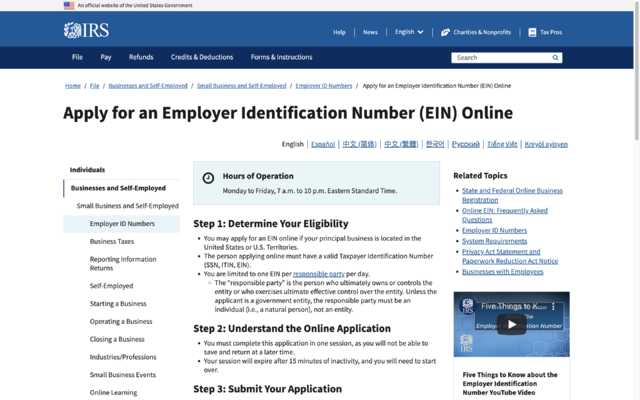
 Enter Your Business Address