Best Shared Hosting Companies
Disclosure: This content is reader-supported, which means if you click on some of our links that we may earn a commission.
Do you want to skip the read and get right to my top pick? The best shared hosting provider for most people is Hostinger.
If you are starting a new website from scratch, shared hosting will be the best option 99% of the time.
There are other types of hosting for bigger sites with tons of traffic. But if you are just getting off the ground, shared hosting is going to be the best price with the least amount of maintenance on your end.
I’ve reviewed my top six recommendations for shared hosting. These are dependable options from well-known providers. You’re not going to get scammed or wind up with a super slow site.
After the reviews, I’ve included a short buyers guide to help you select the best option for your specific needs.
#1 – Hostinger Review — The Lowest Price for Shared Hosting
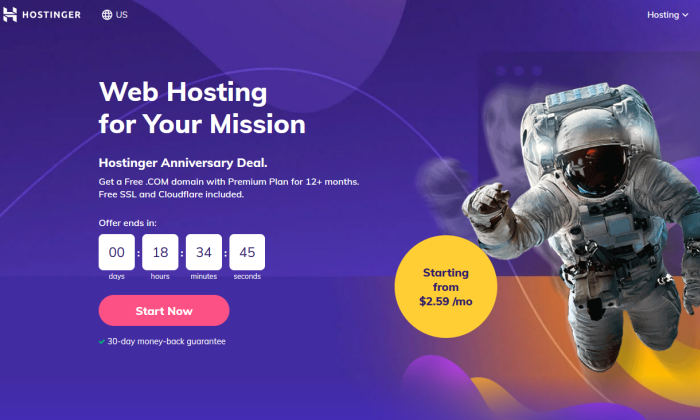
Hostinger strikes the balance between price and performance–it’s the lowest amount you can spend and still get good hosting.
For $1.39 per month, Hostinger will set you up with one site good for up to 10,000 visitors each month. You also get 30 GB of storage, which is a hefty amount for the price.
If you’re starting out on a tight budget, this is more than enough to get your site online.
Of course you have to put the full amount down for a four-year hosting plan to get the best deal. Let’s do the math: 48 months at $1.39 per month is $66.72.
That means you are paying less than $70 for four years of hosting.
There’s simply no way to drive the price lower. You might be able to scratch out a better deal, but it’s probably not going to be with such a reputable host.
Hostinger includes 24/7/365 live chat customer service with every plan. They don’t hang you out to dry. In fact the company offers a 99.99% uptime guarantee.
There’s also a surprising amount of services and features bundled into the most affordable hosting package:
- 1 free email account
- Weekly backups
- Free SSL certificate
- 100+ one-click install apps
- WordPress starter kit
A free email account is one less thing to buy, courtesy weekly backups are a comforting, zero-effort insurance plan.
I’m still talking about Hostinger’s entry-level plan. Literally everything I’ve mentioned up to this point is included for $1.39 per month.
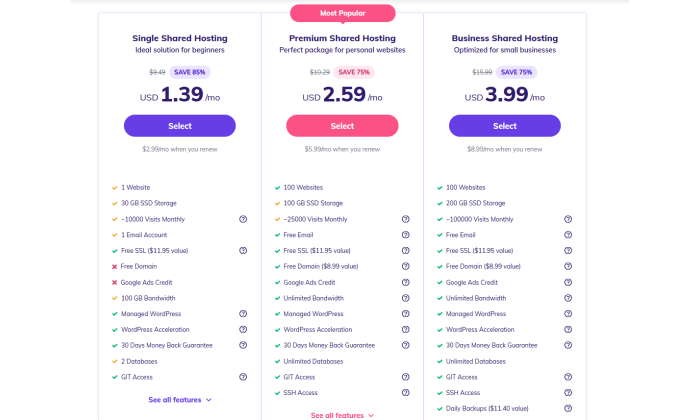
If you need to create additional websites, Hostinger jumps to a whopping $2.59 per month for up to 100 sites.
Need more than 100k visitors a month? You can stick with Hostinger, but be ready to pay a tad more, at $3.99 per month, for Business Shared Hosting.
Yes, the price is going to jump upon renewal like any other host. The thing is, Hostinger’s renewal rate stays lower if you sign up for longer. With the 4-year Single Shared Deal, for example, your renewal rate is $2.99. If you only sign up for a year, the rate is $5.99.
So, you either get a really great or an incredible deal.
I recommend Hostinger for folks who know they need hosting and want the cheapest price out there.
You get better than expected performance from a web host that’s charging you less than the price of an oil change to host your site for four years.
Current high school freshmen will have their diploma in hand before you have to pay for hosting again.
Get in touch with Hostinger and see how little you need to spend.
#2 – Bluehost Review — The Best Way to Launch Your WordPress Site Today
Looking for a one-stop-shop to get your WordPress up and running in no time flat?
Go with Bluehost for a turnkey solution absolutely anyone can use.
Normally you have to get hosting, a domain, and download WordPress. It’s not rocket science, but for a first-timer there are a lot of places to get tripped up.
With Bluehost, you can get everything in a single place for one low price.
The entire step-by-step process, from signing up to publishing your first page, is as easy as possible. There’s guidance at every turn, and should you encounter difficulties of any kind, you can reach out to customer service.
Don’t take my word for it. Bluehost has been officially recommended by WordPress since 2005. When you make contact with a service agent, you’re getting assistance from someone that resolves WordPress issues all the time.
Building a website incredibly straight-forward. There’s no code to write or hours spent Googling answers. This is true if you have never designed a website before in your life.
Choose a template to start your site and then you are off and running.

Find something that aligns with your brand or goals, and customize from there. Bluehost actually gives you custom WordPress themes that you can make your own. Use fonts, colors, and a layout that speaks to your purpose.
In addition to WordPress tools, Bluehost includes a number of features that make your site faster and more secure, with little to no work on your part:
- Automatic WordPress updates
- Google Business verification
- Free CDN
- Free SSL certificate
- Domain manager
Most people aren’t thinking about getting an SSL certificate when they launch a site. But it’s the only way to make sure that visitors know your site is safe. With Bluehost, you can enable a free SSL certificate across your whole site simply by turning it on.
Same with the CDN, which you can enable with one-click to get a faster site. Both of these features are important, but not things you want to have to mess around with. Bluehost makes it effortless to get the benefits with zero work on your end.
If you need more than just WordPress on your sites, go with standard shared hosting through Bluehost.
It’s a great deal, but if you know you are going to use only WordPress, I recommend going with one of Bluehost’s WordPress hosting plans. They are basically the same as shared hosting price-wise, but there’s better speed and security.
The difference with shared WordPress hosting is that the servers are optimized for just that. No other type of sites run on those servers, so the performance is better and it’s easier to secure.
Bluehost shared WordPress hosting is available in 3 different plans:
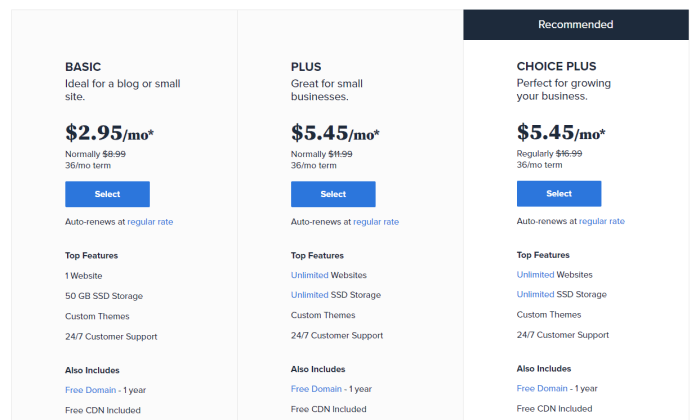
The Basic plan is going to work fine if you are just getting your site off the ground. 50 GB storage is more than enough for most small sites. Upgrading to Plus gives you unlimited storage, and Choice Plus comes with free automated backups.
You’ll notice that Bluehost doesn’t offer monthly pricing. You can sign up for one, two, or three-year plans. The longer your plan, the deeper the discount.
That means you are getting three years of hosting at $2.95 per month. There are enough services and resources bundled with your hosting plan to avoid having to pay for much more.
Compared to hosts that only offer discounts during your first year, Bluehost is a great way to save more money over time.
Everything you need to get started is right there. Hosting plus free domain plus WordPress. Step-by-step instructions and 24/7 guidance. If you aren’t happy with the experience, Bluehost offers a 30-day money-back guarantee.
Jumpstart your WordPress today with Bluehost.
#3 – A2 Hosting Review — The Best Way to Escape a Nightmare Host
I have migrated sites from one host to another, and there’s nothing fun about it. Not going to name names, but I have experienced customer service airballs and been price-gouged to the point where I needed a new host that day.
If you find yourself needing to transfer your site away from a nightmare situation, A2 Hosting is your safe haven from further issues.
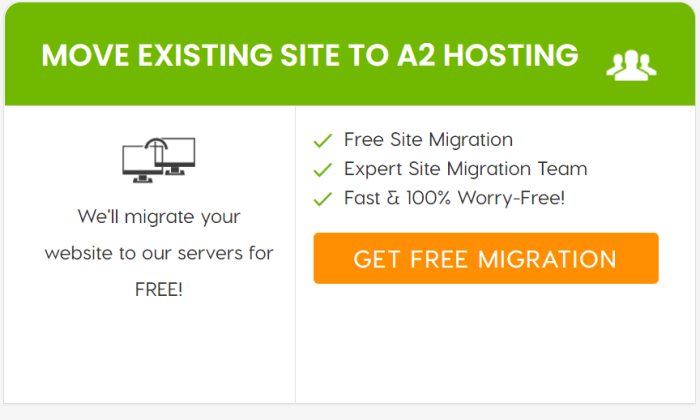
First things first, A2 will transfer your site for free. This is a big deal because there are a lot of little things that have to be done right in order for the process to go smooth.
A2 has a dedicated team of site migration experts that will help you make sure everything gets moved over safely. A lot of companies will give you some tools to make the process go faster, but it still amounts to a DIY migration. A2 actually does it for you.
And once you are set up, you’ll find that A2’s customer support is definitely a step up from whatever you had before. Even the cheapest plan you can get comes with 24/7 support by phone, email, and live chat.
The customer service team has an excellent reputation for resolving technical questions quickly. No more uncertainty and confusion when something goes wrong.
Your site speed will also likely improve, as A2 is constantly upgrading to the newest technologies. LiteSpeed web servers (available with Turbo plans) deliver 6-11 times faster performance than others.
A2 Hosting has been around for a long time and the platform already works with the popular tools everyone uses. There are one-click installs for WordPress, WooCommerce, Joomla, Drupal, and more.
It’s also got bundled benefits your old host never dreamed of providing for free, like:
- 100 GB storage
- Unlimited email
- Unlimited subdomains and parked domains
- Site staging
- Free SSL certificate
- Malware and virus scanning
Unlimited email for free with an entry-level plan is very uncommon. Usually you have to pay extra. Site staging, too, is very rare to get with shared hosting. This allows you to test out new features on your site in a development area before pushing them live.
And 100 GB storage space? That’s two or three times as much as you are going to get for such a low price.
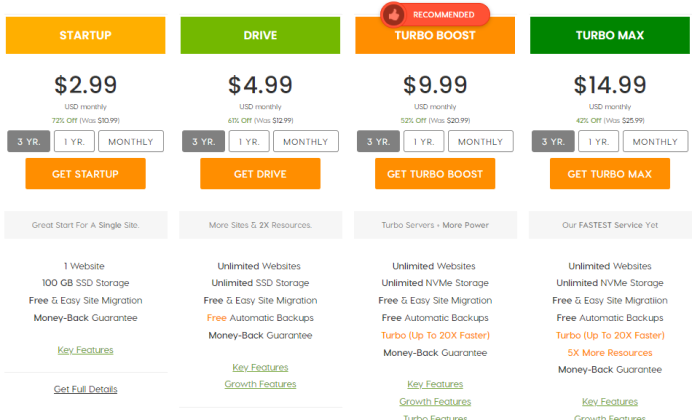
I like A2 for shared hosting because of the great service, generous resources, and useful bundled features.
You’ll notice that the renewal rates are good, not great. Here’s the thing. A2 has 5-star reviews from people who stick with it for years, and they all mention the high quality of the customer service. Some have even reported switching hosts upon renewal, only to run back to A2 because they didn’t know how good they had it.
This is a really good option for people who’s sites are starting to hit resource limits with their current provider. Maybe you’re running out of storage space or maybe your site is just too slow with your other host.
Solve this by moving over to A2 hosting. You’ll get a great price and A2 will move your site over for free.
A2 is the final host you’ll ever need. No more migrations. No more run-arounds from customer service. Just top speed and assistance the moment you need it.
Let A2 rescue you from subpar hosting today.
#4 – DreamHost Review — The Best Way to Avoid an Annual Pricing Plan
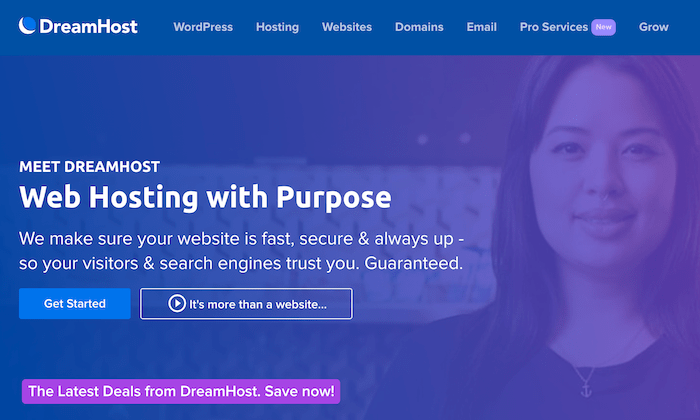
If you want a website without the commitment of a long contract, DreamHost is going to give you the best price.
The company does offer very competitive rates if you are willing to sign up long-term, but unlike most competitors, DreamHost will give you a great deal month-to-month.
It works for people who just need dependable hosting, not a long-term relationship with yet another provider.
Shared hosting starts at $4.95 per month. That’s all you have to put down to get started.
There are no hard and fast limits on bandwidth or storage, so you don’t have to worry about overage fees.
Obviously your site can’t take more than its fair share of resources from the shared server, so if you are planning on running a lot of high-caliber website elements or an online store, you might want to spring for a Shared Unlimited plan. That’s only $8.95 per month to start, still no long-term commitment necessary.
You might think that performance or customer service would suffer if you’re not kicking a ton of money in on day one. With DreamHost, though, you get a 100% uptime guarantee. The company will actually refund you if your site goes down.
It’s a win/win scenario. DreamHost rarely if ever has to pay people because the sites never go down.
Another nice perk of DreamHost is that customer service is never outsourced. You can reach out any time of day by email. You can also get in touch with live chat during business hours (5:30AM–9:30PM PT), which more than covers the entire continental U.S.
DreamHost is also an officially recommended WP provider. I’d go with DreamHost for WordPress sites if you don’t want to put a lot of money down today. Bluehost is phenomenal, but you have to sign up for a year or more.
There’s also a lot of bundled services that will save you time and money, including:
- One-click installs for Google Workspace (formerly G Suite) and Google Analytics
- Automated WP migrations
- Automated WP backups
- 200 WP templates
- SSL Certificate
- Free domain privacy and protection
I want to call out the free domain privacy and protection, which is free forever with DreamHost. This keeps your personal or business information out of the public record (which I recommend doing), and can cost $10-15 per year with other providers.
DreamHost will include a domain for free, but only if you sign up for a year or more. Alternatively, you can purchase a domain directly through DreamHost at a very reasonable price.
Either way it’s a good deal, but I want to focus on DreamHost’s monthly pricing plans for shared hosting. These are just much better than if you try to go month-to-month with other hosts.
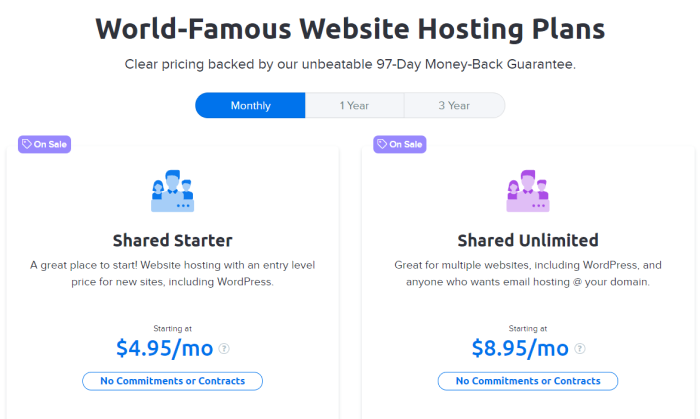
The Shared Starter plan is less than $5 to get started today. No long-term commitment or large upfront cost. After three months, the price jumps up a few bucks to the new current rate, which happens to be $7.99.
This is still not a lot for hosting, considering the unlimited resources and highly available customer service.
One could forgive DreamHost for being less flexible on their refund policy, given that you don’t have to sign anything, but the reverse is in fact true.
DreamHost offers a 97-day refund, which is months longer than most. Cancel whenever you like. There’s no fight to get your money back.
No contract? No problem with DreamHost.
#5 – GreenGeeks Review Review — The Best for Socially-Conscious Companies
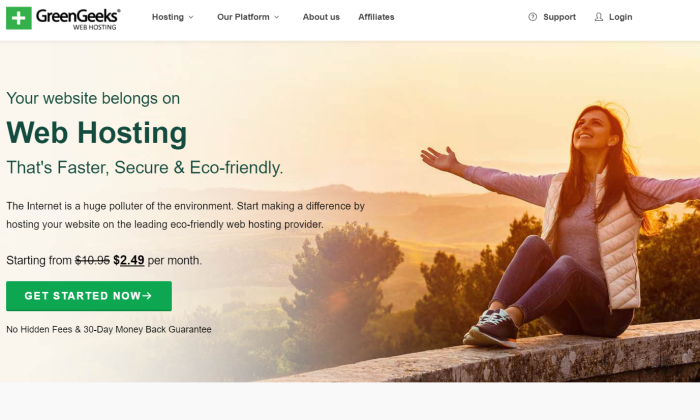
GreenGeeks is a solid all-around hosting company with a lot of actually useful bundled benefits. I mean it. You get fast sites and customer service that’s a cut above what you get most other places.
But if you want an eco-friendly hosting solution, this is definitely your number one pick.
Every web host has giant server farms sucking up energy to deliver their service. There’s no way around it–the internet causes pollution. GreenGeeks matches every bit of energy it takes for hosting with three times the amount in renewable energy.
This is what GreenGeeks means by a “300% green hosting platform.” By choosing them as your host, you’re more than offsetting your carbon footprint. You’ll actually be reducing it, putting more power back into the system than you took out.
As noble as all of this is, I wouldn’t be recommending GreenGeeks if the company didn’t deliver the hosting goods.
It does. Big time. Any plan you choose comes with some of the best performance in the shared web hosting space.
The price is extremely competitive and you get a long list of useful services that improve your website speed, save you money, and allow you to spend less time thinking about hosting. For less than $2.50 per month, you get:
- Nightly backups
- 50 email accounts
- Unlimited bandwidth
- 50GB of storage
- SSL Certificate
- Domain for the first year
- CDN
- Website builder
With a lot of other hosts, you have to pay extra for a site builder and email. GreenGeeks includes both for free. There’s less stuff to set up, and moving forward, less maintenance on your end with courtesy nightly backups.
You also get a free domain name for the first year, which saves another $10-15 bucks right there.
Customer service is always available. You can reach out by phone, email tickets, or chat. The company has an excellent service reputation. GreenGeeks is also one of the few hosts with dedicated specialists that will help you transfer your old site for free.
I give Bluehost the edge for starting a WordPress site, though GreenGeeks makes the process very easy as well. If you’re not planning on WordPress, GreenGeeks is a good choice for Drupal and Joomla, two other popular content management systems. GreenGeeks gives you one-click installs and automatic updates for those apps and more.
GreenGeeks offers three shared hosting plans.
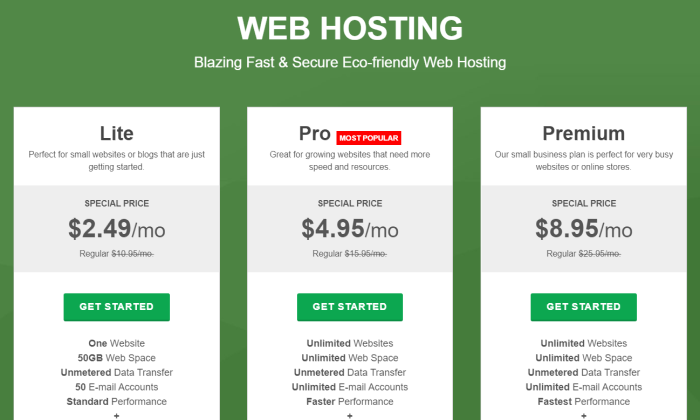
The Lite plan includes everything that I have mentioned so far. If you are just starting out, this is going to be all you need and more for a single site.
The Pro and Premium plans let you build an unlimited number of sites and offer more resources to help your site handle more traffic as it grows.
Regardless of the plan you choose, virtually everything you need to start running your site is bundled in. You can manage everything from a single dashboard.
The renewal rates are priced about average for the shared hosting space. Nothing great to call out there.
But don’t forget. Every year you host with GreenGeeks is another year where you are putting in more energy than you are taking out.
Turn over a new leaf with GreenGeeks today.
#6 – WP Engine Review — The Best for High-Traffic WordPress Sites
The person behind the scenes of an amazing WordPress website knows just how much attention and maintenance went into it.
That person doesn’t have to be you.
With WP Engine, you create great content, and your hosting provider takes over the technical side. This is really important if you have a high-traffic WordPress site, especially if you need to support interactive features and lots of media.
You can rest assured that everything will work and your site will be fast. That’s because WP Engine offers managed WordPress hosting plans. You still save money by sharing the server space with other WP Engine tenants, but you get much better performance and customer service because it’s a managed plan.
If you have a basic WordPress site or blog, Bluehost is going to be just fine. But once you reach a certain size, WordPress maintenance starts to become a lot more involved. With WP Engine, you don’t have to worry about the backend legwork–your sites are always blazing fast.
Think about the impression this makes on visitors. You have the latest plugins, video features, and intuitive shopping carts. Everything works in perfect harmony as potential customers make their way around your site.
This creates a positive, professional online identity for your business. And you don’t have to hire a developer to babysit your site or worry about the configuration and tedious maintenance yourself.
Even though WP Engine manages a lot of the technical stuff, there is no loss of control. In fact, you will have more tools to build out your site than any other platform. Some of the highlights of WP Engine hosting include:
- 30+ premium WordPress themes
- Staging site
- Daily backups
- Threat detection and blocking
- CDN
- Automated WP migrations
The premium themes alone are worth more than $2,000 if you were to purchase them individually.
But the real value comes from being able to create a site that stands out from the rest. With millions of WordPress sites already using the same free themes, WP Engine gives you more freedom to create something different with the more powerful premium themes.
Stand out from the crowd. Test new ideas with complete freedom as WP Engine provides an easy staging area for you to try new plugins and themes before going live.
Whether you are building sites for yourself or your customers, the staging area streamlines safe development.
And when you run into issues, you get the best WordPress customer service in the business. WP Engine customers rave about how fast and comprehensive the support is. They are more than happy to pay extra for the peace of mind.
The cost of signing up with WP Engine is higher than most other shared hosting plans, but that’s because you get a lot more. Everything from themes to support is truly premium.
And, if you sign up using my promo code, you’ll save an extra 20% off your first payment.
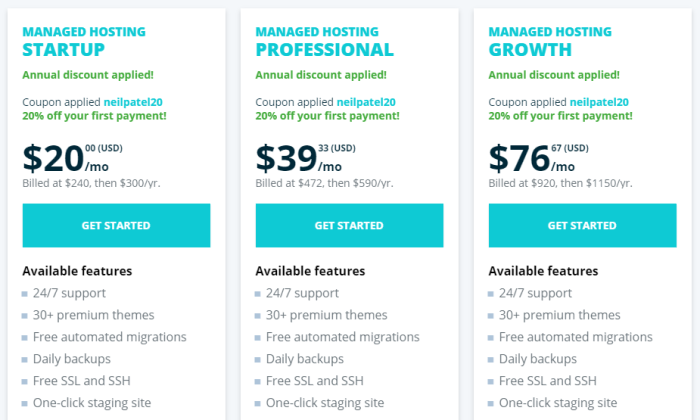
If you are focused on getting the most value from every dollar you spend, WP Engine is worth it. Your site just works, and you don’t have to invest additional time and resources into it.
Bear in mind that WP Engine does not increase upon renewal. You can get two months for free if you sign an annual plan, but the price never changes.
So while WP Engine is significantly more than the introductory rates from other web hosts, over time it’s a lot closer.
WP Engine offers additional managed hosting plans beyond the ones I’ve pictured here. You can get managed hosting plus, which helps with keeping plugins updated, as well as plans for ecommerce hosting.
One thing to be aware of is that WP Engine only does WordPress hosting. If you are trying to host multiple types of sites on the same host, this is not for you. Bluehost can help with whatever type of site you want, and offers managed WordPress plans if you need more than basic shared hosting.
But if you want a top-of-the-line WordPress experience, WP Engine is your best option. You’ll be able to take your sites to the next level with minimal work on your end.Grow your site and your business, not your maintenance schedule.
Get in touch with WP Engine today.
What I Looked at to Find the Best Shared Hosting Company
If you are looking at shared hosting, it’s because you’re looking for a good price with low maintenance.
Consider it entry-level hosting, a fine option for new and small sites that aren’t expecting a ton of visitors.
Other types of hosting–like VPS, cloud, and dedicated hosting–let you handle hundreds of thousands of visitors each month. The trade off is more upkeep and responsibility on your end. Plus these are going to cost five, ten, twenty times as much each month.
Still you want a fast site that’s always up and secure. You’re sharing space on a server, but you don’t want to compromise on the fundamentals.
Done.
All of my picks are dependable web hosts with a long track record of excellence with regards to site performance and security. This is as good as shared hosting gets.
That said, the way that each web host parcels out their services is different.
Let’s get into the fine print and nitty-gritty to make sure that you are finding the best deal on what you really need.
Today’s Price vs Renewal Rate
Shared hosting is definitely the best way to get a low price on hosting, but you want to get something that works within your budget today, tomorrow, and next year.
Typically, to get the cheapest price on most hosting plans, you have to sign on to a multi-year contract. If you have to pay everything up front, it may wind up being several hundred dollars, even if it’s only a few bucks a month.
Is that going to work? You don’t want to get to the end of the registration process only to discover that the “cheap” plan is way more than you want to put down today.
DreamHost is a great option for people that want a low monthly rate, as some hosts won’t let you sign up for less than a year.
The other major price factor to watch out for is the renewal rate. All web hosts offer introductory deals to get you to sign up, but that honeymoon pricing only lasts for so long.
Be smart about this. Signing up for a four-year Hostinger deal locks in the lowest rate for that entire period. Yes, it’s a chunk of change upfront, but over time it’s definitely the cheapest option out there.
Resource Limits Don’t Box You In
As I mentioned, I only picked shared web hosts who offered best-in-class performance for their clients’ websites.
That said, each provider allocates server resources differently–if you start to max out these limits, performance is going to suffer even if you’re with a solid host.
You don’t want to get stuck choosing your content or site design based on resource limits.
Start with how much storage you need. A wedding photographer with thousands of high-res pictures and video is going to blow through storage quicker than a blogger who includes an image with each post.
A2 Hosting offers exceptionally generous storage with their entry-level plan: 100 GB for less than $3 per month. All of A2’s other plans come with unlimited storage.
You’ll see unlimited storage for a lot of upgraded shared hosting plans, and just know that it only counts toward what you use for your site. In other words, you can’t store seasons of your favorite show.
The other major resource to think about is bandwidth, which is basically the amount of data that can pass between your site and visitors. The amount you have is going to impact how fast your site is and how much lag there is between visitors arriving and page elements loading.
Everyone likes fast sites and they rank higher, but how much bandwidth do you need?
Some providers, like WP Engine, make it easy to figure out what to expect, because they list bandwidth along with an approximate number of monthly visitors on the pricing page:
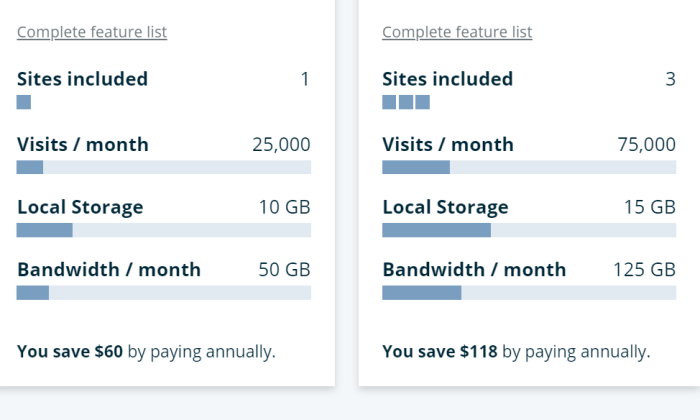
New website owners especially will find this helpful. 25,000 visits a month is an easy number to wrap your head around. Some web hosts only give the bandwidth, which leaves you trying to pencil out how many visitors you can support.
When you see web hosts advertising “unlimited bandwidth,” what they mean is that there are no hard limits on what you can use. Bear in mind that it’s a shared server with finite resources, so if your site (or other people’s on that server) are using more than their fair share, it’s going to impact site performance.
For people with a basic site or blog, site resources aren’t a huge concern. You probably won’t have thousands of visitors each day, and each one will be consuming relatively little bandwidth.
But if you start adding interactive features, WordPress plugins, and other resource-intensive features on your site, I’d pay very close attention to what you get, and how much it’s going to cost if you need more.
Bundled Services You Actually Need
A lot of providers throw in more than just hosting when you sign up. These package deals that include a lot of other services that may save you time and money.
Or you wind up paying for a bunch of stuff that you don’t need.
Here’s a short list of bundled services that are actual plusses for most users:
- Domain name: To get a site online, you have to have a domain name, which is your web address (mine’s neilpatel.com).
- Site Backups: This is what it sounds like and means you don’t have to download a third-party app or manage site backups yourself.
- SSL certificates: A secure sockets layer (SSL) certificate encrypts traffic when people fill out forms or enter payment info. This is important because Chrome, Safari, and other browsers will tell visitors your site is unsafe if you don’t have an SSL certificate.
- Website builder: With a good website builder, you won’t have to write a line of code to get your site looking the way you want it. Simply drag, drop, and edit page elements visually.
- CDN: A content delivery network (CDN) stores your sites on a network of servers across the country or world. This makes your sites load faster for visitors.
- Domain privacy: When you register your domain name, your company’s information becomes public unless you have domain privacy enabled. Some hosts charge for this, others include it for free. I recommend getting it to avoid spam.
- Email: You want an email address associated with your domain (info@exampledomain.com), so it’s convenient if hosts include this for free.
If this is your first site, all of this is going to be helpful.
A free domain name saves $10-15 and the time it takes you to signup with a domain registrar and point to your new host. Bluehost includes a domain name free for the first year, and you can get set up in a few steps without having to hunt down a domain registrar.
And even experienced folks will appreciate stuff like automated site backups. WP Engine takes care of that completely, which saves you from having to pay for and set up a system on your own.
Something like a website builder may be important if you want to customize the look of your site. Hostinger has an affordable site builder, but it’s an extra cost. GreenGeeks, which is a little more expensive per month, includes a site builder for free.
If you are going to run a WordPress site on Bluehost, you don’t need a separate website builder. You get templates and custom themes as part of the hosting package, so you are all set to build a sharp WordPress site immediately.
Alternatively, it may be the case that you already have a business email and use Cloudflare for free CDN. In that case, some of these services are just going to be distractions.
Support You Can Count On
Customer service is very important when it comes to hosting. What happens when your site goes down? What happens when you can’t figure out what’s wrong?
Every minute your site is down or broken sends potential visitors to your competitor’s sites.
Customer service is a big factor in my decision to recommend this specific lineup of shared hosting providers. You can get in touch with any of them at any time day or night. I consider 24/7 support essential.
Some offer a greater range of support channels than others. A2 and GreenGeeks include phone, live chat, and email ticket support with every single plan they offer. Others only include phone service with premium tier plans.
But the number of support channels doesn’t tell the whole story. WP Engine only offers live chat with their lowest tier plan, but the company has incredible customer service reviews. People are very happy with the live chat support, because they are always talking with someone with expertise in WordPress.
Reading reviews only gets you so far, though. To get real evidence, take advantage of the free trial period. Every host I chose offers some risk-free period to try them out.
During that time, submit a bunch of customer service requests: calls, tickets, chats. Try out every avenue. It should be easy to get answers in a timely fashion. If it’s not, I’d consider that a red flag.
For people who already have a website, try to find a web host that will help you transfer your old site. That can get messy real quick. A2 and GreenGeeks will migrate your site for free, so I’d recommend looking at those two if you have a site already.
Conclusion
If you’re starting a new site from scratch or currently running a small website, shared hosting will be the best option for you. As your site grows, you can upgrade your hosting if need be, but it’s going to be more than good enough for now.
Let’s review my recommendations for the best shared hosting:
- Hostinger — Lowest possible price for shared hosting
- Bluehost — Best way to launch your WordPress site today
- A2 Hosting — Best way to escape a nightmare host
- DreamHost — Best way to avoid an annual pricing plan
- GreenGeeks — Best for socially-conscious companies
- WP Engine — Best for high-traffic WordPress sites
Hostinger is my top pick because it has the lowest price and comes with everything a new site needs to flourish.
For getting a new WordPress site off the ground, go with Bluehost. There’s no easier way to get started.
The other options are good, too, and may work even better than Hostinger or Bluehost, depending on what you are trying to do.
Say you need to leave your old host now. A2 is my top pick for you because they offer a free site transfer. This guarantees that the transition will be smooth and you won’t have to migrate everything over yourself.
Those of you looking to spend the smallest amount on day one will like DreamHost. Without signing a contract, you can get top-tier shared hosting at an affordable price.
Choose GreenGeeks if you want your hosting plan to improve the environment. Rest assured that every dollar you spend on hosting goes toward renewable energy.
If you are planning on a high-traffic WordPress site, for example, it might behoove you to go with WP Engine. While it’s overkill for small sites, it’s going to work much better for complex sites with a lot of visitors.
What’s your go-to provider for shared hosting?