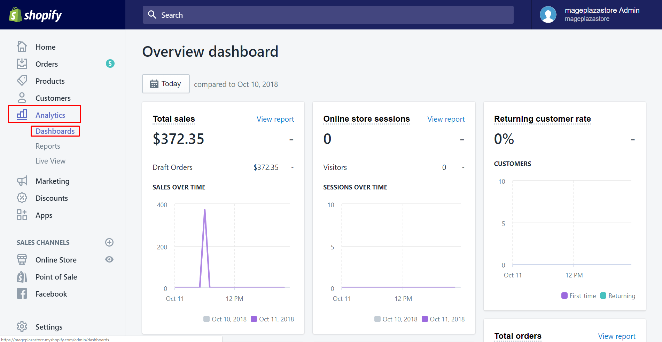
As one of the largest e-commerce platforms on the internet, Shopify offers budding (and established) entrepreneurs a platform to sell their wares and increase their reach. In fact, Shopify dominates nearly 20 percent of the e-commerce market share. That’s not all. With millions of active buyers on the platform, there is plenty of opportunity for …
When you browse the internet, do you ever stop to wonder what’s happening in the background? If the answer’s no, don’t worry. You’re not alone. Most marketers, even great ones, don’t give the “tech stuff” much thought. How a website performs is just something for IT specialists to worry about, right?
No, unfortunately.
If your website’s slow or clunky, it directly affects the user experience. In fact, 40 percent of people won’t hang around if your website takes more than 3 seconds to load. With this in mind, it’s crucial you know how to fix a sluggish website and streamline your page loading times before you lose leads.
Where do you start? Well, one way is to make fewer HTTP requests for your website.
Although an HTTP request sounds like a really technical term best reserved for engineers and IT pros, don’t panic. It’s something any good marketer can understand. Now, let’s take a deep dive into how these requests work and how you can use this knowledge to boost your website’s performance.
What Are HTTP Requests?
Before we get started, it’s crucial you’re clear on what HTTP requests actually are.
HTTP stands for “HyperText Transfer Protocol.” Think of HTTP as the language browsers and web servers use to talk to each other. We (thankfully) don’t need to cover all the intricacies of web code to understand how HTTP affects load time, but here’s a breakdown of the key steps marketers need to know.
When someone wants to visit your website, their browser sends a “request” to your server. This is known as an HTTP request. Your server acknowledges the response and kicks into gear, ready to display the webpage.
Here’s where it gets a little tricky, though. The browser can’t display the page right away. It needs copies of the various different files, such as plug-ins and images, to load the page properly.
How does the browser get these files? By making multiple HTTP requests. If the browser doesn’t make these requests, the page components won’t load.
Depending on how many components your page has, these requests can really add up, which is a problem. Here’s why.
Why You Need Fewer HTTP Requests
There are two simple reasons why every website should aim to reduce the HTTP requests associated with it.
Firstly, let’s start with page load time. The more HTTP requests your site receives, the longer it takes for the requested page to load. For example, a page with 20 HTTP requests will load faster than a page with 70 requests.
The issue? People don’t want to hang around waiting on a website loading.
39 percent of visitors won’t return if your images or videos don’t load properly, as research by SAG IPL shows.
45 percent of respondents won’t buy from a retailer if the website takes too long to load, according to research by Unbounce.
In short, with much competition out there, you’ll lose leads if your website takes too long to load or it doesn’t load properly at all.
Next, let’s think about what impact these lost leads have on your metrics.
According to Google, bounce rate increases by 32 percent when loading time slows from 1-3 seconds, and to make matters worse, poor loading time affects your SEO ranking. Delays in page loading time can cut page views by 11 percent, which tells Google your page isn’t offering value.
Think about it this way: If your website doesn’t impress visitors, they won’t shop with you. They won’t recommend you to their friends. In time, this leads to a lower search ranking, less visitors, and reduced conversion rates overall.
What can we take from all this? Well, too many HTTP requests directly affect your key metrics and your marketability online.
How to Identify Unnecessary HTTP Requests
OK, we’re clear on how HTTP requests work and why you need less of them. How do you identify these excess requests, though? By doing two things: identifying how many requests you’re dealing with, and grading your website performance.
Establish the Number of HTTP Requests Your Website Receives
You can’t eliminate HTTP requests until you know how many your website receives. Luckily, there are tools available to help you identify the number.
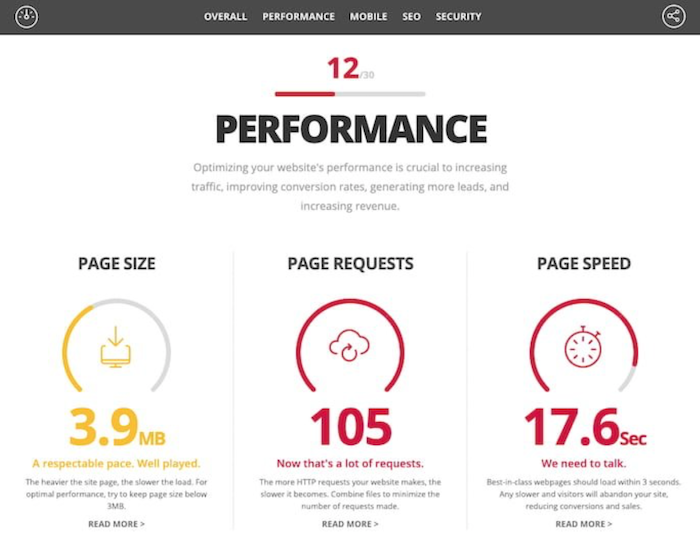
For example, HubSpot’s Website Grader give you a free website “health check” so you can instantly see how many requests you’re receiving:
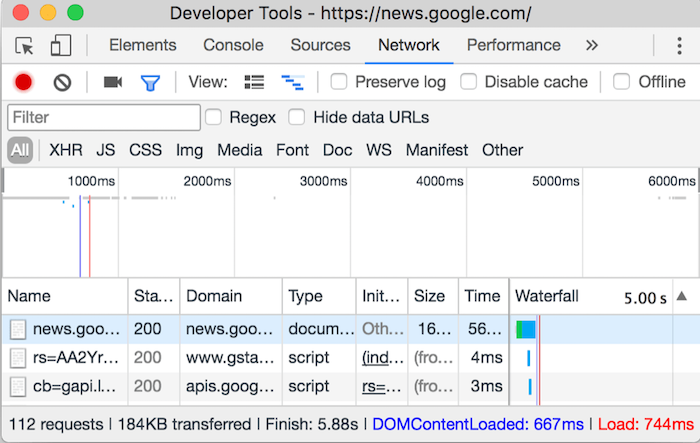
If you use Chrome, you can also use Chrome’s DevTools to identify the number of HTTP requests. Simply right-click the page you want to check, click “Inspect,” then click the “Network” option. The image you’ll see looks something like this:
This page receives 112 requests.
Grade Your Website Performance
When was the last time you assessed your website’s performance and, most importantly, page loading time? If you can’t remember, now’s a great time to run an audit.
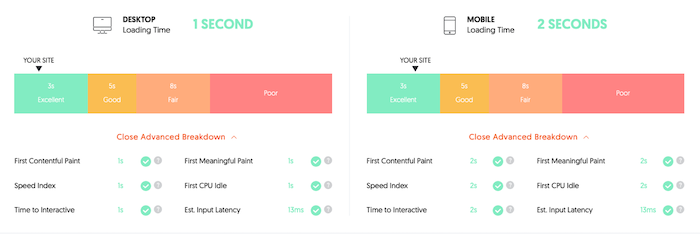
You can try Ubersuggest for this. It’s really simple to use. Simply open Ubersuggest, type in your URL, and click “Site Audit” from the sidebar when the search results finish loading.
Once you’ve clicked “Site Audit,” you’ll see an overview of your website’s speed. It’ll look something like this:
A low score indicates you’re suffering from poor loading times. For example, if your mobile website takes 6 seconds to load, but your desktop site loads in 2 seconds, there’s a problem with your mobile site, and so on.
Don’t worry if you’re unhappy with your page loading times or the number of HTTP requests you’re seeing. Now you know there’s a problem, you can begin streamlining those HTTP requests and ensure your page loads as quickly as possible. Let’s look at how to do just that.
8 Steps to Make Fewer HTTP Requests
Although every website is unique, we can usually blame excessive HTTP requests on a few common problems. With this in mind, here are eight simple steps you can take right now to reduce the number of requests passing through your website.
1. Remove Unnecessary Plug-Ins
Plug-ins are great. They add new functionality to your website and make your web pages more engaging. However, too many plug-ins clutter your page and hold up loading times. While there’s no “right” number of plug-ins, a good rule of thumb is to keep them minimal.
First, identify which plug-ins you use. Do they add value to your website? If the answer’s no, they can go. If it’s a plug-in you only use now and then, you can always reinstall it when it’s required then delete it again.
Not sure how to identify your plug-ins? Reach out to me and see how I can help you better understand your website’s performance.
2. Replace Heavy Plug-Ins With Streamlined Ones
OK, so you can’t remove every plug-in. However, if you want to make fewer HTTP requests, you can often replace resource-heavy plug-ins with more streamlined options.
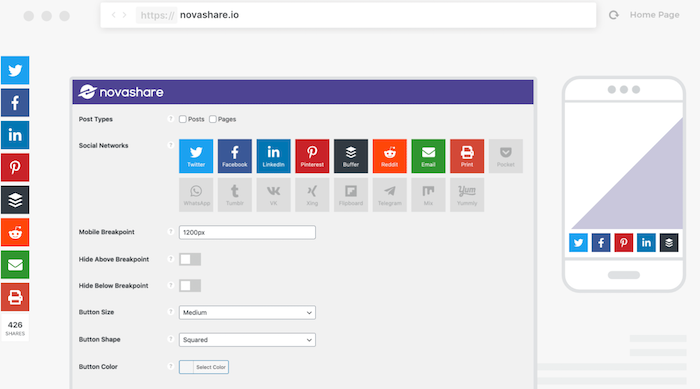
For example, maybe you want to add social media buttons to your page. Great. Social media shares can increase engagement and boost your exposure. However, the plug-ins can be resource-intensive.
To streamline your social media plug-ins, use tools like Novashare. This tool won’t slow your page down, but it will help you reduce the HTTP requests generated by your social sharing plug-ins:
3. Remove Images You Do Not Need
Sure, images can improve your website’s visual appeal and boost the user experience. Unless the image helps your reader understand your content in some way, or it’s a highly useful piece of content in its own right like an infographic, it might be worth deleting it.
Remember, every image creates an HTTP request. While those fun GIFs might have visual appeal, they won’t impress your audience if they affect load time.
Audit every individual web page and don’t be afraid to get a little ruthless. If the image doesn’t add value to your content, delete it.
4. Reduce the File Size for Remaining Images
Once you’ve deleted the unnecessary images, you need to optimize the ones you plan on keeping. In this context, “optimizing” doesn’t mean using alt text or keywords, although you should optimize for SEO, too.
Instead, what I mean is compressing each image. Compression preserves the image quality while reducing the overall file size, which improves load time.
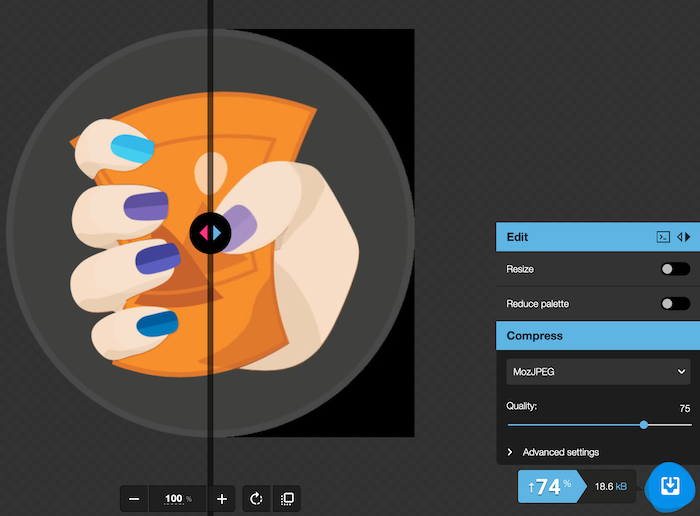
If you don’t have access to image editing tools like Adobe, try free tools like Squoosh instead. You can tinker with the image to find the perfect balance between file size (which should be less than 1 MB, ideally) and image quality:
5. Drop Unnecessary Videos
Just like not every image adds value to your content, some videos detract from the user experience and increase the page loading time.
To be honest, this tip’s really simple. Just like you should cull any images or plug-ins you don’t need, limit how many videos you’re playing on any webpage.
How do you know which videos to delete? Well, there’s no rule here. However, if it doesn’t educate your audience or add value in some way, cut it or replace it with a shorter, comparable video.
6. Enable Lazy Load
“Lazy loading” means an image or video won’t load until the user begins scrolling down your webpage. How does this reduce HTTP requests?
Since the media doesn’t load right away, it won’t trigger an HTTP request for the initial page load. It doesn’t affect the user experience either, since users won’t know the difference between a regular or lazy load. All they’ll know is that the images or videos are viewable once they scroll down.
To enable lazy load, try out plug-ins like the aptly-named LazyLoad. The script takes up less than 10 KB of space, so it’s not resource-intensive. Just install the plug-in and it gets to work immediately:
7. Use Content Caching
Caching is a great way to reduce HTTP requests.
Essentially, caching means a visitor’s browser stores copies of the scripts it used to display your webpage, rather than delete them all. When the visitor returns, there’s no need to make all those HTTP requests again, because the scripts they need are already stored in the browser unless they clear their cache.
Let me give you some tips for priming your website for content caching.
Don’t use cookies unless they’re essential.
Always use the same URL if you serve the content across different pages.
Build up a library of images and videos and reuse them.
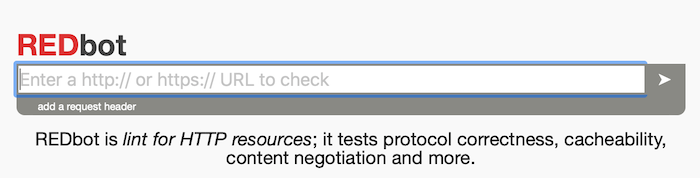
Try out free tools like REDbot to assess your website’s cacheability.
8. Reduce Third-Party Requests
If a visitor’s browser needs to request or download data from a third party to display a website properly, like YouTube or Google Analytics, it’s called a third-party request. The issue? How long your page takes to load depends on how quickly the third-party server responds.
This is a huge problem because you’re not in control of your page loading time. To take back control, think about lazy loading third-party content like embedded YouTube videos. You could also try hosting scripts for necessary programs like Google Analytics locally rather than externally.
Finally, if a plug-in you use makes its own third-party requests, switch it for another plug-in where possible.
How to Make Fewer HTTP Requests
Remove Unnecessary Plug-Ins
Figure out which plug-ins are installed and remove those that you don’t use.
Replace Heavy Plug-Ins With Streamlined Ones
Audit the plug-ins you keep and replace them with more efficient ones if they’re available.
Remove Unnecessary Images
Delete images that don’t add value since each one creates an HTTP request.
Reduce the File Size for Remaining Images
Compress the images you keep to reduce load time.
Drop Unnecessary Videos
Only keep videos that add value to your page.
Enable Lazy Load
Use a plug-in that allows images and videos to load once a user scrolls.
Use Content Caching
To prepare your site for content caching avoid using cookies; use the same URL for content used on different pages; build an image library and re-use them; and audit your site’s ability to be cached.
Reduce Third-Party Requests
Try not to include content that pulls from a third party, like YouTube, since your page load time depends on theirs. You should also replace plug-ins that rely on third-party requests.
Conclusion
HTTP requests are essential to displaying a website and giving your audience an engaging experience. However, too many HTTP requests can disrupt your website performance and deter would-be customers from doing business with you.
The good news? With a few simple tweaks, you can ensure browsers make fewer HTTP requests to your website. You can boost page loading time, improve a webpage’s visual appeal, and, ultimately, increase conversions in the long run.
If you’re not sure where to get started with improving your website’s performance, check out my consulting services and we’ll see how I can help.
Have you tried reducing the number of HTTP requests on your website? Which strategies are working for you?
Search engine optimization (SEO) used to be defined by the number of keywords and keyword synonyms across your website’s content. When Google launched its knowledge graph, SEO shifted away from simply relying on keywords, and search engine crawlers began prioritizing rich snippets and entities on search engine results pages (SERPs). These days, Google has more …
When You’re Setting Up a Business, Did You Know You Need to Pay Attention to Your Company Email and Website?
Setting up a business means attending to what seems like a million little details. Your corporate email and website are two of those details. Don’t drop the ball on them!
But let’s start with business credit.
Business Credit
This is credit in a corporation’s name. It is not tied to the owner’s creditworthiness. Instead, biz credit scores depend on how well a company can pay its bills. Hence consumer and corporation credit scores can vary dramatically.
The Benefits
There are no demands for a personal guarantee. You can quickly get business credit regardless of personal credit quality. And there is no personal credit reporting of company accounts. Biz credit utilization won’t affect your consumer FICO score. Plus the owner isn’t personally liable for the debt the corporation incurs.
The Details
Getting corporate credit is not automatic. Building it requires some work. Some of the steps are intuitive, and some of them are not.
Fundability
Fundability is the current ability of a firm to get funding. Some factors are within your control. Others (like your time in business) aren’t. Your online presence and data are one area which is at or close to 100% with your control.
Business Credit, Fundability, and Business Funding Applications
The better your business credit and fundability are, the more likely you will get approval for financing. Today, let’s concentrate on your online presence, that is, your email address and your website.
Lenders Use Data to Decide on Your Application
They check information from a variety of sources, and they don’t tell you about any of them. Knowing what these secret sources measure can only help you. Understanding what matters the most makes getting a loan A LOT easier, because you know what to improve first. This information is the difference between getting an approval and getting a denial.
Lenders Use LexisNexis Information
LexisNexis is one source where many of the lenders reviewing loan applications get their information from. They offer information regarding likelihood to pay, or not. Lenders compare LexisNexis information to what you put on your loan application. If the application and LexisNexis don’t match, then, the loan providers will deny you a loan. They will see the inconsistency as fraud.
LexisNexis connects all of the data that pertains to you, both positive and negative. They have access to
criminal records
every email address you’ve ever used (these are your professional and personal email addresses)
Lenders Use Online Information Including Your Business Email and Website
One place where lenders and vendors will be looking for your company is online. Even if they’re not specifically checking out your online presence, they may still need to know how to order your product or service, or where to send praise or complaints. Your online presence is where they will find that information, or not.
Your Business Email and Website: Your Website
What happens if your family member or a friend built your website? Maybe that person is talented, but corporate websites differ from personal ones. A business website needs to be easy to navigate. It needs to answer customers’ questions.
Styles differ. Wedding photographers and construction companies differ. They have dissimilar sites and design sensibilities, but they both have Contact and About pages, and information about what they do.
Make sure you own your domain, and not just your domain at Wix or WordPress or the like. You can do this by buying hosting. This is through hosting companies like GoDaddy or HostGator.
Your Business Email and Website: Your Email Address
Given that so much more of lending decisions is going on online these days, then your email address is an opportunity for your firm to puts its best foot forward. Don’t squander this easy and free opportunity! General email addresses like admin@yoursite.com tend to be best.
With a general email address, if someone leaves your employ, another employee can seamlessly take over that email address. A username like admin, webmaster, or even hello is far, far better than cutiepie or the like, even if you’re in a playful industry that caters to kids. After all, your bank and banker aren’t.
Your Business Email and Website: Records Congruency
Keep your records consistent! This includes your online records. LexisNexis and the SBFE (Small Business Financial Exchange) are looking at everything, so it had better match.
Inconsistent records will lead to a denial due to fraud because that’s how lenders interpret inconsistencies. This is a cause of denials which is in the owner’s hands. You have the ability to change and correct this.
This means your corporate name, address, phone number – everything! – must look the same in these places and more:
Every place you have an online presence (your website, Yelp, SoTellUs, etc.)
Build Fundability on Business Credit Applications to Avoid Denials
Keep your firm looking fundable (legit) with:
A professional website and email address
A toll-free phone number
List your phone number with 411
A business address (not a PO box or a UPS box)
Get all necessary licenses
Your Business Email and Website: Online Fundability
There are some aspects of fundability where you should pay particular attention to what’s going on online. They include:
Firm owners listed and listed ownership uniformity
Company name and address uniformity
Industry aligned
Company domain
Information uniform on all records
Online Fundability: Business Ownership Listings
Records consistency matters here, too. Your website should show who owns your company. And that information needs to be consistent. So if the owner is named Susan Johnson on your website’s About page, then she can’t be listed as Sue Johnson on your Contact page. If your ownership changes, you need to show that here.
Business Name and Address Uniformity
Abbreviations can be your downfall here, as can punctuation like hyphens, commas, and colons. If your Contact page says your main office is on Main Street, then your About page can’t say it’s on Main St.
If you move, or you add subsidiaries and other locations, then you need to update that information everywhere. This even means whether you use your 5-digit ZIP code, or a ZIP plus 4 code (9 digits).
Fundability: Industry Alignment
If your industry is over the road trucking, then it needs to be listed that way. Pro tip: when your industry can be called several different names, like long distance trucking, mention those other phrases on your website.
Your Business Email and Website: Company Domain
When your company domain matches your company name, it helps with fundability. Pro tip: try to match what people will be searching for online, so if (for example) the word ‘brothers’ is in your company name, then determine if ‘brothers’ or ‘bros’ will be used by people searching for your company and its goods and services online.
Good websites can help you get funding and convert prospects to customers. While websites differ, there are some things they all need. Such as:
Easy to use navigation – hiding important information won’t help
Speed – if visitors have to hang around and wait for pages to load, they’ll go elsewhere
Intuitive organization – keep your address and phone numbers on your About and Contact pages because people expect that data to be there
Your website also needs:
Branding – if your company is known for the color green, but it’s nowhere to be found on your website, you’re losing an opportunity for connection
Visual design – ugly websites, and those which haven’t had a design update in a decade are not conducive to enhancing your reputation or making sales
SEO – search engine optimization means making your site easier to find. Stuffing in keywords doesn’t help with this, but writing honestly about your biz and using the kinds of terms people search for? That does
One of the more vital items your website needs is content. This can mean blogging, and it certainly means creating pages which explain what you do and what sets your biz apart from its competition. It also means a page devoted to each product you sell or service you provide. Again, you’re making it easier for your prospects to find you.
Setting Up a Business Email and Website: Takeaways
More fundable companies can get more money, and they tend to get more prospects who decide to become customers. One area of fundability you have total or near total control over is your corporate online presence. Keep it professional, uniform. and appealing, and easy to use. We can help you with even more aspects of fundability.
As marketers and brands, many of you use PPC ads to drive traffic to your brand or a client’s website.
There’s nothing wrong with that approach.
After all, PPC ads have obvious advantages. You can reach new customers, track your results, and manage your budget. However, for all their benefits, these ads can sometimes lack something.
Has anyone guessed what I’m talking about? It’s the human touch.
By humanizing your PPC ads, you can stand apart from your competitors.
Before I go on, what do I mean by humanizing your PPC ads? It means creating ads that provoke a response or an emotion. It can help your ads build connections and trust with your market and ultimately increase your business.
It also takes you away from the nameless, faceless, robotic approach that can be digital marketing at its worst.
Aside from those I’ve already listed, there are a few other essential reasons to humanize your PPC ads and your brand in general. Let’s dive in, and then we’ll discuss different ways you can humanize your PPC ads.
Why Should You Humanize Your PPC Ads?
Humanizing your brand can give you a competitive edge and improve customer retention. It shows you’re taking a customer-centric approach, and you understand your buyers.
However, humanizing your brand also builds customer trust, which is vital these days. Communications company Edelman says, “Trust has never been more important for companies to develop and maintain.”
Further, they found that 75 percent of people actively recommend businesses they trust.
That’s not the only benefit, though; according to Edelman: “Customers who trust you are more likely to engage with, buy from, advocate for, and defend you.”
Now, let’s go into detail about some positives you could gain from humanizing your brand.
Humanizing Your Brand Gives You a Competitive Edge
You might already know one of the advantages of humanizing your digital marketing: the competitive edge.
This humanized approach takes the focus away from you as a marketer or business owner. Instead, it concentrates on your customer’s wants and considers your prospects:
individual needs
goals and ambitions
challenges and pain points
Further, the customer-centric approach shows you understand your customers’ unique problems and can offer them solutions.
You Benefit From Customer Advocacy and Retainment
Once you’ve sold successfully to a consumer, there are two things you want to do: retain them and turn them into advocates.
By humanizing your marketing, your customers may be more likely to become those advocates and recommend your brand to others.
Then there’s customer retention. You’re more likely to retain your customer by:
Now you understand the benefits, how do you humanize your PPC ads? Outlined below are 10 easy-to-implement measures you can start using today.
1. Understand Your Audience by Creating Personas
You’ve got a product or service to promote, but who’s your target market, and how do you humanize your PPC ads to suit them?
With buyer personas. Buyer personas are a valuable asset because not every would-be customer responds to your PPC ad in the same way.
To attract your ideal customer, you’ll want to appeal to them by speaking their language, understanding their pain points, and offering them a solution.
Why are personas so effective? Because they allow the personalized approach. Get this part right, and you can humanize your PPC ads and reach your target market.
2. Create Relevant Ads
Yes, we’re back to personas again. Your buyer personas let you create relevant ads by giving you a clearer idea of your potential customers’ search terms.
Humanize your PPC ads with images. They don’t need to be staff images. Just include something that represents your business, what it offers, and what it stands for.
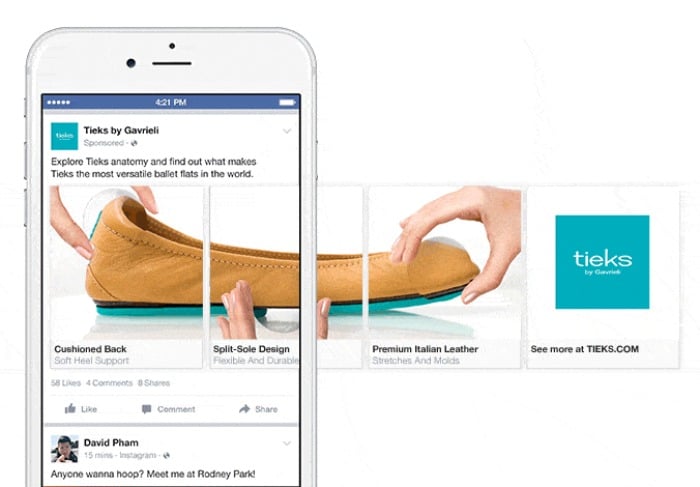
Google offers different ways of adding images to PPC ads through Discovery ads or its image extensions option, or you could use Facebook’s carousel ads.
However, plenty of other platforms allow image-rich advertising and storytelling, like Instagram, Pinterest, or YouTube.
4. Use Social Media
Your buyer personas are also good for shaping your social media strategy.
Use your personas to humanize your PPC ads by understanding where your ideal buyers hang out. Then you can target them on their platform of choice.
Sites like TikTok, Facebook, and Instagram allow you to personalize your PPC ads for better results.
5. Keep Testing
Constant testing may mean avoiding getting stuck in your usual advertising patterns. How do you put this into practice?
By varying your PPC campaigns. You can do this through regular A/B testing to see which elements work best for your audience.
For instance, you could test:
long-form keywords
colors
calls to action (CTAs)
Keep testing and optimizing the results as you go until you know you’re getting the right balance.
6. Go Beyond Keywords
Keywords can only do so much. Yes, they can help get your ads in front of the right people, but they lack personalization.
To further humanize your PPC ads, consider four other critical areas of your marketing:
demographics
motivation
challenges
goals
Simpleview recommends applying these qualities to travel persons to optimize your PPC results. However, these attributes work just as well for just about any other niche.
Take demographics, for instance.
Depending on the age group of the audience you’re targeting, you’re going to want to change your advertisements so they “speak” to that particular group.
Likewise, the motivations, challenges, and goals are likely to be different for each group.
7. Use Storytelling
I’ve already mentioned the value of consumer trust, and there’s an easy way to build on it: with storytelling.
Successful ads often use storytelling at the heart of their ads, and the likes of Instagram Stories have made it accessible.
However, Instagram isn’t the only way. For a similar approach, you could test out Facebook’s carousel ads or maybe a Twitter followers’ campaign.
Here are some ideas if you’re new to storytelling:
staff profiles or a day-in-the-life article so your audience can get to know you better
customer success stories
highlights of a product or service
reviews or explainer videos
8. Inject Some Personality
Think about it: Are your potential customers more likely to click on an ad that sounds like everyone else’s?
Or will they choose a PPC ad that stands out and speaks for itself?
The first impression many customers get of your business is through online ads, so they must reflect your brand.
Use the same tone for your ads as you would for the rest of your marketing to give your customers greater consistency and familiarity.
9. Don’t Use the Direct Sales Approach
The direct sales approach can be a turn-off for consumers. Instead, you could concentrate on getting the prospect to click through to your website, give you their details, and then gently steer them towards the sale.
You may find that customer mapping is helpful with this approach. When you use customer journey mapping, you can:
understand the customer’s key touchpoints
identify your customer’s goals
nurture your leads by tailoring ads to encourage them to make a purchase
10. Keep It Simple Stupid (KISS)
Finally, keep it simple, stupid (no offense). It’s believed Kelly Johnson first used the phrase in the 1960s when it was originally applied to design concepts. However, it applies just as much to content creation.
There’s a reason why the term is still used today: Sometimes marketers like to complicate things, but there’s no need to.
If you want to humanize your PPC ads more, remember you’ve got a limited amount of time and characters. Make every word count by:
keeping your language plain and uncomplicated
spelling out the benefits
writing with your ideal buyer in mind and using keywords
finishing with a CTA
Examples of Great Humanized PPC Ads
There’s plenty the big brands can teach us about making greater connections with our perfect consumers. Here are three of the best.
Snickers
Remember the Snickers “You’re not you when you’re hungry” PPC campaign?
The Snickers advert used a series of deliberate spelling mistakes in its online advertising. More than ten years later, the advert is still delivering results.
Why did it work so well? Because consumers can relate to it. Everyone recognizes that “hangry” feeling.
The Snickers advert is also novel, shareable, and memorable—all things every advertiser can apply to their marketing.
Converse
Rather than going for the full sale straight off, Converse used “Converse-ations” to reach its younger audience.
Working with the ad agency, Anomoly, Converse included keywords teenagers might use when searching online, like “spelling bee” or “how to talk to girls.”
Converse’s campaign allowed it to launch a dialogue with shoppers and used ad copy and microsites to engage consumers, rather than going with the traditional advertising approach.
The “Domaination” campaign proved effective because it provided helpful, relevant content to potential buyers and built connections with them.
Alec Brownstein
Search for “best PPC adverts” online, and the name “Alec Brownstein” is commonly featured in the top five.
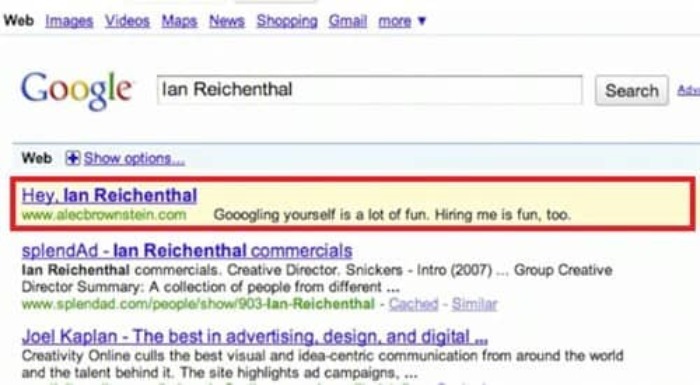
Who is he? He was a job hunter who hit upon the idea of bidding on the names of five creative directors.
Brownstein’s ad looked like this:
When the creative directors googled their names, they found Brownstein’s advert and his website too. As a result, Brownstein was offered the dream job by one of the creative directors he’d targeted.
Brownstein’s advert was successful because he used initiative by thinking in the same way he thought the creative directors would. Many of us Google our names, and Brownstein figured the creative directors would do the same.
There’s a lesson here for every advertiser: Think like your ideal audience and create innovative new ways to reach them.
Conclusion
With the surge towards digital, your marketing may sometimes lack the personal touch. However, consumers want to know who they’re buying from, and they want to build relationships with brands to enhance trust.
Further, when you humanize your PPC ads and other forms of your digital marketing, you open up a line of communication that invites consumers to find out more about your brand.
Snickers and Converse are two brands that have done this well, and you can learn from and apply them to your marketing.
Creating ads that evoke emotion and build relationships is straightforward. Just follow the tips in this article, and you’ll be on your way to humanizing your advertising and building lasting relationships with satisfied customers.
As one of the largest e-commerce platforms on the internet, Shopify offers budding (and established) entrepreneurs a platform to sell their wares and increase their reach.
That’s not all. With millions of active buyers on the platform, there is plenty of opportunity for brands to grow their revenue.
In addition to a massive audience, Shopify offers users a simple, streamlined experience that allows store set up in record time.
When you join the Shopify platform, you have immediate access to functionality that allows you to:
build a website
create a domain
multiple payment options
order receiving and processing
In short, Shopify equips sellers with the tools they need to get their store off the ground.
Shopify benefits don’t only apply to online vendors—through their unique partnership program, individuals can align with Shopify to grow their business and increase revenue through a variety of functions.
Is the Shopify Partner program right for you? Here’s what you need to know.
Marketing: For Shopify users in need of a more defined audience, streamlined campaigns, or optimized content, Shopify Marketers can offer their services to help Shopify users increase their reach and employ better marketing strategies.
Shopify Developers: Experts in Shopify store development, can build apps that help Shopify’s merchants in a variety of ways, including increased engagement and sales.
Shopify Designers: From graphics to branding, these design experts help stores with design needs, often working collaboratively with developers.
Affiliate Marketing on Shopify: Affiliate marketers can offer nearly any service on the platform, from influencer marketing to content creation.
Shopify Partners can also build and sell Shopify apps and themes to generate income.
In addition to the above different kinds of Partners, there are also different levels of partnership, including:
Shopify Partners: Consider this the entry-level role for Shopify Partners. At this level, you gain access to limitless test stores, allowing you to customize, learn and hone your craft. For each action (client referral, app designed, or graphic completed), you earn a monthly commission.
Shopify Plus Partners: This tier is exclusively for Shopify Partners who do excellent work. This level often includes agencies, enterprise consultants, and system integrators, as well as individuals.
Shopify Fulfillment Partners: Fulfillment partners make up the Shopify Fulfillment Network and can operate inside or outside of the bounds of the Shopify Partner Program.
What Are the Advantages of Becoming a Shopify Partner?
Given that one in three Shopify sellers seek services from Shopify Partners, there’s a real opportunity for you to supplement your income when you join the program. In addition to adding some extra padding to your bank account, Partners can access free training resources and perks, including:
FAQs
how-to articles
live chat
the Shopify Academy
The partnership also comes with access to an unlimited number of stores, so you can experiment to your heart’s content.
As a Shopify Partner, you gain exclusive access to offers on tools that can help you run and grow your business. Once you have your dashboard set up (more on that later), select the “Partner Perks” section and select the “Claim perk” button.
Even better, when you sign up to become a Shopify Partner, you create opportunities to scale your business. Regardless of whether you’re a well-established agency or an individual setting out to grow your skills and client base, enrolling in the Shopify Partner program is a great growth opportunity.
Sound good?
Let’s break down how you actually become a Shopify Partner.
5 Steps to Become a Shopify Partner
The Shopify partnership comes with plenty of perks we’ve already covered, but there’s one overarching benefit we haven’t covered: Becoming a Shopify Partner is free.
Now that you have a better understanding of the value associated with a Shopify Partnership, follow these five steps to start growing your business today.
1. Learn More About Shopify Partners
This blog explores the surface-level of a Shopify Partnership, however, you’ll want to spend more time on the Shopify partner page to read the blog and learn more about partner perks and features.
2. Join the Shopify Partner Program
This is the easiest step yet! Simply head to the sign-up page and enter your name and email address and wait for your verification.
3. Verify Your Email Address
After creating an account, you’ll receive an email asking you to follow a link to verify your email address. Be sure to do this within 24 hours, as the window for response closes after that timeframe.
After you select the blue button to confirm your account, you’ll land on the Shopify accounts page. From there, choose “Shopify Partners” and then “Create new partner account.”
4. Enter Your Information
Now that you’ve successfully set up an account, you must complete a form that asks for the specifics of your business. Complete all the necessary fields.
After this step, scroll down to the “Business goals” section and choose the function that best suits your offering. Here you can select:
building apps
building new Shopify stores for clients
providing Services to existing Shopify merchants
referring merchants as an affiliate
selling products as a Shopify merchant
other
After you’ve selected the right category, scroll down the page until you reach the section about platform usage. Here, you’ll identify which platforms you’re currently using, allowing Shopify to equip you with custom tools.
Categories include:
BigCommerce
Lightspeed
Magento
PrestaShop
Square
Squarespace
Wix
WooCommerce
WordPress
None
Other
After selecting the relevant category, read the Partner Program Agreement at the bottom of the page and check the corresponding box.
5. Meet Your Shopify Dashboard
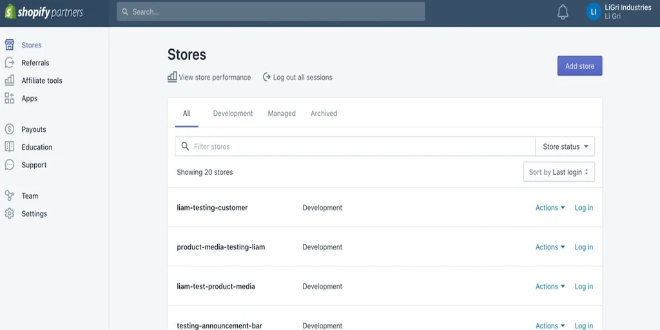
Your dashboard is the hub of your Shopify business. To get started, select the Shopify Partner programs you’d like to apply to from the “Get started” section.
A short form will ask you to explain your interest in each program.
Even if you’re not accepted into a program immediately, you can still use your dashboard to grow and hone your skills. With endless courses available from the Shopify Partner Academy, you can earn certifications in Business Fundamentals, Theme Development, App Development, and Product Fundamentals.
You can take the accompanying test as many times as you like, all while using the resources provided through the Shopify Partner Academy to increase your knowledge base.
After receiving your acceptance to one of the Shopify Programs, you can start earning some cash. Payments occur on a bi-monthly schedule via PayPal.
The Partner Dashboard is also your source for all questions. From the portal, you can contact Shopify support whenever, wherever to get your questions answered.
Measuring the Success of Your Shopify Partnership
You’ve set up your dashboard, been accepted into a few programs, have been working for a few months, and now you want to know how successful your Shopify partnership actually is.
While there are countless metrics you can use to track the success of your endeavors, here are six key figures to assess the strength and success of your partnership.
Lead Conversion Rate
This metric is exactly what it sounds like: a measurement of how many leads converted into customers in a specific period of time, generally within 30-day increments.
Significant due to its ability to highlight how successful your campaigns are at turning attraction into actual leads, your lead conversion rate is a must-track metric.
How do you calculate lead conversion rate? The formula is pretty simple, as long as you have the numbers.
Lead Conversion Rate = (Number of new customers in the last x days ÷ number of leads in the last x days) x 100
Lead Velocity Rate (LVR)
This figure is representative of real-time sales performance. Given its predictive nature, the metric is perfect for forecasting revenue growth.
Lead velocity rate = (Number of qualified leads this month – number of qualified leads last month) ÷ number of qualified leads last month x 100
Monthly Recurring Revenue (MRR)
This metric represents revenue, rather than what is actually actively collected. A good indicator of success, MRR lets you know if your leads are converting to actual customers within a finite time span.
How do you calculate MRR?
MRR = Number of customers x average billed amount
Churn Rate
This metric refers to the number of customers who stop using your service during a specific time frame. Churn rate is a valuable metric to determine if your marketing strategies and onboarding process is effective.
How do you calculate churn rate? There are two types of churn rate:
User churn = (Cancelled users in the last 30 days ÷ active users 30 days ago) x 100
Revenue churn = (MRR lost to downgrades & cancellations in the last 30 days ÷ MRR 30 days ago) x 100
Average Revenue Per User (ARPU)
Use this metric to learn how much revenue you’re creating from each individual user. This statistic is valuable to assess marketing successes and failures and forecast revenue goals.
How do you calculate ARPU?
ARPU = MRR ÷ active users
Lifetime Value (LTV)
This metric represents the amount a user will spend on your service throughout the course of your relationship. This figure helps you assess whether it is more valuable to maintain existing customers or pursue new ones.
LTV = Average monthly recurring revenue per customer ÷ user churn rate
I recommend monitoring these figures on a daily, weekly, and monthly basis for a comprehensive view of your success. These metrics let you identify patterns and see if improvements succeed so you can adjust your approach as needed.
Conclusion
Shopify’s continuous growth shows no signs of stopping.
For any digital marketers, developers, or graphic designers, becoming a Shopify Partner offers an opportunity to broaden your portfolio, sharpen your skills, and earn some extra cash.
If you’re considering wading into the world of Shopify partnership, be sure to actively monitor the right metrics and ignore vanity metrics that have little impact on overall success.
What part of the Shopify Partner program is most useful to you?
A recent study found that 70 percent of Americans are shopping online more than ever. E-commerce is booming, and there’s never been a better time to start an online store. One of the best platforms to launch your e-commerce store is Shopify. Why do so many people love Shopify? In part due to its: affordability …
This website uses cookies to improve your experience. We'll assume you're ok with this, but you can opt-out if you wish.AcceptRejectRead More
Privacy & Cookies Policy
Privacy Overview
This website uses cookies to improve your experience while you navigate through the website. Out of these, the cookies that are categorized as necessary are stored on your browser as they are essential for the working of basic functionalities of the website. We also use third-party cookies that help us analyze and understand how you use this website. These cookies will be stored in your browser only with your consent. You also have the option to opt-out of these cookies. But opting out of some of these cookies may affect your browsing experience.
Necessary cookies are absolutely essential for the website to function properly. This category only includes cookies that ensures basic functionalities and security features of the website. These cookies do not store any personal information.
Any cookies that may not be particularly necessary for the website to function and is used specifically to collect user personal data via analytics, ads, other embedded contents are termed as non-necessary cookies. It is mandatory to procure user consent prior to running these cookies on your website.