Best Free Website Builders

Disclosure: This content is reader-supported, which means if you click on some of our links that we may earn a commission.

Do you want to build a website? Luckily for you and the tens of thousands of online businesses out there, a digital website builder makes it easy to create professional sites that function beautifully in no time. 

The best part? There are many free website builder options. 

Website builders make it possible to create a responsive site optimized for SEO without having to invest a ton of money or time, which is perfect for small businesses. 

But you have to learn what features to look for first.

In this guide, I’ll walk you through the best free website builders on the market today, as well as which one can build the best site in your niche—whether you’re selling painted rocks, are a freelance writer, or want to bootstrap a dropshipping business.

The Top 4 Options For The Best Free Website Builders:

  1. Wix – The best for e-commerce sites
  2. Weebly – The best for general sites
  3. WordPress – The best for blogging and content creation
  4. Site123– The best for quick and easy landing pages

How to Choose The Best Free Website Builder For You

What is your site’s end goal? That’s the first and most important question you want to ask yourself when choosing a site builder.

Do you want to start a blog to share your extensive knowledge and thought leadership with the world?

Do you have a graphic design portfolio you want to show off to gain more freelance clients? Are you a non-profit that needs to display annual achievements and your mission statement? 

When creating your site with a free website builder, your end goal will determine what capabilities you need. Once you have your site’s end goal in mind, here are additional criteria to narrow down your choices.

Design Capabilities

If you’re a freelancer, a designer, or a photographer wanting to create an online portfolio, consider the design capabilities of each builder. 

  • Customization: How deep do their personalization and customization features go?
  • Templates: Do they provide eye-catching site templates you can use, so you don’t have to start from scratch?
  • Media storage: Does your site builder give you a lot of image storage space? Depending on how big your site will be, this is a key question if you want to keep things free. 

When thinking about how to present your portfolio or brand, this is the site builder criteria you most want to pay attention to. 

Learning Curve

How fast do you need your website built? This determines how much time you’re willing to spend learning the ins and outs of your website builder. 

  • Intuitive design: Some builders are pretty intuitive to learn, while others might have a larger learning curve.
  • Ease of use: Do you want a drag and drop builder to make building and configuring your site easier? Or do you prefer writing in HTML and coding the site yourself?
  • Tutorials and technical support: Do they have a robust support options where you can find answers or get a timely response from the company?

If you’re pressed for time and want something built fast, you might not want to pick a hefty builder with lots of capabilities to learn. A more straightforward drag-and-drop builder can get the job done faster and easier. 

Long-Term Options

As your business grows, your website will inevitably need to grow with it. Your site needs are going to change over time. When choosing your site builder, it’s a good idea to look into what their paid features include and if they fit the bill in terms of what your site might need as it grows. 

These can be things like:

  • Additional hosting capacity: Once traffic to your site hits a certain threshold, you’ll likely need to purchase additional hosting to sustain your traffic growth. 
  • Additional plugins and design features: If there is ever a need for additional plugins and features, does the free builder provide that?
  • Personalized support: Once you hit a wall creating your own site, do they have sufficient support to help you take things to the next level with CSS and HTML modifications?

Type of Website

What type of website do you need to build? As mentioned, determining your site’s end goal and working backward can help you answer that.

To give you a better idea, the internet is generally made up of five kinds of websites:

  • Blog: Are you going to continually publish content that informs, entertains, or inspires a particular audience?
  • Portfolio: Are you showcasing your work to sell your services to potential clients?
  • E-commerce site: Are you selling products or services with an online storefront?
  • Small business/organization site: Are you rounding out your brand with a public mission statement or publishing general public business information for the world to access?
  • Online application: While this is technically a website with more complexity, it’s beyond a free builder’s scope since it would need serious developer chops to build well. 

For most businesses, the type of site you need is a pretty basic question. But an important one to answer.

For example, most site builders have blogging capabilities, but this shouldn’t be the only thing you base your decision on. Once you’ve figured out which type of website you need to build, then we can move on to learning about the different kinds of site builders on the market. 

The Different Types of  Free Website Builders

Now, there’s a slew of free site builders out there, and they tend to fall into three general groups. 

Basic Website Builders

I’ve yet to come across one good reason not to build a website for your business. Non-profit organizations, informational sites, and even public speakers with a personal brand can all benefit from creating a professional website found by anyone online.

Basic web builders tend to have multiple functionalities. They don’t cater to one specific category. For example, suppose you’re looking to set up a portfolio site that’s low maintenance and simple, with a general contact form, a home page, a portfolio page, and an about page. In that case, a general website builder can be a great option. 

E-commerce Platforms

Are you currently selling products in a physical location? You’ll want to go with a website builder specifically made for e-commerce. Today, it isn’t enough to display your goods on a physical storefront. You need a digital storefront, too. Or maybe you want to open an e-commerce site without a physical storefront. E-commerce website builders make it easy to do that.

As an e-commerce business, you want capabilities that let you list products, accept multiple types of payments, categorize goods, and allow you to track backend inventory in real-time. 

Blogging and Content Creation

The web isn’t much without content. And if you want your site found by your audience, you want to make sure to use a website builder made to enable that end goal.

If you’re a thought leader, want to build your online brand, be an aspiring blogger, or create a community around a service or product, then a website builder geared for content generation is your best bet. 

You’ll be better off in the long-term as your business grows, and you won’t run into the problems you’d have if you choose a web builder meant for e-commerce. 

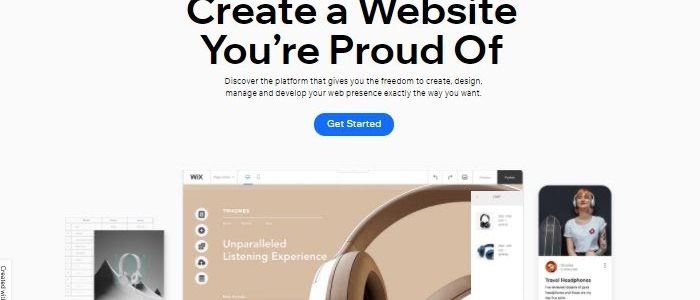
#1 – Wix — The Best For E-commerce Sites

If you’re looking for a free website builder that does everything a real-life store manager would do and then some, Wix makes that a reality.  

The thought of building an online store can be paralyzing. But once you create a Wix e-commerce site, you have access to perks like real-time tax calculations and adding several payment channels that you wouldn’t have with a builder geared toward content or portfolios. 

As a product seller, Wix helps you create beautifully designed storefronts with a selection of over 800 pre-built themes and templates ready to personalize at the click of a mouse. 

There’s no doubt e-commerce businesses are in good hands with Wix. It is a builder that goes out of its way to advertise themselves as such, instead of being a jack-of-all-trades. Still, as with every site builder, there can be some drawbacks. For example, if you ever want to move your site to another provider, you can’t do that with Wix’s builder because of how it’s configured. You’ll have to completely recreate it on a new platform.

Some of their e-commerce features designed to drive sales are:

  • Sales and customer behavior analytics
  • Displaying prices in international currencies
  • Easily creating subscriptions and discount coupons for customers
  • Integration with all social channels for greater visibility
  • Automated email marketing and abandoned cart recovery

To get started with Wix, visit their site and sign up.

#2 – Weebly — The Best For General Sites
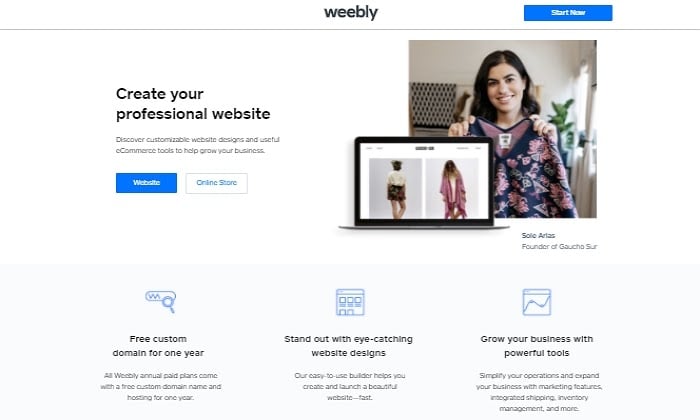
Let’s face it. You might not need a free site builder with all the bells and whistles. And that’s okay. That’s why Weebly exists. It’s the best site builder for general sites that need to do their job well.

It’s perfect for information businesses, non-profits, small portfolios, mission statements, or landing pages. This is because they make it easy to bring your site together with a no-nonsense dashboard and with options like built-in image editors and professional design options that let you create video backgrounds.

As a general site, you don’t want to deal with the technical stuff like SSL certification, encryption, and often costly third-party domain shopping. Weebly integrates takes care of all that for you right on their platform. 

One of their best features as a site builder is that you have the option to fully customize their HTML and CSS if you choose to do so. While it might not be something you need right away, it’s nice to know you have that capability as a future option. Weebly is built for site design with a more structured approach. If you’re looking for a builder with a bit more design flexibility and freedom, this might be a downside. 

Their best site builder features include:

  • Easy-to-use dashboard
  • Drag-and-drop site builder
  • Additional integrations like payments and product search with upgrade
  • Integrated analytics that kills the need for additional plugin installation
  • Mobile app to manage your site from your phone 

You can sign up with Weebly here.

#3 – WordPress — The Best For Blogging And Content Creation
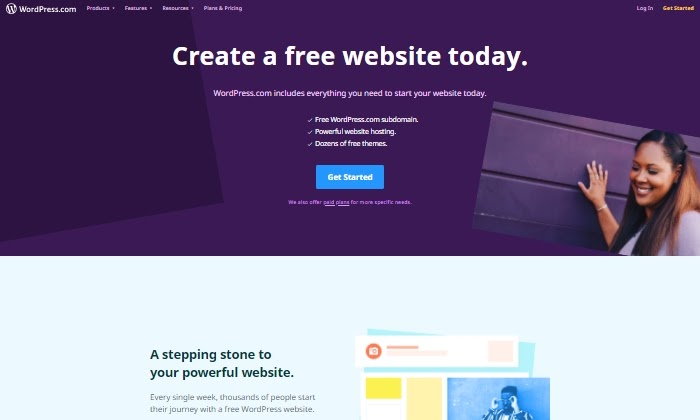
If I had to introduce WordPress to you, I’d say that it’s the top contender for blogging and content creation. 

Thankfully they provide a free site builder to get you started (in addition to paid options). 

For years, bloggers and companies like Disney, Dropbox, Spotify, and NBC have leveraged WordPress.com’s powerful site-building features to build audiences, expand their brand, and drive sales worldwide.

If you’re looking to blog, share your knowledge with the world, or create loads of content around your business, you’ll want to start with their free site builder. It’s designed to be straightforward and easy to use without any confusing and unnecessary features. This way, you can get started creating and publishing your content in record time. To help you if you get stuck, they provide free webinars that walk you through creating your site step by step. 

Their free site builder’s biggest downside is that you might grow out of its limited blogging toolbox. But if you want paid access to fully customize your site in the future, WordPress makes it easy to upgrade without the technical hassle. 

Some of the WordPress site builder’s best content creation features include: 

  • Optimized for search engine results
  • 24/7 live chat and support
  • Free subdomain that you can upgrade later to a custom domain
  • Free hosting without having to use a third party
  • Large selection of free themes to choose from and customize designed for sharing and creating content

Sign up with WordPress and start building your website for free. 

#4 – Site123 — The Best For Quick And Easy Landing Pages
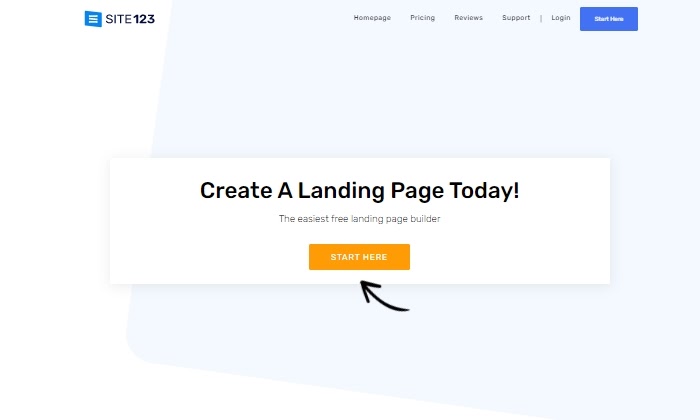
Easy and quick are the two best words to describe Site123. With its no-brainer features, it’s the best site builder for simple sites that don’t need many internal pages. 

In other words, it’s great for landing pages. 

Your business might not need a blog, robust e-commerce features, or top-notch design capabilities, but it’s still in need of a place online it can call home. 

Site123 helps you check that off your list by being the most no-nonsense site builder possible. You can avoid frustration and a big learning curve with Site123’s optimally designed web building process, especially if it’s your first time building a site. 

Their best landing page buildeing features include:

  • Free speedy hosting
  • Built-in media gallery with free professional icons and video
  • Compatible with third-party plugins
  • Beautiful pre-made landing page templates so you don’t start from scratch
  • 500 MB of storage

You can start creating your online presence with Site123 here. 

What is your site’s end goal?

That’s the perfect question to start and end with because it’s the best way to determine which free website builder you’ll want to use. 

There’s no shortage of site builders in the market. What sets them apart is what they’re designed for and how you can use that to reach your goals.

Remember that many of them are geared for where you are now, but that can change when you think about how you plan to expand in the future. 

Still, a detailed overview of each builder and what they offer will point you in the right direction.

After you determine your site’s end goal, pick the right free builder to start creating your masterpiece from one of the options on this list. 

The post Best Free Website Builders appeared first on Neil Patel.

New comment by reubano in "Ask HN: Freelancer? Seeking freelancer? (December 2020)"

SEEKING WORK | Peoria, IL | Remote

Hi HN. We’re Nerevu Group, a distributed team of data gurus that help organizations uncover the insights hidden in their real-time data. By creating interactive dashboards, developing web applications, and integrating disparate data silos, we usher our clients into the data-driven future.

Contact me at rcummings at nerevu dot com

Our tools:

* Languages (Python, CoffeeScript/JavaScript, HTML5, CSS3)

* Frameworks (Flask, Mithril.js, Node.js, Express, Ghost, CKAN)

* Libraries (Brunch, D3, Leaflet, SQLAlchemy)

* DB (PostgreSQL, SQLite, Memcache, Redis, MongoDB)

More info:

* https://www.nerevu.com

* https://www.nerevu.com/blog/category/Case+Studies

* https://www.nerevu.com/services

* https://github.com/nerevu

New comment by Omnipresent in "Ask HN: Who is hiring? (December 2020)"

Raft (https://goraft.tech/) | Multiple Roles | Remote (US Citizen Only) | Full time | https://www.indeedjobs.com/raft-c8bb7a6/jobs

Raft is a niche consulting focused on building cloud native solutions that make a positive impact on wide ranging users. We work in the Govt. Tech space at the intersection of Technology, Data, and Policy. Most of our work is done completely in the open source [0], [1], and [2]. We are looking for like minded folks who want to work on systems that serve a bigger purpose. We are always looking for folks who obsess over automation, want to try new tools, like to dig deep into problem solving, can troubleshoot from logs, and like building inclusive frontends.

Apply at https://www.indeedjobs.com/raft-c8bb7a6/jobs or careers@goraft.tech

[0] https://github.com/cfpb/hmda-platform
[1] https://github.com/raft-tech/TANF-app
[2] https://p1.dsop.io/

Is This The End Of Trump’s Fight To Overturn The Election?

Diane asks Richard Hasen, professor of law and political science at U.C. Irvine. The post Is This The End Of Trump’s Fight To Overturn The Election? appeared first on Buy It At A Bargain – Deals And Reviews.

JetPack Aviation (YC W19) Is Hiring

Article URL: https://jetpackaviation.com/career/ Comments URL: https://news.ycombinator.com/item?id=25399846 Points: 1 # Comments: 0

Hong Kong's Freedom Fighters

Jimmy Lai is charged under a security law for criticizing China.

The post Hong Kong's Freedom Fighters appeared first on ROI Credit Builders.

The Restaurant Lockdown Massacre

New shutdown orders punish minorities and low-income workers.

The post The Restaurant Lockdown Massacre appeared first on ROI Credit Builders.

JetPack Aviation (YC W19) Is Hiring

Article URL: https://jetpackaviation.com/career/

Comments URL: https://news.ycombinator.com/item?id=25399846

Points: 1

# Comments: 0

Grosjean shares photo of right hand burns

Romain Grosjean has posted pictures of his burnt right hand sustained in a fiery crash at the Bahrain Grand Prix.

The post Grosjean shares photo of right hand burns appeared first on Buy It At A Bargain – Deals And Reviews.

20 Buzzword Ideas for Your PPC Campaigns

The best pay-per-click (PPC) campaigns catch the eye, target relevant audiences, and motivate users to click or buy. Buzzwords are one way to reach these goals in the brief amount of time someone may spend looking at an ad.

Effective PPC marketing will always come down to compelling language. No matter how many features you use or Google Ad extensions you add, the best ads will always be the ones with the most powerful ad copy.

What Is a Buzzword?

Buzzwords are popular or trendy words or phrases. They are sometimes referred to as “jargon” or “business jargon.”

A buzzword can be a single word, a short phrase, or an acronym that gains popularity and replaces more traditional words.

Is buzzword marketing effective in business? It can be. There are several instances where marketing with jargon can be appropriate. For example, if you want to show your audience you belong and understand their problems or when you want to filter out irrelevant readers who aren’t likely to buy from you.

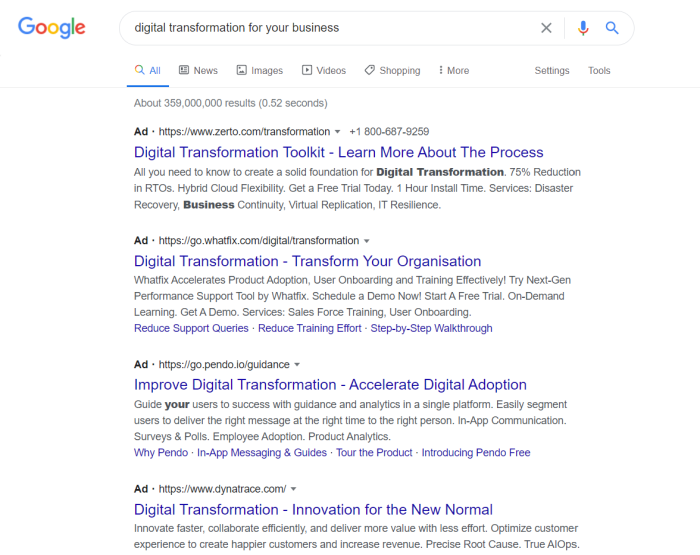
Take a look at these ads for companies offering digital transformation. Are they written for a wide audience?

Buzzword marketing digital transformation example

No. They are clearly making an effort to stand out to a very particular audience, and use buzzwords they know will jump out at a potential customer.

These ads don’t explain or define these terms because they know their ideal client already understands them.

How Can Buzzwords Boost Your PPC Campaigns? 

When you only have a moment to make an impression, buzzwords can have a big impact. They become popular for a reason, and they are often catchy and memorable.

We tend to develop a preference for things that sound familiar, and that includes language. This is called cognitive fluency. When we’re familiar with words, we find them easier to understand — and easier to remember.

Why Is It Important to Use Buzzwords in Your PPC Campaigns?

Countless ads are competing for users’ attention. Your PPC ads need to make a big impact in a small space. Buzzwords can help your ad stand out while appealing to the people most likely to become customers.

Here are some of the benefits of using buzzwords in your PPC campaigns:

Grab Attention Quickly

Most readers only skim ads or read the first few words before moving on. Buzzwords can attract attention and quickly target relevant audiences due to swift recognition of the terms.

If you could only use a word or two to catch the attention of your customers, do you think your ad would stand out if you use words like quality, sell, buy, and fast — words used by every industry or business? Probably not.

It would be more effective to let them know your ad is relevant to them by using buzzwords they’ll recognize from their industry or interests.

Increase Your Visibility

Buzzwords can show up in timely searches for hot topics. You can then direct users to landing pages with content that uses less flashy language.

You can also use varying headlines on multiple ads with attention-getting buzzwords and change them as language evolves.

Target the Right Audience

A specialized audience who connects with your ad copy can become a highly motivated and well-targeted audience. Buzzwords allow you to signal that you’re an insider speaking to other insiders, and communicate value quickly based on that status.

Show You Understand Your Audience’s Needs

PPC is about marketing, but your ads are being read by humans who can be swayed by psychological impulses. Most are making practical decisions based on their emotions, whether they realize it or not.

People use this language because they want to belong. When you use the same language, you’ll tap into a psychological need to feel heard. They’ll respond to make sure they aren’t left out of the latest movement.

If your ad can create an emotional response that fills one or more of these needs, you’re likely to inspire action.

Customers are looking for reasons to buy from you. Reassuring them that you know what they’re facing and can solve their problems encourages them to buy from you.

How to Find Buzzwords to Use in Your PPC Campaigns

The best way to find buzzwords that your customers will recognize is to pay attention to the language they use.

What do your customers say when they email or call your business? What language do they use to describe their pain points and the frustrations they face? What are they asking for when they ask for solutions? What words do they use when they write reviews?

Talk to your service department. They talk to your customers all day long, and they’re used to hearing your customer’s language. If you can address these concerns in your ad, you’re one step closer to showing your customers you are listening. This is a powerful shift.

You can also look at conversations in the communities you serve. What are your customers or audience saying online? What are your competitors saying? What topics are at the center of the most active conversations online?

How to Use Buzzwords

If you want to use buzzwords in your PPC marketing, you should have a good understanding of the structure of an ad. Each ad you write will be made up of a few elements:  headline 1, headline 2, and a description.

You may find that your customers only read the headline of your ad, or that some devices cut off portions of your ad due to space constraints. If you use buzzwords to add impact, make sure your customers will actually see them.

20 Ideas to Get You Started Using Buzzwords in PPC Campaigns  

Ready to get started with buzzwords? Here are 20 ways to make the most of them in your paid ads.

  1. Consider the audiences you want to target with your ads.
  2. If these audiences resemble your existing customers, use the language they use. 
  3. Consult online reviews to see how customers describe pain points.
  4. Check your customer emails and form submissions for the solutions they’re seeking.
  5. Review client testimonials for positive feedback and how they describe success.
  6. Ask your customer service department for suggestions.
  7. Look into online forums and social media chats for new buzzword ideas.
  8. Develop your messaging from your customers’ language.
  9. Create your ads from this new messaging.
  10. Make sure your landing page content matches your customers’ search queries.
  11. Create multiple ads with buzzwords that all point to one relevant landing page.
  12. Keep your website content free of buzzwords and jargon that could go stale.
  13. Update and refresh your ads as the advertising language evolves.
  14. Do your best to send users to relevant content so they don’t navigate away.
  15. Think about the buyer’s journey as you write your ads.
  16. Let your customers see themselves in your ads.
  17. Show up as an insider in specialized industries.
  18. Become a trusted source for solutions by showing what you know.
  19. Create urgency by tapping into your customers’ need to be included.
  20. Target new audiences by adopting buzzwords used in their communities.

What’s the Difference Between Keywords, Buzzwords, and Hashtags?

Buzzwords are trendy words that attract a lot of attention — but only for a short period of time. They are not necessarily language that will stay fresh, and could eventually become stale or develop negative connotations. Buzzwords are ideal for short content that needs to make a fast impression, like your PPC ads.

Hashtags are words or phrases written without spaces after a hash sign (#) in social media posts. They allow you to tag your content so people can find your posts when searching for those topics online. Using hashtags on social platforms can ensure you show up in the right conversations online and grow your social media following.

Keywords are the search terms you want to research when trying to show up on the search engine results pages (SERPs.) While keywords are likely to be used in your ads and your site content and may help your content rank over time, they likely aren’t as trendy and short-lived as buzzwords might be.

Popular Buzzword Examples

From real estate to sales, healthcare, insurance, or the auto industry, every industry has its own specific advertising buzzwords.

Where else does language change quickly? Anywhere there is a lot of innovation in new areas and new capabilities being developed.

For example, in technology circles, if you aren’t using the terms your industry is throwing around, you’ll be left behind.

If your customers see you selling without language that positions you as an expert and trusted authority, they’ll go elsewhere. Buzzwords signal to your audience that you are part of the specialized group they want to be in.

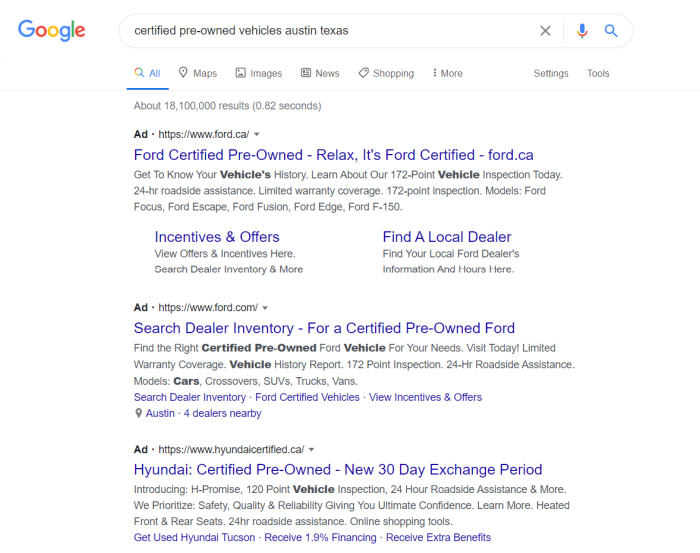
In the auto industry, people have sold used cars nearly as long as cars have been on the road. However, the use of the term “certified pre-owned” vehicles is an example of how marketing language has evolved over time.

Buzzword marketing certified preowned vehicle example

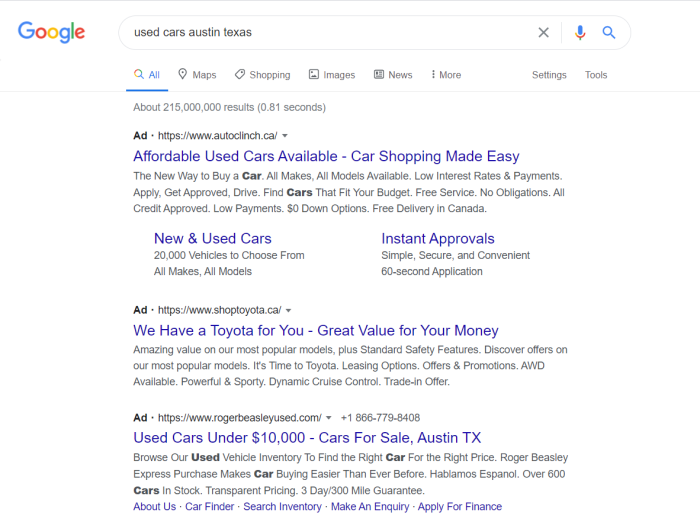
Whether you like the term or not, most people will have a different reaction to ads for “used cars” compared to “certified pre-owned” vehicles.

Without using the new term, you might struggle to sell used cars at the same level as dealers who have adopted it. In this case, not using a buzzword could hurt you.

Buzzword marketing used cars example

Examples of Common Buzzwords

  • Disruption
  • Hyperlocal
  • Freemium
  • Clickbait
  • Leverage
  • Touchpoint
  • Transformation

Examples of Common Buzzword Phrases

  • Blue-sky thinking
  • Pushing the envelope
  • Facetime
  • Ping me
  • Digital transformation
  • Big data
  • Next-gen
  • Deep dive
  • Growth hacking
  • Value add

Examples of Common Buzzword Acronyms and Meanings

  • B2B (business-to-business)
  • EOD (end of day)
  • CAD (computer-aided design)
  • ROI (return on investment)
  • AI (artificial intelligence)
  • RFID (radio frequency identification)
  • SEO (search engine optimization)
  • CRO (conversion rate optimization)

How NOT to Use Buzzwords in PPC

Using buzzwords is a powerful way to boost your ad copy and quickly attract attention from specific audiences. However, be sure the buzzwords you use are relevant, widely used by your audience, and don’t have multiple meanings.

Don’t use buzzwords for communities you aren’t a part of or that will confuse your customers. They want to hear the language THEY use, not the language you use internally.

Ad copy needs to make a point at a glance, and without context, so your buzzwords will need to fit these parameters as well. If it needs explaining, it doesn’t belong in an ad.

If your value proposition isn’t clear in the first few seconds, your ad will likely miss the mark.

What About Using Buzzwords In Longer Content?

Avoid using buzzwords in your landing pages and content marketing. Buzzwords often sound dated after a few months, and it’s time-consuming to update pages of content on a regular basis.

Your ads can be updated and refreshed any time there is a change in language or the general response to popular buzzword changes.

Using too many buzzwords in your writing can turn people off and make them think your content lacks substance. Some buzzwords are so overused that they may turn people off entirely.

Examples of buzzwords to avoid include:

  • Low-hanging fruit
  • Hit the ground running
  • Bells and whistles
  • Get your ducks in a row
  • All hands on deck

Conclusion

Using buzzwords in your PPC campaigns can help you target specialized audiences swiftly and effectively. When used carefully, they can effectively trigger an emotional response in your customers and move them to action.

While using compelling language in your ad copy is essential, remember that plain language will always win out over complicated jargon.

Don’t clutter your ads with multiple buzzwords or try to cram unrelated buzzwords into single ads. Let them stand on their own, craft compelling copy for the rest of the ad, and watch your relevance.

Ad copy is a specialized skill, and many business owners find PPC consulting helpful to see results faster. My team offers PPC management if you’d like to get in touch.

Have you tried using buzzwords to boost results in your PPC marketing? What results have you seen?

The post 20 Buzzword Ideas for Your PPC Campaigns appeared first on Neil Patel.