
What is Video Search and How Can it Help Your Business?

Studying how people use video search to find the content they want is an essential but often neglected area of marketing.

When we understand how video search engines work, we can begin to devise marketing strategies around this traffic source. When you understand your audience’s search intent and properly optimize your videos, you unlock new means of generating leads for your business.

In this guide, we break down video search engines and how you can use them to increase your traffic.

What Is Video Search?

What is video search

The first thing we need to think about is why people search for videos in the first place. What makes someone look for a specific video? Why are they searching for that video? What are they looking to accomplish?

All of these questions are important to answer, and we’ll address them, one by one.

According to Google, people look for videos for three different reasons. They either want to reflect, connect, or learn. So, what does that mean exactly?

An Opportunity to Reflect

Video in any form has provided us with a way of escaping reality. For many decades, it’s been in the form of television. Many people use video to see life through a different lens, which helps them reflect on their own life.

This could be one reason someone might search for a video.

To Connect with Someone

Another reason someone may use video is to foster connections. 51% of people in a study completed by Google say they feel the need to connect with others through video content.

A great example might be someone struggling with addiction to alcohol. Their first response would be to retreat and hide from friends and family because that’s what they’re used to doing.

A quick video search displays hundreds of videos of people going through the same thing, and now they can relate to someone. We seek video to connect with our community and to meet on common ground.

To Learn Something New

Videos have become a way for us to learn about anything we might be interested in, and there are nearly no limitations to what we can find with a quick video search. Whether you’re looking to touch up on something you know already or dive into something completely new, there are millions of videos on the internet to help you accomplish your goal or explore your hobbies.

How People Search for Videos

Now that we understand the “why,” let’s look at the “how.” How do people search for videos on the internet, and what does that tell us as marketers?

One very common way people search for videos is in traditional search engines. A quick Google search for something actionable will supply hundreds of videos revolving around that topic. For example, if someone wants to learn how to properly tape off a living room to use a residential paint sprayer, it might be easier for them to watch a video on how to do it rather than read up on it.

You can also go to the video section on the search result page to see just video results.

Video Search Screenshot of Googles search results for a keyword phrase.

You can type your search into the Google search bar and then choose from the recommended videos, or you can click the videos tab and search strictly for video rather than text results.
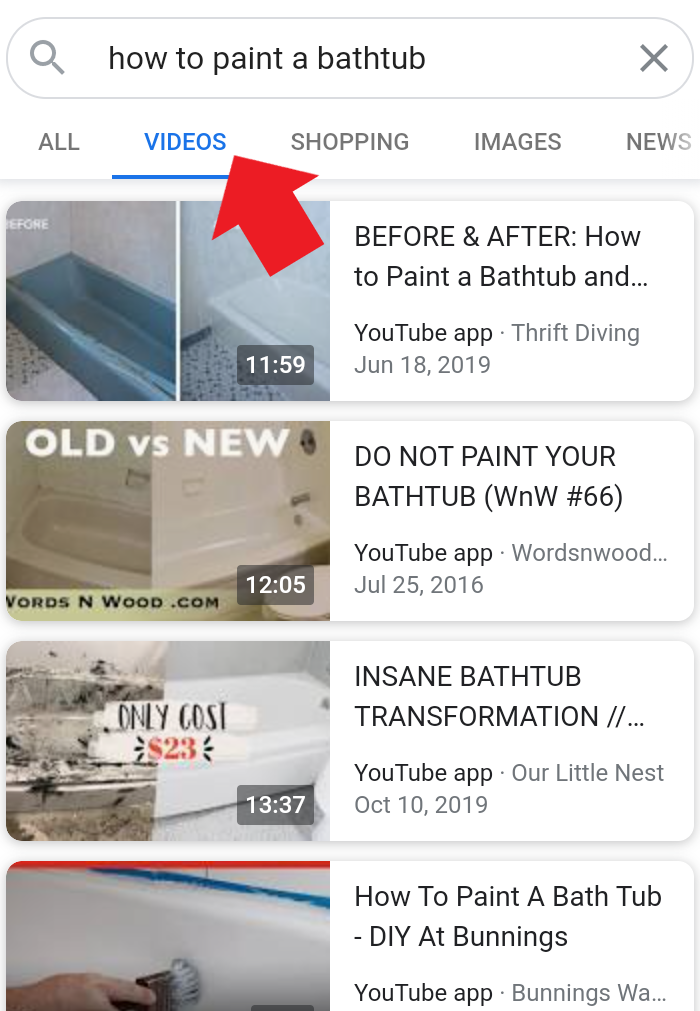
video search on Google

Another popular method people use to search for videos is social media. Facebook, Instagram, Twitter, TikTok, and others all make it simple for you to search for videos in various ways.

For example, Instagram uses hashtags to tag videos. This feature makes it easy for people to come in and search the specific hashtag and find your video if you’ve optimized it correctly. 

video search Instagram screenshot of hashtags to help with search

On Facebook, hashtags aren’t as popular, but you still have video descriptions and closed captions that can be searched.

How to Use Video Search to Grow Your Business

As marketers, it’s our job to bring the right content to the right audience at the perfect time.

To do this, we need to have a firm understanding of a few things.

#1: Understand Your Video Search Audience

You need to understand who your target audience is, but this gets a little more advanced when talking about video search. This task isn’t as simple as optimizing a landing page for your organic search audience. We have to talk about a complete overhaul based on the platform you’re using.

There are a few levels to this.

The first level is choosing the platform you’re using to promote your videos. For example, the audience on Facebook is much different than the audience on TikTok. No matter how hard you try, you’re not reaching many seniors on TikTok, even if you have the perfect piece of video content for that demographic.

Once you understand the platform’s overall demographic, you need to break it down and learn who your specific audience is. What is your buyer persona? What types of videos do they like to watch? Are they looking for entertainment, information, connection, etc.?

The last level is, what types of searches are they making? Once you know where and who they are, how can you connect them with your video? What are they typing into the search bar, and how can you direct that to you?

The easiest way to understand all of this is to reverse engineer it the same we do with organic SEO. Put yourself in your ideal client’s shoes and search for a video within your wheelhouse. Figure out what search phrases lead where and what you need to do based on your competition to jump ahead of them.

#2: Connect With The Video Searcher

This point piggybacks off the previous one, but it goes a little deeper. Connecting with the searcher means understanding what they’re looking for so you can be the one to provide it.

Attention spans are short, so you need to provide the right answer as soon as possible in your video; otherwise, people will turn somewhere else.

Another key to video search is giving the audience exactly what they want, right away. If the first few seconds of your video doesn’t pique the viewer’s interest, they’ll move on to the other hundreds of options available to them.

#3: Know Your Chosen Video Platform

Another point to consider is the chosen platform you’re using from point one. How well do you understand how to use it? Do you know how the video search process works? Do you understand the basics of the algorithm and methods used to determine which videos show up and how they rank them?

In the same way that we try to understand everything about Google’s algorithms for SEO, we need to do the same with each platform, and if you don’t understand it, you might get left behind.

#4: Time it Correctly 

Timing is a huge factor. The length of your video will play a significant role in who chooses to watch it and how well it ranks. There isn’t an “end all be all” for video length because the ideal length depends on the platform.

That said, if someone is looking for a quick solution to a problem, throw that case out the window. For example, when someone is trying to figure out how to upload a featured image on WordPress, they don’t want to watch a 15-minute video because they’re going to know there’s a lot of fluff.

Your video would likely perform much better if it was only one minute because people will assume it is straight to the point.

Google even pinpoints in many video searches where the result you’re looking for is in the video in their search results.

video search how to time it correctly

They pull a snippet out for you to get the answer you’re looking for without having to watch the whole thing.

#5: Optimize Properly 

Lastly, you need to optimize your videos. There’s a whole guide to video SEO here, but there are some important factors pertaining to video search specifically.

First, your thumbnail:

The thumbnail of your video is like the trailer for your upcoming movie. If the trailer sucks, chances are, no one is going to see the movie.

If your thumbnail sucks, fewer people will click through to your video. Your thumbnail needs to contain keywords, and it must instill confidence in the viewer that your video will solve their problem.

Second, you need to optimize your video descriptions on all platforms. Every video search platform uses keywords to determine how relative a video is to what the user is searching. You need to make sure you’re following fundamental SEO principles when it comes to video search as well.

The Most Popular Video Search Engines

most popular video search engines

Many people wonder what the top video search engines are but keep in mind, it’s unique to the individual. What’s a hit on Facebook might tank on TikTok and vice versa. When choosing from these top six video search engines, make sure you factor in everything we’ve discussed so far.

Facebook Video Search

Video marketing on Facebook is all about interrupting patterns. If you’re targeting an older demographic, your content is a bit more serious, and you’re able to grab attention quickly, Facebook might be an excellent place for you.

The problem that I’ve seen with Facebook video is the implementation of intrusive ads. That’s why I recommend sticking to short, sweet, and direct videos on Facebook. If your primary purpose of creating the video is to sell something, keep it super short, ideally less than 60 seconds.

One area where Facebook has shined is in e-commerce. I see videos all the time of people using a product they purchased online, and they do such a great job of making the video appear organic.

The key to getting your video in front of your audience on Facebook is to make sure you include the right keywords in your description and have a very refined target demographic.

YouTube Video Search

Understanding Youtube video search is all about understanding video SEO. There are also various tools and extensions out there to use alongside the manual work and knowledge you obtain.

One thing about YouTube is that they reward continuous creators. Consistency is essential, and if you plan on having success with YouTube, you need to create videos every week so the algorithm sees that you’re a consistent creator.

I see YouTube marketing as an excellent way for affiliates, content creators, and artists to display their work. If you produce something as a product or you’re an affiliate or something, YouTube is the place to show your stuff.

The platform also puts much more emphasis on longer videos. Plus, if you’re creating high-quality content, the longer videos will increase your watch time, which has a positive impact on ranking.

Instagram Video Search

Instagram is built on discovery, and if you’re looking to go from nothing to something, Instagram seems like the place to be. Video search on Instagram is made possible through the use of hashtags.

When someone wants to find something specific or they want to filter content, they search using hashtags.

One great way to get discovered on Instagram is by capitalizing on trends. Throughout the year, Instagram has a plethora of hashtag trends that explode in terms of search volume, and if you find one that’s relevant to you and your audience, you may be able to create a viral video or “reel” (their version of TikTok) in no time.

Twitter Video Search

Capitalizing on Twitter video search is similar to Facebook; it needs to be interruptive without being intrusive. You’ll want to have the proper key phrases in your video’s description because users will search for content relating to that phrase.

Also, keep in mind that platforms like Twitter choose which videos to display on users’ Twitter feeds, so having relevant keywords pertaining to the content in your video may end up on the feed of your ideal client.

Vimeo Video Search

Vimeo is very similar to YouTube, but Vimeo has an advantage with smaller boutique-style audiences. There’s less competition, the quality of videos is better, and viewers are more dedicated to the videos they watch.

Another recommendation for marketing on Vimeo is to stay on top of the engagement with your viewers. Because the audience is so much smaller, there’s a lot less spam and bots, which means more actual conversation from people who may have questions about whatever it is you’re selling or promoting.

TikTok Video Search

Content is king on TikTok, and compared to all the other platforms, this app is the only place where you can post a video with no followers and get millions of views if you know what to post.

It’s essential to understand your audience and tap into their feelings, emotions, fears, and desires. Who are you looking to target, and what do you want them to feel when watching this video?

Once you’ve got that figure out, put in a proper description, add some hashtags, and see what happens. There’s no proven formula because the content is so important on this platform. If your content resonates with the right people, it will get likes and shares, and the sky’s the limit from there.

Conclusion 

Now that you understand video search, how people search for videos, why they search, and how to reach them, how do you feel? Do you feel like any of the previous video platforms could work for your brand?

If this all sounds like a lot of work, consider learning more about what we’ve done to help other marketers get their videos in front of the right audience.

Which platform do you think is the best for video marketing going forward?

The post What is Video Search and How Can it Help Your Business? appeared first on Neil Patel.
New comment by martinbeta1 in "Ask HN: Who is hiring? (November 2020)"

Prisma | Technical Lead: Control Plane | Remote | Full-Time

Until now, Prisma has been fully focused on developer adoption. Now hat we have seen successive months of consistent growth, we are ready to start building out our first enterprise product. The Technical Lead will adopt two developers from the existing team and work closely with the CEO, VP Product and our small Sales Engineering team. Our language is Rust but learning on the job is totally fine – we are more interested in experience building and operating robust high-scale servers and the challenges around deploying to enterprises.

If this sounds interesting to you please check out the full Job Description here and send over your resume: https://grnh.se/745381c82us

The post New comment by martinbeta1 in “Ask HN: Who is hiring? (November 2020)” appeared first on ROI Credit Builders.

Best Call Center Software

Disclosure: This content is reader-supported, which means if you click on some of our links that we may earn a commission.

What would it be like for your business to never miss another call?

Nothing scares away new business like hard-to-reach customer service or disorganized sales calls. Adopt the best call center software and you will outfit your teams with the tools they need to communicate effectively.

Today, an affordable call center is within reach of any business with an internet connection. 

Forget about the requirements of a physical office space, infrastructure, or even a business phone system.

Modern call center software is all you need to get up and running. You still have the hard work of engaging your customers and clients, but all the heavy lifting associated with maintaining a call center is off your plate.

The Top 5 Options For Call Center Software

  1. Five9 – Best for Blended Call Centers
  2. Aircall – Best for Collaboration
  3. 8×8 Contact Center – Best for Enterprise
  4. Dialpad – Best for Startups
  5. Talkdesk CX Cloud – Best for Best for Salesforce Integration

How to Choose The Best Call Center Software For You

I make calls when I’m thinking about committing to a new product or service. Lots of people do. 

The human connection is real, intimate, and—unfortunately—easy to mess up.

One dropped call. One mistaken name from an agent who’s spoken to 35 other people within the hour. 

It doesn’t take much to lose a lead or earn a 1-star review carved in digital stone on the internet.

You’re looking for a system that establishes trust with customers because they know they can call and speak with the right person quickly. 

It must also come with an interface that empowers agents by giving them insight into calls, client histories, and any other information they need to resolve issues in real-time.

Customers need prompt answers from helpful agents. End of story.

The best call center software comes with everything you need to meet these two fundamental call center objectives, and much more. 

Let’s go through the core call center features that help businesses make their customers happier and their agents more productive.

Calling Capabilities

Blended call center software will let the same agent receive incoming calls and make outgoing calls. This isn’t the case with every product, as some are limited to a single direction: inbound or outbound.

This can work to your advantage.

If you only need one or the other, you may be able to get a less expensive plan that’s easier to secure and manage. A helpdesk might only need inbound and a sales team might be fine with outbound calls only.

Dialing Capabilities 

For outbound call centers, having the right dialing capabilities can make a huge difference in terms of agent productivity (and sanity). The four types you are likely to see are:

  • Preview dialer: Lets an agent review contact information before they call
  • Progressive dialer: Automatically dials one contact per available agent
  • Power dialer: Automatically dials multiple contacts per available agents
  • Predictive dialer: Automatically dials based on predicted agent availability

Dialers decrease an agent’s down-time considerably and completely eliminate the manual grind process of making calls from their cognitive workload.

Channels

Call center software should be able to accommodate every channel you currently use or plan to use in the future. If you see something billed as omnichannel, it should cover:

  • Phone
  • VoIP
  • Email
  • SMS
  • Chat
  • Social
  • Video

Ensure that whatever product you choose will let customers interact seamlessly with agents across all supported company channels.

Call Routing

Call center software comes with routing features that segment and direct incoming calls, potentially automating the processes which connect callers with the expert or agent they seek.

Some of the popular call routing features explained:

  • Automatic Call Distribution (ACD): Greets customers and allows them to select from a main menu or enter extension to route themselves. 
  • Automated attendant: Takes calls when all agents are busy, plays hold music, relays wait times, and reminds callers that their time is valuable.
  • Intelligent call routing: Uses automation, AI, or interactive voice response to route customers to the most appropriate agent.
  • Mobile device routing: Allows calls to be routed to mobile devices.
  • Omnichannel routing: Allows calls to be routed across any channel.
  • Virtual hold: Gives customers the option to receive a call back when an agent is ready, instead of waiting on the phone.
  • Warm transfer: Lets customers speak to a new agent before the call is transferred, and allows the previous agent to explain any ground that’s already been covered.

If call center software comes with intelligent call routing, it’s safe to assume it can handle most, if not all, of the capabilities listed above.

Interactive Voice Response 

Interactive voice response (IVR) enables customers to use a phone system to access information from a connected database. This could be someone calling to find out their checking balance, hear the status of their order, or pay a bill.

If you have customers routinely calling to access information, you can free up a lot of phone time simply by implementing IVR. It’s a truly self-service solution that helps people get what they want, without ever talking to an agent.

Call Recording

You have probably heard a thousand times that “this call is being recorded for safety, security, or training purposes.” Well it’s all true.

Call recording is extremely important. Supervisors can listen back to trainee calls and give advice about how to improve. In the event of a legal or compliance issue, call recording will cover your bases.

Good call center software makes it as easy as possible to save and store every call in a highly organized, searchable database. If you integrate your CRM, every recording can also be tied to the appropriate customer or client account.

One advanced call recording feature that can be really useful for sales teams is voicemail-to-email. This sends an email with an audio attachment or transcription of the voicemail to the account owner who missed the call. This is a huge time saver, especially for agents who are remote and on the go.

Workforce Management 

How efficient is your call center? How do you know?

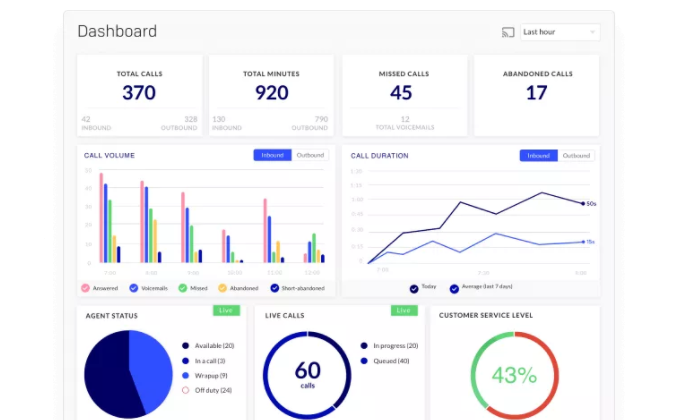
Reporting and analytics are important features of modern call center software. Look for products with both historical and real-time reporting capabilities to support workforce management and optimization.

By tracking key metrics about calls, wait times, and first contact resolution, among others, those in supervisory roles are better able to forecast staffing needs to fit fluctuating demand.

Integrations, APIs, and SDKs

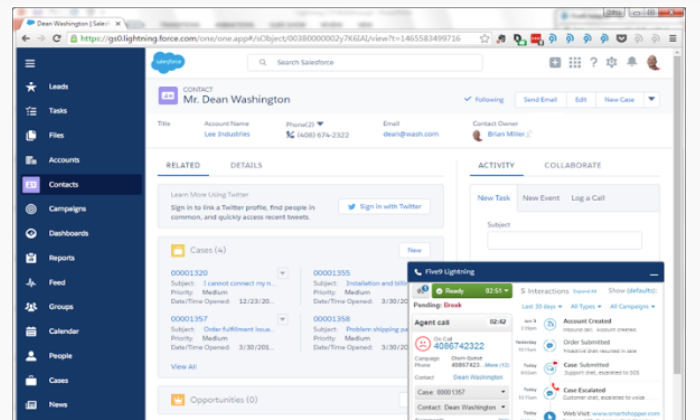
Put key customer data in front of your agents by integrating customer data sources with your call center software. The top products come with seamless integrations that work out of the box with leading CRMs like Salesforce and Microsoft Dynamics.

Many top call center software options have APIs and software development kits (SDKs) that allow you to build out custom solutions.

The better connectivity you can provide, the richer the customer information your call center will collect. 

Done right, you’ll provide marketing, sales, and customer service with data-driven insights to steer their efforts.

Security

Even if your customers aren’t giving their social security number over the phone, they’re sharing personal and potentially sensitive information. It’s unpleasant to imagine how much havoc an attacker could cause with full access to a database of client conversations.

Consider potential vulnerabilities that come with deploying call center software. Does it integrate with your current security stack? If not, be sure to add the cost of securing your new IT perimeter to the total cost of ownership.

The Different Types of Call Center Software

It’s getting less and less important for call center solutions to offer traditional business phone systems. Some do, but most are focused on helping companies migrate gradually to a centralized, cloud-based, multi-channel interface.

As important as the phone is, the reality is that customers are reaching out on more and more channels. 

This is why you’ll see the name “call center” being dropped in favor of “contact center.” 

It simply reflects that companies have to be able to respond however they are contacted: phone, chat, email, and so on.

Whether you are starting from zero or looking to modernize your existing system, picking the right type of call center software is the first step.

On-Premises Call Center Software

Many companies still maintain their own call centers and it can be important to keep everything in house for compliance reasons.

If this is a concern, make sure you choose an option that supports your infrastructure needs.

Cloud Call Center Software

Cloud-based call center software provides the same capabilities as a traditional call center, but it’s delivered as a service. Companies don’t have to manage any of the hardware or software.

A SaaS call center can be deployed in just a few hours or days, since there isn’t much required beyond headsets and devices to work from.

It’s very easy to run a distributed or work-from-home call center with a cloud-based solution, which is another reason these solutions are so popular.

CCaaS

Contact Center as a Service (CCaaS) centralizes all of the channels your teams use to communicate externally. 

Whereas a cloud call center may only give you VoIP, a CCaaS solution is going to loop in text, chat, social, and video as well.

UCaaS

Unified Communications as a Service (UCaaS) has all the capabilities of a CCaaS, with an additional focus of integrating legacy communication technology like fax and teleconferencing.

These products truly unify all forms of communication, helping companies adopt future-proof solutions as they phase out old equipment.

#1 – Five9 — Best For Blended Call Centers

Five9 empowers call center agents to deliver the best possible experience to their customers by providing true omnichannel functionality from anywhere within an intuitive interface.

Agents can switch between chat, email, mobile, social, video, or voice to maintain seamless customer interactions.

Plus, integrations with top CRM platforms mean that all data is captured, providing an end-to-end contact center solution. Whether agents are reaching out or picking up a call, they always have current information about who they’re speaking with.

There are also built-in workforce management tools that make accurate forecasting and scheduling much easier.

For all the power of Five9 call center software, it’s not overwhelming, and people can quickly master the tools at their disposal, such as:

  • Predictive, power, progressive, and preview dialers
  • Intelligent omnichannel routing
  • IVR
  • Historic and real-time analytics dashboards
  • Six built-in CRM integrations
  • Cloud APIs and SDKs

Blended call centers will definitely notice increased efficiency using Five9. Active blending, one of the intelligent routing features, automatically sends inbound calls to agents working outbound campaigns when call volume is high.

Five9 pricing is based on whether you want inbound, outbound, or blended service. You’ll have to get in touch with sales, but there are three options for how to pay:

  • Monthly on-demand
  • Per-minute fees
  • Annual contracts

The lowest price will come with an annual contract, but companies can scale quickly at low cost with on-demand pricing if need be.

As sleek as it is, Five9 is one of the top call center solutions for companies that need to integrate legacy technology. If you’re thinking about using a cloud-based solution for your blended call center, Five9 can help no matter where you are starting from.

#2 – Aircall — Best For Collaboration

Aircall is a CCaaS you can deploy this afternoon.

The VoIP quality is great, calls don’t drop, and agents can work from anywhere on their laptop or personal mobile device. It’s a great solution for virtual cloud call centers because of the built-in security, workforce management, and collaborative features.

Customers can leave voicemails which can be quickly assigned to the right person. New hires can listen into calls to hear what good service sounds like. In fact, you can host up to five people on the same live call.

One of the biggest perks for teams is the ability to assign, tag, and comment on calls. This is so helpful—assign the call to an individual, tag it to a specific department, and leave a short explanation about what’s going on.

It’s not that other call center software can’t do this—it’s just easier in Aircall.

For all the ease of using Aircall, it is a complete CCaaS that provides 

  • Automatic call-back
  • Intelligent call routing
  • IVR
  • Power dialer
  • One-click CRM integrations
  • Call center analytics

Aircall pricing is broken down into three tiers:

  • Essentials: starting at $30 per user/month
  • Professional: starting at $50 per user/month
  • Custom: contact sales

One quick thing: Salesforce integration only comes at the Professional tier, whereas integrations for Pipedrive, Zendesk, Hubspot, Slack and more than 60 others come with Essentials.

Aircall still supports traditional phone systems, which makes it an attractive option for companies that want to expand their call center operations to the cloud at their own pace.

#3 – 8×8 Contact Center — Best For Enterprise

8×8 Contact Center is one of the more robust tools on the market. 8×8 has been around for a long time and can fully support migration to a UCaaS call center.

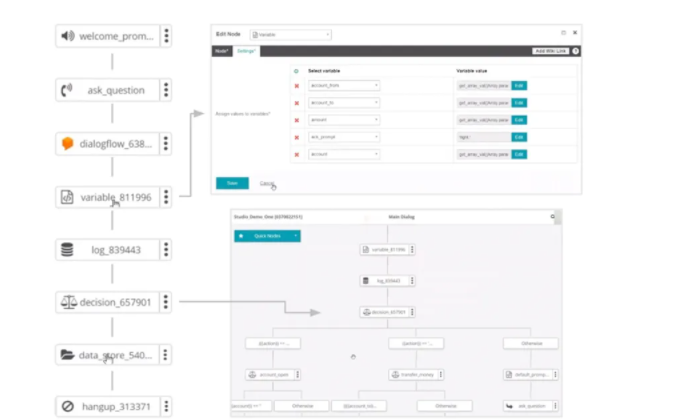
It’s a powerful solution that can help large organizations in particular. Build out complex IVR paths, optimize a large workforce, and process payments all within a navigable interface.

There may be a little more of a learning curve with 8×8 than with other call center software simply because the platform is so feature rich. 

That said, once you have everything set up, the support and online documentation is enough to help people take advantage of 8×8’s advanced features, including:

  • Call and screen recording
  • Predictive dialer
  • Drag-and-drop IVR designer 
  • Speech analytics
  • Customer surveys
  • Native CRM and integrations with top products

The pricing for 8×8 Contact Center breaks down into three tiers:

  • Contact Center – Voice
  • Contact Center – Omnichannel
  • Contact Center – Advanced

8×8 is not going to be the most budget-friendly option, even at its voice-only tier. 

To include digital channels, you will need the Omnichannel plan. For speech analytics and screen recording, you will need Advanced.

For voice-only call centers, other options from this list will meet your needs at a lower cost. If you are trying to build out an omnichannel contact center, however, 8×8 will give you a level of visibility and control that lighter products can’t.

#4 – Dialpad — Best For Startups

Dialpad is a next-generation UCaaS that completely supports today’s on-the-go, distributed workplace. Choose Dialpad for agile, constantly improving call center software.

You can add agents via the web client or Dialpad app. Both are updated frequently for security and to add new features.

For all the flexibility provided to end-users, Dialpad doesn’t skimp on the backend reporting, recording, or monitoring features. This is huge for companies that are still trying to figure out what’s important.

With Dialpad, your team can assess KPIs and discover meaningful trends in real-time. Simply integrate your CRM and watch as Dialpad surfaces the most important metrics from calls on clean dashboards or highly-visible leaderboards.

Some of the other great capabilities of Dialpad include:

  • IVR
  • Seamless mobile routing
  • Call/Voicemail transcription
  • Warm transfer
  • APIs and webhooks
  • Integrations with top SSOs, CRMs, G Suite, and Microsoft 365, 

There are two plan options for Dialpad Contact Center:

  • Pro: starting at $225/month for 3 agents
  • Enterprise: contact sales, 100 agent minimum

Businesses thrive with Dialpad because of its efficiency. Deployment is simple, integrations are tight, and it performs extremely well for organizations with many remote workers. 

#5 – Talkdesk CX Cloud — Best For Salesforce Integration

Talkdesk is a leading CCaaS product that works well for large organizations who need to scale their contact center operations. Quickly provision new agents and securely connect them to sensitive customer data, no matter where they are.

It’s a feature-rich, yet very approachable, solution. People who have never used Talkdesk can sit down and start taking calls.

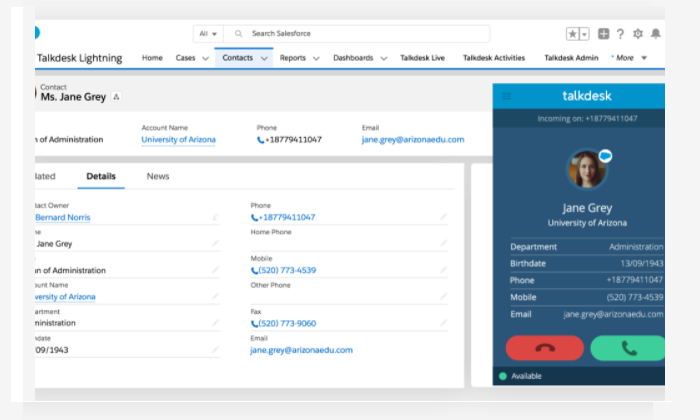
Talkdesk has more than 60 integrations ready to go, but the seamless connection with Salesforce CRM is definitely a key selling point. Agents can see a rich history of who they are talking to and all calls are automatically recorded in the proper place. 

When agents forget call details, they can listen back with a few clicks.

Some tasks, like creating new IVRs, take some getting used to, but for the most part, non-technical users are going to be able to get the most out of every feature, including:

  • Intelligent routing
  • Warm transfer
  • Customer sentiment surveys
  • Real-time dashboards for workforce management
  • Custom IVR
  • Guardian Standard fraud prevention

Talkdesk also offers AI-driven add-ons for speech analytics, workforce management, and quality control. 

Talkdesk has rolled out affordable solutions for SMB call centers. Adopting something this powerful early on will deliver superior customer engagement, and may even cut down on costs by increasing agent productivity.

Summary

Ten years ago, setting up a call center took months. Today, you can deploy one over the weekend.

To make your choice, focus on how the feature set of each product will:

  • Enable customers connect to the right agent quickly
  • Empower agents serve customers and connect with clients

While every option on this list is fairly easy to get set up, Dialpad or Aircall are exceptionally easy in this regard. Aircall will better accommodate legacy technology than Dialpad, if that’s a consideration, and the collaborative features are more mature.

Then again, it depends how you collaborate. The ease of routing calls between devices on Dialpad is phenomenal, which is critical for distrubed call centers.

Five9 has the edge on many other full-scale contact center software when it comes to outbound dialing capabilities. Sales teams can automatically ramp up their call volume without increasing call abandonment numbers. As the inbound call functionality is comparatively rich, Five9 is a great option for a blended call center.

Companies using Salesforce CRM will enjoy using Talkdesk. The integration works with ease and employee familiarity with the Salesforce interface makes adopting Talkdesk that much easier.

Choose 8×8 if your company is going to benefit from building out complex IVR pathways. It’s easy to design customer journeys in the visual, drag-and-drop editor, which really stands out from the crowd.

Additionally, the security in 8×8 is payment card industry compliant, so you can rest assured that connecting customers to sensitive information via IVR won’t cause problems down the line.

The post Best Call Center Software appeared first on Neil Patel.

The Three Primary Strengths Of Network Marketing

The Three Primary Strengths Of Network Marketing Multi level marketing, ‘MLM’, and also Multi Level Marketing are all terms that describe the very same sort of service design. This market has actually had greater than it’s share of sleazebag criminals and also hustler that have actually made use of and also abused the principle. If …

The post The Three Primary Strengths Of Network Marketing first appeared on Online Web Store Site.

Flexport (YC W14) is hiring engineers in Amsterdam

Article URL: https://Flexport.com/careers/engineering

Comments URL: https://news.ycombinator.com/item?id=25243459

Points: 1

# Comments: 0

New comment by martinbeta1 in "Ask HN: Who is hiring? (November 2020)"

Prisma | Technical Lead: Control Plane | Remote | Full-Time

Until now, Prisma has been fully focused on developer adoption. Now hat we have seen successive months of consistent growth, we are ready to start building out our first enterprise product. The Technical Lead will adopt two developers from the existing team and work closely with the CEO, VP Product and our small Sales Engineering team. Our language is Rust but learning on the job is totally fine – we are more interested in experience building and operating robust high-scale servers and the challenges around deploying to enterprises.

If this sounds interesting to you please check out the full Job Description here and send over your resume: https://grnh.se/745381c82us

New comment by susanne_audatic in "Ask HN: Who is hiring? (November 2020)"

Audatic | Berlin, Germany (ONSITE) | Full-time | Visa | SysAdmin & Deep Learning Engineer | http://audatic.ai Audatic is building systems to intelligently modify sound using state of the art deep learning technology and unique datasets. Our personalized sound environment allows users to customize sounds to their individual taste. Applications include effortless interactions in noisy places (especially for people with hearing impairments), and realistic audio-environments for augmented reality. We are a young, driven and dynamic team with the vision to change people’s lives. We value each team member and opinion equally and count on everyone’s contribution to make our vision come true. You are encouraged to constructively challenge our ideas and can expect to be involved in the decisions that shape the future of our company. Tech: Linux, Python with Tensorflow, Android & iOS and some AWS. We are looking for smart and curious people who either like to manage our in-house cluster and infrastructure (SysAdmin) or build novel network architectures (Deep Learning Engineer). Apply now at http://audatic.ai/apply-now/

New comment by ananya125 in "Ask HN: Who wants to be hired? (November 2020)"

Location: Europe/USA (Currently I am in India) Remote: Yes Willing to relocate: Yes Technologies: Python, Clojure, Javascript, C/C++(STL), CSS, GoLang, Django Email: ananyaagrawal125@gmail.com Resume[PDF]: https://drive.google.com/file/d/11R2QnMomtBgjaz-76-Oj8CXs601… I am a 4th year undergraduate student of bachelor’s in Indian Institute of Information Technology, Allahabad, India graduating in May 2021. I have previously worked at Gojek as a Product … Continue reading New comment by ananya125 in "Ask HN: Who wants to be hired? (November 2020)"

How to Choose The Right Technical SEO Agency

Got a crawling, indexing, or site-wide ranking problem? SEO traffic isn’t just about having the right content. One wrong technical seo setting can bring your entire site down. And many technical errors are so obscure that they go unnoticed for years. Even small problems can add up, slowing you down and resulting in less traffic. … Continue reading How to Choose The Right Technical SEO Agency

New comment by ananya125 in "Ask HN: Who wants to be hired? (November 2020)"

Location: Europe/USA (Currently I am in India)

Remote: Yes

Willing to relocate: Yes

Technologies: Python, Clojure, Javascript, C/C++(STL), CSS, GoLang, Django

Email: ananyaagrawal125@gmail.com

Resume[PDF]: https://drive.google.com/file/d/11R2QnMomtBgjaz-76-Oj8CXs601…

I am a 4th year undergraduate student of bachelor’s in Indian Institute of Information Technology, Allahabad, India graduating in May 2021. I have previously worked at Gojek as a Product Engineering Intern, where I worked on building dev analytics dashboard to help 100+ developers across different teams within Gojek to identify and improve bottlenecks. I like building things and currently working on building https://featuremonkey.com – a user feedback management portal.

More info: https://ananyaagrawal.com

The post New comment by ananya125 in "Ask HN: Who wants to be hired? (November 2020)" appeared first on ROI Credit Builders.