
Location: Hampton, Virginia Remote: Yes Willing to relocate: No Site: https://vahid.blog Email: hi [at] vahid.blog Technologies: NodeJS, Golang, Ruby, Express, PostgreSQL, MongoDB, Redis, Kafka, Sinatra, Ruby on Rails, SQL, Webhooks, RESTful APIs, EventSource, SSE, Websockets, Socket.io, JavaScript, Ajax, jQuery, HTML, CSS, React, Redux, Bootstrap, Handlebars.js, Digital Ocean, Heroku, GitHub, Docker, AWS (CDK, Cloudformation, ECS, ALB, … Continue reading New comment by dejwakh in "Ask HN: Who wants to be hired? (September 2021)"

10 Practices for Wix SEO
If you’ve ever built a website, or you’re looking for a suitable website builder, you’ve no doubt heard of Wix.
It’s renowned for its easy-to-use interface, its suitability for beginners, and it gets good reviews for its flexibility, professional-looking templates, and support.
On the downside, Wix SEO limitations often come in for criticism, but that doesn’t mean you can’t enhance your site’s SEO considerably by applying a few best practices.
This article details ten SEO best practices that can improve your Wix website rankings.
Before getting into that, though, let’s describe the pros and cons.
Pros and Cons of Wix
Wix is a web development platform with many advantages. First, you don’t need any coding knowledge and it uses simple drag and drop features to build a fantastic looking website.
Then there’s the Wix SEO tool. It helps you optimize your site for search engines by offering information on page names, meta descriptions, keywords, and more.
With some light guidance, anyone can create a website and get it up and running fast, and uncompetitive niches can rank on Google’s front page.
Additionally, Wix:
- is incredibly customizable
- has a wide range of features
- has a simple drag and drop interface
- offers ample templates to choose from
- is free
However, Wix has its disadvantages too.
Although a drag and drop interface makes web design straightforward, it can limit creativity and create a generic look.
Also, Wix SEO isn’t as simple as it could be, and the free version has limited features. It does, however, have some tools to assist in overcoming this.
Another disadvantage is that you must upgrade your plan to remove advertisements. Entry-level plans still display ads on your site, and premium websites are costly.
How Popular is Wix?
Wix is hugely popular with an audience of approximately 200 million, availability in 190 countries, and more than 1000 plus features.
The platform is especially popular among:
- small businesses
- entrepreneurs
- startups
- freelancers, like photographers, designers, and writers
You can use Wix to create great-looking portfolios and landing pages too.
10 Best Practices for Wix SEO
If you’ve done any research, you know that Wix’s SEO gets a bad rap, but that shouldn’t be the case anymore.
Wix has worked to improve SEO and offers advice to website owners who want to work on this aspect of website promotion. In addition, the platform includes an SEO tool, which I describe below.
1. Use Wix SEO Wiz
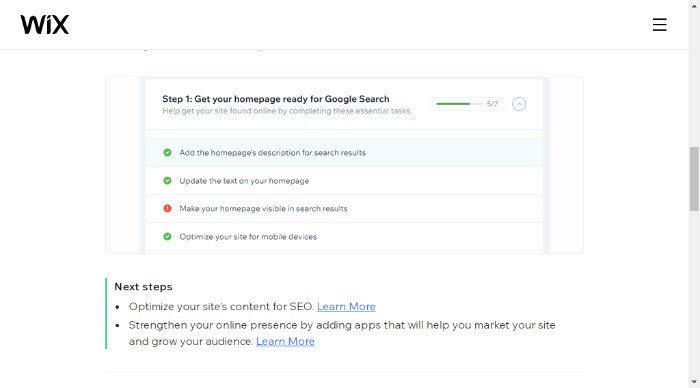
To get started with optimizing your site, use the Wix SEO Wiz. It’s free and allows you to optimize your content.
The SEO Wiz consists of a step-by-step plan detailing areas of improvement and giving advice for enhancing SEO.
In addition, it gives you:
- easy-to-follow tutorials
- tracking capabilities
- access to numerous SEO articles
You can find the Wix SEO Wiz by going to “Marketing & SEO” and then “Get Found On Google” from your site’s dashboard.
2. Use Longtail Keywords
You know all about keywords and keyword research. These are a crucial part of SEO, but you shouldn’t overlook longtail keywords.
Longtail keywords are more specific keywords with low search volume that use longer phrases. For example, “running shoe” is a head keyword, while “best running shoes for narrow feet” is a longtail keyword.
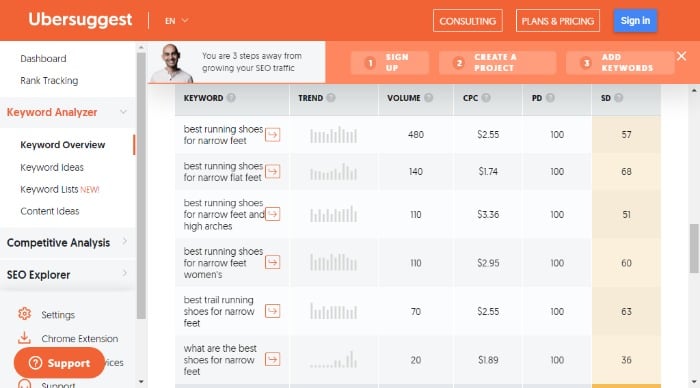
There’s no shortage of free tools available to find longtail keywords for your Wix SEO strategy, including Ubersuggest, Google’s Autocomplete, and wordtracker.com.
3. Make It Mobile-Friendly
A mobile-friendly (responsive) website is accessible from any device, and it makes a website simple to use regardless of how a visitor is accessing a page.
Responsiveness is vital because Google uses mobile-friendliness as a ranking feature, and more people are using mobile devices.
How do you make your website responsive? By:
- creating a layout that adapts well for any screen size and orientation
- using responsive design techniques where possible
- optimizing images for smaller screens using tools like Photoshop or Photopea
- creating content that considers the constraints of smaller screens such as videos, photos, and text length
Wix also advises on how to make your website more responsive.
4. Boost Your Local SEO
Local SEO is a form of internet marketing to rank highly in search engine results for keywords relevant to a physical location. For example, using local SEO is especially beneficial to small businesses and physical storefronts, such as restaurants or beauty salons.
Local SEO includes two categories: on-site and off-site.
On-site involves optimizing your website and online business to rank for local searches. Off-site includes building backlinks and getting reviews and mentions in blogs and directories related to your industry or niche.
Fortunately, it’s not difficult to enhance your site’s local SEO.
One way to improve your site’s ranking is by using geographic keywords in the title of your page and the content.
You should also include city names, states, counties, and zip codes on your page each time they are relevant; this will make it easier for Google to find you.
Another way you can improve your site’s ranking is by including a map on the web page with pins on it. This will allow people to view locations more easily through Google Maps or an embedded map on the web page.
5. Create a Sitemap
Sitemaps are critical for any website because they allow the user to know what to expect when they visit and give the webmaster a way to see how visitors interact with their site.
Additionally, a sitemap provides navigation for visitors, which is essential considering how many visitors may land on your site every day.
Sitemaps are an integral for two reasons:
- They allow you to see your website’s structure at a glance.
- They help search engines index your site more efficiently.
Further, a sitemap helps you understand where your visitors are going on your site so you can optimize content for them more effectively. You can also identify any broken links that might be preventing visitors from finding what they want.
You don’t need to worry about getting your Wix site map picked up by Google.
When you connect your Wix account to Google, it gets submitted to the search engine. Wix also has a tutorial on how to do this manually.
6. Use Wix SEO Tools
Wix SEO is about more than following a plan. It gives you plenty of other tools to improve your rankings, including:
- analytics, to make sure you’re on the right track
- a professional-looking blog for posting high-quality content and gaining organic traffic
- a solid infrastructure to aid organic search
- customizations of slugs, meta tags, and structured data
7. Set Up Google Search Console and Analytics
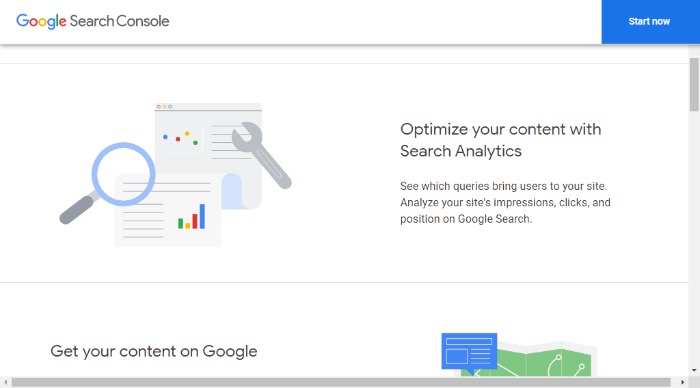
Google Search Console is a free service offering insights about your website’s performance in Google search results.
You can use it to monitor a wide range of things, such as:
- which keywords people are using to find your site
- what errors or warnings Google has detected
- the number of times users have clicked on links from your site that lead to pages on other sites
- providing insights into how users interact with your content
- sharing data on where people are coming from and going to when they visit your site
To add a site to Google’s Search console:

- Go to the Search Console and log in.
- Select “Add a new property.”
- Open the drop-down list.
- Select the property type.
- Verify your site.
8. Optimize Your Wix SEO Throughout the Site
To further optimize your Wix site, look beyond keywords. There are many other areas you can work on, including:
- managing the navigation menu
- using SEO-friendly URLs
- optimizing content by choosing relevant topics that will interest readers
- optimizing design by making sure it is consistent with your product
Further, you can optimize your website images to make them load faster.
For example, you can reduce the width of the images to the size that Wix requires, which is at least 2560 X 1440 pixels.
Finally, use a text editor for simpler HTML code and fewer unwanted tags.
9. Keep Posting Content for Wix SEO
It’s important to post quality content on your blog to generate traffic.
You can use these posts to build backlinks which will also help you rank higher in the search engines.
However, the importance of posting regular quality content on your blog isn’t just about getting traffic or backlinks. It’s also about building your search results for readers who find your site via Google Search.
Consider creating a content calendar to streamline production and keep content fresh and relevant.
10. Add Links
Google values both internal and external links as they give context and meaning, thus improving the quality of search results for readers who find your site via Google Search.
Internal links are links that point to pages on the same website. External links are links that point to other websites, and they’re equally important.
Finally, you can add a line of code within the webpage’s HTML tag at the top of the web page code, so they have an internal link directly from their home page.
External links, on the other hand, are a great way to bring value to your site.
You can get external links from different sources such as:
- guest blogging
- content syndication
- networking events
- press releases
- email outreach to influencers within your niche industry
Wix SEO Frequently Asked Questions
Is Wix Good for SEO?
Wix SEO hasn’t always had a great reputation, but it’s come on in leaps and bounds and now offers a good selection of (free) tools to help your SEO efforts.
Additionally, Wix websites have customization features, allowing you to increase your Wix SEO that way.
Do Wix Sites Rank on Google?
Yes. According to Ahrefs, its data “shows that Wix sites don’t have a hard time ranking on Google.”
Ahrefs research also shows that Wix does well for organic traffic.
Is SEO on Wix Free?
Wix offers free and paid plans, but the paid plans offer more features. If you need to get your website ranked higher in search engines, this is something worth considering if it’s within your budget.
Additionally, Wix offers some SEO tips and techniques for users to build their site and a customized SEO plan for free.
Is Wix or WordPress Better for SEO?
There are many different factors to take into account when comparing Wix and WordPress for your business.
Wix is a web development company that provides website builders with drag and drop technology to build professional-looking websites quickly. This is beneficial for beginners who are not tech-savvy enough to use WordPress. Wix has come a long way to make SEO easier for site owners to manage with a wide range of SEO tools to get started.
WordPress is a free, open-source software powering 455 million websites, making it the most popular content management system globally. It also provides all the blogging, hosting, social media integration, e-commerce capabilities, video integration. It also has access to more plugins and tools than Wix, which allows you to manipulate more technical aspects of SEO.
With that being said, both are great options that depend on what you need.
{
“@context”: “https://schema.org”,
“@type”: “FAQPage”,
“mainEntity”: [
{
“@type”: “Question”,
“name”: “Is Wix Good for SEO?”,
“acceptedAnswer”: {
“@type”: “Answer”,
“text”: ”
Wix SEO hasn’t always had a great reputation, but it’s come on in leaps and bounds and now offers a good selection of (free) tools to help your SEO efforts.
Additionally, Wix websites have customization features, allowing you to increase your Wix SEO that way.
”
}
}
, {
“@type”: “Question”,
“name”: “Do Wix Sites Rank on Google?”,
“acceptedAnswer”: {
“@type”: “Answer”,
“text”: ”
Yes. According to Ahrefs, its data “shows that Wix sites don’t have a hard time ranking on Google.”
Ahrefs research also shows that Wix does well for organic traffic.
”
}
}
, {
“@type”: “Question”,
“name”: “Is SEO on Wix Free?”,
“acceptedAnswer”: {
“@type”: “Answer”,
“text”: ”
Wix offers free and paid plans, but the paid plans offer more features. If you need to get your website ranked higher in search engines, this is something worth considering if it’s within your budget.
Additionally, Wix offers some SEO tips and techniques for users to build their site and a customized SEO plan for free.
”
}
}
, {
“@type”: “Question”,
“name”: “Is Wix or WordPress Better for SEO?”,
“acceptedAnswer”: {
“@type”: “Answer”,
“text”: ”
There are many different factors to take into account when comparing Wix and WordPress for your business.
Wix is a web development company that provides website builders with drag and drop technology to build professional-looking websites quickly. This is beneficial for beginners who are not tech-savvy enough to use WordPress. Wix has come a long way to make SEO easier for site owners to manage with a wide range of SEO tools to get started.
WordPress is a free, open-source software powering 455 million websites, making it the most popular content management system globally. It also provides all the blogging, hosting, social media integration, e-commerce capabilities, video integration. It also has access to more plugins and tools than Wix, which allows you to manipulate more technical aspects of SEO.
With that being said, both are great options that depend on what you need.
”
}
}
]
}
Wix SEO Conclusion
Wix is an all-in-one website builder and hosting service. It’s a convenient and user-friendly platform that can help you build and host your website easily. It also provides Wix SEO guidelines to make sure your website ranks well on search engines.
Wix SEO is an essential aspect of the Wix platform. It isn’t that difficult, and you could achieve results with a few simple steps.
- Step 1: Keyword research
- Step 2: Website content optimization
- Step 3: Writing unique meta descriptions
- Step 4: Designing for mobile
Do you use Wix? Share your tips for optimizing your Wix SEO.
Infracost (YC W21) Is Hiring a Sr Software Engineer: Love Your Cloud Bills
Article URL: https://www.ycombinator.com/companies/infracost/jobs/9fGDG72-senior-software-engineer
Comments URL: https://news.ycombinator.com/item?id=28627978
Points: 1
# Comments: 0
Neuro (YC W21) Is Hiring Engineers to Build APIs for ML Compute, £40-100k Bath,UK
Article URL: https://jobs.lever.co/Neuro/20602492-eaf6-4e42-936a-1e2928e851b8
Comments URL: https://news.ycombinator.com/item?id=28639406
Points: 1
# Comments: 0
CDC director recommends COVID-19 booster for younger at-risk workers, defying advisory panel
U.S. Centers for Disease Control and Prevention Director Dr. Rochelle Walensky late Thursday endorsed the Pfizer coronavirus vaccine booster shot for younger at-risk workers, which is seen as a rare break from the agency’s Advisory Committee on Immunization Practices panel.
A Brief Guide to Blazor for HTTP and C# Applications
Behind every great website or application is a lot of coding. When that code is heavy or overly complex, it can slow down website speed and increase bounce rates. This is why a lot of marketers are excited about a new user interface from .NET called Blazor.
The name is a combination of “browser” and the .NET markup syntax Razor, for those familiar with it.
What is Blazor, and what do you need to know about it? Here’s a quick run-down that even non-developers can understand.
What Is Blazor?
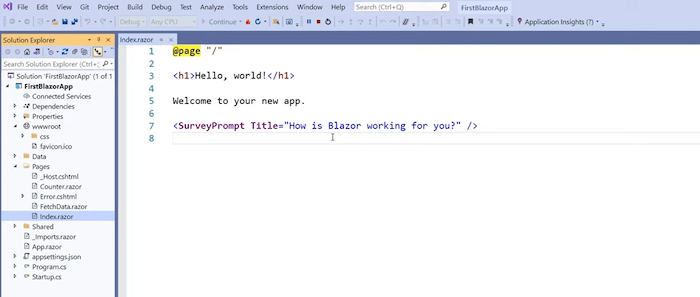
Blazor is a user interface that allows developers to build front-end applications using C#, HTML, and Razor templates. You can build components and pages that then run on a server or directly on a browser. It was built by the .NET team and is completely open-source and free for anyone to use.
The use of templates, C#, and HTML makes developing easier and, in many cases, faster.
What Are Blazor Apps?
One of the platform’s key components is Blazor apps, which allow devs to add features without coding every single step. It is a bit similar to the way a WYSIWYG website builder allows users to build a website without coding at all.
In this case, however, it lets devs code without JavaScript.
You can also run Razor apps on Blazor.
How to Run Blazor: Server or WebAssembly
Blazor can be run in two ways—on the server or using WebAssembly, which allows you to run it directly on most browsers.
There are pros and cons to both. Using WebAssembly, you’ll enjoy a fast UX that is supported offline and can use a CDN. However, the initial load time can be slow, and you may need to call the API, which can slow things down.
If you choose to go with the server route, you’ll find onboarding is a bit easier, and load and render times are faster. However, your app won’t work offline, and changes can cause major latency issues. Also, it can be difficult to scale apps because each user has their connection to the server.
Why You Should Use Blazor
Blazor allows developers to write the client-side of code in C# or HTML, which means you don’t have to know JavaScript or other languages. This makes it easier for a single developer to work on a project. It can also make it more manageable to delegate tasks to team members since they only need to know one coding language.
Since the same code is used on the client and server side of an application, the code only needs to be written once—which can save you tons of time.
There are also several benefits for marketers.
Blazor can help developers create sites that generate more traffic.
Server-side rendering comes standard, which is great for SEO. This allows bots from search engines to easily crawl your code and your site. Server-side rendering improves load time, so when a website loads, it takes a few seconds to show up on-screen. This duration can be reduced if the server sends all the data needed to render the page to the browser before it loads.
Using HTML and C# also reduces the amount of JavaScript on an application, which can increase load times and reduce bounce rates.
How Does Blazor Work?
Blazor works by combining C#, HTML, and apps to make application development easier. It can do nearly everything JavaScript can do, but you don’t have to know JavaScript.
It uses Razor templates to create components that produce browser-renderable HTML and CSS. It’s the same as any other browser content: pure, semantic, and accessible HTML and CSS.
This means you can use all CSS features, including media queries for responsive design, and CSS custom properties.
This video from dotNETConf walks you through how to build a full-stack web app:
I’ll also go through how to set it up in a further section.
What Is Blazor Used For?
Blazor is used to build web-based applications. This can include mobile apps, webpages, and anything else you can build with JavaScript.
The framework allows you to complete a number of common development tasks, such as rendering components and HTML, fetching data over HTTP, and client-side routing.
When used on a browser, it has full access to the browser’s JavaScript APIs. As a result, Blazor apps can use JavaScript functions from .NET methods and also .NET methods from JavaScript functions.
For cases where the framework doesn’t have a specific API or component, or if developers want to work with the JavaScript ecosystem, then JavaScript interop is used.
How to Setup a Blazor Project
Now that you understand the basics of Blazor, let’s talk about how to use the program. As I mentioned above, it is a free, open-source program, so you won’t need to pay to use it. You also have access to the source code through GitHub, if that’s your thing.
You’ll need two things to create a project: the platform and Visual Studio 2019 or above.
Here’s how to get started:
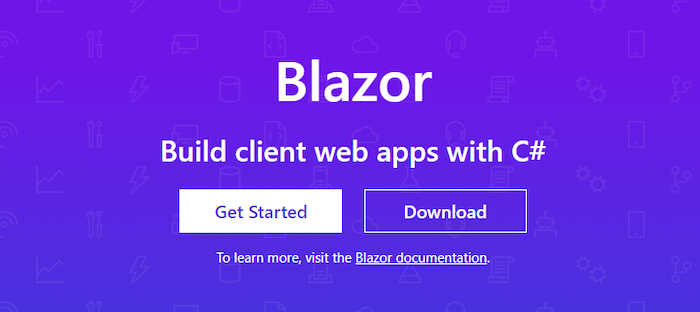
Step 1: Download and install Blazor from the Microsoft page. Click the “Get started” button.
Step 2: Install Visual Studio, if you don’t already have it. This will let you do that actual coding. This may take a few minutes to install and load.
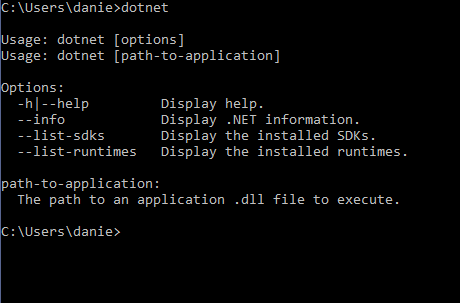
Step 3: Run a command prompt and run > dotnet command. This will verify everything is installed correctly. If it is ready to use, you will get a response like this:
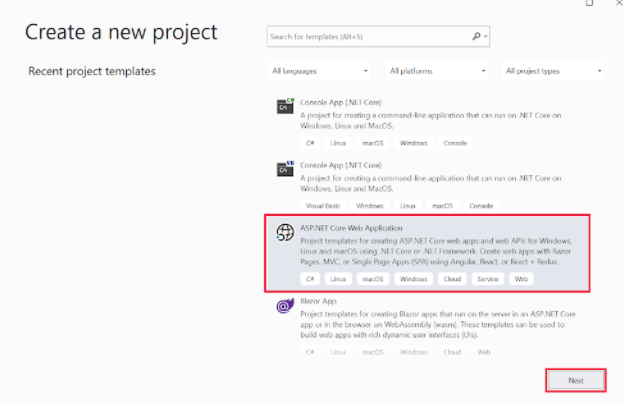
Step 4: Next, open Visual Studio and select “Create a new project.”
Step 5: Select ASP.NET. If you don’t already have the ASP.NET Core Web Application installed in Visual Studio, you’ll need to add it.
Step 5: In “Configure new project” add a name, then select “Create.”
Step 6: In the “Create a new ASP.NET Core web application” box, choose “.NET Core and ASP.NET Core 5.0” in the dropdown menu, then “Web Application” and “Create.”
You now have a project set up. Now you can start using Blazor apps to see how they work. While the actual coding is beyond the scope of this article, I highly recommend this tutorial from Microsoft.
If you want to play around with without downloading a ton of stuff, you can use this browser-based tutorial.
Frequently Asked Questions About Blazor
Is Blazor Worth Using?
It depends on your needs. It is ideal for programmers who don’t like JavaScript, don’t know JavaScript, or don’t want to slow down their site with tons of JavaScript. However, it does require the whole runtime to be shipped and may not work with non-standard browsers in some cases.
Is the Blazor Server Fast?
In general, yes. However, all users have a persistent bi-directional connection to the server, which can cause issues for larger applications.
Is Blazor Easy to Learn?
If you already know C#, you’ll have an easy time picking up Blazor. It’s easy, fast, and integrates well with the .NET ecosystem
How Much Does Blazor Cost?
Blazor is part of the open-source .NET platform, which means there are no fees or costs, even if you use it commercially. It was built and is maintained by a community of contributors.
Does Blazor Matter for Marketing?
Blazor is unlikely to have a daily impact for the average marketer, but there are some benefits marketers should be aware of.
It may make it easier (and faster) for development teams to create new pages or applications. It also makes it easier for search engine bots to crawl, which is a bonus for digital marketing.
What Is the Difference Between Blazor and Razor?
Razor is a template markup syntax for .NET. Blazor (which combines the word “browser” and Razor) is a framework that can run multiple types of code and deliver it to servers or browsers. Essentially, it is an evolution of Razor.
{
“@context”: “https://schema.org”,
“@type”: “FAQPage”,
“mainEntity”: [
{
“@type”: “Question”,
“name”: “Is Blazor Worth Using?”,
“acceptedAnswer”: {
“@type”: “Answer”,
“text”: ”
It depends on your needs. It is ideal for programmers who don’t like JavaScript, don’t know JavaScript, or don’t want to slow down their site with tons of JavaScript. However, it does require the whole runtime to be shipped and may not work with non-standard browsers in some cases.
”
}
}
, {
“@type”: “Question”,
“name”: “Is the Blazor Server Fast?”,
“acceptedAnswer”: {
“@type”: “Answer”,
“text”: ”
In general, yes. However, all users have a persistent bi-directional connection to the server, which can cause issues for larger applications.
”
}
}
, {
“@type”: “Question”,
“name”: “Is Blazor Easy to Learn?”,
“acceptedAnswer”: {
“@type”: “Answer”,
“text”: ”
If you already know C#, you’ll have an easy time picking up Blazor. It’s easy, fast, and integrates well with the .NET ecosystem
”
}
}
, {
“@type”: “Question”,
“name”: “How Much Does Blazor Cost?”,
“acceptedAnswer”: {
“@type”: “Answer”,
“text”: ”
Blazor is part of the open-source .NET platform, which means there are no fees or costs, even if you use it commercially. It was built and is maintained by a community of contributors.
”
}
}
, {
“@type”: “Question”,
“name”: “Does Blazor Matter for Marketing? “,
“acceptedAnswer”: {
“@type”: “Answer”,
“text”: ”
Blazor is unlikely to have a daily impact for the average marketer, but there are some benefits marketers should be aware of.
It may make it easier (and faster) for development teams to create new pages or applications. It also makes it easier for search engine bots to crawl, which is a bonus for digital marketing.
”
}
}
, {
“@type”: “Question”,
“name”: “What Is the Difference Between Blazor and Razor? “,
“acceptedAnswer”: {
“@type”: “Answer”,
“text”: ”
Razor is a template markup syntax for .NET. Blazor (which combines the word “browser” and Razor) is a framework that can run multiple types of code and deliver it to servers or browsers. Essentially, it is an evolution of Razor.
”
}
}
]
}
Blazor Conclusion
If you are looking for a way to streamline the development process—and improve page speed a bit—Blazor is a great platform. While it’s more than the average marketer needs to build a website or launch a landing page, it’s great news for developers.
The user-friendly platform helps streamline workflows, reduces coding language limitations, and makes it easier for dev teams to get work done.
Have you tried Blazor yet? What do you like best about it?
5 Key Graphic Design Elements for Paid Campaigns
Think about the number of ads you see in an average day. Can you remember them all? Don’t worry if the answer’s no. After all, the average person sees up to 10,000 ads per day across the internet!
Let me ask you an easier question. Think about the last marketing campaign you can remember. The last ad that made you sit up and take notice. What about the ad caught your attention?
Chances are, you’ve got something visual in mind. Whether it’s an image, video, or interactive picture, I bet you remember something about the aesthetic—the graphic design.
See, graphic design is about communication: sending the right message to your intended audience and showcasing what’s special about your brand. Let me show you why graphic design matters in paid ad campaigns and the types of elements you can use to craft stand-out ads.
The Importance of Graphic Design in Paid Campaigns
Honestly, there are so many reasons why visual elements work in ad campaigns. However, we’ve narrowed it down to three main reasons graphic design is crucial to paid campaigns, whatever niche you’re in.
For starters, graphic design allows you to make a great first impression with your target audience. It sets the tone for how a prospect perceives your brand. Do first impressions really matter, though?
Sure. Just think about how much competition is out there, for one thing. Stand out from the crowd by setting a professional, positive first impression with eye-catching designs.
Secondly, graphic design helps reinforce your brand identity. It allows you to tell your brand story in a unique, creative way designed to grab a prospect’s attention. You can use a series of consistent, connected ads to really drive home your desired messaging and shape your audience’s perspective of what your company stands for.
Finally, great visuals speak louder than words. They transcend language and cross boundaries to communicate strong, effective messages to a target audience.
The key takeaway? Graphic design helps you craft content that attracts attention and sticks in a prospect’s mind long after the content disappears from their screen.
Graphic design sounds great, right? It is, but bear in mind some words of caution: While great visuals can do wonders for your brand, poor graphic design can leave a bad impression.
Stick with high-quality, professional graphic elements, and keep your messaging consistent: It takes five to seven interactions for someone to remember a brand, so make it easier by communicating consistently.
Not sure where to start with graphic design? You have two main options. If your budget stretches to it, you might want to hire a professional company to help you design great graphics. Alternatively, there are numerous graphic design tools you can use to create your designs in-house.
5 Key Graphic Design Elements in Paid Campaigns
OK, so that’s why graphic design is crucial to any successful paid campaign. What elements go into a great ad, though? How do you make different visual elements work together to create a memorable campaign?
Well, while there’s no “magic” formula, there are five key elements you can use to create visually engaging campaigns. You don’t need to use them all in every design, but you should ideally use as many elements as you can to enrich your content. After all, you only have roughly two seconds to grab a person’s attention before they move on, so your paid ads must stand out.
With that in mind, let’s take a look at each element in turn and consider what they are, how they’re used in graphic design, and how they work together.
1. Typography
In graphic design, typography refers to how you arrange text within your advertisement. It’s how you display words to quickly capture someone’s attention and communicate your core message.
Typography tells people why your ad matters, so it’s crucial you choose the right words. However, what’s equally important is the font and the text size.
The font directly impacts the vibe or mood of your ad. For example, a sharp, angular font sends a strong message:

Softer fonts, on the other hand, have a more relaxed vibe:
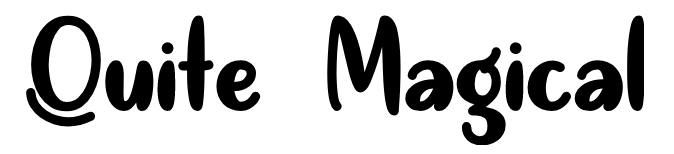
Size and density matter, too. Large, thick lettering conveys a powerful message, while smaller, thinner letters are more elegant and timeless.
Finally, typography covers text emphasis. Highlighting, bolding, or italicizing some words draws special attention to them, so people quickly know which words to pay the most heed to.
Don’t let typography daunt you. Think of it as how you put words together on the screen. Experiment with different text positioning to ensure the ad is well-balanced, and check out examples of ads in your niche to see what works and what doesn’t.
2. Visuals
By “visuals,” I’m talking about the actual images you use to grab someone’s attention. Visuals can include:
- illustrations
- photographs
- videos
- logos
- graphs
- pie charts
Why are visuals so important? Well, they make up the bulk of your ad. Unless you use particularly bold lettering or a lot of blank space (which we’ll cover later), images are central to your visual content.
You can use visuals to convey messages that may be hard to express through words, or you might use visuals to reinforce a written message.
Videos, for example, help you describe how something works in more detail. It’s an opportunity to get closer to your audience and build trust in your brand:
Infographics, on the other hand, help marketers condense complex points into visually appealing content that’s easily consumed and understood. Finally, elements like logos allow marketers to increase brand visibility on social media and elsewhere online.
The takeaway? You can use visuals to craft a consistent brand presence while communicating your core message in an engaging way.
Visuals are key to shaping the overall mood of your graphic design, so think carefully about the type of visual elements you want to include to maximize your ad’s chance of success. Again, it might be worth scoping out successful ads in your niche and seeing what you can learn from them.
3. Space
Specifically, space in graphic design refers to the space surrounding other elements like text, shapes, or visuals. It’s also referred to as “white” space or “negative” space.
Think of white space as your foundation. You start with a blank or white screen, and you build the other elements around this space. In other words, white space is the canvas, allowing you to balance contrasting elements, draw attention to key visuals, and create the right vibe.
To be clear, there’s no need for the space to actually be white; it can be any color. What matters is that there’s clear space between your visual elements to avoid a confusing aesthetic.
The main point to bear in mind? If there’s not enough space between elements, your design might be cluttered, jarring, and difficult for your audience to make sense of. On the other hand, if there’s too much space, the ad might seem redundant or hollow.
Learning the art of white space is key to mastering how to craft well-balanced, appealing content for landing pages and campaigns.
4. Color
I can’t overstate how important color is when choosing graphic designs for your paid campaigns. Whether you opt for a bright, vibrant palette or muted, dulcet tones, the color choice affects the whole mood of your campaign.
In design, we can group color schemes into categories based on where they sit on the color wheel. Here’s a simple example of a color wheel:
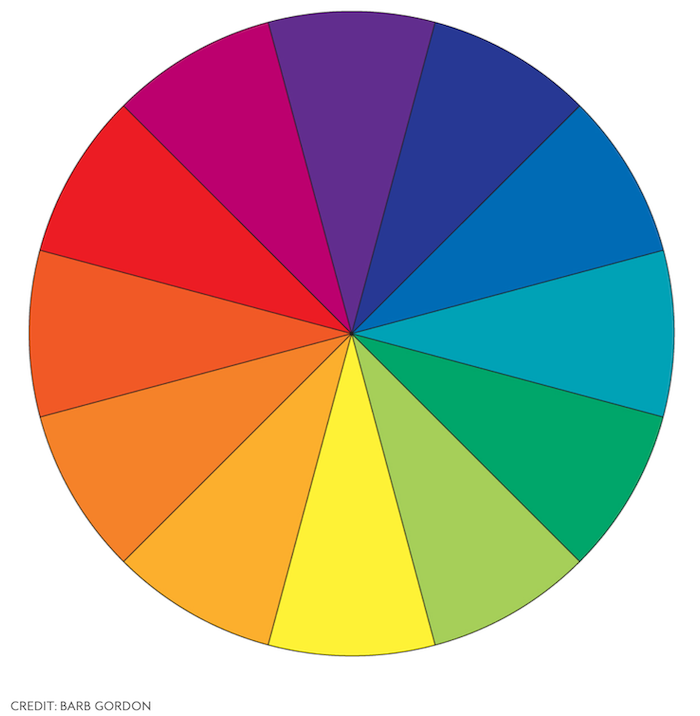
Complementary colors sit opposite each other, such as yellow and purple. Monochromatic colors, on the other hand, are simply different shades of one color (such as different hues of blue.)
Analogous colors sit beside each other, such as orange and yellow, while triadic colors are evenly spaced across the wheel (such as yellow, red, and blue.)
Graphic design involves selecting a color palette to dictate the mood or communicate an emotional response. Bold colors and warm hues, for example, invoke different vibes from cold colors or softer, pastel shades.
You can play around with different color combinations until you find the one which feels right.
Don’t forget to consider what colors to use for all visual elements and how they might work together. If you opt for black and white text, think about how this might work with the color scheme for your background and chosen visuals. A disorganized, fragmented color scheme can ruin the look of your design.
5. Lines and Shapes
In graphic design, lines are about more than just connecting dots. Lines have numerous artistic purposes, such as:
- organizing information in a compelling way
- creating a mood or invoking feelings
- building a sense of movement or momentum
Lines are highly expressive tools. They can be:
- curved
- straight
- solid
- dotted
- thick
- thin

The type of lines you draw depends on the message you’re trying to send to your audience.
Shapes in graphic design simply mean forms contained within lines, such as rectangles, squares, circles, and so on.
There are two main types of shapes: organic and geometric. Organic shapes are less well-defined. They include natural shapes, such as leaves, and irregular or curved shapes, such as vases. No two organic shapes are the same. By contrast, geometric shapes are more simplistic. They can be 2D or 3D, depending on the form, and they include shapes like triangles, rectangles, and spheres.
In graphic design, you can use a blend of organic and geometric shapes, or you can stick with one category for a more uniform design.
Frequently Asked Questions About Graphic Design in Paid Campaigns
What is graphic design?
Graphic design is a means of creating visual content. Using a blend of color, imagery, and text, graphic design communicates specific messages in a visually appealing, engaging way.
Why is graphic design important in paid ad campaigns?
You can use graphic design to drive home your brand message more effectively through paid ad campaigns. With the right imagery, your ad can stand out from the crowd, which is especially important in a crowded niche. What’s more, professional graphics could make your brand seem more authentic and trustworthy.
How do I use graphic design in paid ad campaigns?
Graphic design works great on visual social media platforms such as Instagram, but you can also use it on display ads, landing pages, and Google shopping ads. Wherever there’s an opportunity to add imagery, the right graphic design elements can help you build a consistent brand identity online.
What graphic design elements should I include in a paid campaign?
Ideally, you’re aiming to include a blend of elements. The five key elements to choose from are text, color, space, shapes, and visuals. You don’t need to include every element in every ad, but you should use as many as you can to create eye-catching designs.
{
“@context”: “https://schema.org”,
“@type”: “FAQPage”,
“mainEntity”: [
{
“@type”: “Question”,
“name”: “What is graphic design?”,
“acceptedAnswer”: {
“@type”: “Answer”,
“text”: ”
Graphic design is a means of creating visual content. Using a blend of color, imagery, and text, graphic design communicates specific messages in a visually appealing, engaging way.
”
}
}
, {
“@type”: “Question”,
“name”: “Why is graphic design important in paid ad campaigns?”,
“acceptedAnswer”: {
“@type”: “Answer”,
“text”: ”
You can use graphic design to drive home your brand message more effectively through paid ad campaigns. With the right imagery, your ad can stand out from the crowd, which is especially important in a crowded niche. What’s more, professional graphics could make your brand seem more authentic and trustworthy.
”
}
}
, {
“@type”: “Question”,
“name”: “How do I use graphic design in paid ad campaigns?”,
“acceptedAnswer”: {
“@type”: “Answer”,
“text”: ”
Graphic design works great on visual social media platforms such as Instagram, but you can also use it on display ads, landing pages, and Google shopping ads. Wherever there’s an opportunity to add imagery, the right graphic design elements can help you build a consistent brand identity online.
”
}
}
, {
“@type”: “Question”,
“name”: “What graphic design elements should I include in a paid campaign?”,
“acceptedAnswer”: {
“@type”: “Answer”,
“text”: ”
Ideally, you’re aiming to include a blend of elements. The five key elements to choose from are text, color, space, shapes, and visuals. You don’t need to include every element in every ad, but you should use as many as you can to create eye-catching designs.
”
}
}
]
}
Graphic Design Conclusion
As a technique, graphic design itself is nothing new. However, if you get a little creative, you can use this tried-and-tested technique to craft unique, captivating content for your paid campaigns.
When you’re working on graphic designs, be sure to check out the range of image editing and graphic design tools available online. You should also evaluate successful ads in your niche to figure out what made them special and identify how you can use your findings to craft your content.
Finally, you might consider checking out my consulting services to see how I can help you take your paid campaigns to the next level.
How are you using graphic design in your paid campaigns?

The True Story Behind Credit Card Stacking and Why It’s Not Always Bad
Credit card stacking is in the news lately. Mostly, the news isn’t great. In fact, if you’re reading this, you likely know that. You may very well be thinking that this type of funding is a scam.
Is Credit Card Stacking Always Bad?
credit card stacking
No, stacking credit cards is not always bad. In fact, a credit card stacking program can be a very useful tool for funding a business. It even works well for startups. You just have to know how to avoid the scams.
What is Credit Card Stacking?
This type of funding involves applying for multiple credit cards at once. Then when you get approval, you have access to the balances on all of them. You can use the money to fund a business, even drawing cash if you need.
There is no need for collateral. In fact, this is totally unsecured business financing. However, you do need a personal guarantee. That means you need a decent credit score. Usually, that is a personal credit score of 680 or above.
Credit Line Hybrid Financing: Get up to $150,000 in financing so your business can thrive.
Is Credit Card Stacking a Scam?
No, in and of itself, this type of funding is not a scam. Still, there are scams like this out there. You need to know how to tell the difference between a scam and legitimate card stacking program to fund your business.
Once you know the difference, you can take advantage of this funding option while protecting yourself and your business.
About the Seed Capital Card Stacking Scandal
Let’s talk about the elephant in the room. If you do a Google search on “credit card stacking” you are going to see a lot about Seed Capital. They were running a card stacking scam, and the Federal Trade Commission put a stop to it. Here is how it went down.
First, Seed Capital did not tell companies how this funding would work. Borrowers did not realize they were applying for multiple credit cards. In addition, many times these were personal credit cards, and they had no idea. Furthermore, Seed was filling out the credit applications, not the client.
That’s not necessarily terrible if the client knows about it and has given formal permission, but Seed was also found to be lying about the income of the clients on the applications. In fact, sometimes income was inflated by as much as $100,000.
The result was that many clients were getting approval for multiple cards with very high limits. Again, all of this was without their knowledge.
But There Is More to the Seed Capital Story
Now, the rest of the story. That’s right, there’s more. Most clients found Seed when they looked into some sort of business training program. Behind the scenes, the program had a deal with Seed to use their credit card stacking program to finance the training package for the client.
The client would realize they did not need to or could not make the cash outlay. The training company would offer financing and have the client apply. Then, they would send the info to Seed, who would apply for the credit cards as mentioned above. After that, Seed would let the training company know what the total limit was, and the client would be charged close to that amount, virtually maxing out multiple cards at once.
Not only that, but most clients felt the “training” was a scam itself, believing it not to be useful once they went through the program. Then, they were stuck with thousands of dollars of credit card debt, and a wrecked personal credit score due to high utilization ratios. Unfortunately, they did not have anything useful to show for it.
Legit Card Stacking to Fund a Business
This is not how legit card stacking programs work. On the contrary, you can actually even do this to fund a startup. It’s better if you have someone to help you. A professional can help you find the best card options and the lowest rates.
One common practice is to find cards with 0% introductory rates. This allows for 0% interest, sometimes for over a year, and at least until the introductory rates run out. Credit Suite has a program like this called The Credit Line Hybrid.
Credit Line Hybrid Financing: Get up to $150,000 in financing so your business can thrive.
The Credit Line Hybrid
You need good credit or a credit partner with good credit to qualify for the Credit Line Hybrid. This is unsecured business financing like all credit card stacking, so there is no collateral requirement. You can use the funds on anything for your business.
For example:
- Real estate
- Equipment
- Working capital
- Even startup expenses
There is no down payment necessary and no income documentation either. This is totally “no-doc” financing. Approval can range up to $150,000.
The Credit Line Hybrid Requirements
How do you qualify for The Credit LIne Hybrid? You need a personal credit score of 680 or above or a credit partner that does. Other requirements include:
- No late payments for the past 24 months
- 6 inquires or less in the past 6 months
- No open collections or bankruptcies
- At least 2 open credit cards with a $2,000 limit or higher
- At least 1 ½ years good payment history
- Utilization rate not higher than 40%
- And no bankruptcies in the past 7 years
Benefits of The Credit Line Hybrid
Not having to provide financials is a big benefit. Also, the minimum credit score of 680 is much less than what other types of financing require. Furthermore, you have the option to use a credit partner if you do not meet the minimum credit score.
Another huge plus is that this program can help build your business credit score, which increases the fundability of your business. This is because often the cards in the line report to the business credit reporting agencies.
How is The Credit Line Hybrid Different From the Scams
There are a number of differences between our program and the credit card stacking scams out there. First, you know exactly what is happening and how it works before you sign up for anything. We will never apply for credit cards without your knowledge.
Next, our program does not include inflating income in an effort to get higher limits. Finally, you are free to use the money how you choose. We do not work with partners to provide funding for anything specific. We simply help you get the funding you need to grow your business the way you need to do it.
Credit Line Hybrid Financing: Get up to $150,000 in financing so your business can thrive.
Top Tips to Avoid Credit Card Stacking Scams
First, if you are trying to purchase a product or service and they offer financing, ask the questions. Read the fine print, and make sure you know exactly where the funding is coming from. Also, always monitor your personal and business credit reports to ensure there are no unexpected accounts on them.
In addition, work directly with a trusted company. Part of the problem with the Seed Capital fiasco was that the funding was for a specific service that the client could not afford to pay cash for. They may not have even realized Seed Capital was involved at all.
That means they never had a chance to research Seed on their own. When you go to the company directly, you can do your own research. Looking at reviews and the Better Business Bureau can sometimes save you a lot of pain.
When you work with Credit Suite directly, you not only get access to the funding, but we can help you find any other products or services that could help you grow your business even more.
Credit Card Stacking is a Legit Business Funding Option
Yet, you have to do it the right way. Don’t try to do it on your own. Do your research and find a trusted company that can help. Always make sure you know what you are getting into.
The post The True Story Behind Credit Card Stacking and Why It’s Not Always Bad appeared first on Credit Suite.

The Best Options for Small Business Startup Grants Revealed
Business grants are not easy to come by for anyone, but for startups, it’s a whole other story. Small business startup grants do exist. However, they are even more competitive than grants for existing businesses. We have put together a list of some of the best options, along with some tips on funding startups if grants aren’t enough.
Are Small Business Startup Grants Always the Best Option?
There are a lot of options out there when it comes to small business grants. Who doesn’t want a grant? After all, it’s free money. You don’t have to pay it back. I mean, what’s not to like?
Truly, grants sound like the perfect solution for business funding. Actually, they are great if you can get one. Yet, there are two cons most don’t realize. Of course they are highly competitive. But also, the money isn’t as free as you may think. Even though there is no interest and no repayment, it often takes a lot of time and effort to apply for a grant. Not to mention, sometimes there is an application fee.
On top of the highly competitive nature of most grants, the result is that you could spend a lot of time and money applying for grants with nothing to show for it.
Why Are Startup Grants Different?
Unfortunately these problems are only magnified when it comes to small business business grants. There are far fewer grants available to startups. That means the competition is even more fierce. Furthermore, most of them are not open to just any business.
There are research and development grants, as well as grants for specific types of business owners.
Examples include:
- Veterans
- Minorities
- Women
- And those in low income areas
Is It Even Worth it to Apply?
Due to the fact that it can be very hard to get a grant, you may wonder if it’s even worth trying. That depends. Honestly, If the application process is fast and cheap, then yes, it is likely worth it. Of course, that is assuming you know that you meet all of the requirements.
However, if you are not sure you qualify, and the application process is long or there is a large application fee, it might be best to skip it. Remember, you can use that time and money to pursue other funding options.
Best Options for Small Business Startup Grants
We’ve put together a list of some of the easiest grants to qualify for. Still, competition is still very tough. Also, there are never any guarantees. We’ve divided them into the following categories:
- Open to all businesses
- Innovation and Research
- Women
- Minorities
- And veterans
Best Open to Any Small Business Startup Grant
FedEx Small Business Grant Contest
The FedEx Small Business Grant is one of the most popular small business startup grants around. The contest is open to any business that has been in operation for at least 6 months and has 99 employees or less. It awards eight $7,500 grants, one $15,000 grant, and one $25,000 grant to winners each year.
Best for Innovation and Research
Small Business Innovation Research Program
This grant is designed to provide funding for scientific research and development. The business must be an organized for profit, with a place of business located in the United States. In addition, it must be more than 50% owned and controlled by one or more individuals who are citizens or permanent resident aliens of the United States. It can have no more than 500 employees.
Best for Women Business Owners
Amber Grant
The Amber Grant awards one prize of $10,000 per month to a woman-owned business. One of the recipients also receives an additional $25,000 grant at the end of the year. Applicants only need to tell their story and turn it in with a $15 application fee.
Best for Minorities
The Minority Business Development Agency
The Minority Business Development Agency (MBDA) is operated by the US Department of Commerce. It is dedicated to helping minority-owned businesses access the resources they need to grow and succeed. They provide grants through their Minority Business Centers.
You can find grants available in your area by searching for your local Minority Business Center or visit the MBDA’s website for information on all current opportunities. You also need to have a D-U-N-S number to apply for these grants. Which is necessary for fundability anyway.
Best for Veterans
StreetShares Foundation’s Veteran Small Business Award
The StreetShares Foundation’s Veteran Small Business Award is for individual veterans who are low-income or otherwise lack the financial means to start their own business or nonprofit venture. This grant is also available to surviving spouses and children. The winner must have a positive impact on the veteran community.
Honorable Mention
The InnovateHER small business challenge is sponsored by the SBA office of women’s business ownership. The program awards three winners $30,000 in prize money for businesses that have an impact on the lives of women. Awards are designed for products that meet certain standards including:
- Having a measurable impact on the lives of women and families (30%)
- Having the potential for commercialization (40%), and
- Filling a need in the marketplace (30%)
What if Grants Aren’t Enough?
It’s almost certain grants will not be enough. Of course, any free money is better than none at all. Still, you cannot rely on grants alone to fully fund your business. Instead, one of the best things you can do for your business is build a strong business credit profile.
A business credit profile is the credit history of the business itself, not the owner. It includes all business information and the business credit report, which reflects the business credit score.
To establish a business credit profile your business needs to be fundable. As a startup, this means starting now. Get an EIN, incorporate, make sure you have a physical business address and open a separate, dedicated business bank account.
Honestly, these things are good to have for a grant application anyway. After you establish a business credit profile, look for vendor credit that will report payments to your business credit report. Most importantly, always pay everything on time.
Business Funding With Business Credit
In time, you will have a strong business credit score. Then, you can apply for business loans and lines of credit using your business information, and your business can basically fund itself. Any grant money you can get will be icing on the cake.
The post The Best Options for Small Business Startup Grants Revealed appeared first on Credit Suite.
New comment by akarrer in "Ask HN: Who is hiring? (September 2021)"
REMOTE US or Canada – Full-time – Senior Full Stack Java Engineer
We need to add to our small, but great engineering team that is building the next generation of business media. You will work closely with your fellow development team members to help us build out features and scale the systems.
Details here: https://www.aggregage.com/jobs/