If I told you that you could become a successful YouTuber/vlogger, would you believe me?
YouTube is certainly saturated; 500 hours of video are uploaded to YouTube every minute. There are dozens of million-dollar YouTubers and bloggers creating thousands of hours of video a year.
How could you possibly break through the noise?
Well, I’m here to tell you that video blogging still has huge potential.
The Potential of Vlogging and Why You Should Do It
It might not be as easy as it was several years ago to break onto the vlogging scene, but video is more important than ever to build a successful online marketing strategy.
Why?
First, video remains one of the best and most effective ways for people to get to know you.
When leads see you, their brain develops an impression of you that helps to build trust. You’re not just an anonymous content creator trying to drive your business. You’re a real person.
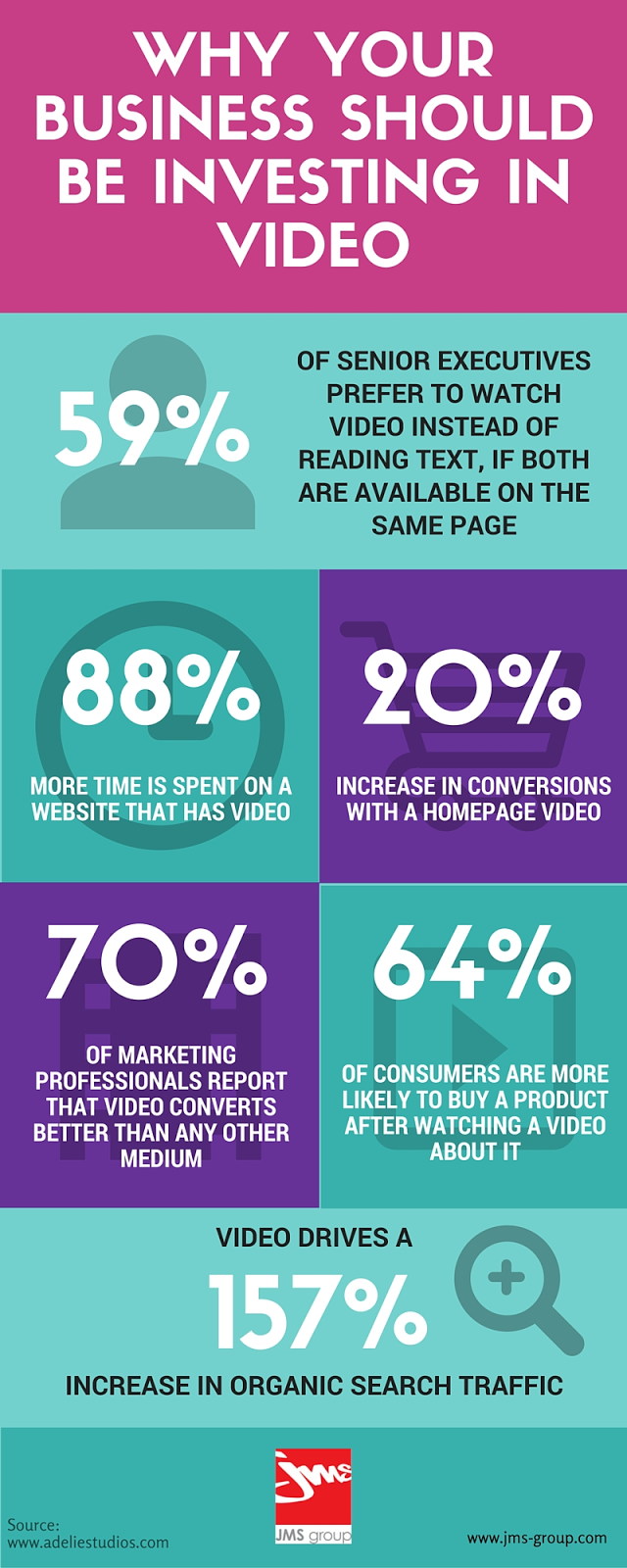
Second, video is a preferred method people have for gaining information. The stats don’t lie. People spend 2.6 times longer on pages with video than those without.
Third, the cost of good equipment keeps on falling, and the cameras in our phones keep getting better.
Finally, video blogging can be lucrative in itself. The top YouTubers and vloggers make between $14 and $22 million dollars a year.
The power of video is undeniable.
All of this brings up the question: how can you become a successful YouTuber?
Below are the steps you need to take to become a successful YouTuber, from starting a vlog and coming up with concepts for a video series to making a quality video and making sure people find your videos.
How to Come up With a Concept for a Series of Videos
Many people start by coming up with one idea for one video. That would be like starting a blog with an idea for only one article. As you probably know, that wouldn’t get you very far.
I explain how long content marketing takes in this video:
Video, like any other form of content marketing, needs a long-term strategy defined by a subject, tone of voice, and approach.
Here’s a question to ask yourself:
“What am I trying to convey to my audience?”
Once you know what you’re trying to do, you can define your vlogging content concept:
What should the format be? Should I do screen capture demos of step-by-step instructions? Should I be out and about talking to people? Should I talk into the camera?
What can I do with video that I can’t do in other formats like the written word?
How often am I going to make videos? How much time can I dedicate to them?
You have to document your plan to determine if it’s going to be feasible for long enough to achieve your goals.
The reality is people need to see consistency in order to understand why they should subscribe to your channel.
If you are making random, sporadic videos, it’s going to be harder to convince people to follow you.
The content of your video will be what determines your success.
That is, of course, only if you make quality videos.
How to Create Quality Video Content for Your Vlog
Video making is a complicated profession. When you see all of the elements that go into shooting a television broadcast or feature film, you will worry you’ll never be able to create anything like that.
The truth is, you probably can’t- and that’s okay.
People who are going to watch your video on your blog are not expecting a Steven Spielberg production.
People understand what vlogging is.
But that doesn’t mean that you should not care about quality. Quality is still super important.
Luckily, the cost of creating quality videos has been steadily dropping and continues to drop. There are more and more types of equipment available that can make your video go from amateur to professional-looking.
Step 1. Get a Camera and Tripod
You might be tempted to use your iPhone.
And honestly, cameras on smartphones have gotten amazing over the years. You have probably taken some great photos and videos on your phone already.
But smartphone cameras are difficult for serious video blogging for the following reasons:
they are hard to mount properly
they have very limited field of depth
they have very limited exposure options
the sound sucks
Selfie videos are best used for things like Instagram Stories.
They can be a part of your video strategy but shouldn’t be the foundation of it.
Cameras range in quality a lot, from basic models that run in the low hundreds to professional gear that can cost tens of thousands of dollars.
Most DSLR cameras also have video modes, though the options can be just as limited as on smartphones.
The good news is that if you’re not chasing snow leopards in the wild, you won’t need all of those fancy settings.
What you need is a camera with a good lens that’s can take high-quality video. Not 4K necessarily, but enough quality to be able to work with if you want to add any extras.
You could always place your camera on a table or shelf, but tripods are very affordable and give you 100% control of your filming.
Full-size tripods can go for less than $20, so there’s really no excuse not to have one.
Step 2. Get a Microphone
You can either get a camera with a mic-in jack to plug in an external microphone (something you can also do when filming with your smartphone), or you can buy a USB microphone and record the sound directly to your computer.
It depends on the type of conditions you’re filming in, but you usually don’t want to capture sound directly from the camera.
Separating the recording between two devices adds the challenge of having to sync up sound and image later.
You can overcome this by creating a clap sound that spikes up your audio visualizer for each syncing, then you line that up with the audio from the video.
I can’t stress the importance of having great sound in your videos. Sound is one of our fundamental senses and it should be a part of your marketing strategy.
Here are a few ways to leverage the power of sound:
Simply put, poorly recorded audio can turn people off and get in the way of you getting your message across.
Step 3. Create Your Lighting Setup
Lighting videos is an art all unto itself. But it’s surprisingly easy to get a great effect since there are normally only three primary lights in a video setup.
The important thing is to separate yourself or your subject from the background. You can do this with the focus and depth of field, of course. But it really looks professional when there is a difference in lighting as well.
You don’t even need a professional lighting setup.
You can create a fairly decent lighting setup from lamps that you might have around the house.
You can also buy LED board lights that diffuse really well without getting hot — one of the drawbacks of using incandescent bulbs. You can buy versions that you can mount on your camera if you aren’t shooting in a controlled environment.
As a general rule, it’s better to be brighter. The image is clearer since the camera captures more light and therefore more detail.
Step 4. Get a Teleprompter
It’s great to be able to speak off the cuff effortlessly. There are some YouTubers with a natural style that works really well. Take the beauty YouTuber Freddy My Love. Her effortless and natural style has been honed from years of practice.
Chances are, you will need help to deliver content in a clear and structured way.
You could memorize talking points and do a couple of takes. Then you can splice together the best parts.
That’s a longer process, though, than using a teleprompter.
A teleprompter makes it easier to hit all of the important points without memorizing or awkwardly transitioning between them. You could even write a script to follow verbatim.
But it’s more than a time saver. It drastically improves the way that you interact with your viewers.
Having notes or something written off screen causes you to break eye contact when you’re addressing your audience directly.
According to a study by Cornell University, humans will naturally increase eye contact with people that we admire or like.
Conversely, we tend to break eye contact when talking about embarrassing or uncomfortable subjects.
Viewers will subscribe to YouTubers and vloggers they respect. You can look directly into the eyes of your viewers while still reading your script or bullet points.
A teleprompter might seem complicated, but it’s actually pretty simple.
Teleprompting uses a slanted piece of glass to reflect the words so you can read them.
As long as there is darkness between the glass and the camera lens, the camera won’t pick up the light reflecting from the text on the glass. The camera will only see you.
You, however, will be able to clearly read the text as it scrolls. It looks like this:
There are also more advanced models that hook up to pedals for your feet that control how quickly the text scrolls.
If all that sounds like way too much, you can always try to build one yourself with a CD case and your smartphone to see if you like it.
Step 5. Do Your Makeup
This might sound a bit controversial – and I’m OK with that because I want you to have all of the options available to becoming successful – but people like watching videos with people who are put together.
(This explains why so many movie stars can be bad at acting.)
You don’t need to be Brad Pitt, and you definitely shouldn’t go overboard, but make an effort.
You’ve got an HD camera and a lighting setup. People have never seen you as clearly as right now.
For example, when you light yourself there will almost certainly be shiny parts of your skin. That’s your natural skin oil.
If you are ever wondering how to do something, like shorten a transition or overlay an image, there are tons of tutorials on YouTube.
The bottom line is that you should be creating a lot of content. The majority of it you might not even use. But you get better and better each time you try something new.
And you should be careful to avoid oversharing. Instead, you should focus on a more qualitative approach.
Even if you think you did something great the first time through, force yourself to try it again.
You never know when you’re going to stumble onto something great.
OK, you’ve got the keys to actually making your videos to execute your strategy, now comes the hard part.
How to Get People to See Your Vlogs
When you make a video, you are in control of everything.
You decide how much you can invest time and money into creating your video. You decide who you work with and what you want the outcome to be.
Then, you decide when you put it online.
You don’t decide when other people watch it.
You can only try to grab their attention.
Getting people to watch your video can be difficult, but there are many steps that you can take to maximize your potential audience and get more people to click play.
Step 1. Create an Awesome Thumbnail
The first thing that many people will see is the thumbnail on the player before they start the video.
In fact, this is the piece of communication that reaches all the people that come across your video but don’t play it.
That digital real estate is your little promo box and can drive engagement. Take the time to make it great.
Here are two examples from Gary Vaynerchuk. He varies the style of the thumbnail from a photo collage with the title in a fun YouTube-style:
To a more elegant and serious tone when his subject matter is more inspirational:
There’s one thing you will always see in the thumbnail though: the title.
It’s crucial real estate that you can entirely personalize to get people to click.
You will have to abide by the brand values and guidelines, but you should create something custom to make sure you are putting your best foot forward.
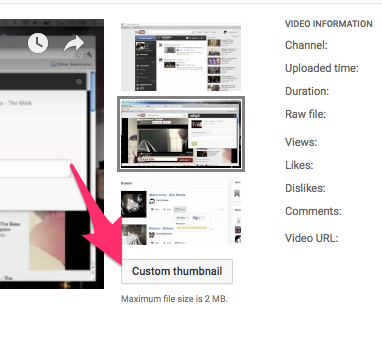
To add a thumbnail to your video, click on the video in your video manager.
Then, in the middle of the screen next to the player, you will see a few images that come from your video that you can select as your thumbnail.
Click on upload image to add your own custom image. The best size is 1280 x 720 pixels. A 16:9 ratio works best since that’s the format of the layout.
Remember, though, that you have to keep your thumbnail under 2 MB.
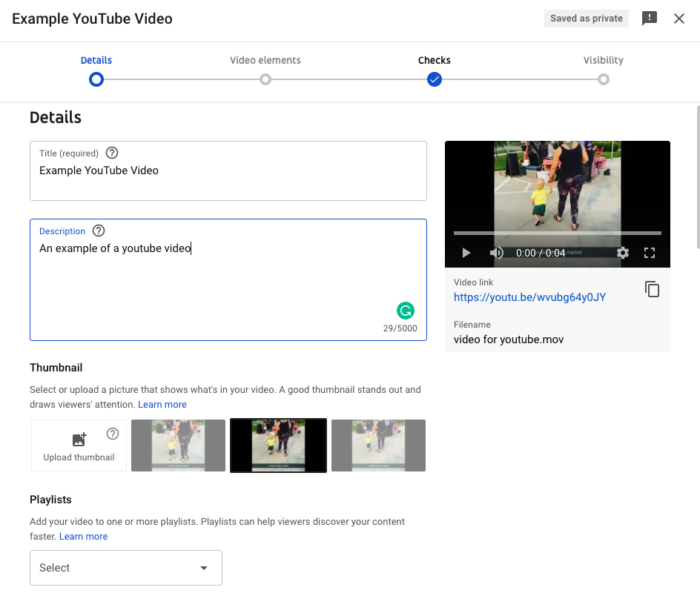
To optimize for search, you need to work on your descriptions. YouTube can’t crawl through your videos like Googlebot crawls through your website.
You need to lend a helping hand to get YouTube SEO right. Here are a couple of things you can do:
Write a description of at least 250 words that outlines the subjects of the video.
Get your keywords in the description in the first few sentences, and use it at least 3 or 4 times in the body of the description.
Start the title of your video with your keywords.
Add tags. Tags help you show up in the related videos column when people are watching other videos.
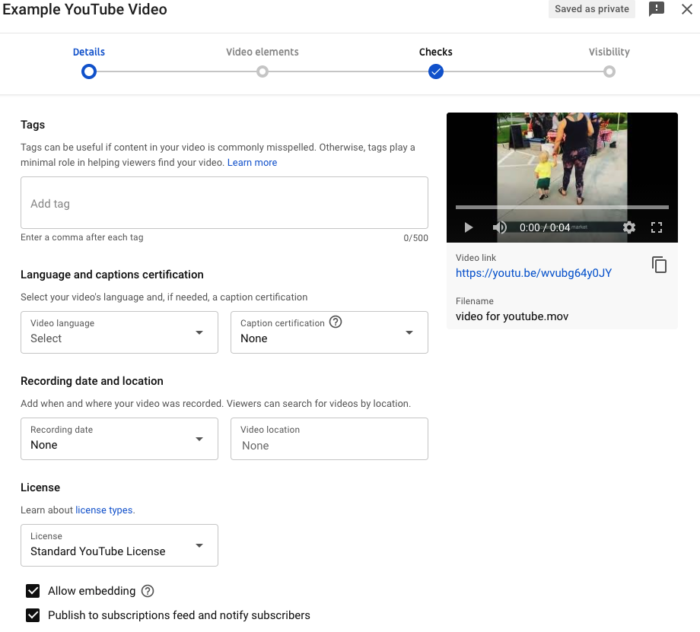
There are also a few of the advanced settings that are helpful to turn on. These features are mostly located under the “Tags” box as seen in the image above.
If your video is focused on a local area, you should add a localization to the video.
Then, you want to drive as many views as possible so you should make sure that the two options are enabled: allow embedding and notify subscribers.
This way people can share your video on their websites, and you can benefit from their traffic to drive views.
And wouldn’t it be silly if your subscribers didn’t know you had a new video? It’s checked on by default but just double-check.
Step 3. Use End Screens to Promote Other Videos
Anyone who has watched your video to its completion is probably very interested in what you have to say. That is the best time of all to catch them.
YouTube developed end screens to keep people’s attention at the end of your video.
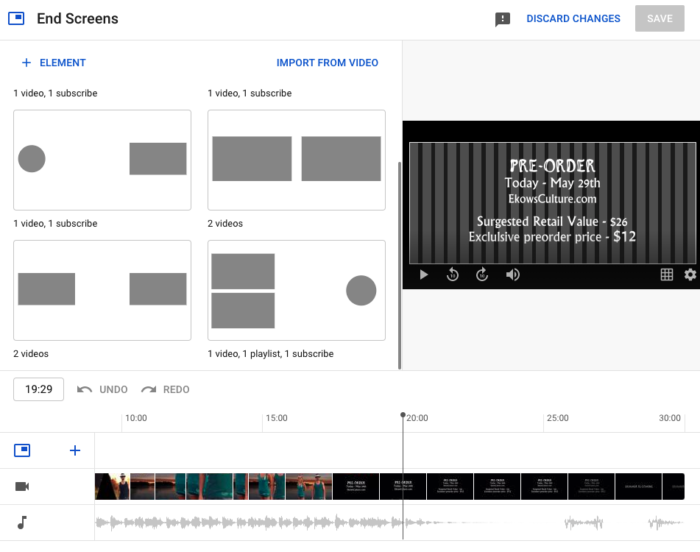
20 seconds before the end of your video, and/or for a bit afterward, you can present related or featured videos to your viewers.
To do that, go to your YouTube Studio account and click on Content (the red box with a “play” icon on the left-hand side). This will open your videos. Select the video you want to add an end screen to. The video will open along with data boxes. On the right-hand side, there is an “end screen” box.
The end screen adds extra time to the end of your video where you can do two key things: promote your other videos and get people to subscribe to your channel.
Click on the Add element button.
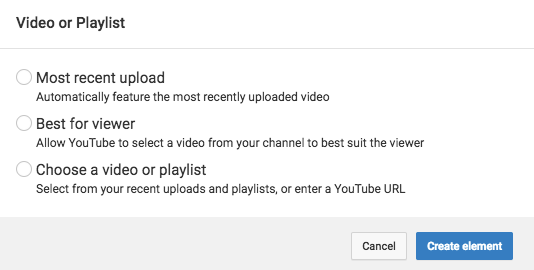
You’ll see a dropdown menu with a few different options. All of them are great for driving traffic.
YouTube provides three options for promoting your other videos and playlists that are pretty great.
You can choose to feature your most recently uploaded videos, or you can choose a specific video that you want to promote.
Or you can let YouTube do the work and automatically recommend videos from your channel that would be the most relevant for each viewer.
You could even link out to other people’s videos if you want.
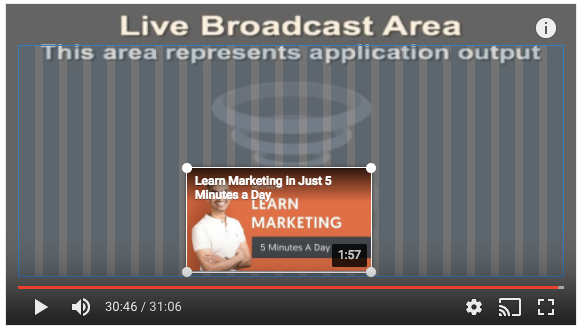
When you add a video, it will display the thumbnail plus the title and the duration of the video:
You can reposition and resize the video.
You can add up to four elements to expose people to as many of your videos as possible.
Step 4. Get People to Subscribe to YourYouTube Channel
Subscribers are more than people that happened to see your video.
They are people who were so happy with that video that they want to see more. They are anticipating that you will give them something great again.
What’s more, media outlets and brands looking to partner with YouTubers will use subscribers as their key metric when evaluating opportunities.
The most important is adding the subscribe action. When you do you will see your channel’s avatar in a round circle.
You can position this button wherever you want on the screen.
You can also use the end screen we discussed above to increase subscribers.
Don’t forget to add a link to subscribe to your website, email signature, and Instagram bio. It’s not just enough to add the YouTube link. You should tell people something clear like “Subscribe to see more videos.”
Step 6. Go Live
Live video is the new wild west in digital marketing. It represents a lot of opportunities. It’s much easier to be featured on the Live home page than the regular YouTube homepage.
Live also gives you the opportunity to interact directly with people while they watch you.
You can instantaneously respond to people’s questions that come up in the chat. This creates a real-time relationship.
How to Vlog Frequently Asked Questions
How do I start a vlog?
Start by choosing a platform. YouTube, Facebook, Instagram, and many other platforms host videos. Then you’ll want to decide on the content you want to share and start researching your audience.
How much money can I make vlogging?
It varies by industry and how successful you are at reaching your audience. Most channels only pay a few cents per thousand views. However, you can use your vlog to promote other products or services.
Do I need expensive equipement to start a vlog?
No. You can start a vlog with a webcam or even a smartphone. There are also free and affordable editing tools.
How can I use a vlog to market my business?
Vlogging can be part of your overall content marketing strategy or you can use video content to push subscribers to paid products or services. People watch videos to learn and be entertained, so make sure to offer value if you want to use a vlog to market your business.
{
“@context”: “https://schema.org”,
“@type”: “FAQPage”,
“mainEntity”: [
{
“@type”: “Question”,
“name”: “How do I start a vlog? “,
“acceptedAnswer”: {
“@type”: “Answer”,
“text”: ”
Start by choosing a platform. YouTube, Facebook, Instagram, and many other platforms host videos. Then you’ll want to decide on the content you want to share and start researching your audience.
”
}
}
, {
“@type”: “Question”,
“name”: “How much money can I make vlogging? “,
“acceptedAnswer”: {
“@type”: “Answer”,
“text”: ”
It varies by industry and how successful you are at reaching your audience. Most channels only pay a few cents per thousand views. However, you can use your vlog to promote other products or services.
”
}
}
, {
“@type”: “Question”,
“name”: “Do I need expensive equipement to start a vlog? “,
“acceptedAnswer”: {
“@type”: “Answer”,
“text”: ”
No. You can start a vlog with a webcam or even a smartphone. There are also free and affordable editing tools.
”
}
}
, {
“@type”: “Question”,
“name”: “How can I use a vlog to market my business? “,
“acceptedAnswer”: {
“@type”: “Answer”,
“text”: ”
Vlogging can be part of your overall content marketing strategy or you can use video content to push subscribers to paid products or services. People watch videos to learn and be entertained, so make sure to offer value if you want to use a vlog to market your business.
”
}
}
]
}
How to Vlog Successfully Conclusion
Video blogging is becoming more and more important for content marketing.
And there’s no time like right now to get started in video marketing.
Organize your thoughts, sit down, and create a concept for a video series.
Like all content marketing, your video needs to give the viewer something of value, whether that be informative or educational or entertainment.
Then, make that video with the highest quality that your time and budget allows.
If it’s helpful, read some books about cinematography. I recommend Gustavo Mercado’s The Filmmaker’s Eye. You can skim through to get the basics about things like shot composition.
Finally, whatever you do, don’t forget to get your video in front of people.
You could make the best video the world has ever seen, but that won’t make you a successful YouTuber.
What are your experiences with YouTube and vlogging?
It’s time for future college students to start applying for the 2022-23 year. Applications for next year already went live with many early decision deadlines approaching near the end of October.
The number of worldwide social media users will surpass 3 billion by 2021.
That’s more than a third of the Earth’s population!
That creates an incredible opportunity to reach online users, and you shouldn’t pass it up.
However, not every platform works the same for every business. That’s why it’s important to review what’s working and what isn’t.
Otherwise, you risk wasting time, energy, and money on flawed campaigns.
Don’t worry. That’s where social media audits can help.
In this post, I’ll show you how to perform a social media audit in just 30 minutes.
The result will tell you if you’re on track to hit it big or if you’re at risk of flushing more dollars down the drain.
Before we get to that, let’s talk about preparing your audit.
How to Prepare Your Social Media Audit
“Auditing” can sound intimidating.
I’ve worked with agencies that charge tens of thousands of dollars and take months to complete a single audit.
In this case, though, yours will be pretty simple. We’ll take a look at each platform and identify a few critical KPI benchmarks to gauge progress.
How often should you perform an audit?
Ultimately, you can do them as often as you’d like to. I recommend at least once a year, but every quarter is ideal.
The point is that you do it consistently and in a way that works for you.
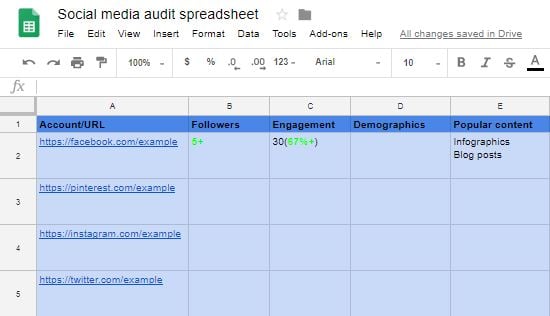
I recommend creating a spreadsheet to maintain all of the information you’ll be recording. Google Drive is a great place to do so since it’s free. Here’s how to do a simple one.
Pull up Google Drive and create a new Google Sheets.
I like using Google Drive because you can share them with your team, partners, and other vendors.
Next, you’ll want to label the columns.
These will be categories that list account information and key performance indicators.
What exactly should your columns contain? Here are some ideas:
The username and URL for each platform that you’ll audit
The number of followers for each account
Engagement metrics
Demographic information
Popular content
These create a nice base to work off of. Here’s what my spreadsheet looks like now.
It seems a bit empty, huh? Let’s fix that by entering our account information.
I’d suggest that you date your audits or add monthly sections to them. This helps track monthly changes when you audit again in the future.
Since every platform is unique, you could also add columns for network-specific metrics.
With this basic template, you’re ready to use your auditing spreadsheet. Now, it’s time to get to work.
I’ll walk you through analyzing Facebook, Pinterest, Instagram, and Twitter. If you are using TikTok or other niche social media platforms, add those to your spreadsheet as well.
Social Media Audit: Facebook
Facebook collects tons of useful data about your Pages and organizes it in one place. You can access it by visiting the Facebook Business Suite.
On that page, Facebook provides valuable insights into both your ad accounts and the business Page itself.
Since we’re focusing on general social media today, let’s first take a glance at the overview.
Right away, Facebook displays information about your Page likes, reach, and the engagement you’ve accumulated. You can filter the results for today, yesterday, the last seven days, or the last 28 days.
Next, click the arrow to the left of your Page to see a breakdown of your best-performing posts.
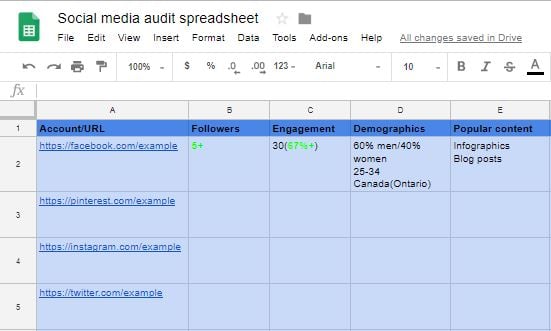
This will tell you what type of content is delivering the most engagement and reach. With this information, let’s go back to our spreadsheet and fill it in.
It should look similar to this:
As you can see, I’ve entered how many new followers I’ve gained, how much my engagement has improved, and what content performed the best.
What about demographics?
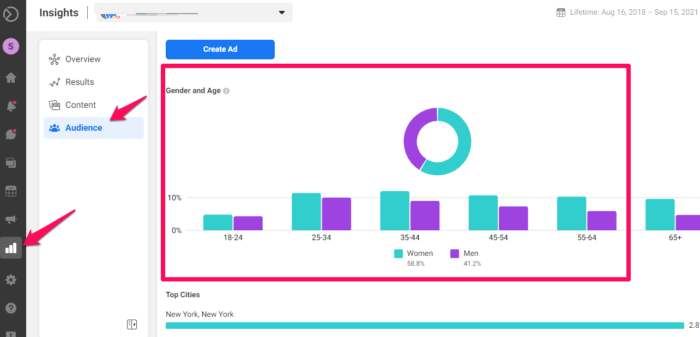
For that, you will need to visit the insights tab. Click on This will give you a report on all of the Pages you run.
Select the Page you’re auditing and it will take you to an overview.
You can also click “results’ to see how many people you reach (this will also show you Instagram reach if you’ve connected that account.)
You’ll also see:
The ratio of men versus women that follow you.
The percentage of users in each age group.
Which countries and cities your followers are from.
What other pages they like.
You have to market differently to every target demographic. Take note of which gender, age groups, and locations make up the majority of your fans.
You can use this data later for tailoring content. But first, let’s input some of this data into our spreadsheet.
With that simple Facebook audit, you should now have a good idea of who your target audience is and what content they enjoy the most.
When you decide to audit your Page again, you can compare these metrics to the updated ones to see how your content performs.
Social Media Audit: Pinterest
Pinterest is a goldmine for marketers.
It’s a platform that heavily rewards quality infographics and visual content. It also offers an awesome analytics page to boot.
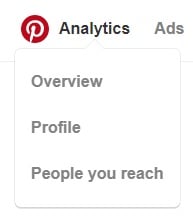
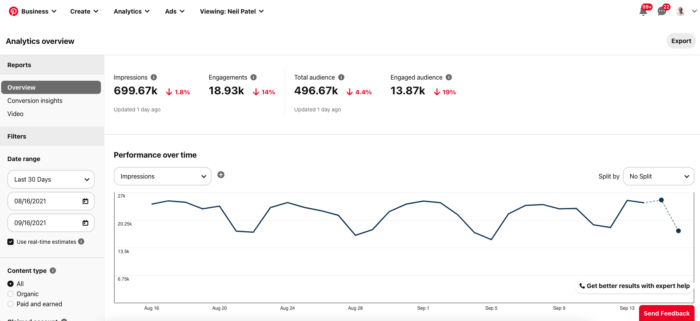
Once you’ve upgraded to the free business account, you can select “Analytics” and “Overview” from the top-left corner.
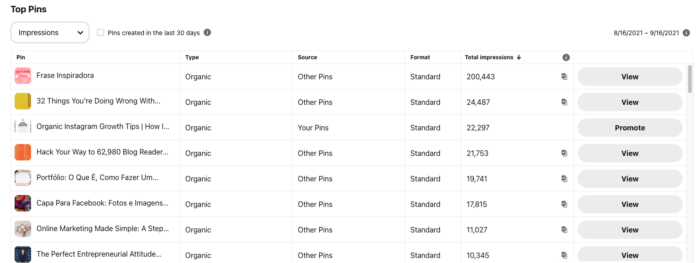
The overview will tell you your average daily impressions, average daily viewers, and most popular content. These first two metrics are convenient for measuring your account’s growth.
As we saw with Facebook, understanding what content performs best will help you offer more of it in the future. This can further increase your engagement and pins.
What kind of content do you notice performs well for your page?
To dig into the demographics of your Pinterest follower, you can click the arrow beside “People you reach.”
You will find information about their location, gender, and language.
Clicking the “Interests” tab shows categories that your followers are most likely to be interested in.
Record these in your spreadsheet. In the future, you could publish more content in these categories to see if your followers enjoy them.
You’ll also see your impressions, saves, and clicks on the “Profile” page.
Saves and clicks are arguably the most important metrics here.
Seeing which posts users save the most will tell you which content to focus on and which to dial back.
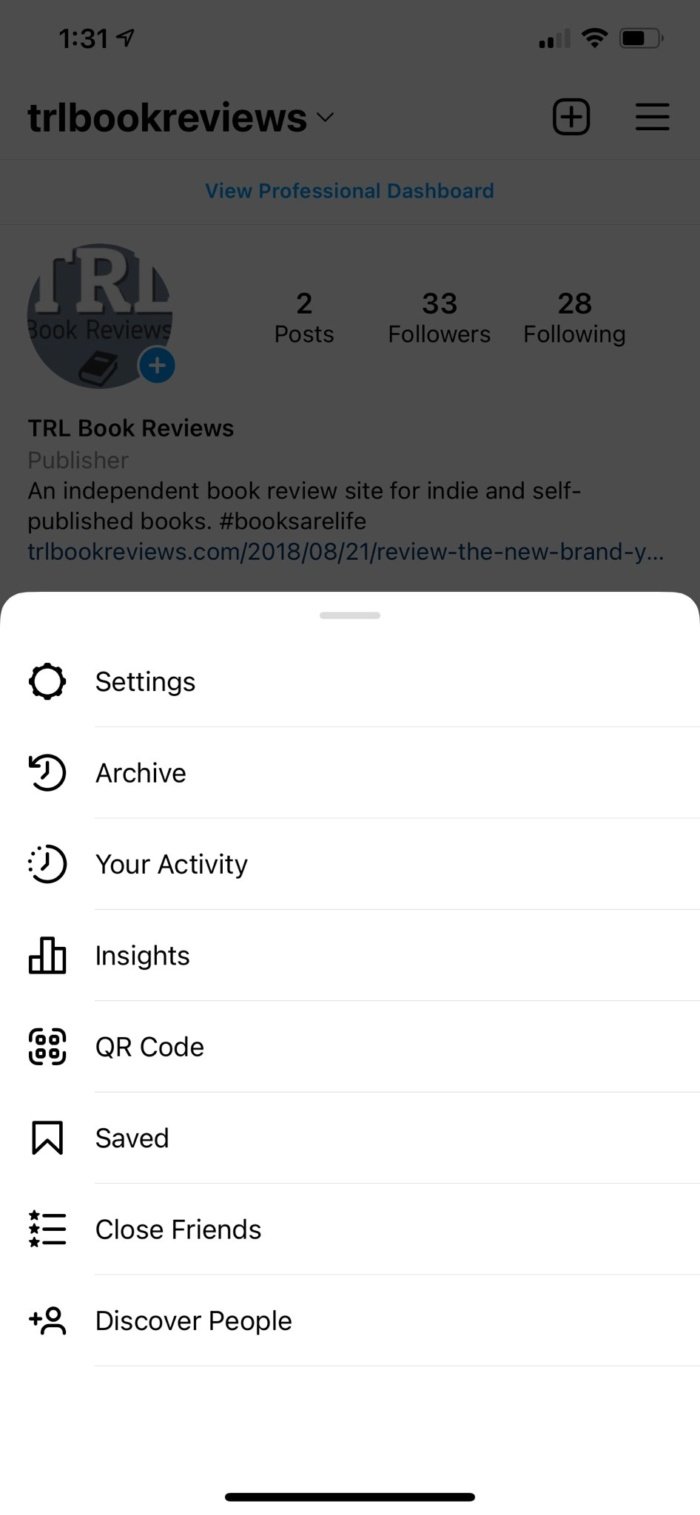
If you upgrade to a business account (and have 100 followers) you gain access to Instagram Insights. This is their native analytics tool to aid you in measuring performance.
It won’t give you insights into content that you posted before you upgraded, but it will give you information about your posts from then on. It can only be accessed from your phone.
Start by tapping the “hamburger” menu in the upper right-hand corner (the three lines.)
Then tap Insights.
If you visit the Insights homepage, it will give you a general overview of your Instagram account. It first content overview, including posts and Stories.
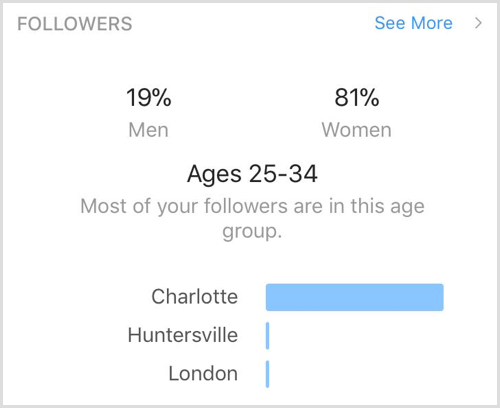
There are also three tabs: content, activity, and audience. The audience tab will show you who your followers are and demographics.
If you want to find out even more about your followers, click “See More” at the top-right corner. That will pull up two graphs.
One will show you the hours when your followers are most active.
The other will reveal which days they are most active.
You can use this to find the most optimal day and hour to post.
Audit Instagram Posts
Next, it’s wise to analyze how your photos are performing. You can do this in one of two ways.
The first option is to select an individual post and click “View Insights.”
Likes, comments, shares, and saves will appear at the top. Instagram also tells you how many profile visits the post resulted in and your reach.
Since hashtags are a huge part of marketing on Instagram, take the time to see which ones attracted the most users.
Consider adding that to your spreadsheet as well if you’d like.
Over time, you will be able to weed out the lesser-performing hashtags and replace them with better ones.
The second approach is to navigate to the posts area of the Insights homepage.
For businesses, it’s a fun way to show followers behind-the-scenes action.
With the Insights tool, you can dive into how your Stories are performing. Simply open a Story and click the viewers on the bottom-left area of the screen.
You will find which users viewed the Story, total impressions, and reach. It also documents actions like replies and clicks.
Use this to determine which content followers respond to the most positively with Instagram Stories.
Social Media Audit: Twitter
Twitter advertising is one of my favorite techniques for quickly gaining attention because it’s so simple.
If you visit the Ads Manager, you will gain access to your account’s analytics.
Let’s start by selecting the “Analytics” drop-down menu and clicking “tweet activity.” This will let you view tweet engagement, impressions, and more.
First, Twitter is nice enough to give you a convenient graph of your impressions over the last 28-day period. You can change this to the last seven days or a custom number as well.
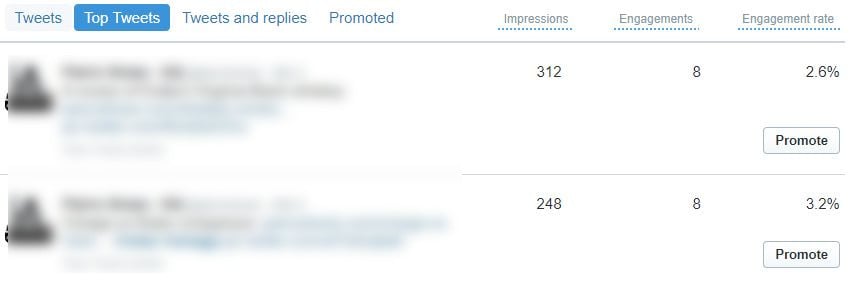
Click the “Top Tweets” tab to see which of your tweets in a selected period are the most popular. Twitter determines this based on engagement and impressions.
Do you notice any trends?
Are certain calls-to-action or styles of tweets doing better than others?
These are questions you should ask yourself to further complete the audit.
Do you know who your followers are?
Well, you can figure that out by visiting “Audience insights” under the “Analytics” tab on top again.
Make sure that you change the selection to your followers.
At first glance, you’ll see an overview with several tabs.
On this first page, you can see information about your followers, such as their:
Interests
Consumer buying styles
Household income categories
Wireless carrier
Gender
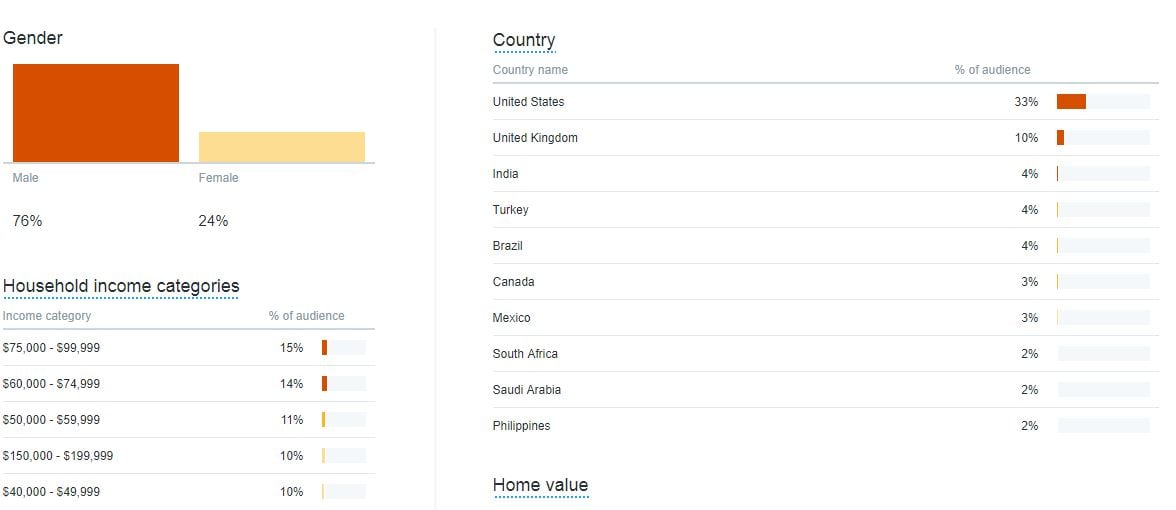
If you click the “Demographics” tab, you’ll see the following:
It’s safe to say that Twitter has a seriously impressive analytics system. It’s convenient, too.
From exact regions to home value, there’s nothing you won’t know about your followers.
Moving along to the “Lifestyle tab,” you’ll get a better idea of what interests them. This is great information to use for tailoring your content.
If you know what they like, you can integrate that into what you post.
They will feel much more connected to your brand when they know that you understand them on a deeper level.
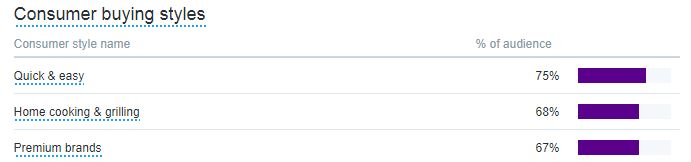
For those of you who are involved in e-commerce, you’ll find a special benefit to the next tab, which is the “Consumer Behavior” tab.
Twitter shows us what kind of consumer buying style our followers fall under and what kind of consumer goods they enjoy purchasing.
This is a goldmine if you sell products online.
It’s literally telling you how they prefer to shop and what they’re looking for.
Finally, the “Mobile Footprint” tab tells you which carrier and devices your followers mostly use.
What Should You Do With Your Social Media Audit When It’s Done?
You’re sitting back and marveling at your in-depth spreadsheet. Now what?
It’s time to get marketing.
You now hold a great deal of data that you can use to improve your social channels and your business as a whole.
What type of content does your audience like the most? Try producing more of this and measure the results next week or next month.
For example, you may find that your Facebook fans prefer videos over images. As simple as it sounds, delivering more videos could be the easiest way to increase shares and engagement.
I recently posted this video on Facebook:
It was a direct result of a simple social media audit like this.
I’m investing a ton into video marketing because I’ve seen that it produces the best results across almost every platform.
I typically don’t talk about “finding your passion” and that type of stuff. I usually like to stick to nerdy marketing ideas.
However, I’ve noticed that more personal topics like this get an awesome reaction.
Guess what?
I’m adding more topics like this to my content calendar.
The whole reason for producing this content is to gain awareness and increase engagement.
The purpose is not to try and sell anything.
Instead, you want to mix content types and topics to drive the most interest possible.
Then, you can run retargeting campaigns with custom audiences to eventually sell to everyone who’s watching, commenting, and hitting the Like button.
Target a More Defined Audience
With all of the research you’ve performed, you also now know a lot more about the demographics of your fans.
Things like age, gender, and location are much more concrete.
In the beginning, you probably had a rough idea of what your ideal user was like. Now, you know for sure.
I’d recommend searching for market reports based on your target demographics. These will give you further ideas on how to serve them better.
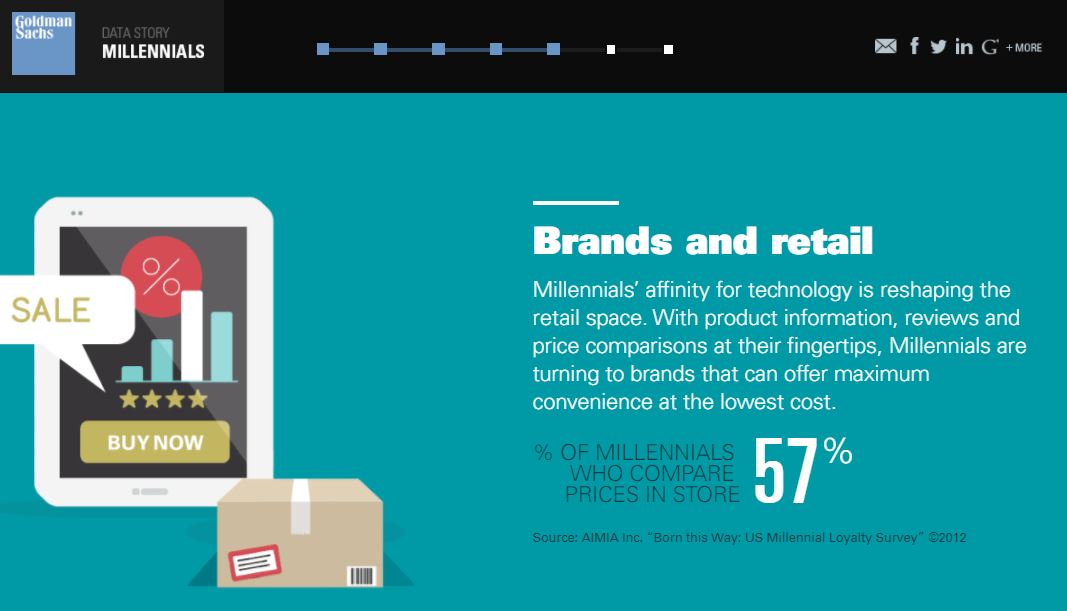
Even infographics like this one from Goldman Sachs on millennials can contain rich nuggets of knowledge about your audience.
Going off of this example, we might experiment by offering free shipping, discounts, or other convenience as the studies suggest.
Once you’ve compiled all of the previous data on your users, it’s simple to find out what works for them.
Reports and similar publications will detail trends and opportunities to take advantage of.
New sales channels and promising promotional strategies are some things to expect.
Overall, you know what your ideal user responds to the best, so you can tailor more content toward that.
Work Smarter, Not Harder
You now also know which platforms are delivering the biggest results.
You can use this information to implement what we call the “80/20 rule.”
It involves doubling down on the social networks that work the best for you.
Perhaps Instagram and Facebook drive the most traffic. If that’s the case, then focus your attention on those platforms.
Putting more energy into just a couple of networks may create more results than diversifying.
This rule also applies to content and advertisements. The data is telling you what works the best, so consider shifting your focus to just a few key areas.
At the same time, you can take this opportunity to test out different platforms. At the end of the day, you’ll never know until you try.
Maybe another social network would perform incredibly well, but you just haven’t tested it.
You can test a couple on a smaller scale and look at the results before you invest too much time into it.
You should also now be setting goals for your social accounts, including:
Follower count
Engagement numbers such as likes or comments
Traffic that you drive to your website
When you perform another audit, you should be able to do it faster. You’ll be much more familiar with the process, which will help you streamline the process.
When you perform your next audit, you can track changes by comparing your numbers to your previous audits.
Over time, you will have a vivid picture of how your social accounts are developing.
I run a quick PPC campaign to find the keywords that convert best within an industry. Then, I’ll start building out content and SEO campaigns around this new data.
The same applies to social. Run paid campaigns to quickly identify top content, audiences, and so on. Then, tailor your organic efforts around what already works.
Social Media Audit: Frequently Asked Questions
Why are social media audits important?
To understand what is working or what is not in your social media strategy.
How often should I do a social media audit?
Any time you are considering changing your strategy or at least once a year.
Do I need tools to do a social media audit?
No. While they can be helpful, the internal tools on social media can be used in your audit.
What do I do with a social media audit?
Social media audits help you find strengths, weaknesses, and opportunities in your social media strategy. Use it to target a more defined audience, improve your social media strategy, and work harder not smarter.
{
“@context”: “https://schema.org”,
“@type”: “FAQPage”,
“mainEntity”: [
{
“@type”: “Question”,
“name”: “Why are social media audits important? “,
“acceptedAnswer”: {
“@type”: “Answer”,
“text”: ”
To understand what is working or what is not in your social media strategy.
”
}
}
, {
“@type”: “Question”,
“name”: “How often should I do a social media audit? “,
“acceptedAnswer”: {
“@type”: “Answer”,
“text”: ”
Any time you are considering changing your strategy or at least once a year.
”
}
}
, {
“@type”: “Question”,
“name”: “Do I need tools to do a social media audit? “,
“acceptedAnswer”: {
“@type”: “Answer”,
“text”: ”
No. While they can be helpful, the internal tools on social media can be used in your audit.
”
}
}
, {
“@type”: “Question”,
“name”: “What do I do with a social media audit? “,
“acceptedAnswer”: {
“@type”: “Answer”,
“text”: ”
Social media audits help you find strengths, weaknesses, and opportunities in your social media strategy. Use it to target a more defined audience, improve your social media strategy, and work harder not smarter.
”
}
}
]
}
Social Media Audit Conclusion
A social media audit doesn’t have to be long or tedious.
If you follow what I’ve outlined in this article, you can complete yours in as little 30 minutes.
Every social media platform offers analytics and insights that you need to improve your social media marketing strategy and speak to your audience in their language.
Preparation and organization are the keys to a successful audit. That’s why a simple spreadsheet is so handy.
You’ll want to keep a record of how these numbers increase or decrease over time. That way, you can draw conclusions about what’s working and what’s not.
Set a schedule to perform your audits, too. You could do them on a weekly, monthly, or quarterly basis.
Don’t be afraid to experiment by trying out new social media networks. You can add these to your next audit.
Set goals based on the collected data, and you’ll be consistently growing your social accounts over time.
What do you think is the most important part of a social media audit?
Your Smart Business Timeline for Building Business Credit Starts NOW
You’ve heard of business credit, right? It’s credit in the name of a business and not its owner. It is an ongoing process and you must do it proactively. That is, it won’t just happen – you have to make it happen. But did you know that you can hit the ground running and build business credit? You can start your business timeline for credit right now!
Your Business Credit Building Timeline
Any business can build credit, even nonprofits. This timeline is designed to work in order
It takes advantage of the passage of time, so you don’t pursue options that require a certain amount of time in business before that time has elapsed.
Get Started by Getting Fundable
There are a number of things you can do to make your business more fundable. That is, more likely to get funding. Here are some acts you can take which are fast. They will give you quick bang for your buck.
Getting Fundable Goes Beyond Building Business Credit
These tasks also have the added bonus of being helpful in other areas of your business
Building fundability bakes credibility right into your business. This will help you attract prospects, and it will help you convert more of them into customers.
Getting fundable helps your business to get money. And it will do so for years to come. It’s worth the time and effort to get it right the first time, this also saves you any lost ground from having to undo older mistakes.
A lot of these steps will require a phone call to a provider or chatting online. To expedite matters, get someone to help you, so you can get the preliminaries done faster, if absolute speed is your objective.
Start Your Business Credit Building Timeline With a Great Business Name
Does your business, or the business name you want to use, contain the name of its industry?
That can be problematic if you’re in what is considered to be a risky industry.
Risk is usually defined as:
A higher chance of injury on the job and/or
Businesses which perform more cash transactions than most other companies
To become more fundable, don’t add the name of a risky industry to your business name
There’s nothing underhanded, immoral, or illegal about doing this
Start Your Business Timeline With Consistent Information
Just copy/paste business information – name, address, and everything else. Why? Because retyping opens up opportunities for error. Differences will be interpreted as fraud by lenders and credit providers. Keep records of where your business name is, so, you can be sure you catch everything. These are records both online and offline.
You want an exact match across the board. This means deciding between spelling a word out or abbreviating. It also means choosing between an ampersand (&) and the word ‘and’. Pick one and stick with it.
Continue Your Business Timeline With Your Business Phone Number
A cell phone or home phone number can harm your business in your quest for fundability. But you can use VOIP (voice over internet protocol). This enables any phone number to ring any device. So you can still use your cell phone.
Toll-free numbers are often best. That is, 800 or an equivalent exchange. You can get a toll-free number fast through a provider like RingCentral. But if your business is purely local, you may be able to go with just a local number.
You also want to have a 411 listing for your business phone number(s). You can get one via ListYourself.net. Lenders and credit providers will be looking for your phone numbers, so make them findable.
Do you really need a separate business phone number? It’s not a complete, 100% dealbreaker if you don’t. But if you don’t want clients to ring your home phone all day long, or have your toddler pick up (!), then a separate business phone number is the best way to go.
Continue Your Business Credit Building Timeline With Your Business Address
Working from a residence can be a problem to lenders and credit providers if your business is a retail establishment like a clothing store. They will check your business address on Google Street View, and you could be denied business credit. A separate address fixes this issue.
A separate business address is also better for your family as no customers will be coming and going in your home, and taking up parking spaces on your street. But what if an office just isn’t in the financial cards right now? A virtual business address is a terrific solution. It can address all these issues.
Virtual Business Addresses
With a virtual business address, you get a deliverable address – not a PO box or UPS box, which would be flagged and generate a denial. This means an actual brick and mortar address.
Some plans give you access to clerical help, conference rooms, mail forwarding, and more.
Three we really like are:
Alliance Virtual Offices
Da Vinci
Regus
But recognize that there are some lenders and credit providers that will not work with virtual addresses.
Continue Your Business Timeline With Your Business Website
Lenders and credit providers will be looking for your business online. It would be a lot better if they got their information directly from you, and not a competitor. As a result, you must have a professional-looking website and email address. Your domain needs to be yourcompany.com or .net if you can get that.
Never use Wix or Weebly, so your domain is yourdomain.com versus yourdomain.wix.com. You will need hosting through a hosting company like GoDaddy or HostGator. You can buy a domain and set up a website. Larger hosting companies will provide services to help if you’re inexperienced with this.
Your Business Email
Your business email address needs to be on the same domain as your website. Generic professional names work well, something like admin@yourwebsite.com or gethelp@yourwebsite.com. Do not use Gmail, Yahoo, AOL, or the like. But don’t worry about checking yet another email address; you can have any email forward to any other email. You can set all of this up at the same time you set up hosting.
Follow Your Business Timeline to The Secretary of State’s Office
The first steps already outlined will probably take you between a month to three months at the least. Now it’s time to move onto the Secretary of State for your state.
The Secretary of State’s office has info on every license needed to run your business
They also have helpful information, like if you need to take continuing education to maintain your license. Processing time varies.
You may need to register your business. It’s possible that the SOS will require that your business name be unique. And they may want corporations to be defined with a term like ‘Inc.’ at the end of their names. For anything you need to pay for at the SOS, be sure to print and keep copies of receipts and forms.
Continue Your Business Credit Building Timeline With Your Business Bank Account
Many business credit providers will insist that you have a business bank account. It must be devoted to your business. This will also help to keep you from accidentally commingling funds. This will make tax time a lot easier. You can apply for a business bank online at many banks, even if the bank has brick and mortar locations.
In particular if you have a personal account with a bank, and you’ve managed it well, you can get a business bank account fast. You can often be approved in as little as 15 minutes online. For some more risky industries like cannabis, it may pay to look online for a bank to work with
Continue Your Business Timeline With Your EIN and Business Entity
Visit the IRS website and get a free EIN for your business. Choose a business entity like corporation, LLC, etc. It’s best to choose a type of corporation. This is to minimize risk and maximize tax benefits. It also creates an entity separate from you, the business owner.
Doing these things at this stage of the game means you’ve got a set business address, phone numbers, etc. So you wouldn’t have to change them later.
Note: a DBA is not a separate business entity.
Proper NAICS Codes
You also choose NAICS codes at IRS.gov. SIC and NAICS codes classify your business and show what it does. The IRS works with NAICS codes. But D&B still works with both. If your business can fit under one or more code, choose the less risky code. There’s nothing illegal, immoral, or underhanded about doing this.
Continue Your Business Credit Building Timeline By Incorporating Your Business
Even incorporating online may take a few business days. In general, you will need Articles of Incorporation. If you want them drafted quickly and correctly, you’ll probably need to hire a corporate attorney to get this done. At the very least, it’s best practices to have a lawyer look over your completed documents.
Get Your D-U-N-S Number
To build business credit, you will need a D-U-N-S number from Dun & Bradstreet. A D-U-N-S number + 3 or more reported payment experiences will generate a business credit report with a PAYDEX score. And, therefore, you’ll have built business credit. The free product will send you a D-U-N-S number within around 30 days. Don’t let them upsell you!
By now, you’re about one to two quarters into your business credit building timeline
Continue Your Business Timeline By Establishing Positive Payment Experiences
Lenders consider credit history as one of the chief factors when determining creditworthiness. Making timely payments will demonstrate to anyone looking to do business with your company that you’re low risk. Work with vendors that will report positive payment experiences to the business credit reporting agencies. That way, you won’t waste your time.
Most vendors don’t report positive experiences, but have no problem reporting if you default. But here are three that will report positive experiences:
We don’t just recommend these vendors because they report, we also recommend them because they have great products and service.
Continue Your Business Credit Building Timeline By Working With Vendors Which Report
Even vendors that report may need you to reach a certain minimum before they will report. They may also want some time in business. So check the fine print and call or chat online with a representative to get information, which you know will be correct. And keep in mind, it can take over 30 days for reported purchases to show up on your business credit report. By now, your timeline has stretched to three-quarters of a year to a year, AND you’ve got good business credit!
A Smart Business Timeline for Credit: Takeaways
Following the steps in order assures that you take the shortest distance between the point of startup, and the point of having good business credit. You don’t meander, you get straight there, in a year or less. For more guidance, and to extend your timeline into getting more credit and funding as your business grows, contact us.
I’m Margot, I have experience as a junior Front End Developer, and enjoy UI/UX. I am searching for a junior Manual QA Engineer position. I am interested in learning automated testing as well.
I excel at working as a team member and my top strengths are problem solving, creativity, empathy and a love of learning.
Dave Wilson and Harry Lyles Jr. preview the most interesting storylines of the week in college football, from Auburn-Penn State to Alabama-Florida. The post Auburn's first Big Ten road game in 90 years and everything else to watch in Week 3 appeared first on Buy It At A Bargain – Deals And Reviews.
GDPR Cookie Consent Agreement
This website uses cookies to improve your experience. We'll assume you're ok with this, but you can opt-out if you wish.AcceptRejectRead More
Privacy & Cookies Policy
Privacy Overview
This website uses cookies to improve your experience while you navigate through the website. Out of these, the cookies that are categorized as necessary are stored on your browser as they are essential for the working of basic functionalities of the website. We also use third-party cookies that help us analyze and understand how you use this website. These cookies will be stored in your browser only with your consent. You also have the option to opt-out of these cookies. But opting out of some of these cookies may affect your browsing experience.
Necessary cookies are absolutely essential for the website to function properly. This category only includes cookies that ensures basic functionalities and security features of the website. These cookies do not store any personal information.
Any cookies that may not be particularly necessary for the website to function and is used specifically to collect user personal data via analytics, ads, other embedded contents are termed as non-necessary cookies. It is mandatory to procure user consent prior to running these cookies on your website.