
B42 | b-42.com | React Native Developer | Remote (Germany) | Full-Time B42 has started to make amateur football better. We take our athletes to a new level of performance and offer professional rehab support in case of a sports injury. We understand football as a social force, for example by taking a clear stand …
How to Use Events to Optimize Your Facebook And Google Ads
Your website is bustling with activity. Visitors are constantly interacting with it.
But are you taking full advantage of everything that’s happening on your website for your paid marketing?
Every interaction a visitor has with your website… a pageview, a click… can be used to better understand your audience.
And when you understand your audience you can target them in a smarter way, and get more bang for your buck from your paid campaigns on Facebook and Google.
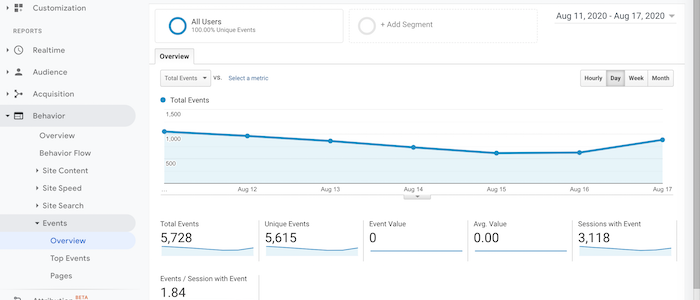
Both Facebook and Google refer to these user interactions as Events. They allow you to track them using a tracking code installed on your website.
What Are Events?
Events are user interactions that don’t involve loading another page on your website.
In e-commerce, the prime example of an event is Add to Cart.
Another event can be filling out a field in a form, as opposed to a form completion that usually triggers loading a “thank you” page. Filling out one or more fields without submission (also known form abandonment) can also be recorded as an event.
In essence, you can record any action a user makes as an event, such as watching a video, clicking on a link, or even downloading a PDF.
Why Events Are Important
Events are important because they indicate the intent of your website visitors and which ones are more likely to become a customer or a lead.
If a visitor watched a video on your website, it demonstrates an interest in your offering.
In e-commerce, even if a visitor did not complete a purchase, an abandoned cart shows a high purchase intent. Sure, something has prevented the visitor from completing the purchase, but any visitor who got that far is worth your attention.
By tracking events you’ll be able to make a more focused offer to these users in your paid campaigns.
How you may ask?
By injecting the events tracking data into your paid campaigns and using this data for more precise targeting and an optimized offering.
Think about it, if you can group together all the visitors who watched a certain video and set up a customized campaign for them that referenced what they saw in the video, wouldn’t that make for a far more effective campaign than a generic awareness message?
It sure will.
Let’s discuss how you can use event tracking to get more out of your ad campaigns on Facebook and Google.
How to Set Up Events on Your Website
With both Facebook and Google, you’ll need to use code for setting up events on your website.
So lets go over how you do that…
Setting Up Events Using Facebook’s Pixel
Standard events on Facebook include:
- View content
- Search
- Add to cart
- Add to wishlist
- Initiate checkout
- Add payment info
- Make purchase
- Lead
- Complete registration
Here is the official Facebook guide for setting up events.
First, you need to verify that you already have the Facebook Pixel code embedded in the header code of every page of your website, between the <head> and </head> tags. If you don’t, first go ahead and insert the base Pixel code.
Next, select the event that you wish to track for a specific page from Facebook’s list of events. Let’s say Add to Cart event, which looks like this:
fbq(‘track’, ‘AddToCart’);
Paste the Add to Cart event code above the </script> tag.
Here’s how it should look:
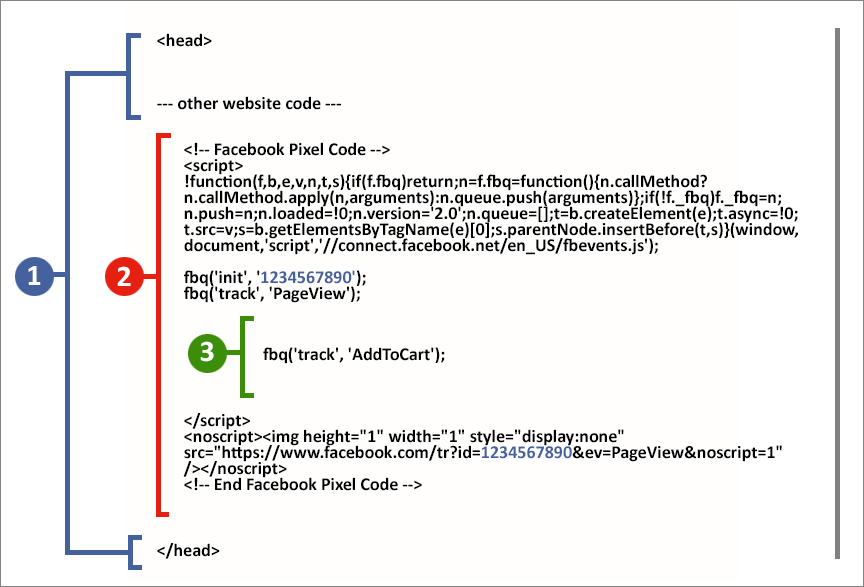
Here’s what each number in the image stands for:
- Your header code
- Your base Facebook Pixel code (the ID number is unique to every website)
- The specific event code
You’ll need to repeat this on every page you want to track one or multiple events. Each page needs its relevant event code.
Event Tracking Setup Using Google Analytics
You can also track events in Google Analytics for even more insight. For event tracking in Google Analytics, you’ll need to create custom code snippets for every event.
Here is the official Google Analytics guide for setting up events.
The code is then added to the link code of the item or action you want to track so when the item is clicked, it will be displayed as an event in Google Analytics.
The event code is made of four elements – two required elements and two optional elements:
- Category (required) – defines a group of actions you want to track
- Action (required) – the type of action you want to track
- Label (optional) – for your monitoring convenience, stating what’s the event is about
- Value (optional) – assigning a numeric value to the event; can be monetary value, or just a scale
The basic structure of an event code looks like this:
onclick=”ga(‘send’, ‘event’, ‘Category’, ‘Action’, ‘Label’, ‘Value’);”
The code should be added within the href link code, before the link text:
<a href=”www.examplewebsite.co.uk/pdf/company_brochure.pdf” onclick=”ga(‘send’, ‘event’, ‘PDF’, ‘Download’, ‘Company Brochure – PDF Download’);“>Download Our Brochure</a>
In the example above, no Value was assigned to this event.
There Must Be a Better Way
All this event data needs to be injected into your paid campaigns in order to optimize them but before we get into that, let’s talk about the elephant in the room.
Code!
Dealing with code isn’t ideal for marketers. It’s just not our forte.
It holds us back since constant optimization is one of the core principles of online marketing.
And when you need your development team for every act of optimization, well, it’s not ideal.
Is there a better way to track events on your website? Yes. There’s a tool called Oribi that offers exactly that – no code event tracking.
Oribi tracks every interaction on your website, page views, and button clicks, automatically. It collects all this data and makes it all available to you. Even when you make changes to your website, like adding a page or changing buttons, events are updated dynamically. As said, all of this is done without any code business on your behalf.
Here’s how event tracking looks in Oribi:
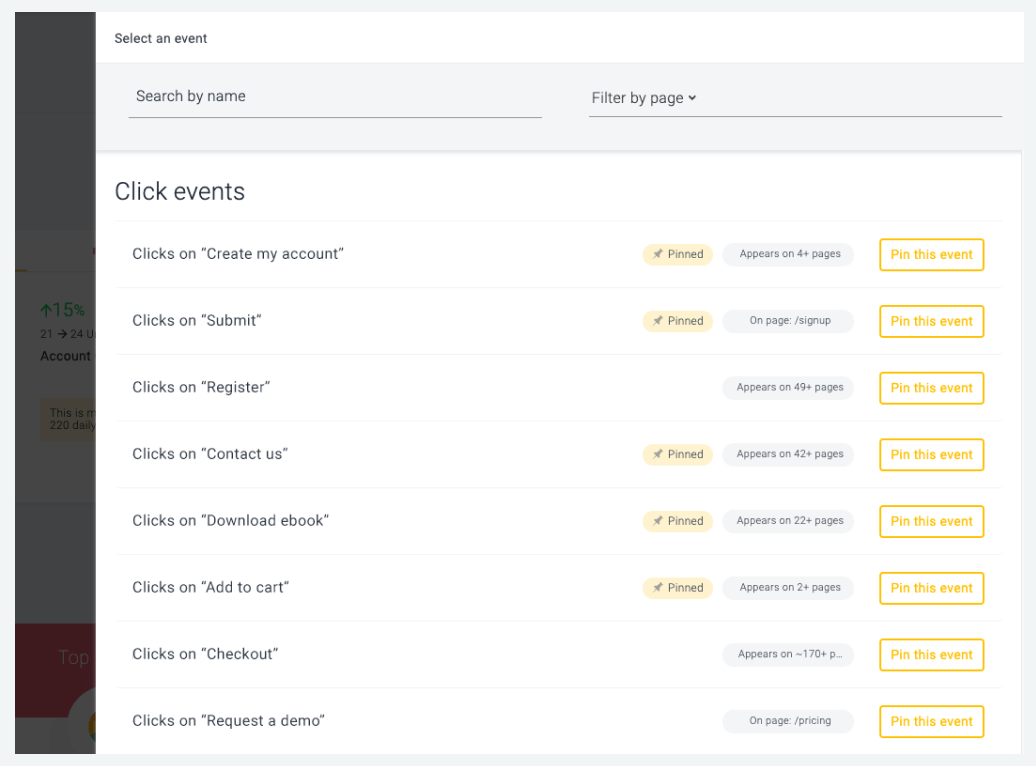
The value here is apparent. You don’t need to decide which events to track, and you don’t need your development team to track it for you. Everything is tracked for you. You just need to follow the data.
Using Event Data to Optimize Your Paid Campaigns
Now you can use all this event data that you collected so diligently to better segment and optimize your paid campaigns and get more return on your ad spend.
There are two main objectives for tracking event data:
- Internal – being able to analyze how visitors are interacting with your website and from that optimizing the UX (user experience)
- External – exporting the data to your paid campaigns to better segment them – group together audiences according to their place in the funnel and specific interests in order to deliver more relevant messages
Let’s look again at the Add to Cart event. As mentioned, adding an item to a cart shows a high purchase intent. These visitors, even if didn’t complete the purchase, declared their interest in your product.
They are ‘worth your efforts’ to continue and court them in the hope they will complete a purchase in the future.
But they are all different, and you can better understand them based on the item, or items, they chose.
If you could, for example, group together all those visitors who added a shirt and then group together those who added a pair of shoes – wouldn’t your customized paid campaigns for these two distinct groups be so much more valuable?
You’ll be able to deliver a highly relevant message, or offering, in your ads.
This is just the tip of the iceberg as far as segmentation and optimization of your paid campaigns that can be achieved with event tracking.
Two Main Use Cases for Ad Campaign Optimization Based on Event Tracking
Both Facebook and Google offer very strong optimization capabilities for their ad campaigns.
There are two objectives for this:
- Ability to segment your audience in order to deliver a highly relevant message (the more segmented the audience is, the more relevant your message can be)
- Ability to reach new audiences that are also relevant to your offering
Let’s look at how these objectives are achieved through specific features in Facebook and Google ad campaigns.
Facebook’s Retargeting and Google’s Remarketing
The simplest way to explain the Remarketing feature is this:
When you visit a website, a tracking cookie is installed on your browser (yes, that’s the famous cookies message you now see everywhere). After you leave the website, you begin to see display ads from that website.
This is the remarketing feature: it allows advertisers to show you ads of the website you visited on other websites.
The ads can be general, just a reminder of the brand, but they also can be more personalized. The more directly related the ad is to the content you viewed, the impact it will make, thus increasing the likelihood of a purchase or return visit.
Let’s say you browsed a vacation apartments website. You looked at apartments in Lisbon, but didn’t make a reservation. A couple of days later, while scrolling down your Facebook feed, you all of a sudden see an ad that says “Still thinking about Lisbon?”
Now that’s powerful. It will stop your scrolling. It will make you think about Lisbon again. If you clicked the ad, it would take you back straight to the Lisbon section of that vacation apartments’ website.
So by tracking events – in this case browsing a specific page – you are able to deliver highly targeted, super relevant, and hopefully mighty engaging ads to audience that already demonstrated interest in your offering.
Facebook’s Lookalike Audience and Google’s Similar Audience
The simplest way to explain the Lookalike (Similar Audience) feature is this:
Based on your audience attributes, Facebook and Google are able to target similar people and show them your ads.
Behind this simple explanation, there is a highly complex algorithm able to locate people with similar interests, demographics, location, and professional background.
Facebook and Google are able to do this thanks to the vast amounts of data they have on their users.
Let’s say you track a video as an event. The video is a top-of-the-funnel content that explains the benefits of using the app you are offering. Website visitors who watched the video are “recorded.”
You can define the visitors who watched the video as a specific “audience” in Facebook or Google Analytics.
Then, the algorithm finds similarities between the visitors who watched the video and based on this data, can show your ads to other people who never watched the video but share the same similarities with your audience.
This is an incredible tool to expand your potential audience and reach people that are likely to be interested in your offering. This gets you more value on your ad spend.
Connecting the Dots: Events, Audience, and Targeting
So, now you know how Facebook and Google can help you refine and optimize ad campaigns, but what is the process to set it all up?
The first part of the chain is identifying the events and inserting the proper codes for all pages and types of events. We’ve already covered how to set them up, both on Facebook and Google Analytics.
How you define an event is crucial for the success of the campaign and determines which strategy you’ll use either remarketing or a lookalike (similar) audience.
Once you have the events set up, it’s time to connect them to your ad campaign. In this context, “connect” means enabling Facebook and Google to use the data collected from the event tracking to optimize the ad campaign.
Facebook Event Tracking Ad Optimization
Let’s start with the easier of the two.
Once you inserted the event tracking code to the various pages of your website, the events data is available for you on your Ads Manager.
As opposed to Google, where you need to first import the event data from Google Analytics to Google Ads (we’ll get to how to do it in a sec), on Facebook this action is taken care of for you.
Still, you’ll need to locate this data. Here’s how:
First, log in to Ads Manager and click the Pixels tab…
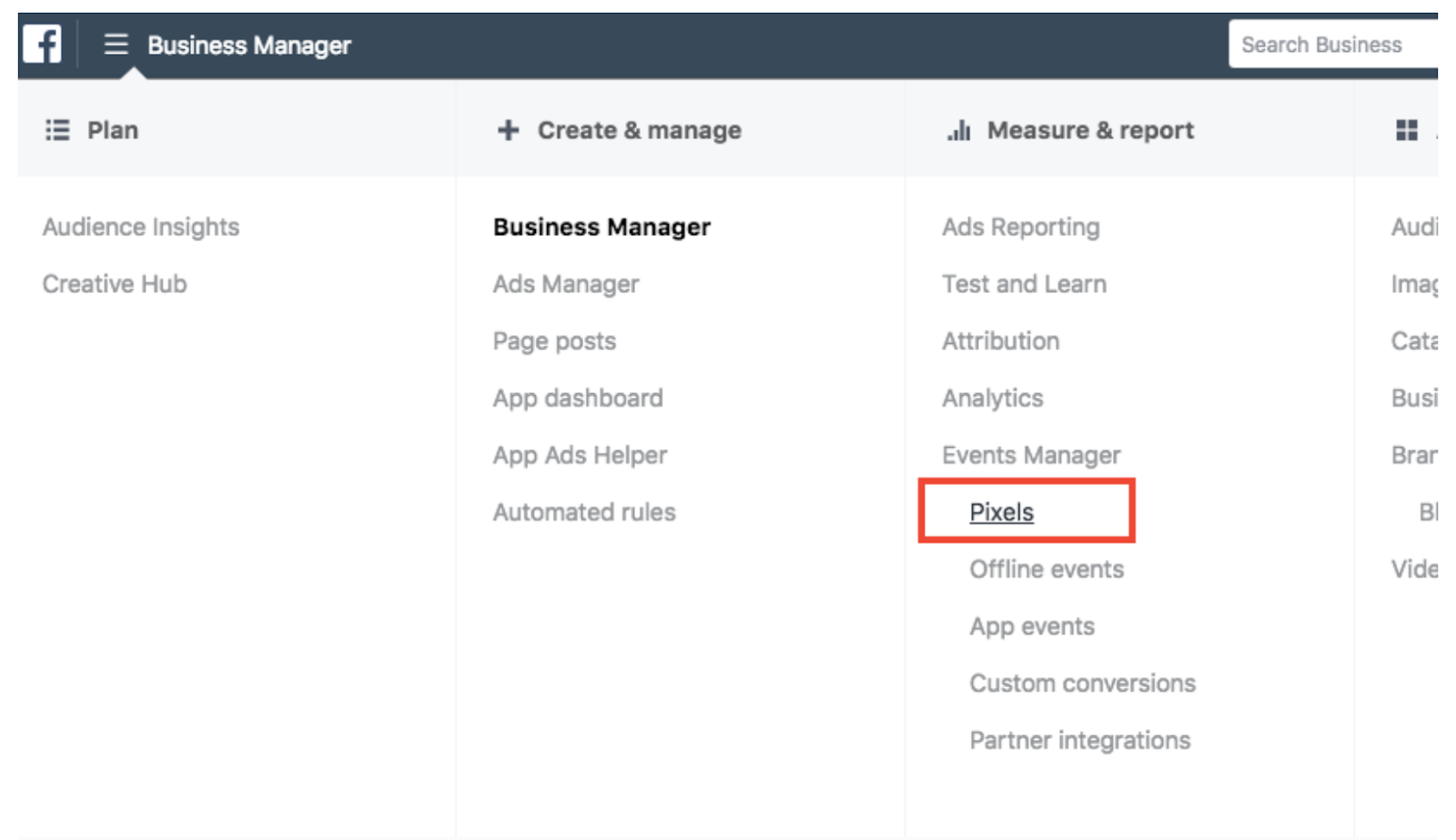
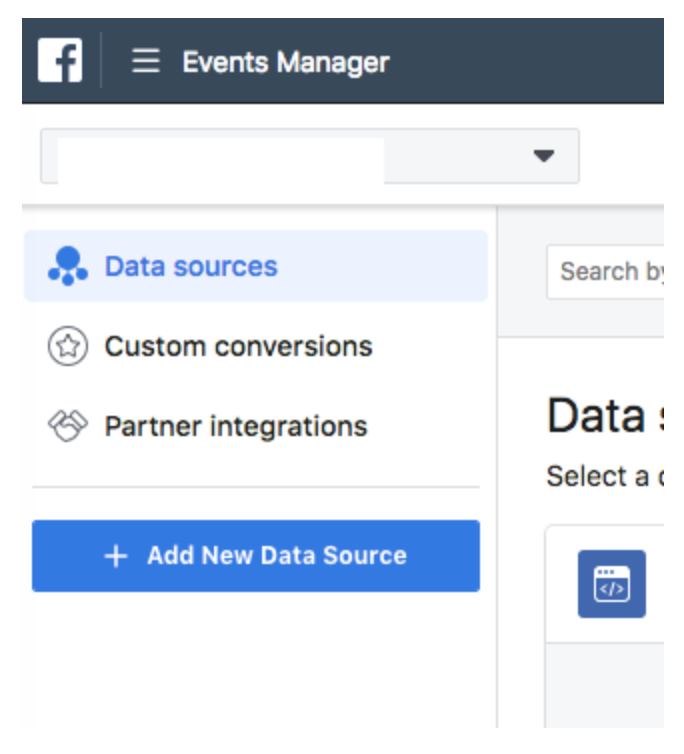
Then, on the left, choose “data sources”, it will take you to your pixel…
Now you’ll see a general breakdown of your events…
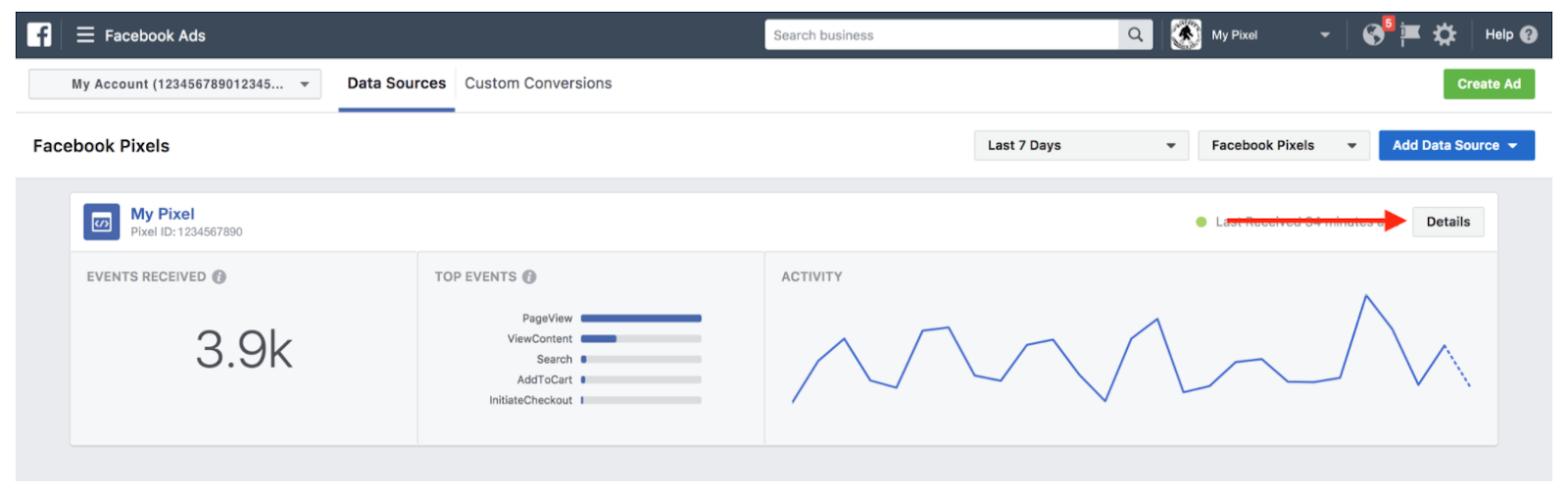
And to give you an overview of this report, a few things you should know:
- Events received is the total number of events recorded by the pixel
- Top events list the highest-performing events
- Activity shows the number of events recorded per day for the past week
Now, I want you to click on the “details button”.
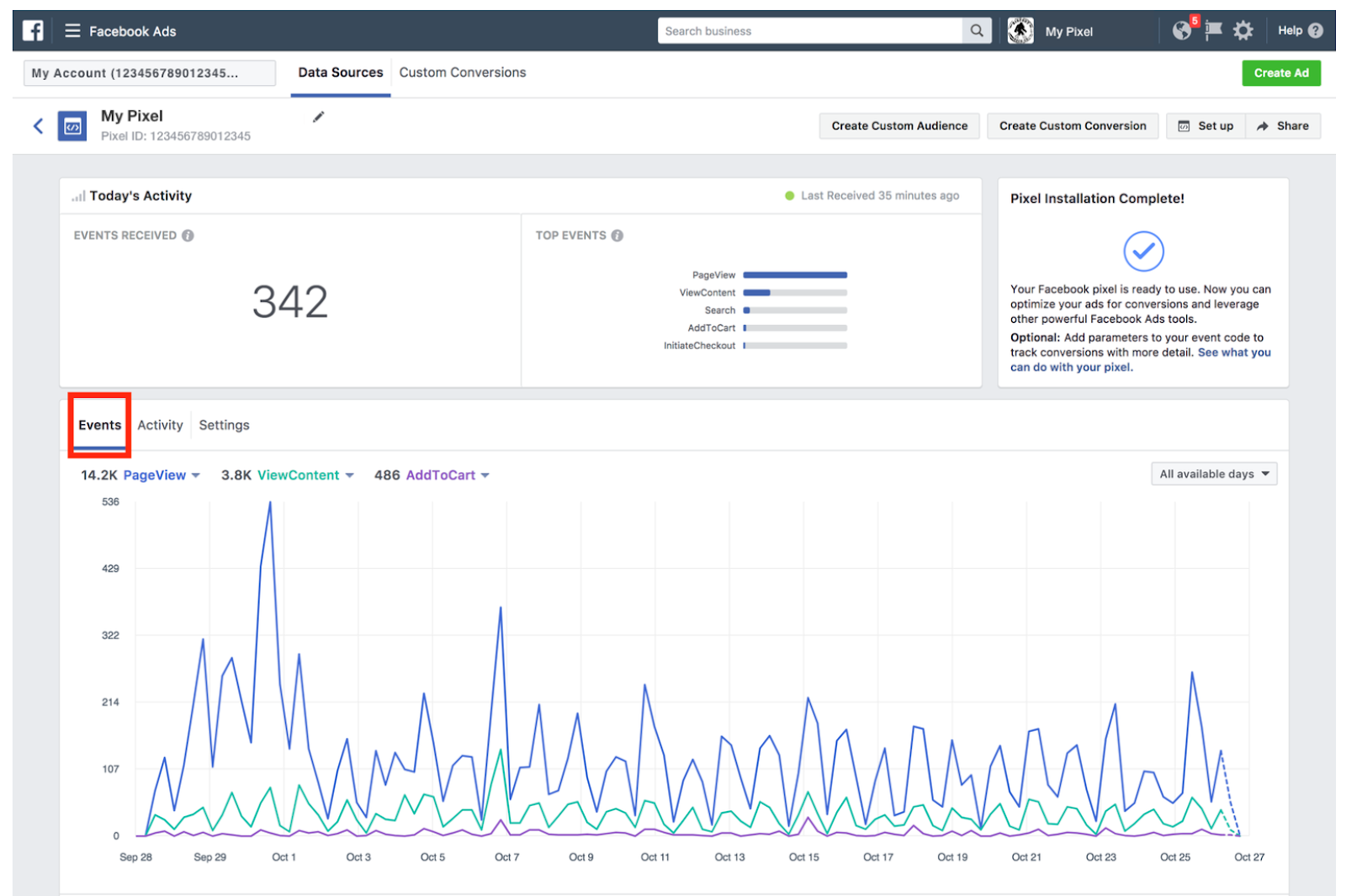
Here you can see the actual breakdown of events, by volume and date. You can segment the visitors based on their actions, as we discussed before, or use the different segmentation for Lookalike audience creation.
Since you are already in Facebook Ads Manager, all the information is available for campaign targeting and optimization.
Google Analytics and AdSense Event Tracking Optimization
It’s a two-step process. First, you need to define the events in Google Analytics, and then import them into Google Ads.
Step #1: Define the event in Google Analytics
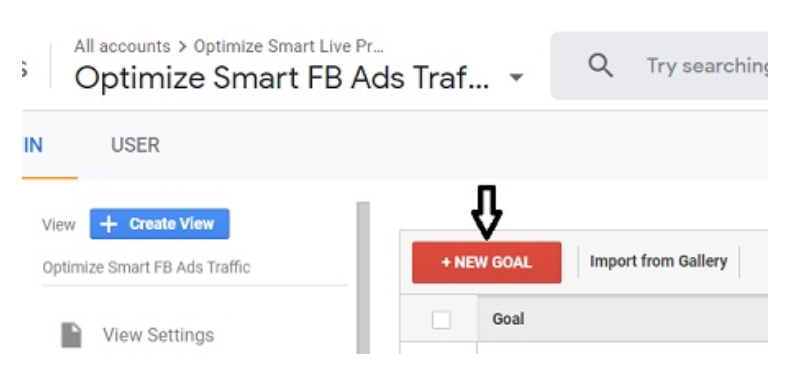
In your Analytics account, click the “Admin” tab in the bottom left corner. Then click the “Goals” tab.
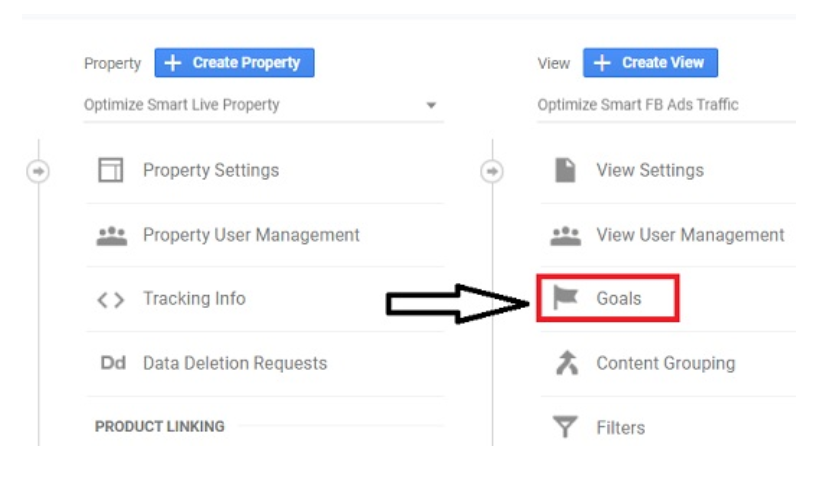
Select “+New Goal”…
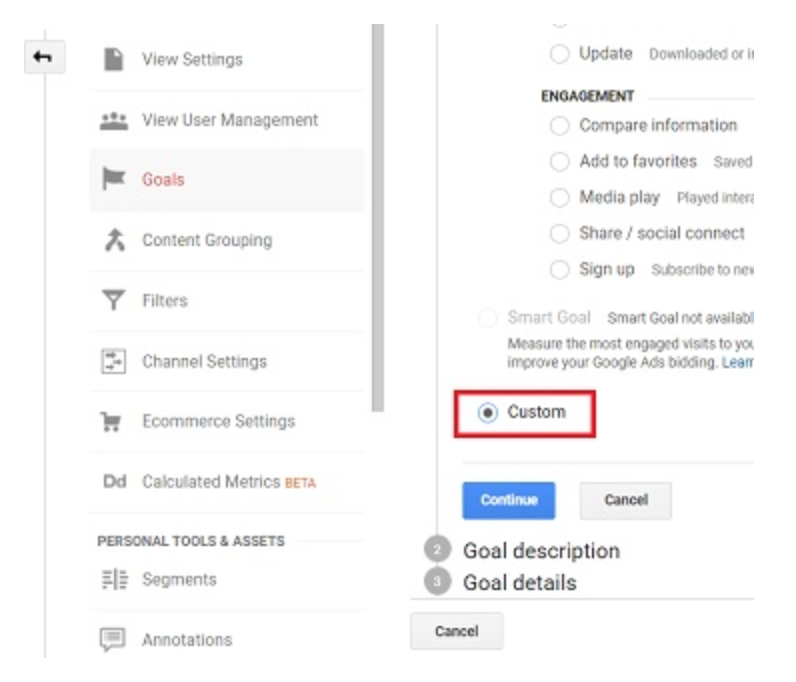
Choose the “Custom” option…
Name your goal…
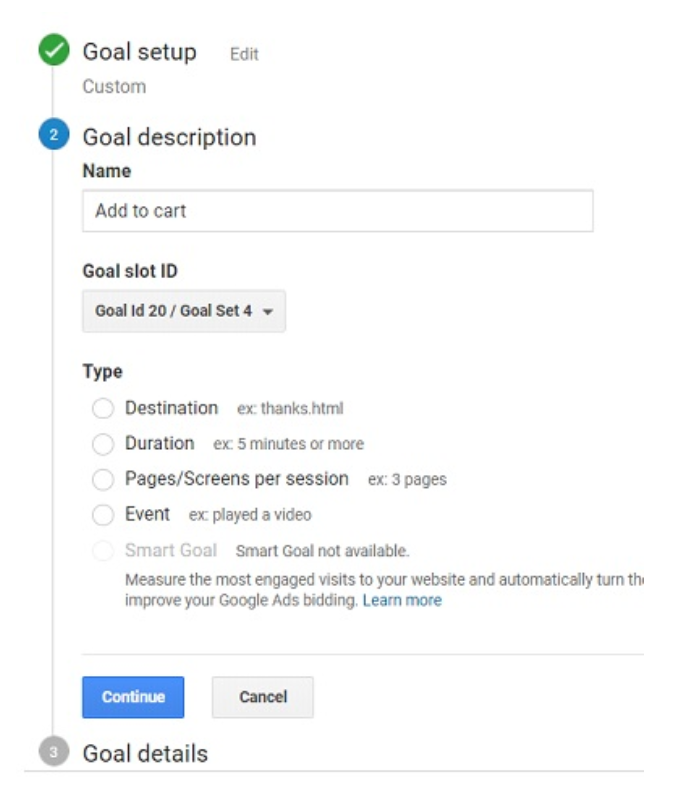
Select “Event” option…
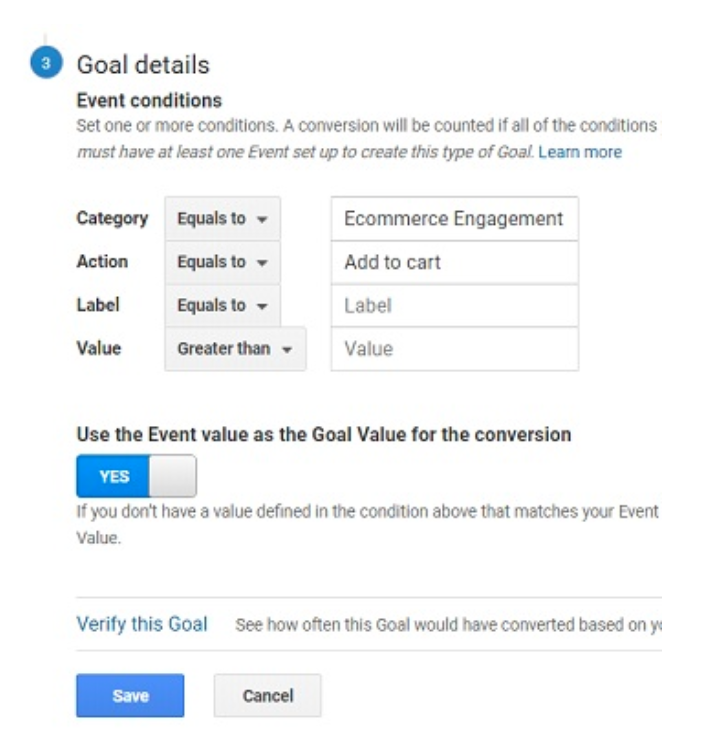
Now you’ll need to refer to the four elements you defined in the event code you had inserted for the specific event. This:
onclick=”ga(‘send’, ‘event’, ‘Category’, ‘Action’, ‘Label’, ‘Value’);”
The Goal you’re creating will have a specific box for each value. It looks like this:
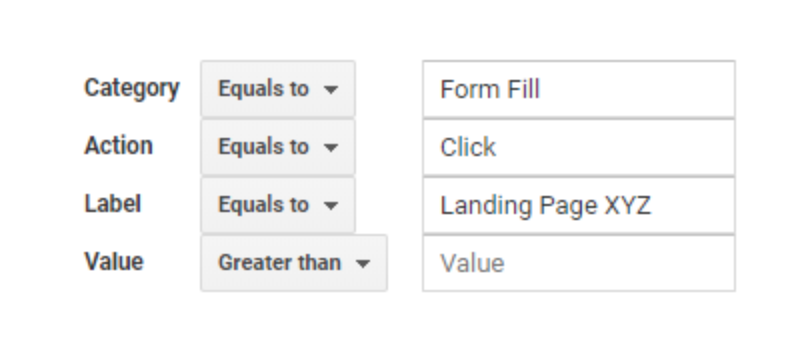
The text you are entering here must be identical to the text in the code. If it won’t, the event won’t be recorded.
You’ll need to repeat the process above with every event you’re tracking.
Step #2: Import the event into Google Ads
In your Google Ads account, click the “Tools” tab at the top navigation bar. Select “Conversions” from the dropdown menu.
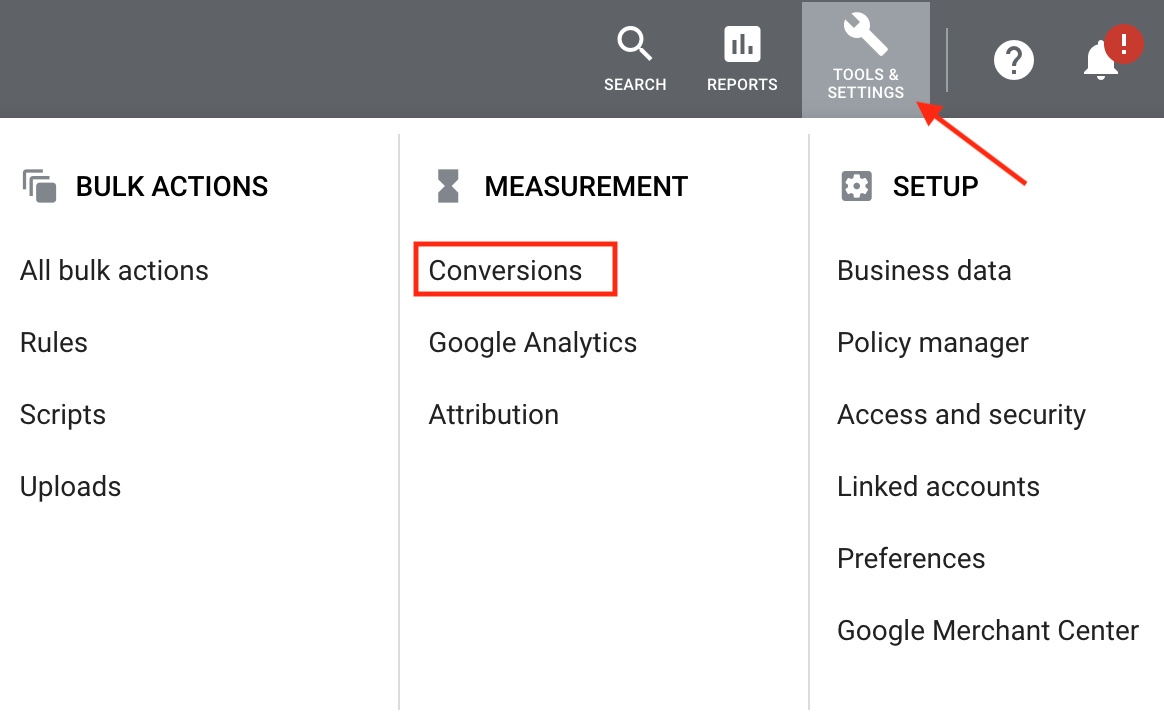
On the left side of the page, click “Google Analytics”…
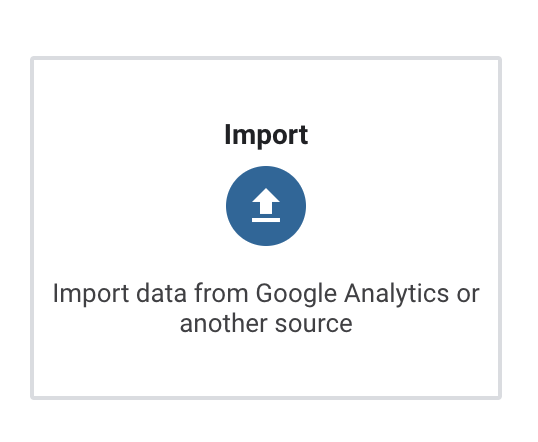
You’ll see a list of all the goals you defined in Analytics…
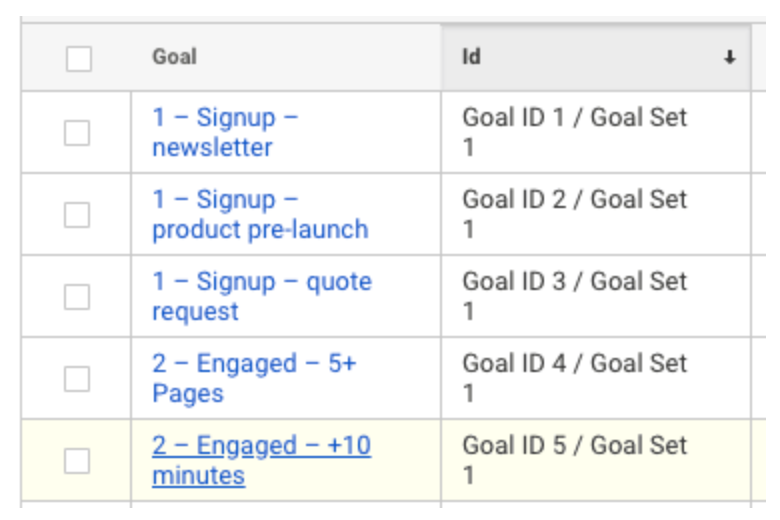
Select the ones you want to import. Then click “Import”.
And you’re done. The events you track on your website are finally available for segmenting your remarketing campaigns and creating similar audiences.
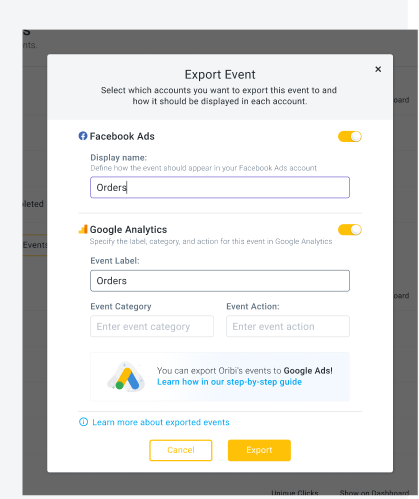
If you don’t want to this yourself, Oribi can also do it for you.
Conclusion
Event tracking provides you with valuable data on your website visitors, such as level of intent, specific interests, and place in the funnel.
This provides better optimization of your paid ad campaigns on Facebook and Google.
You should use event data to deliver highly relevant and effective remarketing ads to segmented audiences who have already visited your website.
You should also use event data as the base for creating lookalike or similar audiences for ad campaigns targeting potential audiences who have not yet visited your website.
By optimizing your paid ad campaigns with event data you’ll be able to better engage users, increase your conversion rate, and get more of your ad spend which results in less money for more clicks.
Have you tried event tracking to help optimize your Facebook of Google ad campaigns?
The post How to Use Events to Optimize Your Facebook And Google Ads appeared first on Neil Patel.
42 (YC W14) Is Hiring Software Engineers (Remote) – JavaScript/Python
Article URL: https://jobs.42.engineering
Comments URL: https://news.ycombinator.com/item?id=24221080
Points: 1
# Comments: 0

Why Mercedes isn't concerned by qualifying mode ban
Mercedes believes the upcoming ban on qualifying engine modes may actually help its overall competitiveness in races this season.
The post Why Mercedes isn't concerned by qualifying mode ban appeared first on Buy It At A Bargain – Deals And Reviews.

5 Big Benefits of Blogging and How to Write One
Blogging is a tremendously helpful tool when it comes to building your digital presence, your personal brand, and starting a new business. 77% of internet users read blogs regularly. It involves a bit more work …
The post 5 Big Benefits of Blogging and How to Write One appeared first on Paper.li blog.
The post 5 Big Benefits of Blogging and How to Write One appeared first on ROI Credit Builders.
The post 5 Big Benefits of Blogging and How to Write One appeared first on Buy It At A Bargain – Deals And Reviews.
New comment by tibble49 in "Ask HN: Who wants to be hired? (August 2020)"
Location: New York
Remote: Yes (only)
Willing to relocate: No
Technologies: C#, VB, HTML, Javascript, Angular, CSS, PHP (but willing to learn anything, fast learner and love the challenge of learning a new tech or language)
Resume: https://drive.google.com/file/d/1ZsFsgLNjZxeLoQhzlzy_BYPWG9C…
Email: lindsey.tibbitts@gmail.com
New comment by hervan in "Ask HN: Who is hiring? (August 2020)"
Ubermetrics | Berlin, Germany | ONSITE | VISA | Frontend Developer (React)
Hello HNers! A couple of years ago I felt encouraged by these job listings to pursue my career goals of relocating to a tech hub to work with cutting-edge tech. Now I’m glad to come back to this thread, this time from the opposite side – we’re hiring!
Ubermetrics is the leading SaaS platform for Content Intelligence and Analytics, Earned Media insights and Social Listening. We collect news articles, posts, comments and many other text documents from millions of online sources and process this stream using big data technologies and algorithms from machine learning and bioinformatics. We are hiring new motivated colleagues willing to grow with us and help us support customers like DHL, Activision Blizzard, TÜV Rheinland and sport1 to be successful.
Our tech stack: React, D3, Java, DL4J, Vert.x, Jenkins, Docker, Ansible, Cassandra, Elasticsearch, MariaDB+Galera, RabbitMQ, Hazelcast
Apply here: https://ubermetricstechnologies.softgarden.io/job/6825746/ – or if you want to know more about us or about the job, drop me a message, I’d be happy to talk!
How to Use Events to Optimize Your Facebook And Google Ads
Your website is bustling with activity. Visitors are constantly interacting with it. But are you taking full advantage of everything that’s happening on your website for your paid marketing? Every interaction a visitor has with your website… a pageview, a click… can be used to better understand your audience. And when you understand your audience … Continue reading How to Use Events to Optimize Your Facebook And Google Ads
The 5 Best PPC Companies of 2020
Paid advertising offers a 200% ROI. So for every dollar you spend, you get two dollars in return. It’s no surprise that nearly 80% of marketers consider PPC profitable and beneficial for their businesses. But it’s not as easy as throwing ads up, seeing what sticks, and hoping people buy from you. There’s a reason … Continue reading The 5 Best PPC Companies of 2020

Can You Get Kabbage Business Funding in a Recession?
Is There Any Kabbage Business Funding in a Recession?
Kabbage is one of several lending companies online. It provides small business funding in the form of loans and lines of credit. We look at the specifics and drill down into the details about the online lending option.
Kabbage Business Funding in a Recession: Background
Kabbage is located online here: https://www.kabbage.com/. Their physical address is:
925B Peachtree Street NE
Suite 1688
Atlanta, GA 30309.
You can call them here: (888) 986-8263. You can email them at: support@kabbage.com. Their contact page is here: https://www.kabbage.com/support/contact/. They have been in business since 2009, which is longer than most of the players in this space.
Kabbage is one of several lending companies online. It provides small business funding in the form of a line of credit.
Kabbage is a venture funded company. They are backed by investors which include SoftBank Capital, Thomvest Ventures, Reverence Capital Partners, Mohr Davidow Ventures, the UPS Strategic Enterprise Fund, ING, BlueRun Ventures, Santander InnoVentures, Scotiabank, and TCW/Craton.
The company offers perks for its customers. These include specials from Dun & Bradstreet, UPS, Vonage, and Adobe Creative Cloud. See: https://www.kabbage.com/customer-perks/.
Loans and Lines of Credit
First, they offer lines of credit. This means it is revolving credit you can use as needed. For most, amounts of up to $250,000 are available. You can qualify in as little as 10 minutes. Furthermore, terms are 6, 12, or 18 months. You have to be in business for more than one year, and your business revenue has to be $50,000 annually or $4200 per month over the last 3 months.
Kabbage Review: Credit Reporting and Score Requirements
In the course of this Kabbage review, I could not find anything concrete about a credit score requirement or credit reporting. I did find other reviewers that had contradicting information. For example, one claimed there was no minimum interest rate requirement. In contrast, another claimed that the minimum interest rate for application approval is 500. Another put the minimum at 560. Whatever the case, it appears that their minimum required credit score is much lower than others in the field. In addition, one reviewer stated that they do not report on-time payments to the credit agencies, but they may report late or missed payments.
The only thing concrete I could find from Kabbage themselves is that they do a one-time hard credit pull. A hard credit check will affect your credit score. Also I found this information in the FAQs on the Kabbage website. It wasn’t just out there on a top page.
Kabbage Review: Approval and Receipt of Funds
Kabbage links to your bank or merchant accounts to understand your cash flow and decide what amount you can afford to borrow. Their lines of credit range from $1,000 to $250,000.
For lines of credit up to $200,000, if they are able to automatically get business information and verify your bank account, they can approve a loan in minutes. Amounts over $200,000 must have a manual review. Sometimes, mistakes happen during the sign-up process. Also, they may send small deposits to help confirm your banking information for security purposes. In these cases, it may take longer to get access to funds.
Once everything is settled, they send funds to the account of your choice. If you choose to have your funds deposited to a PayPal account, it takes just a few minutes. However, loans that go to a business checking account can take up to three days to be deposited. It just depends on your bank.
They retain access to your account. This means they can review your revenue faster than other lenders. Still, it also means they have access to your account for the duration and beyond unless you take action.
If you make a draw using the dashboard or app, you have to take a minimum of $500. In contrast, if you use your Kabbage card there is no minimum draw.
Kabbage Business Funding in a Recession: Advantages
Advantages include fairly low fees. Kabbage perks are a nice touch not found with other online lenders.
Kabbage Business Funding in a Recession: Disadvantages
Disadvantages include how hard it is to find the actual, correct requirements to qualify for their loans.
Demolish your funding problems with our rock-solid guide about 27 killer ways to get cash for your business. You might turn out to not need Kabbage business funding in a recession.
A Viable Alternative to Kabbage Business Funding in a Recession – Building Business Credit
This is credit in a small business’s name. It doesn’t link to an entrepreneur’s consumer credit, not even if the owner is a sole proprietor and the only employee of the small business.
Thus, an entrepreneur’s business and consumer credit scores can be very different.
The Benefits
Due to the fact that small business credit is separate from individual, it helps to secure a small business owner’s personal assets, in the event of litigation or business bankruptcy.
Also, with two separate credit scores, a business owner can get two different cards from the same vendor. This effectively doubles buying power.
Another benefit is that even start-ups can do this. Going to a bank for a business loan can be a recipe for disappointment. But building small business credit, when done correctly, is a plan for success.
Consumer credit scores depend upon payments but also additional factors like credit usage percentages.
But for small business credit, the scores actually merely hinge on if a company pays its bills timely.
The Process
Establishing business credit is a process, and it does not occur without effort. A business must proactively work to establish business credit.
Nonetheless, it can be done readily and quickly, and it is much quicker than establishing consumer credit scores.
Vendors are a big aspect of this process.
Doing the steps out of sequence will cause repetitive denials. No one can start at the top with company credit. For example, you can’t start with retail or cash credit from your bank. If you do, you’ll get a denial 100% of the time.
Business Fundability
A small business must be fundable to loan providers and merchants.
That’s why, a company will need a professional-looking website and email address. And it needs to have site hosting bought from a supplier such as GoDaddy.
In addition, business phone and fax numbers should have a listing on ListYourself.net.
At the same time, the company phone number should be toll-free (800 exchange or comparable).
A business will also need a bank account devoted purely to it, and it must have every one of the licenses essential for running.
Licenses
These licenses all must be in the accurate, appropriate name of the company. And they must have the same company address and telephone numbers.
So bear in mind, that this means not just state licenses, but potentially also city licenses.
Demolish your funding problems with our rock-solid guide about 27 killer ways to get cash for your business. You might turn out to not need Kabbage business funding in a recession.
Working with the IRS
Visit the Internal Revenue Service web site and obtain an EIN for the company. They’re totally free. Pick a business entity like corporation, LLC, etc.
A business can begin as a sole proprietor. But they will more than likely want to change to a variety of corporation or an LLC.
This is in order to limit risk. And it will make the most of tax benefits.
A business entity will matter when it involves taxes and liability in case of a lawsuit. A sole proprietorship means the entrepreneur is it when it comes to liability and taxes. No one else is responsible.
Sole Proprietors Take Note
If you operate a company as a sole proprietor, then at least be sure to file for a DBA. This is ‘doing business as’ status.
If you do not, then your personal name is the same as the small business name. Hence, you can wind up being directly accountable for all small business financial obligations.
Additionally, per the IRS, with this structure there is a 1 in 7 possibility of an IRS audit. There is a 1 in 50 possibility for corporations! Steer clear of confusion and substantially reduce the odds of an IRS audit simultaneously.
Starting the Business Credit Reporting Process
Start at the D&B web site and obtain a free D-U-N-S number. A D-U-N-S number is how D&B gets a small business into their system, to produce a PAYDEX score. If there is no D-U-N-S number, then there is no record and no PAYDEX score.
Once in D&B’s system, search Equifax and Experian’s web sites for the small business. You can do this at www.creditsuite.com/reports. If there is a record with them, check it for correctness and completeness. If there are no records with them, go to the next step in the process.
In this way, Experian and Equifax will have activity to report on.
Vendor Credit
First you must establish trade lines that report. This is also referred to as vendor credit. Then you’ll have an established credit profile, and you’ll get a business credit score.
And with an established business credit profile and score you can begin to get retail and cash credit.
These kinds of accounts tend to be for the things bought all the time, like marketing materials, shipping boxes, outdoor work wear, ink and toner, and office furniture.
But first of all, what is trade credit? These trade lines are credit issuers who will give you initial credit when you have none now. Terms are often Net 30, rather than revolving.
Hence, if you get an approval for $1,000 in vendor credit and use all of it, you will need to pay that money back in a set term, such as within 30 days on a Net 30 account.
Demolish your funding problems with our rock-solid guide about 27 killer ways to get cash for your business. You might turn out to not need Kabbage business funding in a recession.
Details
Net 30 accounts have to be paid in full within 30 days. 60 accounts must be paid in full within 60 days. In comparison with revolving accounts, you have a set time when you must pay back what you borrowed or the credit you used.
To launch your business credit profile the right way, you need to get approval for vendor accounts that report to the business credit reporting agencies. Once that’s done, you can then make use of the credit.
Then pay back what you used, and the account is on report to Dun & Bradstreet, Experian, or Equifax.
Vendor Credit – It Makes Sense
Not every vendor can help in the same way true starter credit can. These are merchants that will grant an approval with very little effort. You also want them to be reporting to one or more of the big three CRAs: Dun & Bradstreet, Equifax, and Experian.
You want 3 of these to move onto the next step, which is retail credit.
Retail Credit
Once there are 3 or more vendor trade accounts reporting to at least one of the CRAs, then move to retail credit. These are businesses which include Office Depot and Staples.
Only use your SSN and date of birth on these applications for verification purposes. For credit checks and guarantees, use the company’s EIN on these credit applications.
Fleet Credit
Are there more accounts reporting? Then move to fleet credit. These are service providers such as BP and Conoco. Use this credit to buy fuel, and to repair and take care of vehicles. Only use your Social Security Number and date of birth on these applications for verification purposes. For credit checks and guarantees, make certain to apply using the small business’s EIN.
Cash Credit
Have you been sensibly handling the credit you’ve gotten up to this point? Then move to more universal cash credit. These are businesses like Visa and MasterCard. Just use your SSN and date of birth on these applications for verification purposes. For credit checks and guarantees, use your EIN instead.
 These are normally MasterCard credit cards. If you have more trade accounts reporting, then these are in reach.
Monitor Your Business Credit
Know what is happening with your credit. Make certain it is being reported and take care of any inaccuracies ASAP. Get in the practice of checking credit reports. Dig into the particulars, not just the scores.
We can help you monitor business credit at Experian and D&B for 90% less.
Update Your Record
Update the relevant information if there are mistakes or the data is incomplete. At D&B, you can do this at: https://iupdate.dnb.com/iUpdate/viewiUpdateHome.htm. For Experian, go here: www.experian.com/small-business/business-credit-information.jsp. And for Equifax, go here: www.equifax.com/business/small-business.
Fix Your Business Credit
So, what’s all this monitoring for? It’s to challenge any mistakes in your records. Mistakes in your credit report(s) can be corrected. But the CRAs typically want you to dispute in a particular way.
Disputes
Disputing credit report mistakes typically means you send a paper letter with copies of any proofs of payment with it. These are documents like receipts and cancelled checks. Never send the original copies. Always mail copies and retain the originals.
Fixing credit report inaccuracies also means you precisely spell out any charges you challenge. Make your dispute letter as understandable as possible. Be specific about the problems with your report. Use certified mail so that you will have proof that you mailed in your dispute.
A Word about Business Credit Building
Always use credit sensibly! Don’t borrow beyond what you can pay off. Keep an eye on balances and deadlines for repayments. Paying on schedule and in full will do more to increase business credit scores than pretty much anything else.
Building small business credit pays off. Excellent business credit scores help a company get loans. Your loan provider knows the small business can pay its debts. They know the small business is for real.
The small business’s EIN attaches to high scores and lenders won’t feel the need to request a personal guarantee.
Business credit is an asset which can help your company for years to come. Learn more here and get started toward establishing business credit.
Kabbage Business Funding in a Recession: Upshot
Companies which will do best with this particular lender are already somewhat successful. Most businesses would be able to take advantage of the perks which Kabbage offers. However, smaller companies which are less successful would do well to look elsewhere. In particular, for a company looking for a lower end line of credit would more likely be better served getting a microloan.
So while you can probably get Kabbage business funding in a recession, there are other options out there.
And finally, as with every other lending program, whether online or offline, remember to read the fine print and do the math. Go over the details with a fine-toothed comb, and decide whether this option will be good for you and your company. In addition, consider alternative financing options that go beyond lending, including building business credit, in order to best decide how to get the money you need to help your business grow.
The post Can You Get Kabbage Business Funding in a Recession? appeared first on Credit Suite.