What Are Canonical Tags?

Itching to learn about canonical tags? First, let me explain why they’re relevant to your website ranking.

There’s been a longstanding belief that Google penalizes duplicate content. In case you haven’t already heard, that’s not strictly true.

As Google search advocate John Muller explains:

“…it’s not so much that there’s a negative score associated with it,”

“It’s more that if we find exactly the same information on multiple pages on the web, and someone searches specifically for that piece of information, then we’ll try to find the best matching page.”

Additionally, on its ‘how to avoid duplicate content’ page, Google states:

“Duplicate content generally refers to substantive blocks of content within or across domains that either completely match other content in the same language or are appreciably similar.”

As Google makes clear, there are times when a website owner has a genuine reason for having duplicate content, like online stores or printer-only web pages. However, these duplicate pages can cause confusion for search engines, and they don’t always know which is the original or which page you want to prioritize.

How do you get past this? You could try 301 redirects or use top-level domains, but you could also use a canonical tag URL.

If you’re wondering what canonical tags are, or you want to know how they can help you, read on to find out more.

The Basics of Canonical Tags

In the most basic terms, a canonical tag is an HTML snippet (rel=canonical). As I’ve touched on in the intro, you implement a canonical tag when you want to indicate to the search engines which is the original page. For example, you might have multiple versions of a page if you’re an e-commerce site owner or if you’ve got a mobile and desktop version of your website.

Now, if you wanted the search engines to prioritize the mobile pages, you’d add a self-referencing canonical tag to the mobile version to tell the search engine to index that page. This means that the URL attached to the rel=canonical is the page itself.

In other words, once you implement canonical tags, the search engines know which pages to dismiss and which ones to display in the SERPs.

Canonical tags are simple to add to your page by including rel=”canonical” in your header, but what does this do for your SEO?

How Do Canonical Tags Help SEO?

Canonical tags are an essential part of any SEO strategy, enabling your site to rank higher. There are several ways they do this:

First, they tell search engines which URL version is the “correct” one, preventing duplicate content from ranking lower and ensuring you get the right page indexed.

Further, a canonical tag assists your SEO efforts in other ways, like:

Syndicated content: Canonical tags allow you to better manage syndicated content. When you syndicate content from one site to another, it’s important to ensure the search engines still reference the original content. Just add the rel=”canonical” tag to your header to indicate which page you want to index.

Improved rankings: When you have multiple versions of a webpage or article, adding a canonical indicates to the search engine you want people to go to that specific page, enhancing the original ranking.

Tracking: canonical tags enable you to track traffic from different sources. For example, if you have two URL versions, say, one with www and one without. This can help you determine which version generates more traffic and optimize your site accordingly.

Regular search engine crawling: Here’s what Google has to say about crawling: “Google will choose one URL as the canonical [main] version and crawl that, and all other URLs will be considered duplicate URLs and crawled less often.” In other words, if you don’t want Google to make the choice for you, then add a canonical tag.

Filtering for e-commerce stores: It’s not uncommon for e-commerce stores to have large volumes of duplicate content that might look like this:
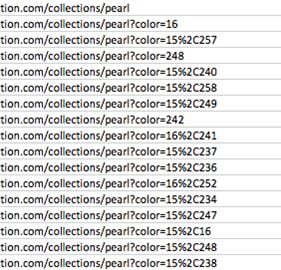
Example of duplicate content in ecommerce stores.

To ensure the search engines index your preferred e-commerce page, you would include a canonical tag.

What Does A Canonical Tag Do?

As I’ve explained, canonical tags can tell search engines which version of a URL you want them to index. They’re also known as “rel canonical” or a ‘canonical link element.’ You add a canonical tag to the <head> section of your page, which looks like this:

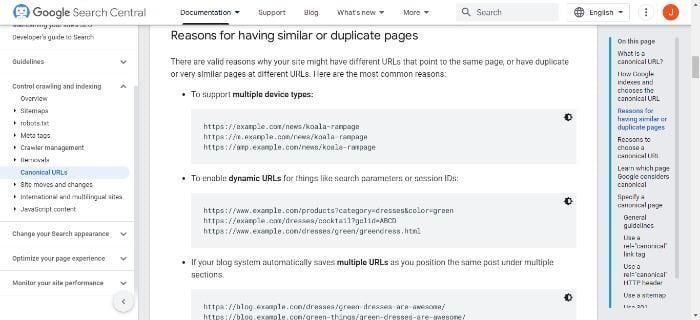
What a canonical tag looks like.
Examples of canonical tags.

When you use a canonical tag to tell the search engine which version you prefer, it helps keep your site’s SEO consistent and can also help prevent duplicate content issues.

What Are The Issues With Duplicate Content?

First, let’s explain what duplicate content is.

We can define duplicate content as identical or similar content appearing on multiple pages of your site. Several factors can contribute to duplication, such as reprinting an article from another site, copying and pasting text from one page to another, or using multiple URLs for the same page.

Another common cause is unintentional duplication.

This can happen when two or more pages have similar titles and metadata, and it can occur when site owners syndicate their content to other websites or use software to generate pages automatically.

A further reason for duplicate content is intentional duplication. Sometimes site owners create multiple versions of a page in an attempt to manipulate search engine rankings. They may also copy and paste content from other websites to increase traffic or improve their SEO ranking – which is basically black hat SEO.

When multiple pages on a website contain the same or very similar content, it can confuse search engines and dilute the ranking power of those pages, which stresses the importance of adding a canonical tag.

How To Check for Duplicate Content

There are a few ways to identify duplicate content on your website.

The simplest is to do a Google site search; this would look like site:yourdomain.com, and see if any results show up that you didn’t expect. If you have an XML sitemap, you can also use Google’s “site:www.yoursite.com” operator to check for duplicate pages.

Other methods to check for duplicate content are:

  • Checking your site’s index status in Google Search Console. Compare the number of pages indexed in Google with the number of pages you think should be indexed. The results may look something like this:
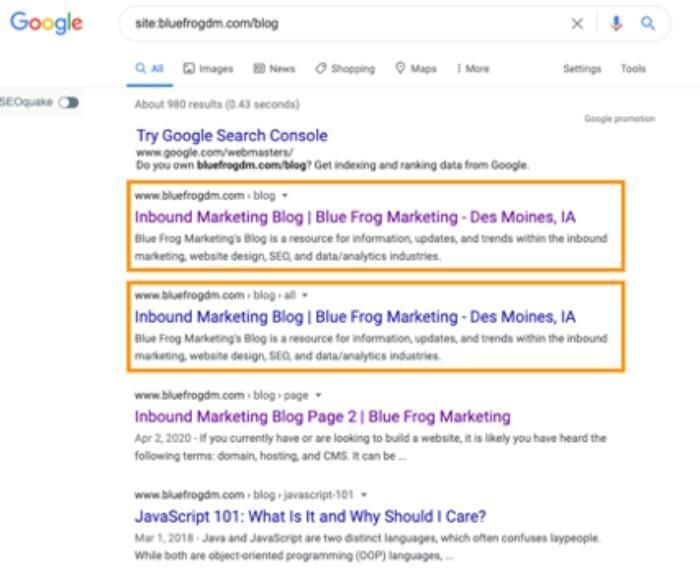
How to check for duplicate content.
  • Using the “site:example.com” search operator to find pages that are only on your site and not on other websites.
  • Spotting duplicate content by using a tool like Copyscape or Siteliner. These tools will scan your website and report any instances of copied text.
  • You could also use a tool like Screaming Frog to crawl your website.

How To Implement Canonical Tags

There are two ways to add canonical tags to your pages: manually or with a plugin. If you’re adding them manually, you need to add a <link> tag to the <head> section of each page that you want to canonize (make your main/original page).

If you’re using a plugin, many platforms give a simple way to add canonical tags to your pages. Below are some of the options for adding tags to various main hosting options.

Implementing Canonical Tags in WordPress

If you’re using WordPress, the easiest way to add a canonical tag is with a plugin. WordPress users can install it by:

  • Going to the installation page on WordPress and selecting ‘Add new’
  • Look for the Yoast SEO plugin
  • Activate Yoast
  • Then go to the ‘after activation’ option

You can also install canonical tags manually by adding some PHP code to the header, which looks like this:

Implementing canonical tags in wordpress.

Implementing Canonical Tags in Shopify

Shopify has a guide explaining how to add a canonical tag url.

Or to add canonical tags manually, just:

  • Go to your admin panel
  • Find the ‘sales channels’ option, go to ‘online store’ and click ‘themes’
  • Select the theme to edit, select ‘actions’ then ‘edit code’
  • Go to layout and choose theme.liquid
  • Insert code into closing ‘head’ tag
  • Enter the code, which looks like this:

Implementing canonical tags in shopify.

Implementing Canonical Tags in Squarespace

Fortunately, canonical tags are easy to implement on Squarespace websites. In the Squarespace editor, all you need to do is:

  • Go to ‘Pages’
  • Choose the gears option
  • Select ‘advanced’ from the menu
  • Follow the directions from there.

Best Practices For Implementing Canonical Tags

With canonical tags, there are a few best practices to keep in mind. First, always use a canonical tag when you have multiple page versions.

Second, make sure the canonical tag points to the correct page. If you accidentally point to the wrong page, it can result in lower rankings for that page. :

Also:

  • Use canonical tags on all duplicate pages; this ensures that the search engines only index one version of each page.
  • Implement absolute URLs when specifying the canonical tag to enable search engines to index pages correctly.
  • Only specify one rel=”canonical” tag per page.

One good idea is to make sure that you audit your canonical tags to help identify any potential implementation issues and correct them. SiteChecker offers a free trial of a canonical URL checker.

Finally, only use canonical tags when necessary; too many canonicals can hurt your site’s ranking potential.

FAQs

What is An Example of a Canonical Tag?

A canonical tag looks like this: example.com?dress=1234 and example.com/dresses/1234 (Source: Google).

Is a Canonical Tag Necessary? 

Some people argue that canonical tags are unnecessary, as Google has stated that they do not use them as a ranking factor. However, if you want to avoid duplication issues and have a preferred page you want to direct traffic to, then a canonical tag may be the way to go. 

Conclusion

A canonical tag is important for helping search engines understand the relationship between pages on a website. Canonical tags can prevent duplicate content issues and enhance your SEO efforts, allowing your preferred pages to get indexed by search engines.

There are significant benefits to adding canonical tags, such as improved web page performance, more regular crawling, and easier tracking. They’re also highly beneficial for e-commerce site owners who often have multiple pages of duplicate content.

Although there are other methods you could use, a canonical tag is quick to implement, and major platforms like WordPress and Shopify have options to add plugins to simplify the task.

Do you use canonical tags? How have they helped you?

Tsonuda gets grid penalty for too many reprimands

Yuki Tsunoda has been given a ten-place grid penalty at the Italian Grand Prix after accumulating too many reprimands across the season.

The post Tsonuda gets grid penalty for too many reprimands appeared first on Buy It At A Bargain – Deals And Reviews.

What Is Search Intent?

Have you been racking your brain trying to gain better visibility on Google?

Chances are you’ve probably heard the term ‘search intent’ or keyword intent, or user intent, as some call it, while figuring out your basic SEO strategy.

Whatever your preferred term, it all comes down to the same thing: when a person conducts a search online, they have a main purpose in mind. For example, they might be thinking about buying a new car, and they’re researching car models.

Alternatively, they may be looking for a local service, like a dentist or hairdresser. Or perhaps they’re just in the mood for fast food and want to buy a burger and fries.

Many SEOs are focusing on search intent because Google’s changing algorithms mean that content relevance is more important than ever. Basically, Google wants to rank pages that best answer the searcher’s query.

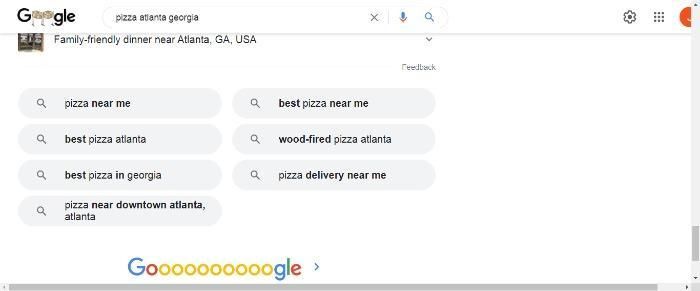
You can often see search intent queries when you look online. Here’s an example: If I search for ‘pizza in Atlanta, Georgia,’ I get a list of local stores. If I was to pick a specific neighborhood in the city, I would get an even more specific set of stores.

However, Google then goes a step further.

It knows I’m hungry for pizza and in a buying mood, and it autogenerates alternative terms for me. In short, the search engine understands my search intent and offers me suggestions to meet my needs.

When you create content, you need to do the same: understand what the searcher wants through the keywords and terms they use, and develop content, offers, and lead magnets to match their demands.

The Basics of Search Intent

You should have a clear idea of search intent by now, and why it’s important you understand what your buyer is looking for.

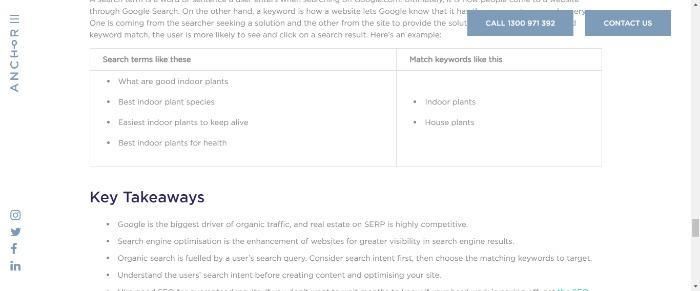
Just so you get an even better picture of the difference between search intent and regular keywords, this image illustrates it well:

Key takeaways of search intent.

See? If you were in the gardening niche, you could write any number of articles around those search terms or offer a lead magnet detailing the best indoor plants.

There are numerous advantages to going beyond just keywords and aiming to understand the searcher’s intent.

As you see from my example in the intro, search intent has the potential to put your website in front of the searcher, increasing your chances of a click-through, a conversion, and, ultimately, perhaps a loyal customer. Then there are other benefits, like:

  • You can improve your website’s search engine ranking: Search engines like Google use algorithms to rank websites based on how well they match the searcher’s intent. If you can create content that better meets people’s wants and needs, it’s likely to rank higher in the search results.
  • You can better target your audience. Create relevant content to attract and potentially convert leads into customers and develop marketing strategies that are more effective.
  • Search intent gives a better user experience: Give your prospect what they want, and they’re more likely to view you as an authority and keep coming back. With search intent, you can create more relevant content for your audience.

Types of Search Intent

Here’s an important stat for you: 99 percent of search queries fall under the four main types of search intent.

That figure doesn’t come from me, that’s according to Brian Dean of Backlinko.com.

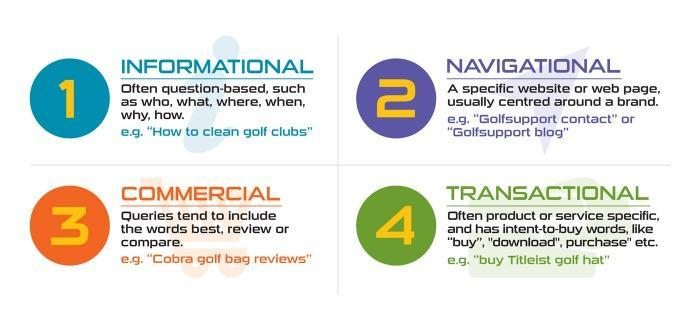
You can break intent down into four main categories: navigational, informational, transactional, and commercial.

4 types of search intent: informational, navigational, commercial, and transactional.

Let’s take a deeper look at the different types.

Navigational Intent

This is when search intent involves something specific and the user already knows the brand or website name. Everyone reading is likely familiar with navigational intent, and you’ve probably used it yourself before.

To satisfy this intent, users typically enter relevant keywords into a search engine, like ‘Adobe login’ ‘Adobe tutorial;’ or ‘Adobe subscription.’

By using relevant keywords, searchers ensure that they get the most accurate and useful results for their query.

Informational Intent

This type of search is what drives people to your website when they’re looking for information.

Informational intent is when someone is looking for information on a certain topic. They might not know what exactly they’re looking for, but they use keywords to guide their search; for example, you’d type something like ‘How to fix a flat tire.’

Usually, people search with this kind of intent when they’re at the beginning stage of the buying journey. For example, they may be starting a new home improvement project or researching a potential purchase.

Knowing how to target this type of search intent helps you improve your website’s ranking and bring in more traffic. Below are some tips to enable you to do just that.

  • Ensure your website is well-organized and easy to navigate. People who search for information want to find it quickly and easily.
  • Use keywords that are relevant to your topic to help with visibility and ranking. Help ensure that your site appears high on the search results pages.
  • Answer the questions people commonly ask online; use Google’s ‘People Also Ask’ feature as a starting point.
  • Finally, provide valuable content that meets the needs of your audience. Informational searchers are looking for accurate, reliable information, so make sure your website delivers!

Transactional Intent

Transactional intent means a person is online looking to actively buy a product or service.

Typically, they have a specific item in mind, and they may also be searching for the best deal. For example, they could be considering signing up for a subscription service or looking for a car part.

These types of searchers may be looking for further information, so they might use terms such as ‘review’ or product reviews, or they might search for listicle-style ‘top ten’ articles or comparison pieces to help inform their decision.

Commercial Intent

Commercial intent is when someone is looking to learn more about a company or product before making a purchasing decision. Again, you can determine this by the keywords they use. For example, if someone searches for ‘ buy pizza near me,’ you know they’re in a buying/commercial mood.

They might also use words like ‘buy,’ ‘purchase,’ ‘deal’ and ‘discount.’ in their searches.

Of course, there are also hybrid queries that contain a combination of intentions, such as commercial and informational.

Why Is Search Intent Important For SEO?

Times have changed.

Online visibility used to be all about keywords, and this often led to keyword stuffing, where site owners would overuse keywords to try and manipulate the search engines in their favor. Unfortunately, this often led to low-quality content dominating the SERPs, and these types of articles gave limited value to readers.

Then search got intelligent, which meant understanding search intent became a fundamental part of SEO. What are people looking for when they type a query into a search engine? Answer that question, and you can better optimize your content and website to match those needs.

That’s not to say keywords are no longer important, but you can’t afford to overlook your potential customers’ wants and needs. Integrating search intent into your content is how you can achieve that.

To further understand the role of search intent in SEO, you need to look no further than an extensive case study involving top SEO professionals, like James Dooley, Viola Eve, and Matthew Woodward.

These experts discussed search intent analysis, its importance, Google’s ever-changing algorithms, and the data surrounding these topics.

All the experts featured in the case study believe that search intent is ‘the foundation of content optimization’, equaling backlinks, technical SEO, and content when it comes to the search engines’ page evaluation process.

The case study concluded:

  • Search intent is a ‘critical ranking factor,’ and the top SEOs create their strategies around it.
  • Robbie Richards, the founder of Robbierichards.com, asserts that Intent is the most important factor when it comes to prioritizing, and accurately qualifying your keyword opportunities.’
  • Without search intent, your content isn’t pulling its weight. Or, as Viola Eve puts it, ‘Google’s job is to return the most relevant answer to a search query. If you understand what Google deems relevant, you can create a more targeted content briefing and SEO strategy and increase your chances of success dramatically.’

Finally, for this section, if you’re not using search intent yet, now might be a good time to do so.

With developments like artificial intelligence (AI), search is becoming increasingly sophisticated. For example, in a recent post, Google discussed Multitask Unified Model (MUM), and its potential for transforming search as we know it.

To save blinding you with science (or technology), here’s a simplified definition of MUM and how it assists search intent:

MUM is a search intent modeling technique that allows you to identify and group related search queries together.

This technique can help you understand what users are trying to accomplish when they search on your site. You can then use this information to improve your site’s search engine results pages (SERPs), create better content, and target ads more effectively.

In other words, MUM can understand the complexities of consumers’ needs, meaning searchers can complete tasks and get questions answered in fewer steps.

For instance, a search query may look like this:

Example search query about hiking.

Then the search engine could provide an answer.

How To Learn Your Audience’s Search Intent

How do you determine your audience’s search intent? It can be a difficult task, but it’s important to get it right if you want to create content that’s effective in attracting and engaging your audience. Here are a few tips for learning your audience’s search intent:

1. Do some research into what keywords and phrases your target audience is using to find information online. Tools like Ubersuggest, Google Keyword Planner, and Google Trends can help you identify popular keywords and phrases related to your topic.

2. Pay attention to the types of questions your audience is asking on social media and online forums. This can give you some clues about the types of information they’re looking for.

3. Take a look at the SERPs and see what’s ranking high in Google for the keywords and phrases you’re targeting. Use the results to determine: The keywords they’re using in their search engines. Ensure you understand:

  • The type of content they’re looking for (informational, etc.)
  • The intent behind their search
  • Their location and demographics

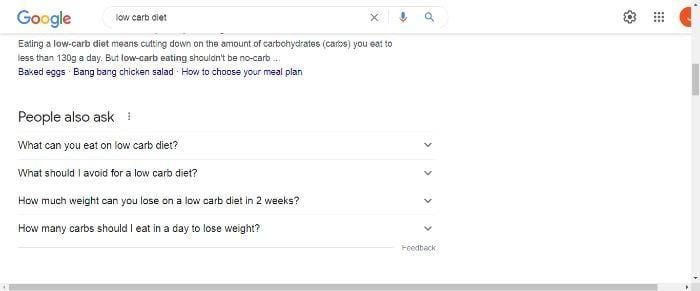
4. Use Google’s People Also ask feature. For example, if I type in ‘low carb diet,’ I get this:

Example google search of the term low carb diet.

5. Use Google’s Autosuggest capabilities. For instance, if I start to enter ‘new car,’ I get

‘New car deals’

‘New cars 2022’

‘New car low price’

6. Another way to analyze search intent is to use Google’s related searches feature. This tool appears at the bottom of the search results page and shows you a list of other keywords that people are searching for.

7. Implementing a site search bar and functionality on your site. You can track this via GA. Using what your users are searching for on your website makes it easier for you to narrow down their search intent.

Putting Search Intent Into Action For Your Content

As you can see from the examples in the above section, it’s pretty easy to write content around people’s search intent. Here’s how you can start putting search intent into action:

  • Use keyword research to determine which keywords and modifiers your target audience is using to find information related to your topic. Once you know which keywords and phrases to target, you can add them throughout your content, in the title, in the body, and in the keywords section of your website.
  • Create your website copy and content around your ideal customer’s search intent. For example, let’s consider ‘What can I eat on a low-carb diet?’ there is plenty of content you could create around the phrase.
  • Ensure your CTA’s match your prospect’s search intent and their customer journey stage. For example, if you wanted to target searchers who want information about a low-carb diet, you’d write a series of articles around the topic and then invite people to sign up for a cheat sheet or eBook. Then when a lead signs up for the cheat sheet, you can start nurturing them through informational emails, etc., about the low-carb products you sell.

Now, let’s move on to content optimization.

Optimizing Content For Search Intent

The above section should give you some ideas for optimizing content, but there’s always more you can do.

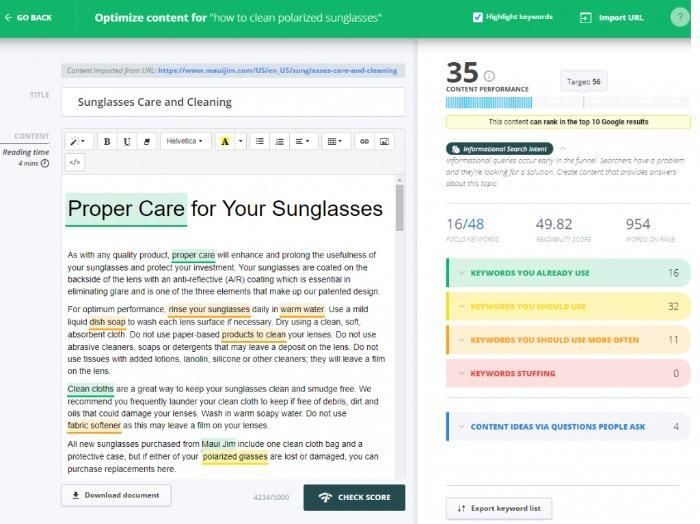
First, use a tool. For example, Cognitive SEO has created a tool that lets you write keyword-optimized content around informational searches.

Optimizing content for search intent.

Then, add keywords to match the search intent.

For instance, to further optimize your site for navigational intent, you could include a relevant keyword to your title tags and meta descriptions, format your text properly and use images and videos that help illustrate your points.

With informational intent, you could offer freebies like a lead magnet and write engaging, informative content to persuade readers to take action. Additionally, you could use call-to-action buttons and other elements that encourage visitors to interact with your content.

For transactional intent, where your searcher is ready to buy, you need a frictionless landing page with a simple CTA like this example from Muzzle:

The Muzzle app.

Another way to optimize for transactional search is by using structured data markup. This code tells search engines what type of content they have and can help them better understand the purpose of your page. Adding structured data markup can also help your content rank higher in search results.

FAQs

What is Search Intent?

Search intent is the underlying reason why someone conducts a search. Understanding what people are looking for can help you create content that meets their needs and helps them find what they are looking for.

How Do You Determine Search Intent?

There are several ways to determine search intent, including viewing the SERPs for clues, using Google’s ‘People Also Ask’ feature, and using software tools.

Conclusion

Understanding search intent is key to providing the best user experience possible and there’s a simple reason why: search is consistently evolving and becoming increasingly sophisticated. Likewise, consumers’ demands change over time. Now, they want content that answers their questions and makes the buying decision easier, while understanding and addressing their pain points.

By considering what the user is looking for and tailoring your content to match, you can create a page that provides the answer they want.

When you can deliver the kind of content that meets searchers’ needs, you’re more likely to rank higher on Google and win customer confidence. In time, this can mean you’re more likely to engage your lead and ultimately convert them into a buyer.

Do you use search intent? How has it helped your business?

Motion (YC W20) Is Hiring QA and Back End Engineers

Article URL: https://www.usemotion.com/jobs

Comments URL: https://news.ycombinator.com/item?id=32768366

Points: 1

# Comments: 0

New comment by jasonjamerson in "Ask HN: Who is hiring? (September 2022)"

Louisiana State University Digital Media | 3 Roles | Baton Rouge, LA | onsite | full time

Feel free to reach out to me about any of these positions.

-Assistant Professor, Video Games

https://lsu.wd1.myworkdayjobs.com/LSU/job/0220-Design-Buildi…

-3D Digital Art Generalist Instructor

Seeking highly experienced candidate, pay commensurate.
https://lsu.wd1.myworkdayjobs.com/LSU/job/Digital-Media-Cent…

-Digital Twinning Engineer / Project Manager

Highly trained in 3D scanning, reconstruction and modeling for the creation of 3D assets and simulation development. Project Manager who will oversee the project and serve as coordinator of logistics and operations for the technical staff and all student employees. Job not yet posted, contact for more info.

New comment by evanderkruk in "Ask HN: Who is hiring? (September 2022)"

Figure 1 | Backend Engineer | Remote (Canada and USA) | Full-time | https://figure1.bamboohr.com/jobs/

Figure 1’s mission is to democratize medical knowledge and improve the future of healthcare. Our platform is valued by millions of healthcare professionals worldwide, and is trusted on a daily basis by our community as a quick, easy, and secure way to share and consume medical knowledge.

Extraordinary real-life stories unfold every day on Figure 1. We see physicians in field hospitals treating Syrian refugees, physician assistants treating patients on remote Alaskan fishing boats, and surgeons demonstrating cutting-edge techniques to an audience of their peers. Thanks to our global community, we’ve been able to connect healthcare professionals from around the world with the help they need in the moment they need it.

Must Have Skills:
Python 3.x experience
PostgreSQL or similar relational DB
Flask
SQLAlchemy

Nice To Have Skills:
Elasticsearch
Kubernetes
Google Firestore
AWS

If you are interested in the chance to help save lives and make the world a better place, we’d love to hear from you!

New comment by atramyar in "Ask HN: Who is hiring? (September 2022)"

Backblaze | Engineering, TechOps, Business Intelligence, Marketing, and Product Management | Full-time | Hybrid | San Mateo Backblaze is a public company that makes storing and using data astonishingly easy. When our founding team got together, they committed to helping people save their data. Today, the Backblaze Storage Cloud provides a foundational platform around the … Continue reading New comment by atramyar in "Ask HN: Who is hiring? (September 2022)"

Wisconsin Lt. Gov. Mandela Barnes, Senate candidate, supported cutting prison population in half

Wisconsin Lt. Gov. Mandela Barnes, a Democrat running against incumbent Republican Sen. Ron Johnson, has repeatedly advocated for cutting the state’s prison population in half, eliminating cash bail and other progressive criminal justice reforms.

Before entering public office, Barnes previously worked as an organizer for Milwaukee Inner City Congregations Allied for Hope, a Milwaukee-based social justice group, when he teamed up with another organization, Wisdom, to launch a 2012 initiative aimed at cutting Wisconsin’s prison population in half.

The 11×15 campaign sought to reduce the state’s prison population to 11,000 inmates by 2015, Barnes told local media at the time.

Barnes later served two terms in the Wisconsin State Assembly before he was chosen as the running mate to now-Democratic Gov. Tony Evers. 

MANDELA BARNES’ TIES TO LINGERIE PARTY BARRING ‘RATCHETS’ COULD HAUNT HIS WISCONSIN SENATE BID

During their campaign in 2018, Evers signed onto Barnes’ idea of halving the state’s prison population. Evers, who at the time was the state schools superintendent, said he wanted to do that by allowing inmates to be released for good behavior, creating or expanding court diversion programs and treating 17-year-old offenders as juveniles instead of adults, the Milwaukee Journal Sentinel reported at the time.

Evers did not put a time frame on halving the prison population, but he called it a “goal” and said he would not release violent offenders. 

Months before the election in July 2018, Barnes celebrated Evers and other Democratic gubernatorial candidates for supporting his initiative.

“6 years ago when we kicked off the 11×15 campaign to cut the prison population in half, we could hardly find elected leaders or candidates to get onboard,” Barnes tweeted. “To see it embraced at a gubernatorial candidate forum makes me proud to have worked with such visionary organizers/activists.”

After Evers and Barnes won the election in November 2018, narrowly defeating incumbent Republicans Scott Walker and Rebecca Kleefisch, Barnes continued supporting the prison initiative, tweeting in October 2019, “Cool, let’s cut our prison population in half.”

Since Evers and Barnes entered office, Wisconsin’s prison population has been reduced by about 15%. In 2019, the population was 23,777, compared to 20,123 today, according to 2022 statistics from the state Department of Corrections.

The vast majority of those currently incarcerated – 68% – are classified as “violent” offenders, meaning it would be impossible to cut the population in “half” without releasing at least some of those violent offenders.

WISCONSIN DEM SENATE CANDIDATE SPENT NEARLY $600K ON POLICE DETAIL WHILE COZYING UP TO DEFUND POLICE MOVEMENT

In 2016, when he was still a state legislator, Barnes sponsored a bill to end cash bail in Wisconsin. The measure, which did not make it out of committee, would have required a defendant to be released unless there was “clear and convincing evidence” that he or she was a flight risk or a danger to society, the Milwaukee Journal Sentinel reported.

During a September 2018 podcast, Barnes also said he supported allowing inmates to vote.

“I’ve long championed restoration of voting rights immediately once someone has served their sentence, and I mean, honestly, even when someone is locked up,” he said.

Barnes has also made statements online with a soft tone on the defund the police movement, and his campaign has received funding from five groups that advocate for defunding cops.

“Defunding the police only dreams of being as radical as a Donald Trump pardon,” Barnes tweeted in July 2020.

On Sept. 3, 2020, Barnes blasted the criminal justice system after the police officers involved in the shooting death of Breonna Taylor did not face charges.

“You can feel how you want about to calls to reform, defund, or abolish but the question is, how can a system that allows this to happen continue to be upheld?” he wrote.

The lieutenant governor also spoke at a major meeting for the Center for Popular Democracy — a far-left group that supports defunding the police and claims Israel targets Palestinians with “violent attacks.”

“Defund police. Defund police states,” the group tweeted in May of last year. “Defund militarized occupation. Defund state-sanctioned violence.”

Barnes has stated in the press that he does not support the defund the police movement, despite his past statements. 

Johnson’s campaign slammed Barnes as “dangerous” in a statement to Fox News Digital.

“Lt. Gov. Barnes is a socialist liberal who cares more about catering to his ‘woke’ base than keeping Wisconsin families safe,” Johnson campaign spokesman Alec Zimmerman said.

“Crime is out-of-control in Wisconsin, and we can’t afford to elect a radical who cares more about criminals than their victims. Mandela Barnes is dangerous for Wisconsin,” he said.

Barnes’s campaign did not respond to Fox News Digital’s request for comment.

Fox News’ Houston Keene contributed to this report.

Aces into Finals as Bird's career comes to close

The Aces returned to the WNBA Finals for the second time in the past three years with a 97-92 victory Tuesday in Game 4 of their semifinal series against the Storm, in the process bringing an end to Sue Bird’s legendary career.

The post Aces into Finals as Bird's career comes to close appeared first on Buy It At A Bargain – Deals And Reviews.

The post Aces into Finals as Bird's career comes to close appeared first on BUSINESS DEMO WEBSITES.

The post Aces into Finals as Bird's career comes to close appeared first on Buy It At A Bargain – Deals And Reviews.

Local SEO Keyword Research (Step-by-Step Guide)

Have you heard the line ‘ if you build it, they will come’? In case you don’t know, it’s from the late 80s Kevin Costner movie ‘Field of Dreams.’

It’s an inspiring quote, but when local business owners set up their websites, it doesn’t really hold true. They believe once they’re set up online, prospects start flocking to their doors wanting quotes, making orders, or signing up for their mailing lists. However, that isn’t the case for many people.

That’s not just conjecture on my part. Research shows that 77.23 percent of local business owners surveyed struggled to get online visibility.

According to the same survey, 42.85 percent believe that Google favors larger brands. Now, don’t get me wrong. High-profile businesses do tend to perform better online simply because more people are looking for them. However, that doesn’t mean your local company website can’t compete for local keywords.

All it takes is some careful local keyword research and a detailed local SEO strategy, and that’s exactly what I’m going to talk about today.

Why Is Local SEO Important?

Local SEO is valuable because it helps small companies reach potential customers who are looking for products or services in their area.

For example, if you own a home repair business, you would want to target people in your local area who may need your services. In other words, local keyword research targets potential customers who are already interested in what you have to offer.

When done correctly, local keyword research:

  • Generates more leads and sales.
  • Helps you rank higher in local search results, increasing website traffic.
  • Makes it easier for searchers to find you when they’re searching for local businesses on their mobile devices.
  • Builds trust and credibility with potential customers through reviews.

Research also supports the importance of local SEO. According to Statista, 35 percent of consumers go online multiple times weekly to find local businesses.

That’s not all, though. The research shows that 21 percent of consumers use the internet daily to find local businesses.

These stats demonstrate that as a local business, you need to be visible online, but perhaps you need some more evidence? Okay, here goes.

There are plenty of case studies showing how small businesses can benefit from local keyword research and SEO optimization. Just search for ‘local SEO case studies’, and you can see what I mean.

What Makes Local Keyword Research Unique

As I’ve already detailed, the main focus of local SEO and local keyword research is attracting more leads and gaining more customers.

However, aside from using local SEO to target a particular geographic area, there’s plenty more that makes local SEO different.

The most obvious is Google’s ranking factors. With local searches, the search engine giant considers several vital areas, such as:

  • The searcher’s location
  • The sentiment and keywords in online reviews
  • Name, address, and phone number quotations
  • A Google My Business profile and relevant keywords
  • Your Google Maps star rating
  • Social media interest

To improve your local SEO further, Google offers these tips:

  • Verify your location, to help improve visibility in local search.
  • Keep your opening hours up to date, especially around holiday times. This lets local consumers know you’re open, so they don’t have a wasted visit.
  • Manage/respond to reviews, to show you appreciate and act on feedback. Review management is also essential as positive reviews inspire consumer confidence, and can enhance business visibility.
  • Add photos and in-store listings. Images showcase your store and products, to give customers a deeper understanding of what you’re selling and whether the products are right for them.

Google also considers relevance, distance, and prominence (your overall web presence), including content, backlinks, and directory listings.

Another factor that makes local keyword research unique is the emphasis on modifiers. The search terms you integrate into writing must be super specific to your location. For example, if you’re a business in Austin, Texas, you would want to use keywords like ‘Austin restaurants’ rather than just ‘restaurants.’

Additionally, voice search is essential to local SEO. Research shows that 74 percent of people use voice search at least weekly to find local businesses, while 76 percent of voice search users choose smart speakers at least once a week, with most searching daily.

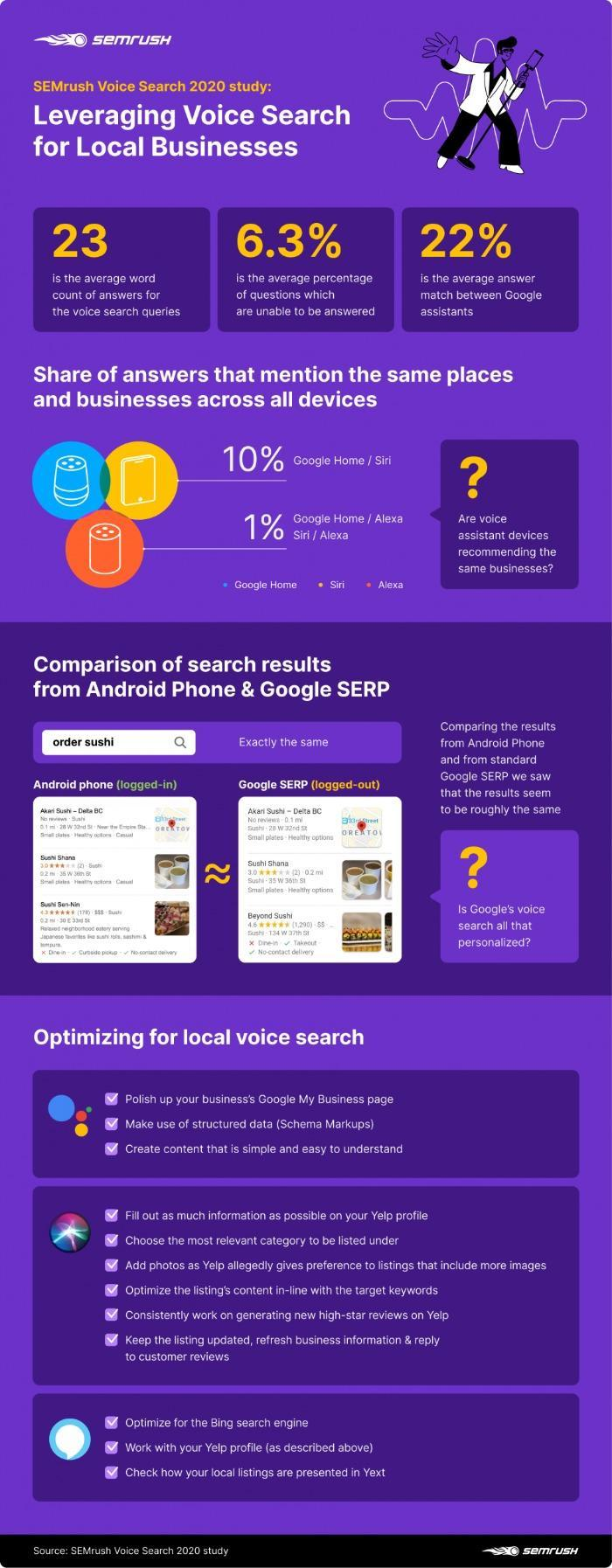
A further survey from SEMrush suggests optimizing voice search for each smart speaker (Alexa, Siri, Google Assistant, etc.) and has some helpful tips to enable you to do this:

Infographic from SEMrush showing facts about leveraging voice search for local businesses.

The above graphic also includes some useful tips you can introduce into your local keyword research strategy.

How To Find The Best Local Keywords

You know the importance of local keyword research, but how do you discover the best ones to use? Fortunately, it’s not as complicated as it may seem. Just follow these tips.

Find Industry-Related Local Keywords

To do this, first, consider what you offer and what services or products you want to promote; then brainstorm a list of keywords related to your business.

Alternatively, a simple way to find local-based keywords is using Google search results. Type in your main keyword and scroll down to the bottom of the page. There, you’ll see a section called ‘related searches.’ For example, a small business located in Miami could target the keyword ‘Miami dentist.’

Then:

  • Once you have a list of keywords, do online research to see how popular they are. You can use tools like Ubersuggest, Google Keyword Planner, or Google Trends to get this information. You could also use tools like Ubersuggest to analyze competitor keywords and see if it’s feasible to overtake them in the rankings.
  • Another way is to type a keyword into the Google search bar and watch as the autocomplete suggestions appear, giving you some great ideas for related local keywords.

Use Keyword Modifiers

Using keyword modifiers lets you focus your efforts on specific areas or types of searches for targeted traffic and better results from your local SEO efforts.

These modifiers can include location-based terms like ‘near me,’ ‘in my area,’ or ‘local.’ Or you might use ‘car mechanic Cincinnati’ or ‘local mechanic Cincinnati.’

Again, use Autosuggest, related search, or competitive keyword research to see the terms others are using.

Consider Keyword Intent

What are your prospects looking for? Are they looking to buy a product or service, find out more information, or just browsing? Once you know the searcher’s intent, you can better target your keywords and content to meet their needs. Use the same techniques, like Autosuggest, to get an idea of the keywords users are typing in.

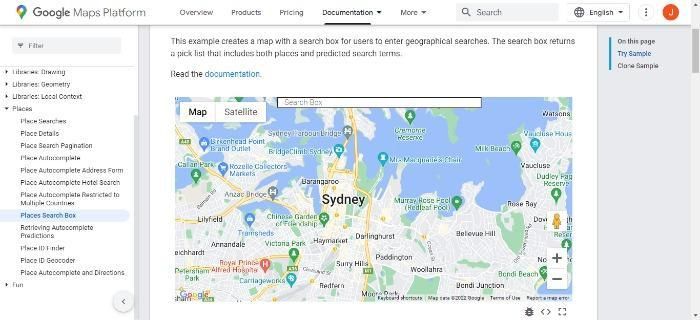
Google Places Search Bar

Another great tool for finding local keywords is the Google Places search bar.

A map of Sydney, Australia from Google Maps.

When you do a geographical search by entering a location in the search bar, you get a ‘pick list,’ which includes places and likely search terms.

Once you have a list of keywords, it’s essential to analyze them and determine which ones are the best fit for your business.

Implicit Vs. Explicit Local Keywords

When doing local keyword research, there are two main ways to target your audience: implicit and explicit.

Implicit targeting is when a user searches for a term like ‘hardware store’ or ‘DIY.’ but doesn’t include specifics like location.

In simple terms, Google basically guesses what you’re looking for and offers your location-based results.

To find out what implicit local keywords might be important to your business, do some research online and talk to your customers. Ask them how they would search for a company like yours if they were looking for one in their area.

On the other hand, explicit local keyword targeting involves search terms that people use when looking for your product or service. For example, ‘Dentist in Santa Barbara’ or ‘Hairdresser in Venice Beach.’

How To Use Your Competition In Your Local Keyword Research

Can you really steal your competitors’ keywords? Absolutely! Just use a tool to conduct competitive research to find out what keywords they’re using.

There are a few ways to assess and use your competition in your local keyword research:

1. Look at the keywords they are targeting and see if there are any that you’re also targeting. Chances are, if your competitors are targeting a keyword, it’s because it’s profitable and has a lot of search volume.

2. See what their website looks like and how they rank for their target keywords. This can give you ideas on how to improve your website and rank higher for your target keywords. For less competition, you could take the opposite approach and target keywords your rivals aren’t using. Just make sure they’ve got a worthwhile search volume.

3. Review what content they are creating around their target keywords.

4. Look at the SERPs and pay attention to keywords. These terms are usually in bold.

Now let’s look at some tools to make your local keyword research easier.

The Best Local SEO Keyword Research Tools

I’ve already referenced my tool. Ubersuggest, but it’s worthy of another mention here. It’s an easy-to-use tool that delivers:

  • Keyword and content ideas
  • Keywords by traffic
  • Similar websites
  • And plenty more besides

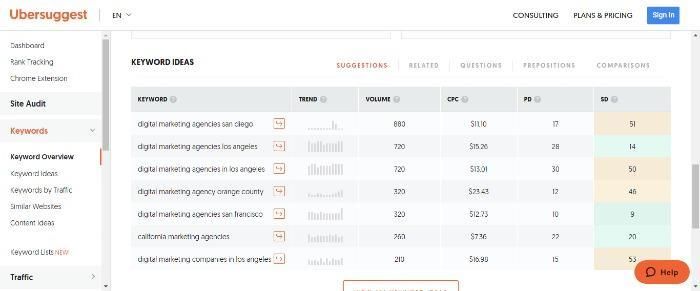
For example, if I search for ‘digital marketing agencies California,’ I get:

Keyword ideas from Ubersuggest about digital marketing.

You can also choose from ‘prepositions,’ ‘related,’ ‘comparisons,’ and ‘questions,’ to get a better idea of search intent.

Other tools to consider:

  • Google Keyword Planner. With this tool, you can see competitive keywords and get ideas for other related keywords.
  • Moz Local to get a free listing score and see where you stand.
  • SERPStat to help you further analyze your competition and for SEO purposes.

Ultimately, the best way to find the right keywords for your business is to experiment with different tools and techniques and analyze what works for you.

FAQs

What is Local Keyword Research?

Local keyword research aims to identify relevant keywords that people are likely to use when searching for businesses like yours online. 

How do I research keywords for local SEO?

Using the right tools is essential. After all, if potential customers can’t find you in your area, you’re missing out on a lot of business. Ubersuggest, Google Keyword Planner, and Moz’s Keyword Planner all get you off to a great start. Then there’s competitive analysis, viewing the SERPs to see what’s ranking, and using autocomplete.

How do I find the best local keywords?

When it comes to doing local keyword research, there are a few things you need to keep in mind. Consider what your customers might search for when they want to find your business and brainstorm. Then, conduct local keyword research with tools like Ubersuggest, Google’s Autosuggest, or People Also Ask. You can also view the SERPs and look for keywords.

Conclusion

Local keyword research should be an essential part of any small business marketing plan.

By understanding the keywords people in your area are searching for, you can create content and advertising that speaks to them directly, and by using the right tools like Ubersuggest, it’s easy to find out what those keywords are.

Search intent is also a vital part of online visibility, so don’t overlook that area if you want local customers to discover you online.

Do you use local keyword research? Share how you got your business on the map below.