How to Find Old Tweets

If you’re searching for an old tweet, there’s an easier way to find it than just scrolling through your timeline. This guide teaches you how.

Why Finding Old Tweets Matters

There are a million reasons you may want to uncover your own or someone else’s old tweets.

Maybe you tweeted a brilliant business idea last year, but you can’t remember what it was. Perhaps you remember making a particularly witty comment and want to see how many retweets it got.

It could even be something as simple as seeing what your now-favorite celebrity was tweeting about before they got famous.

Finding old tweets could also be a case of saving face or saving your reputation. We’ve all said things we’re not proud of in the past. The trouble is the permanency of the internet means off-hand comments can be hard to escape. We’ve all seen stories of five-year-old tweets coming back to bite people and ruin their careers.

Better to find those tweets and delete them for good, no matter how innocuous they may seem.

How Do I Search for Old Tweets?

The most obvious way to search for old tweets is to scroll back through your time timeline. Depending on how much you tweet, however, this could take a long time. Even if you only tweeted once a day for three years, that’s over 1,000 tweets you’ve got to scroll through.

Luckily, there are three better strategies you can use to find old tweets.

Use Twitter’s Advanced Search

Twitter’s advanced search feature is the easiest and most comprehensive way to search for old tweets on your own or anyone else’s profile. You can search using multiple filters, including date, keyword, places, and accounts. That means you can pinpoint an exact tweet or find multiple tweets that all meet the same criteria.

Start by navigating to the advanced search page.
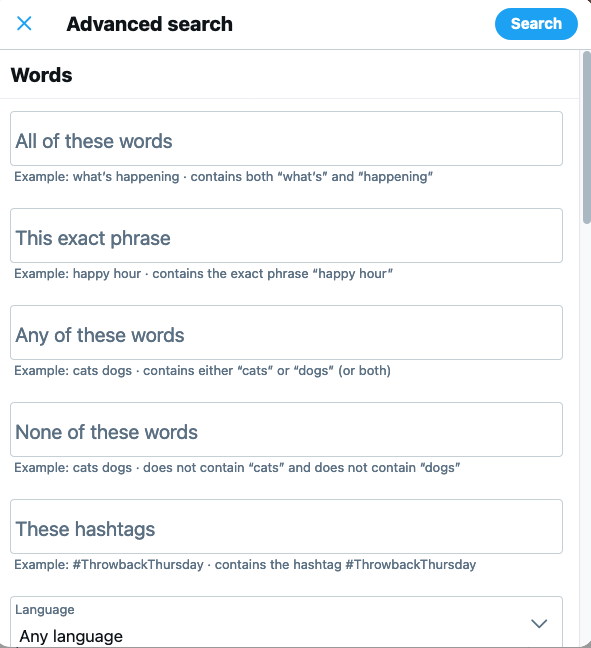
How to Find Old Tweets - Use Twitter's Advanced Search

Next, choose what you want to search for. Let’s say we want to see what I said about link building in 2016.

We start by typing “link building” into the exact phrase search bar.
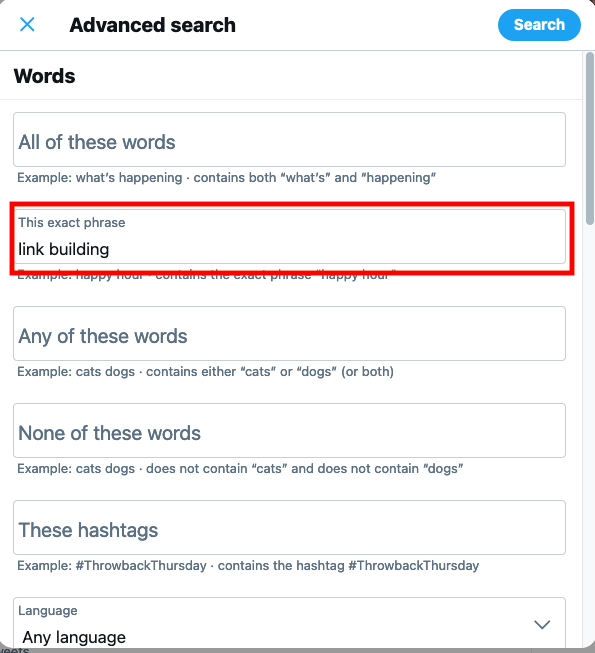
find old tweets by using advanced search - screenshot

Then add my account to the accounts section.
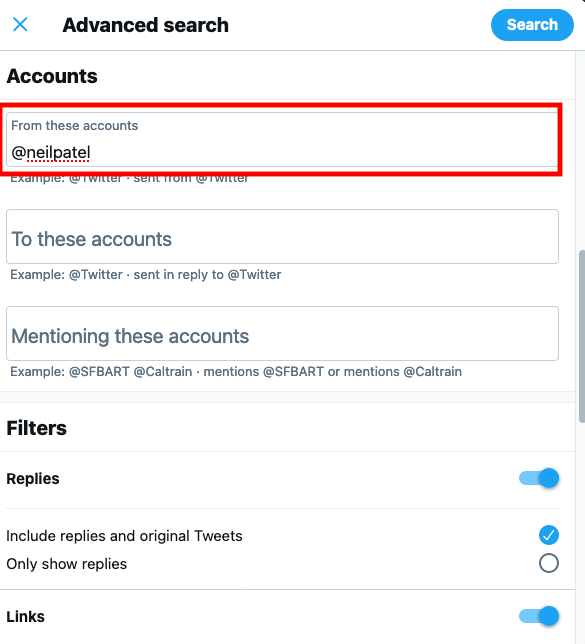
How to Find Old Tweets - Twitter's Advanced Search Account Example

Then select the date range. In this case, we’re looking for tweets between the start and end of 2016.
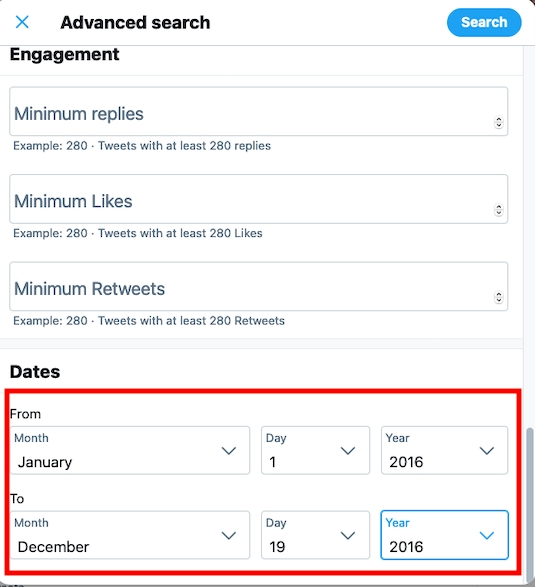
How to Find Old Tweets - Adding date range in Twitter's Advanced Search

Voila. We get a list of every time I mentioned “link building” in a tweet in 2016.
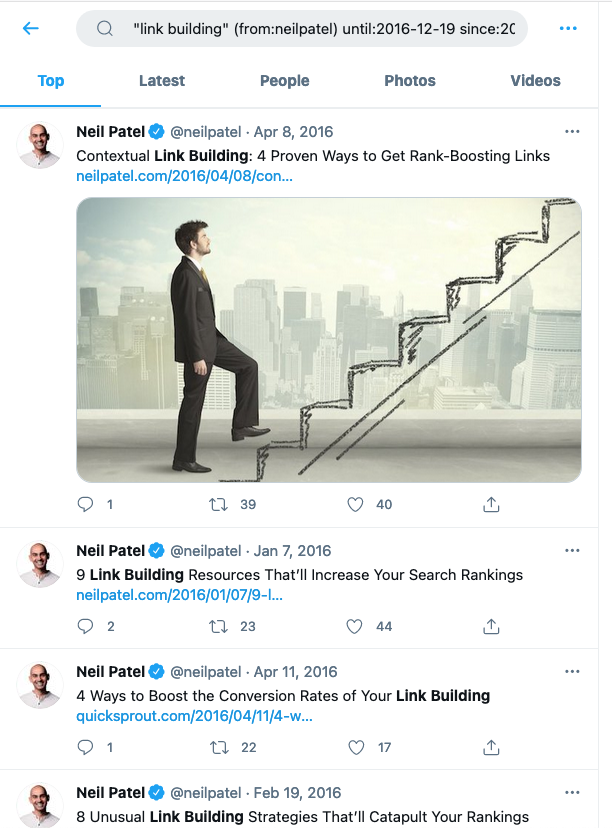
Old Tweets - Neil Patel Example

You can use the advanced search filter’s criteria to find just about any tweet you want. You can use the date range to pinpoint what someone tweeted on a specific day. You can also use it to find your first tweet ever.

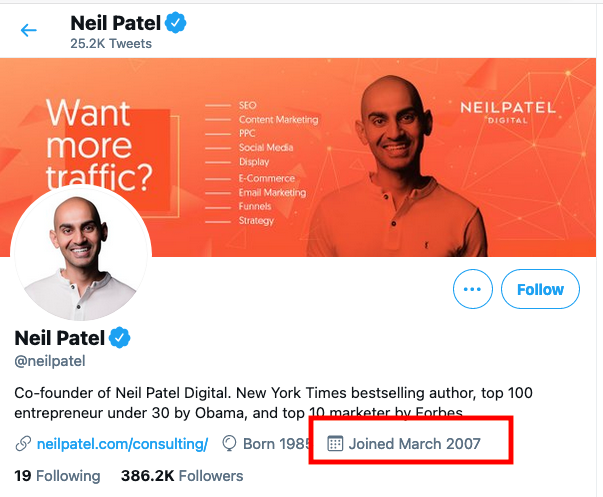
In my case, we can see I joined Twitter pretty early on in March 2007.
Old Tweets Neil Patel

Finding my first tweet is as simple as going back to the advanced search feature and apply the following filters:

  • My account (@neilpatel)
  • The date range (March 1, 2007 – March 31, 2007)

Twitter doesn’t list the tweets in chronological order, but it is easybut easy to see what my first tweet was.
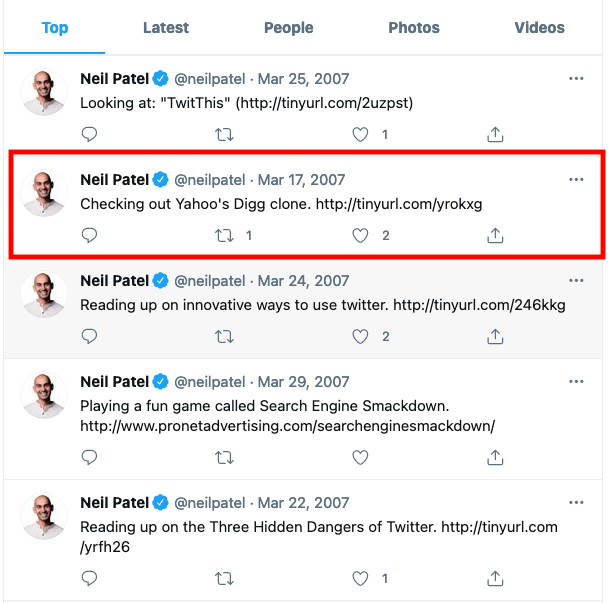
Old Tweets - Neil Patel example of finding first tweet

The best thing about Twitter’s advanced search feature is how easy it is to change the parameters and run a new search without going back to the main search page.

In the example above, we can quickly edit the search to find out what I tweeted about in March 2020.
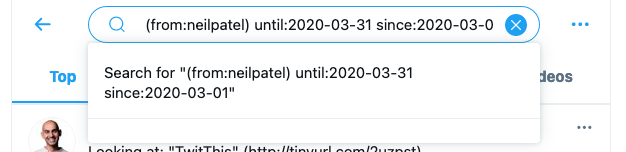
How to Find Old Tweets - Editing Search Paremeters in Twitter's Advanced Search

If your original parameters weren’t narrow enough, you can easily add more to the existing search. For instance, we can add “coronavirus” to the start of the search to only include tweets related to the pandemic.
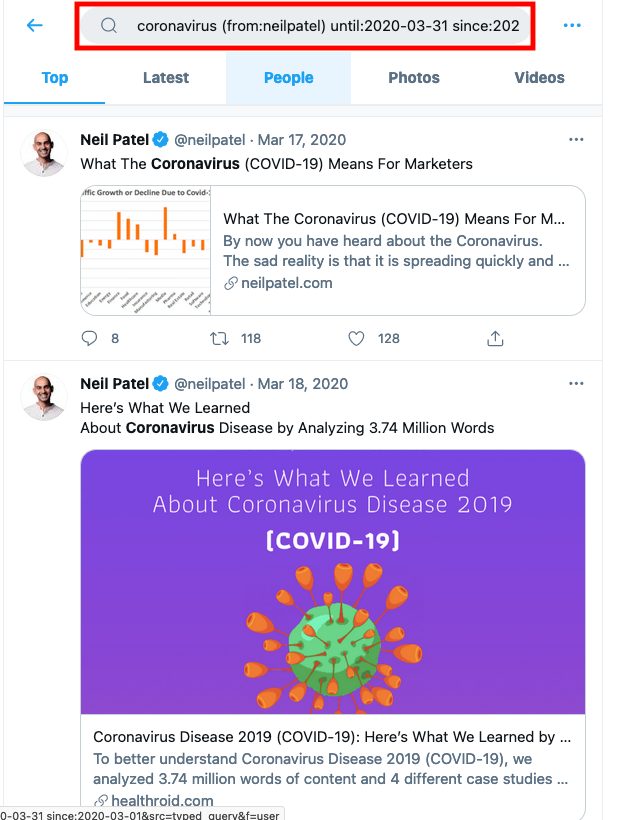
Old Tweets Examples, Neil Patel

We can also search for another person’s tweets during the same timeframe by adding “OR from:[Twitter handle]” after my name.

Let’s use this to see what my good friend Eric Siu had to say.
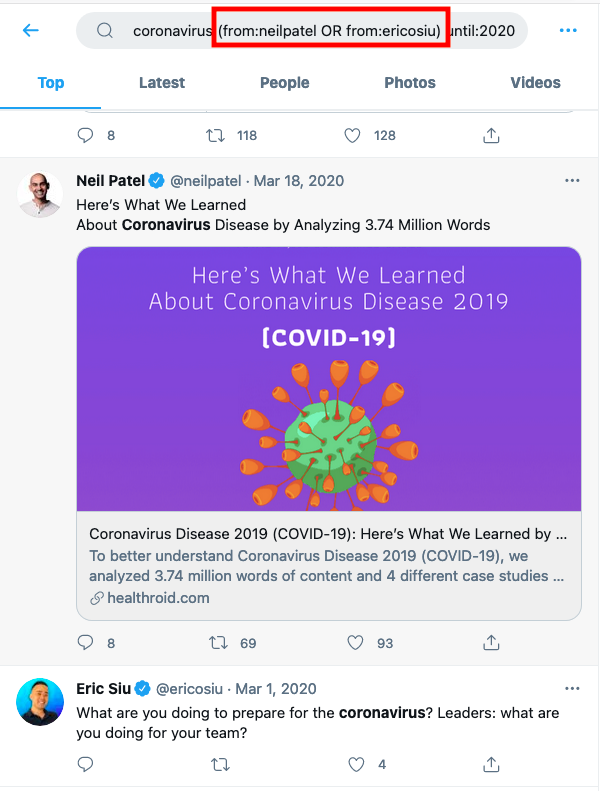
How to Find Old Tweets - how to search for another person’s tweets during the same timeframe

Ask Twitter for Your Records

Twitter’s advanced search feature isn’t the only way to use the platform to find your old tweets. You can also download an archive of your data, giving you access to all of your tweets at once.

Go to “Settings and privacy.”
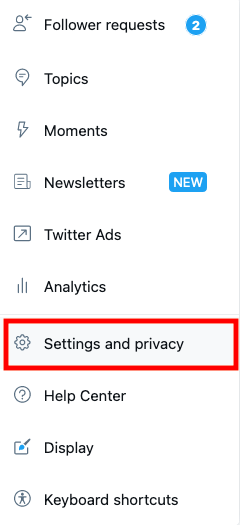
How to Find Old Tweets - Ask Twitter for Your Records

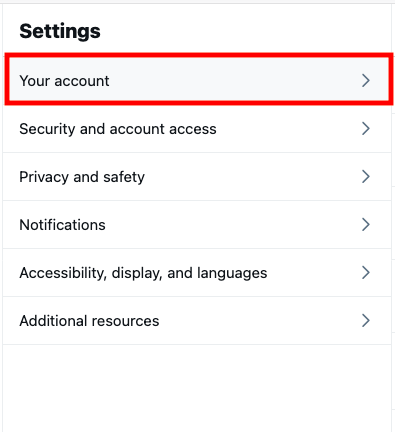
Then click “Your account.”

How to Find Old Tweets - Go to Account Settings at Twitter's Advanced Search

Then “Download an archive of your data.”
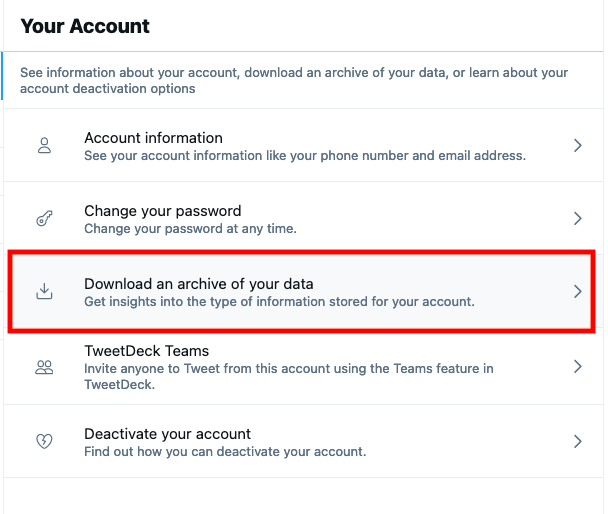
How to Find Old Tweets - Download an archive of your data in Twitter's Advanced Search

Enter your password, then click “Request archive.” You’ll get a notification as soon as your ZIP file is ready to download.
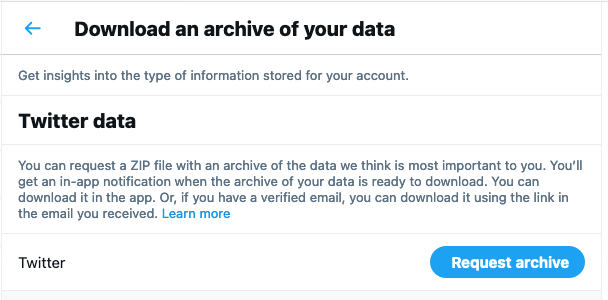
How to Find Old Tweets - Twitter Data Archive

Use a Third-Party Website to Delete Your Old Tweets

Several third-party websites will do all of the hard work of finding specific tweets for you.

All My Tweets

All My Tweets is a fast, free, and easy way to view all of your tweets on a single page. Log in using your Twitter account, and you’ll get a complete round-up of your Twitter activity.

Tweet Binder

Tweet Binder lets you get a full report on any Twitter account, not just your own. This is great if you want to find out what someone else was tweeting about in the past or understand how their activity on the platform has changed over time.

TweetDeleter

TweetDeleter leverages your Twitter archive to make finding and deleting tweets incredibly easy. This is a great solution for people who tweet an awful lot and who may find their archive a little overwhelming when they download it.

Should I Delete My Old Tweets?

Now you’ve found your old tweets, you’re probably wondering whether or not you should delete them. Unfortunately, there’s no straightforward way to answer this question.

There is a good case to be made in favor of preserving all of your old tweets, but there’s an equally good case in favor of deleting them (or at least deleting the worst of them).

Let’s look at both sides of the coin below to see if we can come to a decision.

Pros of Deleting Your Old Tweets

Deleting old tweets gives you a chance at a fresh start and can help avoid any unwanted and negative publicity as your audience grows. Here are some of the best reasons for deleting old tweets:

  • You want a fresh start on Twitter but don’t want to change your email address. It may be best to delete everything in this case.
  • You’ve changed opinions on a particular topic. Changing your opinion is a great trait, but you may not want anyone calling you a hypocrite.
  • You joined Twitter when you were a teenager. We were all embarrassing when we were younger, but it’s best to delete any evidence of your younger, more foolish self.
  • You don’t want a new employer spying on your history. Some employers check social media accounts before making a hire. Don’t let them find anything they won’t like.
  • You’ve switched industries. If you used to work in e-commerce but now work for non-profits, it might be worth deleting old tweets that are unrelated to your current field.

If you want the advice of an expert, Katie Linendoll believes that if you have to think twice about a tweet, then just delete it. “If you’re hesitant on a tweet and you think it might be dicey, then in what capacity do you think it’s a good idea to keep it up there?” she asks. “It’s mind-boggling to me, it’s just not worth it.”

You won’t be alone if you delete your tweets, either. According to TweetDeleter, activity increased 14 percent in 2020. The most common reason users were deleting their tweets was “cleaning up my feed for potential employers.” Other popular motives included “getting rid of embarrassing tweets” and “a change of opinions than what past tweets represent.”

Cons of Deleting Your Old Tweets

Deleting your old tweets isn’t necessarily the best idea, however. There are some pretty significant drawbacks to deleting your tweets, especially if you plan to delete a large amount.

  • People may notice. Mass deleting all of your old tweets can be as bad as not deleting them for people with a big following. Doing so may cause people to speculate on what you said in the past, even if you didn’t say anything bad at all.
  • Deleted tweets are gone for good. There’s no getting a tweet back once you delete it, so think carefully if you’re willing to let it go.
  • Mass deleting tweets may mean losing sentimental posts. Old images or a message to a now-departed friend may hold tremendous sentimental value. I’d advise against deleting these kinds of messages wherever possible. Even if you don’t think you’ll miss the tweet now, you may change your mind in the future.

Deleting tweets can be a double-edged sword. That’s why I believe in being very careful about the tweets you do delete. Don’t worry about a typo, for instance, or for commenting on a belief that loads of people held at the time. If you take this approach, you may not have much of a timeline left.

Do take Katie Linendoll’s advice, however. If you have to think twice about it, just delete it and move on. Life’s too short to get worried about a single tweet.

How to Delete Old Tweets in Bulk

You don’t have to delete your old tweets one by one. Several apps let you delete all (or a selection) of your old tweets automatically.

TweetEraser

TweetEraser lets you filter and delete your tweets quickly and easily. Filter by keyword, hashtag, or date, and then start deleting. There is a free version of the tool, but heavy Twitter users will probably need the premium version which costs $9.99.

TweetDeleter

TweetDeleter doesn’t just let you search tweets; it lets you delete them, too. You can use the platform to crawl your old tweets and delete them one by one, or you can set up an auto-deleter that will crawl your profile and delete tweets according to predetermined settings automatically.

Best of all, TweetDeleter lets you keep your deleted tweets on their app. You may not want other users to see them anymore, but you can re-read them whenever you want.

The standard version of TweetDeleter costs $3.99 per month.

TwitWipe

Do you want to purge your profile completely? Then opt for TwitWipe, which deletes all of your tweets in one go. It’s super simple to use, deletes your tweets instantly, and, best of all, is free to use.

Conclusion

It’s not always easy to find what you or someone else tweeted in the past, especially if you’re a prolific tweeter. Tweeting regularly is a great way to grow your personal brand and your business, but it can also make it hard to keep track of what you said.

Whether you use Twitter’s advanced search feature, request all of your activity from the platform, or use a third-party tool, finding old tweets can let you identify which ones you want to keep and which you want to delete.

Whose old tweets are you going to look at first? What embarrassing things did you tweet about in the past?

Etleap (YC W13) Is Hiring a Customer Success Manager

We are looking for a dynamic, experienced customer success professional to ensure we are building strong and enduring relationships with our customers, and that they are receiving the attention and support needed to achieve their goals.

About Us

Etleap’s mission is to transform the way businesses drive analytics projects.

We started Etleap out of frustration with the exorbitant amounts of engineering work required to set up, maintain, and scale data pipelines for analytics. Our vision is to make it simple for analytics teams to quickly and securely connect the data sources that power their businesses. We’re doing this by removing all of the traditional complexities of data integration and creating a new kind of ETL that enables the end user of data to integrate and transform data from any source.

Our team is customer-obsessed and values openness and being experimental. We’re growing fast, and we’re backed by First Round Capital, SV Angel, YCombinator, and a number of other top-tier investors.

About You

– 5+ years of customer success/account management experience
– Have led onboarding and customer education for a technical enterprise software product
– Experience building relationships with technically sophisticated customers
– Exceptional verbal, written, and interpersonal communication skills
– Self-starter: Able to propose solutions and accomplish tasks with limited direction and a figure-it-out attitude
– Startup experience is a big plus

About the Role

– Build relationships and drive engagement with Etleap’s customers via onboarding, periodic business reviews, and other check-ins
– Champion customers’ growth goals in order to maximize product value and identify upsell opportunities
– Manage a customer health dashboard to be shared with the executive team
– Plan and optimize strategy for managing retention and flagging risks regarding renewals
– Own communication with customers for marketing initiatives, including trade shows, webinars, and case studies

You will be working as part of a dynamic team in a fast-paced startup office environment. Our office is near AT&T Park at 2nd & Townsend in San Francisco. We offer catered lunch, a kitchen stocked with great snacks, as well as unlimited PTO, health care, and commuter benefits.

How to Apply

To apply, send your resume to jobs@etleap.com.


Comments URL: https://news.ycombinator.com/item?id=26759541

Points: 1

# Comments: 0

New comment by jmcvetta in "Ask HN: Freelancer? Seeking freelancer? (April 2021)"

SEEKING WORK | Devops Consultant | Remote

Software consultant with 20+ years experience. I was doing devops before the word “devops” was a thing.

Services:

* Automated testing & continuous delivery (CI/CD pipeline)

* Cloud infrastructure architecture and build-out (IaC)

* Dockerization, microservices, & orchestration

* Bespoke developer tools (Golang, Python, etc)

Recent project:

Developed an open source plugin for Terraform allowing it to provision Rollbar.com resources. Delivered on time and under budget, with no supervision and twice-monthly status meetings. Code has complete documentation, a full set of unit and integration tests with 95% coverage, automatic test runs using Github Actions, A+ quality rating by CodeClimate, and continuous delivery using semantic-release. Deliverables passed internal dogfooding with zero issues identified.

https://github.com/rollbar/terraform-provider-rollbar

Contact: jmcvetta@protonmail.com

Github: https://github.com/jmcvetta

Resume: Available upon request.

Miso (YC W20) Is Hiring in Seoul, Korea

Article URL: https://boards.greenhouse.io/miso Comments URL: https://news.ycombinator.com/item?id=26757982 Points: 1 # Comments: 0

Bentocart (YC W19) Is Hiring Restaurant Partnership and Sales

Article URL: https://www.workatastartup.com/jobs/42895 Comments URL: https://news.ycombinator.com/item?id=26752995 Points: 1 # Comments: 0

How to Create Evergreen Content Right From the Start

Evergreen content engages and educates readers for longer without a huge amount of effort. Once you master the art of writing “timeless” content, you can ensure your articles, e-books, and tutorials stay relevant for years to come.  Below, I’m going to show you exactly why evergreen content should be part of every marketer’s content strategy, …

The post How to Create Evergreen Content Right From the Start first appeared on Online Web Store Site.

The post How to Create Evergreen Content Right From the Start appeared first on ROI Credit Builders.

New comment by raoulbhatia in "Ask HN: Who is hiring? (April 2021)"

Radar Cyber Security is the only European supplier of Managed Detection & Response who provides its services based on inhouse developed technology. ONSITE in Vienna preferred. REMOTE work possible to some extend (location within EU is a must-have!) . Relocation & VISA support available! https://www.radarcs.com/jobs/ Excerpt: * Service Delivery Manager https://cdn1.radarcs.com/wp-content/uploads/2021/01/Service-… * Service Operations Specialist …

The post New comment by raoulbhatia in “Ask HN: Who is hiring? (April 2021)” first appeared on Online Web Store Site.

How to Use The Facebook Creative Hub

According to a study by HubSpot, over 30 percent of marketers say Facebook Ads provide the highest return on investment. Struggling to see ROI with your ads? You’re not alone. It’s tough making a Facebook ad that stands out, appeals to your audience, and converts. Then there are all the different ad formats to consider, …

The post How to Use The Facebook Creative Hub first appeared on Online Web Store Site.

How to Optimize Google My Business and Leverage It for More Sales

One of the simplest ways to gain traffic and customers is claiming and optimizing your Google My Business (GMB) listing. Google My Business (GMB), is a listing of your business’ operating information, reviews, posts, and so much more.

To that end, there are a few things you should consider before diving into how to claim your business on Google.

For example:

  • What are your customers finding when they search for your business online?
  • If they need to know your phone number, how quickly can they access it?
  • If they want to know if you have parking available, how will they find out?

You need to make sure this information is available to consumers before they even reach your website.

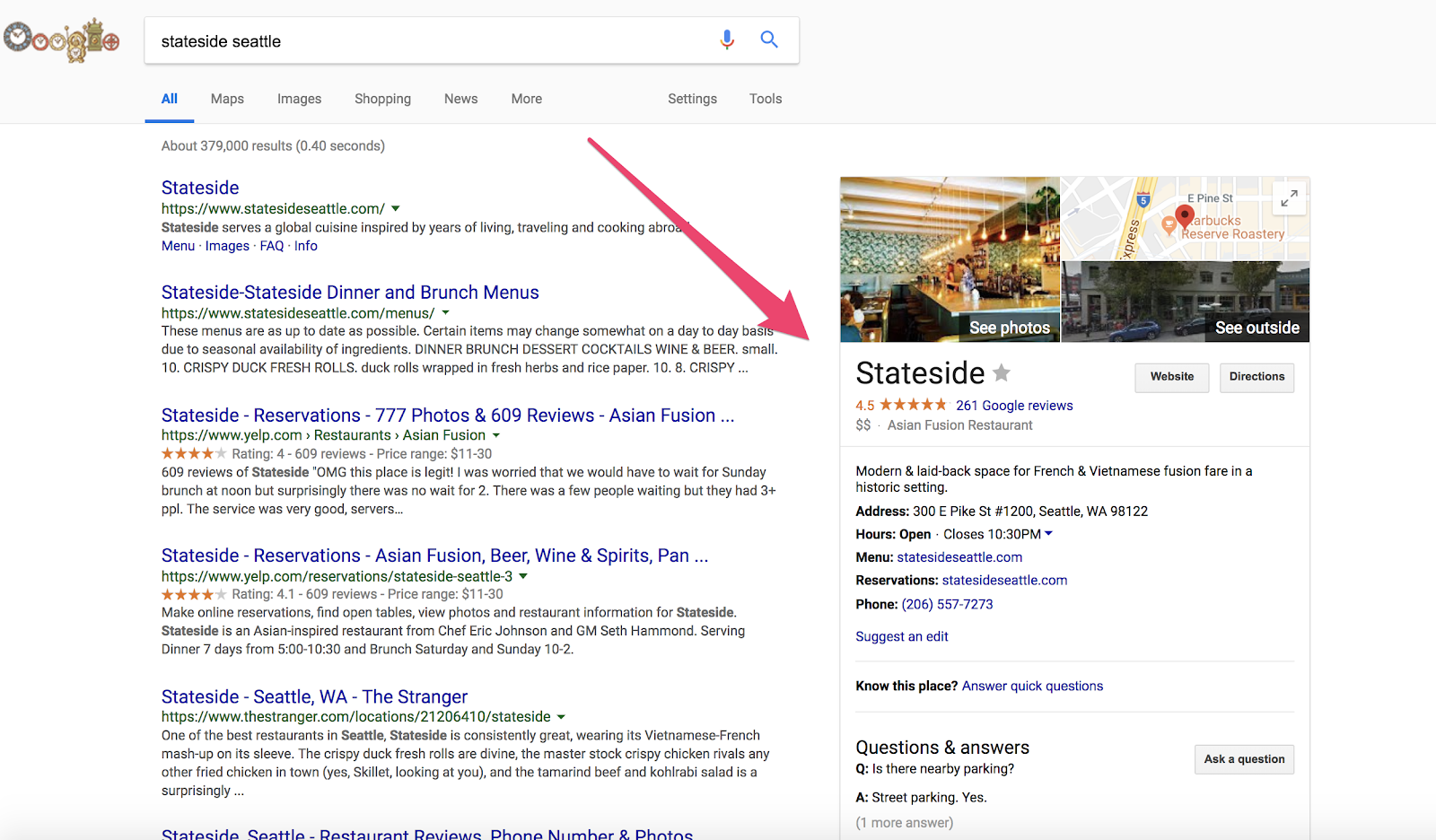
Although most of this information can likely be found on your website, Google My Business indexes the content you provide for consistency across Google Search and Maps (Google Local Guides can also review and edit your listings for consistency).

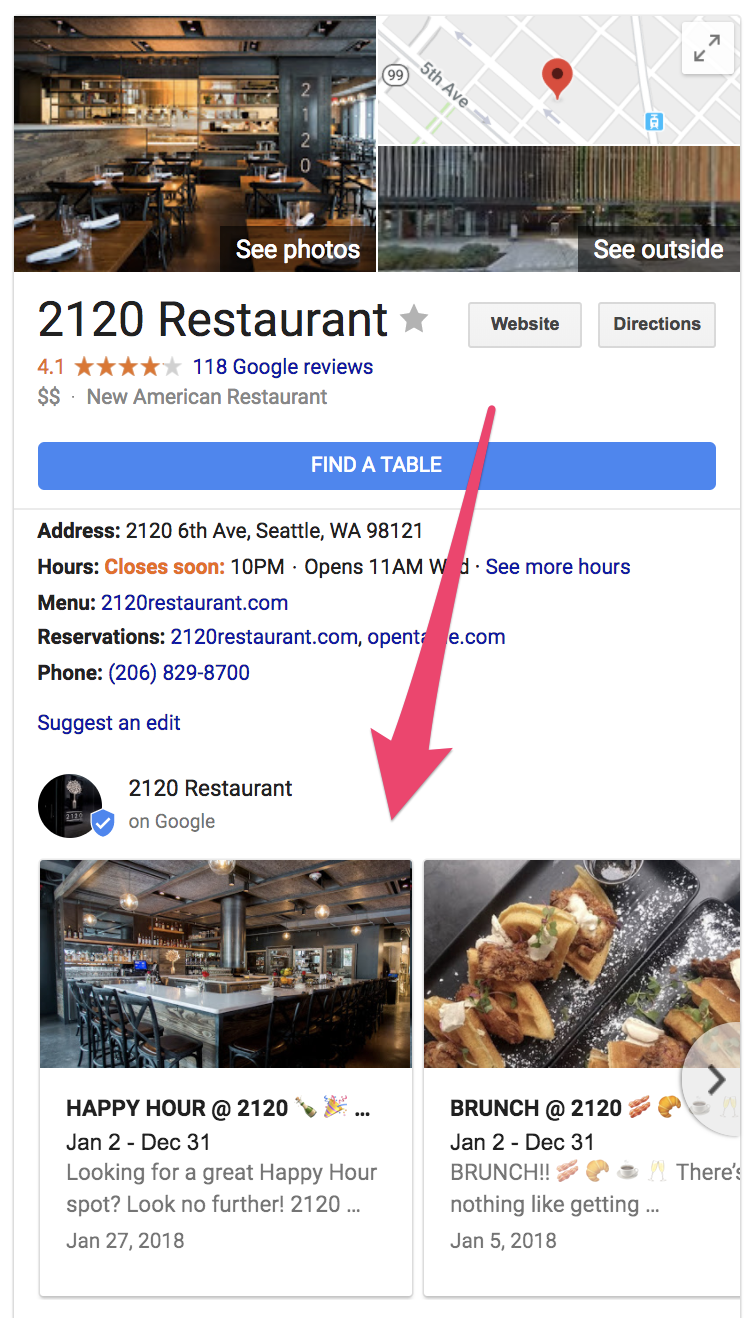
Example business who has claimed of google my business

But it’s not just a place to find basic information about your business.

When used correctly, Google My Business is a powerful tool that can increase your revenue and provide valuable insights about your customers.

I’m going to explain its importance and how you can optimize it to generate more sales.

The Number One Mistake Business Owners Make with Google My Business

Let’s face it. Google dominates search.

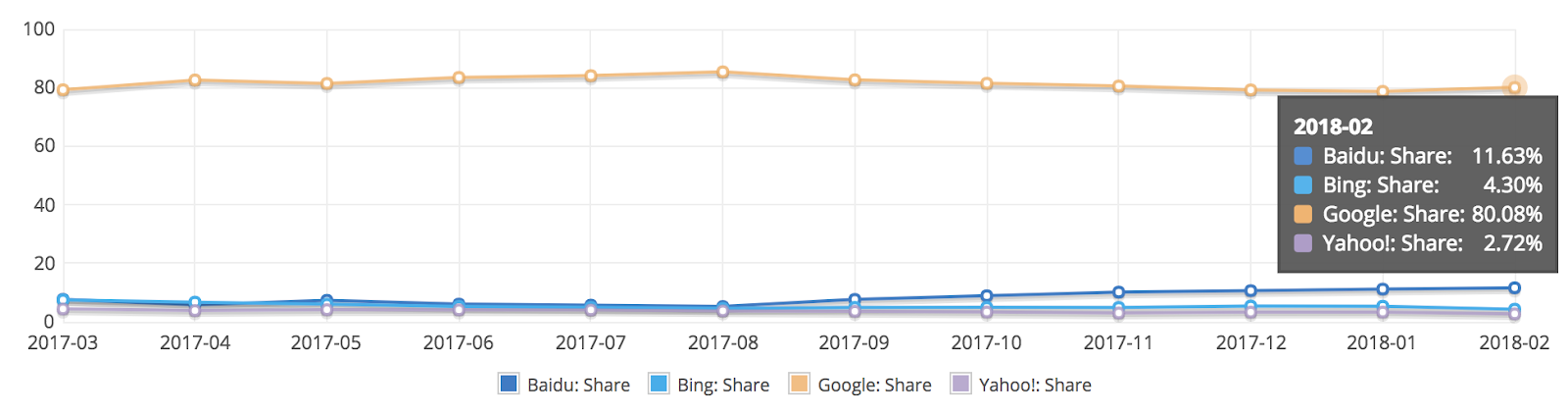
According to Net Marketshare, approximately 80% of all searches happen on Google.

graph showing the segments of the google my business traffic

To put things into perspective, there are 3.5 billion searches per day.

The kicker? Most people don’t get past Google’s first page of search results.

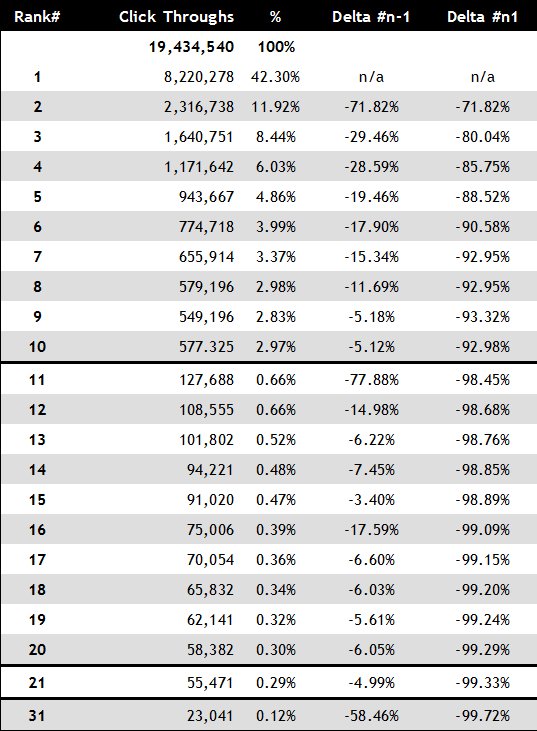
A study examined the number of click-throughs for each Google search result, and they exponentially decreased on page two.

Table showing how to claim a business on google my business

In other words, your customers are finding what they need on Google’s first page.

Although there are other ways to get your business to show up on the first page of Google, Google My Business is an incredibly valuable (and easy) tool to use that helps you:

  • Control, index, and display pertinent business information
  • Interact with potential customers and manage your online review reputation
  • Curate customer photos, videos, and other user-generated content
  • Gather insights regarding how your customers are arriving on your site

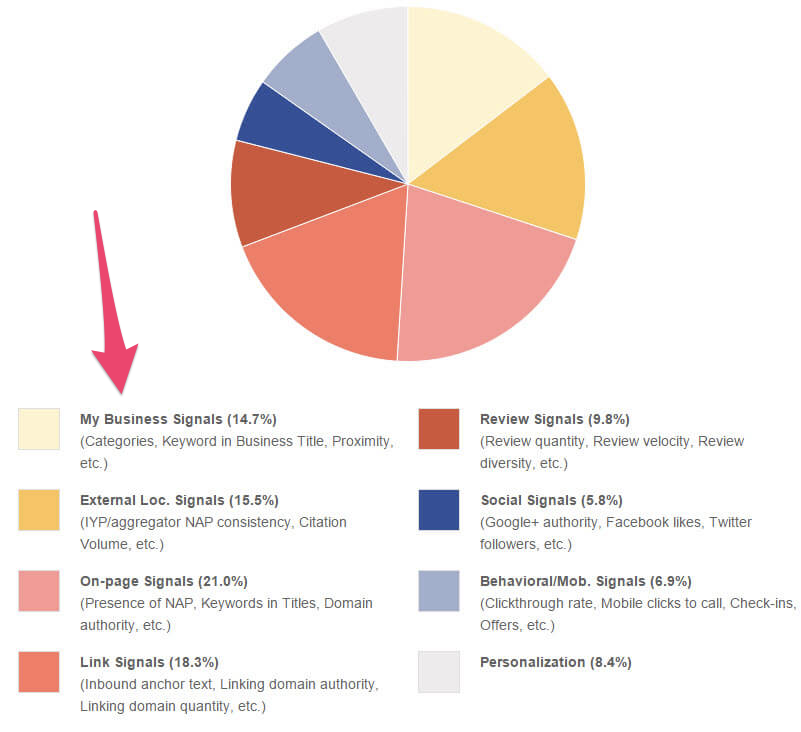
The signals sent from Google My Business even play a role in local SEO strategy.

Google my Business showing pie chart affects local SEO

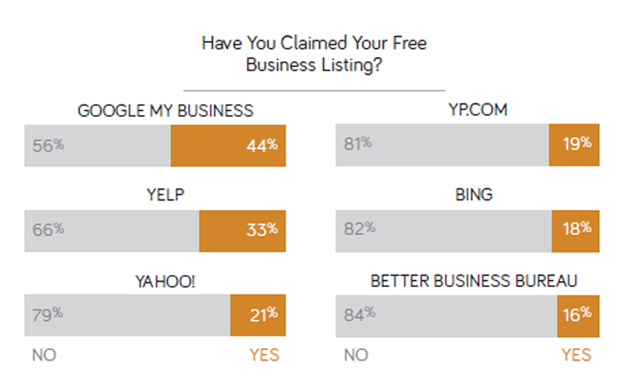
56% of local retailers haven’t claimed their free Google My Business account.

  percent of businesses that have  claimed their business listing

This is surprising because a Google study found that “50% of consumers who conducted a local search on their smartphone visited a store within a day.”

There is an enormous upside for using Google My Business, and the process to claim your business only takes a few steps.

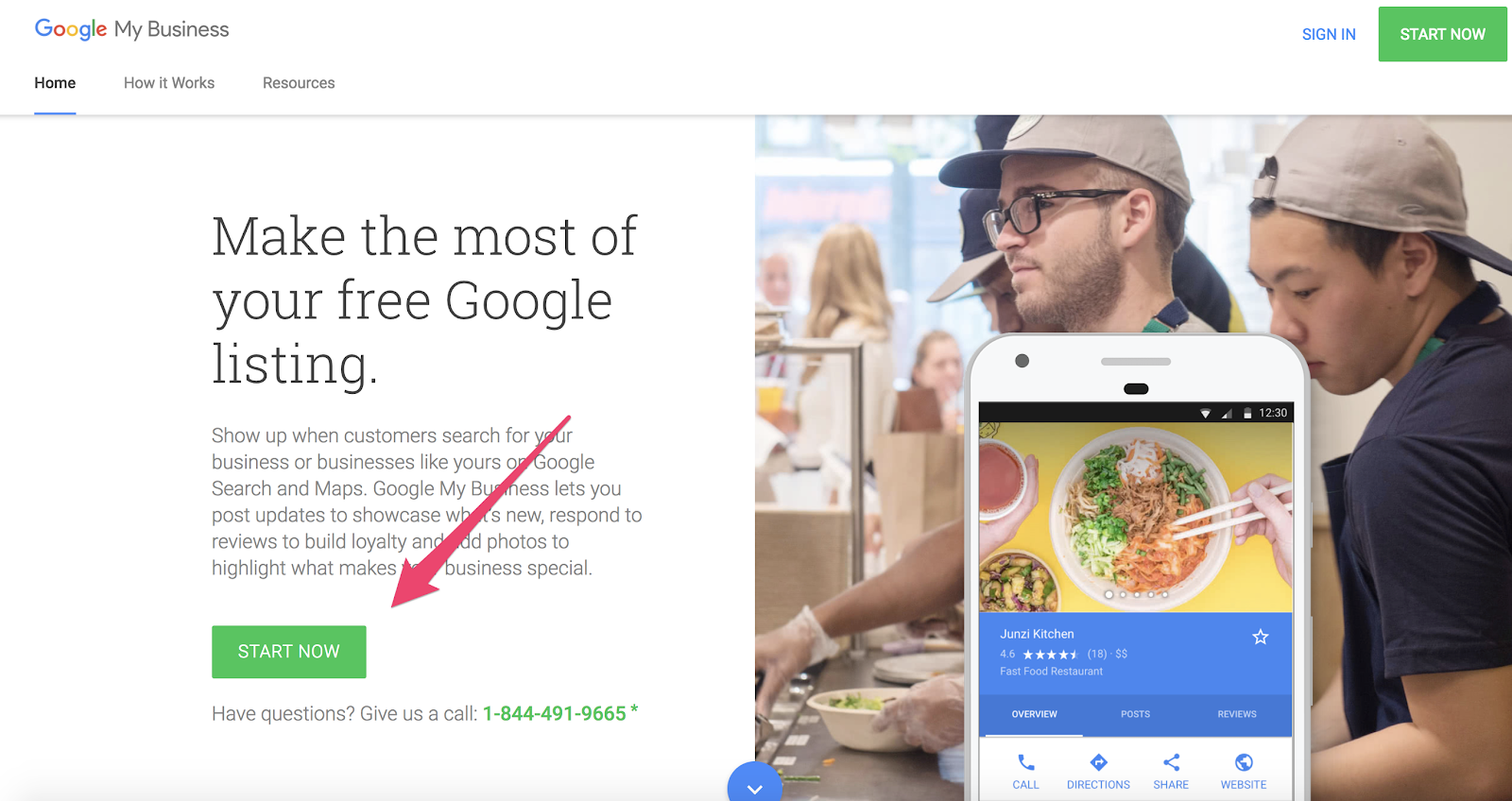
To start, visit https://www.google.com/business.

making the most of your free Google My Business account

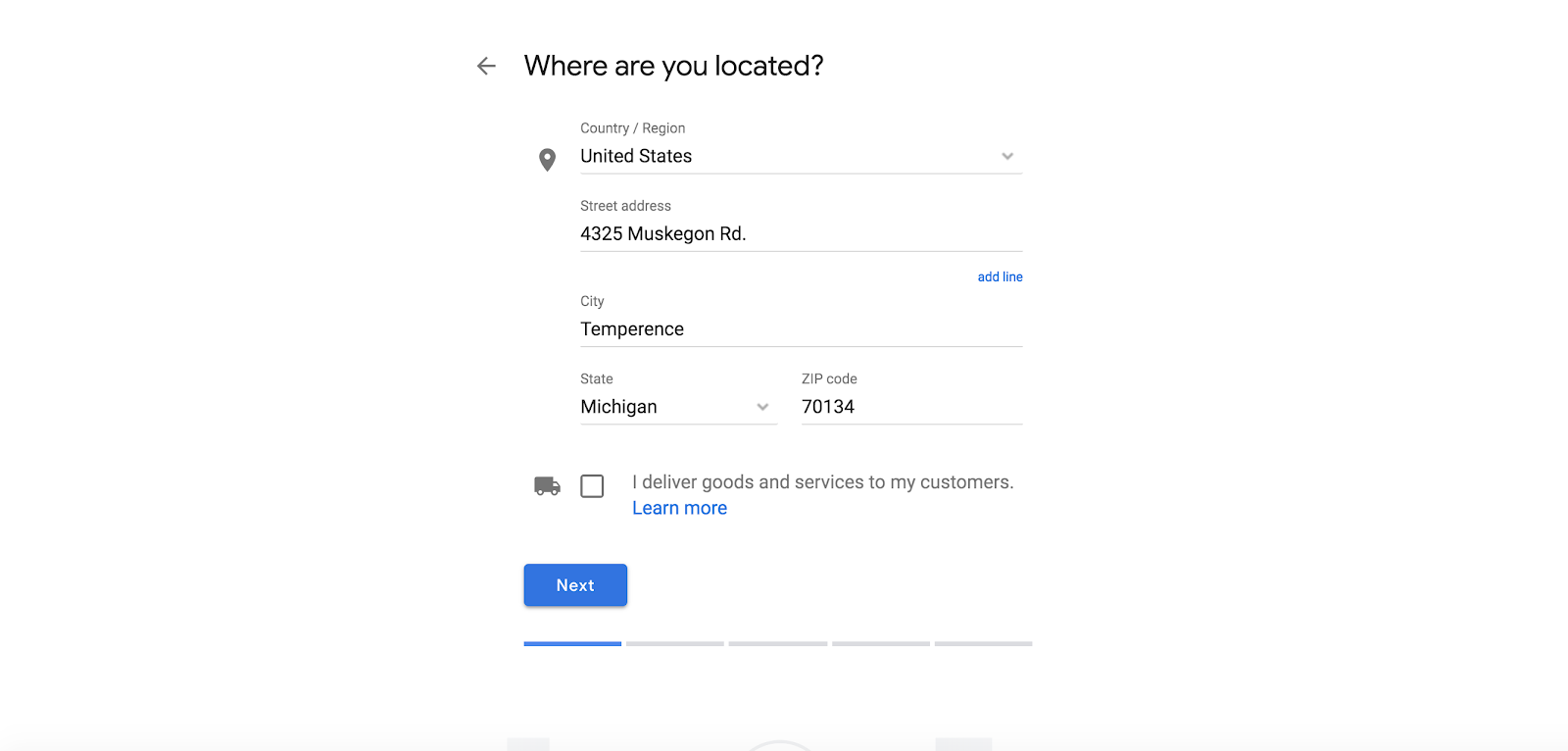
Next, input the basic information (name, address, phone number, website) about your business.

pasted image 0 252

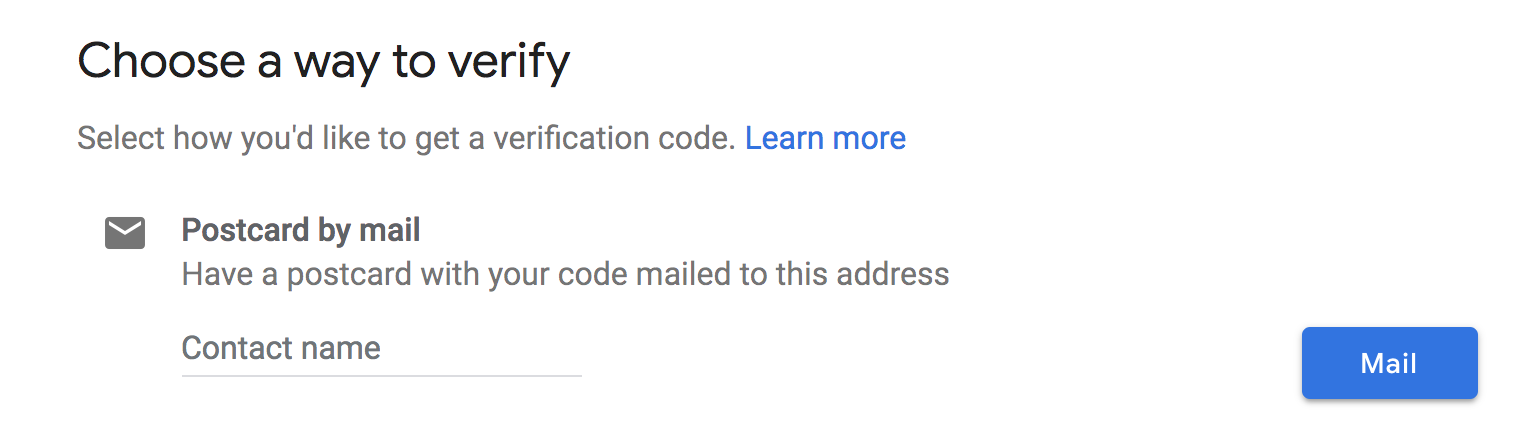
Then, you’ll be required to verify your account by submitting a code that is mailed to your business address. This step is necessary to unlock all GMB features.

pasted image 0 226

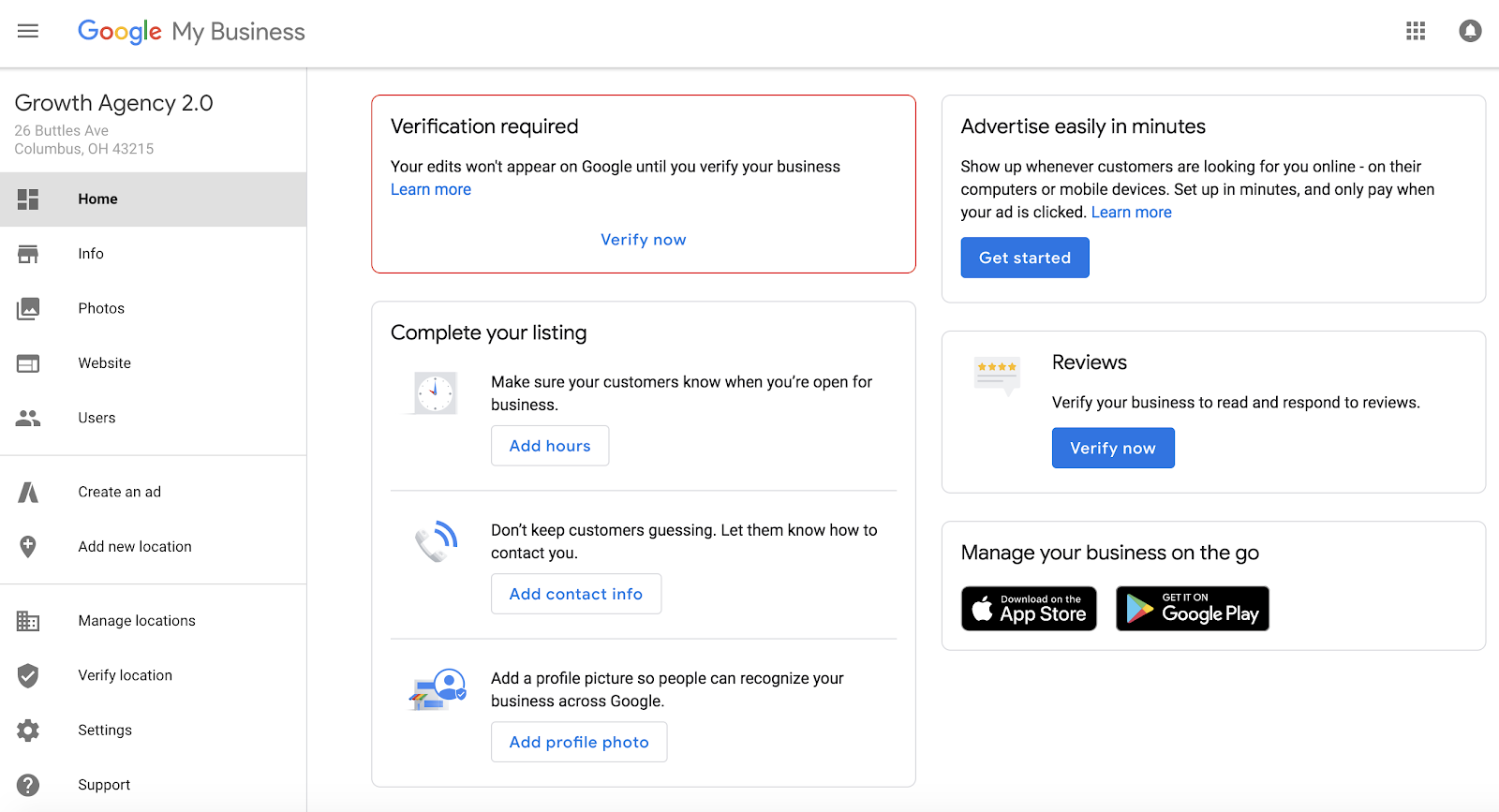
After your company information is added, you can access your dashboard to start personalizing your listing.

pasted image 0 225

But don’t stop there. You’re not done!

Most companies make this mistake. They claim their Google My Business account, add the bare minimum details, and abandon it.

They’re leaving money on the table.

You need to optimize it.

Claiming the account is just the start. There are so many ways you can use it.

When leveraged correctly, Google My Business can lead to increased sales and improved customer loyalty.

How to Claim a Business on Google

Claiming your business on Google is one of the easiest ways to reach new customers–but you need to make sure you follow some best practices in order to get the most out of your listing.

1. Ensure Your Information Is Accurate, Comprehensive, and Up-to-Date

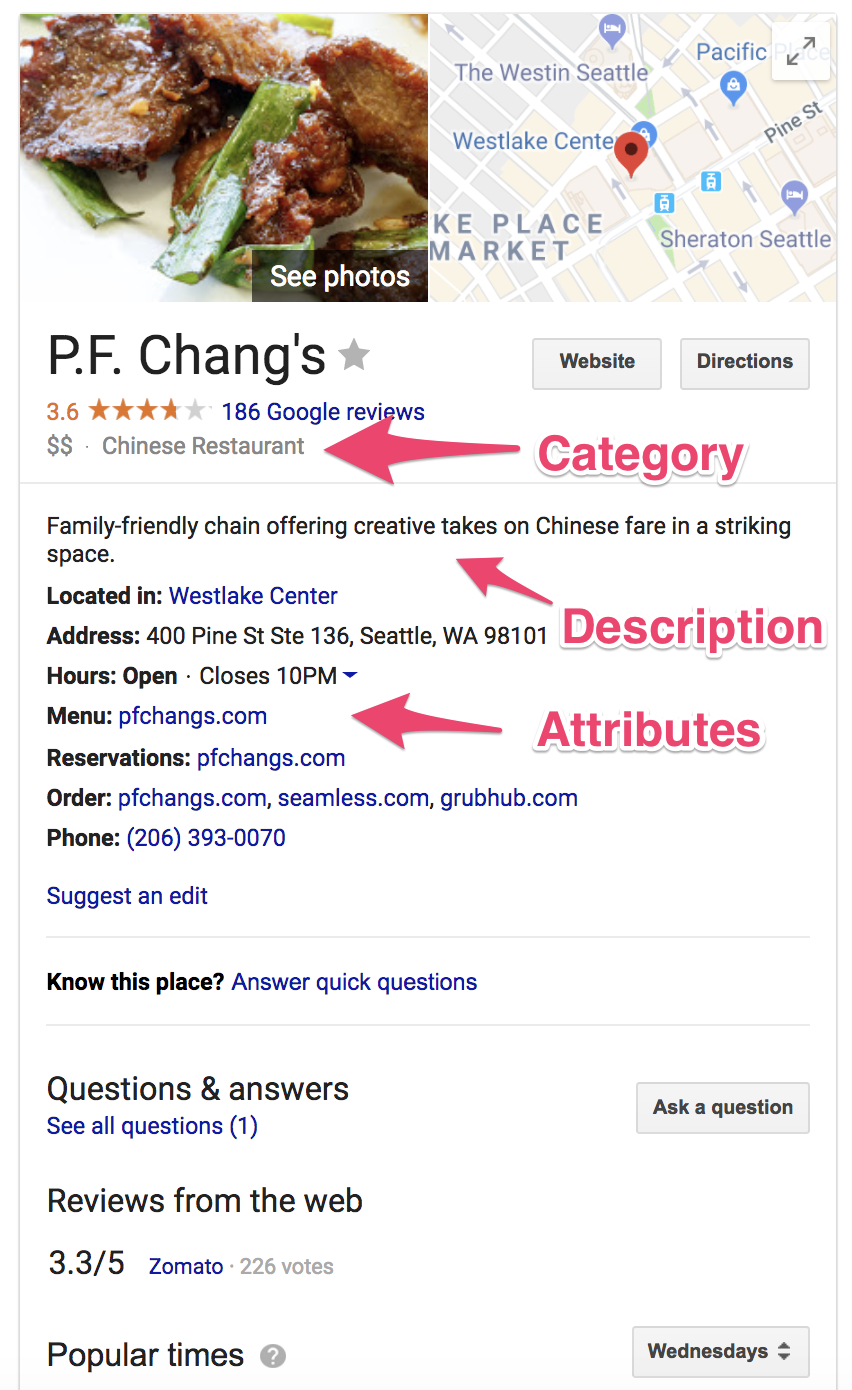
There are many different parts of your Google My Business listing, so let’s start with your core business information:

  • Name
  • Address
  • Phone Number
  • Website
  • Description
  • Category
  • Attributes

Google My Business requests your name, address and phone number (otherwise known as NAP) to begin the listing.

This information will be indexed by Google Search, Maps and Google+, providing a foundation for your local SEO.

Your information should be consistent with what is currently listed on your website.

Actually, you need to ensure the information is exactly the same.

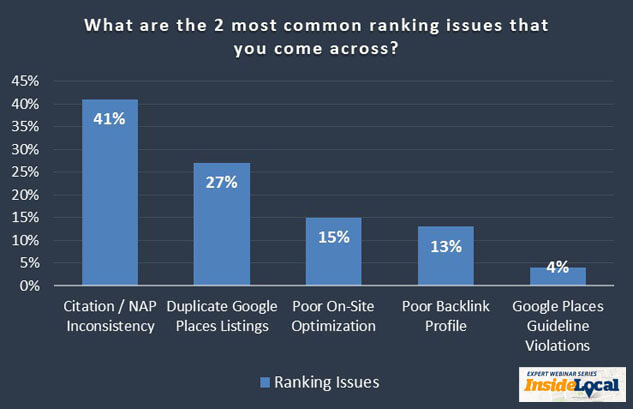
Inconsistencies in the information will negatively impact your search ranking.

bar graph showing common ranking issues that may come up when you claim a business on Google

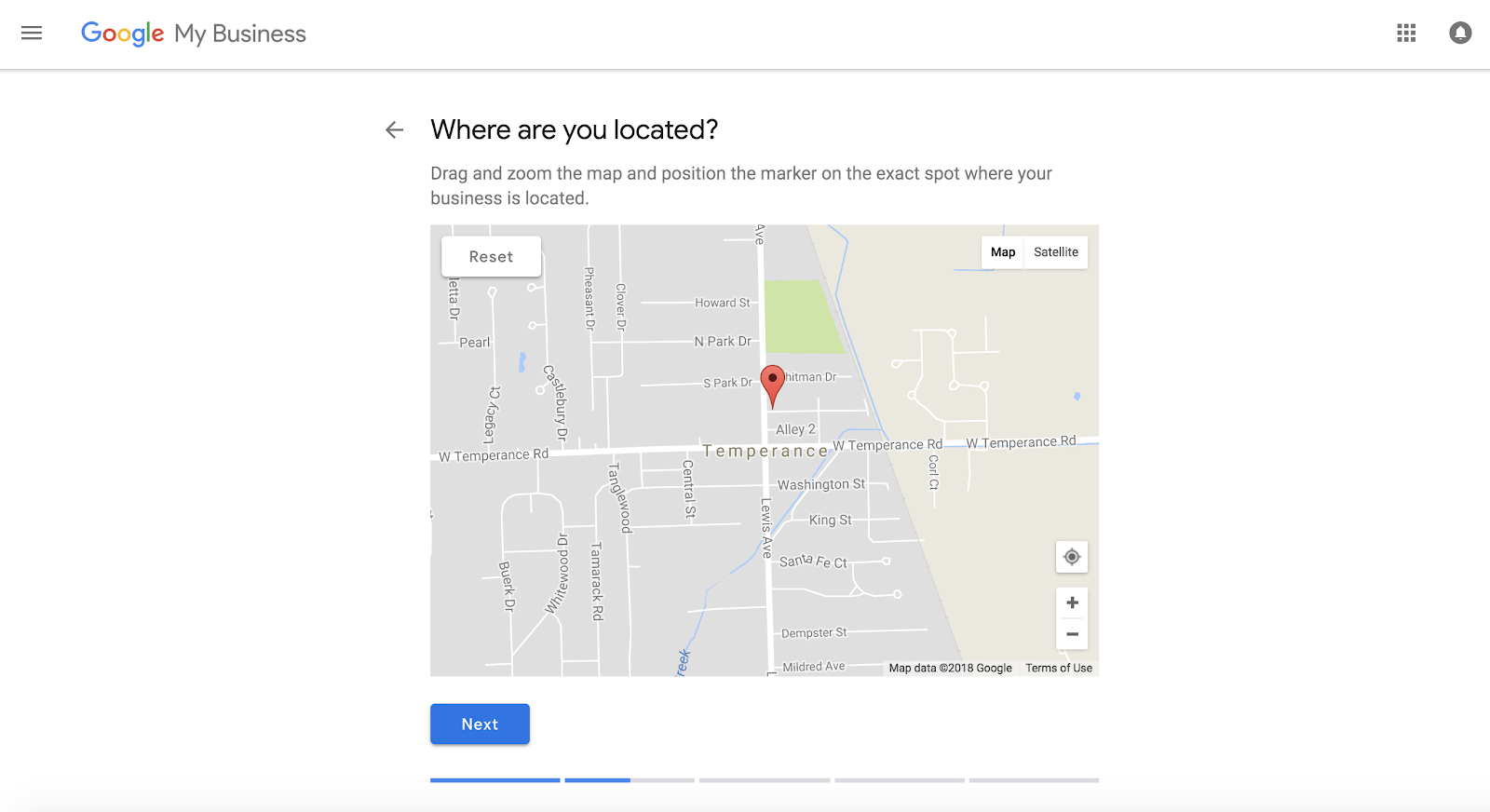
When inputting your address, make sure it matches with the correct coordinates on the map and include the same zip code (5-digit vs. hyphenated 9-digit code) provided on your website.

Additionally, it’s better to have a local number as opposed to a national or call center option.

Using Google Maps to optimize your Google  My Business page.

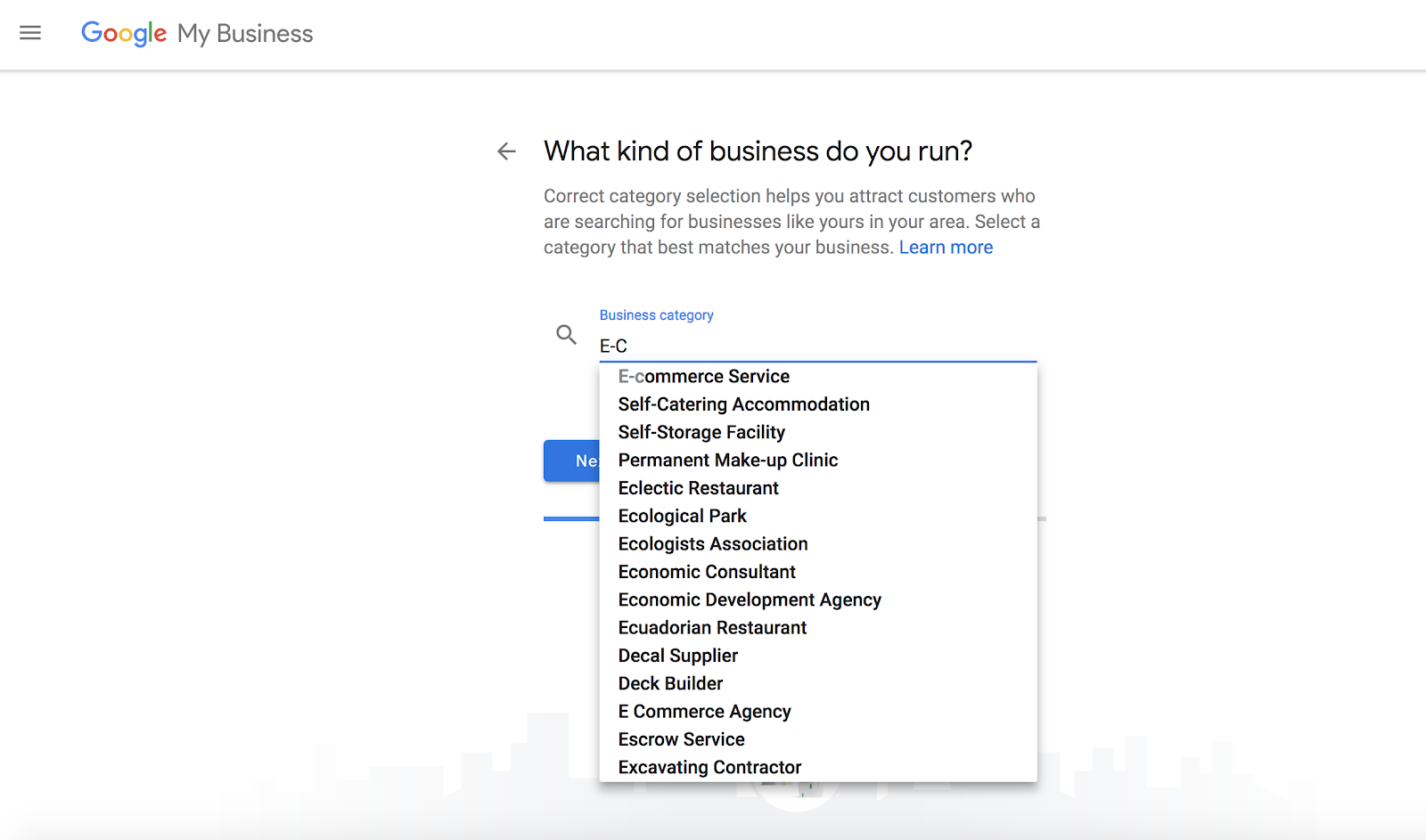
After you’ve provided NAP, you can focus on two very important pieces of your listing: your business category and your company attributes.

These areas require you to be specific in regards to what type of business you operate.

You should consider your keyword strategy when adding your business category and attributes.

Be careful, though.

I don’t recommend you stuff your listing with keywords.

Google My Business prohibits that type of behavior. In 2016, they eliminated users’ ability to edit GMB descriptions and introduced attributes to provide a more accurate listing.

example of introducing attributes in your Google My Business account.

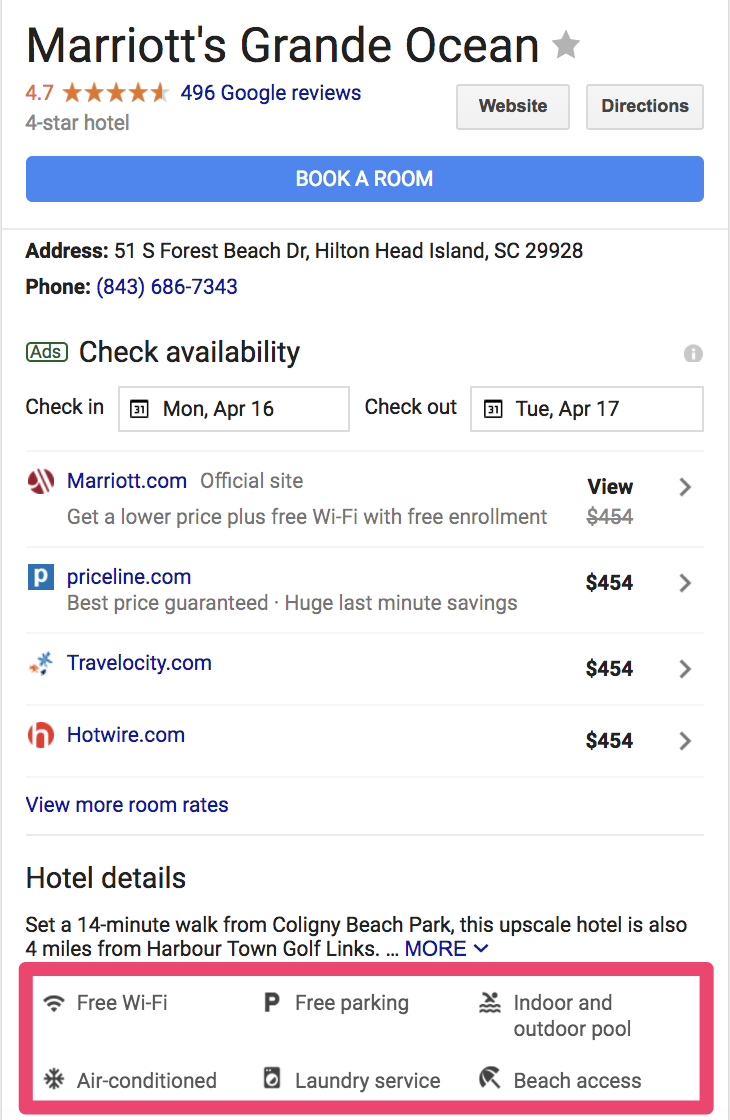
While your category is meant to be very specific, attributes can paint a clearer picture of your business and the experience you provide.

It is beneficial to browse the complete list of 2,395 business categories to make sure you’re capturing the correct classification of your company.

Remember to be specific. Don’t put “Cosmetology” if you run a “Nail Salon.”

Example business categories for your google my business account

Attributes allow business owners to expandtheir business’ capabilities in ways that might not be apparent from the business category they have selected.

Does your restaurant have a patio or bar seating? Is it kid-friendly?

What are the amenities in your apartment complex? Tennis courts? Indoor pool?

Does your coffee shop offer free wifi? Public restrooms?

These attributes can be added to answer questions your customers will likely have and provide a better understanding of the business’ capabilities and offerings.

example attributes for your google my business account

After your basic information is complete, you can move on and personalize the visual aspect of your listing.

The first thing your customers will notice when searching for your business?

Your profile picture.

No listing is complete without a photo.

A Synup study found, “Listings with photos are 2x as likely to be considered reputable and get 35% more clicks.”

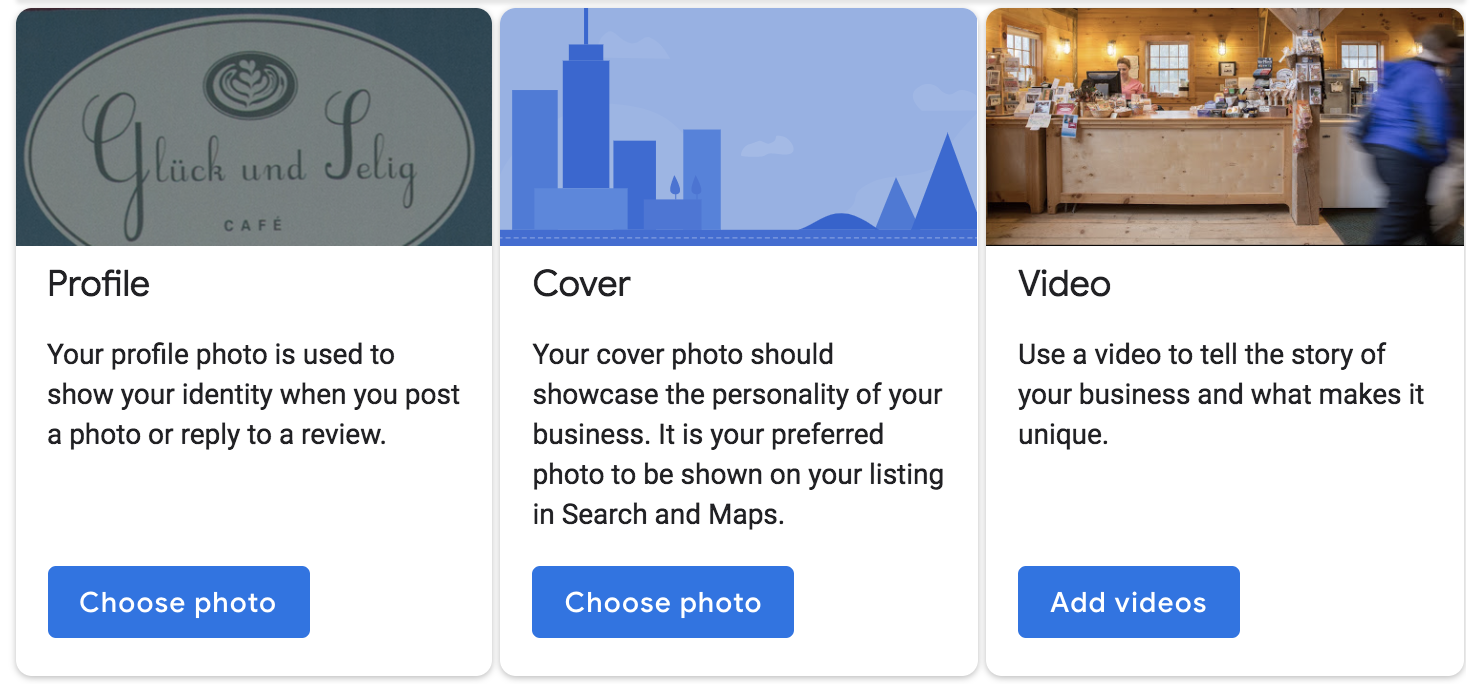
Google My Business encourages you to upload a profile photo, cover photo, and video to showcase your business. Each has their own purpose shown below:

Example profile photos for your google my business account

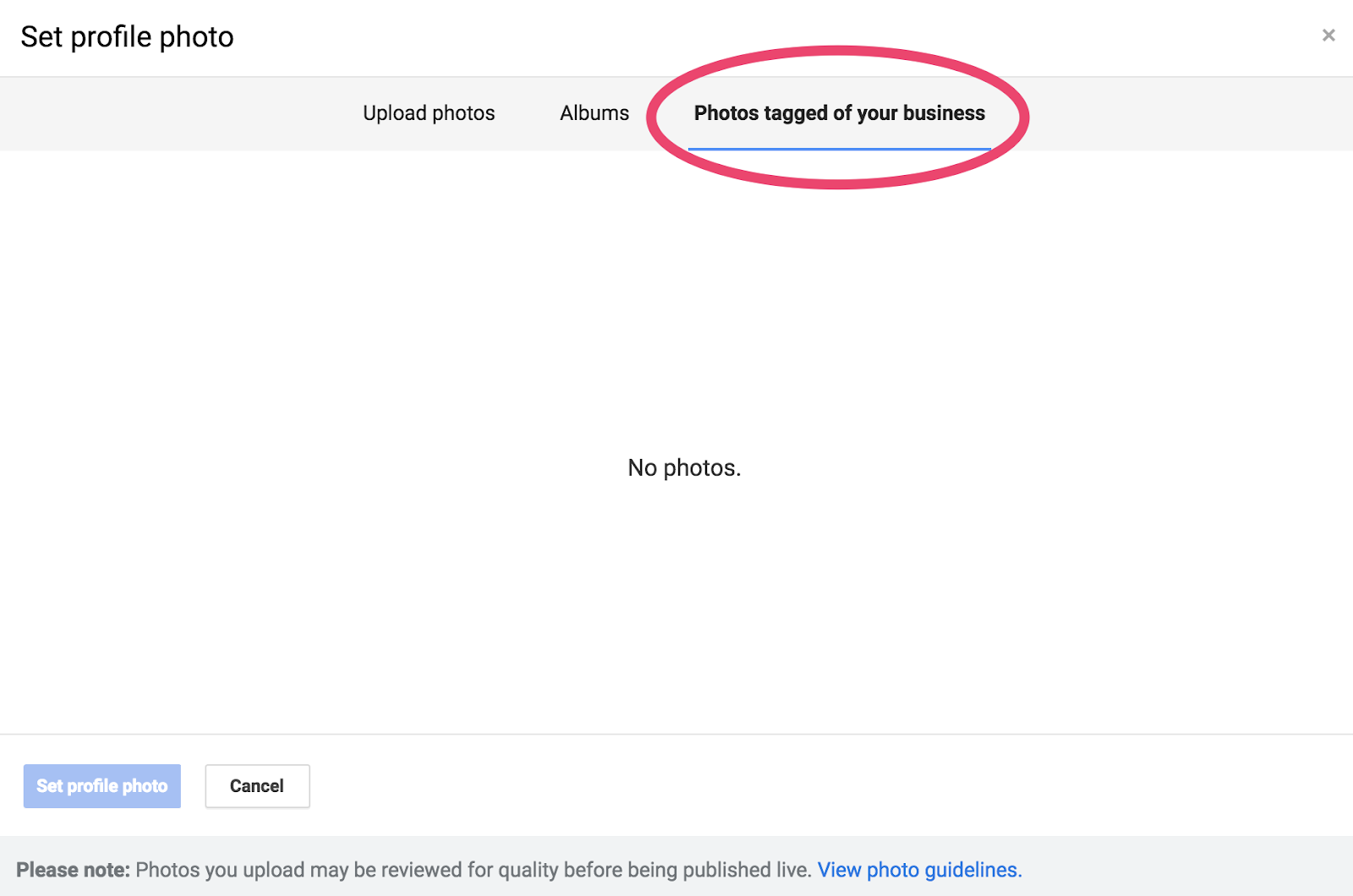
Not only can you upload your own high-quality content, but you can also feature user-generated content too.

Someone snapped and posted a great pic of your flagship entrée?

Use it as your profile picture by selecting it under the “Photos tagged of your business” option.

"photo tagged of your business" to add to your Google My Business profile.

Encouraging your customers to add photos of their interactions with your business can lead to a plentiful gallery of user-generated content on your listing.

But they don’t have to just share their experiences in photos.

They can write about their experience too.

2. Ask for Reviews (and Respond to Them)

Reviews are the lifeblood of local search.

It’s a really simple equation:

Good reviews = sales. More good reviews = more sales.

Bad reviews can also present you with an opportunity.

Almost everyone likes a second opinion. That’s why 90% of people read reviews before purchasing.

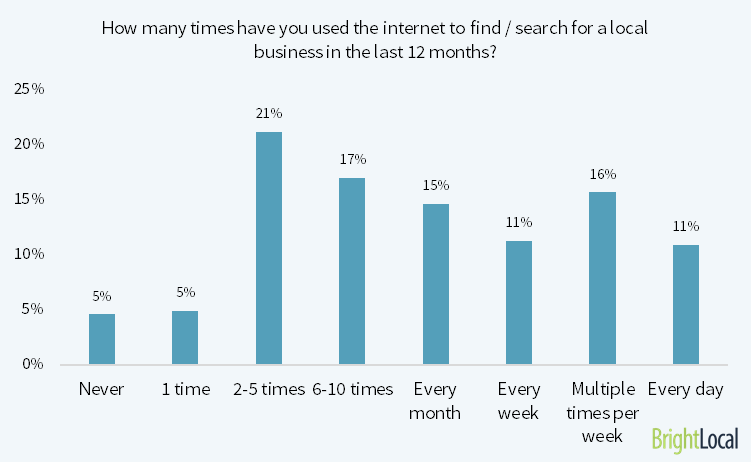
The frequency of searches for reviews is increasing too. A 2016 study found, “53% of consumers search for local businesses at least one time per month.”

That’s a 10% increase over 2015.

bar graph showing how many people use the internet to find local businesses, emphasizing the importance of your Google My Business account/page

How do you get reviews from your customers, though?

It’s simple. You ask them!

Some sites discourage this, but Google My Business actively encourages it. You can send a link to your customers in a few easy steps.

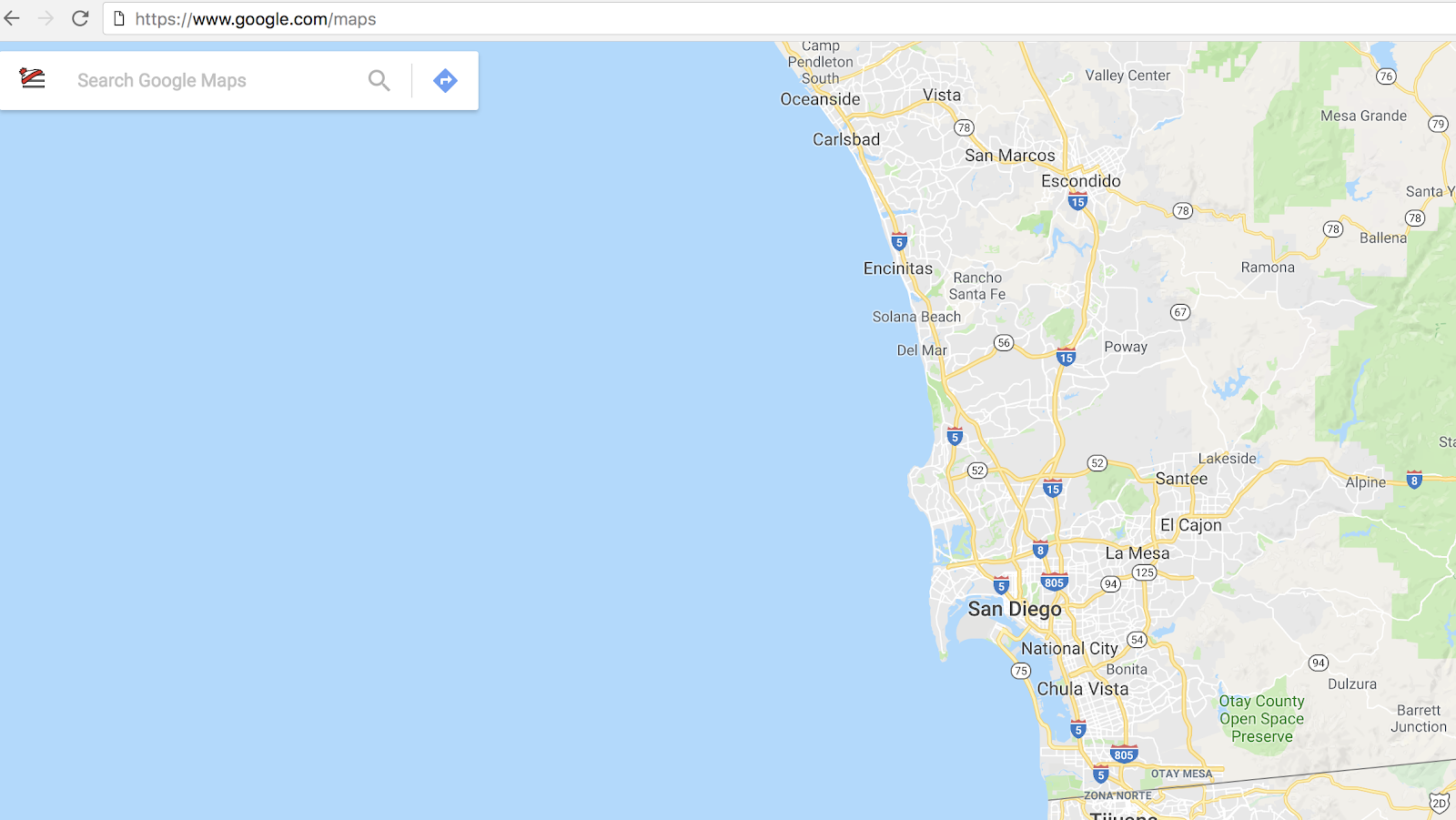
Open www.google.com/maps in a new web browser.

How to claim a business on Google using google maps

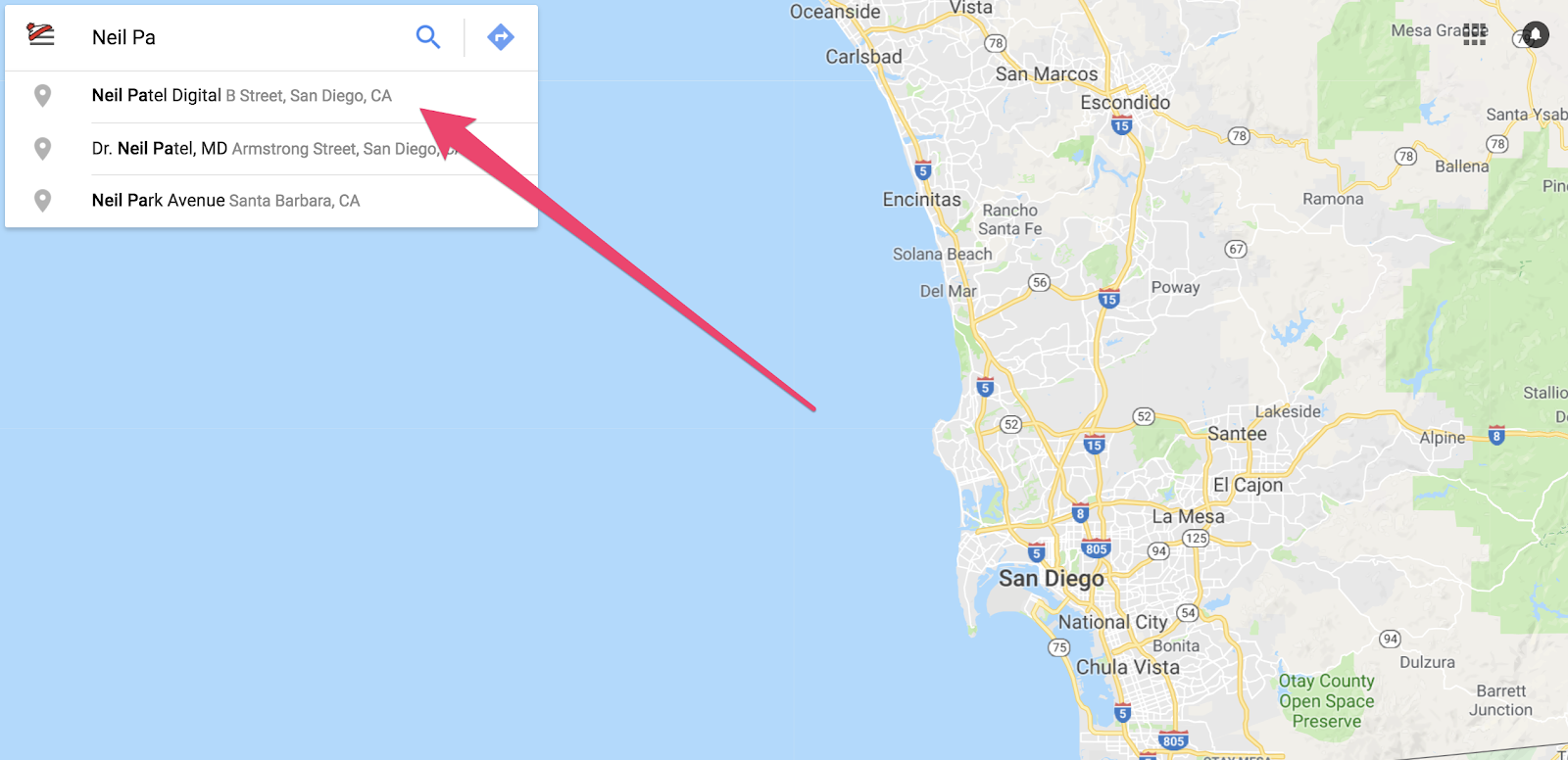
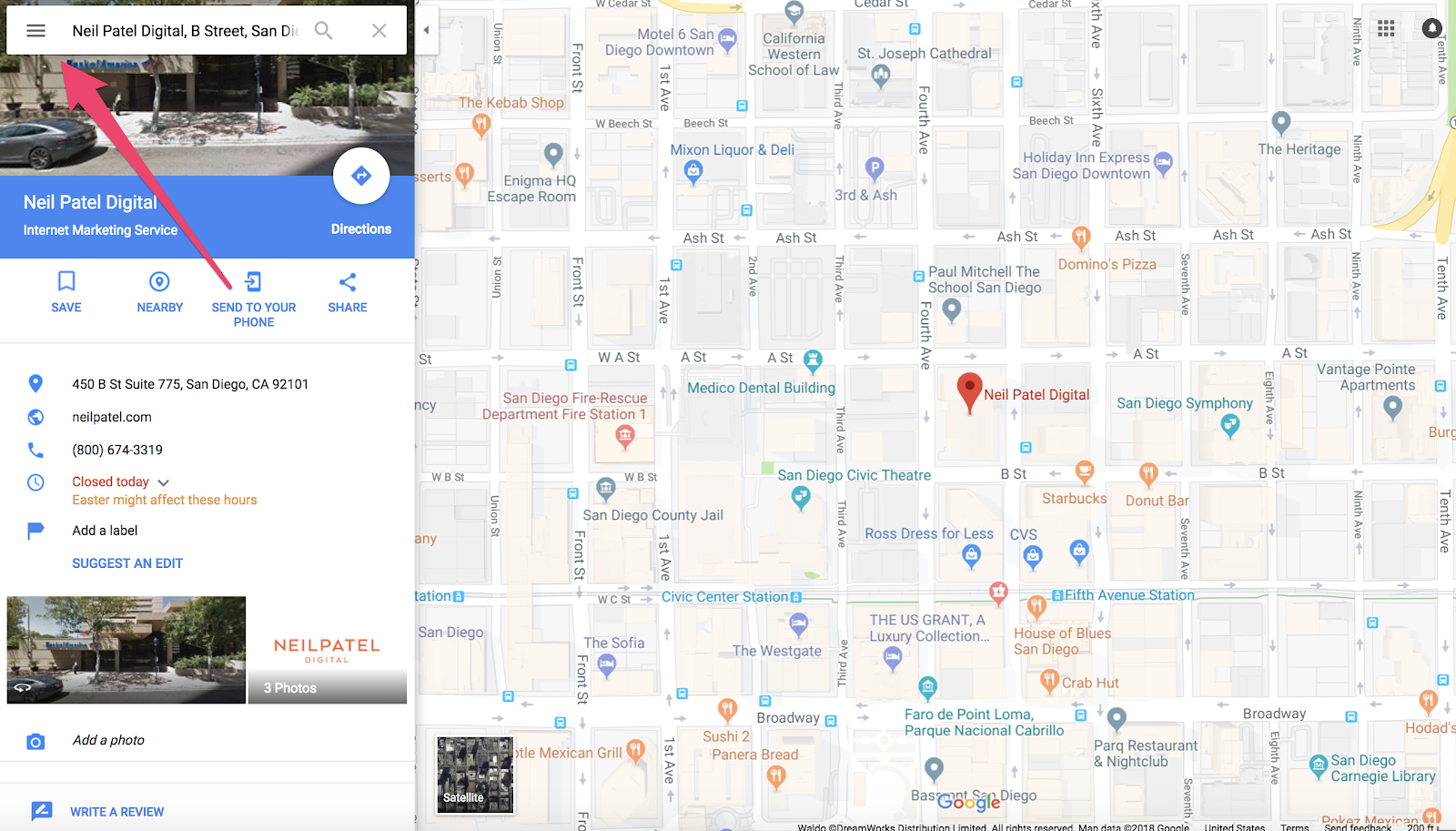
In the top left corner, search the name of your company. (This is also a great opportunity to check if your address is correct on your Google My Business dashboard.)

How to claim a business on Google using google maps (step 2)

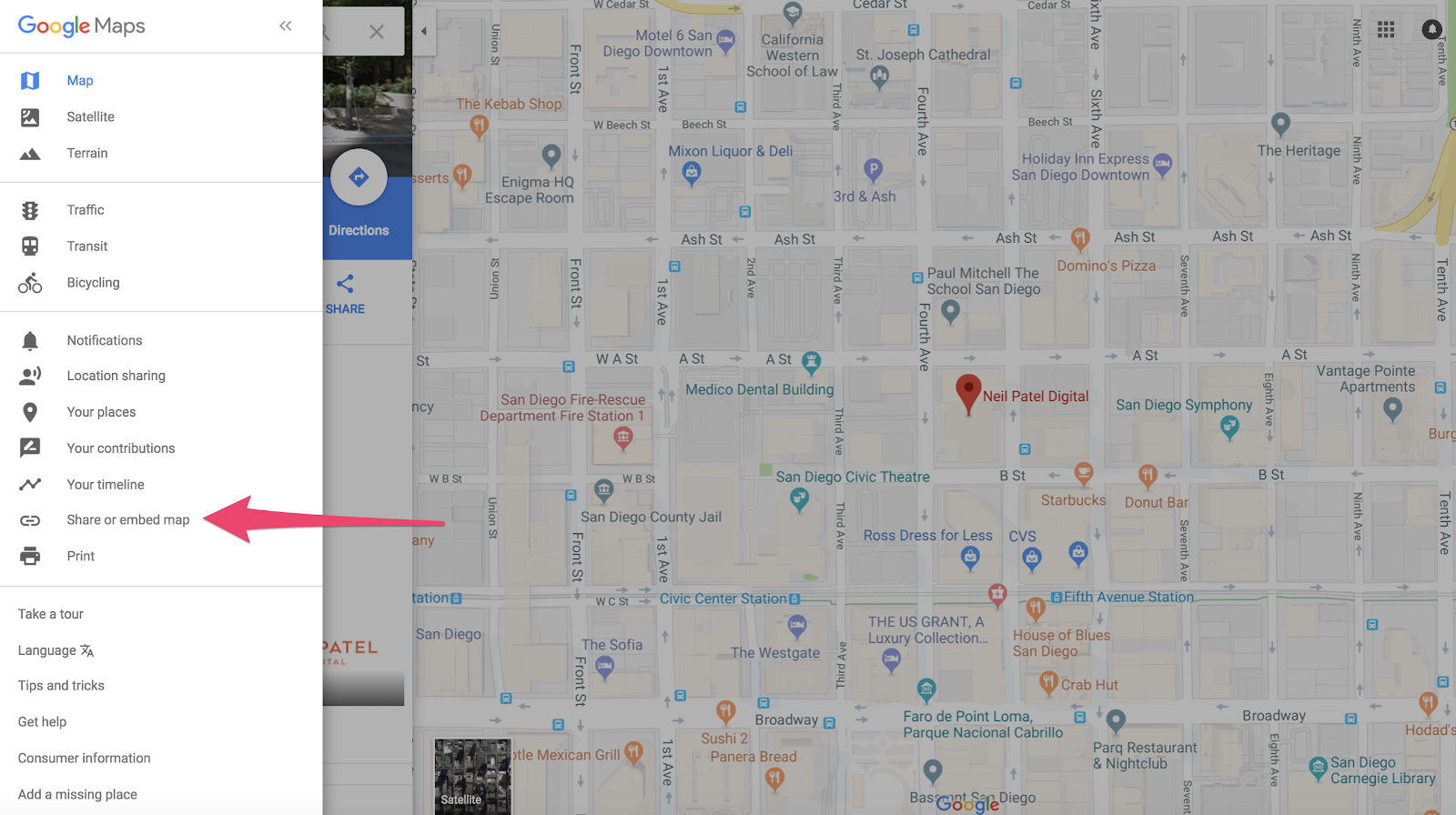
After selecting your business, click the menu option in the top-left corner.

"menu option" (step 3) businesses on Google My Business

Click “Share or Embed Map.”

share/imbed map stage of claiming a business on Google

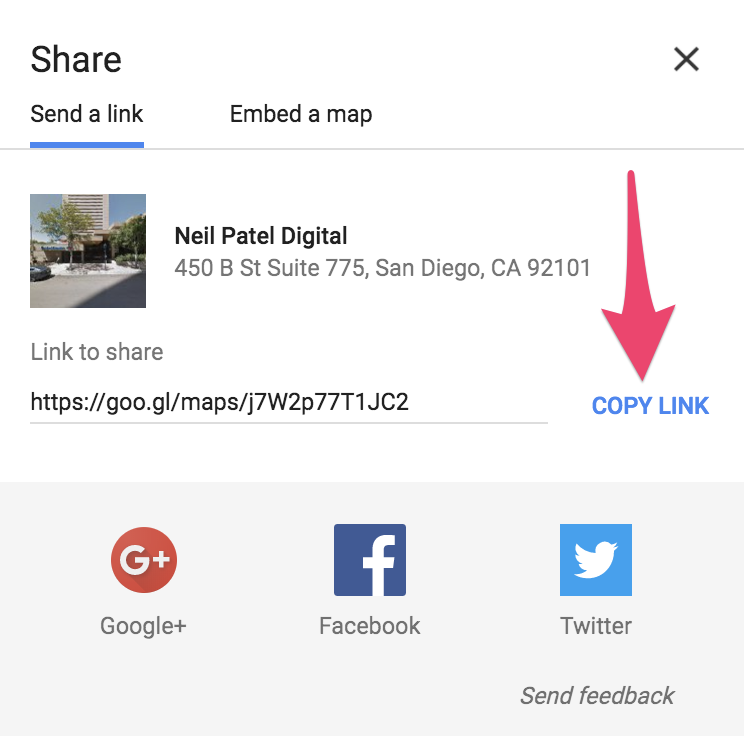
Click “Copy Link.”

how to claim a business on google - "copy link"

Share with all your previous customers by sending the link via email or text.

After you start to gather reviews on your listing, you need to respond to them.

All of them.

Every last one of them.

The good. The bad. The neutral.

Take time to write a message to each reviewer using the Google My Business dashboard.

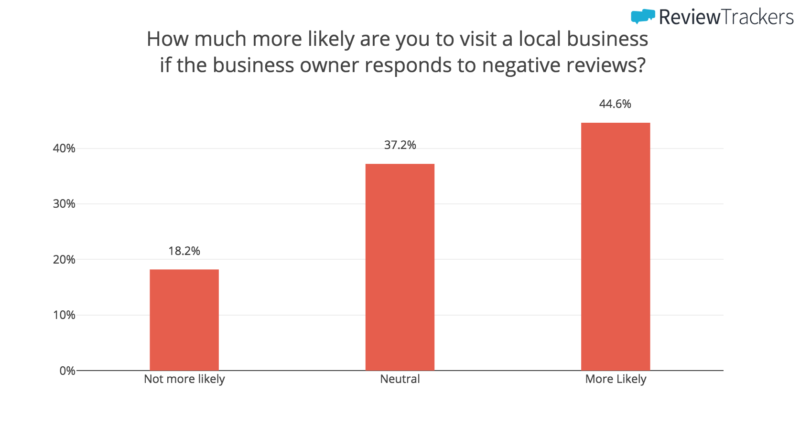
53% of people expect responses to negative reviews.

bargraph showing how much more likely you are to visit a local business if the owner responds badly to negative reviews on their Google My Business account

If your reviews are arriving with a perfect 5-star rating, this is your opportunity to turn a customer into a passionate supporter of your business.

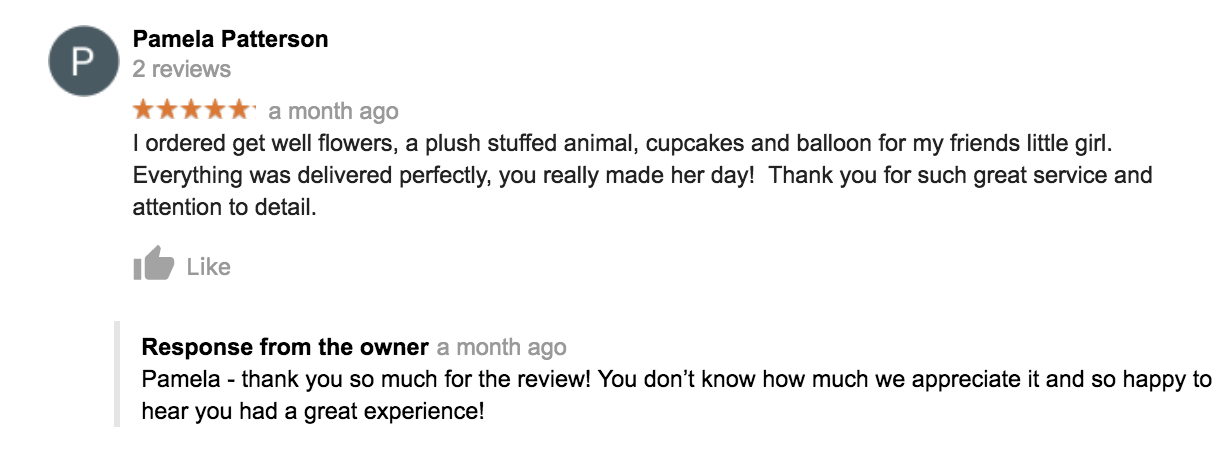
Whether you’re a national company or a local flower shop (as shown below), it is important to reach out and acknowledge the experiences your customers have with your brand.

example review to use in your Google My Business Account

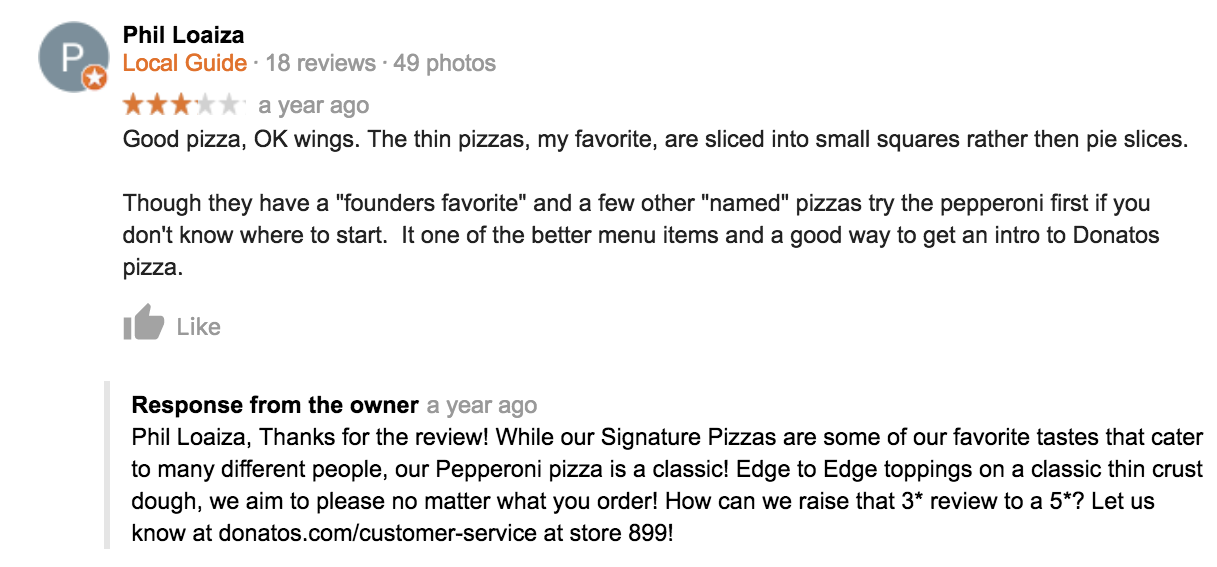
If things are bad, this is your opportunity to make things right. Donatos Pizza monitored their reviews in Columbus, Ohio and leaped at the chance to enhance a customer’s experience.

Upon receiving a neutral 3-star review, the owner actively reached out to see how he could “raise that 3-star review to a 5-star review.”

example 2 of responding to bad reviews on their Google My Business account

Now, that’s customer service.

3. Speak Directly to Your Customers through Google My Business Messages

What if your customers can’t find something on your listing or website?

They aregoing to want to contact you. But how?

You might be thinking, “Simple. My phone number is included in my Google My Business listing.”

But actually, sometimes your customers don’t want to callyou.

In fact, a study found “90% of business leads would rather receive a text message than a phone call.”

That’s why mobile messaging can be a highly effective part of your marketing strategy.

It can lead to increased customer engagement and can help close the sale.

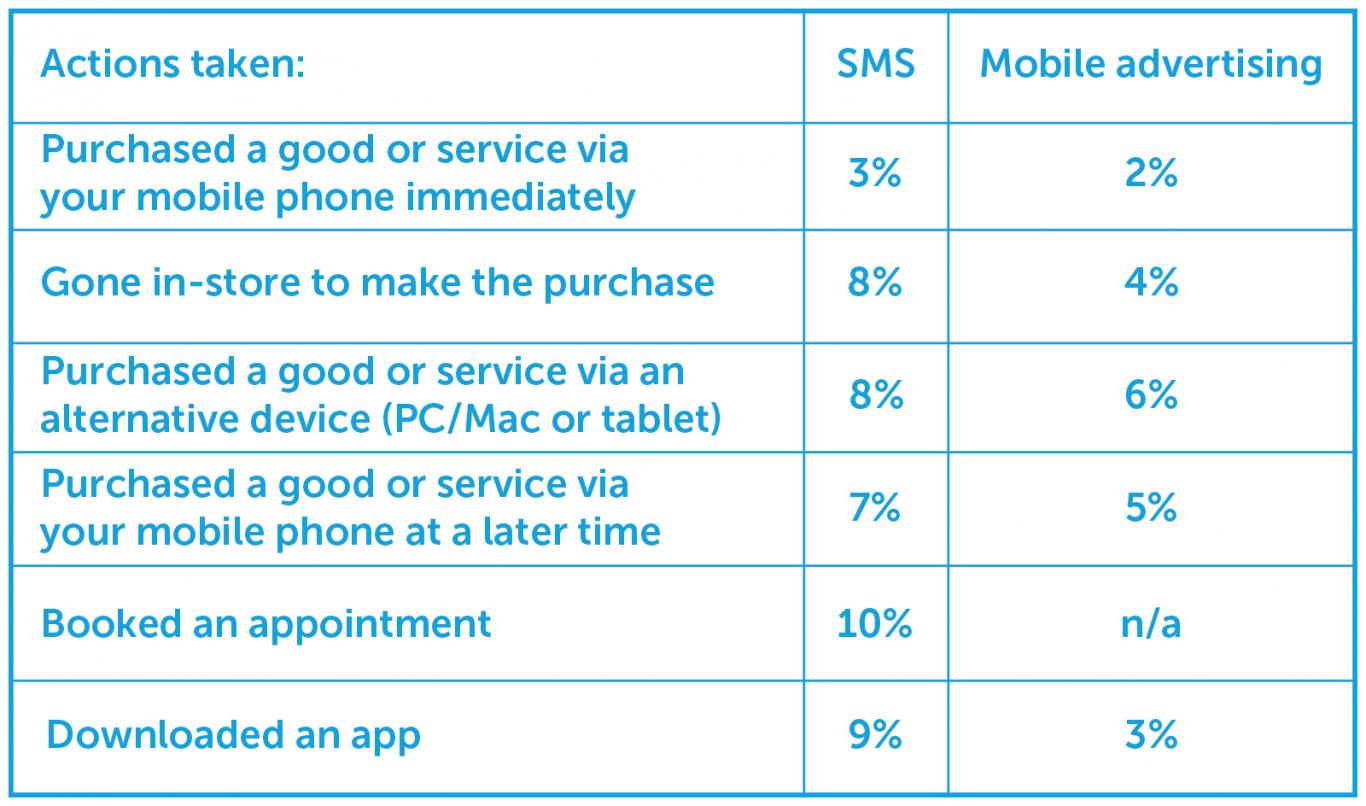
Studies show direct SMS messaging even has a higher conversion rate than mobile advertising.

pasted image 0 248

That’s why Google introduced its messaging feature as a solution.

Now, you can activate this feature and communicate one-on-one with your customers, answering questions, fielding comments, and increasing loyalty.

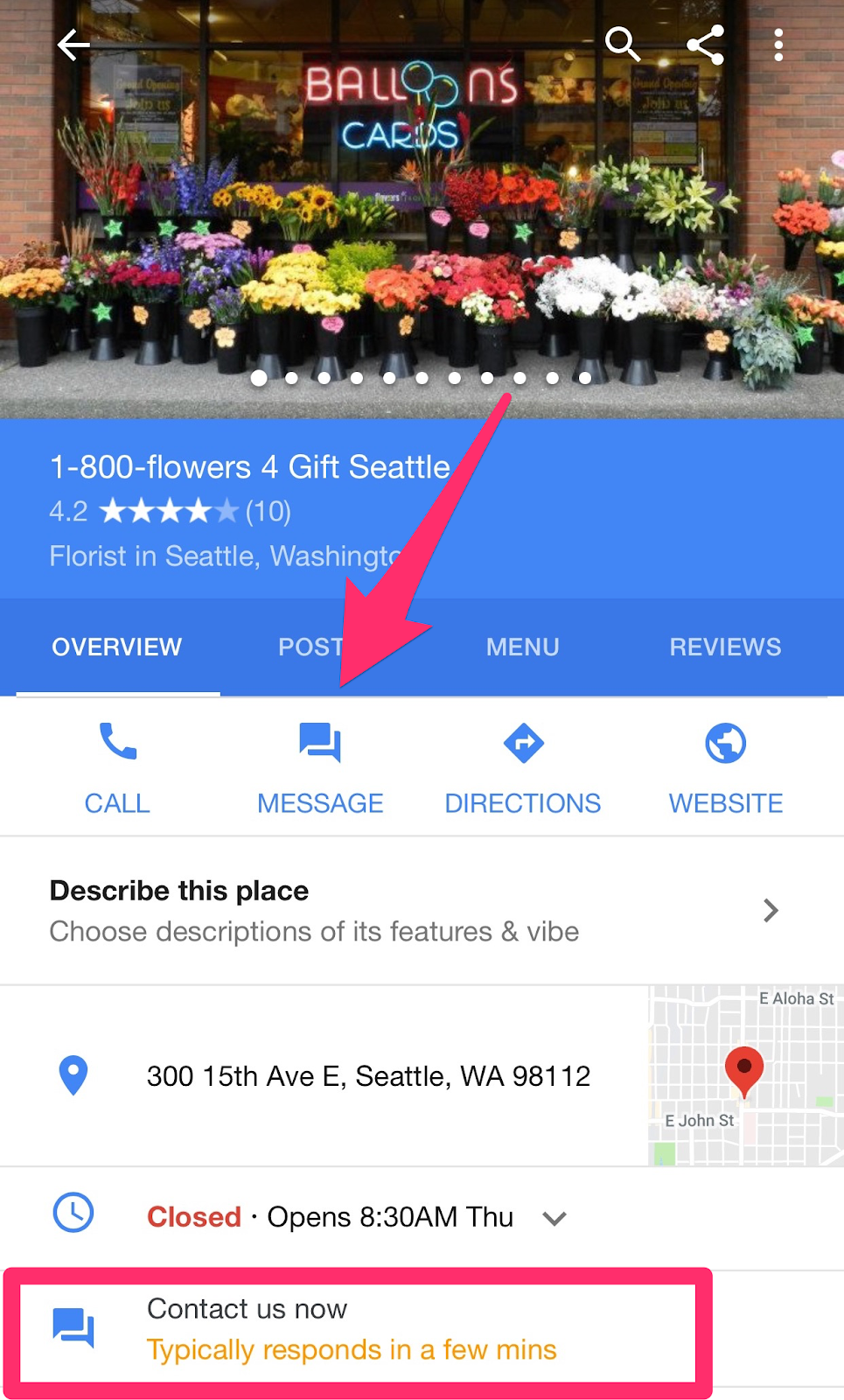
By activating the Google My Business messaging feature, you unlock the option for customers to ask you a question via SMS text straight from your GMB listing.

with the messaging feature on Google my Business, you can exchange texts sent straight from your listing

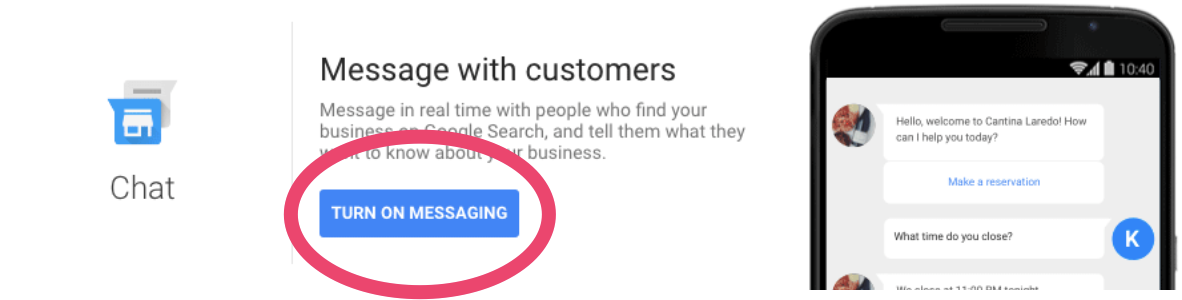
You can turn this feature on by clicking the “Turn On Messaging” button in your Google My Business dashboard.

how to claim a business on google and use the messaging feature

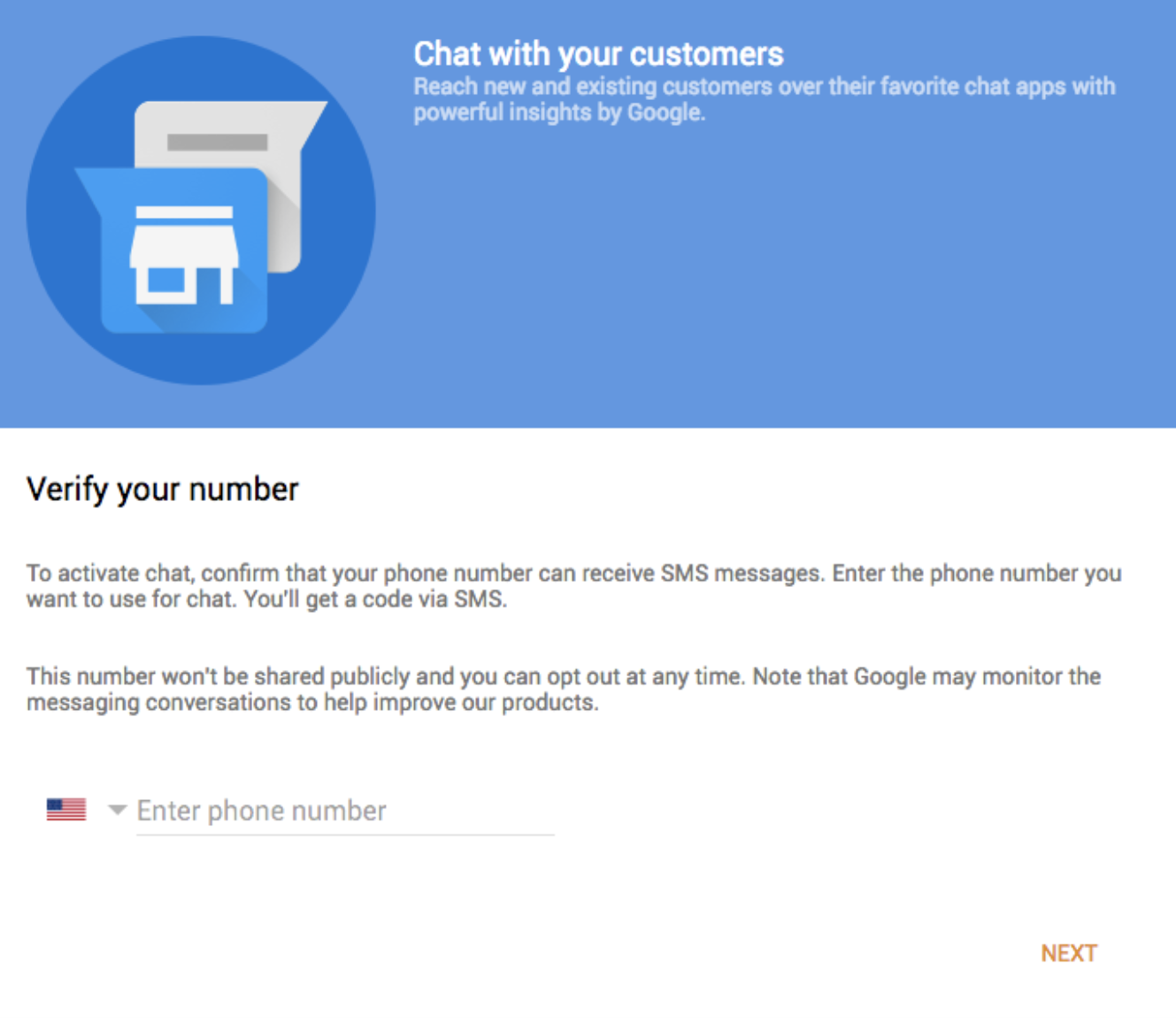
Next, you will be asked to input a phone number you’ll want to use to chat.

It’s important to note that this phone number will not be shared publicly since your customers will be clicking the “Message” button.

If you don’t want to use a personal number, there are a number of alternative options.

Once you add your number, you will be required to verify it with a code you receive on your phone.

Chat with your customers via your Google My Business page

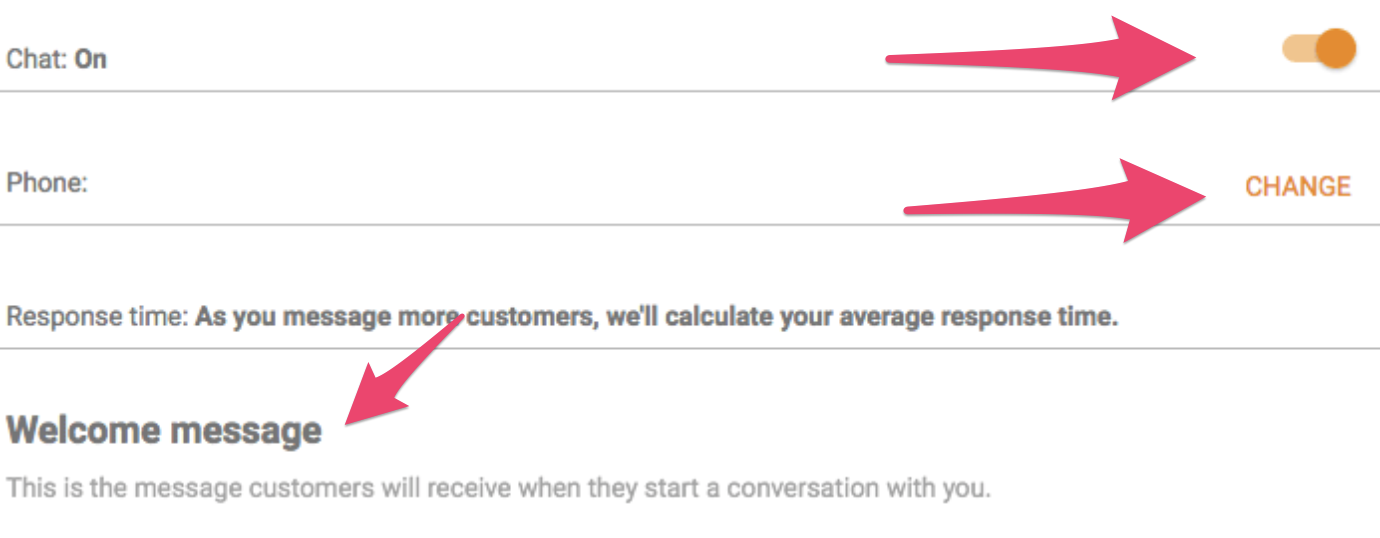
You’ll have complete control to turn this feature on and off and can update the number as needed.

Google also calculates a response time for you that will be shown on your listing. This is averaged from the length of time it takes you to respond to inquiries.

Finally, you can add a “Welcome Message.” This is what users will receive when they start a message to you.

A sample message could read, “Thank you for contacting us. We appreciate the ability to serve you and will respond to your request momentarily.”

Settings in your Google My Business Account

Now that the feature is activated and ready to go, you will receive an SMS text message any time someone asks a question via the message button on your listing.

You can then directly respond in the form of a text message.

This feature fosters a closer connection between your business and customers. Your business can be perceived as more transparent, which can lead to increased credibility and sales.

But this service is only effective in sharing information with customers who activelyinquire.

Google also created an option to share news and updates right on your listing for those who may be passivelybrowsing.

Let’s take a look at how Google Posts can optimize your listing.

4. Add Posts to Share Business Updates

Now that I’ve shown you how to manage user-generated content on your Google My Business listing, let’s focus on the content you create.

This is where Google Posts come in.

Google opened its post feature it to all businesses in 2017. This feature allows you to share content about your business in a variety of ways. Some examples include:

  • Highlighting a new line of fall clothing with various product images
  • Showcasing an upcoming event you are trying to promote
  • Using a gif to relive a game-winning shot with your audience
  • Sharing a text update on a recent company advancement

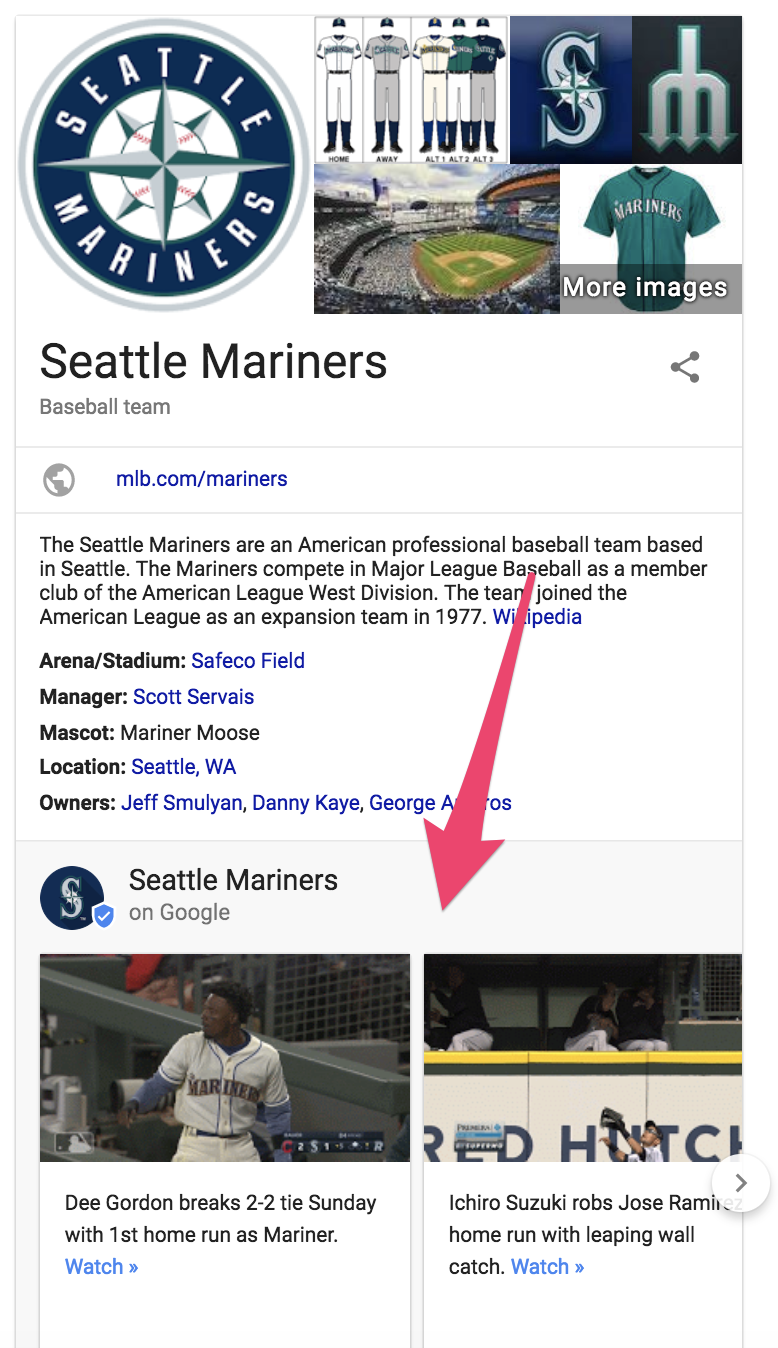
The Seattle Mariners are a great example of how a brand is using Google Posts to promote highlights of their games.

google my business idea - business page for the Seattle Mariners

Google Posts allows you to add text, photos, gifs, and even call-to-action buttons including:

  • Buy
  • Sign up
  • Learn more
  • Reserve
  • Get Offer

You can begin creating posts after you have verified your Google My Business account. Once the verification is complete, your “Posts” option will appear on the left-hand menu.

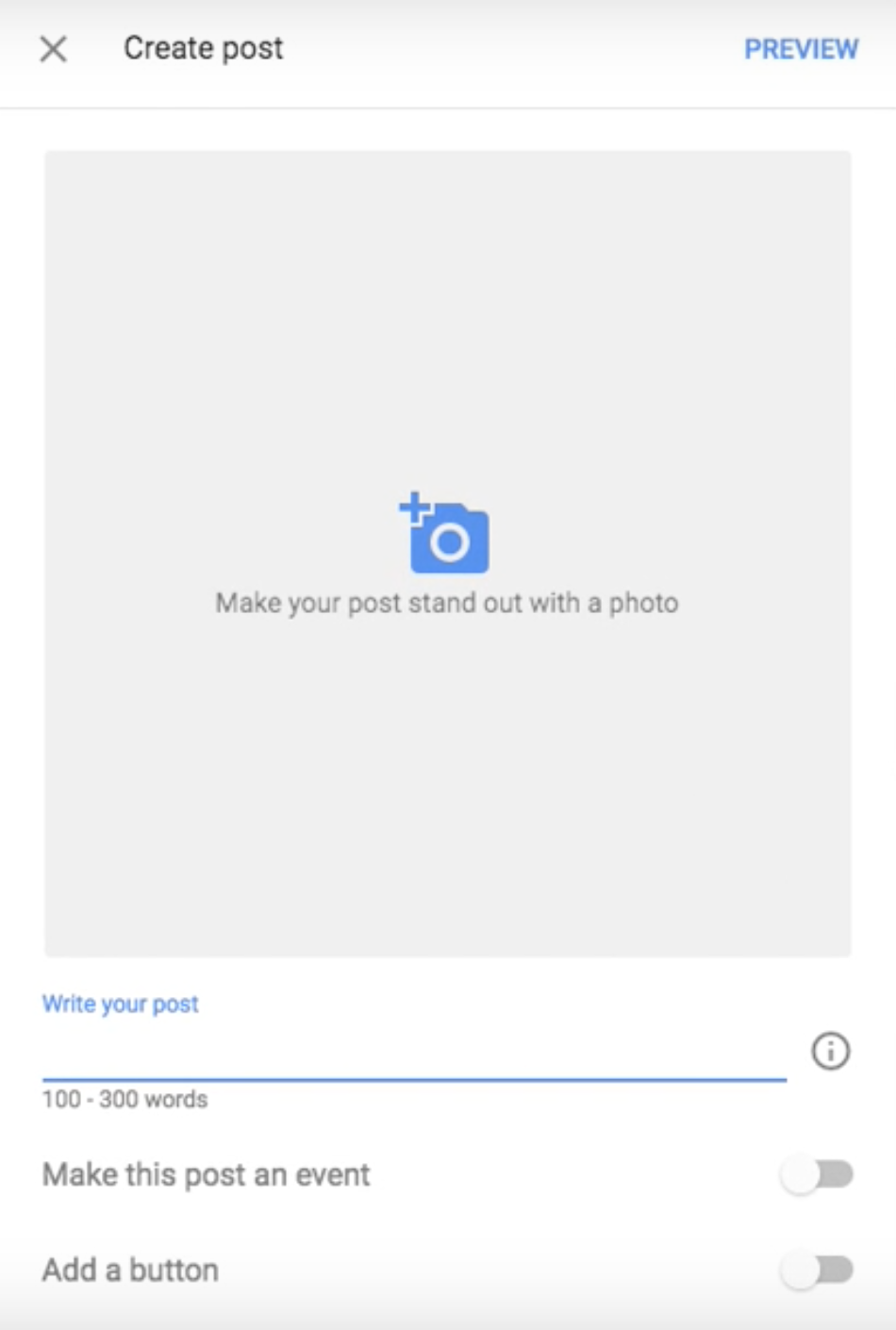
After clicking “create post,” you can add text and visuals.

create posts for your Google My Business account

When creating your post, you should consider:

  • Google allows a maximum of 300 words per single post but only 60-70 characters will show up on the mobile and desktop display if you use a CTA button.
  • The entire text post will show on mobile if no CTA button is used.
  • The image you select should be a high-quality representation of your business. Google uses a 4:3 ratio, so the minimum dimension required is 400×300 pixels.
  • Speak directly to your audience. Don’t use industry jargon, but rather focus on sharing content that will move your audience to engage with the post.
  • Google provides insights (more on that in a bit) and engagement metrics for each post, but it’s also a good idea to set up UTM parameters for links as well.

After clicking “publish,” you can check out your post on your listing.

Now, it is ready and waiting for view by all those searching for your business. Make sure you review it within a week of publishing it since Google Posts disappear in a week.

example of google my business account

Google Posts disappear after seven days unless you set a shorter time frame. That’s why it’s important to be timely and hyper-specific when crafting your posts.

Consider having a strategy in place and drafting an editorial calendar designated for your Google Post content.

That way, you can better integrate posts into your marketing plan and examine their impact on your business.

5. Track Customer Paths Through Google My Business Insights

As with any marketing tactic, it’s important to measure the impact of your Google My Business listing.

Google has built-in tools to help with that.

Google My Business Insights can tell you:

  • How customers are finding your business (direct vs. discovery searches)
  • Where on Google your customers are finding your listing (Search vs. Maps)
  • The actions your customers are taking on your listing (Visiting your site, clicking on directions, browsing the photo gallery, calling you)
  • Areas that your customers are living (based on direction queries)
  • Total phone calls and time when customers are calling

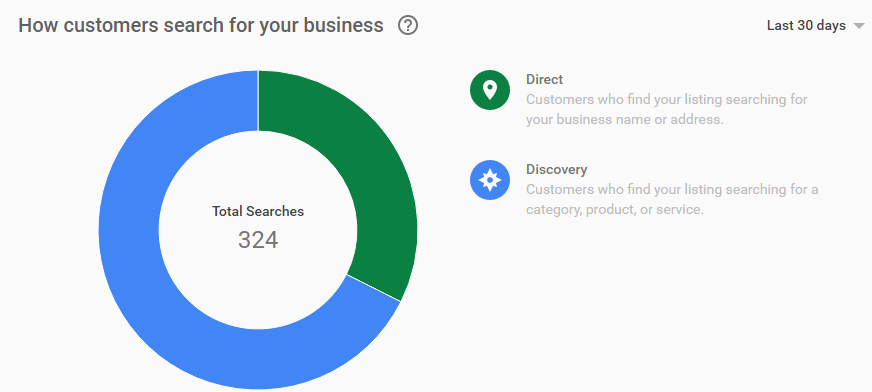
Let’s start with the most important question: How your customers are finding you?

They are using two types of searches: direct and discovery.

Direct searches show that your customers know about your company and are using your business name or address to find you.

Discovery searches involve searching for the business type or category—not necessarily the business’ name. This is common for people who aren’t familiar with your company.

pie chart of how customers reach businesses using google my business

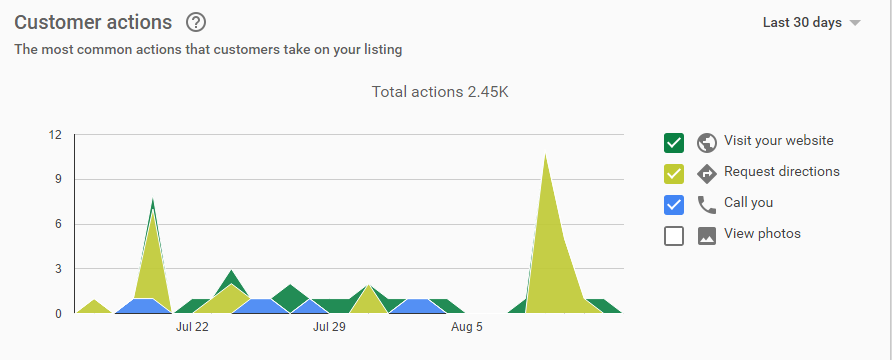
Once you figure out how they are finding your listing, you’ll want to understand what they are doing with it.

Are they visiting your website?

Requesting directions?

Calling you?

Browsing through your photos?

While it is important to set up UTM parameters for links, Google My Business also provides an in-depth look at your customers’ actions in your listing.

Google My Business tracks user actions in their insights dashboard, which can help you understand what your customers find valuable in your listing.

Chart showing customer actions. Google my business tracks your data for you.

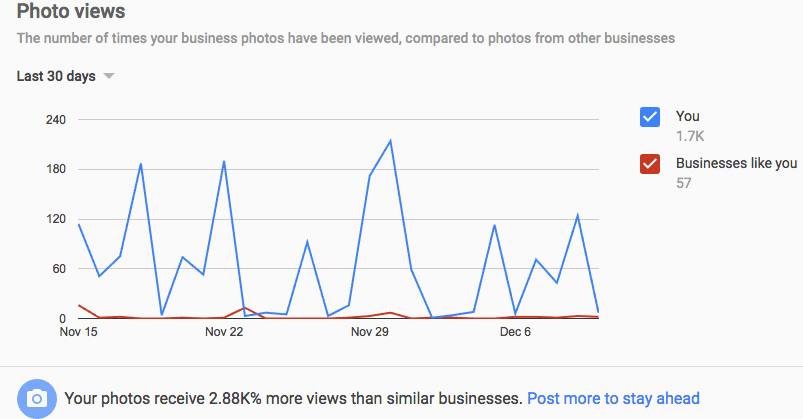
Google also enables you to benchmark your user-generated content (specifically your photo gallery) against your competitors.

You can analyze your gallery’s photo views and compare them to other businesses similar to yours.

tracking photos used in google my business

All of this information can be used to track your customers’ conversion path and provide a comprehensive understanding of your customers’ actions prior to reaching your website.

Conclusion

There are many ways customers can find your business. Google My Business positions your important business information in front of the eyes of potential customers who are looking for your product, service, or experience.

GMB helps with local SEO, offers a chance to engage with your customers via reviews or posts, and provides useful insights on your customers’ purchasing paths. On top of everything else, it is a free and valuable tool.

Not claiming and optimizing your Google My Business listing is like saying, “No thanks” to someone offering you a free digital sign for your restaurant right off a highway exit.

If you want help setting up your Google My Business account, or with your digital strategy in general, we are here for you!

How will you optimize your Google My Business listing to generate additional revenue for your business?

Sturm Ruger's stock turns lower, falls 1.0% after rallying as much as 2.3% earlier

This is a Real-time headline. These are breaking news, delivered the minute it happens, delivered ticker-tape style. Visit www.marketwatch.com or the quote page for more information about this breaking news.

The post Sturm Ruger’s stock turns lower, falls 1.0% after rallying as much as 2.3% earlier appeared first on WE TEACH MONEY LIFE SELF DEFENSE WITH FINANCIAL GOALS IN MIND.

The post Sturm Ruger’s stock turns lower, falls 1.0% after rallying as much as 2.3% earlier appeared first on Buy It At A Bargain – Deals And Reviews.