There are some obvious benefits of working from home. There are also some not so obvious disadvantages. The key is make the most of the benefits of working from home and figure out how to work around the disadvantages.
How to Ensure the Benefits of Working from Home Outweigh the Disadvantages
Many do not realize there are ways to fund your work at home business without using your personal credit. In fact, many would consider difficulty finding funding a formidable disadvantage of working from home running a business.
The truth is, you most definitely can enjoy the benefits of working from home and not have to fund the whole endeavor using your personal credit. You can build business credit even while running a home-based business.
What are the advantages of running your business out of your home? It’s a hard question to answer. The problem is, what is a benefit to some is a disadvantage for others. Some love the isolation, others miss working with people. Production increases for some people for various reasons. Others struggle to stay focused when working from home.
The close proximity of food is fabulous for some. You can save money and time by simply eating what is in your fridge. Others find it hard to stop eating when working from home. This makes it hard to maintain a healthy weight. Along the same lines, some find it easier to exercise working from home, while others need the commute to or from the office to encourage them to stop by the gym.
That said, one clear advantage of running your business from your house is that you save money. Overhead costs are much lower. You save on building costs. Time and money spent commuting is almost nonexistent. Clothing costs are significantly less as well. Even so, business funding is always a necessity.
Disadvantages of Working from Home
Aside from those already mentioned above that are actually an advantage for some, there are some other clear disadvantages of working from home. First and foremost, it can be difficult to get home based business loans, or even home based business grants. That doesn’t mean funding a home-based business is impossible. You just have to know what to do to make even a home based business more fundable.
How to Increase the Fundability of a Home-Based Business
The number one best way to increase the fundability of your home-based business is to talk to a business credit expert. A consultation like this can be priceless. It’s true, you can take the work from home tips about funding that we are about to offer and execute many of them yourself. However, it will take you twice as long. Furthermore, you may very well miss something.
A business credit expert can help you assess the current fundability of your business. Then, they can walk you through the steps to help you fill in any fundability gaps. Finally, they have relationships with lenders to help ensure you get the best funding possible for your business now.
They not only help you start the processes necessary to ensure you are eligible for funding in the future, but also help you find the best funding for your home based business right now.
Is Your Home Based Business Set Up to Be Fundable?
This is likely the number one issue with the fundability of a business run out of your home. Most home business owners set their business up as a sole proprietorship. They use their personal contact information. Typically they do not incorporate, and some do not even open a business bank account.
This seems like the easiest, fastest way to do things. It’s no wonder it is the standard. Still, it is probably the number one reason for the work at home disadvantage of having trouble getting funding. Setting up as a sole proprietor can be detrimental to fundability. For a lender to see your business as a separate, fundability entity apart from you as the owner, you need to do things differently.
Separate contact information, including a business phone numberand abusiness address that are different from your personal phone number and address.
An EIN, to use in place of your SSN on business documents and funding applications. You can get one for free from theIRS.
Incorporate and an LLC, S-corp, or C-corporation. It is necessary to fundability. Also, it lends credence to your business as one that is legitimate. Not to mention it offers some protection from liability.
Open a separate business bank account. Among other things, it will help you keep track of business finances. It will also help you keep them separate from personal finances for tax purposes.
Best Home Based Business Loans
Fundability, in the simplest terms, is the ability of your business to get funding. If your business is not seen as fundable, then lenders will not help you fund it. Home based business loans will be out of the question.
Not all loans are created equal when it comes to getting money for your home based business however. Some work better than others. Here are some of our top picks for work from home business loans.
Credit Line Hybrid
With the Credit Line Hybrid, you can usually get a loan of 5x the amount of your highest revolving credit limit account, up to $150,000. Honestly, this is more than what you could get on your own when applying for credit cards. Furthermore, you can get cash out on this program.
Also, there is no impact on your personal credit with this type of financing. You need a 680+ credit score, but if you don’t meet that you can take on a credit partner who does. A lot of business owners use the good credit of friends or family to help them get the funding they need.
The best part is, not only does this not affect your personal credit score, it can help build your business credit score if your business is set up properly as mentioned above.
Your existing 401(k) or IRA can help fund your business as well. The funds work as collateral for business financing. As a result, your personal credit score isn’t really an issue. This program uses IRS proven strategies. You will pay no tax penalties, and you still earn interest on your 401(k). Even better, rates are low, and this option usually has a quick closing and funding process.
SBA 7 (a) Loan
This is the SBA’s most popular program. The SBA offers federally funded term loans up to $5 million. The funds can be used for expansion, purchasing equipment, working capital and more. Banks, credit unions, and other specialized institutions in partnership with the SBA process these loans and disburse the funds.
Funding Doesn’t Have to Be a Disadvantage of Working from Home
Arguably, business funding is one of the greatest work from home challenges. It can be such a challenge in fact, that it can seem to overshadow many, if not all, of the work from home benefits. With the right expert to walk you through the process, you can be sure that at least this one challenge can be overcome, and the benefits of working from home can tip the scale. You’ll have to keep yourself out of the refrigerator though.
According to a study by HubSpot, over 30 percent of marketers say Facebook Ads provide the highest return on investment.
Struggling to see ROI with your ads? You’re not alone.
It’s tough making a Facebook ad that stands out, appeals to your audience, and converts. Then there are all the different ad formats to consider, making sure your images pass the text checker, writing the copy, getting final creative approval–and that’s all before you set up targeting inside the Ads Manager.
If you’re over throwing money at ads and not seeing your conversion rates improve, Facebook Creative Hub could be the answer to your woes.
The platform is incredibly powerful for finding strategies the top brands are using and implementing them into your creative before you hit publish.
By the time you finish reading this post, you’ll have a solid understanding of:
What the Facebook Creative Hub is
Why you need to use it as a marketer
How to use the Creative Hub and what metrics to track
What Is Facebook Creative Hub?
The Facebook Creative Hub is an incredible feature designed to help you create better Facebook Ads. At its core, it’s an ad mock-up generator making it easy for you to create, test, review, and share ads before you hit “Publish.”
However, Facebook Creative Hub isn’t an average ad mock-up tool.
It’s a powerful way to find inspiration for your next campaign. Browse real-life examples from top brands, filter by ad type, and see their exact strategies for success.
What Value Does the Facebook Creative Hub Provide for Marketers?
As I mentioned earlier, Facebook Creative Hub is so much more than a full rendering of your creativity.
Here are some of the biggest benefits marketers can expect from the Facebook Creative Hub.
Find Inspiration
When Creative Hub first launched, a “Get Inspired” button helped you stumble across successful ad campaigns. Today, the button is long gone, but the inspiration page is still alive and well.
Filter by ad format and select from:
photo
video
carousel
instant experience
stories
Messenger
Filter by a platform such as:
Facebook
Instagram
Messenger
Audience Network
You can also browse the Featured and Leaderboard sections for even more ad inspiration.
Once you’ve found something you like, click the “Create Mockup” button and start creating!
Create Ad Mock-Ups Like a Pro
Are you a bit intimidated when it comes to creating mock-ups? Or do you feel as a busy marketer, it’s simply a waste of time?
Facebook Creative Hub is here to make the entire process quick and effortless while helping you see more ROI with your Facebook Ads.
Simply click the “Create Mockup” button, and you’ll enter a screen where you can see exactly what the final product of your ad will look like.
By combining your ad inspiration and the editor, you’re setting yourself up to create a powerful Facebook Ad.
Make Sure Your Images Won’t Sink Your Reach
If you’ve created Facebook Ads in the past, you’ll know the platform is strict on which images get approved.
Use something with too many words over your graphic, and your reach will plummet.
Creative Hub lets you run your images through the mock-up editor and its built-in text checker. It will instantly tell you if your image will negatively or positively impact your ad performance.
Share Ad Mock-Up With Your Team
Once you’ve added your images, ad copy, link, and call-to-action, you can generate a link to share with your team.
The link is active for 30 days, and you can use it to get feedback from anyone to see if they’ve got ideas for improvement.
Or, you can use it as a way to share the creative with your client before the ad goes live. The link will show the user exactly how the ad will look in all the different formats, giving clients a clear view of what to expect.
How to Use the Facebook Creative Hub
Ready to start creating your highest converting Facebook Ads yet? Here’s a step-by-step guide on how to create your mock-ups in Creative Hub.
1. Where to Find Facebook Creative Hub
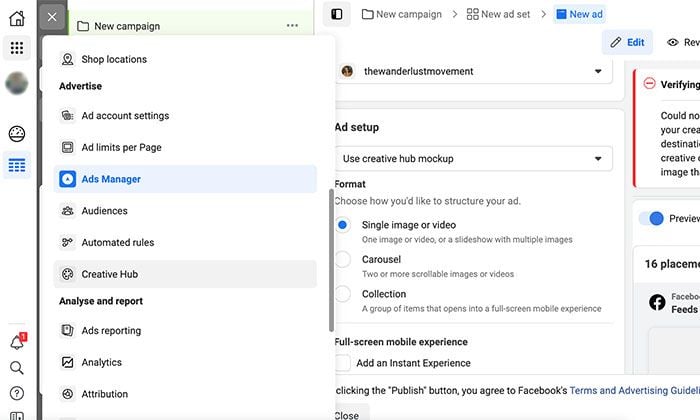
Go to Facebook Ads Manager and click on the grid of nine blocks. A menu will pop up. If Creative Hub isn’t in your shortcuts, scroll down to the “Advertise” section and click on it.
Next, Facebook will take you to the mock-up screen to start building your ad.
2. Pick a Feed Placementin Facebook Creative Hub
The first step in creating your ad mock-up is choosing a placement.
What is a Facebook ad placement? It’s all the different places where your ad can show up on the platform. Choosing the right one comes down to your campaign objective and your audience.
For example, if you’re a fashion brand targeting Gen Z, you’ll want to focus on Instagram. It’s the generation’s prime channel for discovery and shopping, with 58 percent using the app to discover new brands and products.
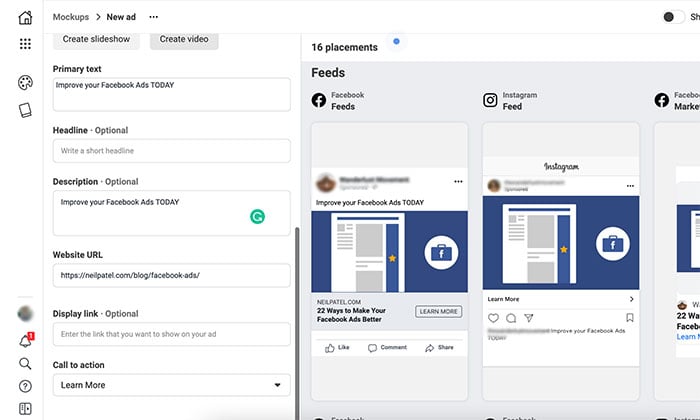
Click on the “Expand” button by the placement you want to focus on for your creative. It will open a pop-up, and you can see what your ad will look like on desktop, mobile, and other views.
3. Pick a Format
Next, you need to choose how you want to structure your ad. There are two formats to choose from:
A single image, video, or slideshow with multiple images.
A carousel ad with two or more scrollable images and videos.
Which one should you choose? Again, it boils down to your campaign objectives.
Single image and video ads are perfect if you want to focus on a singular offer (for example, a flagship course) and increase brand awareness, lead generation, and traffic to your site.
4. Add Media to Facebook Creative Hub
Next, scroll down to the “Default Mockup” section and start adding your media.
You can upload a premade video or an image straight from your desktop.
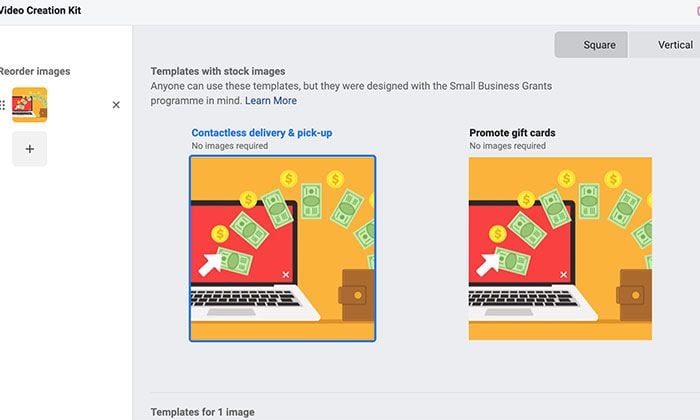
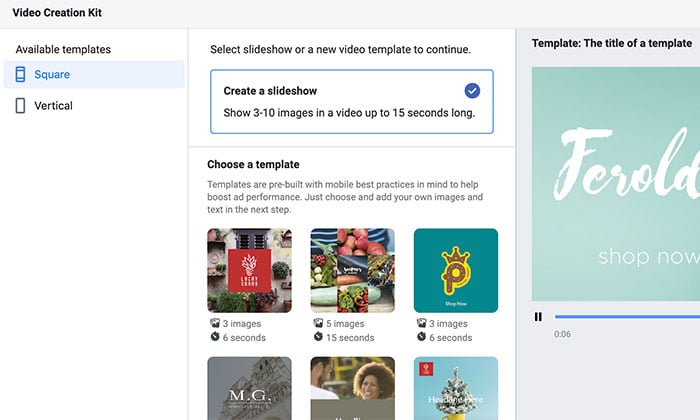
Creative Hub also gives you the option to create your content from scratch. Click on the “Create Video” button to launch the video creation kit, select a template, and turn still images into an engaging video.
Click on the “Slideshow” button, and Facebook will help you create a slideshow in under five minutes with one of the templates. You can add a background, stickers, and logos and choose from a variety of slideshow durations.
Both options are ideal for marketers who don’t have video editing skills or the budget to hire someone to create video content. With 74% of marketers saying video content has a better return on investment than static imagery, these two features help you get a slice of the action.
5. Add Other Basic Details
Next, you want to fill in the copy for your ad such as:
Primary Text: This is the caption for your ad. It appears on most ad placements, and you want to keep it short and sweet. Facebook recommends under 125 characters.
Description: This is optional additional text that will only appear in a few select placements.
Website URL: Where you want to send traffic i.e., your landing page.
Display Link: You have the option to display a shorter URL instead of the full website URL.
Call-to-Action: Select a CTA from the drop-down list which is the best fit for your ad. For example, if you’re promoting an event, select “Get Tickets.”
6. Publish Your Ad
Once you’re happy with your mock-up, you’ll need to add it to the Ads Manager before it can go live.
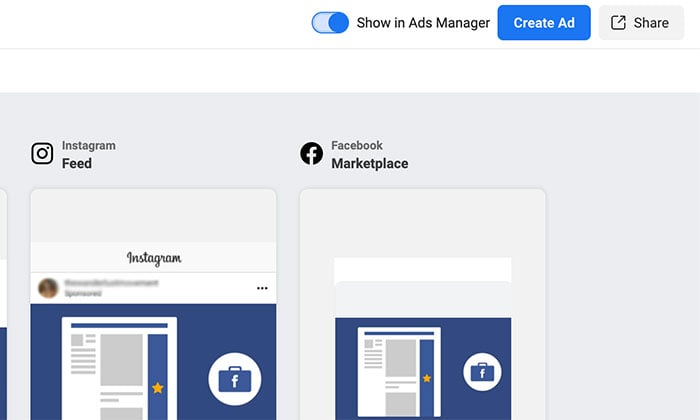
To do this, turn on the slider in the top right-hand side corner. The “Create Ad” button will turn from gray to blue.
Click on it, and Facebook will take you to the Ads Manager. A pop-up will ask you to select your campaign objective from three columns: Awareness, Consideration, and Conversion.
When you’re done, scroll down and select the “Continue” button.
Here you can set your daily ad budget, the timeline for the campaign, and select your audience. Scroll down to the “Placements” header and select “Manual Placements” if you want control over where your ad is displayed.
When you’ve tweaked everything to your liking, click “Next.” You can preview the ad you created in Creative Hub one final time and change anything if necessary.
If you’re happy, click on “Publish.” Your ad will go into review, and Facebook will notify you once it’s live.
7.Track Your Ad’s Success
Here are some of the most important metrics to track for your Facebook Ads:
Conversion Rate
If your ad campaign involves someone clicking on a CTA, here’s what you need to measure:
Lead Generation: How many people signed up for your offer from Facebook?
Sales: How many sales did you end up making from your ad campaign?
Traffic: How many link clicks to your website did you receive?
Frequency
If your ad budget is only a few dollars each day, you don’t need to worry about this metric. However, if you’re spending hundreds of dollars a month on Facebook Ads, you need to monitor frequency.
Frequency is the number of times your ad has been served to an average user.
If someone keeps seeing the same ad again and again, banner blindness creeps in, and your ad will lose its effectiveness.
CPC and CTR are metrics to measure the general appeal of your ad campaign.
CPC will tell you the average cost of a click from your ad to your website, and CTR is the percentage of people who click onto your website after seeing your ad.
If you notice you have a low CTR, it could mean your ad isn’t appealing to your audience, and it’s time to tweak your ad mock-ups.
Cost Per Action
Cost Per Action (CPA) refers to the behavior you want the person to take after seeing your ad.
It could be:
visiting the landing page on your website
playing the video
signing up for your webinar
The lower your CPA, the higher your revenue and conversion rates for the same ad spend.
Conclusion
You’ve made it to the end of this post, which means you’re officially a Facebook Creative Hub master.
What’s next?
It’s time to start drawing inspiration from the biggest brands in the business and create amazing ads for your target audience.
Pipedrive | Junior Engineers | Prague, Lisbon, Tallinn | ONSITE
Pipedrive is a SaaS visual sales tool for small to medium businesses. We’ve been backed with $90 million in funding since 2010 and are experiencing rapid growth. Our team is now located in five countries, building the sales tool used by over 85,000 companies.
I am very happy with the maturity of the process here and the autonomy our team is having. We are getting a lot of support from the company while still being able to innovate and fully own our part of the product.
I am looking for junior engineers to join my platform team. This is a unique opportunity to work in a highly technical team and solving some of the most challenging backend problems we have.
Our stack is mainly TypeScript, Node.js, React, Docker, MySQL, Elastic, … We expect some experience with that but the main thing is the cultural fit. We are looking for team players.
Please ping me an email at jakub.kadlubiec@pipedrive.com if you want me to refer you or if you want to learn more about the company. Please include the location where you’d like to work from (no remote). I am an engineering manager not a recruiter.
Article URL: https://www.algolia.com/careers/senior-software-engineer-distributed-systems-paris/ Comments URL: https://news.ycombinator.com/item?id=26669523 Points: 1 # Comments: 0 The post Algolia (YC W14) is hiring to enhance its search engine appeared first on ROI Credit Builders.
  Location: Seattle Area
  Remote: Yes
  Willing to relocate: Prefer local/remote.

  Technologies:
   - Game Programming & related (C#, Unity 3d, Python, JSON, Couchbase, Django, etc...)
   - Embedded Programming (C++, C, VxWorks, etc...)
   - Cloud (AWS)

  Résumé/CV: Email me and I'll give pdf/docx.
  Email: cole , 2021 & brown , dev

  LinkedIn: https://www.linkedin.com/in/cole-brown/
  GitHub: https://github.com/cole-brown
    - Have more "portfolio" code not on GitHub if interested.
———
I’m a Game Programmer. My current task is to port an MMO video game from a traditional colo server achitecture to a cloud architecture. I’m also in charge of: maintaining the colo version and its ~50 servers; planning technical features for upcoming milestones; writing code for the game or the website(s). I’m the ‘jack of all trades’ – but my boss likes my ability to jump on emergencies or new unknown things and get done whatever needs doing.
Before games, I was an Embedded Programmer. I made hardware easier to access for the rest of the programmers. I mainly did OS abstractions; the hardware abstraction layer; and I2C/SPI drivers on custom hardware.
I’ve figured out hardware bugs, ‘magic blue smoke’ bugs, ‘this is too old to have documentation anymore’ bugs…
About Me:
I ‘d like interesting problems to figure out.
I’m interested in leaving video game development for a better work/life balance, career future, and salary.
I’m working on a Python 3 project and learning Rust in my free-ish time.
Technologies: Historically, Rust and React/JS have been the main ones, but would love to branch out, especially in the functional direction. I am interested in working with any number of FP languages — Scala, Clojure, Haskell, even slightly esoteric ones including ML and Elm.
After 5 years of experience developing software full-time, I am interested in joining a productive company with a strong mission and strong engineering culture. The exact vertical is not important, as I’ve worked in automotive, analytics, and healthcare with success. My skills have been proven primarily through building interfaces and tooling, as well as some full stack and backend development. Previous tech lead experience. Hopefully I can bring a unique perspective to the team.
Why was Lewis Hamilton allowed to get away with abusing track limits at Turn 4 during the Bahrain GP but Max Verstappen’s overtake at the same part of the track deemed against the rules?
This website uses cookies to improve your experience. We'll assume you're ok with this, but you can opt-out if you wish.AcceptRejectRead More
Privacy & Cookies Policy
Privacy Overview
This website uses cookies to improve your experience while you navigate through the website. Out of these, the cookies that are categorized as necessary are stored on your browser as they are essential for the working of basic functionalities of the website. We also use third-party cookies that help us analyze and understand how you use this website. These cookies will be stored in your browser only with your consent. You also have the option to opt-out of these cookies. But opting out of some of these cookies may affect your browsing experience.
Necessary cookies are absolutely essential for the website to function properly. This category only includes cookies that ensures basic functionalities and security features of the website. These cookies do not store any personal information.
Any cookies that may not be particularly necessary for the website to function and is used specifically to collect user personal data via analytics, ads, other embedded contents are termed as non-necessary cookies. It is mandatory to procure user consent prior to running these cookies on your website.