How Google Lens is Getting Your Products Found Online

Google is constantly innovating and testing new features, and augmented reality (AR) is a hot topic right now.

You might think of AR as a way to make digital images appear in your living room. But Google’s visual search technology for Android, Google Lens, does a lot more than that.

It enables you to bring your physical environment into the digital world.

What Is Google Lens?

Google Lens is an image recognition technology that allows users to interact with real-world objects using their phone’s camera.  

Using AI, Google’s technology interprets the objects on your phone camera and provides additional information. It can scan and translate text, see furniture in your house, and help you explore local landmarks.

Google Lens is integrated directly into the camera on some phone models. If it doesn’t come pre-loaded on your device, there’s also an app you can download from the Google Play store to try it out.  

Uses of Google Lens

Have you ever been traveling and wished you could read that train ticket in a foreign language? With Google Lens, just hover your phone camera over it, and it will translate the text for you.

You can also use Google Lens to learn about your environment in other ways. If you point your camera at a nearby landmark, you’ll see historical facts and information about opening hours. If you use it on an animal or plant, it can identify the type of flower or the breed of dog.

When eating out at a restaurant, you see which items on the menu are most popular (this information is pulled from Google Maps). Students can even use it to help them with their homework: if they hover over an equation, they’ll get a step-by-step guide to solve the problem.  

But one of Google Lens’ most exciting applications for marketers, and the one I’m going to talk about today, has to do with online shopping.

Say a user is browsing on their phone and sees a sweater they like.

Rather than typing a long query into Google (“brown sweater, zig-zag pattern…”), the user can tap and hold the image, and Google Lens will find the same item (or a similar one), so they can buy it.

The app also provides style tips and ideas about what items to pair with the sweater. The recommendations are based on AI’s understanding of how people in fashion photos typically wear similar clothing.

Before the shopping feature came out, users could already search for clothing by taking a screenshot and opening it in Google Photos, or by pointing their camera at a physical item in a store. Long clicking on an online image for an instant search just makes the whole process easier.

In the future, Google plans to make AR showrooms available, so shoppers may soon be able to try on clothes at home virtually.

How Can E-commerce Businesses Optimize for Google Lens?

Once SEOs experiments with the long click search, we’ll gain some more insights into what works and what doesn’t with that specific feature.

But we know a fair bit since Google Lens and image search have been around for a few years.

Here’s what you do if you want to optimize for Google Lens:  

Get Your Products to Appear on Google Lens

Before we get into specifics about image optimization, you’ll want to make sure your product listings show up on Google. So how do you do that? With product listings.

Product listings on Google are free. You can also run a paid campaign on Google Shopping if you want, although Shopping now offers free listings as well.

If you take advantage of Google’s free product listings, your products will show up in Google Search, Google Images, Google Shopping, and Google Lens searches. However, they need to follow Google’s policies, and you’ll need to do one of the following two things:

  1. Open a Google Merchant Center account and create a feed to upload your product data
  2. Integrate structured data markup onto your website

Google Merchant Center

Google Merchant Center lets Google know more about your products, so they can list them in search.

Here’s how to sign up for Google Merchant Center:

Go to Google’s Merchant Center homepage and sign in to your Google account.
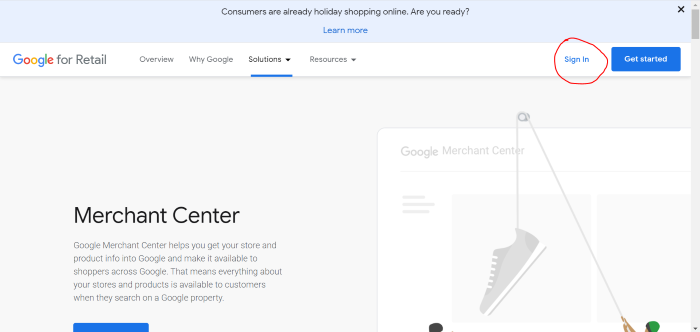
merchant center signin google lens

Click “Sign in to Merchant Center” in the dropdown menu.
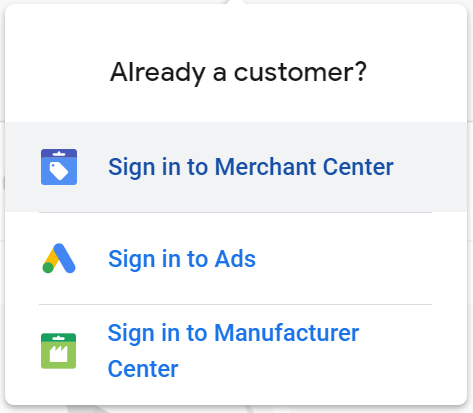
sign into merchant center google lens

Then, enter your business’ name and information.
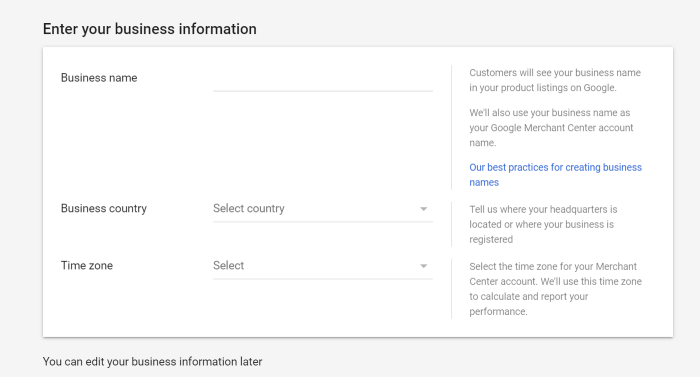
business name and info merchant center google lens

Scroll down, and fill in more information about your checkout process, tools you use, and whether you’d like to receive emails.

When you’re finished, agree to the Terms of Service and click “Create Account.”

Once you’ve created your account, don’t forget to add your products.

You can do this by creating a product feed. On the home screen of your new account, click “Add product data”:
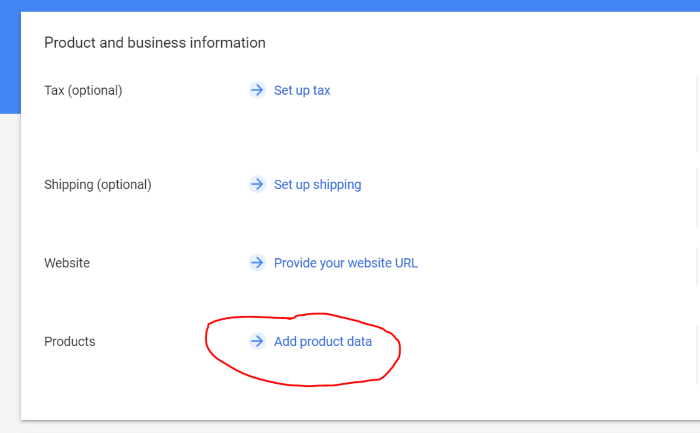
add product data merchant center google lens

You can then choose to add individual or multiple products.

Structured Data Markup

If you don’t want to use Google Merchant Center, you can still get your products to show up on Google Lens and elsewhere. However, you’ll need to add some structured data markup to your website. (In fact, I recommend doing this even if you do use Google Merchant Center.)

Structured data markup is code snippets added to your HTML that help Google better understand information on your website. Schema.org annotations are the most commonly used markups for SEO.

For example, Schema can tell Google that a specific page is a recipe, an article, about a local business, or an event.

To implement Schema.org markup, you’ll need access to edit the HTML on your site.

Google provides a helpful support guide on setting up structured data so that your site is compatible with their Merchant Center.  

If you use WordPress, there are also several Schema markup plugins. 

Once you’ve added the code, use Google’s Structured Data Testing Tool to make sure Google understands your markups.

Follow Google Image Optimization Best Practices With Google Lens

Google Lens technology is similar to Google’s reverse image search, but with a more sophisticated use of AI. A lot of the same principles that apply to regular image optimization for SEO also apply when you’re optimizing for Google Lens.

Image Size

Large images that load slowly (or not at all) can hurt your SEO (as well as making your website less user-friendly).

Since e-commerce websites tend to have many images (as they should!), loading times are particularly important.

Use a compression tool like Compress JPEG or Compress PNG to shrink your images.

Label Images and Add Keywords

Make sure to use keywords and descriptive language wherever you can, for example in image titles, ALT text, filenames, and EXIF data.

Add image titles and ALT text via the HTML of your website, or using your content management system (like WordPress or Squarespace).

EXIF data can be edited locally on your computer. This data adds more in-depth information to your photo, such as the time and date it was taken and what camera was used.

Although machine learning tools like Google Lens rely more on image recognition than text when executing a search, adding clear and relevant information to your image can improve SEO and user experience.

Use High Photo Quality and Visuals For Google Lens

Another way to optimize for Google Lens is by providing crystal clear product images.

If someone long clicks on a brown sweater in a photo, and that sweater is a product you sell in your e-commerce store, you want your product to come up as part of their search. To do that, Google needs to understand the brown sweater you’re selling is the item the searcher is looking for.

Look through your website and replace any images that are blurry, cropped oddly, or don’t fully show items.

Ideally, you’ll want to use high-resolution images taken on a professional camera while balancing quality with file load time. Opt for a high-quality file format like .PNG or .JPG.

Google Lens vs. Pinterest Lens

Google Lens isn’t the only game in town. Pinterest offers a similar feature, called Pinterest Lens.

Just like Google Lens, Pinterest Lens allows users to shop for products from third-party retailers. Users can take a photo, upload one, or hover over a physical item with their camera to use the feature.

So what’s the difference between Google Lens and Pinterest Lens?

On Pinterest, there’s a lot of action going on inside the Pinterest app. Unlike the all-pervasive Google, Pinterest is a specific ecosystem with its own Verified Merchant Program and internal search engine.

If you want to optimize your brand for Pinterest Lens, make sure you have a Pinterest business account, get your products onto Pinterest using Catalogs, and join the Verified Merchant Program.   

Otherwise, many of the same rules apply as with Google Lens. To get found in Pinterest Lens, optimize your images by adding keywords in the filename, title, and ALT text, and ensure photos load fast and are high quality.

What Does Google Lens Mean for Marketers?

Advances in Google Lens search aren’t just changing the nature of SEO. They also represent a significant shift in the way people look for products.

Nowadays, if you want to shop online, you might go to an online store and type in a specific search term. When you’ve found what you’re looking for, you’ll check out and go back to whatever you were doing before.

But with Google Lens, every minute you spend online becomes a potential shopping experience. While you’re busy looking through social media posts, reading blog articles, or messaging friends, you might spot an item you like and start casually browsing through products.

Tech journalists have viewed Google’s focus on improving the Shopping and Lens experiences as part of a broader strategy to compete with Amazon… and they’re probably right.

Google wants people to spend more time in Google search and less time browsing e-commerce websites.

If you’re a marketer working in e-commerce, this is big news. It means in the future, fewer people might be visiting your website directly by typing it into the address bar. Instead, they may arrive directly via channels like Google Lens or Pinterest Lens.  

In the future, we may see brands investing more heavily in strategies like product placement as part of their marketing. If tons of pictures of a famous person using your product are floating around the web, people could then easily seek that product out directly with a Lens search.  

Conclusion

Google is always innovating and creating new and different ways to search. Google Lens is the most recent example of the search giants’ constant growth.

For e-commerce retailers, this new technology should not be ignored as it could very well be the future of image search.

As marketers, we’re expected to pivot rapidly as technology changes, and Google Lens is no exception.

Have you heard about Google Lens or Pinterest Lens? What are your thoughts about this way of searching?

The post How Google Lens is Getting Your Products Found Online appeared first on Neil Patel.

The Fed's Stimulus Paradox

The post The Fed's Stimulus Paradox appeared first on Buy It At A Bargain – Deals And Reviews.

New comment by joshuawootonn in "Ask HN: Who wants to be hired? (December 2020)"

Mid-Level Frontend Engineer

  Location: Iowa, USA
  Remote: Yes
  Willing to relocate: Yes
  Technologies: React, Typescript, Node, Next, Gatsby, Figma, Illustrator
  Résumé/CV: https://drive.google.com/file/d/1eYZi0_t7Ps2Kp7vNDthZybaGdTfviFb7/view?usp=sharing
  Portfolio: https://www.joshuawootonn.com/
  Codepen: https://codepen.io/joshuawootonn
  Email: joshuawootonn@gmail.com

New comment by kirsh300 in "Ask HN: Freelancer? Seeking freelancer? (December 2020)"

SEEKING WORK | Remote / Sweden | Senior Mobile Developer | 9 years experience

Hi! I’m a result driven, experienced mobile developer with a passion for code quality. I’m an expert on Android and have built for iOS as well. Interested in working on exciting products, especially those that have a positive social impact.
Languages: Kotlin, Java, Swift

LinkedIn: https://www.linkedin.com/in/tkirshboim/

Github: https://github.com/tkirshboim/

Email: tal.kirshboim@gmail.com

Sao Paulo's Interlagos to keep F1 race until 2025

Formula One has confirmed the Brazilian Grand Prix will remain at Sao Paulo’s Interlagos until 2025, rebranded as the Sao Paulo Grand Prix. The post Sao Paulo's Interlagos to keep F1 race until 2025 appeared first on Buy It At A Bargain – Deals And Reviews.

The Fed's Stimulus Paradox

The central bank again revises its growth forecasts upward.

The post The Fed's Stimulus Paradox appeared first on ROI Credit Builders.

The Fed’s Stimulus Paradox

The central bank again revises its growth forecasts upward.

The post The Fed’s Stimulus Paradox appeared first on ROI Credit Builders.

Openbase (YC S20) Is Hiring

Hi – we’re Openbase! We are a small Seed startup based in San Francisco currently hiring our core team. Founded in 2019, backed by Y Combinator and some of the world’s top investors.

We help developers choose amongst millions of open-source packages so they can build amazing products faster.

We are are currently hiring Frontend, Backend, and Full Stack engineers. https://openbase.io/careers

Our stack consists of AWS, Netlify, TypeScript, Node.js, Express, PostgreSQL, Apollo GraphQL, React, and Parcel.


Comments URL: https://news.ycombinator.com/item?id=25448582

Points: 1

# Comments: 0

Best Webinar Software

Disclosure: This content is reader-supported, which means if you click on some of our links that we may earn a commission.

Looking to dive right in? My top recommendations for webinar software to suit just about every business need are Demio, Livestorm, or EasyWebinar

With so many people working from home, it’s become even more apparent as to just how important it is to stay connected with your audience. 

When you can’t do this in person, how the heck are you supposed to do it?

By hosting webinars, of course!

Just about every business is hosting webinars these days. It’s a fantastic way to engage with prospects and build a ‘face-to-face’ connection without physical contact. 

However, hosting webinars, whether live or recorded, can be a lot of work with a few challenges along the way. That’s why it’s essential for you to have the right webinar software on your side. 

I’ve put together a list of the top five webinar software out there, and we’re going to cover the in’s and out’s of how to choose the best webinar software for you!

The Top 5 Options for Webinar Software 

  1. Demio – Best for Live Events
  2. Livestorm – Best for Ease of Use & Automation
  3. EasyWebinar – Best for Beginners & Social Media
  4. WebinarNinja – Best for Training or Coaching
  5. WebinarJam – Best for Large Businesses

How to Choose the Best Webinar Software For You

Most of the top webinar software will have very similar characteristics. That is, making your webinar easy to record and share, the video and audio are high-quality, and there is a range of interactive features like live chat or built-in polls. 

So, with a plethora of webinar software to choose from that all seem to offer the same things, how are you supposed to choose the best one for your needs? 

Well, you need to narrow in on three important factors. 

Attendee Capacity

The number of participants you can have in your webinar at one time is going to be a vital factor in your decision-making process. Some webinar software is designed for smaller groups, while others have the capacity to host thousands of attendees at one time. 

Maybe you’re not sure how big your webinar will be or how quickly it will grow. In that case, you should consider whether your software provider has a plan that allows you to scale your attendee capacity alongside your business growth.

Furthermore, if you can have thousands of participants at one time, how well does the software function? Is there any latency or known technical issues that arise when everyone is logged in?

The great thing here is that most webinar software providers have tiered pricing based on how many participants you’d like to have in each meeting, so if you find one you really love, you’ll likely be able to make it work.

Accessibility 

How easy is it for your participants to join the webinar? Do they have to download an extra app or plugin, or can they launch from their preferred web browser and be immediately joined in?

For some users, the stress of requiring an extra app or program to join a webinar is too overwhelming or complicated. So much so that they may choose to ditch their plans to join your webinar altogether.

With this in mind, it’s important to focus on choosing a webinar software that is easily accessible for your participants. Many options simply launch from a web browser, and this way, your participants are unlikely to find a reason to back out of committing. 

Customer Support

Imagine if you’ve put in weeks of hard work to pull off an incredible live webinar, and five minutes before you’re set to begin, the software crashes. 

Just the thought of this alone has me feeling sick. 

If you plan to hold live events often, it’s imperative you use a webinar software provider that offers 24/7 customer support to get you out of these sticky situations. 

Furthermore, technology can be challenging and fickle. Having access to a team of professionals who know the software inside and out at your fingertips at any time of day really should be an important factor when considering which tool to use.

The Different Types of Webinar Software

What we are going to focus on here is what the different types of webinars are and whether your preferred software accommodates your ideal webinar. In essence, there are three basic types of webinars. 

Most of the top webinar software will have the capacity to offer all of the below, but it’s certainly something to keep in mind when doing your research and making sure it meets your needs. 

Live Webinars

Some would say that live webinars are irreplaceable. Certain chemistry can come out of live public speaking that you don’t get with pre-recorded content.

Live webinars can help establish your brand as a ‘real-life’ person and put a face to your name. They’re interactive, personal, and really, they can be seen as significant events. 

In a nutshell, live webinars provide you with the opportunity to connect and build a relationship with your audience in real-time. 

Recorded Webinars

Recorded or automated webinars are newer to the world of online marketing, but that doesn’t necessarily mean they are better than live webinars. You can record the content, schedule it to go live, and even set it to expire within a specific timeframe.

Recorded webinars are great for maximizing your reach because they’re accessible for more participants whenever it’s most convenient. No longer do you have to worry about finding a time that works for every single person. 

Series Webinar

Essentially, a series webinar can be made up of multiple live and/or automated webinars, which are scheduled over multiple dates and times. The content should involve gradual learning for the participants with an incentive to come back for more. 

These types of webinars are great for broader or more complex topics with dense information that is more easily digestible over a series of webinars. 

Holding a series will really put you out there as the expert in your field. But, naturally, they take a bit more time and effort than the one-off webinars. 

#1 – Demio — The Best For Live Events

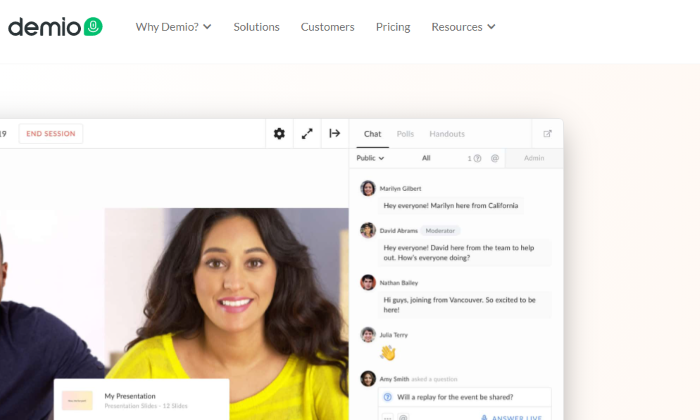
Demio is the cream of the crop when it comes to modern, user-friendly webinar software that is bound to help your business grow. It’s suited to almost any size business that wants to hold interactive live events to drive their marketing campaigns. 

One of the best bits? There is no download required! Not only will your attendees have access to a beautiful platform that clearly reflects your branding, but they’ll also be able to join from any browser with just one click.  

So, what makes them the best for live events? Here are a few of their top features:

  • Run interactive polls and get stats in real-time 
  • Embed launch offers and CTAs designed to convert sales on the spot
  • Share handouts for instant download with your attendees
  • Give attendees video and microphone permissions as needed
  • Public and private chat functions for live Q&A

In a nutshell, Demio is so interactive it’s bound to leave your audience feeling like they truly know you! 

Another great thing about Demio is that you can record your webinar and send it to all registered participants so no one misses out if they can’t make it, even if they do miss the chemistry of a live event.

Demio offers three pricing plans:

  • Starter: $34/month for up to 50 attendees
  • Growth: $69/month for up to 150 attendees
  • Business Plan: $163/month for up to 500 attendees

Demio offers a 14-day free trial of their Growth plan, so you can give it a try before you buy. 

#2 Livestorm — The Best For Ease of Use & Automation

If you’re looking for webinar software that allows you to run live, on-demand, or automated webinars with just about any goal in mind, Livestorm could be the one for you. 

If you want to hold a live event or detailed product demo, you can do that. If you want to build an educational customer training series or an online course, you can do that, too. 

Livestorm is a simple yet powerful video communication tool. They really stand out for their ease of use and detailed automation. 

You don’t need to be tech-savvy to use this software. You can have a webinar up and running in no time, thanks to automation features like an event registration page, promotional emails, and automatic custom event reminder emails. 

Some other great features of Livestorm include:

  • Join the webinar in any browser with one click
  • Full suite of webinar types such as live, on-demand, and pre-recorded
  • Screensharing capabilities
  • Interactive live chat, polls, and Q&A within the webinar
  • Excellent analytics and reporting capabilities

Another great feature? Livestorm also offers comprehensive customer support in multiple languages. 

In addition, they also have a very useful self-service documentation section of their website. I love this offering because they’re incredibly handy when you’re facing a minor set-up issue or pesky technical difficulty that you know you could solve alone without needing to explain yourself at length to tech support. 

Livestorm plan options include:

  • Basic: Free for up to 10 live attendees
  • Premium: $99/month for up to 100 live attendees
  • Enterprise: Personalized quote based on your requirements

Get started with Livestorm for free today!

#3 EasyWebinar — The Best For Beginners & Social Media

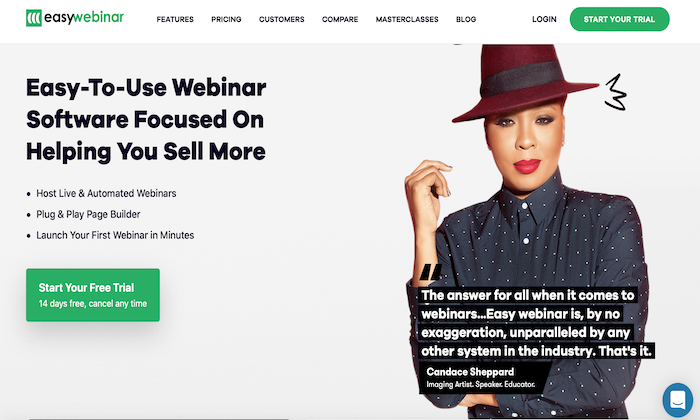
The EasyWebinar motto is ‘wildly easy to use live and automated webinar platform,’ and by all accounts, they seem to hit the nail on the head. They are also reportedly one of the only webinar platforms that have successfully integrated marketing strategy with webinar technology. 

This software is for anyone wanting to launch their first seminar quickly and painlessly with a drag and drop page builder and tons of seamless integrations at your fingertips.

The highlight of this software? EasyWebinar allows hosts to livestream to Facebook and YouTube at the same time

Why is this so impressive? 

Well, it essentially gives you uncapped potential regarding how many people your content can reach at one time. Of course, those viewing through Facebook or YouTube won’t get the platform’s built-in interactive capabilities, but your message could still be reaching thousands more people. 

Other notable features of EasyWebinar are:

  • Seamless integration with popular platforms such as WordPress and MailChimp
  • In-depth engagement tracking tools covering webinar watch time and in-platform clicks  
  • Browser-based viewing
  • Turn live events into evergreen webinar funnels
  • Allows four presenters in one room, all with sharing capabilities

Although EasyWebinar is not the cheapest webinar software on the market, this platform certainly packs a punch. There are three pricing plans on offer:

  • Standard: $78/month for up to 100 room attendees
  • Pro: $129/month for up to 500 room attendees
  • Enterprise: $499/month for up to 2000 room attendees

You can try both the Standard and Pro plan for free or schedule a demo of the Enterprise plan. 

#4 – WebinarNinja — Best For High-Quality Training or Coaching

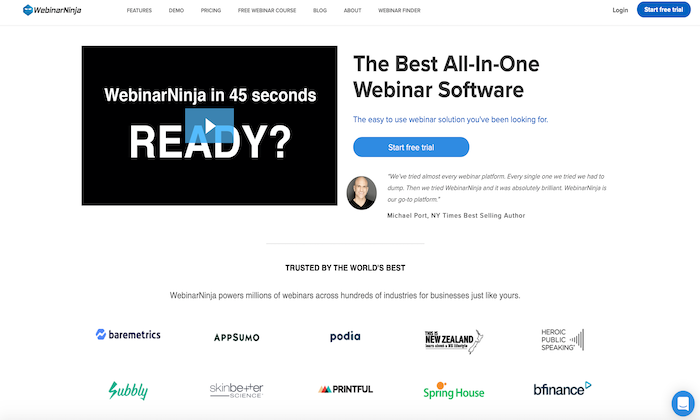
WebinarNinja is a close contender of Demio in terms of their modern, beautiful design, and flexible webinar capabilities. They are also slightly more cost-effective for smaller groups than Demio. 

WebinarNinja is trusted by well-known B2B brands such as Baremetrics, AppSumo, and Podia, which essentially supports their ranking as the best for high-quality training or coaching purposes. 

You can run any type of webinar with WebinarNinja: live, automated, series, or hybrid. The key features that come into play with the coaching or training aspect are uploading PowerPoint presentations, creating Q&A spaces, and easily sharing information. 

Some other notable features of WebinarNinja are:

  • Tons of integrations with notable systems such as MailChimp, ConvertKit, HubSpot, Squarespace, and ClickFunnels
  • Beautiful ready-to-use templates for quick and simple webinar creation
  • Save marketing materials within the software for easy access
  • Create custom branded registration and thank you pages designed to convert

Furthermore, WebinarNinja reportedly has some of the best customer support out there. This support is extended via live chat, email, and a comprehensive resource library for set-up guidance and minor troubleshooting.

WebinarNinja has four pricing plans available:

  • Starter: $39/month for up to 100 attendees
  • Pro: $79/month for up to 300 attendees
  • Plus: $129/month for up to 500 attendees
  • Power: $199/month for up to 1000 attendees

Every membership comes with a 14-day free trial, so you can pay nothing and get started today!

#5 – WebinarJam — Best For Large Businesses

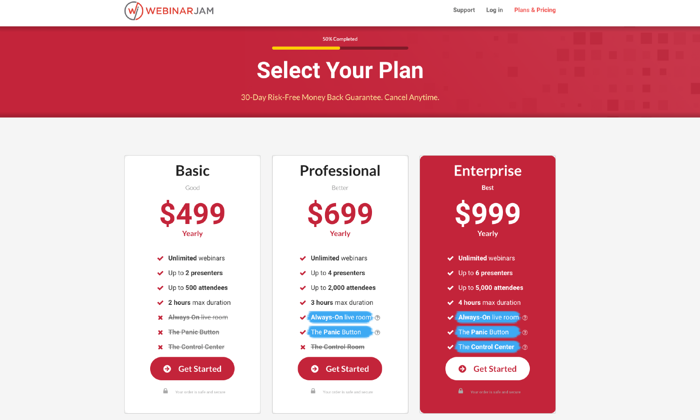
With the ability to host up to 5,000 attendees at one time with little to no delays, WebinarJam is easily one of the best out there for large businesses. 

A really great highlight of WebinarJam is that, although it’s designed for huge audiences, you don’t have to skimp out on some of the awesome interactive features that software for smaller groups has on offer. 

My favorite interactive feature is the advanced live chat within the webinar that actually pulls the person’s video to the stage, so to speak. You can also include offer pop-ups and countdowns to encourage attendees to take action. 

These features are almost more important for a larger business than small ones, to remove that ‘faceless large business’ barrier some may perceive. 

Some other features that WebinarJam has to offer includes:

  • Top-notch 24/7 customer support
  • Email and SMS reminder notifications
  • Create paid webinars and accept payment directly through the software
  • Stream directly to YouTube for further participant reach
  • Compatibility with multiple browsers and systems

The key selling point of WebinarJam? It automatically records your content every single time. 

Why is this so nifty? I don’t know about you, but forgetting to hit that pesky record button is a frequent pastime of mine. 

There are three pricing plans on offer:

  • Basic: $499/year for up to 500 attendees
  • Professional: $699/year for up to 2,000 attendees
  • Enterprise: $999/year for up to 5,000 attendees

WebinarJam are so confident you’ll love their software that they offer a 30-day money-back guarantee, so your purchase is risk-free. At the time of writing, they also have a $1 14-day trial for a limited time only.  

Summary

My top recommendations for webinar software to suit just about everyone’s needs are Demio, Livestorm, or EasyWebinar

At the end of the day, the best webinar software for you is potentially going to be different from the best for me. That’s why it’s important to use the methodology discussed here to do your due diligence in choosing the best webinar software for your business needs. 

Don’t forget to also take advantage of free trials and money-back guarantees to get a real feel for how your chosen software works before you commit long-term.

The post Best Webinar Software appeared first on Neil Patel.

Why You Should Build Interactive Tools to Increase Sales

The average American sees up to 10,000 ads and brand messages every single day. Sounds a little overwhelming, right? That’s because it is.

After seeing this many ads every day, viewers simply stop noticing them—meaning they aren’t engaging with them. As a result, you miss out on sales opportunities.

You need to go further to engage your target audience and convert them by personalizing the whole marketing experience through interactive marketing tools. Here’s what you need to know.

What Are Interactive Tools in Marketing?

Pretend for a moment that you’re looking for new hair color. It’s tricky because you’re unsure which colors suit you, and you could use some personalized help.

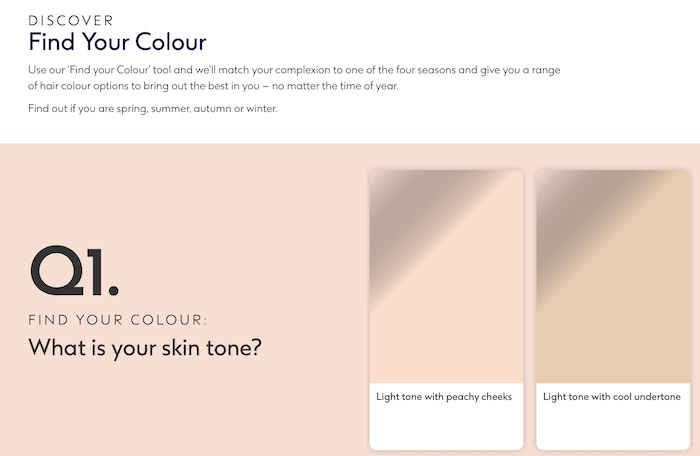
Finally, a website catches your eye because there’s an interactive tool designed to help you pick a hair color. All you need to do is input some simple details, such as your skin tone and eye color, and you’ll see a list of compatible hair dyes.

The outcome? You purchase a hair dye. In other words, you just went from a potential lead to a paying customer, and it’s all thanks to that interactive website tool.

Essentially, this is precisely how interactive tools for marketing are meant to work. And this particular example isn’t imaginary—you can check out Boots to see what I mean:

Interactive tools to increase sales hair color quiz

If you go through the sequence, you’ll find a list of compatible colors. Then, when you click on a color, a link pops up to take you straight to the right product:

Interactive tools increase sales hair color quiz result

How’s that for convenience?

With just a few minutes of interaction, users get helpful, meaningful results—and you may make a sale.

Examples of Interactive Tools 

That’s just one example of interactive tools in a sales context. However, you can build many interactive tools and discover at least as many ways you can use them in your marketing strategy.

Here are five common types of interactive marketing tools we can use in different ways.

Virtual Try Ons for Interactive Marketing

This one’s similar to what we just worked through, but it’s not quite identical—we’re taking it one step further.

Embedded “quizzes” like the one we just looked at rely on customers clicking on certain answers. The algorithm then presents people with solutions matching their answers.

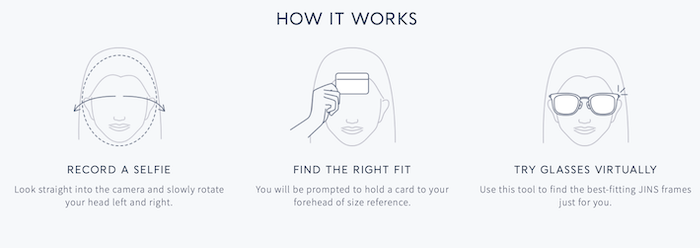
Conversely, virtual try-ons use augmented reality or simple image captures to let people use selfies to “try on” everything from makeup to glasses.

The benefit? Customers know whether the product suits them or not, so they’re more likely to buy. Briefly, here’s how they work:

  • Someone visits your product page.
  • They tap the “try on” link, which activates the user’s phone camera.
  • With augmented reality, the user places the product on their face to see how it looks.
  • If they’re happy with the appearance, the prospective customer moves the product to their basket and goes through checkout.

It’s not just limited to beauty products or accessories, either. For instance, platforms like Amazon allow their users to “place” furniture around the room to see if they look good in their home. The same technology applies.

Interactive Measurement Tools

Customers sometimes find buying products like shoes online challenging because it’s hard to determine what size to get.

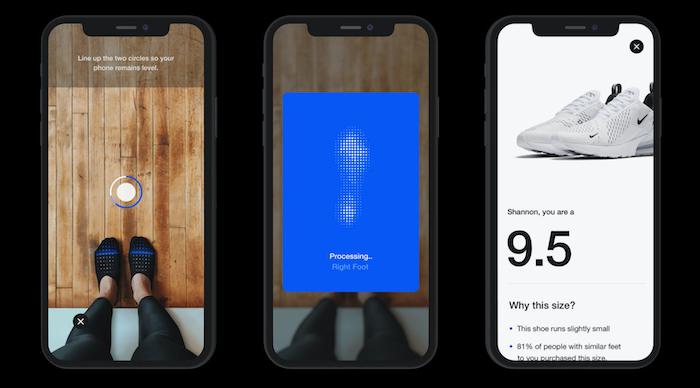
That’s where measurement tools come in. Let’s break down Nike’s Digital Foot Measurement Tool as an example.

  • Customers shop through the Nike app.
  • They decide on the shoes they want and opt to “try them on.”
  • The camera scan’s the person’s foot to get measurements rather than using augmented reality.
  • Once the scan is complete, the app tells the person which size they should choose.

It’s easy to see how this may lead to more sales and, happily, fewer returns.  

Interactive tool increase sales of shoes by measuring feet

Interactive Calculators

Calculators are useful interactive tools for your website and can be used in more ways than one might think, including as:

  • Nutritional calculators
  • Pricing calculators to help potential customers build customized product “bundles”
  • Financial calculators to help people select the right financial product for their circumstances

Whichever sector you’re in, there’s a good chance you can use an interactive calculator to personalize the user experience.

For example, say you run a kitchen supplies website, and you want people to buy your recipe books. They’ve asked questions about how healthy the recipes are.

A nutritional calculator can help them out and, in turn, encourage people to spend more time on your website and potentially have more trust in your brand.  

7 Reasons You Should Use Interactive Tools to Increase Sales 

We’ve explored what interactive marketing tools are and how they work. There’s still a fundamental question remaining: Can these tools increase your sales?

The answer is: Yes! Here are my top seven reasons why interactive tools in your marketing strategy can increase sales:

1. Interactive Tools Boost Engagement Levels

Customer engagement is vital, but it’s hard to stand out from the crowd. Here are two reasons why:

  • The average person spends almost two and a half hours a day scrolling through social media. In this time, they’re exposed to countless marketing messages, from banner ads to PPC.
  • We’ve become “conditioned” to ignore banners (a phenomenon dubbed “banner blindness.”)  

Don’t worry, though. This time is where interactive tools have their chance to shine. 66% of marketers report an increase in engagement levels after introducing interactive content to their marketing plans.

Ultimately, increased customer engagement is a pretty effective way to generate more sales in the long-term, so it’s worth using interactive tools in your content.

2. Improved UX Using Interactive Tools May Convert Customers

Conversion is what marketing is all about, and interactive tools could help you do just that. Let me show you how it’s working for JINS, a prescription eyewear provider.

As a forward-thinking company, JINS wanted a new, innovative way to increase conversion rates and improve customer experience. Their solution came via virtual try-ons for glasses.

Interactive Tools Increase Sales Glasses Try Ons Marketing App

All someone needs to do is turn on their camera and upload a selfie to the platform. Once that’s done, the user chooses which frames they’re interested in and puts them onto the selfie.

Here’s what it looks like in action. On the left, we have the selfie, and on the right, the actual frames after the customer made their purchase:

Increase Sales Interactive Marketing Tools App glasses try on

Potential customers now have a quick and accurate way to gauge which glasses to buy! According to JINS, conversion rates have drastically improved since they added this interactive tool.

3. Interactive Tools Allow Customers to Feel Confident in Large Purchases

Like I said earlier, this is not just about trying on hair colors or checking out fashion accessories. This technology is about making big purchases, too.

Take Target, for example. Users upload a picture of their room and place a true-to-life copy of a furniture piece in the space. They can also download the Target app and try out the augmented reality version instead, which is a little more engaging because you can move the product around the room. Amazon does this with many of their products in their app as well.

Increase Sales Marketing Tools Interactive Tools AR Christmas tree

This feature allows users to check if the furniture or other large item fits their space before purchasing it, which means they’re more likely to click “buy” and less likely to make returns.

4. Personalized User Experience via Interactive Tools Can Increase Conversions

Do you see a pattern of personalization forming? Interactive tools allow us to personalize marketing like never before. Here’s why it matters from a sales perspective:

These stats tell us two things:

First, customers crave personalization. They want to feel valued by companies.

Second, they’re more likely to become loyal customers if there’s a personal touch to your marketing efforts.

This is a no-brainer way to build brand loyalty and increase your chance of future sales.  

5. Interactive Tools Increase Lead Generation

I’ve touched on this already, but it’s worth emphasizing just how effective a lead generation strategy using interactive tools can be from a sales perspective.

Firstly, there’s an SEO angle. If you can attract more social media shares and inbound links, you should generate more traffic. Additionally, if people spend more time on your website and there’s a lower bounce rate, your search engine ranking can improve. Social shares may boost your SEO ranking by over 20%, too. (You can check who’s linking back to you with my free backlink checker.)

The upshot of interactive tools catching people’s eyes is that there could be more organic traffic and better quality leads because the people you’re attracting are already looking for your product or service.

Let’s think about this from another angle, too. The data you’re capturing from prospects as they use your tools may help you figure out what your customers want so you can improve your products and services.

Consequently, you can generate more quality leads in the long-term, all without much extra effort from a marketing perspective.

Sounds great, right?

6. Automate Your Marketing With Interactive Tools

Yes, interactive tools can help you automate your marketing efforts, and the tools do much of the work for you. The algorithms detect what the customer wants and make recommendations or offer solutions based on this information.

This can help you increase sales and make alterations as needed because you can:

  • Check your metrics to ensure the tools are working how you want them to
  • Make changes to the UX based on what you’re seeing
  • Compare performance across different interactive tools and invest time, energy, and resources in the ones performing most effectively

7. Interactive Tools May Draw Traffic to Your Website  

Without traffic coming to your website, there’s little chance you’ll make sales. Again, interactive tools can help you out here. Here’s why.

Firstly, 47% of people use ad blockers now, so there’s a chance some potential customers won’t even see your marketing if you’ve focused efforts on those. Interactive tools help you sidestep this problem.

Secondly, 79% of successful marketers say interactive tools and content encourage people to return to their websites. It’s not just about creating new content, either—you can use the same content time and time again when you have interactive tools.

Think about it. If a customer loves the eyeglasses they purchased from you the first time around, they’re more likely to return to your online shop. There, they’ll use the same virtual try on tool they used before to check out different pairs. You didn’t have to try to impress them with new interactive tools, promotional emails, or any other marketing strategy—they liked what they used the first time and engaged with it again.

How’s that for a cost-efficient way to solidify a lasting relationship with your customer base?

Conclusion

Why should you build interactive tools to increase your sales? Well, as we can see, they’re not just a reliable way to generate leads and improve conversion rates, but they’re cost-effective, too.

They’re not especially challenging to deploy, either. It’s easy enough to find interactive tools you can tweak to suit your needs and embed them on your website. If you want more help with introducing interactive tools into your marketing strategy, check out my consulting services.

Have you tried interactive marketing tools yet?

The post Why You Should Build Interactive Tools to Increase Sales appeared first on Neil Patel.