

You heard about AI, but have you ever used it?
Just think of it this way, what if you can use artificial intelligence to create content for you so you wouldn’t have to even write?
Well, believe it or not, this blog post that you are reading now was written by a simple AI tool.
To be fair no AI tool is perfect yet as technology isn’t there yet.
And to give you perspective the AI wrote this post and then I had to modify it and add specific sections and steps.
When I look back and did an analysis, AI wrote roughly 25% of this post.
That’s not too bad. Sure, I had to write 75%, but the hardest part about writing isn’t putting words on a paper it’s coming up with the ideas and the overall format.
So today I am going to show you how to write a blog post using AI… keep in mind over time it will get better as technology improves.
But first, something you should know…
Google doesn’t penalize for duplicate content and even if they did this AI tools makes 100% unique content for you.
So, you won’t have duplicative or plagiarism issues.
It’s not just mixing words around it is trying to understand what you are trying to write your article on, do research, and come up with words that encompass everything you are trying to get across.
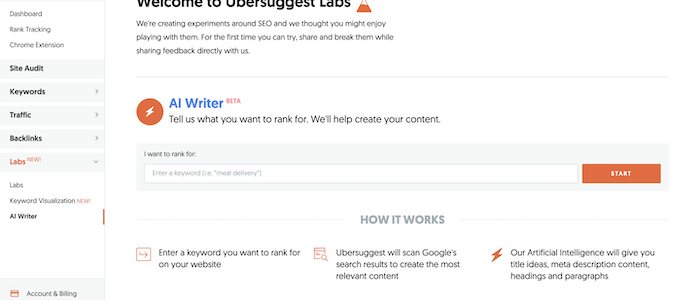
First off, go to Ubersuggest’s AI Writer.
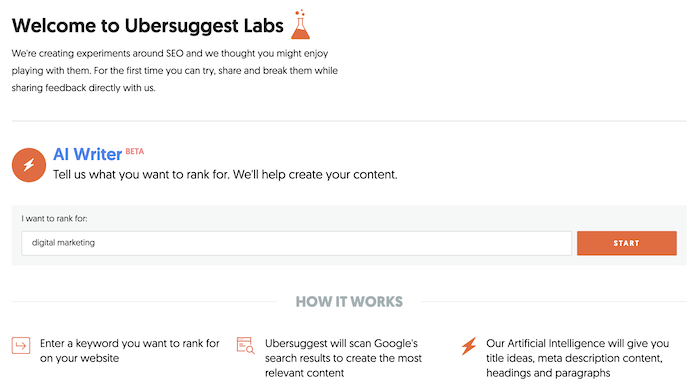
First, enter in the keyword you want an article on. For this example, I chose the term “digital marketing” as my blog is on digital marketing.
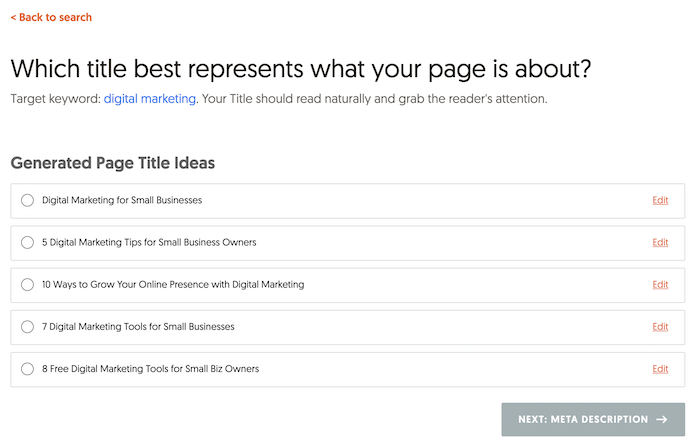
Then you will want to select a title from the list provided. You don’t always have to use it at the very end but a lot of the titles are based on what people are searching for.
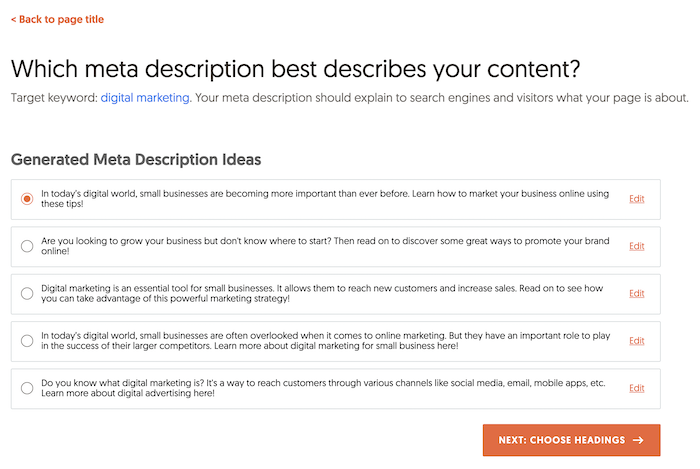
Next, you will want to choose a meta description.
Similar to the above, meta description is also based on keywords that are popular from a traffic perspective.
After you select your meta description you will want to select a few headings.
Keep in mind headings are like book chapters. Pick the ones that work the best, and again keep in mind you can always adjust the text later on.
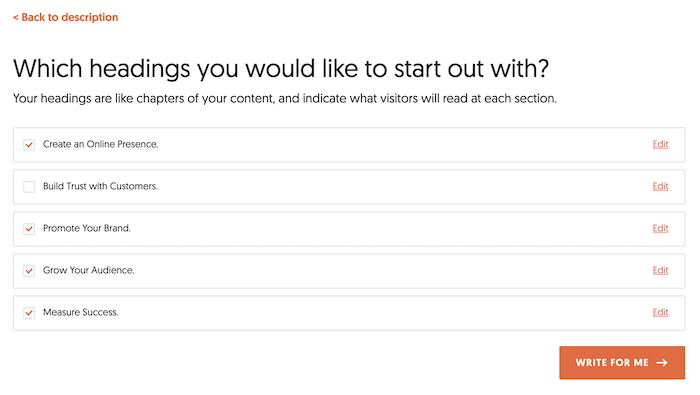
The last step is, that Ubersuggest will take all of the data and spit out content for you.
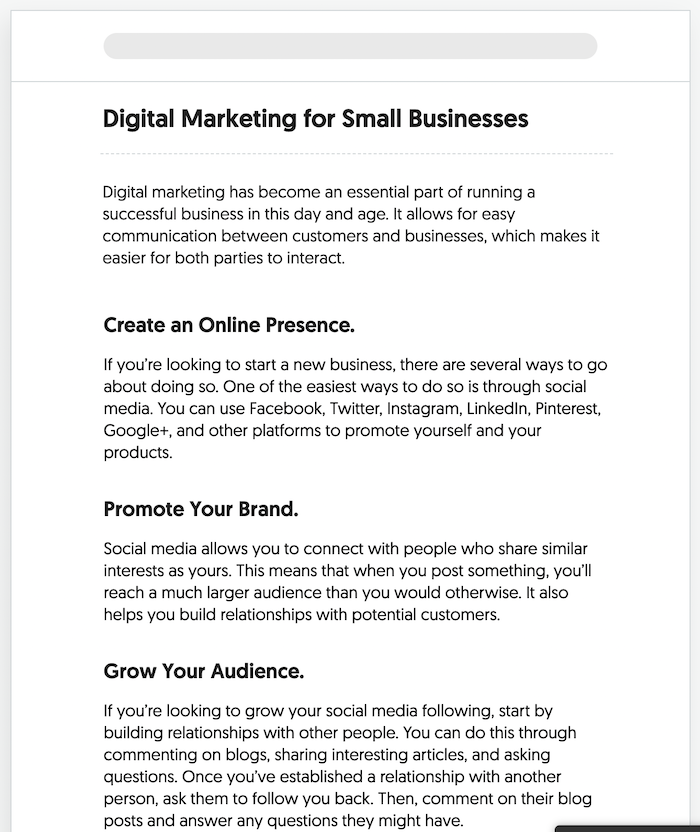
By no means is the content perfect and I wouldn’t recommend publishing it or any AI content written by any tool for that matter.
More so use it as a starting ground.
Well, the AI tool won’t always be contextually accurate, but most of the time it is.
More so the way you make the AI piece amazing is by getting more detailed.
So for example in the digital marketing above, in the “create an online presence” section I would go in-depth on Facebook, Twitter, LinkedIn, and Pinterest on how you can use them for marketing.
As for Google + it doesn’t exist, so I would delete that part and expand the other platforms and give step-by-step instructions on how to leverage them.
I would also include screenshots so each step is clear.
Under the “promote your brand” section I would discuss ads and other ways to promote your brand such as running promotions, sales during holidays, or even doing webinars.
I would give examples of other successful ones that businesses have run and give examples of failed campaigns that have been run and break down what you can learn from them.
The “grow your audience” section already talks about what to do if you have no followers. They are all good tips that the AI tool wrote, but the tips are too surface level. I would dive deep into each one.
From how you should think about commenting on other profiles and blogs to what email templates to use to convince people to collaborate with you.
And the measuring success section was cut off from the above screenshot but it mentions Google Analytics. I would go more in-depth on how to set up goals in Google Analytics and tie in revenue.
The Ubersuggest AI tool isn’t meant to replace humans or for it to perfectly write your content for you.
It’s meant to give you a start.
You have experienced writer’s block and we all hate it. The tool solves that part plus it gives you a head start.
It not only gives you title and meta description ideas, but it writes some of the content for you as well as gives you popular headings based on keyword search volume.
All you have to do is adjust and fill in the rest.
So make sure you give it a try.

Are you striving for consistency with your social media marketing? A good social media content calendar could be the missing ingredient.
Creating a social media calendar is a simple process, but it can have some impressive results.
Here’s how to quickly set up your social media content calendar and start leveling up your performance.
A social media calendar gives you a detailed overview of your upcoming social media posts.
This helps you to be more strategic with your content, maintain consistency, and delight your target audience on a regular basis.
Your social media calendar can be as simple as setting out what dates you’re going to post on, or it can be much more detailed.
Many successful social media content calendars will include high-level information to help you get more from each post:
This information gives you an initial framework you can use to build out each post.
Be careful when you are planning, though.
There’s a clear distinction between a content calendar and a content plan. Generally, a content calendar will set out the dates and times for your posts, whereas a content plan will detail the strategies and topics you want to use for your social media marketing.
Since these ideas are closely related, they’re often referred to interchangeably—and can be incorporated into one document.
To give you a better idea of what to include, and where, take a look at this example of a content calendar:
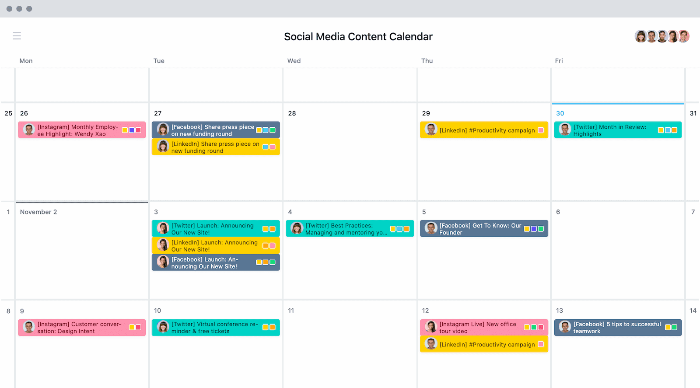
By taking a strategic approach with your planning, you may find a social media content calendar helps you save time and be more effective with your social media marketing.
Over 72 percent of the U.S. population use at least one social media platform, so your social media marketing is clearly important.
The question is, how does a social media calendar fit in?
Let’s take a look at two of the most important aspects of social media marketing: understanding your target audience and being consistent.
If you don’t understand where your target audience hangs out, what content they want to see, and how they consume information, then how do you expect to reach them? It’s difficult to connect with your audience when you’re making social media posts on the fly, which is why a social media content calendar can be so valuable.
The other thing that takes you a long way in social media marketing is consistency. It might not seem like it, but this one is actually very difficult to pull off. It’s not easy to keep coming back each day (or however often you post) with top-quality content.
It’s simply impossible unless you’re planning ahead.
Whatever niche you’re in, there’s tons of competition out there, so you need time to bring your ideas to life and make sure they’re perfectly targeted to your audience.
Those aren’t the only reasons to start using a social media content planner though. They can also help you:
The great thing is that anyone can start using a social media content calendar right now and use these benefits to improve their social media performance.
You don’t need any fancy software to create an effective social media content plan. All you need to do is open a spreadsheet and follow these 6 steps.
Before you create any plan, you need a clear idea of what you’re trying to achieve.
We all have some kind of goal for our social media posts, but it pays to narrow in on this and make them much more implicit. When you know exactly what you’re working towards, then it’s going to be much easier to come up with the content that’s going to help you achieve it.
Before you create your social media content calendar, make sure you sit down with your team and set yourself SMART goals (specific, measurable, achievable, relevant, and time-bound).
It’s also important to understand what KPIs you will use to measure your performance against these goals. For instance, are you most concerned with followers, impressions, clicks to your site, or something else?
Once you’ve got clearly defined goals, and a process for measuring your performance, then you’re ready to proceed.
Now that you’ve got a clear picture of what success looks like, it’s time to find out how you’re currently performing.
This information is important because it’s going to serve as your baseline. Once you have this data, it’s much easier to test the changes you’re making and adjust your strategies accordingly.
You can add a sheet for all your KPIs to your social media content calendar to keep an eye on this and help make sure you’re constantly working to improve your processes.
Gather all relevant information and make sure it’s easily accessible:
This will require a little bit of hard work, but it’s well worth it!
One of the main reasons you’re creating a social media content calendar is to make sure you’re giving your audience the content they’re looking for, and you’ve got to understand your past performance to do this.
If we went back a decade or so, this step would have been pretty simple. There were a handful of social platforms dominating the scene, which made this question easy to answer.
Today though, there are lots of thriving social media platforms, each with its own demographics. For instance, if you’re advertising to people aged 18-25, you’re probably going to have to use different platforms than if you’re trying to reach the over 55s age group.
Don’t get me wrong though, they’re all on social media!
58.4 percent of the global population is on social media, but how can you best reach your specific target audience?
You don’t have unlimited resources, so that might mean focusing your efforts on a handful of platforms. Bear in mind, that those platforms won’t necessarily be the biggest ones, they just have to be the ones where your target audience hangs out.
Check out the in-depth demographics in the image below and think about which platform might be the best fit for your target audience.
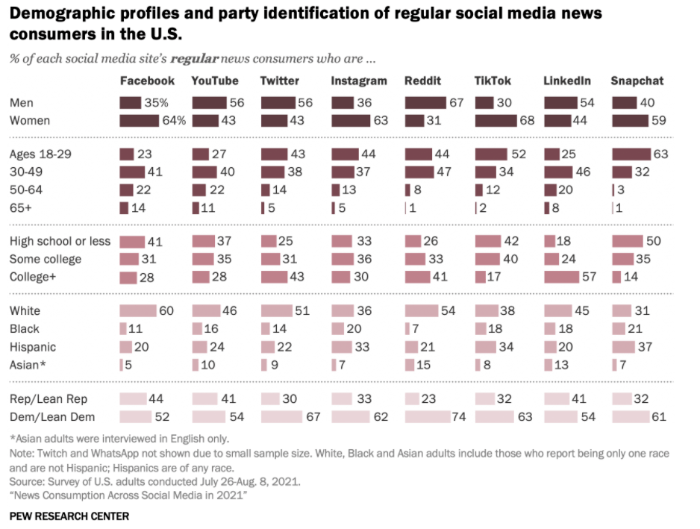
As you can see, these figures vary greatly, so it’s important to decide where you want to be and when.
One of the greatest benefits of a social media content planner is that it helps you to be more consistent, but the question still remains, how often should you post?
The answer will vary for each business.
If you’ve got a huge marketing team working on different elements like images, video, copy, personal interactions with followers, and everything else, then there’s no reason why you can’t post multiple times a day.
However, if you’re a one-man team working on every part of your business, then this probably isn’t realistic.
Ultimately, it’s about utilizing your resources to achieve a good balance between quality and quantity. If you’re putting out poor content that nobody interacts with though, it’s no use to anybody.
There’s no hard and fast answer to this question, but the key is maintaining a schedule where you can be consistent. Most algorithms (whether that’s Google, Facebook, or YouTube) value consistency.
This is something you can be in complete control of, especially with a good social media content calendar.
It can be helpful to break your posts down into categories to give your audience a mix of different content types.
There are two rules that are popular for this and they can help ensure you’re offering variety as well as making life a little bit easier for yourself.
This rule helps you strike a balance between engaging your audience and trying to sell your products.
It states that 80 percent of your posts should be designed to engage, inform, and educate, and the other 20 percent should be used to directly promote your business.
People don’t go on social media to be bombarded with promotions, so this formula helps you hit the right balance of growing sales while maintaining a positive brand image.
You’ve got to figure out how your content can fit with these goals.
If you’re always posting the same type of content then it can quickly get boring. This is why many brands use the Social Media Rule of Thirds throughout their content calendars.
In the social media rule of thirds, one-third of your posts promote your own content, one-third share curated content, and one-third share personal interactions with your followers.
The last thing you need to do before setting up your social media content calendar is audit your resources. How big is your team, and what skills do you have available to you?
If you have a team full of social media specialists, videographers, and content creators, then your plans are going to be a lot more ambitious. However, you’ve also got to put systems in place to bring these people together.
This is where your social media content calendar becomes even more important.
When you’ve clearly set out your schedule for the next month, or even quarter, then everybody can see what they need to work on.
Your writer can work on the copy, and your videographer and graphic designer can work on the visuals, bringing everything together on time.
The easiest way to create a social media content calendar template is using a Google sheet.
Open up a new sheet, and split your calendar into weeks.
Use the columns at the top to set out your dates, and in the rows, enter the following for each platform you intend to post on:
This should allow you to create a basic template in just a few minutes. It should look something like this example of a social media content calendar:
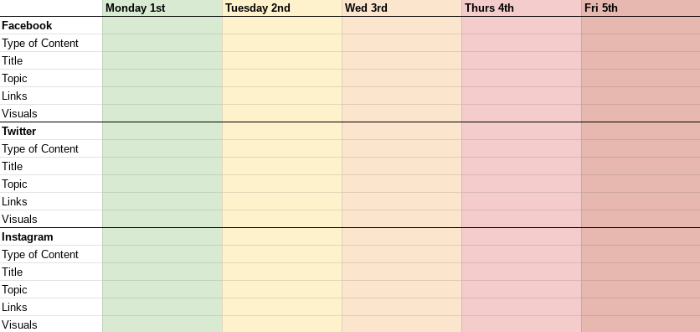
From here, you can build your social media content calendar out as much as you like, however, this should give you an excellent starting point.
If you have a budget, you could look at different project management systems like Trello or Airtable to custom-build your social media content calendar. As you start to use them, you’ll be able to spot trends, plan promotions, and much more.
The benefits of a social media calendar are that it saves you time, helps you to be more consistent, reduces errors, and allows you to be more strategical. This should help you provide your audience with better content and increase brand engagement.
You don’t have to have a social media calendar but it can be incredibly helpful. It’s hard to consistently offer your audience high-quality content, and sometimes you need time to plan what you’re doing. Knowing what posts you have coming up gives you time to get your copy and visuals in place and tie them to your promotions.
You can get as detailed as you want with a social media content calendar. Some basic information to include is the type of content, title, topic, links, and visuals that are needed.
The easiest way to create a social media content calendar is in a spreadsheet. It’s very simple to set up, and you can have a functioning content plan in just a few minutes.
{
“@context”: “https://schema.org”,
“@type”: “FAQPage”,
“mainEntity”: [
{
“@type”: “Question”,
“name”: “What are the benefits of a social media calendar?”,
“acceptedAnswer”: {
“@type”: “Answer”,
“text”: ”
The benefits of a social media calendar are that it saves you time, helps you to be more consistent, reduces errors, and allows you to be more strategical. This should help you provide your audience with better content and increase brand engagement.
”
}
}
, {
“@type”: “Question”,
“name”: ”
Do I have to have a social media calendar?”,
“acceptedAnswer”: {
“@type”: “Answer”,
“text”: ”
You don’t have to have a social media calendar but it can be incredibly helpful. It’s hard to consistently offer your audience high-quality content, and sometimes you need time to plan what you’re doing. Knowing what posts you have coming up gives you time to get your copy and visuals in place and tie them to your promotions.
”
}
}
, {
“@type”: “Question”,
“name”: “What should my social media calendar include?”,
“acceptedAnswer”: {
“@type”: “Answer”,
“text”: ”
You can get as detailed as you want with a social media content calendar. Some basic information to include is the type of content, title, topic, links, and visuals that are needed.
”
}
}
, {
“@type”: “Question”,
“name”: “How do I create a monthly social media content calendar?”,
“acceptedAnswer”: {
“@type”: “Answer”,
“text”: ”
The easiest way to create a social media content calendar is in a spreadsheet. It’s very simple to set up, and you can have a functioning content plan in just a few minutes.
”
}
}
]
}
Creating an effective social media content calendar shouldn’t be difficult.
With some basic Microsoft Excel skills, you can create a content calendar that clearly outlines your strategy for the weeks and months to come. Not only will this help you create better content, but it’s also going to save you time.
Whether you’re a large social media team or an individual marketer, a good social media content calendar is going to make it much easier to coordinate your efforts and ensure you consistently meet your audience’s needs.
Start doing this, and your social media marketing results are going to improve dramatically.
How often do you post to social media?

Funny Car points leader Matt Hagan took the No. 1 qualifying position Saturday for Tony Stewart Racing at the NHRA New England Nationals.
The post Hagan tops Funny Car qualifying in N. Hampshire appeared first on Buy It At A Bargain – Deals And Reviews.

Sebastien Bourdais and Renger van der Zande returned Chip Ganassi Racing to the victory fountain at the Detroit Grand Prix with a second consecutive win Saturday in the IMSA sports car race.
The post Ganassi Racing returns to Belle Isle with IMSA win appeared first on Buy It At A Bargain – Deals And Reviews.
Article URL: https://apply.workable.com/stackerhq/j/FAC2417239/
Comments URL: https://news.ycombinator.com/item?id=31628699
Points: 1
# Comments: 0
Article URL: https://www.themuse.com/jobs/themuse/senior-software-engineer
Comments URL: https://news.ycombinator.com/item?id=31630189
Points: 1
# Comments: 0
SEEKING WORK | Southeast Asia | REMOTE only
  Location: Remote Anywhere (preferably GMT-5 - GMT+2)
  Remote: Yes
  Willing to relocate: No
  Technologies: React, Typescript
  Résumé/CV: will provide via email request
  Email: hungdoansy (at) gmail (dot) com
  Github: hungdoansy
  Note: part time only
Hi I am a 3-yoe Frontend Developer. I work mainly with React, Typescript, Web3js, TailwindCSS, ChakraUI, just to name a few. I can deliver pixel-perfect and highly maintainable UIs. I would love to work part-time only. Range: a minimum of $2000.
Senior Software Engineer, 15yrs experience
Looking for remote contractor work part time 20h/week or fixed price projects. I am based in Burgas, Bulgaria (UTC+2)
Location: Remote, I prefer European or US companies
Willing to relocate: No
Technologies: Angular(Material/PrimeNG), NodeJS, AWS Services, .NET/C#, Vanilla JS, TypeScript, SQL, Mongo, ElasticSearch, Python, CircleCI – CI/CD automation, Docker – building/deploying containers, ExpressJs. I have vast experience in various projects.
Resume CV: https://www.linkedin.com/in/ltoshev/
Email: lubomir.toshev@gmail.com
Preferred Rate: 60 EUR/h or 65 USD/h
You can expect results and good communication.
Article URL: https://bristle.notion.site/Careers-Bristle-f7a66759282a4a1195cbafdce00a8722 Comments URL: https://news.ycombinator.com/item?id=31593784 Points: 1 # Comments: 0