An In-Depth Guide to Google Analytics 4
NOTE: On June 8, 2022, Christopher Coomer, VP of Data, Analytics, and Insights at NPD, will cover the essentials of GA4 in a short presentation. This will be followed by an extensive Q&A session with webinar host Will Francis of DMI. Register here. Those who attend will receive a free follow-up guide to help them transition to GA4.
Google recently announced it is sunsetting Universal Analytics in June of 2023. This means if you’ve been holding out on switching to Google Analytics 4, your time is almost up.
I’ve heard from a lot of marketers and business owners who are not excited about the switch. Change is always hard, but I really think this switch is going to be a good thing. For starters, it provides a ton more data and is more customizable—which means you can track what matters to you, not just what Google thinks might matter to you.
This guide walks you through everything you need to know to make the switch, including what you can do with Google Analytics 4, how to make the switch, and how to get started with the new platform.
What can you expect? New report functions, enhanced features, and predictive insights make this new generation of GA more powerful than ever.
What Is Google Analytics 4?
Google Analytics 4 is the newest version of Google Analytics. This is a whole new generation of web analytics that will allow marketers to effectively analyze important customer usage metrics, not just track traffic.
Google Analytics 4 tracks the entire customer path across multiple platforms and leverages AI and machine learning to provide more detailed insights into how users interact with your website and app.
GA4 is also focused on customer privacy. This comes in the face of some of the latest privacy laws, such as GDPR and CCPA. With privacy-first tracking, cross-channel data measurement, and AI-driven predictive analytics, GA4 is an advanced tool that provides unparalleled insights.
What is the Difference Between Google Analytics 4 and Universal Analytics?
The most obvious difference between Google Analytics 4 and Universal Analytics is that GA4 enables you to report on activity that occurs on both websites and applications. There are a number of other differences, including:
Google Analytics 4 Has a New Dashboard
The first change you are likely to notice is the entirely new dashboard. It is more streamlined and many of the reports you are used to are gone or have been moved. The navigation bar to the right includes buttons for home, reports, explore, advertising, configure, and library.
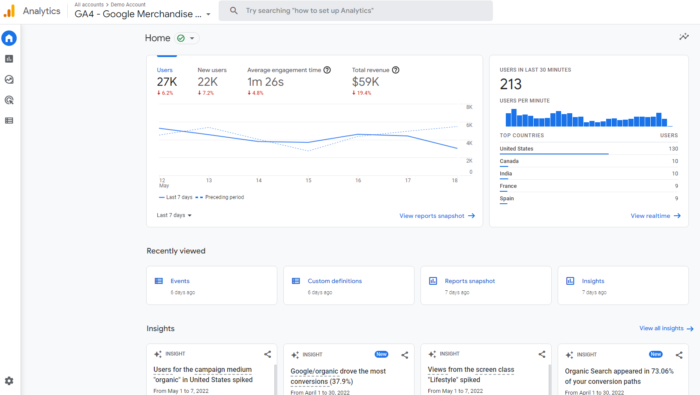
At the bottom, under Insights, you’ll see predictive insights based on Google’s AI. I’ll dig more deeply into the features and what they mean in a later section, so keep reading!
All Measurements Are Events in GA4
With Universal Analytics, page views were the most important metric. With Google Analytics 4, all measurements are events. Instead of seeing generalized data, you can now gain a fuller understanding of how users interact with your app and website.
What does this mean for you? You can still view session-level reporting, but the ability to break it down by interaction means more in-depth reports and insights.
GA4 also has an array of new metrics. These include engagement metrics such as:
- engaged sessions
- engagement rate
- engagement time
It also tracks a number of other dimensions, including attribution, demographics, events, and so forth.
This is a big change, but it’s actually going to make it easier to track customers throughout their journey. GA originally assumed page views were the most important metric—that is no longer true. The new parameters might have a learning curve, but you will have access to more data.
Gain Access to Predictive Insights With Google Analytics 4
While looking at past behaviors is helpful in understanding your audience, it doesn’t help you make proactive decisions. With GA4’s powered predictive metrics, you can make data-driven decisions on a large scale.
What does this look like? For most businesses, predictive analytics can significantly impact retargeting campaigns. AI metrics include:
- purchase probability
- churn probability
- revenue prediction
With the above metrics, you can create audiences based on their predicted behaviors. For example, users who are likely to purchase in the next 7 days or users that are likely to spend more than $500 in one purchase.
These audiences can then be targeted using Google Ads campaigns or even on social media.
These metrics can also improve website performance. You can create custom funnels for different audiences based on their behaviors and needs. The suggestions will continue to improve as more data is collected.
GA4 Gives Marketers More Control
GA4 allows you to customize the dashboard, enabling you to see the reports that matter most to your business. It even works well in conjunction with Google Data Studio so you can create custom visualizations of the data collected.
You can also create custom segments based on trigger events which are essentially a subset of events that occurred on your website or application. This enables you to more accurately track customer interactions.
For example, you can create segments on all conversion events that occurred in a particular location. These capabilities make it possible to take a more granular view of your users and their behaviors.
Cross-Platform Tracking
What happens when users are active on more than one platform? With the old Google Analytics, tracking users across platforms was nearly impossible. The new Google Analytics 4 tracks both web and app data in one property (hence the beta name of Google Analytics App+Web).
Cross-platform tracking enables you to see the complete customer journey, including acquisition, engagement, monetization, and retention. You can use GA4 to track the user experience from start to finish—and from platform to platform.
This is done through unique user IDs assigned during app or website login.
With the appropriate gtag.js script, the user ID for each logged-in session will be sent from either the website or the application to Google Analytics. The ID will be reported to the GA4 property and any user metrics will be logged. When the user logs in again on an alternative platform, the reports will connect the user’s data to their unique ID and pick up where it left off.
This is incredibly useful information for any marketer, as it allows you to better understand the cross-platform experience of your users. The data can also be used to extrapolate information for a generalized demographic and build more accurate customer models
How to Set Up Google Analytics 4
Since Google Analytics 4 can be used for your website or application (or both), there are two separate setup processes. They are outlined below.
Alongside an Existing Property
If you currently have a Universal Analytics property for your website, then set up of a Google Analytics 4 property can be completed with the GA4 Setup Assistant.
- In Google Analytics, click “Admin” on the lower left of the screen.
- In the Account column, select the desired account:
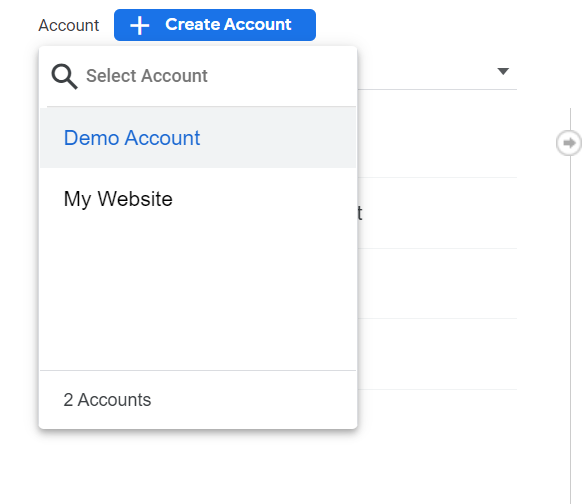
- In the Property column, select the Universal Analytics property that currently collects data for your website:
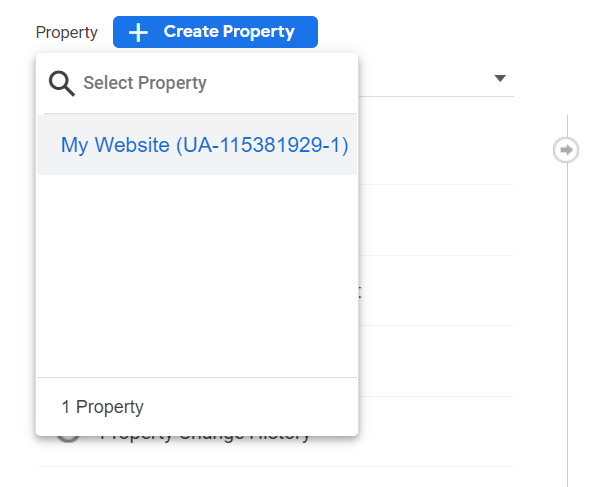
- In the Property column, select GA4 Setup Assistant:
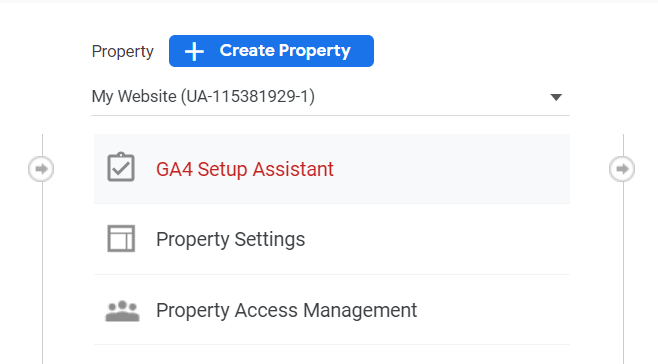
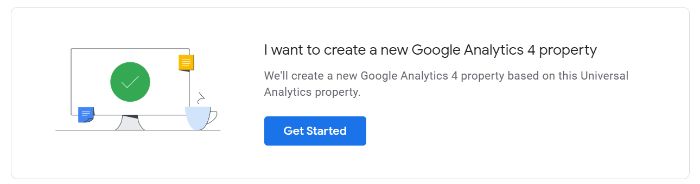
- Click “Get started” under “I want to create a new Google Analytics 4 property:”
- If your site uses the gtag.js tag, you can select “Enable data collection using your existing tags.”
- Click “Create Property.”
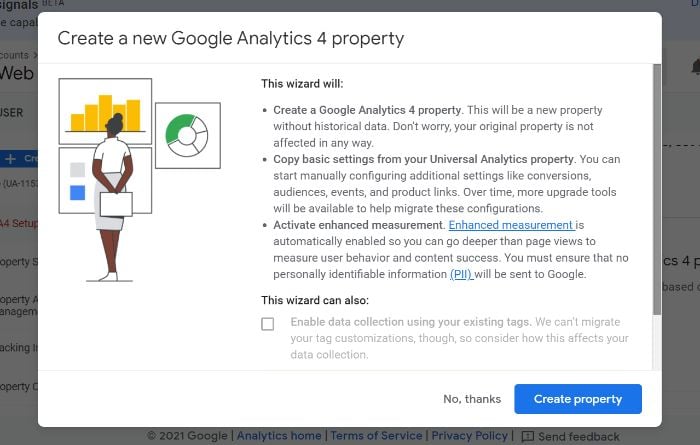
If you are unable to “Enable data collection using your existing tags,” it’s for one of three reasons:
- Your website builder/CMS doesn’t yet support the gtag.js tag.
- You use Google Tag Manager.
- Your website is tagged with analytics.js.
In all three cases, you’ll need to add the tag yourself.
Google Analytics for Firebase
To upgrade your Firebase account to Google Analytics 4, follow these steps:
- Log in to the Firebase console.
- Go to Analytics > Dashboard on the left panel.
- Click “Begin upgrade” in the banner at the top of the page.
- Follow the on-screen instructions to complete the upgrade.
Once upgraded, you can find app analytics in both the Firebase console and Google Analytics.
How Do I Use Google Analytics 4?
Now that you understand the power of the new Google Analytics platform, I’ll walk you through how to use it. I will say there is a learning curve for the platform, and that can definitely be frustrating.
Start by following the steps below. This will help you understand the basics and how to navigate the new platform. If you still aren’t seeing the data you need, consider signing up for a longer-form course or reaching out to my team for more help.
Test The New Search Bar
The search bar in GA4 lets you access more than ever, including instant answers for specific queries (such as “how many users this month vs last year”), specific reports or insights, property configuration, or to access the help content.
Try a few queries to see what you can access, such as “how to create a report” or “top users by city.” As you learn the new dashboard, the search board will be invaluable.
Get To Know The New Dashboard
Now let’s look at the new dashboard. At first glance, it might look pretty familiar. Take a look around, however, and you’ll see most of the reports you’re used to are not where they used to be.
Here’s an annotated version of the dashboard. I’ve labeled the navigation bar on the left as well as the different displays. For this walk-through, I’m using GA’s demo account (Which you can access here), so it may look a bit different than your version, especially if you’ve already started customizing it.
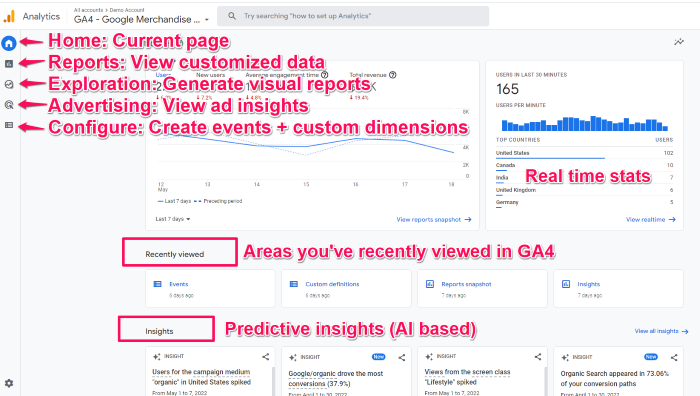
NOTE: A few of the navigation menu items including Audience and Library aren’t in this screenshot, but should be accessible in your dashboard if you have editor access.
Explore The Reports Dashboard
From the dashboard, click on the second icon on the left nav bar, the one that looks like a graph:
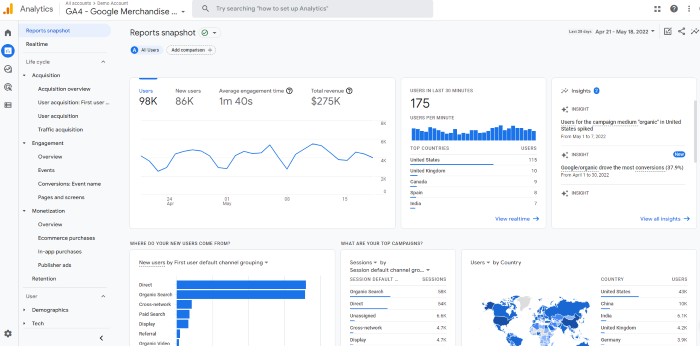
There’s a ton of data here. I won’t walk through all of it because different sites will track different metrics, so yours might look different.
But let’s say you want to see how many people viewed a specific page. In this dashboard, you’d click “engagement” and then look at the “Views by page title and screen class” chart.
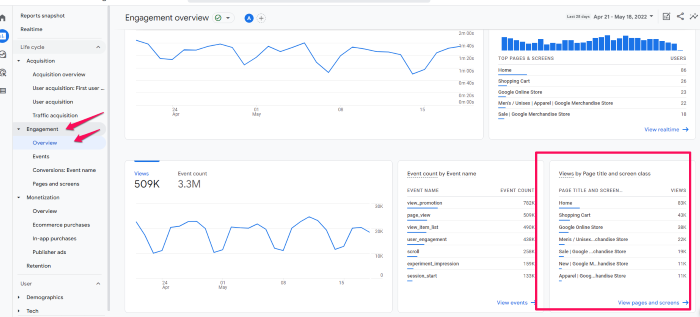
You can also view acquisition, monetization, and user demographics here. If you want to compare different metrics, select the + icon at the top (next to Engagement Overview.)
Customize Your Reports Snapshot
One of my favorite features is the ability to customize the reports snapshot so you can see the data that matters most to you at a glance. This will also help you get to know GA4 a bit better so you are more comfortable using it.
First, let’s create a new report.
To start, click Library at the bottom of the left navigation bar. Note, if you don’t see this option (It’s not in the demo account), it means you don’t have admin access.
Then, scroll down to the Reports table and click Create a new report. Then, select Create an Overview Report. You’ll be asked to provide the data source and GA will walk you through creating the report. (This part changes based on the type of report.)
If you want to change the layout of your overview, click the six dots
Create A New Event
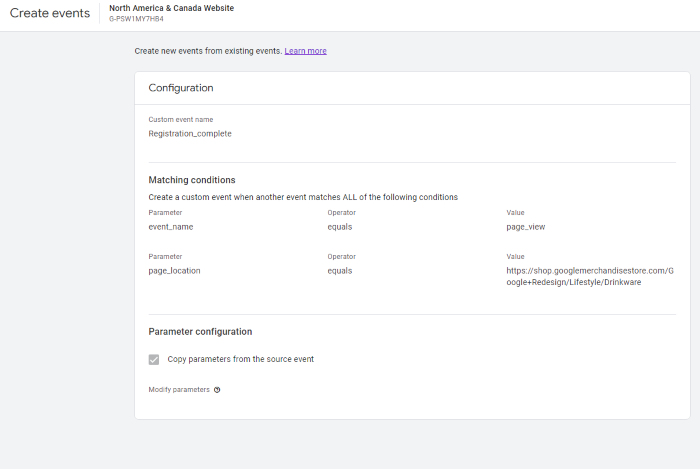
Events are crucial in the new Google Analytics—in fact, this is how you’ll track just about everything. You will need an editor role in GA to make these changes, so if you don’t see the options I mention, that may be the issue.
- To create a new event, head to Configure > Events.
- Then click Create Event.
- Choose the data stream (If you have more than one property in GA)
- Tap Create.
- Give your report a name. I suggest creating a naming convention and sticking to it. For example, using <audience location, acquisition channel>, a report might be named “US visitors from social” or similar. Creating a standard naming convention will help keep you organized.
- In the “Matching Conditions” field, enter the existing event this will be based on, such as “click.”
- If you want to use the same parameters as the original event, select “copy parameters from the source event.” For example, if you want your new event to be triggered when a click occurs and already have an event for that, you’d check this box.
- Specify any changes you want to make to the new event. For example, if you want to track when someone clicks and then takes another action, you’d add it here.
See Suggested Audiences
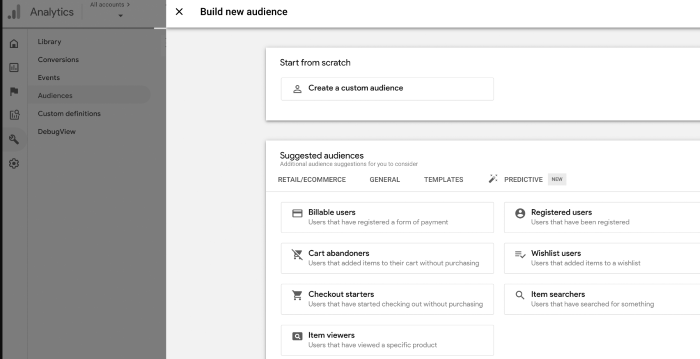
Google Analytics 4 now suggests new audiences. If you’re looking to expand your user base or break into new markets, this can be crucial information. When you create a GA4 property, you’ll tell Google about your business, including your industry category.
Google uses that information to generate new audiences that may be a good fit for your business. To view this data head to Audiences, under the Library. You’ll see suggested audiences listed under Build a New Audience.
Frequently Asked Questions About Google Analytics 4
What is Google Analytics 4?
Google Analytics 4 is a new analytics property offered by Google. It enables users to analyze data from websites, apps, or both websites and apps. It is a complete redesign of GA, so there is a bit of a learning curve.
What is the difference between Google Analytics 4 and the old GA?
The main difference between Google Analytics 4 and the old GA is in what the two different property types track. Google Analytics 4 can track the analytics of both websites and applications, while the old GA can track only website analytics.
Is Google Analytics 4 free?
Similar to Universal Analytics, Google Analytics 4 is a free property type. There are no costs associated with using one (or more) GA4 properties on your account.
Can you run Google Analytics 4 and Universal Analytics at the same time?
Yes, you can currently run both platforms parallel to each other. UA will stop gathering data in the summer of 2023, so make sure you’ve installed GA4 even if you aren’t ready for the switch quite yet.
Why is Google Analytics 4 so hard to use?
GA4 is extremely customizable, which can make it hard to learn. However, once you get a hang of it, you’ll find you have access to deeper insights you can use to grow your business.
{
“@context”: “https://schema.org”,
“@type”: “FAQPage”,
“mainEntity”: [
{
“@type”: “Question”,
“name”: “What is Google Analytics 4?”,
“acceptedAnswer”: {
“@type”: “Answer”,
“text”: ”
Google Analytics 4 is a new analytics property offered by Google. It enables users to analyze data from websites, apps, or both websites and apps. It is a complete redesign of GA, so there is a bit of a learning curve.
”
}
}
, {
“@type”: “Question”,
“name”: “What is the difference between Google Analytics 4 and the old GA?”,
“acceptedAnswer”: {
“@type”: “Answer”,
“text”: ”
The main difference between Google Analytics 4 and the old GA is in what the two different property types track. Google Analytics 4 can track the analytics of both websites and applications, while the old GA can track only website analytics.
”
}
}
, {
“@type”: “Question”,
“name”: “Is Google Analytics 4 free?”,
“acceptedAnswer”: {
“@type”: “Answer”,
“text”: ”
Similar to Universal Analytics, Google Analytics 4 is a free property type. There are no costs associated with using one (or more) GA4 properties on your account.
”
}
}
, {
“@type”: “Question”,
“name”: “Can you run Google Analytics 4 and Universal Analytics at the same time? “,
“acceptedAnswer”: {
“@type”: “Answer”,
“text”: ”
Yes, you can currently run both platforms parallel to each other. UA will stop gathering data in the summer of 2023, so make sure you’ve installed GA4 even if you aren’t ready for the switch quite yet.
”
}
}
, {
“@type”: “Question”,
“name”: ” Why is Google Analytics 4 so hard to use? “,
“acceptedAnswer”: {
“@type”: “Answer”,
“text”: ”
GA4 is extremely customizable, which can make it hard to learn. However, once you get a hang of it, you’ll find you have access to deeper insights you can use to grow your business.
”
}
}
]
}
An In-Depth Guide to Google Analytics 4: Conclusion
Google Analytics 4 is a powerful analytics tool that provides invaluable insights into your audience. There are numerous benefits to GA4, including cross-platform tracking, more control over data, and AI-driven insights.
Fortunately, setting up a GA4 property on your website or app is easy. The steps outlined above should take you less than 10 minutes to complete, so there’s no excuse to put off the transition.
Have you made the switch to Google Analytics 4? I’d love to hear your thoughts in the comments.

 , and business credit is just one of many tools you need along the way. If you’re interested, our business credit guide can help any user ensure their toolbox is well stocked.