10 Best Email Marketing Softwares for Small Businesses

Ninety-nine percent of email users check their inbox every single day. 

That’s more high-intent traffic than any other avenue or platform you can use to reach your audience.

When people sign up for your email list, they are giving you permission to sell them. You can market to them for as long as you want until they unsubscribe.

Today, some small businesses have fallen into the trap of believing that email marketing isn’t beneficial. Don’t be one of them.

Eighty-one percent of small businesses see great results when they use email to acquire customers, giving them a key competitive advantage.

Let’s look at the best email marketing software you can use to achieve your goals.

1. Best Email Marketing Software for Multi-Channel Marketing: Omnisend

Omnisend is a popular marketing tool that caters primarily to small e-commerce businesses. It helps put everything in one place including your:

  • SMS marketing
  • social media marketing
  • email marketing

A study performed by Dot Digital shows the importance of email marketing in the e-commerce niche. They found that email yields an approximate 42 dollar return on every dollar spent. 

With Omnisend, you can easily create emails using a variety of templates and drag-and-drop editing tools—perfect for new and novice marketers.

This email marketing software is also great at helping you increase conversions by using discount codes, scratch cards, and various informative add-ons (like PDFs).

Key Features:

  • Pre-built templates for attractive emails without coding or advanced email knowledge.
  • Workflows that help you replicate top-converting email strategies.
  • Lead generation pop-ups that increase ROI.
  • Analytics dashboard for fixing mistakes and identifying opportunities.

Pricing:

One of the best features of Omnisend is its pricing structure. It’s free for up to 500 emails per month (perfect for small businesses) and 60 text messages. This includes automation, recommended workflows, and A/B testing.
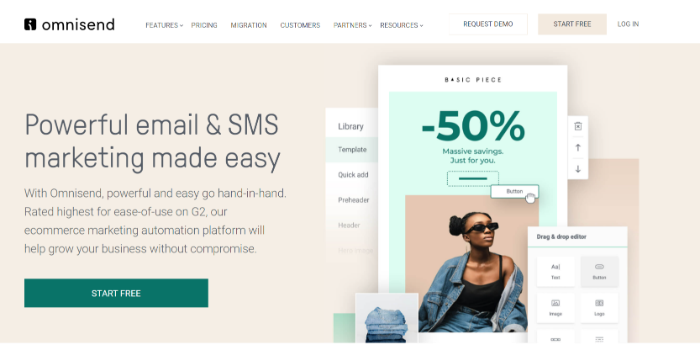
Best Email Marketing Software for Multi-Channel Marketing - Omnisend

2. Best Email Marketing Software for Free Users: MailChimp

At one time, MailChimp was exclusively used as an email newsletter platform. 

Today, it’s a complete CRM platform that allows you to design landing pages, email capture forms, and much more. Its range of features helps small businesses stay organized and execute marketing strategies.

However, be warned. MailChimp does have limitations on the number of lists you can create and how accurately you can segment your audience. 

This requires you to have a firm understanding of your customer avatar.

Key Features:

  • Loaded with hundreds of integrations (for sites like Shopify).
  • Boasts a CRM product suite of automation tools, behavioral targeting, and more.
  • Provides appointment booking.

Pricing:

If you need an email marketing tool to help you scale on a low budget, MailChimp is a great option. When you are just starting out, you can access its wide range of features for free.

However, when your list is scaling and you’re ready to start spending, you can purchase plans for up to 10,000 emails a month. With email users expected to climb to 4.6 billion by 2025, now’s the time to act.
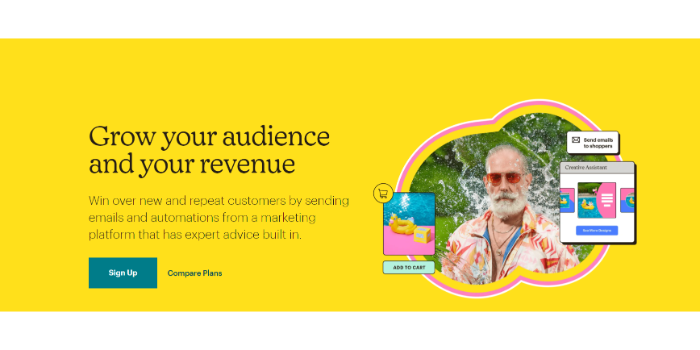
Best Email Marketing Software for Free Users - MailChimp

3. Best Email Marketing Software for Segmentation: ActiveCampaign

ActiveCampaign is the best email marketing tool for selling products to lots of different target audiences. 

Its segmentation capabilities allow you to easily separate your contacts into lists and customize your marketing for hyper-personalization (which reduces opt-out rate by 50 percent.)

Using “[Name]” at the beginning of an email simply isn’t effective anymore. You need to actively write a copy that caters to an individual’s specific pain points and concerns.

ActiveCampaign helps you organize your list, target effectively, and create emails that convert.

Key Features:

  • Design and write emails that convert for specific audiences.
  • Personalize emails based on various audience segmentation variables.
  • A/B test to identify what converts and what doesn’t.
  • Landing page builder.

Pricing:

While ActiveCampaign doesn’t offer a free plan, it is transparent and upfront with its costs. For $9 per month, you get email automation, content creation support, unlimited sending, templates, newsletters, and data-backed reporting.
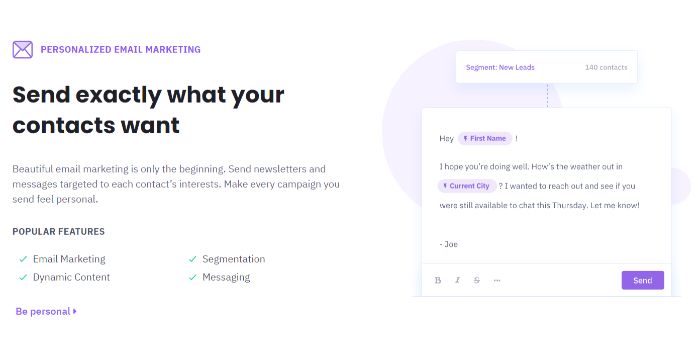
Best Email Marketing Software for Segmentation - Active Campaign

4. Best Email Marketing Software for Scaling Up: Drip

An average cart abandonment rate of 69.82 percent leads to missed sales opportunities that small businesses can’t afford to lose. 

When you want to scale, Drip is one of the highest recommended platforms out there. It has plans for businesses of all sizes, so your spending will only grow as you do.

The cost is uniquely catered to you based on the size of your list at the time you subscribe.

If you’re simply “dabbling” into email marketing, you can get started with Drip. If you already have a list of 10,000 email subscribers that you want to start making use of, don’t worry, they have a plan for you too.

Key Features:

  • The editor has both templates and drag-and-drop features.
  • Data insights provide behavior-based automation.
  • Email and website integrations.
  • Industry-leading customer service.

Pricing:

Drip offers a 14-day free trial and, from there, it determines how much you pay based on the size of your list.

For example, at $19 per month, you can have 1,500 contacts and unlimited emails. At $209 per month, you can have up to 15,000 contacts and unlimited emails.
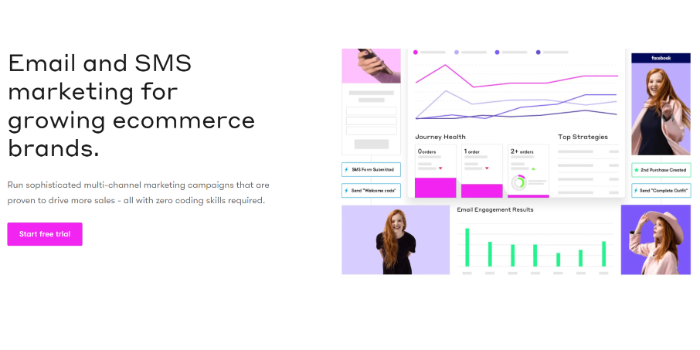
Best Email Marketing Software for Scaling Up - Drip

5. Best Email Marketing Software for Email Design: Stripo

Not every business needs complicated email software. Stripo does one thing and does it well.

It’s an email builder designed to integrate with other platforms like GetResponse and MailChimp. Use Stripo to access beautiful templates that allow you to create on-brand marketing messages. 

Key Features:

Pricing:

Stripo offers a “free for life” plan that provides access to free email templates, learning software, and email support. From there, you’ll have to upgrade to the basic plan of $15 per month.
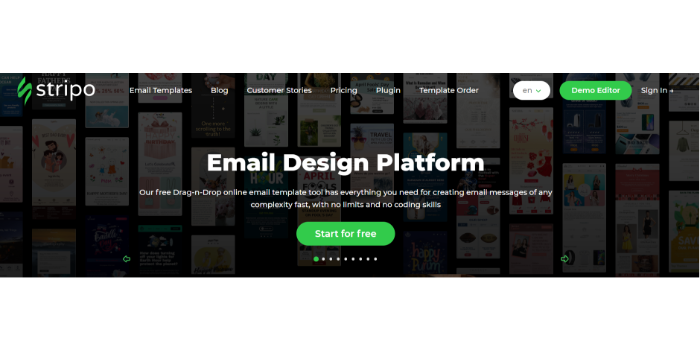
Best Email Marketing Software for Email Design - Stripo

6. Best Email Marketing Software for Lead Generation: OptinMonster

At one time, OptinMonster was nothing more than a WordPress plugin. 

Today, it’s a standalone email marketing tool with many features like opt-ins, pop-ups, triggers, templates, testing tools, integrations, and analytics.

It’s the best option for businesses that want to generate leads simply because of the versatility of the campaigns you can run. Examples include an exit-intent popup, floating bar, or fullscreen slide-in. 

They have a lot of gamified options as well. If most of your target audience is Gen Y or Z, their attention spans are between 8-12 seconds. Not quite long enough to read an email. 

Gamification increases retention times, click-throughs, and conversions.

Key Features:

  • Great drag-and-drop templates.
  • Extensive integrations.
  • Gamified emails.
  • HTML and Java editing.

Pricing:

OptinMonster is so much more than an email marketing software. At just $9 per month for the basic plan, you gain unlimited access to marketing campaigns, segmentation, integrations, and a website if you don’t already have one.
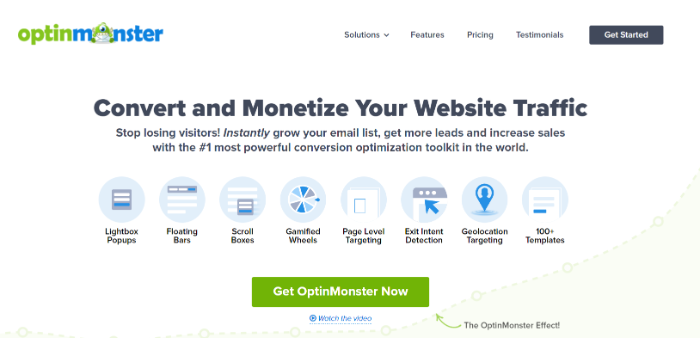
Best Email Marketing Software for Lead Generation - OptInMonster

7. Best Email Marketing Software for Contests and Promotions: Wishpond

Wishpond is one of the most comprehensive email marketing tools we’ve looked at so far. If you can dream it, they offer it. 

Wishpond has integrations for e-commerce, email marketing, and automation.

It also has a comprehensive landing page builder loaded with features including promotions, and a dashboard for implementing social media growth into your email marketing. 

The tool also offers online forms for you to do surveys and ask your audience what they’d like to see or hear more of. It’s a great option for small businesses with high-ticket offers.

Key Features:

  • Landing page builder with templates and customizations.
  • Easy-to-design contests and promotions.
  • Referral suite with lead captures, generation options, pop-ups, and link sharing.

Pricing:

Wishpond is $75 per month for the basic plan.

This price tag comes with a red flag: don’t use this tool if you don’t already have an established email list of at least 100 people.

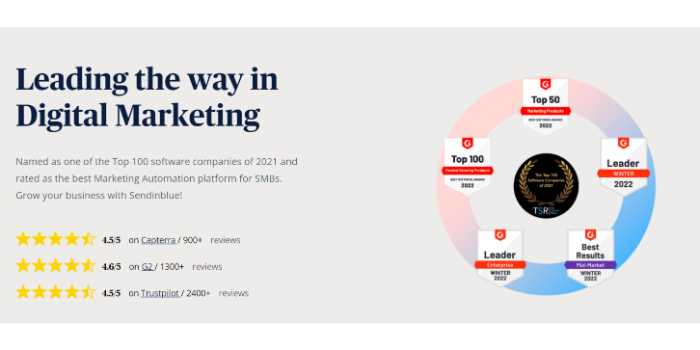
8. Best Email Marketing Software for Automation: Sendinblue

Sendinblue’s goal is to help you automate email marketing to save costs and protect your bottom line. It offers a comprehensive CRM, email templates, landing pages, and even social media integration—all in one place.

Email has a 60 percent conversion rate compared to social media’s 12.5 percent, but it can take a long time to design and execute a successful strategy. With Sendinblue’s guidance, you can truly have the “best of both worlds” with this email marketing tool.

Automation is the main thing that stands out about Sendinblue with its great workflow, targeted campaigns, triggers, and lead scores.

Key Features:

  • Integrations with e-commerce platforms.
  • Automation elements.
  • WordPress plugin with a 4.5-star rating.
  • Free CRM system.
  • Multi-channel marketing.

Pricing:

Affordability takes centerstage with Sendinblue. Their free plan contains an email template library, email personalization, design tools, campaigns, and up to 300 emails a day. From there, the light plan is $25 per month with no sending limits.
Best Email Marketing Software for Automation - SendinBlue

9. Best Email Marketing Software for Funnels: GetResponse

Sometimes you need to build your sales funnel before you build an email list, and that’s what GetResponse is all about. You can build your entire funnel using its email marketing software, and even implement a live chat feature on your site.  

Key Features:

  • Powerful automation enables detailed list segmentation.
  • Plenty of testing options to figure out what converts.
  • Funnel and landing page builder.
  • Live chat, social media, and SEO features.

Pricing:

GetResponse has a complicated pricing structure simply because of everything it offers. If you simply want to send emails and build one landing page, you can use the free plan for up to 500 contacts. If you want to unlock the automation and segmentation features, you’ll need to get their “Marketing Plan” at $48 per month.
Best Email Marketing Software for Funnels - GetResponse

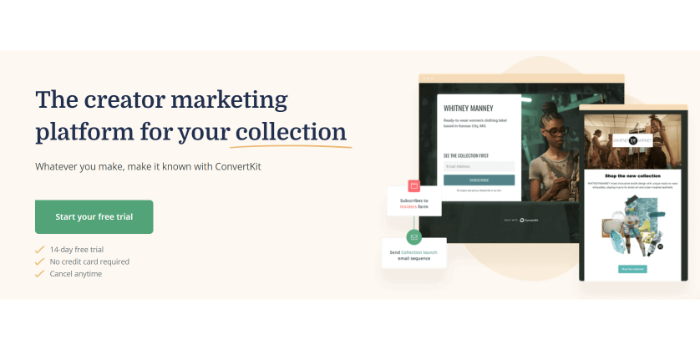
10. Best Email Marketing Software for Content Creators: ConvertKit
Best Email Marketing Software for Content Creators - ConvertKit

According to ConvertKit, creatives sent 16 billion emails in 2021. That’s 530 every second.

How do you get noticed among all that noise?

When you want your personal brand to stand out, ConvertKit’s features will appeal to your audience. It offers a landing page builder, solid deliverability, and support for content creators.

The downsides are limited templates, lack of reporting, and a hefty price tag.

Key Features:

  • Run targeted campaigns.
  • Sell digital products and build your subscriber/follower base.
  • Simple to use and super basic.

Pricing:

ConvertKit offers a free plan but it’s incredibly limited. From there, your email list determines a price. When you hit 3,000 subscribers you need to upgrade to a $49 per month plan, allowing you to use funnels and sequences. To get newsletters and any decent data reporting, you’ll have to purchase a premium plan.

Frequently Asked Questions About Email Marketing Software for Small Businesses 

What’s the best email marketing software for small businesses?

Omnisend is the best email marketing tool for small businesses because it combines the right amount of features with an attractive price. Through it, you can execute a multi-channel marketing strategy and scale your revenue. 

Is email marketing beneficial to small businesses?

Email marketing is an incredible tool for small businesses and personal brands. Its average ROI of $36 for every $1 spent means that you are likely to see great business success from investing in high-quality and well-written emails.

Can my small business use email marketing software for automation?

Absolutely, tools like Sendinblue and Drip offer great email automation and triggers that help you make the most of your marketing efforts without requiring lots of time and attention. 

{
“@context”: “https://schema.org”,
“@type”: “FAQPage”,
“mainEntity”: [
{
“@type”: “Question”,
“name”: “What’s the best email marketing software for small businesses? “,
“acceptedAnswer”: {
“@type”: “Answer”,
“text”: ”

Omnisend is the best email marketing tool for small businesses because it combines the right amount of features with an attractive price. Through it, you can execute a multi-channel marketing strategy and scale your revenue. 


}
}
, {
“@type”: “Question”,
“name”: “Is email marketing beneficial to small businesses?”,
“acceptedAnswer”: {
“@type”: “Answer”,
“text”: ”

Email marketing is an incredible tool for small businesses and personal brands. Its average ROI of $36 for every $1 spent means that you are likely to see great business success from investing in high-quality and well-written emails.


}
}
, {
“@type”: “Question”,
“name”: “Can my small business use email marketing software for automation? “,
“acceptedAnswer”: {
“@type”: “Answer”,
“text”: ”

Absolutely, tools like Sendinblue and Drip offer great email automation and triggers that help you make the most of your marketing efforts without requiring lots of time and attention. 


}
}
]
}

Conclusion: Email Marketing Software Drives Real Results

It’s clear that email marketing software can help small businesses grow

When someone subscribes to your email list, you have their permission and it shows that they’re interested in whatever it is you offer.

Why not make the most of their engagement and sell to them?

Use the best email marketing software to build your list, increase your conversions, and ultimately, generate more revenue. 

Which email marketing software have you used? What do you like most about it?
How to Track the ROI of Your Online Advertising Campaigns

You just started a new AdWords campaign.

You’re trying to drive some easy, instant sales to your site.

But you quickly realize that you have no idea how to tell if those visitors are converting. No clue if you’re wasting your hard-earned budget without a return.

You’re not alone.

76% of marketers are still struggling to track the ROI of their campaigns.

Even worse is when marketers think they’re tracking the effectiveness of their campaigns, but they’re doing it in the wrong way.

So it looks and seems and feels like they’re on the right track. All while budgets get squandered, and results continue to lag.

Here’s how to get started tracking your return on online advertising campaigns.

Outline What a “Conversion” is For Your Campaign

Conversion tracking can be complex.

It’s not cut-and-dry like most people think.

The first step to tracking the return on investment for an online advertising campaign is to outline what your campaign goals are.

Are you trying to build brand awareness? Are you trying to drive e-commerce sales? Consultations? Free trials?

Depending on your goals, conversion tracking will be vastly different.

For example, a conversion for e-commerce sales is quantifiable without much extra effort.

You can tell exactly what someone bought and how much you spent to acquire that customer via ads.

But what about consultations or free trials?

When AdWords shows a conversion for your campaign, it’s not a sale.

Meaning you aren’t getting a return on investment just yet. Your bank account isn’t increasing when someone signs up for a consultation.

So those conversions don’t tell the whole story.

If you’re not tracking something quantifiable, such as items sold or likes generated to your Facebook Page, then you need to start with some basic math.

If you are trying to get consultations (or other similar conversions) that don’t have a dollar amount to tie back to, you can set up a basic equation to give them value:

(Average Closed Lead Value X Rate of Lead Close) = Per Lead Value

This simple equation will give you insight into how much a lead is worth in your business, making it easier to tie back ROI to your conversions.

Set up Google AdWords Tracking

Setting up Google AdWords conversion tracking correctly is critical for measuring your ad ROI.

It helps you track data on how your campaigns are performing and whether or not you are finding success.

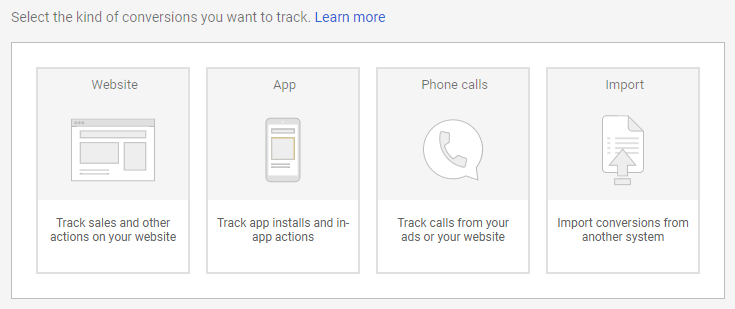
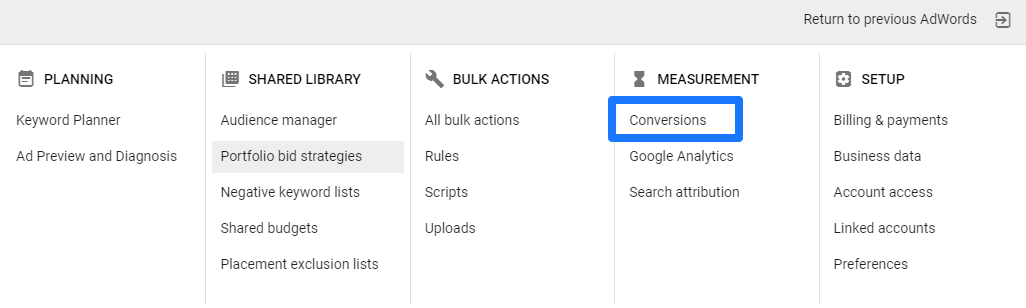
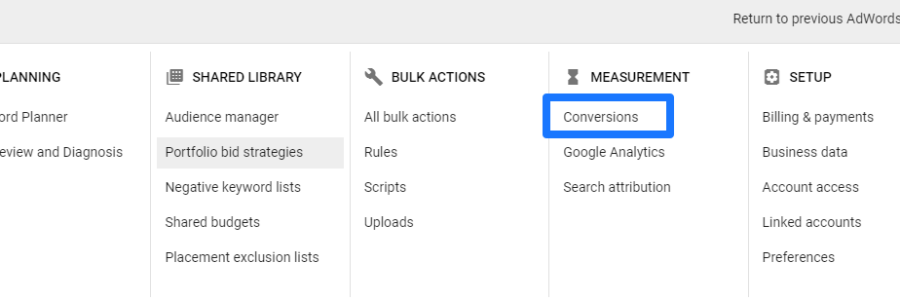
To get started, open up your AdWords account and navigate to the conversions section:

Here, you can begin setting up conversion tracking elements for multiple parts of your campaigns.

From basic call data to website conversions, you have a few different options:

Depending on your campaign, you might need more than one of these elements to track conversions.

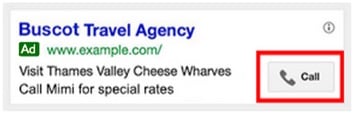
For example, if you decide to run AdWords ads with call-based extensions, you’ll want more than just website tracking.

To get started, click on the element that you need to track.
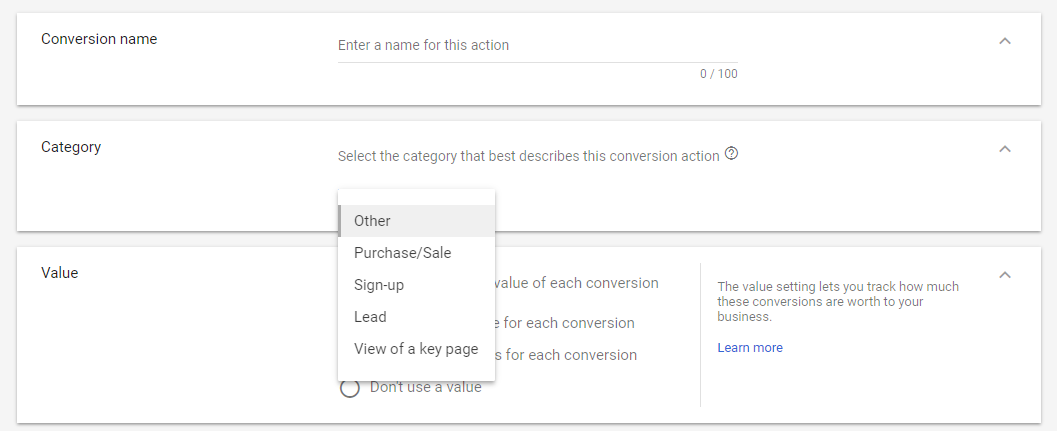
The most common one will be your website conversions, or the people who buy a product or convert on your site.

Select the tracking type and give it a name and a category to recognize it:

Next, under “Value,” you’re going to want to input some basic numbers.

Remember that equation in the section before?

If your product/service isn’t a direct sale like e-commerce, you want to set your lead value as the conversion value here.

This will give you some insight into ROI fast without having to dig through each conversion.

Once you’re ready, save the conversion tracking element, and it’s time to install your tag.

I can tell you’re already jumping for joy. Tone it down, I know it’s exciting stuff.

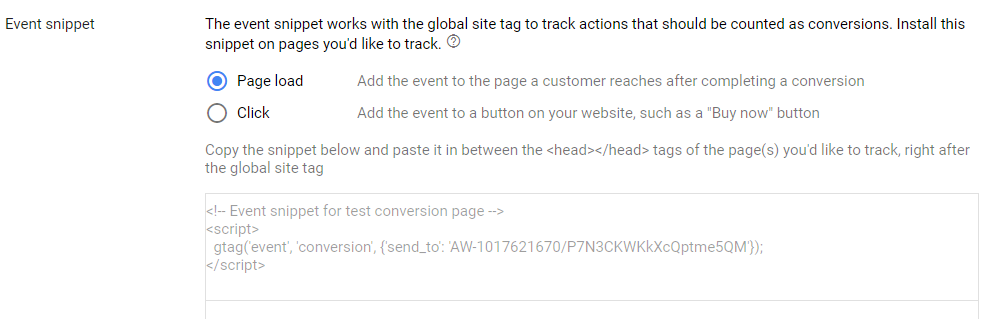
Now you can scroll down to the box called “Event snippet” where you can select between two options:

The most common one will be the Page Load option.

This simply means that whenever someone lands on a page, AdWords will mark it as a conversion.

So, the key here is to place this tag on the right page.

If you place it on your landing page, your conversion data won’t make sense.

You need to place it on a thank you page that a user will land on after they’ve converted.

So, if someone fills out a form somewhere on your site, they need to be directed to a thank you page. That’s where you want to place the tag.

Simply install the code into your thank you page header, and you’ll have live tracking for your campaign.

If you want to double-check your tag installation, use the Google Tag Assistant to make sure it’s installed correctly:

Voila! That’s it.

Now you can start to track the fundamentals of ROI on AdWords.

But that’s not all. This is just the first step of tracking your advertising ROI.

It’s time to go into some depth.

Setup Facebook Pixels

Facebook advertising is amazing because of all the diverse options it gives you.

The options are virtually endless. You can create campaigns to fit almost any goal you might have.

However, that’s also part of the problem. Determining exactly how likes, comments, awareness, visits, and clicks translate into new paying customers isn’t easy.

First, you need to set up tracking scripts, just like you did for AdWords.

This is the only way to start collecting the initial data on how your campaigns are performing.

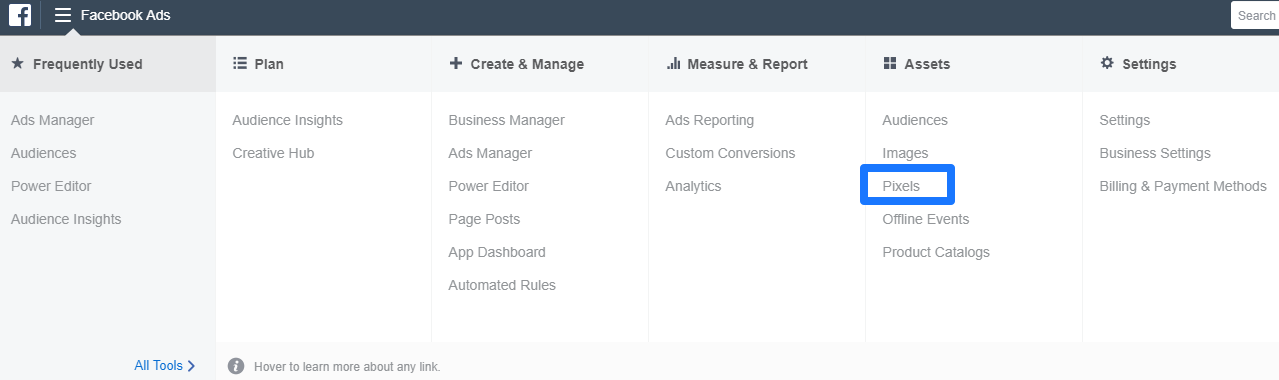
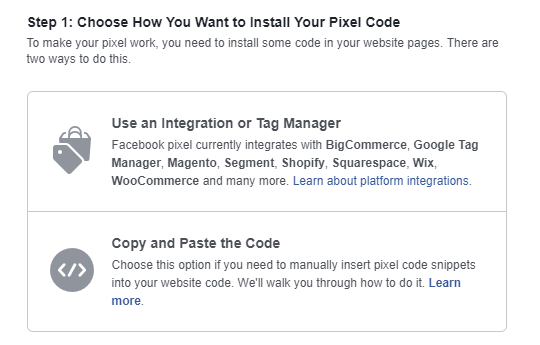
To start setting up your Facebook Pixel for tracking, head to your Facebook Ads Manager and click “Pixels” under the Assets section:

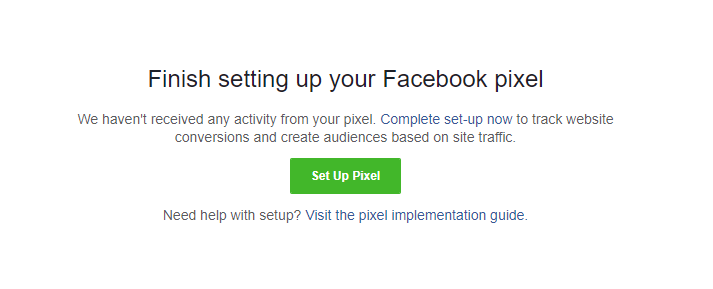
Now, click the green “Set Up Pixel” button to get started:

Facebook is easy to work with because they’ve got dozens of integrations that make installation a breeze:

If you know how to install code, you can do it yourself.

If you don’t (or you’re just lazy like me), select the first option.

Once you’ve integrated, be sure to head back to the Ads Manager to make sure there’s a confirmation in the top right corner:

This pixel script will give you the basics. You’ll start to see who does what on your site (and how it all relates back to your original ad campaigns).

But you’re going to need to take it a few steps further before you can glean any ROI insight.

Let’s do it.

Take Advantage of UTM Codes

UTM codes ‘tag’ your URLs to give you extra data about where your traffic is coming from.

For example, let’s say you’re doing paid promotion with an influencer on Twitter.

They are posting a few of your blog posts every day to get you more traffic and sales.

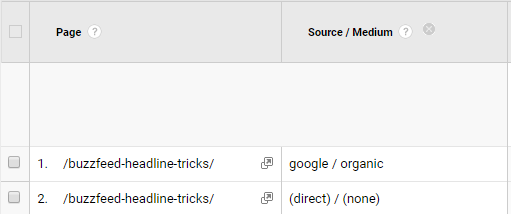
But when you look in Google Analytics, this is all you see:

Great. This isn’t helpful because you could be running dozens of these campaigns at one time. Or your traffic could just be high and diverse.

There’s no way to pinpoint which activities or campaigns are generating those sessions. Meaning, you have no clue if your efforts are working or not.

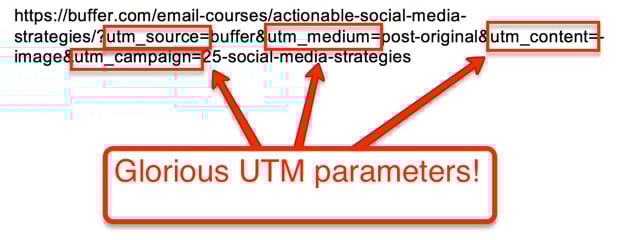
UTM codes allow you to add tracking data like source, medium, campaign, and even keywords to your URL to properly record each visit.

For example, here’s what a completed UTM could look like:

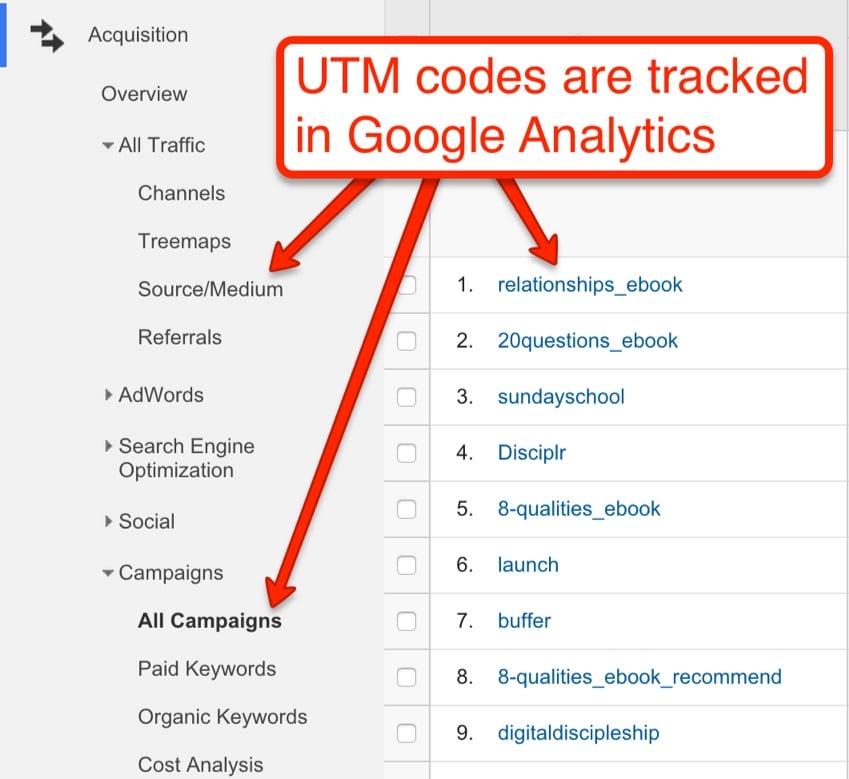
Here’s what your data will look like inside Analytics when you start to add UTM codes:

Now, you can tell exactly how you got the traffic, why it’s coming to you, and where it’s coming from.

So, how do you set these up?

There are a few ways to go about it.

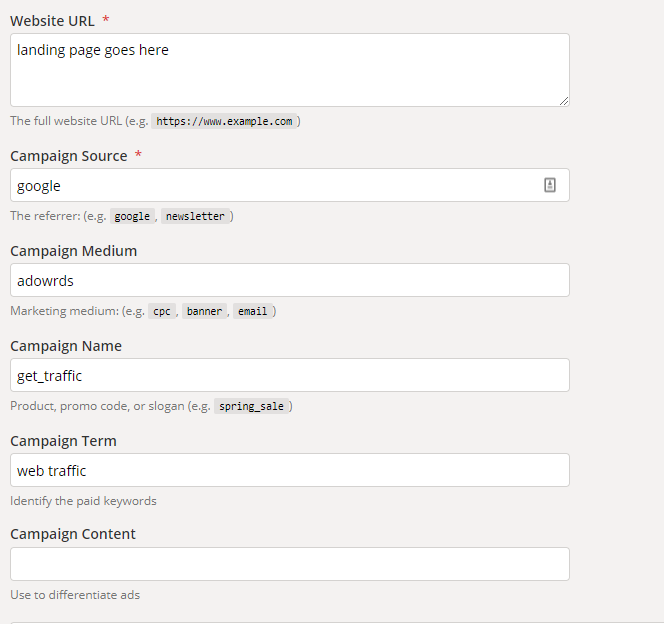
If you’re running smaller advertising campaigns and just need to track a few links, head to Google’s UTM builder:

You can use this page to fill out the desired tracking tags like campaign source, medium, name, and keywords.

You simply type the final URL that you want to track into the “Website URL” section and generate your new URL.

Use that in your next campaign to get better data in Google Analytics.

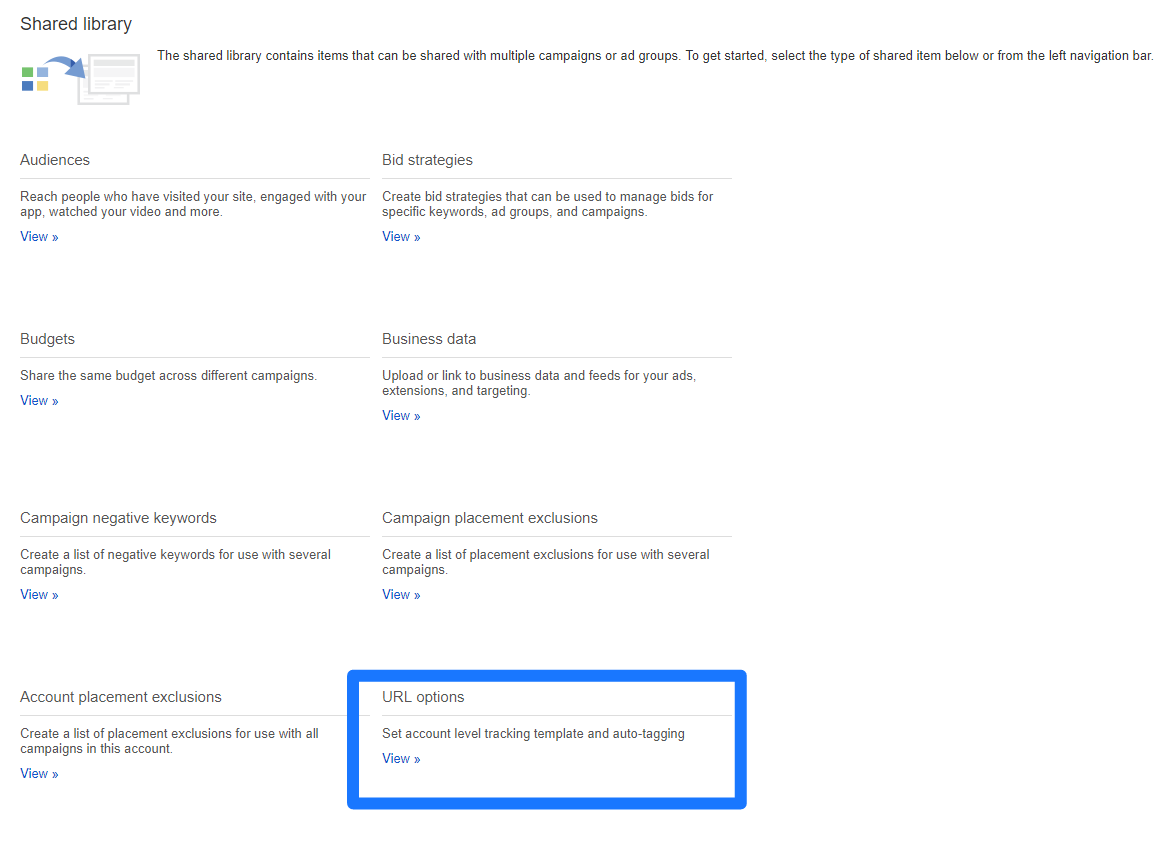
If you run tons of AdWords ads and don’t want to make new UTM codes for every landing page, there’s a shortcut.

Head to your AdWords account and navigate to your shared library.

From here, select the URL options tab from your settings:

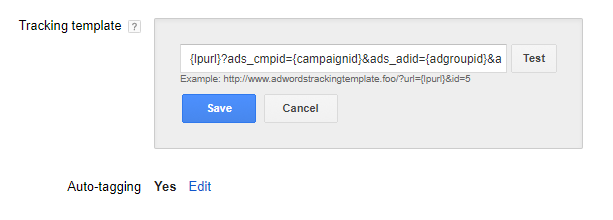
Then, make sure that auto-tagging is enabled. Head to the “Tracking Template” and here’s where you can enter UTM information.

Enter {lpurl}, then a question mark, and then any ValueTrack parameters you want to use, separated by ampersands (&).

For example, let’s say you wanted to track the campaign it came from. You’d add a string like this:

{lpurl}?ads_cmpid={campaignid}

Doing this will enable tracking at the account level, meaning you’ll never have to set up UTM codes for each new AdWords ad you create.

Track Your Phone Calls

Now that you’re tracking basic conversion data on the top advertising networks, along with more laser-focused link tracking, it’s time to pull it all together.

Without phone call data, you’re missing out on a big piece of the puzzle.

Tons of AdWords conversions are from phone calls.

Why? When someone is going to book something like a consultation or hotel room, they often call in.

It’s easy, especially from mobile phones.

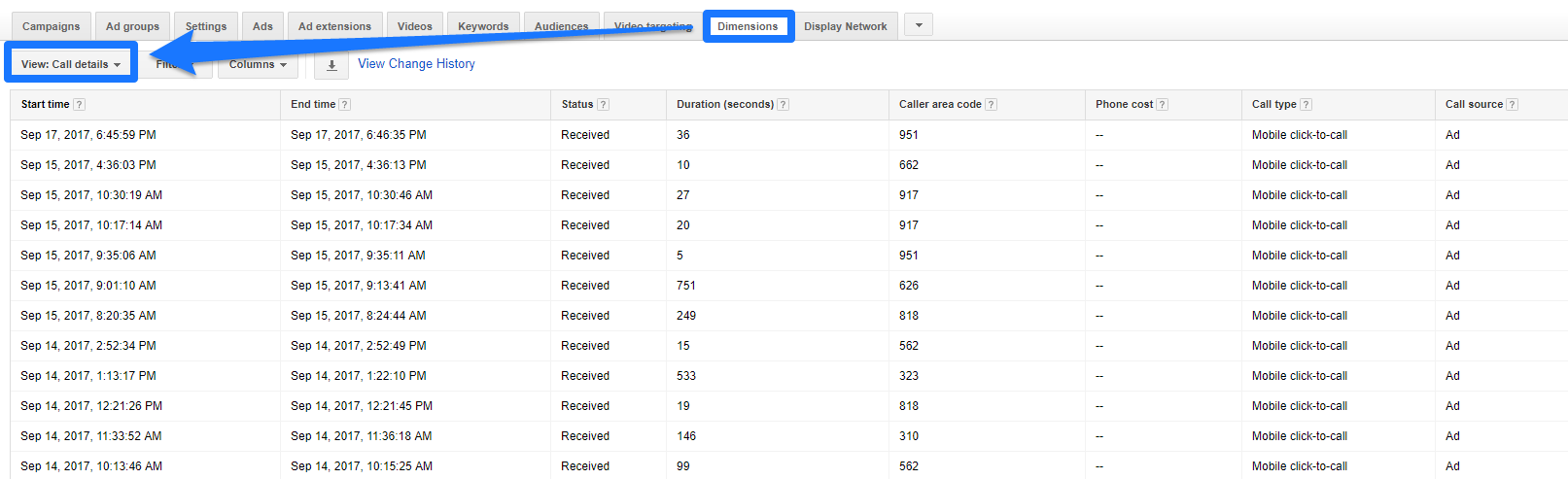
But what happens when this is all you see in AdWords?

You ain’t got nothin’ to show who converted or where in the heck they came from.

Tracking offline events is critical to success.

If you’re getting a lot of conversions from phone calls, you need to know which ones came from advertising and which were already coming from organic traffic.

Otherwise, it’s a shot in the dark as to whether you’re better off spending your dollars on SEO or PPC.

One of my favorite tools for tracking call data is CallRail.

You can set up keyword pools on your site that give each user their own tracking data.

Using dynamic number insertion, CallRail gives each user their own phone number rather than 1,000 users seeing your standard business line.

Meaning you can track each individual as they move throughout your advertising funnel.

You can see how they got to your site, the keywords that brought them to you, and the landing page they landed on.

You can record phone calls for even better conversion tracking.

If you want to tie ROI back to your advertising campaigns, you need tracking at every level.

That includes boring, old-school things like phones.

And yes, people still call businesses (as much as we hate it).

Conclusion

When you’ve started a new online advertising campaign, what’s your first step?

If it’s not setting up conversion tracking, you might be making a big mistake.

Tracking return on investment is critical to understanding how well your online campaigns are doing.

First, you need to start by outlining what a conversion means to your campaign.

Is it a direct sale via e-commerce, or is it a consultation?

The idea here is to tie your efforts directly to ROI and understand that a conversion isn’t necessarily money in your pocket.

Next, set up tracking scripts with the top advertising outlets.

You need these to collect critical data.

Be sure to take advantage of UTM codes to get insight into where your traffic is coming from.

Lastly, track your phone calls. People often forget how important call tracking is for getting an understanding of ROI.

Want to prove that your campaigns are worth it?

Clicks don’t tell you that. Neither do leads, opt-ins, or consultations. Only revenue does.

About the Author: Brad Smith is the founder of Codeless, a B2B content creation company. Frequent contributor to Kissmetrics, Unbounce, WordStream, AdEspresso, Search Engine Journal, Autopilot, and more.

Mastering TikTok Ads: Everything You Need to Know to Get More Revenue From TikTok

With over 1 billion users and counting, TikTok presents a great opportunity for businesses to advertise their services, grow their audience, and increase their ROI through targeted ad campaigns. 

The challenge? Standing out on such a competitive platform and ensuring the right audience sees your ads at the right time. If you want to get the most from your TikTok advertising budget, you need to employ effective strategies, so here’s how to master TikTok ads and execute winning campaigns.

Who Should Use TikTok Ads?

Anyone can advertise on TikTok. However, TikTok ad campaigns work better if you’re targeting certain demographics.

Here’s what I mean. TikTok typically attracts teens and young adults. According to DataReportal’s research:

  • 43.3 percent of users are aged between 18 and 24.
  • 32.2 percent are between 25 and 34 years of age.

Just over 11 percent are 45 or over, so it’s not the best platform if you’re targeting this age demographic.

We can delve a little deeper into the demographics.

  • Although men and women use TikTok, it’s more popular with women: females account for over 60 percent of TikTok’s user base. 
  • TikTok is most popular in the United States where there are over 136.4 million users. 

Say you’re targeting young U.S. women. Do TikTok ads work better for certain businesses instead of others even within this demographic? Possibly. Fitness and sports-related content are among the most popular content with over 57 billion views, while beauty and skincare content has over 33 billion views.

To be clear, TikTok is available in 154 countries, so it does have global appeal among teens and young adults.

7 Steps to TikTok Advertising Success

While there isn’t a “right” way to run a TikTok advertising campaign, there are ways you can optimize your TikTok ads and boost your chances of success. To master TikTok advertising, follow these seven simple tips.

1. Get to Know TikTok Ads Manager

TikTok Ads Manager is a hub from which you can create, run, and manage your ads. With TikTok Ads Manager, you can:

  • create engaging ads using different visual formats and templates;
  • target specific audience groups per campaign; and
  • track ad performance through customized reports.

How much does TikTok advertising cost? Well, TikTok uses a bidding model, so you can set your own daily and campaign limits depending on your marketing budget. As a guide, be prepared to spend at least $50 per day for campaigns, and $20 per day for specific ad groups.

Before you create TikTok ads, you need a TikTok Ads Manager account. TikTok offers a breakdown for getting going, but here’s a quick start guide. 

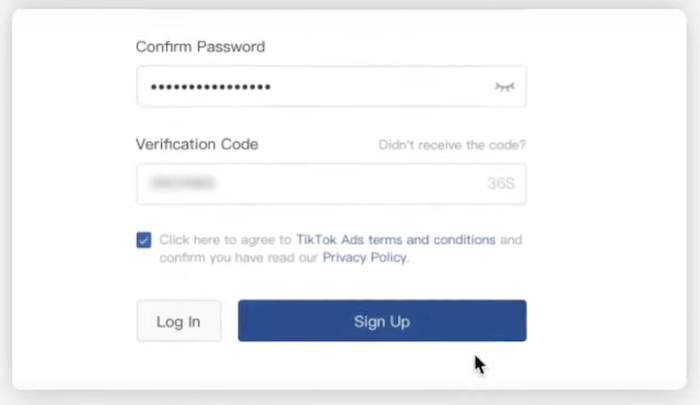
First, head to the TikTok for Business page and “Get Started.” From the next screen, click “Sign Up” then input your details before hitting “Sign Up” again:

TikTok Ads Sign Up Screen to Create Account

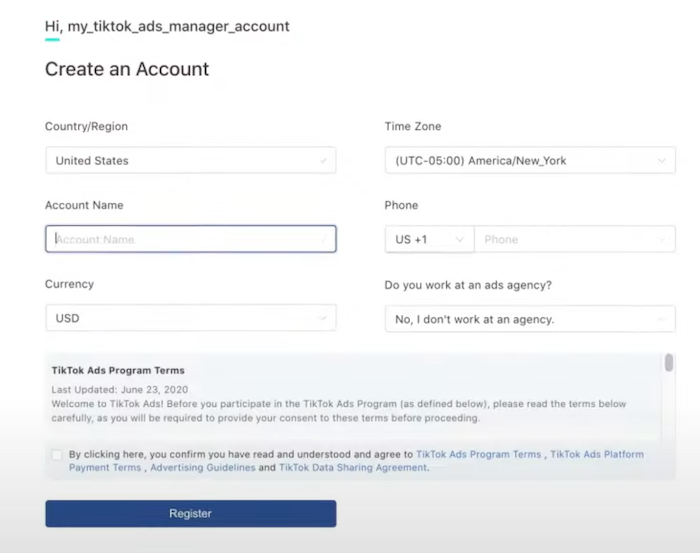
Next, input some basic business details to create your account:

 TikTok Ads Manager Input Business Details to Create Account

Once you’ve registered, you’ll need to provide a few more business details, including payment information, and wait for account approval before creating your first ad.

Creating TikTok Ads

  • From your TikTok Ads Manager account, click the “Campaign” button at the top of the page. 
  • Choose your campaign objective e.g., app installs, traffic, lead generation, or audience reach.
  • Set a campaign name and a budget. If you choose “No Limit,” your spend is determined by the budget you set at the “ad group” level. Or, you can choose “Daily Budget” or “Lifetime Budget,” which means you’re limited by the daily or lifetime budget you set at the campaign level.  
  • Create your campaign. 

Once there’s a campaign set up, you can set up an ad group and then create individual ads. The instructions are super easy to follow, and you can be up and running in minutes.

Here’s something crucial to note. Once you create a campaign, you can’t change the budget. Make sure you’re happy with your maximum spend limits before creating your TikTok Ads campaign.

2. Use Creative Elements to Stand Out

Although you can run ads for up to 60 seconds, TikTok suggests you keep most ads under 15 seconds. Given the short timeframe, you’ll want to use some fun creative elements to stand out, so here are some suggestions. 

  • Try “Branded Effects.” Branded Effects are elements like stickers and filters you can use to enrich your ads.
  • Choose your ad format wisely. In-Feed ads, for example, look and feel just like native content which helps them feel more authentic, while TopView ads appear at the top of a user’s “For You” section and might help drive brand awareness.
  • Add music or sound to add extra layers to your ads. Just make sure the music or sound effects match your brand’s voice.

Laneige, a popular Korean skincare brand wanted to increase engagement and encourage people to download a coupon for skincare products. They used Branded Effects to show what people may look like before moisturizing: 

TikTok Ads for Laneige Branded Effects Before Moisturizing

Then after moisturizing:

TikTok Ads Thirst for Life Hashtage and Branded Effects Campaign Laneige

The result? 419,000 engagements, 12,000 new followers, and thousands of coupon downloads.

Unsure of what elements to use? View popular posts in your niche, consider why they resonate with your target audience, and apply these principles to your campaigns.

3. Test Spark Ads

Ever seen someone using (and loving) your product on TikTok? Do you wish you could run this user-generated content (UGC) as part of your own ad campaign? 

Well, thanks to Spark Ads, you can take existing, organic posts from other TikTok accounts and turn them into original ad content. Why would you want to do this? Let me give you three reasons.  

Using existing content means less work for you, for one thing.

What’s more, since the content comes from real TikTok accounts, any activity you generate (such as likes, follows, or shares) is linked to your post. If you’re looking to boost your engagement, Spark Ads can help.

Finally, UGC adds authenticity to your company and helps to boost your brand’s reputation. Since customers are over two times more likely to prefer UGC to branded content, Spark Ads are definitely worth your time.    

Here’s an example. Digital bank Up targets Australians aged between 18 and 34. They wanted a creator partnership to build brand awareness and grow their audience reach. 

For their mission, Up chose an Australian finance influencer, @TashInvests. They produced Spark Ads which generated over 1.5 million impressions and 76 app downloads, which exceeded Up’s original expectations:

TikTok Ads Up Bank Spark Ads Collaboration

Here are some tips for getting the most from this form of TikTok advertising.

  • Opt for content with happy, positive undertones to present your products in the best light.
  • Use short text overlays to emphasize key points e.g. product features. 
  • Run A/B tests to identify which ads are performing best and revise your less successful ad content. 
  • Finally, always ensure you get someone’s permission before using their content in Spark Ads.

4. Test Different Targeting Options

The most successful ads target a specific audience. TikTok knows this, so the platform lets you tailor who sees your ads by excluding certain audiences and directly targeting others. 

You can target audiences by dimensions such as their age, behaviors, device, interests, and physical location. For example, maybe you want to target under-25s using iPhones, people based in Canada, men interested in soccer, and so on. 

Here’s how to do it.

From TikTok Ads Manager, go to “Ad Group,” then “Targeting.”

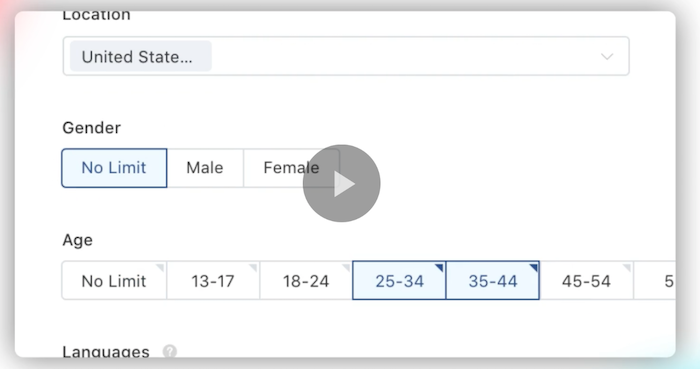
Then, choose which audience segment to target. For example, you might choose U.S. users aged between 25 and 44:

TikTok Ads Audience Targeting by Location Age and Gender

TikTok will then optimize who sees your ads so there’s a greater chance of running a successful campaign. Cool, right?

5. Use Data to Leverage Hashtags Effectively

Hashtags allow people to organize content into categories so others can find what they’re most interested in. For example, someone looking for Starbucks content might search for #starbucks.

While you can use as many hashtags as you want, you won’t reach your ideal audience unless you know which hashtags to target, so here’s how you might choose the right ones.

First, check out which hashtags your most successful competitors use. Chances are, it’s worth including at least one or two of these hashtags to boost your visibility.

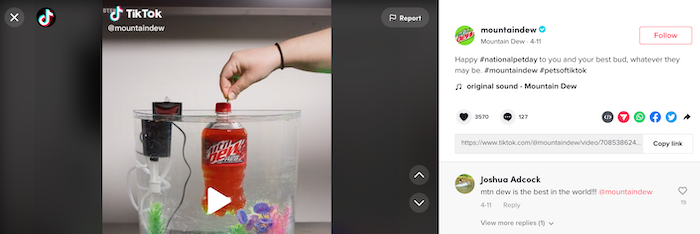
Next, use trending hashtags. Mountain Dew, for example, targeted #nationalpetday to advertise its “Code Red” beverage in a fun, engaging way:

TikTok Ads How to Use Popular Hashtags Mountain Dew Ad

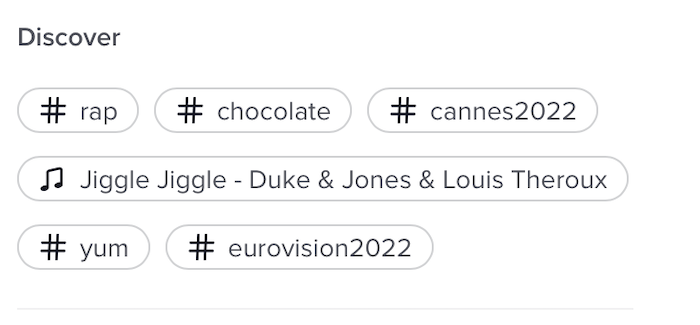
To find these hashtags, scroll to the “Discover” tab and check out the day’s top tags. Choose any that resonates with you:

TikTok Ads Discovery Feature for Finding Popular Hashtags

You can also find related keywords by searching for a word and leaving the hashtag out. Tap “Hashtags” under the search bar, and you’ll see similar hashtags to include in your campaigns.

6. Create High-Quality Graphics

TikTok is a highly visual platform, so your ads need graphics and videos to stand out. If you don’t have expensive recording equipment, don’t worry; you don’t need it. Here’s how TikTok creator @lucajpeterson quickly creates high-quality visual content. 

First, film and upload your video content as usual. Before clicking “Post,” hit “More Options” and drag the “Upload HD” bar right so it turns green:

How to Create High Quality TikTok Ads Video Content Upload HD

Sharp videos bring your content to life. In this Zoomerang TikTok video, for example, we get a real sense of the fabrics, textures, and colors since the brand uses high-quality graphics:

To get the most from your TikTok advertising, upload the clearest, sharpest graphics and videos you can.

Let me leave you a final tip here. According to TikTok’s own research, more than 63 percent of videos with the highest click-through rate (CTR) highlight the main focus product within the opening three seconds. Whatever your marketing goal, get to the point quickly.

7. Keep Your CTAs Simple

When it comes to TikTok ads, you might only have someone’s attention for a few seconds. This means that you need a clear, concise, and actionable call to action (CTA).

CTAs ask viewers to do something, whether it’s visiting your website, using a promo code, or downloading an app. Good CTAs can help boost sales by responding directly to users’ needs and driving specific actions.

For example, Sour Patch Kids wanted to promote its “custom mix” which lets customers build own candy bag. The display card “Make Your Mix” is colorful, engaging, and fun, and specifies the desired action: 

TikTok Ads Custom Mix Campaign for Sour Patch Kids

You can access pre-made CTA buttons through TikTok Ads Manager; however, creating your own visual inlay helps make your campaign stand out.

  • Focus on your goals and use as few words as possible to communicate the message. 
  • Choose the right color palette: your button should complement the ad.  
  • Try to create a sense of urgency that entices viewers to click the button. 
  • Use different versions of the same ad and run A/B tests to see which CTA performs best.

Frequently Asked Questions About TikTok Advertising

How much does TikTok advertising cost?

Your TikTok advertising cost depends on several things. At the campaign level, there’s a daily and lifetime budget of $50. At the ad group level, you need a minimum budget of $20 per day, and your lifetime budget works out as your daily budget multiplied by the number of campaign days scheduled.  

How do you create ads in TikTok?

First, create a TikTok Ads account and choose your campaign objective. Name your campaign, set your marketing budget, determine the ad placement, and choose your target audience. Set your campaign schedule and create your ads.

What kind of businesses should use TikTok advertising?

If you’re a business on TikTok, you could try TikTok ads. However, TikTok ads might work best for retailers selling to younger audiences. 

What makes a good TikTok ad?

Good TikTok ads are visually appealing with clear CTAs and well-chosen hashtags to boost visibility. They use high-quality images and successfully capture a viewer’s attention within just a few seconds.  

{
“@context”: “https://schema.org”,
“@type”: “FAQPage”,
“mainEntity”: [
{
“@type”: “Question”,
“name”: “How much does TikTok advertising cost?”,
“acceptedAnswer”: {
“@type”: “Answer”,
“text”: ”

Your TikTok advertising cost depends on several things. At the campaign level, there’s a daily and lifetime budget of $50. At the ad group level, you need a minimum budget of $20 per day, and your lifetime budget works out as your daily budget multiplied by the number of campaign days scheduled.  


}
}
, {
“@type”: “Question”,
“name”: “How do you create ads in TikTok?”,
“acceptedAnswer”: {
“@type”: “Answer”,
“text”: ”

First, create a TikTok Ads account and choose your campaign objective. Name your campaign, set your marketing budget, determine the ad placement, and choose your target audience. Set your campaign schedule and create your ads.


}
}
, {
“@type”: “Question”,
“name”: “What kind of businesses should use TikTok advertising?”,
“acceptedAnswer”: {
“@type”: “Answer”,
“text”: ”

If you’re a business on TikTok, you could try TikTok ads. However, TikTok ads might work best for retailers selling to younger audiences. 


}
}
, {
“@type”: “Question”,
“name”: “What makes a good TikTok ad? “,
“acceptedAnswer”: {
“@type”: “Answer”,
“text”: ”

Good TikTok ads are visually appealing with clear CTAs and well-chosen hashtags to boost visibility. They use high-quality images and successfully capture a viewer’s attention within just a few seconds.  


}
}
]
}

Conclusion: TikTok Advertising

If you want to maximize visibility, increase your ROI, and boost your social media reach, then try TikTok ads. TikTok advertising is suitable for all businesses on the platform, it’s easy to get started, and since you don’t need a huge campaign budget, it’s accessible for startups and small companies. 

To create a winning TikTok ad, use images and creative elements like videos where possible, keep your CTAs brief and impactful, and target the most relevant hashtags. Need help getting started? Take a look at my consulting services.     

Have you tried TikTok advertising yet? What do you find most challenging about TikTok ads?

Finley (YC W21) is hiring fintech software engineers (US remote)

[Job Posting]

When you pay for a coffee by tapping your credit card, the card and card reader exchange key transaction information and kick off a series of data and compliance checks between your card issuer and the merchant.

For example, the payment processor might want to check that the card is legitimate, that the transaction amount is accurate, and that the transaction has been properly recorded in the card provider’s database.

All of these checks happen in a matter of seconds, and they’re enabled by secure standards that enable programmatic data transfer and verification.

But when businesses try to access funds they’ve already been approved for, these same types of checks can take over a week for banks and capital providers to process and execute. That friction–and hold-up in funds–can blindside a business.

It turns out that all the table-stakes aspects of consumer credit–fast transactions, programmatic data checks, and ease of use–are still missing in business credit, even though business credit is a much larger chunk of the economy.

At Finley, we’re building modern software to streamline, secure, and record all the transactions between businesses and their capital providers. Just a year and a half after launching, we’re managing over $2 billion in debt capital for innovative companies like Ramp, Even, and Ribbon.

Now, our team is hiring for software developers (US remote) interested in building B2B financial infrastructure. If you’re interested in learning more, check out https://www.finleycms.com/careers/ or email your resume to contact@finleycms.com.


Comments URL: https://news.ycombinator.com/item?id=31585107

Points: 1

# Comments: 0

Girl, 16, stabbed in random NYC daytime attack; NYPD searching for suspect

The NYPD is searching for a suspect in the random stabbing of a 16-year-old girl that occurred in broad daylight outside a juice bar in Brooklyn on May 22.

New comment by Harsimran1 in "Ask HN: Who is hiring? (May 2022)"

NALA | Senior Backend Engineer (Go) | Remote (GMT to EAT time zones) | Fintech | YC W19

We are an African payments company (https://www.nala.com/our-story) that just raised $10m from top VCs to transform Payments on the African continent and are on a mission to increase economic opportunity for Africans worldwide .

We’re looking for a Senior Backend Engineer to become a part of the core Engineering team at Nala and be our guiding light in architecting the product as we take on some interesting product challenges in our target to acquire 50K paying customers by end of this year:

– Develop own infra for sending payments across countries

– Drive customer FX rate down to zero

– We serve 5 countries at the moment – help us build infra to serve 12 countries by the end of this year

– Multicurrency wallet and P2P

.

If you love taking product ownership and have hands-on experience building highly reliable and scalable backend services from scratch for a tech product, we’d love to speak with you.

Brownie points if you’ve worked in Fintech, Payments, Crypto currency space. 😀

Our Tech Stack: Go, AWS, ECS, gRPC, Dart, Flutter, Postgres, kafka, redis, vault, Terraform

Apply here: https://apply.workable.com/j/A03DB89286/

We’re also hiring for Senior Mobile Application Engineer (Flutter): https://apply.workable.com/j/E6D10B4980/

P.S. Any questions, you can connect with me: https://www.linkedin.com/in/harsimrancheema/

New comment by lauraptrsc in "Ask HN: Who is hiring? (May 2022)"

CLOJURE job @ Reify Health

+ 100% remote
+ real-life impact through a SaaS in the health industry
+ the company’s dedication to current issues (e.g. Black History Month, Women’s International Day)
+ different levels of seniority available, from medior to senior staff
+ work from Ireland, UK, Germany, Canada, the US

Check the senior engineering job here: https://www.reifyhealth.com/opportunities?gh_jid=4378985004

OR ask me more on LinkedIn: https://www.linkedin.com/in/laura-petrescu/

New comment by CFShopify in "Ask HN: Who is hiring? (May 2022)"

Shopify is a leading global commerce company, providing trusted tools to start, grow, market, and manage a retail business of any size. Shopify makes commerce better for everyone with a platform and services that are engineered for reliability, while delivering a better shopping experience for consumers everywhere. Shopify powers millions of businesses in more than … Continue reading New comment by CFShopify in "Ask HN: Who is hiring? (May 2022)"

E-commerce Optimization: 6 Steps to Boost Your Conversion Rates

For online stores, increasing conversions is the key to long-term success.

After all, if visitors don’t buy, then you’re not making any money! And with $7.31 trillion dollars projected to be spent on e-commerce retail by 2025, you want to make sure to optimize your CRO so you can receive as much of that spend as possible.

That said, optimizing your e-commerce store can be confusing.

Even if you’ve done everything right, from driving traffic to your website to running digital ads, you might still see low conversion rates. The average conversion rate for US e-commerce stores was 2.8 percent in the second quarter of 2021 (which is the most recent data available).

So what gives, and how can you push past a three percent conversion rate? E-commerce optimization is all about making it easy for your visitors to buy from you.

How do you do that? It starts with diving into your analytics to see where visitors are getting stuck. If that sounds complicated, don’t worry—I’m going to walk you through it.
First, however, let’s talk about why CRO is different for e-commerce websites.

How Is Conversion Optimization Different for E-commerce Stores?

Conversion rate optimization (CRO) for e-commerce stores is different because e-commerce stores sell physical products, which can be more complex and time-consuming to purchase than, for example, a service – which has an average 9.3 conversion rate across the industry.

The difference in average conversion rates is partially because a service website might have one or two steps in the checkout process, while an e-commerce store could have five or six – meaning it’s all the more important for you to optimize your CRO.

This means e-commerce stores need to pay more attention to the purchase process, from product pages to the checkout page.

E-commerce stores have unique friction points, such as shipping and returns, which can impact purchase decisions.

Because of this, e-commerce owners need to take a holistic approach to optimizing their stores.

This might mean looking for opportunities to increase customer confidence through social proof and streamlined checkout processes.

Ultimately, e-commerce owners should focus on creating a frictionless purchase experience to boost their conversion rates.

E-commerce CRO Strategy #1: Add Recommended Products

Adding recommended products to your e-commerce store is a great way to increase conversion rates.

When someone visits a product page, they want information about the product and how it can meet their needs.

If you suggest additional products that might be of interest, you can help guide their purchase decision and increase your conversion rate.

Invespcro found that 37 percent of shoppers clicked a recommended product during their first return visit to a site.

Similarly, shoppers that click on product recommendations are four and a half times more likely to add items to the cart and complete a purchase.

Amazon, for example, recommends products based on previous purchases or items you looked at. This helps keep customers engaged with the site and increases sales.

They also use “Frequently Bought Together” prompts to show customers related items they may like.

Recommending relevant products to your customers also improves the personalization of your e-commerce store.

Website personalization and product recommendations can be further enhanced by using AI, trending data, and previous shopping experiences.

86 percent of consumers say website personalization affects their purchasing decisions. This is an e-commerce conversion rate optimization tactic you don’t want to miss out on.

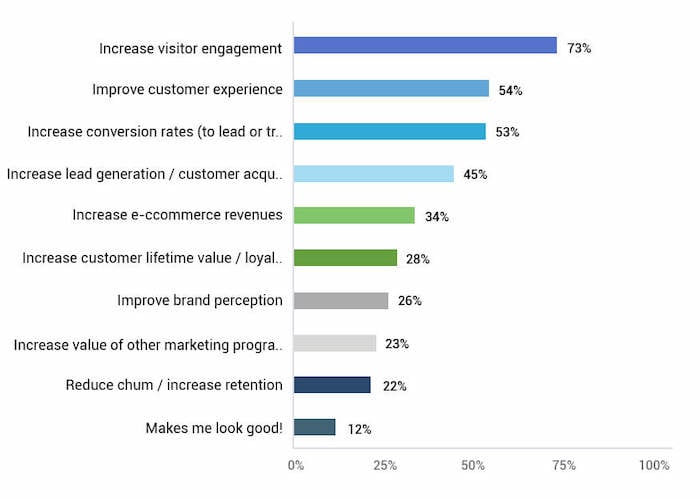
ecommerce conversion rate optimization graph

You can add recommended products in several different ways. Some examples include:

  • adding recommended products at the purchase stage, somewhere above or under their shopping cart
  • adding recommended products in the confirmation/transaction email you send to customers when they make a purchase
  • add recommended products on search results pages for similar/related products

The steps for adding recommended products will vary based on your e-commerce platform. Here are instructions for the most popular platforms:

E-commerce CRO Strategy #2: Make Sure Your Product Pages Shine

High-quality product pages are key to your e-commerce success.

When customers can see what they’re buying and get an idea of how it will look and function in their lives, they feel more confident about the purchase.

Since your visitors can’t touch and feel your products, you need to make sure the media you use on each product page does them justice.

Start with high-quality photos that depict the product from various angles at different levels of detail.

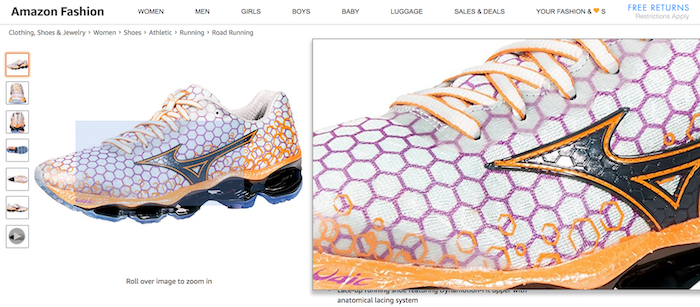
Make sure your photos are high enough resolution to support a zoom feature to show texture and details.

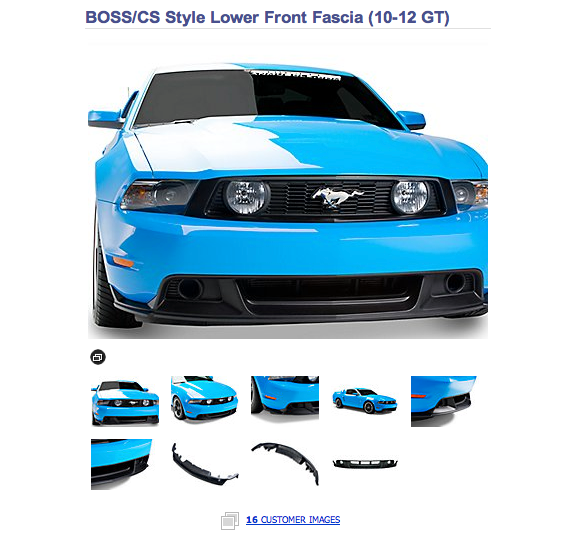
product image of shoe for ecommerce optimization

If you have the space, add a 360-degree view of the product so customers can get a complete look.
360 product image of car for ecommerce optimization

If your e-commerce store sells clothes or accessories, use models to show how the items look on various body types.
Besides images, consider using demo videos or explainer videos to show your products in action.

Remember, you don’t have to generate all the content yourself either.

Encourage customers to submit visual content or source your images and videos from social media, which perform double duty as social proof, which will help increase conversions.

Product descriptions that highlight key features are also key to getting shoppers to buy.

Be sure to include all pertinent information, such as size, color, and fabric content.

Use clear and concise language to avoid confusion and highlight the unique features of your products.

E-commerce CRO Strategy #3: Streamline Navigation

You can’t make sales if site visitors can’t find what they want.

Your site’s navigation is often the first place shoppers look if they have a specific product or category in mind.

Navigation that is confusing, too complex, or difficult to understand will cost you sales and customers. In fact, a HubSpot case study found that simplifying or removing navigation elements from middle-of-the-funnel landing pages resulted in a 16-28% increased conversion rate!

There’s no one-size-fits-all solution for e-commerce website navigation. The best way to design a website menu depends on the nature of your products and how your customers like to organize information.

Here are a few steps for creating effective e-commerce website navigation:

  1. Use heat maps or do user testing to find how and where users click.
  2. Prominently display categories on every page.
  3. Include clear labels and concise descriptions for all menu items.
  4. Create intuitive and logical menus based on how your customers browse your site.
  5. Avoid burying essential menu items in nested sub-menus.
  6. Test different navigation structures to see what works best for your customers.

An example of great e-commerce navigation comes from Apple.

If you have a large number of products, a drop-down menu that lists everything can be overwhelming.

If Apple included all its products and services in a drop-down menu, its website would have very clunky and confusing navigation.

Not only would that work against the brand’s minimalist image, but it’d also be hard for customers to find what they need.

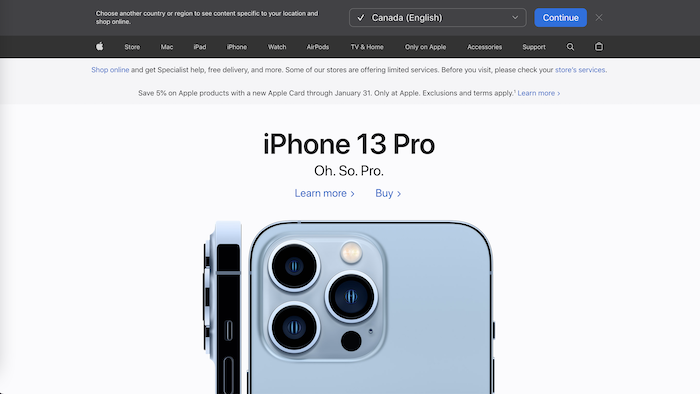
Instead, Apple opts for clean top navigation with no dropdown or secondary menu item:

ecommerce optimization - apple homepage

When visitors click on a top navigation item, they’re directed to a menu page that lists options within the category:

ecommerce optimization - apple menu navigation

Doing away with a complicated drop-down also helps streamline the mobile user experience, which is increasingly important.

Clear navigation also has SEO and UX benefits.

Providing a clear path to the products customers are looking for makes it easier for shoppers to find what they need on your site—which increases sales.

This can help improve your search engine ranking, as Google (and other search engines) favor sites that are easy to navigate.

If you’re unsure if your site is easy to navigate, or have seen drop-off points in your analytics, consider using a heat map tool like Crazy Egg to see where people click on your pages.

You can also use a tool like Optimizely to test different versions of your navigation and see which one leads to more conversions.

Once you’ve identified any potential drop-off points, it’s time to start making changes!

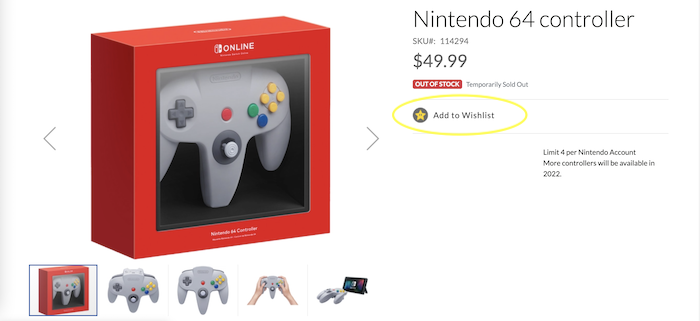
E-commerce CRO Strategy #4: Add a Wish List or Favorite Option

Wish lists and favorite options allow users to save items they might buy later.

This is a great way to increase conversions because it gives users the opportunity to “test drive” your site and come back later to buy products they love.

Creating a wish list also requires customers to create an account for your e-commerce store.

This allows you to offer relevant promotions and gather customer data to improve user experience and increase sales.

Wish lists can help you:

  • alert customers about special offers available for items on their wish lists
  • deliver targeted content based on items they’ve shown interest in
  • identify retail trends and seasonal activities to improve demand forecasting
  • understand what your customers are looking for and offer similar products
Nintendo ecommerce optimization wish list

Research from Google found 40 percent of online shoppers think their experience would be better if they were offered a wish list.

In addition, make it easy for your customers to create wish lists on other platforms. For example, enable “Pin It” buttons so visitors can share your products on their Pinterest wish lists.

Or, promote the use of the “Save” feature on Instagram and Facebook.

There are many ways to make it easy for your customers to save products they are interested in.

If you use Shopify as your e-commerce platform, you have two options for adding a wish list feature: add custom code to your site, or add a wishlist app, like Wishlist Hero.

On BigCommerce, all you need to do is enable wishlists in your shop’s settings.

WooCommerce offers an extension so you can allow users to add items to their wishlist when they shop your store.

E-commerce CRO Strategy #5: Streamline the Check Out Process

According to the Baymard Institute, 69.82 percent of e-commerce carts are abandoned at checkout.

This rate increases on mobile and desktop devices, which have some of the highest cart abandonment rates.

Cart abandonment rates by device:

  • desktop: 66.1 percent
  • mobile: 80.6 percent

To avoid losing customers at the checkout, make the process as quick and easy as possible.

This means offering clear and concise shipping information, providing a guest checkout option, and ensuring all payment methods are available.

You should also ensure the checkout process is easy to navigate with all required information requested upfront.

Here are a few ways to streamline the checkout process:

  • Use a single-page checkout: This will keep customers from going through multiple pages to check out.
  • Save billing and shipping information: Customers hate having to enter their information each time they make a purchase, so make their checkout process easier by saving and auto-filling their information.
  • Use a progress bar: Let customers know how far along they are in the checkout process so they don’t get impatient.
  • Offer a shipping calculator: This will help customers determine how much their shipping will cost and whether or not they want to continue with the purchase.
  • Personalize page to their local currency: Customers feel more comfortable when they’re making a purchase in their local currency.
  • Reduce clicks: Try to make the checkout process straightforward, so customers don’t get frustrated and leave.
  • Provide order confirmation: Once a customer has completed their purchase, send them an order confirmation to let them know everything went through successfully.
  • Include trust symbols: Add trust symbols like security seals to reassure customers their information is safe and their purchase is legitimate.

Remember, the easier you can make it for customers to buy, the more likely they are to convert!

E-commerce CRO Strategy #6: Add More (and Better) Social Proof

Social proof is one of the most powerful tools at your disposal to boost e-commerce conversion rates.

Adding social proof elements to your site increases confidence in potential buyers and nudges them towards completing a purchase.

Some effective ways to add social proof include testimonials from happy customers, reviews from unbiased third-party, or user-generated content of your product in action.

According to Trustpilot, 89 percent of global consumers read online reviews before making a purchase.

This implies reviews are a regular part of a consumer’s purchase journey, but they can also be a deciding factor in the purchase process.

That said, reviews don’t just exist on your product pages.

Other digital channels such as social media, email marketing, and even paid search can be used to display reviews.

For example, brands that work with influencers can benefit from video and social posts that include reviews.

This can include YouTube reviews, unboxing videos, or branded TikTok promotions.

There are a few things you can do to increase your reviews, including:

  • asking customers for reviews after purchase.
  • making it easy for customers to leave reviews on your site
  • including social media icons on your product pages that link to your profiles
  • using review aggregators like Trustpilot and Bazaarvoice
  • reaching out to influencers for social content creation
  • promoting UGC on your social channels

Frequently Asked Questions About E-commerce CRO Strategies

How can I improve my e-commerce conversion rate?

To increase your e-commerce CRO, consider adding recommended products, making sure your product pages shine, implementing simple navigation, providing a wish list option, streamlining the checkout process, and adding social proof.

How are e-commerce conversions calculated?

E-commerce conversions are the total number of visits to your e-commerce site divided by the number of purchases.

What is a good e-commerce conversion rate?

The average e-commerce conversion rate varies depending on the type of product you sell but is typically around two percent. Some of the top e-commerce sites have conversion rates between 5 and 10 percent.

What is CRO in e-commerce?

E-commerce conversion rate optimization, or CRO, is the process of making adjustments to your site with the goal of increasing the percentage of visits that result in a purchase. In e-commerce specifically, CRO is focused on optimizing the product page, checkout process, and overall user experience.

{
“@context”: “https://schema.org”,
“@type”: “FAQPage”,
“mainEntity”: [
{
“@type”: “Question”,
“name”: “How can I improve my e-commerce conversion rate?”,
“acceptedAnswer”: {
“@type”: “Answer”,
“text”: ”

To increase your e-commerce CRO, consider adding recommended products, making sure your product pages shine, implementing simple navigation, providing a wish list option, streamlining the checkout process, and adding social proof.


}
}
, {
“@type”: “Question”,
“name”: “How are e-commerce conversions calculated? “,
“acceptedAnswer”: {
“@type”: “Answer”,
“text”: ”

E-commerce conversions are the total number of visits to your e-commerce site divided by the number of purchases.


}
}
, {
“@type”: “Question”,
“name”: “What is a good e-commerce conversion rate? “,
“acceptedAnswer”: {
“@type”: “Answer”,
“text”: ”

The average e-commerce conversion rate varies depending on the type of product you sell but is typically around two percent. Some of the top e-commerce sites have conversion rates between 5 and 10 percent.


}
}
, {
“@type”: “Question”,
“name”: “What is CRO in e-commerce?”,
“acceptedAnswer”: {
“@type”: “Answer”,
“text”: ”

E-commerce conversion rate optimization, or CRO, is the process of making adjustments to your site with the goal of increasing the percentage of visits that result in a purchase. In e-commerce specifically, CRO is focused on optimizing the product page, checkout process, and overall user experience.


}
}
]
}

Conclusion: E-commerce Conversion Optimization

E-commerce conversion optimization is key to driving growth for your business.

While blogs and service sites rely on traffic from search engines and social media, e-commerce sites need to optimize SEO and every step of the buying process.

When starting an e-commerce conversion rate optimization strategy, start by looking into your customer data and website analytics. Use heat mapping tools to see where customers are clicking and what they scroll past.

Once you understand what is and isn’t working, start making changes to your website.

Test each change to make sure it improves conversion rates before rolling out the change to all visitors.

What CRO strategies have you used to boost e-commerce sales?

Using Ubersuggest for E-Commerce: Everything You Need to Create a Killer Online Store

Despite the growth of social selling for e-commerce, SEO keyword optimization is still crucial to long-term business success. Why? Because that’s how most customers find you.

Search traffic is responsible for 65 percent of e-commerce sessions. If you’re not optimizing for keywords, buyers won’t find you among your competitors.

SEO offers many other advantages. SEO offers many other advantages. For instance, it has a fantastic ROI when done correctly. 

If you want further proof of SEO’s advantages, case study after case study shows how a few tweaks can potentially get your site to the front page of Google. 

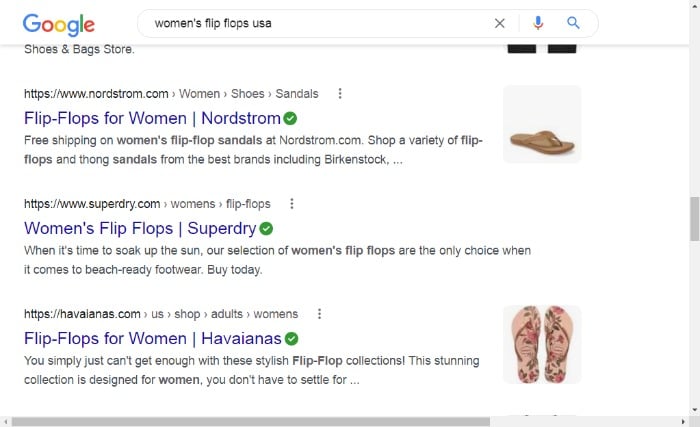
ubersuggest for ecommerce - search results

A few words of warning before I move on: 

  • Don’t expect results overnight. SEO can take time to yield results, but it’s a valuable investment that pays off long-term. 
  • Don’t let SEO overwhelm you. There are numerous areas of SEO I could discuss here, but let’s just focus on keywords for now.

Why Should E-Commerce Companies Care About SEO Keywords?

With an estimated 4.2 million e-commerce businesses in North America, there’s a ton of competition. 

To stay ahead of the curve, you need to do everything possible to optimize your site, rank higher in SERPs, and increase visibility. You’ve probably guessed by now, but one of the best ways to do this is with strategically chosen keywords.

For guidance, your chosen keywords should be:

  • Relevant to your product and target audience. 
  • Attainable in search results.
  • Lucrative in terms of driving targeted, profitable traffic to your online store.

When it comes to finding keywords, you need resources to help you along the way. This is where Ubersuggest comes in. 

Ubersuggest is a free tool that makes it easy to research keywords and identify which ones to target. 

But, you don’t have to take my word for it. Let’s talk about how Ubersuggest helped our e-commerce customer, Portrait Flip, improve traffic and drive ROI. 

Portrait Flip is an online store that creates real portraits by real artists from customer photos around the world. Using Ubersuggest for its keyword research, the company increased its organic traffic by 70% in just two years and increased revenue by 32.33 percent over their goal. 

Perhaps you think that’s unattainable. However, there’s a simple reason behind the enhanced results: you drive more relevant, organic traffic to your website by optimizing your pages by targeting the right keywords.

How to Use Ubersuggest to Create a Killer Online Store

From SEO audits and competitive analysis to monitoring results and adapting your approach, plenty goes into running a successful online store. However, there’s no need to get overwhelmed. With the right tools, creating a killer e-commerce store isn’t complicated. 

Below are five steps to creating a killer online store using Ubersuggest. (link to each section)

  1. Create a project from your dashboard in Ubersuggest,
  2. Perform an SEO Audit.
  3. Find the right keywords to target. 
  4. Conduct Competitive Analysis
  5. Create a Backlinks Plan
  6. Track Your Progress

I’ll walk you through each step of the way. 

Step #1 Create a project in Ubersuggest

If you’re new to Ubersuggest, you need to start with the basics.

Begin by registering for a free account.

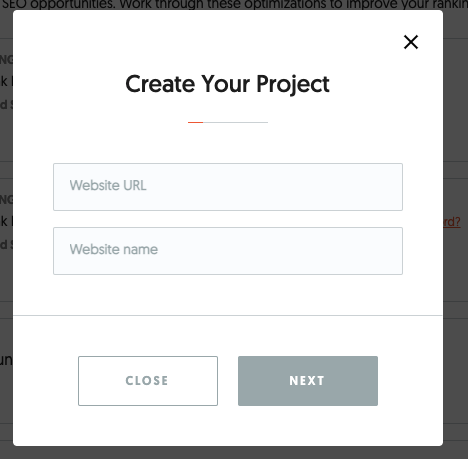
Once you do that, go to the dashboard and click on “Add Your First Project.” Next, add your website URL and name.

create your project using ubersuggest for e-commerce

It’s also essential to connect your project to your Google Account to see how your keyword strategy is affecting your Google presence. Here’s how to do that:

  • Go to the dashboard.
  • Select the project you want to connect to Google Search Console. 
  • Click ‘connect with Google.’
  • Connect the account or select the ‘Use another account’ option.

Remember, SEO takes time, and there might be some trial and error along the way. Therefore, once you’ve set it all up, I recommend you use Ubersuggest at least once a week to: 

  • Check-in on your SEO progress (you can use the different weekly alerts to help you understand where to focus your efforts).
  • Work through the suggestions in your dashboard.
  • See what your competitors are up to and take small steps each week to compete against them.
  • Find new keywords to target on your product pages (try A/B testing product pages with different keywords to see which one ranks higher).

Portrait Flip did this and achieved significant success and savings:

“We were able to create and implement a clear SEO strategy with Ubersuggest starting in January of 2020 that helped our organic traffic take off. We’ve saved thousands of dollars on paid advertising by keeping Ubersuggest at the heart of our SEO, and we’ve watched our SEO and our revenue grow exponentially, too.”

Step #2 Perform an SEO Audit.

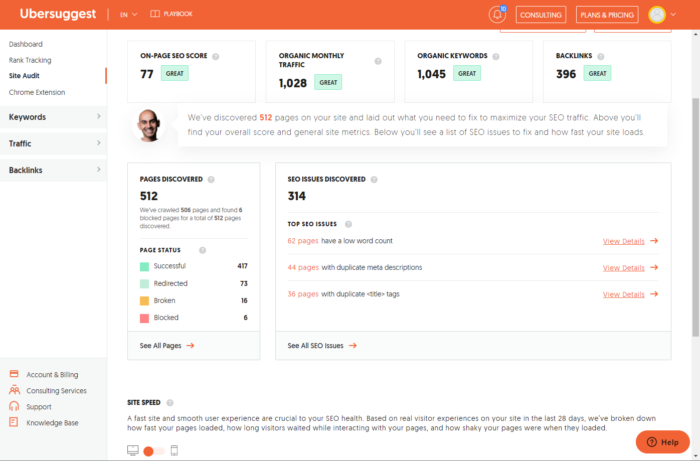
The Ubersuggest Site Audit is the best place to start with your Keyword Strategy. When you perform this analysis, you get a general overview of your website’s SEO standing. 

From here, you can understand where your website ranks in terms of industry-standard for optimal SEO health.

site audit using ubersuggest for e-commerce

To perform a site audit:

  • Go to the project dashboard.
  • Find SEO explorer on the left side menu and select ‘SEO Analyzer.’
  • Wait for the analyzer to create a report; your report sorts errors by difficulty and how fixing them impacts your SEO.
  • Review your report. Pay careful attention to the ‘See All SEO Errors,’ on the associated tab.
  • Click ‘What is this, and how do I fix it?’ on the associated tab. 
  • Once you’ve reviewed the major issues, select the ‘SEO Analyzer Overview’ option. This takes you back to the site audit main page.
  • Now, you’re ready to review the second part of your audit report, which details your desktop and mobile web speed. Use the orange circular toggle, to switch between Desktop and Mobile reports.
  • Fix the issues, return to the ‘SEO Analyzer’ overview, and choose the ‘recrawl’ button at the top of the page.
  • Finally, review the report to see if you’ve fixed the errors or if there are any fresh ones. 

Here’s how Portrait Flip used the site audit feature.

First, Portrait Flip optimized its results by focusing on the ‘Broken Link’ finder.

This helped the business understand where it was losing potential customers due to broken product links. 

At first glance, this might not seem like an important issue, but broken links negatively impact your SEO and the customer experience.

Portrait Flip also found the ‘Page Load Time’ report invaluable, as the company was keen to see if any added website code was inadvertently increasing its load times.

Again, this may not seem like a significant issue. However, speed is crucial for online shopping. Ideally, you want your e-commerce store to load within two seconds. Anything above that adds to your bounce rate and customer dissatisfaction and leads to lost sales. 

After fixing simple issues on the Portrait Flipw website, 98 percent of the revenue generated from its SEO and PPC efforts in 2021 came from organic search. 

Step #3 Research Keywords to Target

Now, this is where the fun starts. 

You can use the Ubersuggest Keyword Reports to understand which keywords to include in your content to drive relevant and lucrative traffic.

ubersuggest keyword ideas for ecommerce

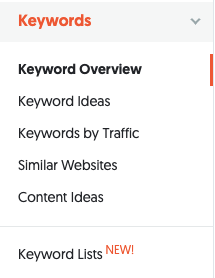
There are two main features to focus on here. 

1. Keyword Overview 

The keyword overview allows you to see how competitive a keyword is and its search volume trend over time. To narrow down your keyword choices, think of the general search terms your target audience might use when searching for a product you sell.

2. Keyword Ideas  

The keyword research feature shows you how people search for keywords related to your business and your products. It enables you to uncover valuable keywords that other competitors aren’t targeting.

How Portrait Flip uses these tools:

Content marketing is at the heart of Portrait Flip’s efforts to attract traffic to its site. For example, the business used blogging and posted regularly on its social media channels. However, these efforts weren’t driving traffic the way the company hoped. 

This is where Ubersuggest proved its worth.

  • The Keyword Overview report enabled Portrait Flip to find relevant keywords to focus on and that prospects use in their searches. 
  • Next, Portrait Flip optimized its blog posts and e-commerce product pages with new keywords. 
  • Finally, Portrait Flip used the Keyword Idea and Content Idea reports to help them plan out their next blog topics. 

The results were exceptional.

Portrait Flip exceeded their traffic expectations in one quarter by over 27 percent—and that’s without any paid advertising. If you’re planning on using these reports, here are a couple of tips to get the most out of it them: 

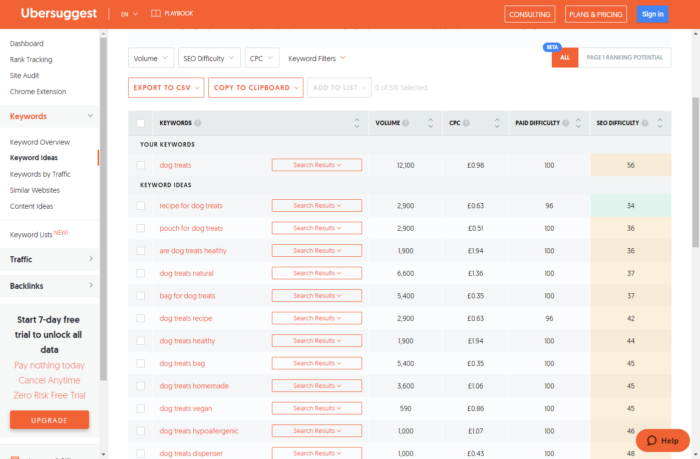
Find The Most Competitive Keywords

Use the ‘SEO Difficulty’ filter to help determine which keywords are more competitive than others. Be intentional in comparing this with the ‘Paid Difficulty’ feature to help decide if you should pay for Google Ads against the keywords. 

NOTE: Keywords with high Paid Difficulty are usually lucrative. However, they are almost always more expensive.

find competitive keywords using ubersuggest for ecommerce

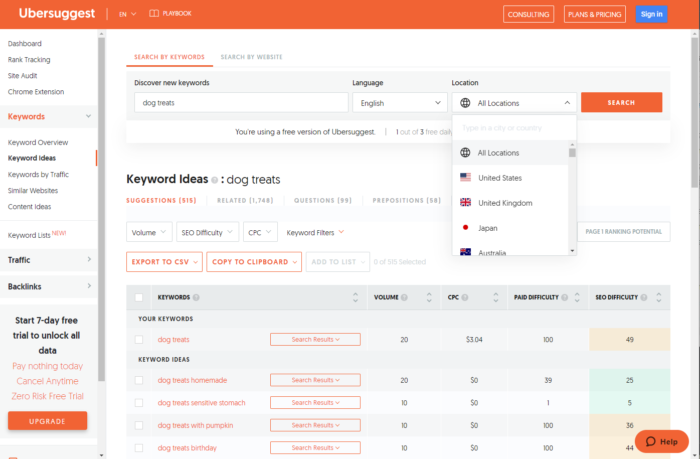
Search by Location

If you want to attract a worldwide audience, search for global keywords on the ‘location’ tab. You can target your geographical search towards specific local traffic or by country. This can help you find unique keywords in different regions to target.

using ubersuggest for keywords by location for e-commerce

Step #4 Conduct a Competitive Analysis

Competitive analysis is an essential part of any effective SEO strategy. By understanding your competitors, you can learn what techniques and keywords they’re using to rank well in search engines and replicate their successes.

Ubersuggest makes this task more manageable than ever. Just use the following tools: 

  • Keywords by Traffic: Go to Ubersuggest, enter the competitor domain URL, and hit “Search” to find the top keywords that the website ranks for. Note any organic keywords and monthly traffic, the domain score, and backlinks. You can also add your competitor’s URL as a project in your Ubersuggest dashboard for regular tracking. 
  • Backlinks Opportunities: Discover what websites are linking to your competitors and get a detailed overview of who to reach out to request links back to your site. Here’s how: 

1. Enter your domain name or URL from your site into the Backlinks Opportunity tool. (Linked above).

2. Enter a competitor domain or a URL from their site. 

3. Click ‘search.’

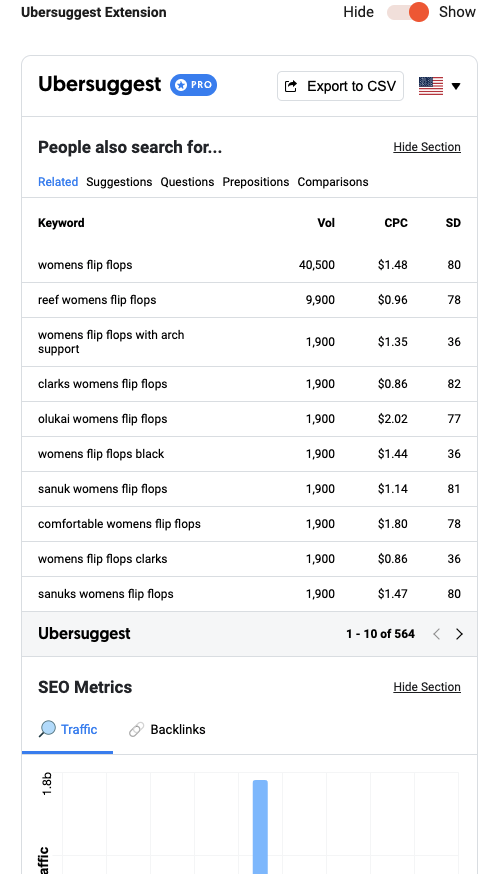
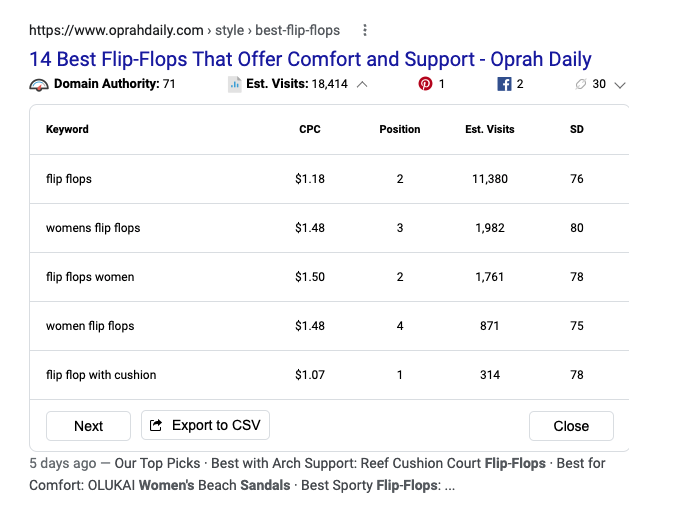
You can also use the Ubersuggest Chrome Extension for keyword analysis directly in Google search results, YouTube, AND Amazon pages for further insights.

ubersuggest chrome extension

Here’s how you’ll see the data in your SERPs: 

You can also remove competitors or add them.

You’ll also see monthly search and CPC: 

ubersuggest chrome results for ecommerce

Here’s how to use this feature: 

Create a Project for each Competitor: On the Dashboard, click “add a project” and add a few of your competitors to get a complete overview and consistent updates on your competitor’s ranking. You can easily remove competitors or add them. Here’s some more information on using Ubersuggest to spy on your competitors.  

How Portrait Flip used Ubersuggest’s competitive analysis tool: 

Portrait Flip monitored how its competitors were performing and what keywords they were ranking for. Specifically, the company used the Keywords by Traffic and Top Pages by Traffic reports together to get an idea of keywords they were losing out on. Using the information, Portrait Flip secured Page #1 on Google above competitors for primary keywords that drove converting traffic to their site.

Step #5 Start Tracking Your Progress

As you work on your SEO Keywords, it’s critical to be patient and track your progress over the long term. 

Although you might see results with your plan in the next few weeks, as I’ve repeatedly stressed, SEO is an ongoing process and it takes time to get results. Typically, you can expect to wait a few months, so if you’re not seeing immediate progress, don’t get discouraged. 

When you track your keywords, you can see which ones aren’t working and use some fresh ones to optimize your content. 

Then rinse and repeat! 

Keep testing and learning. A/B test different targeted keywords on product pages over time and track to see which performs best. 

You can use Ubersuggest to monitor keyword performance. Here’s how:

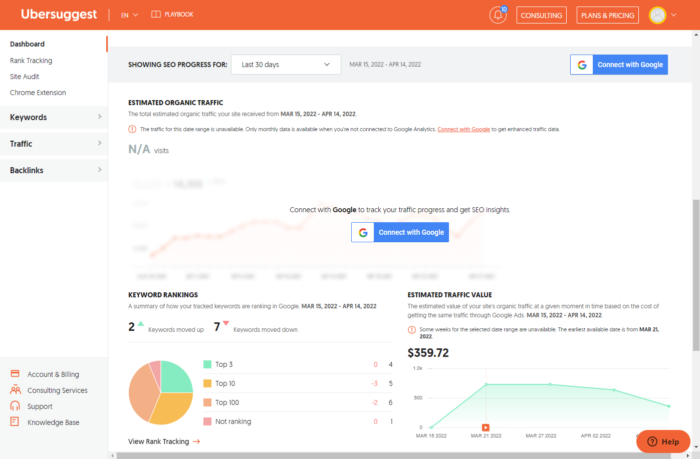
In your Dashboard, you can view SEO progress over a specific time. Plus, you can see your progress in keyword ranking and estimated traffic value.

dashboard view of seo ovetime in ubersuggest for ecommerce

How Portrait Flip did this:

As they tracked their progress, they found that most of their year-to-year growth came from organic traffic, which steadily grew once they started using Ubersuggest. 

Conclusion: Using Ubersuggest to Improve Your E-Commerce Store

One of the toughest tasks for e-commerce business owners is standing out from the competition. Gaining visibility, discovering the right keywords, identifying backlinking opportunities, and conducting competitive analysis are some of the most challenging tasks every online store owner faces.  

Fortunately, Ubersuggest offers a solution to these common problems, allowing you to enhance your e-commerce store in key areas. This allows you to increase visibility, attract targeted prospects, and enhance conversions.