How to Work With a Business Credit Coach

Have you ever heard the term business credit coach? Have you ever wondered what it was all about? Is it worth it? For most, the answer is yes! Honestly, pretty much any business that does not already have strong, established business credit can benefit from business credit coaching.

A Business Credit Coach Works to Help You With Building Business Credit

Many business owners, particularly new business owners, don’t have the best business credit score. In fact, they may even have no business credit score at all. That’s because, unlike consumer credit, business credit does not build passively. You have to be intentional.

Intentionality is Tricky

This part can be tricky. Sadly, there are a lot of details that can block you from approval that many do not understand. Furthermore, the process that helps you build credit for your business in the most effective and efficient way seems tedious to many. Worse yet, it is almost impossible to hack on your own. You could try forever and never get anywhere. This is where a coach can be well worth the cost.

How Does a Business Credit Coaching Program Work?

First, you’ll sit down with a business credit coaching professional. Then, they will examine how your business is set up and talk about your current financial situation. This means your business finances, your consumer credit score, and your cash flow. Also, any accounts your business has, your expenses, debt, and cash on hand may be examined.

Next, you’ll talk about any success you’ve had with the business credit building process. The business credit coach will look at your business credit cards. He or she will want to determine if they are really building business credit for you. In contrast, they may be reporting on your personal credit.

Personal Credit Can Affect Business Credit

Remember, personal credit does affect business credit. A good business credit coach will explain how this works. First, most business lenders will perform a personal credit check. That means if you have bad personal credit you are out of luck. However, it also means your personal credit score could take a hit, because inquiries have a negative impact.

Still, with the right guidance related to business credit, it’s possible to get business owners access to funding without a personal credit check. This is usually in the form of vendor credit, and sometimes business credit cards. By using these types of accounts to build strong business credit, you can reduce the reliance of lenders on your personal credit when determining creditworthiness.

Remember, without good personal credit, you will not be able to get lending that requires a personal guarantee. Your coach can help you understand what a personal guarantee is, and how it relates to personal liability. Then, together you can decide if putting your personal credit on the line is a good idea, particularly if your business is new.

A Good Business Credit Coaching Program Should Start With Building a Fundable™ Foundation

Truthfully, not every business credit coaching program will call this the same thing, but all good ones will agree it’s the essential start of building business credit. It has to do with how your business is set up. Your coach will examine the details of your business’s foundation and determine if anything is keeping you from credit approval.

Credit Coaches Should Ask These Foundational Questions To Start Business Credit Building

  • Do you have separate business contact information, or do you use personal information?
  • Is your business address a PO Box or a physical address?
  • Is your phone number listed in the 411 directory?
  • Does your business name or NAICS code indicate that your business may be part of a risky industry?
  • Is your business name exactly the same everywhere it is listed?
  • Is your business set up as a corporation and does it have an EIN?
  • Do you have a separate business bank account?
  • How does your business website look?

Of course it seems picky, but all of these seemingly little details really do make a big difference. Obviously, cooperation on this point is vital. Often a business fails to get cash credit, basically a loan from a bank, or any other kind of credit, due to issues with one or more of these details.

Legal Compliance

This is another thing your coach will look at. You need to have all necessary licenses to operate. In addition, there may be other legal requirements. For example, if you operate out of a virtual office, your state may require you to have a registered agent.

Getting and keeping your business in compliance with various legal requirements will be a part of the process. As a bonus, you’ll find out it gives clients more confidence in your services.

After the Foundation

Once your business is properly set up to build business credit, it’s time to get accounts reporting. It is not like building good credit as a consumer. You’ll have to intentionally seek out accounts that will extend credit without a credit check and report payment to the business credit reporting agencies. These are often referred to as starter vendors.

Finding Starter Vendors

The truth is, there are very few companies that do both of these things. Most want clients to have already established business credit before they will approve credit, and of those that do not, very few report on-time payments. This can make it virtually impossible to build a positive payment history.

However, the right credit coach will know how to save you a lot of time finding these vendors. Applying to random vendors just to see if you get approved, and then waiting to see whether or not they report, is a huge waste of time. Since time is money, it is an incredible waste of money as well. A credit coach can easily earn the cost of his or her services with this step right here.

What’s the Payoff?

Using a business credit coach to walk you through this process will pay off in the long term. It will create a base for you to access loans in the name of your business. Even those lenders that want to see your personal credit may offer better terms and interest rates if you also have good business credit.

Benefits of Company Credit

With strong company credit, you’ll be able to get access to working capital more easily, as well as company financing for anything else you may need. Company credit is one of many tools a business can use to grow and thrive. Business coaches can help their clients acquire this tool, so that the businesses they work with can get the financing they need, when they need it.

Credit Coaching with Credit Suite Helps with Establishing Business Credit and Funding

Credit Suite works with businesses daily helping them with establishing business credit, continuing to build it, and helping them find the funding they need right now. We have relationships with lenders that approve those with excellent business credit, and those that are still working on it. We have financing options, including credit lines, with competitive interest rates. Businesses have funding choices whether or not they already have company credit.

Honestly, it is almost impossible to run a business without at least some debt. We have the ability to help companies find the lenders and types of funding they need, whether that be loans, financing based on investments, or some other option. We work with banks and other credit providers to get you the dollars you need for success. Better yet, our proven system is sure to help you build strong credit for your company in the most effective and efficient way possible. 

The post How to Work With a Business Credit Coach appeared first on Credit Suite.

Supabase (YC S20) Is Hiring a Head of Documentation

Article URL: https://www.ycombinator.com/companies/supabase/jobs/NlWk3Gi-head-of-documentation

Comments URL: https://news.ycombinator.com/item?id=31488879

Points: 1

# Comments: 0

How You Can Use Ubersuggest to Find Out What Your Competitors Are Doing and Beat Them

Did you know that 90 percent of Fortune 500 Companies use competitive intelligence to gain an advantage over their competition?

Competitive intelligence is the ethical collection and analysis of your competitors’ information, best practices, and overall organization.

The phrase “spying” tends to have a negative association but it’s really one of the best ways to figure out what the sites ranking above you are doing that’s working.

When you’re working on competitive intelligence, it’s important to collect as much information about them as possible.

But how do you do it?

Ubersuggest is a research tool that not only helps you with SEO, but helps you find out what your competitors are doing and how to beat them.

How to Spy on Your Competition Using Ubersuggest

Spying is a great and perfectly moral way to see what the competition is doing to get ahead of you in the SERPs. It’s important to understand that the first five organic results amount to 67.6 percent of all clicks. If you’re not in the top five, you can’t expect a lot of traffic.

You’ll want to start by making a list of competitors to model after. Keep in mind they don’t always have to be in your niche but you want to find sites that are ranking higher than you for the keywords you want.

To find your competition, do a manual search or use a tool like Ubersuggest to search for your target, highest-value keywords, and see who is ranking at the top of the SERPs.

Once you’ve got your list, you’re ready to start sleuthing.

1. Search From Ubersuggest Home Page

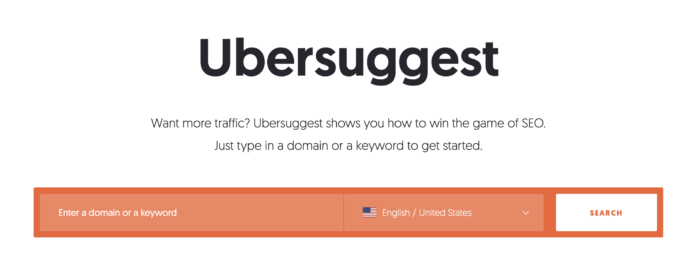
One of the easiest ways to get started spying on your competitors using Ubersuggest is through the homepage. First, simply enter your competitor’s main domain URL in Ubersuggest.

ubersuggest home page for competitor research

When you’ve done that, you’ll want to look for the following metrics and take note of them:

Organic keywords – This is the number of keywords that a domain ranks for. It’s important because if they’re outranking you, they’re likely ranking for more keywords than you.

You can use this data to find keyword gaps and see what keywords your competition ranks for that you don’t. Perhaps they found a really low competition keyword that you’re not going after.

You could then create a piece of content around that keyword and rank relatively easily.

Organic monthly traffic – Take notice of how much traffic your competition gets and compare it to your site.

You can use view your competitors’ traffic as a way of seeing where and when things fluctuate. Google updates its algorithm frequently, which contributes to constant traffic fluctuations. USe your competitor’s traffic trends as a benchmark for your own KPIs.

Domain score – The overall domain score from 0-100 is critically important to the success of a website. Sites with a higher domain score don’t necessarily need to work as hard at producing quality content because Google tends to favor whatever it is they put together since the site is already trusted.

Backlinks – Backlinks are another highly important piece of the SEO puzzle. A backlink occurs when someone links to your site from their page. The more backlinks you have to a piece of content, the more Google looks at it with favor.

Use Ubersuggest’s backlink checker to dig into the backlinks your competition is getting, and go after the same or similar links as part of your backlink strategy.

2. Track Competitors From Within Your Own Project

Once you’ve created a project in Ubersuggest for your website, you’ll want to go to your dashboard.

On the very bottom of the dashboard there is a bar labeled, “my competitors.” Here you can find opportunities to track what your competitors are doing and figure out information about their keywords, keyword gap, traffic, and backlinks.

tracking competitors on ubersuggest from dashboard

The most useful feature I find with this is the comparison of common keywords to keyword gaps.

tracking competitors on ubersuggest from dashboard

Common keywords are keywords that both you and your competitor rank for. You can use this to figure out which keywords they’re outranking on, so you can start looking at their content to see what updates you can make to yours.

As for keyword gaps, you can use this to figure out what new pieces of content you should create around low-hanging fruit keywords that they’re already ranking for.

3. Create a Competitor Project

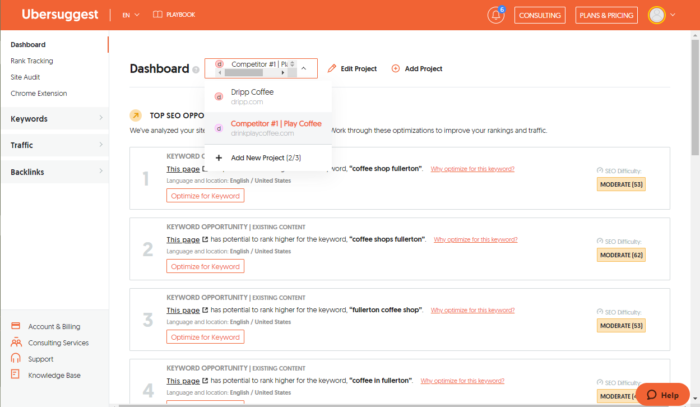
One great feature of Ubersuggest is that it doesn’t limit what websites you can add as a project, this makes it easy to spy on your competition. Here’s how you’ll do it:

1. Head back to the dashboard and create a new project for each individual competitor website.

tracking competitors on ubersuggest from dashboard

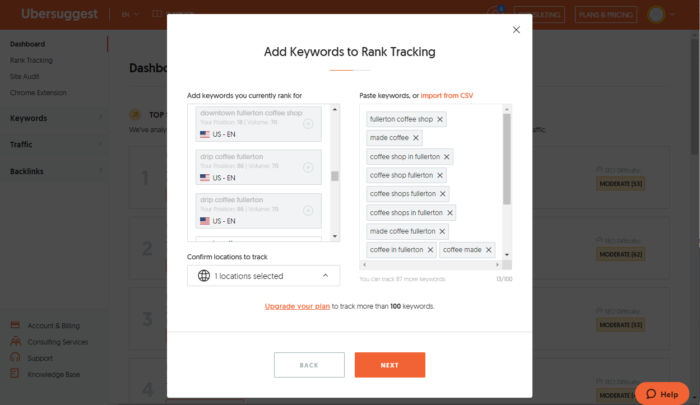
2. Add all the keywords that suggest you track (these are keywords your competitor is already ranking for… can it get much easier than that?) and feel free to add any others that you might be interested in or curious about.

ubersuggest add keywords to rank tracking

3. Add other competitors to the project to see how they’re measuring up against each other.

4. Go through the list of “Top SEO Opportunities” on the competitor project dashboard to learn from what they’re doing wrong and find opportunities where you can improve your site in places where they’re underperforming.

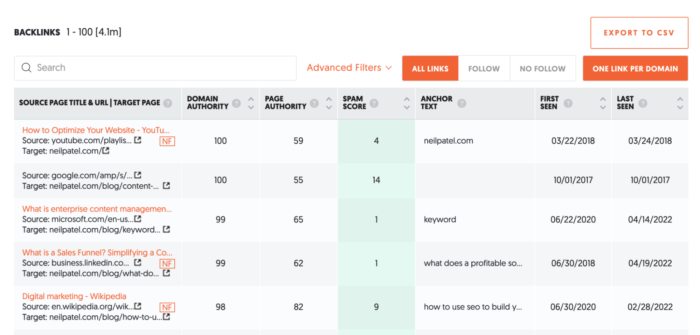
5. Scroll down the dashboard to get a view of how they’re performing with backlinks. You can even click through on the link in the dashboard to get details on who’s linking back to them to find websites to target with backlink requests.

ubersuggest competitor backlinks

Even putting in a small percentage of this effort can make a huge difference on your overall SEO.

4. Track Their Keywords

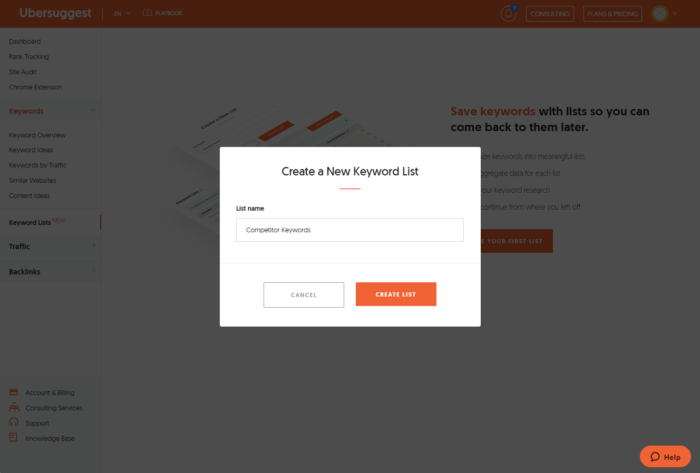
You can also create a keyword list to start tracking the top keywords your competitors are fighting for. This is one of my favorite strategies.

keyword list ubersuggest for beating competitors

Save keywords into lists using Ubersuggest so you can come back to them later.

  • Organize keywords into meaningful lists
  • See aggregate data for each list
  • Save your keyword research
  • Easily continue from where you left off

When choosing keywords to track, here are some tips:

  • Track keywords that you’re not tracking but your competitors are
  • Use the Keyword Idea Report for inspiration
  • Track keywords that include their name or location
  • Track keywords that include specialty services/products that you don’t offer
    • Example: If you’re a coffee shop and your competitor offers a specialty latte and it has search volume, track it as a keyword.

The big question is, why? Why track all this information and will it really make a difference?

Let’s face it, there are over 200 ranking factors that Google uses to determine who ranks where. There’s no way we can get everything right.

Keyword research is one of the things we can control–and we can do it well with the proper procedures and steps.

You could also spend days, weeks, and months researching keywords on your own trying to figure out what you want to rank for. The result could be, nothing.

Instead, see what people are already ranking for. Piggyback on what others are doing right.

This is the fast track.

Of course, don’t expect to hit a home run every time, that won’t happen. You’ll win some and lose some, but you’ll be able to do it much faster by tracking competitor keywords instead of coming up with everything on your own.

5. Research Their Backlinks

Ubersuggest has a Backlinks Opportunity report as well. This tool allows you to enter your own website and multiple competitor websites to see where they’re getting their backlinks from.

This can help you in the following ways:
1. Get insights into what content is popular for your competitors that you may be able to write about from a different perspective (or you may already have content written about).

2. Quickly create a targeted list of websites to go after to share your own valuable content with (if they liked your competitor’s content, there’s a good chance they’ll also like yours).

3. Prioritize who you want to reach out to based on the referring domain’s Domain Authority and relevance to your business.

Let’s break down each of these points to help understand why they’re important.

Figuring out what pieces of competitor content is popular can help you create something shareable, something that people want to link to.

The reality is, you can reach out to anyone you want but if the content you’re sharing with them isn’t amazing, they’re not going to want to link to it.

From there you can create a targeted list of websites to go after with outreach. This is especially true if you’re researching competitors in the same niche.

With the number one result in Google averaging about 3.8 times more backlinks than the rest of the positions on page one, it’s safe to say that backlinks are still one of the most important ranking factors.

6. Download the Chrome Extension

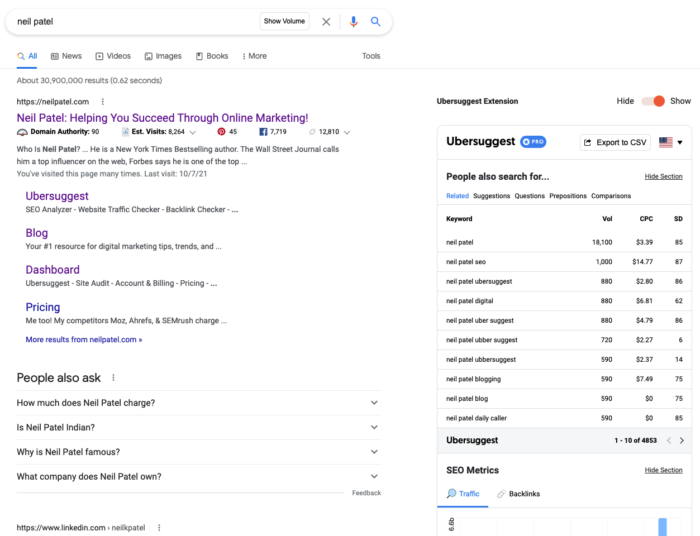
Being able to have information at your fingertips is important and with the Ubersuggest Chrome Extension, you can. By downloading the extension, you can see keyword insights directly in the Google search results, YouTube, and Amazon.

chrome extension for ubersuggest

Downloading it is simple and you’ll receive all the data right on the Google search results page. Information like domain authority, keywords, and monthly traffic will all display right underneath the title tag of the website.

You’ll also get traffic volume data and keyword difficulty information about the keyword you searched and related keywords.

BONUS TIP: Find Your Competitor’s Mistakes and Avoid or Leverage Them to Your Advantage

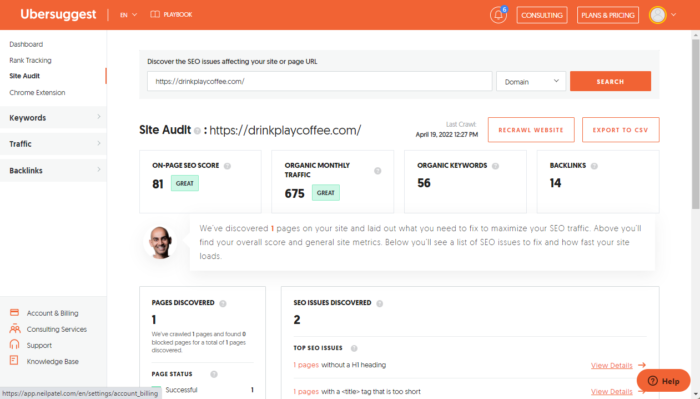
One great way to get ahead of the competition is to figure out what they’re doing wrong and how you can capitalize on it. Take a look at the competitor’s Site Audit Report and check the health of their website.

site audit report ubersuggest

You can look through various SEO issues to see what’s going on with their site and how you can capitalize on their shortcomings.

Maybe their site is a bit slow? You could ensure that your site runs fast so that it can’t be used against you.

Maybe they’re lacking proper meta descriptions and title tags on some of their content? You can create a competing piece of content and ensure it gets proper metadata.

Tips:
1. Find the websites that are giving your competitors backlinks and reach out to those sites with your own valuable content for them to link to.

2. Find the pages that have the most traffic on your competitor’s website to see if you have a similar webpage that competes. If you don’t create one! If you do, optimize it more with targeted keywords.

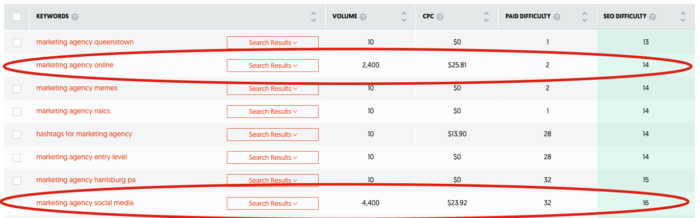
3. Are you fighting for the same keywords? Try and differentiate yourself by finding the missed opportunities. Look for long-tail keywords or keywords with lower search volume and lower search difficulty ratings.

missed opportunity keywords in ubersuggest

Conclusion

Competitive intelligence helps you figure out what your competition is doing right and what you’re doing wrong, it’s really as simple as that.

If you can find out what they’re doing and how they’re succeeding, you can use that as a springboard for your success. To do so, you need a great competitive research tool.

Using Ubersuggest for keyword research provides versatility and simplicity to the SEO process. You need a tool that helps you do a lot of things without complicating it.

Click here to sign up for Ubersuggest for FREE today! If you want help with your keyword, SEO, or marketing strategy, you can also reach out to our agency for help.

Zoo responds after viral video shows lion bit man's finger: 'Should never have happened'

A male lion at the Jamaica Zoo has bitten the finger of a man who stuck his hand into the animal’s enclosure; a viral video has circulated and the zoo is now reviewing the incident.

MLB suspends Yanks' Donaldson for one game

Yankees third baseman Josh Donaldson has been suspended for one game for calling White Sox shortstop Tim Anderson “Jackie” on Saturday. Donaldson is appealing the suspension.

The post MLB suspends Yanks' Donaldson for one game appeared first on Buy It At A Bargain – Deals And Reviews.

PGA champ, Bama fan Thomas takes Jimbo jab

PGA Championship winner Justin Thomas and former Alabama golfer Justin Thomas took a dig at Texas A&M football coach Jimbo Fisher after winning a second Wanamaker Trophy on Sunday.

The post PGA champ, Bama fan Thomas takes Jimbo jab appeared first on Buy It At A Bargain – Deals And Reviews.

New comment by gofort in "Ask HN: Who is hiring? (May 2022)"

G-Core Labs | Remote-first | Full-time | https://gcorelabs.com/ | https://careers.gcorelabs.com/jobs/Careers

We build CDN, DNS, DDoS Protection, Video Streaming, Edge Computing and other infrastructure solutions.

We are looking for:

* Systems Engineers (to operate global infrastructure of more than 800 nodes all over the world)

* Systems Engineers (to operate Clickhouse Cluster and Kafka Cluster)

* [CET +- 5h] Go Software Engineers to build image conversion solution and new CDN features

* [CET +- 5h] Python Software Engineers to build API for our CDN Product and integrate with other providers

* [CET +- 5h] C Software Engineers to develop protection from DDoS attacks using XDP (eBPF) and add new features to our proxy server

* [CET +- 5h] Product Managers to push our infrastructure products forward (Security, Image Optimization, DNS, etc.)

* L2 Engineers to debug our customers problems efore they come to Ops

Can personally guarantee healthy engineering culture.
I work in this company for more than 5 years and can definitely recommend it, write me so I can refer you and speed up recruiting process.

Email: b_kurnosov@gcore.lu
Linkedin: https://www.linkedin.com/in/bogdan-kurnosov/

MLB suspends Yanks' Donaldson for one game

Yankees third baseman Josh Donaldson has been suspended for one game for calling White Sox shortstop Tim Anderson “Jackie” on Saturday. Donaldson is appealing the suspension. The post MLB suspends Yanks' Donaldson for one game appeared first on Buy It At A Bargain – Deals And Reviews.

Website Design: The Complete Guide

Disclosure: This content is reader-supported, which means if you click on some of our links that we may earn a commission.

Website design used to be very hard, but that is no longer true.

Years ago, when I first started designing my websites, there weren’t a ton of resources. There were basically two options—learn the basics of website programming languages or hire a designer. The first choice is difficult and time-consuming. The latter is expensive. 

After a brief attempt of trying to design everything on my own, I ended up spending top dollar on a designer. It was more than I wanted to spend, but I didn’t really have much choice.

Today, new website owners have more resources at their disposal. It’s possible to design a professional website without hiring a designer or learning how to code. 

Whether you’re a complete beginner or just looking for an alternative way to design websites, you’ve come to the right place. I’ll explain how to design a website below in this step-by-step guide. 

My Favorite Tool For Website Design

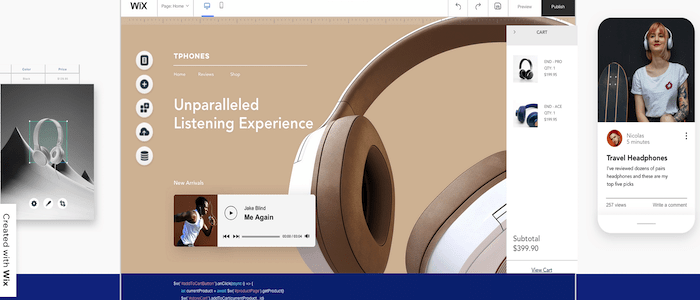
Wix is my favorite tool for website design. It’s essentially an alternative method to sidestep web design altogether.

As a free website builder, Wix makes it easy for anyone to build and design a website from scratch—no experience, development skills, or design knowledge required. 

The reason I love Wix so much is that it’s just so effortless. Even for such a simple tool, the final design always looks professionally made. People will just assume you hired a designer—it’s that good. 

That effortlessness extends to important things you don’t want to deal with on your own, like security and reliability.

Wix manages optimization for both on their end, so your site is always protected and their servers are always able to deliver your website to visitors.

Plus, they go the extra mile with automated site data backups that make sure you’re never left starting from scratch should something terrible happen.

Another reason why I recommend Wix so highly is because of its versatility. It can accommodate the design needs of virtually every type of website under the sun.

From simple blogs to portfolio sites, online stores, restaurant websites, small business sites, and more, Wix can do it all. Other website builders on the market just don’t have the same versatility. 

Continue below, and I’ll teach you how to design a website for free using Wix. 

Step #1: Create a Wix Account

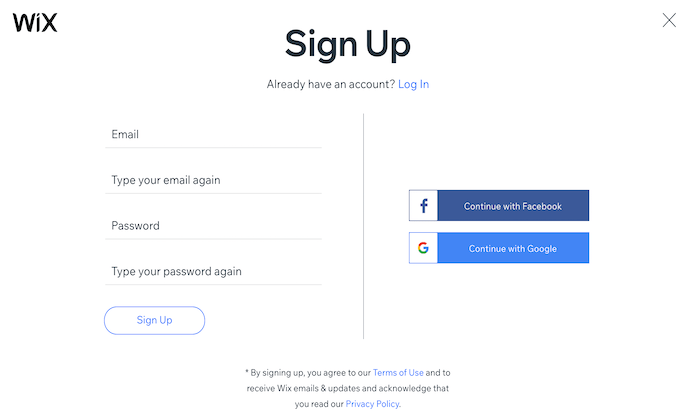
The first thing you need to do is sign up for Wix. So head over to Wix.com and create an account. This is 100% free to do, and you don’t even have to give your credit card information.

Just click one of the many “Get Started” buttons on the homepage or anywhere else on the site.

Unlike other platforms, the Wix sign-up process can be completed in a matter of seconds. There aren’t any complex form fields to fill out. They just need your email and a password. 

You can even bypass typing anything and sign-up with a single click using Google or Facebook. 

Once you’re signed up, Wix will automatically walk you through the website design process. 

Step #2: Choose Your Website Type

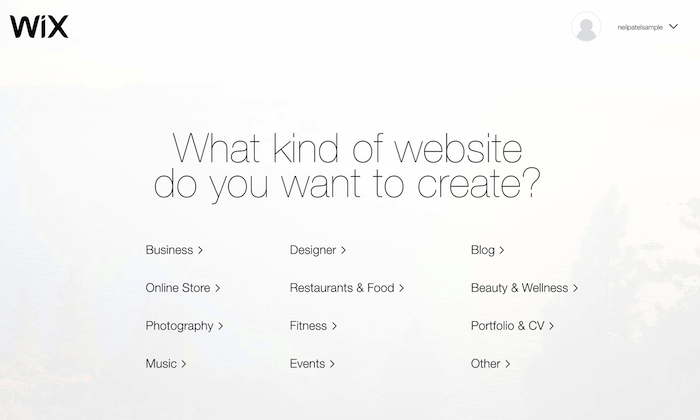
Next, you’ll need to figure out what type of website you want to design. Your answer will have a significant impact on your design choices.

For example, a personal blog and an ecommerce website will have major differences in design choices. A portfolio site used to showcase photography or custom art won’t have the same design as a local restaurant website.

Wix makes this step easy for you. You’ll be prompted to select your website type from a wide range of potential options.

Based on your answer, Wix will automatically present you with applicable templates in that category. For example, if you select “online store,” then the layout will accommodate product pages, product categories and make it easy for you to design a checkout process. 

Once you choose a website type, Wix presents you with two options for your design:

  • Let the Wix ADI create a website for you.
  • Create your website with the editor.

The first option is straightforward and is excellent for people who are in a rush. You’ll just answer a few simple questions, and Wix will design a site for you based on your responses. It’s impressive how quickly the process takes.

You’ll have a brand new custom website design in less than a minute. The design comes out beautiful, and aside from customizing the pages with your own content, you’re done.

For the purposes of this tutorial, we’re going to stick with the second option—creating a site with the Wix editor. This will give you more freedom and control over every aspect of the design choices. 

Step #3: Select a Template

Rather than trying to design a website with a blank canvas, it’s much easier to start with a template.

Take a few minutes to browse through the different options. What styles do you like? Which templates emulate your brand image? Wix has thousands of templates to choose from. It can be a bit overwhelming at first. But narrow your focus based on your specific type of website.

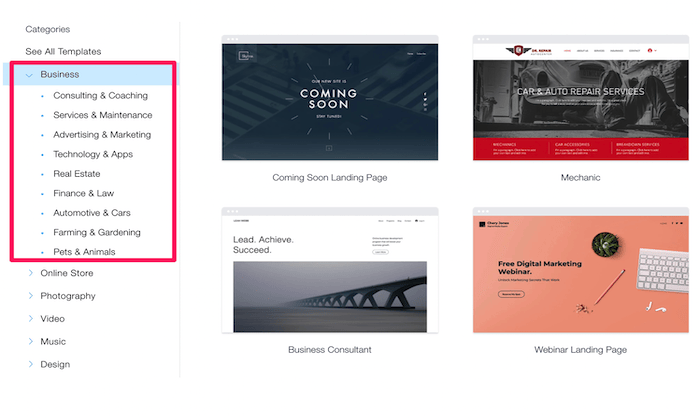
For this example, I choose a “business” website. But that’s a really broad category. If you look to the left side of the screen, you can narrow your focus further into types of businesses. 

Wix has specific templates for consultants, real estate companies, professional services like finance and law, marketing, and so much more. Every website type has different subcategories with templates. 

For example, if you select “online store,” then you’ll see templates for clothing, jewelry, electronics, home decor, beauty supplies, sports equipment, and more. If you’re designing a blog website, Wix has templates for personal blogs, travel blogs, fashion blogs, podcasts, etc.

Your template will become the foundation for the rest of your website design. So it’s important to take your time and not rush through this step. You’ll still be able to customize different design elements to your liking, but that’s much easier with the right template. 

Step #4: Edit Your Layout

Website visitors will form an opinion about your website in less than one second of landing on the home page. That’s why the design is so important, and it all starts with the right layout.

Wix templates have already been optimized for a user-friendly design. But you have the freedom and flexibility to make some changes here. 

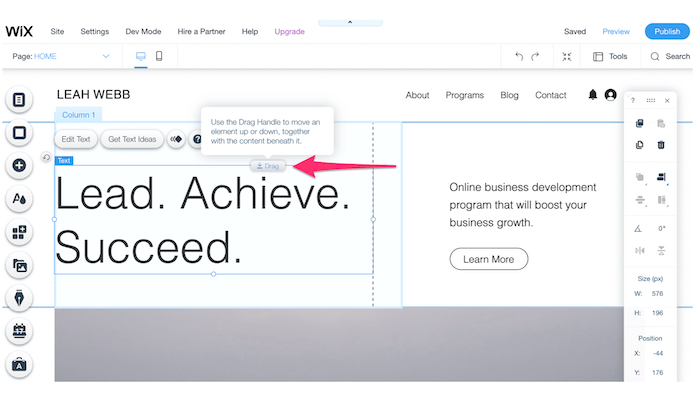
In this example, I’m editing the “Business Consultant” template. Let’s say I wanted to move the positioning of the headline on this homepage. I’d simply click the box in the Wix editor and drag it somewhere else on the page. 

Or maybe I want to reposition that “Learn More” call-to-action on the right half of the screen. I can click on it and drag the button anywhere I want. 

I encourage you to move a few things around when you’re first getting started. This will introduce you to the Wix editor, so you’re comfortable down the road. If you ultimately don’t want to make any layout changes, you can always revert back to the original design. 

Step #5: Prepare Your Content

Content is a significant component of your site’s design. You can’t completely finalize the design without understanding exactly what materials will be featured on the website. 

Gather images, videos, GIFs, logos, slogans, text (copy), and whatever else you want to display on your site. 

Let me show you an example to illustrate my point.

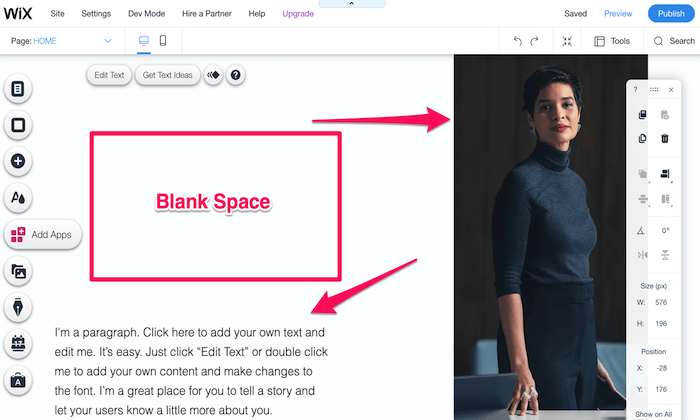
I’m still editing that same business consultant template. One of the first things I’d do on this part of the page is swap the image with a picture of myself. But before I do that, I’d also need to think about the corresponding text copy on the screen’s bottom left side. 

By default, the template has some blank space here, as I’ve highlighted above. While blank space is an important web design feature, I don’t love how it’s used in this instance.

So these are my options:

  • Use a full-length photo (like the one above) and add a paragraph in the blank space.
  • Use a smaller photo (like a headshot) and just use a single paragraph of text.

Both will achieve my goal of eliminating that empty section of the page. Do you see how one component impacts another? All of this is related to the design, and it’s much easier if you have your content prepared ahead of time. 

Step #6: Define Your Branding Strategy

Start to think about how visitors will perceive your website. Things like the color scheme, fonts, and other design components will directly impact your brand image. 

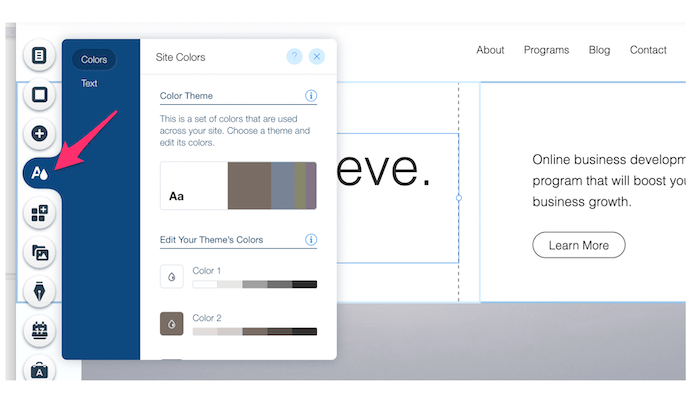
Click the “Theme Manager” on the left side of your Wix editor. This is the button with an “A” and what looks like a raindrop or paint drop.

From here, you can change your site’s theme colors. You’ll also have the ability to edit your default text themes for headers and paragraphs. 

In this case, the current color scheme works well for a business consultant. It’s modern and professional. But let’s say you were designing a website for kids. You could have a bit more fun with bright colors and big, bold fonts. 

If you added your company logos and other materials back in step #5, you’ll want to make sure that the color scheme flows well with the rest of your content. 

Step #7: Add Landing Pages

Your landing pages will each have unique designs. While they should all follow the same branding principles and theme of your home page, the design choices will have some variations.

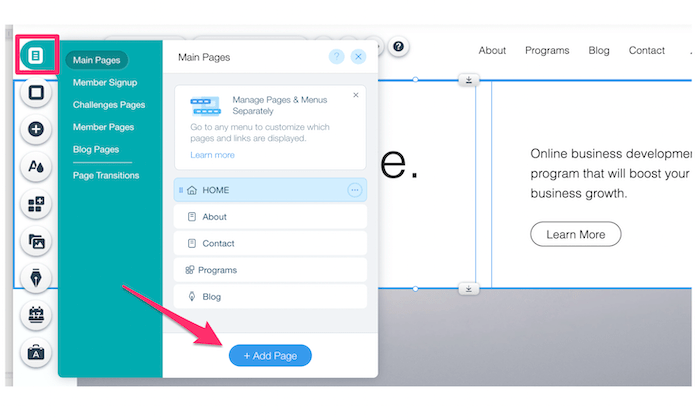
To add a page, click the top icon on the left side of your Wix editor. Then click “add page,” as I’ve highlighted below.

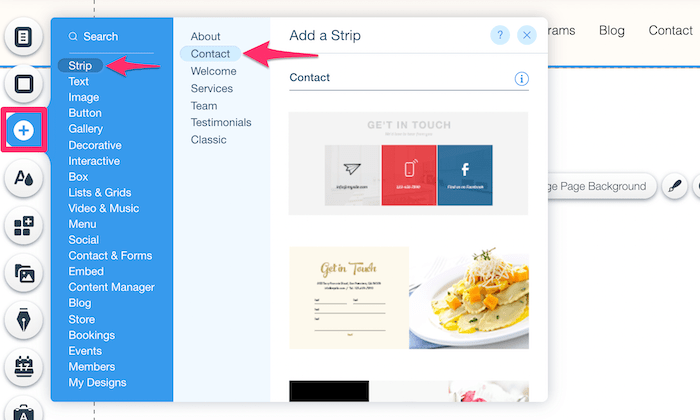
New pages will essentially be a blank canvas, except for your header and footer. But rather than starting from scratch, you can “add a strip” to any page based on what content it will contain. 

Just click the “+” button on the editor to browse through some options.

Think of this as a mini template. Apply the same principles you used back in step #3 when you first chose your overall site template. 

This is just an easier way to design new landing pages. Wix already has so many great options that it’s not worth trying to build your pages from scratch. 

Step #8: Focus on Usability

Sometimes during the design process, you can start to lose focus on how visitors will engage with your site. But user experience (UX) can’t be overlooked. 

There are certain design best practices people expect when they visit a website. For example, they expect the navigation menu to be at the top of the page. They expect the footer to contain contact information. They expect the logo to take them back to the home page.

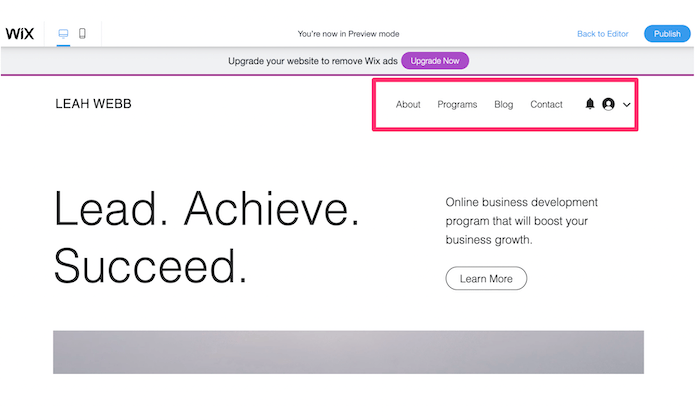
Let’s look at something simple, like a navigation menu:

In this example, there are only four pages in the menu. You could maybe get away with adding one or two more. But beyond that, it’s too much.

Imagine if this website had 10 or 20 pages in the menu. It would be a disaster. The top of the page would be too cluttered, and visitors would never find what they’re looking for. Overall, that would be a poor design choice. 

Think about usability with every design choice you make, from CTA placement to scroll effects, white space, architecture, and everything in between. 

Don’t try to reinvent the wheel here. Follow web design best practices, and the UX will be fine.  

Step #9: Optimize the Design For Mobile Devices

According to Statista, roughly half of all global web traffic comes from mobile devices. So there’s a coin-flip chance that each visitor on your site will be browsing from a smartphone or tablet. 

You need to make sure your website design is mobile-friendly. Otherwise, visitors will bounce, and you’ll never get mobile conversions. 

Fortunately, Wix makes this process easy for you. 

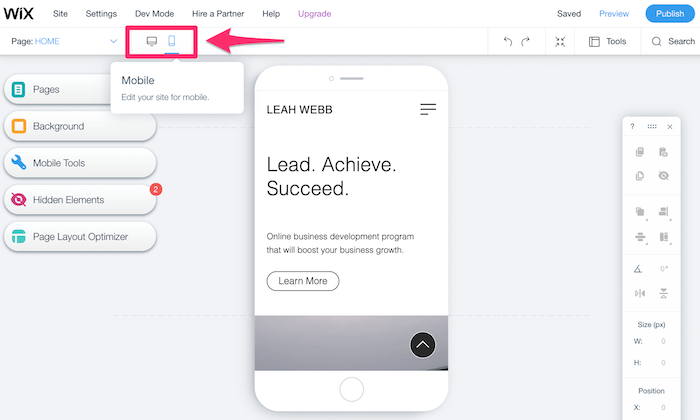
From the editor or previewer page, simply click the mobile icon to switch away from the desktop view of your website. 

Wix will automatically optimize your website for mobile. But it’s still a good idea to check everything out for yourself to see if you want to make any changes. If you see something you’d like to change, you can edit your site’s mobile design without changing the desktop version. 

Step #10: Publish Your Website

Once you’ve finalized the design, it’s time to get your site live on the web. 

It’s worth noting that your site doesn’t have to be 100% finished to publish it. You can always go back and add pages at a later time. But once you have a homepage, about page, contact page, and a handful of site elements, get it published so you can start generating some traffic. Just be sure you don’t publish any incomplete pages. 

Click the blue “Publish” button at the top right of your Wix dashboard to continue.

As I said before, you can design and publish a site with Wix 100% for free. But there’s a catch.

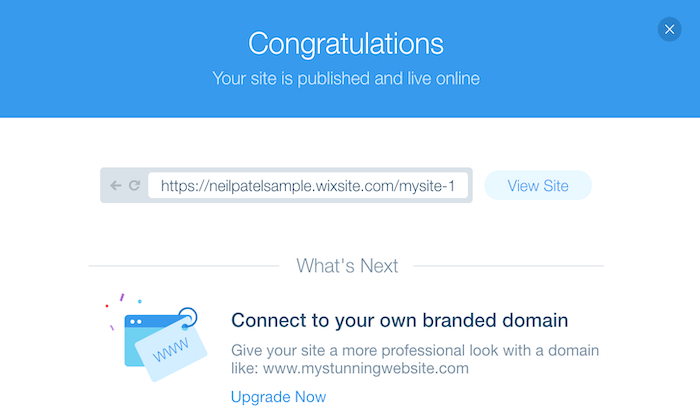
Free Wix users won’t get to customize their domain. All domains include your Wix account name, followed by Wix’s branding, and then your site’s name. As you can see from the example above, the domain here would be:

http://neilpatelsample.wixsite.com/mysite-1

This is not a viable option for any business-related website. It’s okay if you’re just using the site to play around with web design principles. But if you want a legitimate site with real visitors, you’ll need to upgrade to a premium Wix plan. 

Now you’ll be able to use a custom domain name, either purchased directly through Wix or from a third-party domain registrar. If you don’t already have a domain, just get it from Wix. It’s easier to manage everything through a single platform.

Conclusion

Website design has really evolved over the years. What was once a major challenge or expensive venture for new site owners can now be accomplished with ease.

Website builders like Wix essentially eliminate the need to design websites from scratch.

Non-technical users and people with zero design experience can choose a template and populate their site with custom content. There’s no need to learn any web programming languages or hire a designer. 

Sign up for Wix, follow the step-by-step process listed above, and you’ll have a professionally designed website in a matter of minutes. It’s that simple!

Constitutional Thunder Out of the Fifth Circuit

The post Constitutional Thunder Out of the Fifth Circuit appeared first on BUSINESS DEMO WEBSITES.

The post Constitutional Thunder Out of the Fifth Circuit appeared first on Buy It At A Bargain – Deals And Reviews.