Common UX Accessibility Mistakes Found on Websites

Tim Berners-Lee, the inventor of the World Wide Web, says the web is for everyone. Unfortunately, that isn’t always the case.

Poor design decisions can present barriers for many different groups of people. In fact, research by WebAIM finds that across one million homepages, there were over 50,000,000 “distinct accessibility errors” at an average of just over 50 per page.

These errors don’t just make people feel marginalized; they stop hundreds of thousands of people from interacting with your brand or buying your product.

Few webmasters want to purposefully marginalize people or limit access to their site. That’s why it’s so important to understand the most common web accessibility issues and learn how to resolve them with clean design.

Let’s get started.

Why Is UX Accessibility Important?

Because the internet has become an essential part of the day-to-day lives of more than a billion people, site owners must take steps to make sure everyone can access it equally. It’s not just a matter of human rights, however. There is an obvious financial case for making your site accessible. Given that 61 million people in the United States have some form of disability, an inaccessible site could be harming your bottom line. Make your site accessible, and you potentially open the door to thousands of more customers.

Complying with UX accessibility design trends can bolster your company’s reputation. Making an effort to cater to a particular group of disadvantaged users proves your company cares about all of its customers. This added step may encourage potential customers to do more business with your brand going forward.

There’s also the small matter of legal compliance. While there’s debate about whether the 1990 Americans with Disabilities Act includes websites as well as physical stores, that hasn’t stopped thousands of lawsuits getting filed with federal courts each year. You may not be punished for a lack of ADA website compliance, but the threat of legal action is clear.

Ultimately, designing with UX accessibility doesn’t just improve the browsing experience for users with disabilities; it improves the user experience for everyone. Even users with perfect vision benefit from a better color contrast and more labels — and your SEO certainly benefits from things like added alt text and better link descriptions.

The 7 Most Common Web Accessibility Mistakes

Making your website more accessible is as much about avoiding common issues as it is about integrating new technology. Avoid the following seven mistakes, and you’ll go a long way to making your site more accessible than your competitors.

1: Missing Alt Text on Images

Alt text is an HTML attribute that describes what an image represents. From an accessibility perspective, alt text provides information for screen readers to accurately describe images to visually-impaired users. If you don’t provide alt text or your alt text isn’t very descriptive, then you aren’t making your site’s images available to everyone.

There’s a difference between empty alt text and missing alt text. Sometimes images can be for purely decorative purposes. Where this is the case, an empty alt tag can be used, which appears as alt=””. This is ignored by screen readers and doesn’t impact usability.

Often, alt text isn’t empty but missing completely. When a screen reader comes across a missing alt attribute, it will assume that the image is important and inject the file name. For images like graphs and infographics that are fundamental to a user’s understanding of a webpage, the file name won’t be sufficient. That’s why it’s essential to create alt text for all of your images.

2: Weak Color Contrast

Have you ever tried to read a white font on a yellow background? Not easy, is it? But that could be how many users feel every time they visit your site. The truth is some people struggle to read text unless the color contrast between the font and the background is very stark. It’s why black font on a white background is such a popular choice.

The easiest way to improve color contrast is to avoid using similar colors for backgrounds and text. That means no orange font on a red background. Or green text on a blue background. Pay particular attention to design features like your website’s header or the submit button on forms, too. These features tend to incorporate brand colors and are more likely to cause contrast issues.

Alternatively, you can use a tool like the Contrast Checker from WebAIM to quantify your contrast ratio. The higher your ratio, the better the contrast and the more readable your website will be. The tool will tell you whether your colors pass or fail. As a rule, text and background colors should have a contrast ratio of at least 3:1 for large text and at least 4:1 for normal-sized text.

As you can see from the images below, dark blue text on a white background has a great contrast ratio.
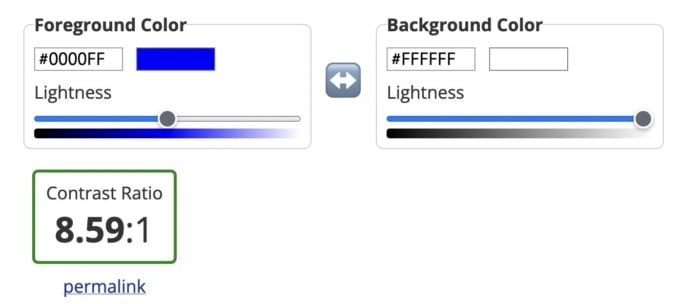
Example of a good contrast ratio of colors with dark blue on white.

But yellow text on a white background has a terrible contrast ratio.
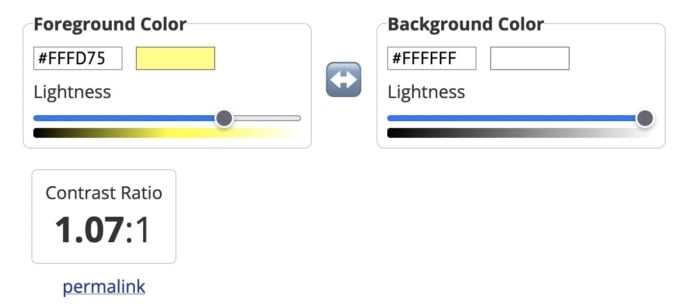
An example of bad color contrast with yellow on white.

3: Poor Link Text

Links are a vital part of a web page, both from a user experience perspective and for SEO. But you need to accurately describe them using link text to make them effective.

While those versed in SEO might never dream of missing a chance to add a keyword in an internal link, missing link text is surprisingly common. Logos, buttons, and icons are all guilty of having no text, which means screen readers will ignore them. That’s not great if you want users to click your CTA button.

Vague or ambiguous link text is also an issue. Not only does a phrase like “click here” offer no SEO value, but it can also hamper users accessing your site via a screen reader. Including the entire http:// link without any anchor text whatsoever is even worse. Neither version contains the information these users need.

Instead, make sure the clickable text describes exactly what the user can find on the next page. In the example below, for instance, you know that by clicking the link, you’ll be directed to a page where you can get a 14-day free trial of Shopify.
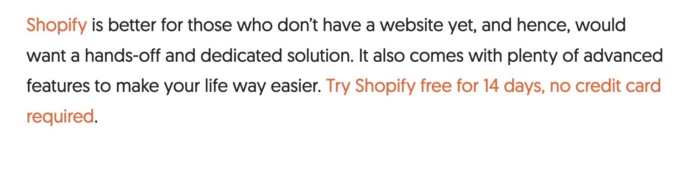
The 14 day free trial for shopify.

Then there are navigation links. These can also create problems for screen readers if they are poorly coded. That’s because screen readers will not skip over them, meaning users will have to listen to your navigation menu every time they open a new page. Solve this by assigning ARIA roles to your navigation menus to indicate their purpose. This will help screen readers to avoid them where necessary.

4: Missing Form Labels

I’m almost certain your website has at least one form on it, even if it’s only on your contact page. But does every field have a label telling users what information they need to input? If not, your forms aren’t accessible to everyone.
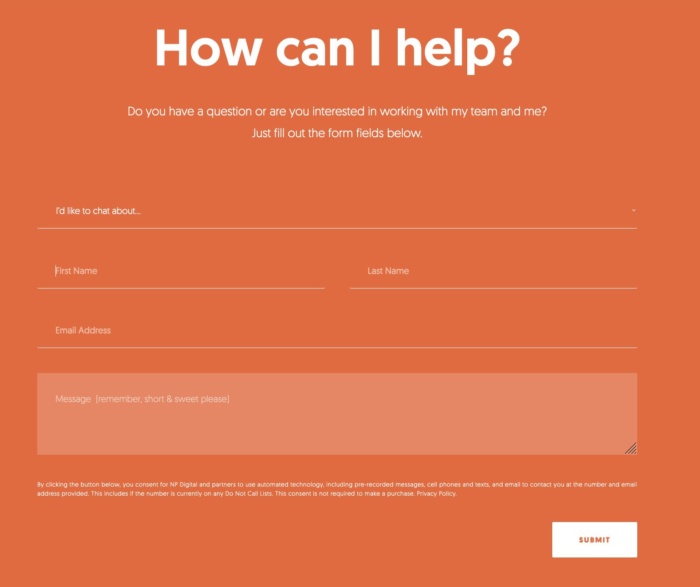
A "how can I help" form.

Just like with link text, form input fields need a label so screen readers and other accessibility devices can understand them and help users navigate them. A label isn’t just the placeholder text you can see in the form field, though. You also need to add a description in the form’s code. That’s because placeholder text is usually ignored by screen readers. It also doesn’t help that placeholder text usually lacks a strong color contrast.

Ideally, you’ll have a visible label inside a <label> element so everyone (users, screen readers, bots) can understand what’s meant to go in each field.

5: No Markup For Data Tables

Tables are something of a nightmare for screen readers and other accessibility devices. When screen readers come across a table, they tell the user that there is a table with a given amount of columns and rows and then proceed to list out all of the data. Unfortunately, that data may not be read in the correct order. Worse still, screen readers can’t read out tables where there is more than one set of row or column headers.

In truth, the best way to make tables accessible is to not have them at all. Of course, that’s not going to work for some websites. So, where tables are required, you need to make them as simple as possible and use the correct markup. ID, HEADERS, and SCOPE attributes should be used to correctly label each part of your table. You can also use table captions to provide additional information to users about how to best understand your table.

Another alternative is presenting your data as an image file, with appropriate alt text listing out the data. However, for complex tables, that may not be feasible.

6: Lack of Keyboard Accessibility For Screen Readers

Not everyone is going to use a mouse to navigate your website. Many visually-impaired people will use a keyboard or another accessibility device to move around your website. And that means you need to pay special attention when designing and creating the layout of your site.

Specifically, users must be able to navigate your website using the space bar and tab key. Simple sites built in semantically correct HTML may make this possible without any adjustment, but more complicated websites will need to code in digital landmarks that better allow keyboard users and screen readers to move about.

Adding skip-to-content links at the top of each page can also save your users from having to tab through every menu item every time they open a new page. These buttons, which appear when you push the tab key, allow users to navigate the site using the tab and spacebar keys to skip the navigation and head straight to the main content of the page.
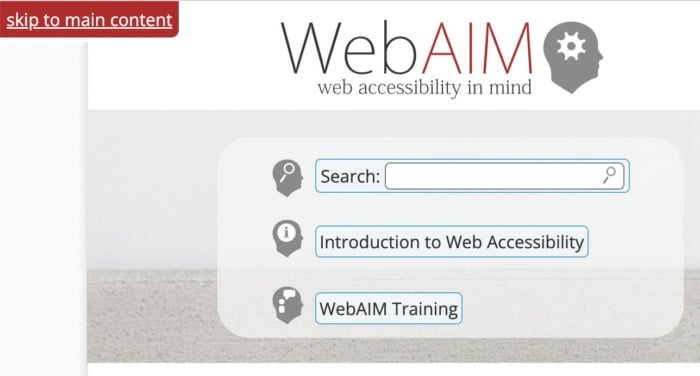
WebAIM's search function.

7: Non-HTML Content WIthout Proper Markup</h3>

It’s easy to forget about non-HTML elements when optimizing your site for accessibility. But content like PDFs and Word documents can also be an issue. Out of the box, users cannot customize these documents to make them easier to read nor do they work well with assistive technologies. Accessibility issues are even worse when documents are produced as image-only PDFs.

One solution is to solve navigation mistakes by tagging these resources for navigation by screen readers. Another is to use Office’s built-in Accessibility Checker to improve the accessibility of these documents when you create them.

Interactive content like sliders, accordions, and drag-and-drop widgets can also affect accessibility. So, too, can dynamic content like pop-up boxes and confirmation messages. If the screen reader can’t understand when these pieces of content are loading, it won’t be able to tell users about them.

Once again, you can use ARIA attributes to resolve this issue. Tagging these interactive and dynamic elements with the correct ARIA attribute will notify screen readers that the page’s content has changed. Alternatively, you can design your site in a way that avoids the need for pop-ups and other forms of dynamic content. Static websites may not look as flashy, but they are much more accessible.

FAQs

What are the four significant categories of accessibility?

The Web Content Accessibility Guidelines are built upon the four principles of POUR: perceivable, operable, understandable and robust.

What is ADA compliance?

If your site is ADA-compliant, then it meets the recommendations set out in the Americans with Disabilities Act of 1990 and is accessible to someone with a disability. 

How do I make my website more accessible?

You can make your website more accessible by improving color contrast, adding alt text, or adding keyboard accessibility for screen readers.  

What is an example of website accessibility?

Allowing users to navigate your website using a keyboard instead of a mouse is an example of website accessibility. So is adding alt text to every image on your website.

Conclusion

Unfortunately, even the best designers and web entrepreneurs can create inaccessible websites. It’s why it’s so important to keep referring back to these mistakes whenever you build a website or create a new piece of content.

It’s more effort to include alt text on all images, add markup data to tables and improve the quality of your link text, but millions of users will thank you for it.

But don’t stop there. Next, learn how to create inclusive content and improve the overall user experience of your website.

What UX accessibility mistakes are you going to correct first?
5 Rules for Your Sub-Brand Keyword Strategy

If you’ve tried Coca-Cola, you’ve probably had a Diet Coke.

If you use Google as your preferred search engine, chances are you have a Gmail account.

What’s the link between the two? Both are high-profile companies with high-profile sub-brands.

Think of a sub-brand as a room in a house and the house as your brand. Successful sub-branding means targeting the right audience with the right product.

If sub-brands are part of your company’s brand architecture, a well-defined sub-brand SEO strategy helps keep the lines clear.

Brands like Coca-Cola and Google do this well, making it clear how their sub-brands are related to but different from the parent brand. From an SEO perspective, this makes for an ideal keyword strategy.

I want to help you do the same with your brand architecture.

These five rules will help keep your sub-brand SEO keyword strategy true to your brand image while allowing your sub-brands to uniquely stand out.

Why Do Businesses Create Sub-Brands?

To sub-brand or not to sub-brand?

That is the question.

As you build your business’ brand, it’s tempting—and often strategic—to widen your footprint over time.

Companies across all industries have portfolios with multiple brands. Sometimes they develop these brands themselves. Sometimes they acquire them.

There are a lot of good reasons to create a sub-brand. Here are a few:

To Target Specific Audiences

In some cases, a business might want to distinguish between its flagship brand and sub-brands that target more specific audiences.

Take the car brand Toyota and its luxury sub-brand Lexus, for example. The brands operate independently under the Toyota umbrella, but they market to different target audiences. Having separate brands allows them to connect with each on a deeper level.

To Tap Into New Markets

Sub-brands are an opportunity to reach new audiences. Appealing to a new niche allows the parent brand to:

  1. Build a stronger bond with their current customer base
  2. Attract new customers
  3. Expand into a new, profitable revenue stream

Another approach might be for product expansion. Companies can use sub-brands to test a product on the market under a different brand name.

Who can say where they might end up?

To Uniquely Market Different Products

Whatever the motivations, sub-brands should stay true to the parent brand’s mission as they develop.

Each product has its own personality, feel, and set of features even though they are all separate items under the same umbrella company. This also means each sub-brand needs a separate budget for marketing and promotion.

So, of course, your sub-brand SEO keyword strategy needs to be sharp to support it.

Influencing search engines will take time, but it pays off when the conversions your strategy drives show up in audience and revenue.

#1: Think About the Audiences for Your Main and Sub-Brands

Look at the demand of your audience and prospective audience. How are you going to meet their needs with a sub-brand?

To answer this question, you must determine their search intent. Use keyword research to formulate this strategy.

Your content needs to provide them with the information they need. From your branding to your content, you want to spark a unique relationship with your target audience.

As I’ve said in the past, brand-loyal people want to find a brand to be loyal to.

The company’s business goals should serve as the cornerstone of the choice to expand. How you go about your sub-brand SEO strategies is unique to your desired outcome.

For example, I bet you didn’t know Converse was a sub-brand of Nike.

Well, if you’re on Converse’s marketing team, using “running shoe” as the sub-brand’s SEO keyword would be “off brand.” A more fitting keyword for the strategy would be “high top sneakers.”

So, while Converse is a sub-brand of Nike, their keyword strategy sets them apart from the parent company to see self-sustaining conversions.

You’ll notice when the right combination of keywords serves the company and sub-brand’s goals.

How will you know you hit that sweet spot?

Your audience will tell you.

Insights from your content performance metrics and ROI will reveal a wealth of resources. Then, you can sustain those wins by following that same strategy, adjusting as needed.

#2: Keep an Eye on Your Competition

You’ll need to keep an eye out for the competition as you expand. A strong sense of your audience and competitors will help differentiate your sub-brand.

Say you want to step into a market and challenge the industry norms.

Think of some of your favorite parent companies. Now, think of some of their spin-off ideas that have been successful.

Who did you think of?

I thought of Apple.

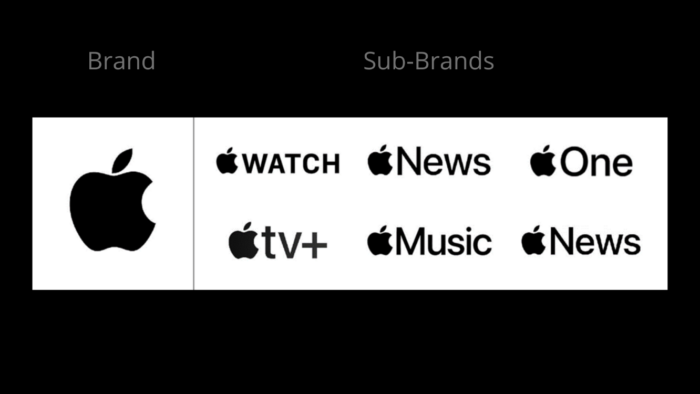
Apple's parent brand and some of its sub-brand companies.

For instance, Apple offers a variety of tech products. These products bear the Apple logo and support the parent company.

Apple is not a product in and of itself, but each sub-brand leverages Apple’s brand value and appeals to various market niches.

When Apple first started, they wanted to be perceived as the alternative to the mainstream. Sub-brands help carry out this plan. Think about how users proudly declare their loyalty to Apple products: “No PCs for me; I am a Mac guy.” “I don’t have an MP3 player; I have an iPod.” “It’s not a Blackberry; it’s an iPhone.”

Sub-brands allow Apple to stand out from the competition in completely different markets. Google’s algorithm favors domain diversity, meaning that you’re not likely to see a ton of pages from the same domain in a given SERP. This means that when talking sub-brands, you want to use as many domains as possible.

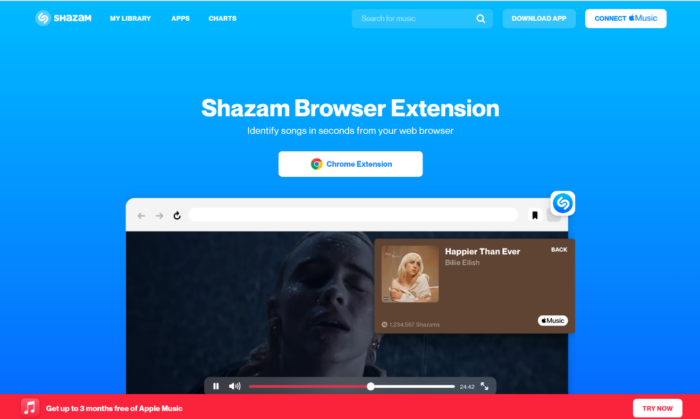
The homepage of Shazam, a sub-brand under the Apple the brand.

While the previous examples leveraged Apple’s brand equity, the company has also had success with sub-brands that stand alone.

A multi-domain SEO strategy, not to be confused with subdomain, helps them market Shazam as a sub-brand under the Apple brand. While branded as an individual product, Shazam is set up as a separate domain that drives traffic back to Apple’s domain. It feeds in users through Apple Music.

While it’s not a go-to SEO technique like keyword optimization, a multiple-domain SEO strategy is an out-of-the-box play that doubles your chance to rank for multiple domains.

With sub-brand SEO, you can implement a multiple-domain strategy without devaluing the brand by strengthening its approach to their audience and against competitors.

#3: Avoid Keyword Cannibalization at All Costs

Before you make your way down sub-brand SEO street, don’t take a wrong turn with your content due to keyword cannibalization.

If more than one of your pages pop up for the same search query, you’re competing against yourself. Because they target the same keywords, your pages eat into each other’s performance (hint: why we call it cannibalization).

Be mindful of keyword cannibalization when developing a sub brand SEO strategy.

Keyword cannibalization problems don’t come with a “one-size-fits-all” solution. There are unique approaches to address different cannibalization issues.

Those approaches include:

  • Merging Page Topics: Try to merge pages with similar topics that are getting in the way of how the page is competing among others.
  • Page Re-optimization: Taking another stab at the topic by re-optimizing pages helps set clear intentions for the page.
  • Redirect lesser-performing content: Once you determine which of the cannibalizing pages is the strongest, remove other pages and broken links you no longer need. From here, you can perform regular content audits. You’ll want to make your topics come first and have your keywords work for them.

Fix cannibalization issues and you’ll pull in your audience, further establishing brand authority in your industry.

#4 Be Realistic About Keyword Difficulty

Estimating keyword difficulty reveals how hard it will be to rank first on Google. As you brainstorm the “keyword bank” you want to use for your sub-brand, remember it needs to be realistic and profitable.

The difficulty of a keyword is determined by variables like domain authority, page authority, and content quality. So, use these points to guide you toward the ones that fit your sub-brand best.

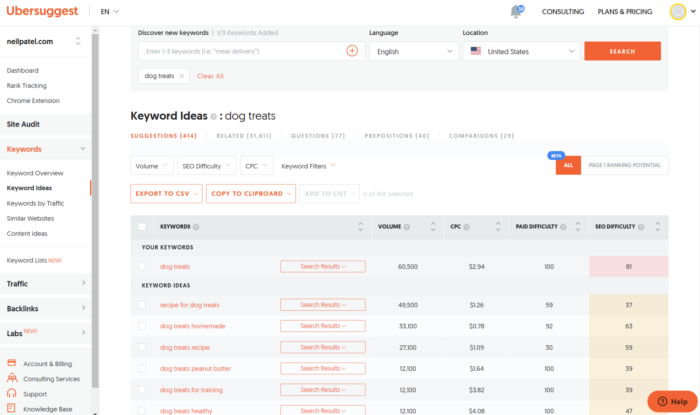
Say your sub-brand is a dog treat expansion from your main dog food line:

Use the SEO tool Ubersuggest to find strategic keywords for sub brands.

An SEO tool like Ubersuggest tells you which keywords are most difficult to rank for. An easy keyword difficulty score lands between 0 and 29. From the list above, you can see they all rank over 30, meaning the competition is tough. This report also gives you a sense of the keywords your competition is targeting.

Another helpful highlight is user search intent. Before stepping into a particular market, this helps see how your potential audience might benefit from using your sub-brand as their solution.

Sub-brand SEO optimization is like a marathon and may not reach its full potential overnight.

However, targeting a term with a high keyword difficulty like “dog treats” is still worthwhile. If the ROI is good enough and the potential conversion rate is acceptable, go for it!

Even if a keyword has a low difficulty rating, is it really worth targeting if the ROI shows that there is little chance of making money from it and that it is not frequently searched for?

#5: Think About Brand Architecture at All Times

You are placing your company in danger if you don’t keep a sub-brand in step with its parent company. You’re not taking full advantage of the parent brand’s equity if you implement a sub-brand’s strategy in isolation.

This could potentially hurt the parent brand’s credibility. We saw this when Old Navy overtook the Gap as a sub-brand by strategizing in isolation.

A crucial component of the brand architecture “home” is the strategy it takes to build out a room (a sub-brand). Remember the house example I explained to you earlier? With a sub-brand, you have to think about the layout and how it fits within the parent company, or “home.”

Examine the brand strategy of your parent company while keeping in mind the prospect of future sub-brands. How can you expand to offer more solutions to your audience? What new markets do you want to conquer?

FAQs

What is a sub-brand?

A sub-brand is formed when a brand extends to one or more new individual product categories. Based on the outcomes of this expansion, sub-brands can be an effective marketing tool.

A sub-brand uses a unique name to develop its own brand, though that name sometimes complements or plays off the name of the parent brand. A sub-brand also has its own client expectations and personalities distinct from the parent company.

What does a sub-brand mean?

A sub-brand is created when a primary brand expands. Take Diet Coke for instance. It has a unique color code, yet it incorporates the iconic Coca-Cola logo with the recognizable bottle shape.

Sub-brands are frequently developed as a way to connect with untapped markets. Sub-brands can then establish themselves in the new market on behalf of the parent company.

{
“@context”: “https://schema.org”,
“@type”: “FAQPage”,
“mainEntity”: [
{
“@type”: “Question”,
“name”: “What is a sub-brand?”,
“acceptedAnswer”: {
“@type”: “Answer”,
“text”: ”

A sub-brand is formed when a brand extends to one or more new individual product categories. Based on the outcomes of this expansion, sub-brands can be an effective marketing tool.

A sub-brand uses a unique name to develop its own brand, though that name sometimes complements or plays off the name of the parent brand. A sub-brand also has its own client expectations and personalities distinct from the parent company.


}
}
, {
“@type”: “Question”,
“name”: “What does a sub-brand mean?”,
“acceptedAnswer”: {
“@type”: “Answer”,
“text”: ”

A sub-brand is created when a primary brand expands. Take Diet Coke for instance. It has a unique color code, yet it incorporates the iconic Coca-Cola logo with the recognizable bottle shape.

Sub-brands are frequently developed as a way to connect with untapped markets. Sub-brands can then establish themselves in the new market on behalf of the parent company.


}
}
]
}

Conclusion

The idea of sub-branding is not new.

Through sub-branding and brand extensions, iconic companies have discovered how to increase brand recognition and “go global” over the years.

Maintaining your parent brand’s vision for the future is easier if you map out how the sub-brand’s growth will affect it, and vice versa.

Your brand is only as strong as your brand architecture. So, be strategic about how you build out your “home”—from parent company to sub-brand(s).

Sub-brand SEO helps you be deliberate with how you build out this idea.

The more in-tune you are with your long-term goals, the easier it is to figure out your initial direction for a new product line.

Keep your intentions clear at all times, making sure that each new entity has a stand-alone personality and functions within the larger framework of your parent company.

Are you considering launching a sub-brand? Do you need to review your brand architecture so your SEO efforts work in your favor? Get in touch with my team and we will help you brainstorm your options.

'I think he will be the first overall pick': How Will Levis is thriving at Kentucky, and what's next

After going from a run-first backup QB at Penn State to leader of No. 7 Kentucky, Levis’ next giant leap could be as a top pick in the NFL draft.

The post 'I think he will be the first overall pick': How Will Levis is thriving at Kentucky, and what's next appeared first on Buy It At A Bargain – Deals And Reviews.

The post 'I think he will be the first overall pick': How Will Levis is thriving at Kentucky, and what's next appeared first on BUSINESS DEMO WEBSITES.

The post 'I think he will be the first overall pick': How Will Levis is thriving at Kentucky, and what's next appeared first on Buy It At A Bargain – Deals And Reviews.

What's Next For The January 6 Committee?

The clock is ticking on the House Jan. 6 committee.

With the midterm elections a little more than a month away and control of the House uncertain, experts are beginning to wonder what the endgame is for the investigation, even as Hurricane Ian postponed the ninth, and perhaps last, public hearing.

By most accounts, the committee’s efforts thus far have proven more successful than anticipated in both unearthing new evidence and drawing attention to the role of former President Trump in enflaming the violence at the Capitol.

The question now becomes, what kinds of recommendations will the committee make to shore up democratic institutions in the U.S.? And will they push for criminal charges against Donald Trump?

Quinta Jurecic is a fellow in governance studies at the Brookings Institution and a senior editor at Lawfare. She joined Diane to talk about what the committee has learned so far, and what we might expect to see in the coming weeks.

The post What's Next For The January 6 Committee? appeared first on Buy It At A Bargain – Deals And Reviews.

New comment by aabhas in "Ask HN: Who is hiring? (September 2022)"

Found | Frontend / Backend / Fullstack / Product | Remote (US Only; H1/TN okay; offices in SF/Portland/Seattle) | Full-Time | https://found.com/

We’re building Found so self-employed people have the support, structure, and confidence to work for themselves. Our founding team has hands-on experience with taxes and accounting, financial services and FinTech, self-employment, and scaling startups. Our team is dedicated to taking care of business banking, expense tracking, and tax saving so self-employed people have more time to do what they do best. We just raised our Series B from Sequoia, Lightspeed, and Founders Fund, and today we are expanding and scaling a product experience that thousands of Found customers use to run their businesses.

Tech Stack Includes: Rails, Kubernetes, React, MySQL, Typescript Benefits Include: Paid medical/dental/vision, parental leave, unlimited PTO.

Hiring for engineers across the stack, security, designers, marketing. Apply here: https://found.com/careers/

(I’m the CTO and you can find me here: https://www.linkedin.com/in/aabhassharma/ or https://twitter.com/shars17)

New comment by tamyrondon in "Ask HN: Who is hiring? (September 2022)"

SumUp (https://sumup.com) | Sofia, Bulgaria | Full-time | Hybrid | Software Engineer

We are looking for experienced Backend Developers to join our Merchant Bank tribe. We are transitioning from a localised setup with regional banks to a unified Global Bank and building our systems with event-driven microservices architecture, and we’ll need an experienced Developer to take on the challenge.
1) Backend Developer (mid and senior) stack: Java, Kotlin, Spring Boot, AWS, Microservices [https://dev.bg/company/jobads/sumup-backend-engineer-kotlin-…]

SumUp is a leading financial technology company, operating across 32 markets. We empower business owners by enabling them to accept card payments in-store, in-app and online, in a simple, secure and cost-effective way.
Questions about the roles or the company?
Reach me at tamyres.rondon@sumup.com

How Providing Video Transcripts Boosts Your SEO

Chances are, you already know the seo basics. Researching keywords, optimizing your website, measuring the results, and tweaking your strategy are the fundamentals everyone should take to heart if they want to increase their leads and enhance their conversion rates. However, we aren’t discussing any of that today. Instead, I’ll explain how to use video … Continue reading How Providing Video Transcripts Boosts Your SEO

How Providing Video Transcripts Boosts Your SEO

Chances are, you already know the SEO basics.

Researching keywords, optimizing your website, measuring the results, and tweaking your strategy are the fundamentals everyone should take to heart if they want to increase their leads and enhance their conversion rates.

However, we aren’t discussing any of that today.

Instead, I’ll explain how to use video transcripts to boost your SEO efforts.

This method is proven to enhance your search engine optimization, but it’s all the more vital today.

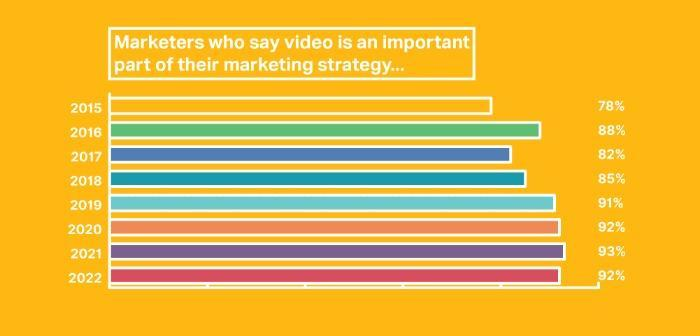
Most surveyed marketers realize how essential using video marketing is. In fact, according to research, 86 percent of businesses use video marketing, and 92 percent state that it’s an ‘important part’ of their marketing strategy.

A chart showing how many marketers think that video is important in a marketing strategy.

However, if you want to get the most out of your videos, you can take it a step further and use video transcripts to maximize your SEO.

That’s not all, though.

There’s another reason video transcripts are so essential, and that’s accessibility, but more about that later. For now, let’s just focus on SEO.

Video Transcripts and SEO

Video transcripts are a valuable tool for SEO, and there are several ways that they contribute to your site’s visibility.

  • First, transcripts make your video content accessible to a wider audience, including those who are d/Deaf or hard of hearing or prefer to watch videos with the sound down. This can help you attract more viewers and get more engagement on your site.
  • Looking for a way to get your videos indexed by search engines? Then add transcripts. They enable search engines to crawl your video content and give context to the information you’re sharing. You can see your indexed videos in GSC’s new video indexing report as well.
  • You can use transcriptions for internal link-building opportunities on your website. Do you have content complimenting your transcriptions and giving the visitor extra value? Then link to it and keep your visitor on your site for longer.
  • Transcripts provide valuable keywords and phrases that you can use to optimize your videos and improve your ranking in search results.
  • Finally, evidence suggests that captions can enhance video view times by around 12 percent, according to Facebook internal testing. In addition, closed captions give search engines crawlable content, increasing the chances of your content getting indexed.

Additionally, you can use transcripts as part of your overall SEO/content strategy. For instance, you can use them to create various forms of written and visual content, including:

  • blog posts and eBooks
  • individual quotes for social media
  • graphics
  • infographics

How To Start Transcribing Your Videos

So we’ve established that video transcriptions can be an SEO boon for you. But how do you get started?

One method open to everyone is manual transcription: just typing up the content word-for-word yourself. Of course, this is the most affordable option, but also the most time-consuming. You don’t just need to type it; you need to edit and format it to perfection.

Now, I can understand if the manual option doesn’t appeal to you, but other methods are available to you, like:

Mobile apps: There are now many mobile apps that can be used for transcription purposes. Some of the best mobile apps for transcriptions include Otter and Trint.

Use Google’s automatic captioning: YouTube’s speech recognition software creates automatic closed captions for YouTube long-form content, live videos, and Shorts.

Speech narration and dictation software: You can use software like Dragon Naturally Speaking to dictate transcripts, but you’d still have to edit, proofread, and format the completed piece.

Free transcription tools: Descript and oTranscribe are just two of the resources that allow you to do transcriptions. Descript also has paid options.

Google’s doc’s voice commands: If you have Chrome, you can use Google’s free voice typing. To use it, open a document, go to docs, select ‘voice typing’ and wait for the microphone icon to appear. Click the icon, and you’re ready to start dictating. To finish the transcription, click the ‘microphone’ icon again.

Speech-to-text application programming interfaces (APIs): Amazon Transcribe and Deepgram are two examples, but there are many more to choose from. Deepgram gives you a free $150 in credits when you sign up, and new users to Amazon Transcribe get 60 minutes free a month for the first year.

Use captioning: By 2050, the World Health Organization predicts that almost 2.5 billion people will likely experience hearing loss, while 700 million may need hearing rehabilitation. Providing closed captions is a simple way to make video content accessible, and you can add them automatically to your YouTube content.

Best Tools for Video Transcriptions

Transcription services have come a long way since they first emerged. Over the years, the quality of transcription services has improved drastically, and as I highlighted above, you’ve got plenty of methods to choose from.

Here are a few to consider, many with a free trial if you want to give them a spin.

Rev

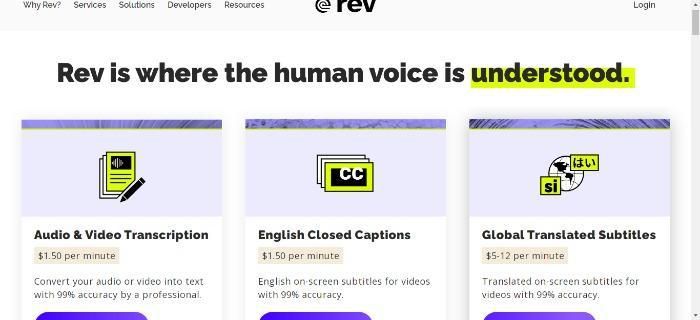
The SEO tool Rev.

Rev is a popular transcription service that offers high-quality, accurate transcriptions of audio and video files and a simple pricing structure of $1.50 a minute.

It couldn’t be much easier to use. Simply go to the audio and video transcription option and click the ‘upload your files’ button. Next, upload or drag and drop your files, or paste the URL. Then sign in/register, and pay.

Sonix

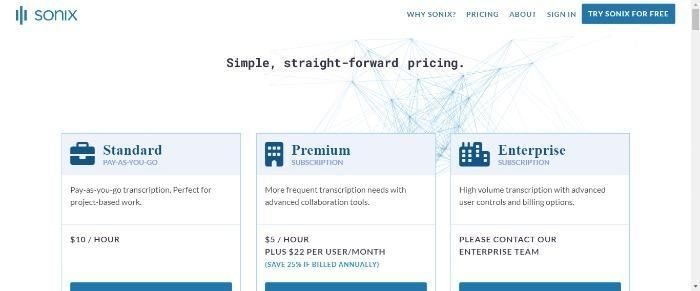
The SEO Tool Sonix.

Sonix is a transcription service that helps you convert your audio and video files into text. It provides three packages, including standard, premium, and enterprise.

The standard package starts at $10 an hour and is suitable for shorter projects. Premium is $5 an hour plus $22 per month per user and is best suited for teams. For Enterprise pricing, you need to speak to the Sonix team.

Features include 35 languages, automated subtitles, an SEO-friendly media player, and secure storage.

Scribie

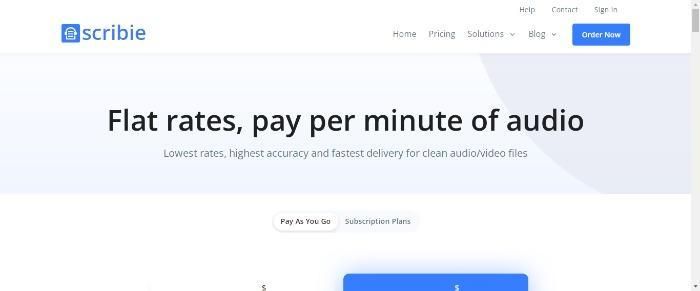
The SEO tool Scribie.

Scribie is a transcription service offering fast, accurate, affordable transcripts. The company has a team of transcribers who are experts in different fields, such as medical, legal, and academic transcription.

The company has 40k transcribers and converts transcriptions from audio to text. Pricing starts at .10 cents per word for automated or .80 for manual transcriptions.

You can also choose from three pricing packages: pay-as-you-go, Pro and Enterprise. Pro is $9 monthly, and yearly subscriptions are available too. For Enterprise subscription pricing, contact sales.

A few more worth a mention include:

  • TranscribeMe: This transcription service offers high-quality transcripts at an affordable price. They also provide a free trial so that users can test out their services before committing to a purchase.
  • Adobe Premiere Pro’s “transcription” feature: This feature allows you to create a written video transcript right in the app.
  • Trint.com: Trint is a web-based platform that uses AI to transcribe your videos. It offers three paid plans, monthly and annual subscription options, and a free seven-day trial.

Best Practices for Using Your Video Transcripts To Boost SEO

Creating transcripts is not just complementing your video, but also providing additional content that is beneficial for SEO purposes.

Here are some tips for using your transcripts to optimize your videos for SEO:

1. Make sure the keywords and phrases you include are relevant to the topic of your video. For example, if your website is about aging well, you could include ‘tips for aging well’ or ‘advice for aging well’

2. Use a variety of keywords and phrases throughout the transcript. Keyword stuffing, the practice of adding excessive keywords without proper context, must be avoided at all costs.

3. Place keywords at the beginning of sentences and paragraphs whenever possible.

4. Check the accuracy of the transcript against the audio track to ensure accuracy.

Video Transcriptions and Accessibility

Away from SEO, there’s another reason why you’d want to use transcriptions and closed captions with your video.

It stands to reason that the more people can access your content, the wider you can spread your message. Providing transcripts helps the millions of people who have hearing problems or are registered as d/Deaf. 61 million people in the U.S. have some form of disability, so it’s important to use all accessibility measures to open doors for those people.

The Americans with Disabilities Act (ADA) means websites must be accessible. Providing transcripts helps achieve ADA compliance.

While there is some debate on the exact nature of legal requirements, there can be consequences. Therefore, if you’re unsure, get some clarification from an expert familiar with the laws.

FAQs

How Can I Transcribe My Videos?

There are several free and paid options available. As well as software, you could use transcription agencies; however, this may be a more expensive option. On the other end of the spectrum, you have manually transcribing them yourself, but this can be extremely time-consuming.

What Are the Best Video Transcription Tools?

It all depends on what you’re looking for and the volume of content you need transcribing. For example, if you’ve got a lot of content to transcribe, a subscription may work out cheaper. Alternatively, if you’re looking for the occasional transcription, then pay-as-you-go services may be better for you. Take advantage of some free trials and see which option works for you. Then, look at whether the tool is within your budget and offers value to your overall SEO efforts.

Conclusion

Sold on transcripts for your videos yet?

Providing video transcripts can help boost your SEO in several ways, such as helping the search engines index your site, increasing your ranking, and providing link-building opportunities.

However, video transcripts do far more than give your site a valuable SEO boost: they also provide greater accessibility for people with hearing loss and for people who may prefer to watch content with the volume turned down when they’re in public.

By using video transcripts, you can get the most out of your online video content by using it as part of your overall SEO strategy to get your content out to more people.

Do you use video transcripts for SEO? How do they help you and your visitors?

Substack (YC W18) is hiring data analysts to build the future for writing

Article URL: https://boards.greenhouse.io/substack/jobs/4006118005?gh_src=hn

Comments URL: https://news.ycombinator.com/item?id=33027160

Points: 1

# Comments: 0

Yankees' Judge hits 61st homer, ties Maris' record

After a seven-game stretch without a long ball, New York star Aaron Judge hit his 61st home run of the season Wednesday night against the Toronto Blue Jays, tying Roger Maris’ American League record, a day after the Yankees clinched the AL East crown.

The post Yankees' Judge hits 61st homer, ties Maris' record appeared first on Buy It At A Bargain – Deals And Reviews.