The Ultimate Guide to Customer Acquisition: Examples, Tips, and Resources

Customer acquisition is a huge pain point for many business owners. Even more difficult is developing a consistent way of bringing in new business.

Your goal should be to put together a system that acquires customers almost on autopilot. That’s easier said than done, though.

This guide should help get you started.

What Is Customer Acquisition?

Customer acquisition is your business’s process of bringing in new customers. The goal of every business is to create procedures that make acquiring new customers simple and systematized. Unfortunately, many small businesses and freelancers have a hard time developing a process for bringing in new clients.

An important piece of the puzzle is a business’s ability to measure its customer acquisition cost. In the digital marketing realm, this is often referred to as “CPA” or “cost-per-acquisition.”

It applies across the board, whether you’re using paid advertising, organic reach, print, radio, TV, or anything else. You should know how much you need to spend to acquire a customer. Once you determine that, it becomes much easier to scale up your marketing because you know you can pump more dollars into your campaigns and get XYZ in terms of customers out the other end.

What Is the Purpose of Customer Acquisition?

The purpose of customer acquisition is self-explanatory. Without a customer, you don’t have a business. Without consistent customers, you don’t have a stable business.

A little caveat here is businesses should also focus on customer retention, which is different from an acquisition. Retention is your effort to keep the customers you already have rather than going through the vicious cycle of constantly needing to acquire new ones. Increasing your retention by only five percent can increase your profits by as much as 95 percent.

When you combine customer acquisition and retention, you have a sure-fire recipe for success. Here’s why:

  1. It helps you make the money you need to cover costs and pay employees, allowing you to reinvest in the business and drive better results for your clients.
  2. It shows steady growth and success to partners, investors, and outside influencers.

Being able to continually drive new business towards your company keeps everyone happy, but it’s not the end goal. The goal is to retain the customers you have as long as you can. Although it costs money to acquire new ones, it doesn’t cost anything to keep them.

Customer Acquisition Versus Lead Generation

There may be some confusion about the difference between the two, but it’s actually simple: Lead generation is one step of the customer acquisition funnel. A person or entity must first become aware of your business before they can buy anything from you. This generally happens as a result of lead generation.

For example, let’s say your business is running a Facebook ad. This usually happens to cold traffic (people who have never heard of you). They see your ad and pause to look for a second. They’ve now become a lead and are no longer cold traffic because they are aware of you.

Maybe they click the ad, fill out a form, and end up having a conversation with you. All of these are steps in the overall customer acquisition funnel. Lead generation is simply one step.

How to Create a Customer Acquisition Plan

Now let’s talk about some of the actionable steps you can take to develop the best customer acquisition strategies.

1. Identify Your Customer Avatar

The first step for every business (before they’re even a business!) should be to create a customer avatar or buyer persona. This is your ideal customer: who they are, what they like, their problems, and their demographic information.

It’s a great strategy for a business to know who their customer is as early as possible. For example, if you sell anti-aging cream, you have a very clear audience who would be interested in that product. Your audience might be women ages 40+ who have a developed skincare routine but are looking for a little extra help. They might be middle to upper-middle class and can’t afford surgery or cosmetic procedures, but they can afford your cream.

If you know exactly who your target is, you’ll have a much easier time acquiring them because your ad copy, text, images, and products will speak their language.

2. Determine Goals

Once you have your customer avatar, jot down some goals and objectives. What are you trying to achieve with your marketing efforts? Here are some examples:

  • Awareness: Are you trying to spread awareness of a cause, shed light on something, or make yourself known to a specific audience?
  • In-person: Does your business require people to physically come into a brick-and-mortar location?
  • Phone call: You might need to convert the online traffic into a phone inquiry.
  • Form: Is your traffic still in the early stages of learning about you? If so, you might just want them to complete a form.
  • Conversion: If the traffic you’re targeting already knows who you are, you might simply be trying to get them to convert into a sale.

Regardless of what your goal is, you need to have one. The clearer the direction you take, the easier it will be to convey the proper message and get your audience to do what you want them to.

3. Choose a Platform or Avenue

Once you’ve figured out who your audience is and what you want them to do, you need to determine what method to use to reach them. There are many different customer acquisition channels, both online and offline. Here are some of the most popular:

Content Marketing

Content marketing is a great long-term way to develop customer relationships and drive traffic to whatever it is you’re looking to accomplish. Best of all, there’s no right or wrong way to do it because you can put together content based on your niche.

Just keep in mind that content marketing isn’t as simple as blogging on your website and expecting people to find it. You need to understand basic SEO and realize that this is a long-term strategy and can take months before you see results.

Social Media

Acquiring customers on social media offers a few different avenues. You can use paid ads, which I’ll discuss shortly, or you can do it the slow way by building up an organic following, posting regularly, and reaching out to people to start conversations.

I like using social media in the most natural way possible, and that’s by “being social.” Start conversations, send messages, and provide value to people. They will respond. Seventy-three percent of marketers find social media “somewhat effective” or “very effective” in their business. It all starts with a conversation.

Paid Advertising

Whether you choose PPC on Google or social media ads like Facebook, paid advertising is a great way to get your business in front of the right audience right away. Keep in mind that Google Ads have a 100 percent ROI, but that does require you to understand how to do it right.

4. Set a Budget

You need to have a budget and customer acquisition cost formula if you plan to have success. Marketing can quickly run more expensive than you expected if you don’t have a set budget in place ahead of time.

Start with a small budget and work your way up as you start to experience success.

5. Optimize and Tweak

Once you’ve had a chance to compile data on how people are receiving your ads, pieces of content, etc., you can optimize and tweak as necessary. For example, if you find that a specific demographic is converting the best on a social media ad, you might want to allot more ad spend to those people and take some away from the people who aren’t converting.

3 Examples of Successful Customer Acquisition

One of the best ways to understand how to implement and measure customer acquisition is to see other companies do it successfully. Here are some examples you can piggyback off of:

Shopify: Interactive Content
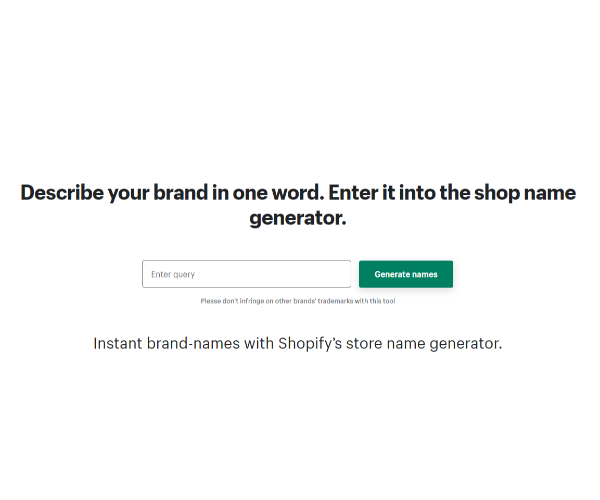
Examples of Successful Customer Acquisition - Shopify

Shopify is the e-commerce giant responsible for thousands of successful e-commerce stores. One great way that they drive customers towards the site is with interactive content such as business name generators, quizzes, and even product choice suggestions. This is not only fun, but it keeps you on the site longer, which looks good to Google.

The content you create needs to be interesting and unique. The internet is a highly competitive environment, and you can’t just post anything and expect people to read it and react.

Turbotax: Free, Free, Free
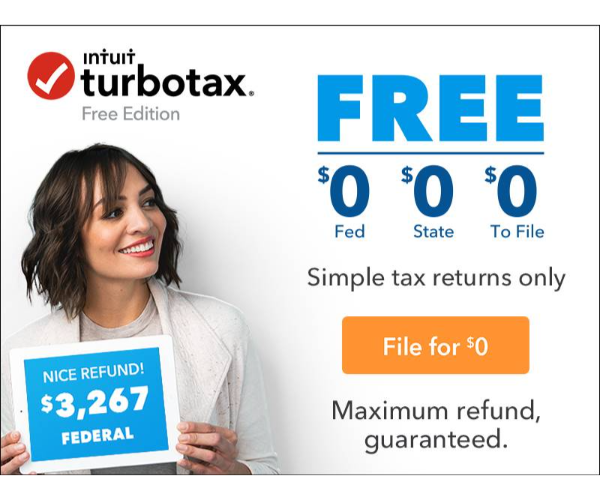
Examples of Successful Customer Acquisition - Turbotax

Turbotax is a great example of using multiple platforms to convey your message. We’ve likely all seen their ads somewhere when they talk about how their service is free for individuals and always will be. If you understand neuro-linguistic programming, you know that “free” is a big buzzword.

Make sure you’re offering enough value to your customers in exchange for what you’re asking. Advertising has changed, and it’s no longer as simple as telling people what you do. You need to provide value.

Swagbucks: Referral Marketing

Examples of Successful Customer Acquisition - Swagbucks

One of the best ways to get more customers is to have your customers get them for you. Referral marketing is a powerful method because it doesn’t cost much, and you’re rewarding the customers you already have, which can help increase customer retention.

This method is especially useful at the beginning of a business’s life when you’re trying to grow your network and establish credibility. Offer something to your customers for every lead they bring your way.

5 Tips to Improve Your Customer Acquisition Strategy

Here are some bonus tips to help you nail down your customer acquisition:

1. Master the CTA

Your call-to-action (CTA) needs to be perfect once you know your audience and have traffic. At this point, it becomes all about what you’re doing to convert the traffic you have. Conversion rate optimization becomes the key, and it usually starts with having a crystal clear and persuasive CTA.

2. Track Everything

You should be tracking every little detail about your prospective customers. Most importantly, focusing on the right metrics will take things to the next level. Demographic information, heat maps, abandoned carts, retargeting—all of these are important. This data can help you understand more about your audience so you can further optimize the ads for future success.

3. Make Sure the UX Is Perfect

If you’re getting traffic, the ads are working, and everything seems to be going well, but you still don’t have customers, there could be another reason. Make sure your site is fully functional, mobile-optimized, fast-loading, and easy to use.

4. Be Patient

It can take as long as a week to build up enough data on Google ads. If you change or cancel an ad before that time, you might be shooting yourself in the foot. The same applies to content marketing. It takes a long time for Google to recognize your content and index it properly.

5. Diversify

I believe in spreading yourself around and making sure you’re reaching as many people as you can. If you think some of your audience would respond to a different method of customer acquisition, set a budget for it, and give it a go.

Customer Acquisition FAQs

Below, see some of the most frequently asked questions about customer acquisition.

What is a good customer acquisition cost?

A good customer acquisition cost is whatever you need to be profitable. It will vary from business to business. All that matters is that you’re not spending more to acquire a customer than they will pay you. Keep in mind operating costs as well.

How do you manage customer acquisition?

Many businesses have people in charge of this or an entire department. Of course, it can be difficult for small businesses, so it might make more sense to outsource it.

Is it more cost-effective to keep a customer than to acquire a new one?

Acquiring new customers has been deemed the “startup killer” for a reason. It’s much cheaper to retain than acquire, but you can’t have one without the other. Make sure you’re focusing on both.

What is acquisition rate?

Find this number by dividing the total number of people who opted into your campaign by the total number of people who saw it.

{
“@context”: “https://schema.org”,
“@type”: “FAQPage”,
“mainEntity”: [
{
“@type”: “Question”,
“name”: “What is a good customer acquisition cost?”,
“acceptedAnswer”: {
“@type”: “Answer”,
“text”: “A good customer acquisition cost is whatever you need to be profitable. It will vary from business to business. All that matters is that you’re not spending more to acquire a customer than they will pay you. Keep in mind operating costs as well.”
}
}
, {
“@type”: “Question”,
“name”: “How do you manage customer acquisition?”,
“acceptedAnswer”: {
“@type”: “Answer”,
“text”: “Many businesses have people in charge of this or an entire department. Of course, it can be difficult for small businesses, so it might make more sense to outsource it.”
}
}
, {
“@type”: “Question”,
“name”: “Is it more cost-effective to keep a customer than to acquire a new one?”,
“acceptedAnswer”: {
“@type”: “Answer”,
“text”: “Acquiring new customers has been deemed the “startup killer” for a reason. It’s much cheaper to retain than acquire, but you can’t have one without the other. Make sure you’re focusing on both.”
}
}
, {
“@type”: “Question”,
“name”: “What is acquisition rate?”,
“acceptedAnswer”: {
“@type”: “Answer”,
“text”: “Find this number by dividing the total number of people who opted into your campaign by the total number of people who saw it.”
}
}
]
}

Summary of The Customer Acquisition Guide

There are many ways to approach customer acquisition, and while most of the methods lead to the same place, there is no one-size-fits-all solution. You need to figure out what marketing method works best for your business and how you can implement it consistently.

Most importantly, understanding your customer and their objective is crucial. Once you’ve done that, the rest falls into place.

What customer acquisition methods do you use in your business?

5 Surprising Things the Top Ranked Sites on Google Have in Common

5 Surprising Things the Top Ranked Sites on Google Have in Common (And What You Can Learn from Them)

What separates the heavyweights of the search engine rankings from everyone else? That’s a question every good SEO constantly asks themselves as they look to outrank sites that seem to dominate Google for every relevant keyword (like Wikipedia or WebMD).

Unsurprisingly, these sites have more than a few things in common. It’s not just their age or authority either—factors that other sites can’t hope to match. There are plenty of similar qualities that help top sites stand apart from their competitors that you can copy and improve today.

Let’s review five of the most important and surprising factors and explain what you can learn from them and how you can use that to improve your own site.

1. Backlinks Reign Supreme

Let’s get the least surprising commonality out of the way first. The top-ranked sites on Google all have a serious number of backlinks. As we all know, high-quality backlinks almost always mean high rankings.

Research from Backlinko finds the first result on Google has an average of 3.8 times as many backlinks as the rest of the results on the first page.

The big boys have it made when it comes to acquiring more backlinks, too. They continue to get more backlinks over time as a result of their position in Google.

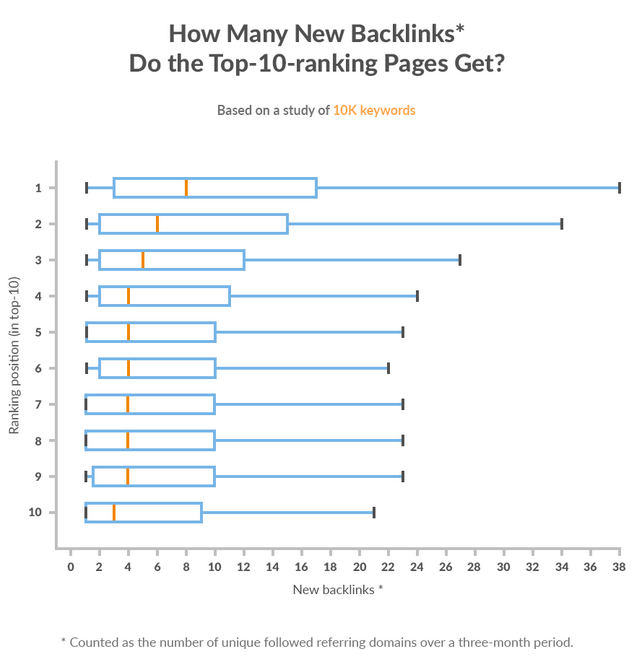
Research by Ahrefs finds that the top three results generate more new referring domains than the rest of the pages on Google. Pages ranked first and second get significantly more new referring domains. Those pages ranking first get between backlinks at a faster rate of between five percent and 14.5 percent per month.

top ranked sites Ahrefs study

It’s not just a large number of backlinks that are important. They need to be high quality, too. What does a quality backlink look like? It comes from an authoritative domain, is placed within its content, and has topical relevance to your website.

Let’s say you have a car blog. A link from another high-ranking car blog carries more weight and is of higher quality than a link from a major health website because it’s much more relevant to your niche.

You shouldn’t discount internal links, either. The biggest websites (and news outlets in particular) almost always put a lot of effort into making sure every new piece of content links back to several previous posts.

Great internal linking makes it significantly easier for Google to crawl your website and index your information. The easier your site is to crawl, the more likely Google will find and rank your content. They may not have the same power as backlinks, but internal links can still result in higher rankings.

All this is to say that you need to build backlinks in a scalable way if you want your site to compete with the biggest brands in your industry.

2. Provide High-Quality Content

Most top-ranking websites are well known for the quality of their content. Okay, some major sites don’t publish high-quality content all of the time, but every high-ranking site does produce exceptional content, at least some of the time.

Don’t forget, high-quality content doesn’t necessarily mean it’s longer or more detailed than everyone else’s. It might contain unique research that other companies can’t hope to copy. Or it could break a story. Or it could be designed better. Or it could go viral. There are lots of ways to create amazing content.

Doing so matters when it comes to SEO because high-quality content helps boost several ranking factors. It’s a magnet for backlinks, it reduces your bounce rate, and it should result in a higher clickthrough rate (CTR).

The top-ranked sites don’t just rely on the objective quality of their content, though. They also take steps to optimize it to perform better in Google. That means including keywords in header tags, throughout the content, in the page title, and in the URL.

Creating high-quality content isn’t easy, especially when there’s no objective way to determine how good your content is. That’s the job of your users. That being said, there are still steps you can take to make it more likely your users think highly of your content.

The first is to make sure it’s written by an expert. This is a pretty simple task for some top-ranking sites like media outlets. Journalists, by default, are experts on certain topics. However, there’s nothing stopping you from writing about your expertise or hiring expert writers, either.

You could even use a strategy adopted by some health websites, where content is written by a professional writer and then fact-checked by a medical professional. Doing so has the double benefit of having content written by an excellent writer while also being medically accurate.

3. Focus on User Experience

Top-ranking sites on Google put a premium on the user experience and do everything they can to keep customers coming back. This means having a great design, high-quality content as discussed above, an intuitive layout, and a great browsing experience in general. Yes, some of the highest-ranking sites may serve up ads on their pages, but they don’t ruin your browsing experience with them or use intrusive popup ads, either.

A great user experience is one of the reasons these sites are top of Google, after all. Google announced that user experience metrics would be used to rank sites, beginning in 2021. How your site loads, what it looks like, and how users interact with it contribute to your rankings, along with other factors like HTTPS, safe browsing, mobile friendliness, and the presence of interstitials.

Google puts such a big emphasis on your site’s user experience because it aligns with its goal of giving customers the best possible browsing experience. The search giant finds over half (52 percent) of users will be less likely to engage with a brand after a bad mobile experience. So why would it rank you if you have a high bounce rate?

Improving your site’s user experience and aligning it with the experiences provided by the top-ranking sites won’t just improve your rankings; it also makes commercial sense. Ad network Ezoic generated a 186 percent increase in earnings per 1000 visitors by improving the UX of a publisher.

4. Make Sure Your Page Speed Is Competitive

You’ve never had to wait for the New York Times to load, have you? That’s because top-ranking sites know the importance of delivering content as fast as possible. Page load speed has been a ranking factor for desktop searches since 2010, and Google announced it was also a ranking factor for mobile searches back in 2018.

Say it with me: A slower site means lower rankings.

You need to optimize for page speed if you want to mix it with the highest-ranking sites. It’s not so much about getting the edge over your competitors and making your site 0.1 seconds faster, however. It’s about having a site that’s fast enough to not impact the user experience negatively.

Research by Google finds over half (53 percent) of visitors abandon a mobile site if it doesn’t load in three seconds.

If you have a slow site, you won’t just get penalized for a poor load time. You’ll also get penalized for having a high bounce rate as users get fed up with waiting and choose a different site instead.

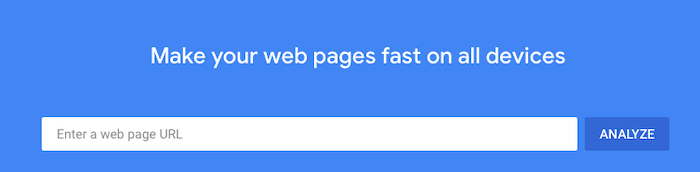
The easiest way to check your page speed is by using Google’s PageSpeed Insights tool. It will let you know how fast your site is, give it a score out of 100, and suggest improvements.

Top ranked sites page speed

If you want to have a seriously fast-loading page, read my advice on getting a perfect score with Google PageSpeed Insights.

5. Consider User Intent

Have you noticed how some top-ranking sites have several pieces of content that all seem to approach the same topic from a slightly different angle? That’s because they understand the power of user intent and the value Google places on it.

Google wants to serve up the best and most appropriate content for each query. A big part of that is understanding what the user is trying to achieve from their search. Are they trying to learn something? Research a topic? Make a purchase? Google delivers different results for each intent.

For instance, Google shows e-commerce pages where it thinks the user is trying to make a purchase, but it serves up blog articles for information-related queries.

Knowing what type of content Google thinks users want to see is key to becoming a top-ranked site, because you’re much more likely to get ranked if you create content that matches the user intent for each target keyword. This is why so many top-ranking sites have similar content targeting the same topics: to catch every user intent.

It’s not simply a matter of informational vs. commercial, either. There are dozens of types of informative content that users may want to access. In some cases, it’s a listicle. For other queries, a video may be more appropriate.

Taking time to understand the user intent for each keyword or topic you’re targeting can yield serious results. Marketing SaaS CoSchedule saw a 594 percent increase in search traffic when they aligned content with user intent.

Top Ranked Sites: FAQs

What do the top-ranking sites have in common?

They all have a lot of high-quality backlinks, great content, an excellent user experience, a fast-loading website, and content that matches the user’s intent.

Why do the top sites have so many more backlinks?

This is partly because of the quality of content but also due to the fact that they sit at the top of Google. This makes them an easy target for people trying to link to an authoritative source.

How can better content improve my rankings?

Better content can improve your rankings in several ways. High-quality content attracts more backlinks, but Google also rewards in-depth content and results in users spending a long time on the page.

Why does user experience matter?

Google wants to provide the best experience to its users. Part of that means sending them to sites that are easy to browse. It’s why user experience factors are now ranking factors.

How can I check my page speed?

Use the Google PageSpeed Insights tool.

How can I gauge user intent?

Google the keyword you want to rank for and look at the pages that appear in the results. If all of the content has the same format, that’s the type of content you should create.

Conclusion: What You Can Learn From the Top Ranked Sites

You can’t turn your website into a top-ranking site overnight. However, you can learn a lot from them and implement tactics they use to improve your site’s Google ranking. There are more than a few things they do in common, as you’ve learned.

Make sure you have a scalable system for generating backlinks, create high-quality content, focus on the user experience, ensure your site loads fast, and consider user intent when you create content.

Do these five things, and you could be well on your way to having a top-ranked site in the future.

What are you going to work on first?

American Express Credit Card, A Company History

American Express Credit Card, A Company History

The American Express credit report card had actually been around considering that 1850 because after that the American Express credit scores card has actually seen it great quarters and also it get on share of negative quarters. A reputable firm that is prepared to assist individuals get a credit report card that will certainly collection every person’s private requirements. They have actually been about enough time that, the American Express Credit Card Company understands what type of costs are mosting likely to be practical for the ordinary individual to be able to manage with out entering into bank card financial obligation quickly after they obtain a charge card.

The American Express credit history card has a selection of various kinds of credit history cards so that every person would certainly locate a credit score card for all their demands. When you begin to look at the various individual American Express credit scores cards you are going to see even more than simply one kind of credit report card that you are able to utilize. You are going to see that the American Express debt card supplies you to have money back, taking a trip, as well as also a cost savings honor.

The American Express debt card additionally uses a credit history card for the little organization proprietors that are out there. With the tiny company credit history cards, the company proprietor can take pleasure in American Express’s several advantages. The American Express credit report card also provides benefits for the tiny service proprietors simply like the credit history cards for the individual remedies.

When you are looking for a credit history card for on your own or for your tiny company you might desire to examine out what the American Express debt card has to supply you. There is a pair of various kinds of credit report cards that are used via the American Express firm supplying you a credit report card that is going to fit all of your requirements as for as the usage as well as charges of a credit report card has to supply.

The American Express credit report card had actually been around because 1850 given that after that the American Express credit history card has actually seen it excellent quarters as well as it get on share of negative quarters. They have actually been about long sufficient that, the American Express Credit Card Company recognizes what kind of charges are going to be viable for the typical individual to be able to pay for with out going right into credit score card financial obligation soon after they obtain a credit history card.

The American Express credit history card has a range of various kinds of credit score cards so that everybody would certainly discover a credit report card for all their demands. There is a pair of various kinds of debt cards that are supplied with the American Express firm using you a credit scores card that is going to fit all of your requirements as for as the usage and also charges of a credit score card has to use.

New comment by davidhalter in "Ask HN: Who is hiring? (July 2021)"

cloudscale.ch | Zürich, Switzerland | ONSITE | Full-time

We are an IaaS platform in Switzerland trying to offer a high-quality “cloud”. We are working with Django/React, but knowledge in these technologies is not a must. We have also been working on a Kubernetes CSI driver and there’s our own Terraform provider.

We are mostly looking for an engineer willing to learn. Ideally you have a preference for functional patterns. Currently we are however looking for someone with fluent German.

If you’re interested, just email me at dave (at) cloudscale.ch and I’ll tell you more about this job :).

Best Cheap Web Hosting

Disclosure: This content is reader-supported, which means if you click on some of our links that we may earn a commission. Do you want to skip the read and get right to my top picks? The best cheap web hosting service for most people is Hostinger or DreamHost. There’s no need to pay a fortune … Continue reading Best Cheap Web Hosting

Indicting the Trump Organization

The post Indicting the Trump Organization appeared first on WE TEACH MONEY LIFE SELF DEFENSE WITH FINANCIAL GOALS IN MIND. The post Indicting the Trump Organization appeared first on Buy It At A Bargain – Deals And Reviews.

Best Cheap Web Hosting

Disclosure: This content is reader-supported, which means if you click on some of our links that we may earn a commission.

Do you want to skip the read and get right to my top picks? The best cheap web hosting service for most people is Hostinger or DreamHost.

There’s no need to pay a fortune for web hosting if you’re launching a new website. A cheap web hosting solutions will work just fine.

But how cheap is too cheap? There are a lot of attractive options out there. Separating the good deals from the scams is important.

Fortunately, you won’t actually have to search through all of them. There are really only one or two dozen reputable web hosts to consider.

That list gets even smaller if you’re looking for a cheap web hosting plan that actually delivers good service.

If you want to get your site online for as little as possible, these are my top picks:

#1 – Hostinger Review — The Best Web Hosting Plan Under $1.50

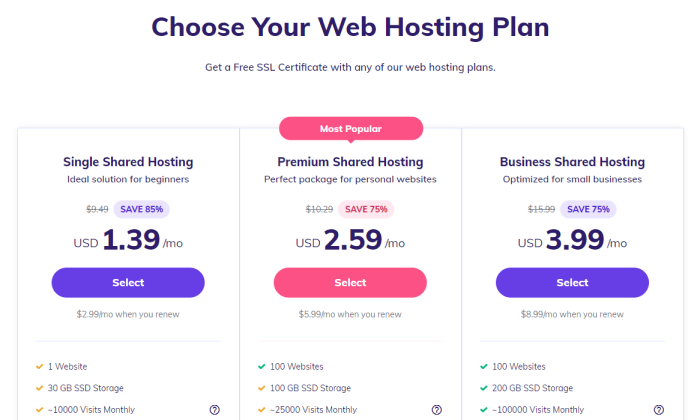
Hostinger has the absolute cheapest price for hosting at $1.39 per month for the Single Shared Hosting plan. So what’s the catch?

You have to sign up for a 48-month contract, which sounds a little heavy. But, bear with me. 

Four years of Single Shared is going to cost less than a single year of hosting through other providers. 

Seriously, other low-budget hosting plans are still twice to four times as expensive. Plus, the introductory rates you get with competitors might skyrocket when you have to renew. Once the honeymoon period is over, you might be looking at $10 or more each month.

With Hostinger on the other hand, your rate for shared hosting goes from $1.39 cents to $2.99/month upon renewal. That’s still a great price.

In other words, the Hostinger full rate is still less than introductory rates from other good cheap hosting options.

Okay, great. But I know you’re thinking the low rate must mean that there are annoying domain limits and few free tools to build your business. 

Untrue. Hostinger is loaded to the brim with features and function.

Hostinger’s Single Shared Hosting plan supports one site, and includes:

  • 100 GB bandwidth
  • 30 GB storage
  • 1 email account
  • Free SSL certificate
  • 99.9% uptime guarantee
  • 24/7/365 customer support
  • Optimized for WordPress with one-click installation
  • User-friendly control panel
  • Cloudflare protected nameservers

There’s no free domain name included, which isn’t a big deal if you already have one. Bluehost and DreamHost come with a free domain name for the first year, but higher per-month rates.

If you need a free domain name, more storage, or unlimited bandwidth, Hostinger lets you upgrade your plan while keeping costs low:

Say you need to move to Premium Shared Hosting to support another site. That will cost $2.59/month to start and $5.99/month when you renew. That’s not going to break the bank, and you can host up to 100 websites.

Hostinger does a lot to ensure that the service is easy to use. Set up takes minutes and absolutely zero technical skill.

If you ever have issues, Hostinger’s customer service is always available and has a phenomenal reputation. The company gets you in the door with budget-friendly prices, and keeps you around with quality support.

Choose Hostinger for the lowest per-month plan on the market. Try it today risk-free, as Hostinger will refund your purchase if you aren’t happy within the first 30 days.

#2 – DreamHost Review — The Lowest Spend on Day One

Not everyone wants to sign a long contract for hosting, but you usually have to in order to get the lowest price. Typically, you have to pay the whole amount upfront, which can get expensive even when you are looking at cheap plans.

DreamHost offers similar discounts if you want to sign a contract, but if you don’t, DreamHost’s month-to-month pricing is the lowest out there. 

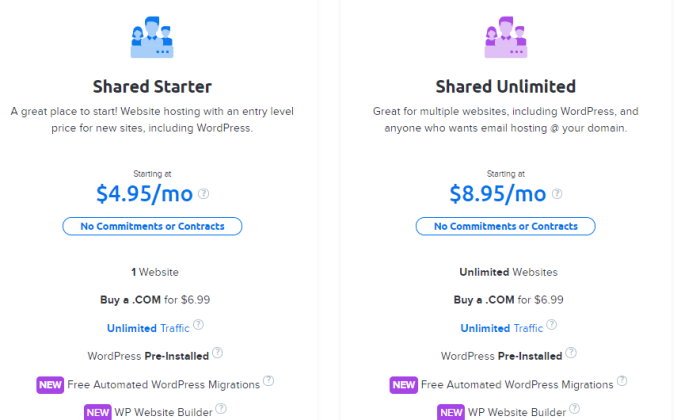
DreamHost Shared Starter is $4.95/month for one site. No contract necessary.

There’s really no way to get a lower price without a commitment. This can be really important for cash-strapped startups betting on growth. Instead of a big upfront spend, they can budget a predictable monthly hosting cost into the equation.

Freedom isn’t free, they say, and it’s especially true with hosting. Many young companies have found themselves locked into a long contract with no way out. Now they’re spending money on a service they don’t like at a time when every dollar counts.

With DreamHost, you can still get cheap hosting, but you don’t have any of the long-term risk that comes with a multi-year contract.

When you look at the month-to-month pricing for other plans on this list, there is no competition. A2 Hosting is $10.99/month, Hostgator is $10.95/month, and Hostinger is $9.99 with a $4.99 set up fee.

Bluehost and iPage don’t even offer plans without at least a year-long commitment.

All of these other plans are great, don’t get me wrong, but if you are looking for a no-contract option, DreamHost is the clear leader. Especially because you get such a solid range of features and free tools to build your site:

  • Unlimited traffic
  • 50 GB storage
  • Free SSL certificate
  • Free WordPress website builder
  • Free automated WordPress migrations
  • Automated WordPress updates
  • 24/7 live chat and ticket support

Like Bluehost, DreamHost is officially recommended by WordPress. The integration is deep and all of the updates are handled automatically. This is good for security purposes and saves you the trouble of doing it yourself.

So you can get all the benefits of tight WordPress integration without the commitment and large down payment required by Bluehost.

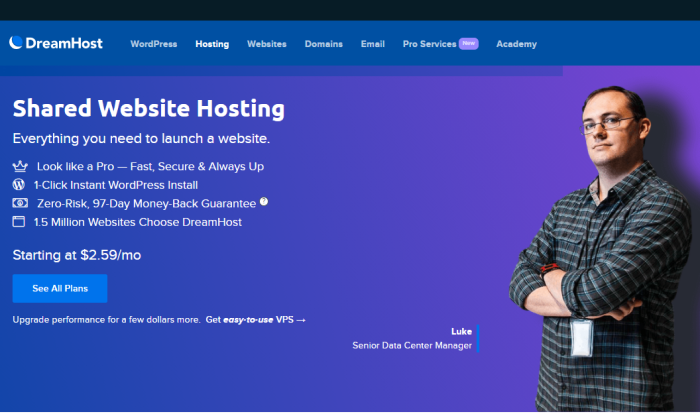
Now you might think that no contract would mean no money-back guarantee. The truth is DreamHost has a zero-risk 97-day money-back guarantee. That’s the longest time to try a web host that I know of.

If you need more than one site, and you want to pay month-to-month, iPage can’t help you. DreamHost offers a Shared Unlimited plan for $8.95/month that works for an unlimited number of sites:

If you just have one site, Shared Starter is all you need. 

Stop worrying about when the honeymoon period of your introductory pricing is going to end. 

Get DreamHost and pay a low, predictable rate each month. No more contracts, no more inflexible commitments. Just reliable hosting at a consistent price.

Try DreamHost today and use it risk-free for more than 3 months!

#3 – Bluehost Review — The Best for New Sites (Especially WordPress)

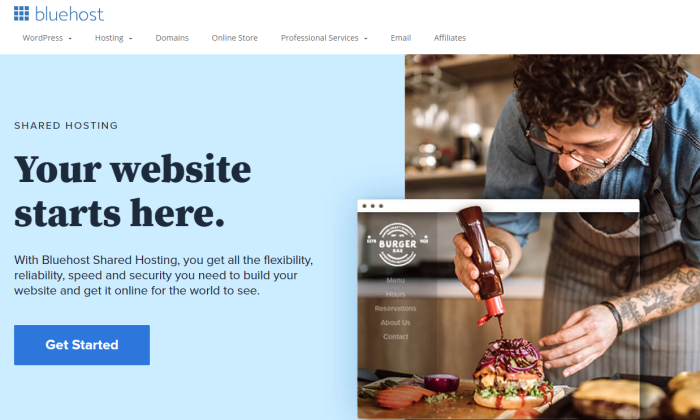
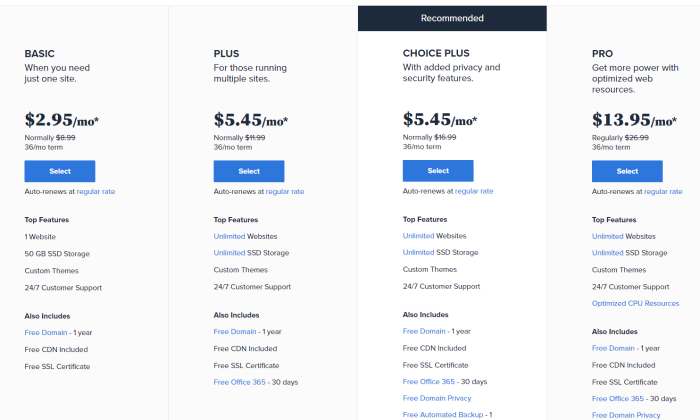
There’s probably no easier way to get your new website off the ground than with Bluehost. And it won’t cost you much at all, as the company offers incredibly feature-rich shared hosting starting at $2.95/month.

For most people with a new site—especially if it is their first site—Bluehost is what they want.

If you are building a WordPress site, I really recommend checking out your options at Bluehost. The company is one of only three hosting providers that is officially recommended by WordPress. The integration is amazing and installation is automatic.

We’ll talk more about why it’s so good for WordPress in a second, but I want to talk about why it’s good for just about anyone with a new site.

First off, Bluehost has some of the cheapest hosting rates around. And even the most basic plans are loaded with features and value. 

You get a free domain name for the first year. Not only do you get to skip that expense, but the convenience of registering your domain through Bluehost cuts down on the time it takes to go live.

If this is your first site ever, you will be grateful at how simple the process is. If you’ve built sites before, you will really appreciate everything that’s done for you. 

For example, you get a free SSL certificate for your site,and enabling it takes one click on the dashboard. This is critical for keeping all of the information on your site secure and lets visitors know that the site is safe to visit.

You can get free SSL certificates from other places, but they will not be this easy to install, trust me. And you will have to renew them every couple months. 

With Bluehost, it’s completely hands-off and you are always protected.

You also get a free content delivery network (CDN) through Bluehost’s partnership with Cloudflare. This is going to improve site speed and performance with near-zero work on your part.

Okay, so on top of the free domain name, SSL certificate, and CDN, Bluehost gives you:

  • 50 GB storage
  • Unmetered bandwidth
  • 24/7 customer support via phone and live chat
  • $100 Google Ads credits
  • Automatic WordPress installations and updates
  • Custom WordPress themes
  • 30-day full refund if you aren’t satisfied

All of these features are included with the Bluehost Basic shared hosting, which starts at $2.95/month. If you have to upgrade, prices stay affordable at the higher tiers:

One thing to be aware of is that Bluehost renewal rates are about two to three times higher than the introductory rate. This is why I recommend signing up for a long plan to max out the discount period.

Even at full price, though, Bluehost is really competitively priced compared to the field. This is especially true when you consider the long list of features you get and the ease of getting set up.

It’s as hands-free of a hosting experience as you could ask for and when you want to develop your site, all the tools are right there. 

WordPress is automatically installed on Bluehost, for example. This means full integration and automatic WordPress updates. 

With Bluehost shared hosting, you can use another content management system (CMS) besides WordPress if you want. 

But if you know that you are only going to use WordPress, I highly recommend going with one of Bluehost’s WordPress Shared Hosting plans

These start at $2.95/month, which is the same price as regular shared hosting. The difference is that the servers that have been optimized exclusively for WordPress. There’s no other type of software on them, so servers can be better configured and more easily protected.

If you have a new site in mind, make Bluehost your one-stop-shop for getting online. Get everything set up in a single place instead of having to go through a domain registrar. Best of all, you’ll get a great deal in the process.

So if you have a new site: Get Bluehost Basic shared hosting.

And if that new site is a WordPress site: Get Bluehost Basic WordPress hosting.

There’s a reason that more than 2 million sites are hosted through Bluehost. Find out why today.

#4 – A2 Hosting Review — The Best Web Hosting Under $3 for Online Stores

If you grow your ecommerce site past a certain point, the cheapest web hosting options won’t work. But, if you are just getting your online store up and running, there is no better budget-friendly option than A2 Hosting.

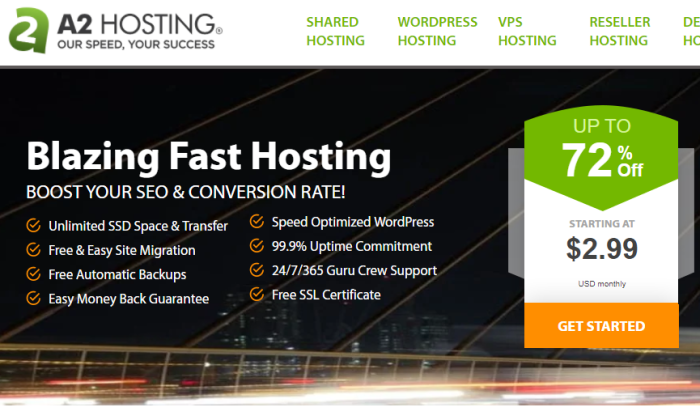
In fact, you can get everything you need to launch for $2.99/month with the A2 Startup plan. You’ll have to sign a contract to get the lowest rate, but you’ll be ready to go within minutes.

Along with PayPal integration, the cheapest A2 hosting plan comes with one-click installs for five of the top ecommerce platforms, including WooCommerce, OpenCart, and Magneto. There’s hardly any backend IT work to start selling.

A2 Hosting offers some of the best site speed and security for the price, which are really important for online stores. 

Shoppers won’t stay if your content is slow to load. A2 takes care of all the technical legwork that goes into maintaining high performance servers. It’s compatible with Cloudflare’s free content delivery network, which can boost your speed as well.

Most shoppers won’t even come if Google says your site’s not safe. That’s going to happen if you don’t have an SSL certificate. A2 includes one for free, and it’s always enabled.

This is a huge perk, because you can get free SSL certificates elsewhere, but it’s on you to configure and renew them, which can be frustrating.

Most of the other security benefits are similarly hands off. The virus scanner, firewall, and brute force defense are on autopilot—you’ll receive notification if there’s something you need to do, but A2 handles a lot on its own.

And if you have an issue you can’t solve, A2 will help. Go read reviews. The company has some of the happiest web hosting customers on the planet. If you need to move your old site to A2’s servers, they have a team that will do it for free.

Some of the other excellent benefits of A2 Startup include:

  • 100 GB storage
  • Unlimited bandwidth
  • Unlimited email addresses
  • 24/7/365 customer support via phone, live chat, email, and ticketing 
  • 99.9% uptime commitment
  • Optimized WordPress hosting
  • DNS management tools
  • Website staging

Website staging is really useful for online stores. You can test new features and buttons on a page in a development area before pushing it live. This way you can see if anything breaks before it impacts your customers.

The A2 Startup plan is aptly named—it won’t be enough once your site matures. But by the time you’ve hit that milestone, your site will be bringing in more than enough money to justify the cost of upgrading.

A2 is one of the pricier options on my list of cheap web hosting providers. I like it for online stores because of the speed, security, and generous limits on storage. 100 GB is twice as much as you get with Bluehost.

And if you aren’t happy with your service, A2 Hosting will refund your account within 30 days of purchase. It’s a true hassle-free money-back guarantee.

Your online reputation matters, so it’s a huge peace of mind to know that customer service is always there. A2 Hosting representatives are extremely knowledgeable. They will help you resolve issues quickly, before your online store takes a hit.

Sign up with A2 Hosting today for the cheapest possible way to host your online store.

#5 – HostGator Review — The Best Way to Host Your Existing Site for Cheaper

When your current host jacks up the rates or takes a customer service nose-dive, you need to switch. Whatever the cause, there is no reason to pay for substandard hosting.

Hostgator will help you migrate your old site for free. This includes the cPanel, email accounts, files, databases, scripts, etc. They also include one free domain registration transfer, which saves a few bucks, too.

All you have to do is fill out a transfer form within 30 days of signing up. Hostgator will do the rest.

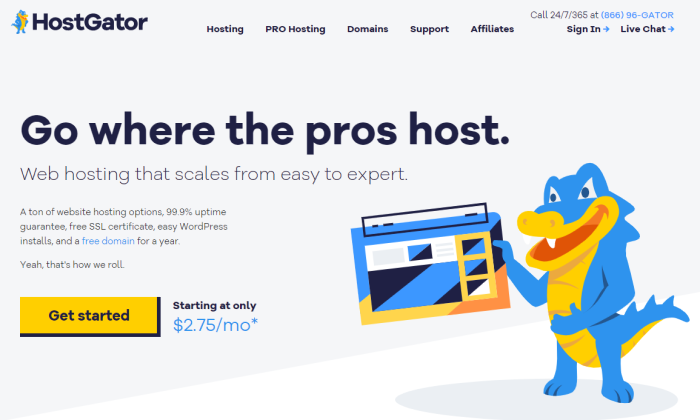
You get the free migration with any of Hostgator’s shared hosting plans, including Hatchling, which starts at $2.75/month with a contract.

With Hostgator, you can lock in a really low rate and get great uptime for less than you paid before. After the zero-stress migration, you get high quality customer support available any time of day by phone and live chat.

It’s cheaper web hosting, better service, and very few limits on what you can do. Some of the highlights include:

  • Unlimited storage
  • Unlimited bandwidth
  • Free SSL certificate
  • Free email
  • Free domain (or registration transfer)
  • One-click WordPress install
  • Free website builder
  • Free Google Ads and Bing Ads credits

The good news is that Hostgator provides tons of tools to help you optimize the content on your site and keep things running at top speed. The interface is very easy to use, which gives you complete control over your site and databases.

It’s comparable to Bluehost in a lot of ways, which I like better if you have a brand new site. But if you already have a website, Bluehost won’t move it over for free. Hostgator will. If you have more than one site to migrate, Hostgator will give you a quote for the cost, but the first one is free.

This makes your transition to cheaper hosting a lot easier. Plus, Hostgator offers a 45-day money-back guarantee. If you don’t like what you see, you have more than a month to jump ship without paying a cent.

Quit spending too much on hosting and find out why so many people love Hostgator.

#6 – iPage Go Review — The Best If You Have Multiple Sites

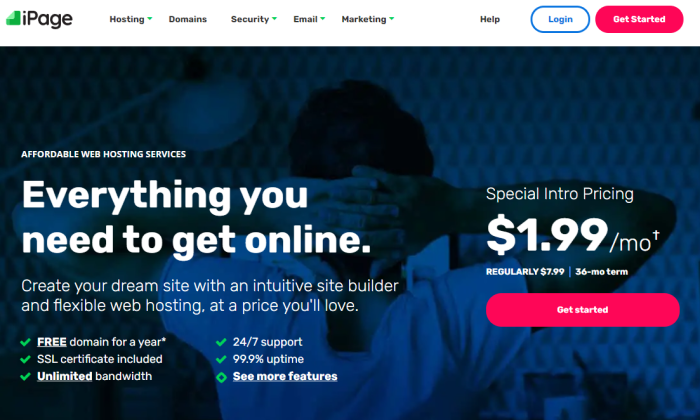
iPage Go lets you create unlimited websites for under $2/month. Every other plan on my list requires you to purchase an upgraded plan to support more than one site.

I really like iPage Go because there is one plan. Without tiered pricing, you don’t have to worry about upgrading your plan until you need something more substantial than shared hosting.

In other words, you can build as many websites as you want without having to stress about paying more to do more.

With iPage Go it’s unlimited sites, domains, and storage. Like similar “unlimited” offerings, your service has no hard and fast limits, but there are restrictions on how much your site can demand from the shared server.

So, when iPage says they offer scalable bandwidth, it means they aren’t metering the traffic to your site. You could still hit restrictions, but there is no set cap for the number site visitors.

Most people looking for cheap hosting for their websites won’t have to worry too much about these limits. iPage is able to support 99.5% of customers without any issues at all. In fact, the company will work with you to make sure you’ve optimized your site if you start to approach restricted usage limits.

In addition to providing the cheapest multi-site hosting option, iPage gives customers access to a ton of free tools to build and nurture their site.

You get a free domain name for the first year, along with a free SSL certificate. On top of that, you get free email with autoresponders. You can use the email provided, or manage your website accounts with Microsoft Outlook and other third-party apps.

iPage hosting includes a free website builder, which can help you customize the look and feel of all your sites. WordPress is a one click installation as are other popular content management systems like Joomla and Drupal.

For less than $2 per month, all of this is yours. Other benefits include:

  • 24/7 customer service
  • Unlimited databases
  • One-click installs for OpenCart, Magneto, and PrestaShop
  • PayPal integration
  • Integration with popular email marketing software services
  • Site traffic reporting
  • 30-day money-back guarantee

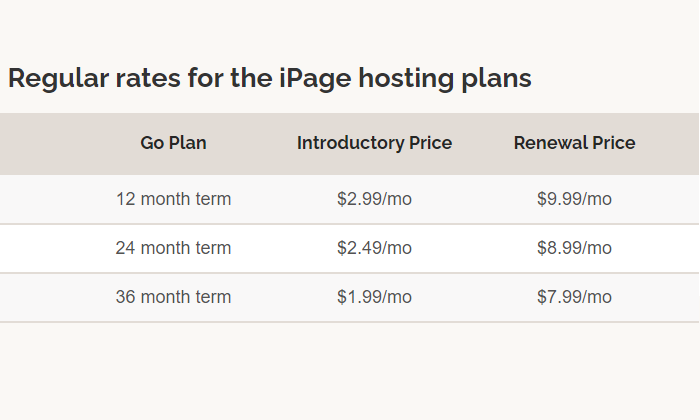
There is no month-to-month pricing for iPage Go. You can sign up for one, two, or three years. The longer the contract you sign, the lower the introductory pricing and renewal rate you get:

I’m not aware of another hosting provider who gives you a discount on your renewal rate for signing a long contract, so that is a unique perk.

As I mentioned, you’ll never have to upgrade to a different shared hosting plan. You get everything they offer with iPage Go. There are hardly any limits on your resources, and if your site gets too popular to be supported by shared hosting, iPage has some more powerful hosting solutions at competitive prices.

Until then, host all of your websites for one low price with iPage.

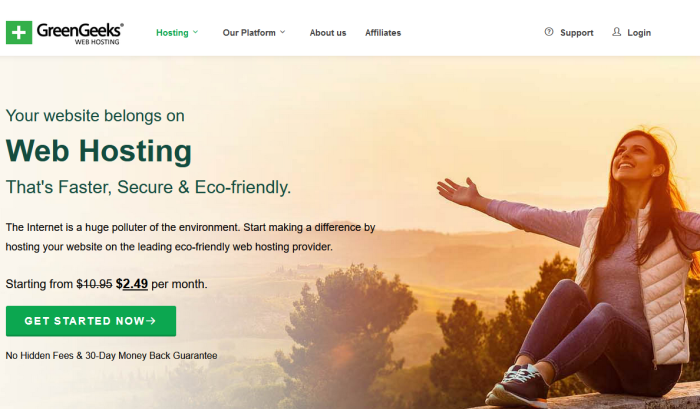
#7 – GreenGeeks Review — The Best Price for Managed WooCommerce Hosting

If you’re starting with a WordPress site (as many people do) and you’re looking to transform it into a potent online store, you ought to deploy WooCommerce. Sure, the plugin is free, but you’ll still need hosting and to manage your newly WooCommerce-enhanced site.

But, if you go with GreenGeeks, you can take care of all that in one fell swoop.

Much like A2 Hosting, you can get an affordable hosting plan that allows for an easy, one-click install of WooCommerce on your site. But, unlike A2, you get managed features like daily backups and automatic updates even at the lowest pricing tier.

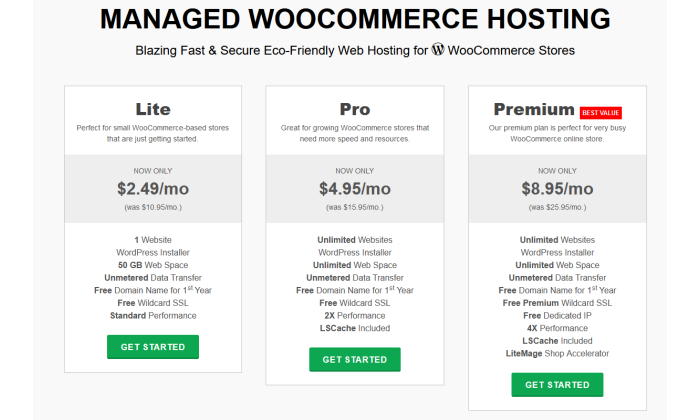
Speaking of pricing, GreenGeeks offers three levels of managed WooCommerce Hosting:

  • Lite: starting at $2.49/month
  • Pro: starting at $4.95/month
  • Premium: starting at $8.95/month

The only drawback of that pricing structure is that the starting price is for a three-year commitment.

That could be a bit too much of a commitment for someone just trying GreenGeeks on for size or worried about massive, rapid scaling over that time. But GreenGeeks’ prices don’t jump up wildly for shorter terms, unlike some other providers.

For example, with the Lite package, a two-year commitment only raises the monthly cost $1.50 to $3.95/month. For a one-year term, it’s $4.95/month. Of course, month-to-month is the most expensive, but that rate of $10.95/month is right on par with A2’s base plan rate.

I mentioned above that even the Lite plan has daily backups and automatic plugin updates, but it also includes a free Wildcard SSL, unmetered data, a free domain name for the first year, and 50 GB of space for one website.

And, if you’re worried about scalability over the long haul, GreenGeeks’ Premium plan can put those fears to bed. With it, you get everything mentioned above, plus LSCache, LiteMage shop accelerator, a free dedicated IP, capacity for unlimited websites, and more.

All of this comes backed by some of the best customer support in the category. You can browse the GreenGeeks knowledge base or reach out to a rep via live chat, phone call, or email. Their phone center is available Monday through Sunday, 9 a.m. to midnight Eastern and GreenGeeks has a great track record of responding to any email request within 20 minutes.

Get a great deal on WooCommerce hosting by starting with GreenGeeks today.

What I Looked at to Find the Best Cheap Web Hosting

You’re looking for the cheapest plan out there, but you still need a dependable host.

There’s no shortage of budget-friendly web hosting options available. Each one promises great uptime, site performance, and customer support.

It seems like anyone can get their site up for less than the cost of a cup of coffee.

What’s the catch?

If you understand your options and pick the right one, there is no catch.

I’m going to guide you through saving every dollar possible without getting scammed or locked into a plan that you’ll regret later.

Use these four criteria to cut through the advertising gimmicks, rule out plans that are “too good to be true,” and hone in on the best deal for lowest price.

Price

When looking for web hosting in general, price is pretty important. But in looking at cheap web hosting, I’ve made pricing the most important criteria by far. 

In other words, I asked myself: How can I get dependable hosting at the absolute lowest price?

Since you have to pay for hosting each month, even a few dollars’ difference between plans will add up over time.

I focused on web hosts with a rock solid reputation because their cheap hosting options don’t cut corners. These plans are no-frills hosting, for sure, but I made sure they cover all the essentials. 

With some of the less reputable hosts out there, you can get a rock-bottom price and a rock-bottom experience. 

The providers I chose have super-affordable plans that won’t cause trouble now, trap you into upgrading, or wind up costing a fortune down the road.

Contract Terms

Lots of web hosts might seem cheap at first glance, but you need to review the contract terms to truly get a sense of the actual cost. 

To lock in the lowest possible rate, you’ll likely have to commit to a two, three, or even a four-year plan. 

Importantly, these contracts are typically paid up-front and in-full. 

That means that web hosting advertised at $3 per month could actually cost you upwards of $100 today.

Along with the length of the contract, you need to check the renewal rates. It’s common practice in the web hosting industry for hosting plans to skyrocket upon renewal.

Promotional pricing might cost $3 per month, but then automatically renew at something like $10 per month.

That would more than triple your rate upon renewal. Suddenly it’s not so cheap anymore.

Domain Limits

How many sites do you want? 

If you add a site or two, you could accidentally get forced to upgrade and pay a lot more.

iPage, for example, lets people create as many websites as they want with their cheapest hosting plan. 

With Hostinger, on the other hand, you’ll have to upgrade to host more than one site. That said, Hostinger’s next plan up is still less than $3 per month and you can build up to 100 websites.

Another important limit to consider is bandwidth. This is the maximum amount of data your site can transfer to users during a set amount of time. 

Now there’s no such thing as unlimited bandwidth, but you are definitely going to see that advertised with a lot of the cheapest web hosting plans out there.

Why can they say this?

Because these are shared hosting plans where your site is on a server with a bunch of other sites. On a typical day, these sites are not going to use all of the server’s resources, so they say it’s unlimited.

The truth is that you will definitely still have limits on how much of the server’s central processing unit (CPU) your site can use. 

Getting too many visitors to your site may exceed your CPU limits, and the provider may ask you to upgrade.

Shared hosting plans with unlimited bandwidth are perfect for cheap web hosting, just don’t equate it with unlimited visitors.

Free Tools to Build and Grow Your Site

You’d be surprised, but even some of the least expensive web hosting plans are packed with free tools and capabilities. Getting these freebies as part of a bundle can help you save in other areas.

Some of the features to look out for include:

  • Ad credits: free Google or Bing advertising credits to target your audience
  • Domain name: your site’s online address at www.your-domain-name.com
  • Email account: an address @your-domain-name.com
  • SSL Certificates: protects online privacy and lets visitors know your site is secure
  • Visual website builder: an application that lets even total newbies design beautiful pages

Everything that’s included with your hosting plan is something you don’t have to spend more money on. 

It’s not hard to register your domain name, but if your hosting plan includes it, that’s going to save you $10-15 in the first year.

Getting a free professional email is another $30 in your pocket. The freebies add up.

Even Hostinger, which can be purchased for less than $1/month, comes with an email account, SSL certificate, and a website builder that requires zero coding knowledge to use.

Conclusion

You don’t have to spend very much to get your site online, but if you aren’t careful, web hosting can wind up costing a lot more than you think.

Choosing a reputable provider is the first step, but you don’t have to worry about that if you stick to my list of best cheap web hosts. These are all really well-known companies with a long history of dependable service.

  1. Hostinger — Best web hosting plan under $1.50
  2. DreamHost — Lowest spend on day one
  3. Bluehost — Best for new sites (especially WordPress)
  4. A2 Hosting —Best web hosting under $3 for online stores
  5. HostGator — Best way to host your existing site for cheaper
  6. iPage Go — Best if you have multiple sites
  7. GreenGeeks — Best price for managed WooCommerce hosting

To get the lowest per-month price, go with Hostinger. At less than a buck fifty per month, there is nothing else even close.

Of course, if you don’t want to lock into a long contract to get low rates with Hostinger, I recommend DreamHost. You can get high-quality hosting for less than $5/month without any commitment.

If you have a new site in mind and you want to get it off the ground quickly, Bluehost is the choice for you. It’s a little pricier than Hostinger, but still under $3/month. Plus Bluehost includes a free domain name for the first year (you’re going to need that for a new site), which saves another $10-15 right there.

If you have multiple sites to host, iPage should be your first and last stop. Unlimited websites for less than $2/month. Say no more.

Shortlist A2 Hosting for online stores. It’s well set up to handle the extra security and performance demands of ecommerce. If you’re running a web store on WooCommerce, think about GreenGeeks for a little extra savings for comparable performance.

And if you are tired of your current hosting situation, let Hostgator help. They will migrate your site to their servers for free. Then you can start saving money and enjoying quality customer service again.

How Google’s Search Engine Really Works (A Peek Under The Hood)

Google’s search engine is technically complex.

There are hundreds (maybe even thousands) of different factors taken into account so that the search engine can figure out what should go where.

It’s like a mysterious black box, and very few people know exactly what’s inside.

However, the good news is that search engines are actually pretty easy to understand.

We may not know every single factor (out of a hundred or thousand), but we also don’t need to.

I’ll bring it down to the basics with a simple method to please Google, rank higher, and bring in more website traffic.

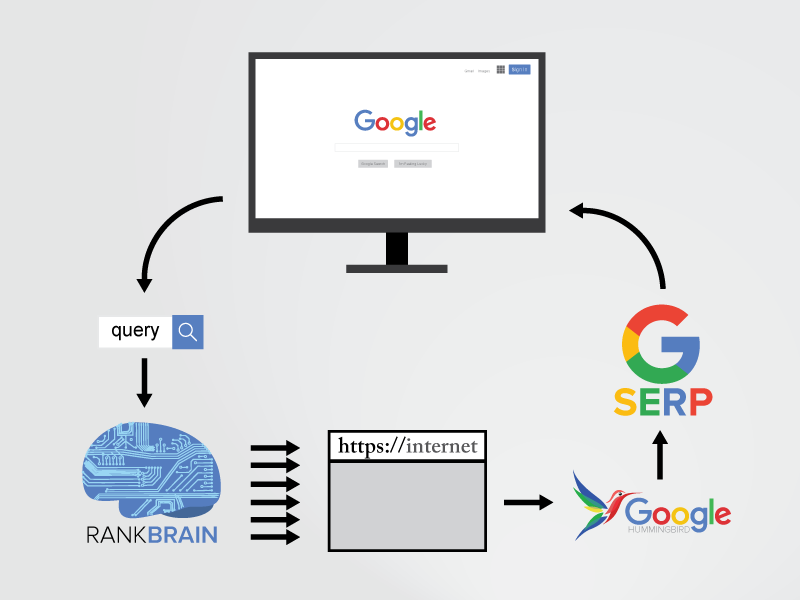
I’ll also introduce some of the latest developments, like RankBrain, that help Google guess what you’re actually looking for (even if you don’t type it in).

First, I’m going to walk you through exactly how Google’s search engine really works so that you can see that it’s not as difficult to understand as you might think.

How Do Search Engines Crawl the Web?

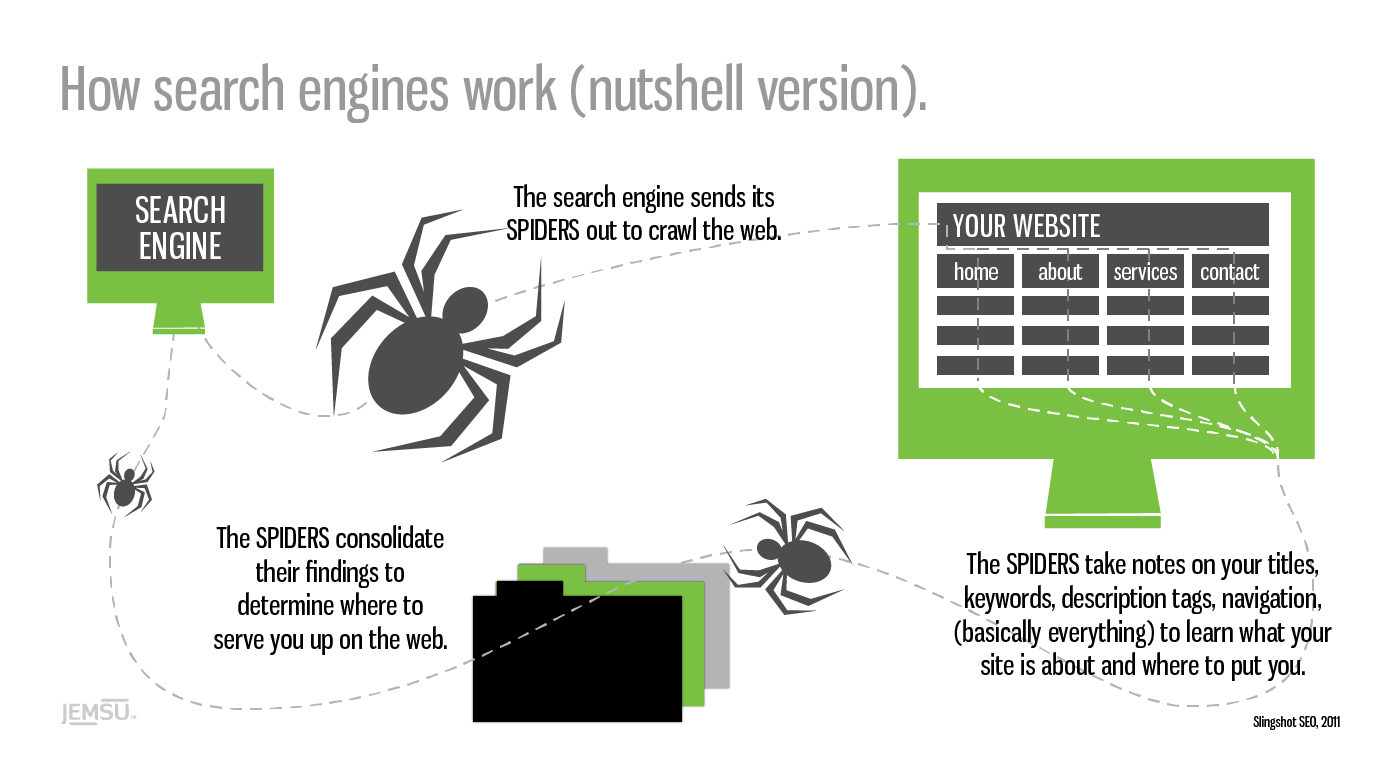
Google’s first job is to ‘crawl’ the web with ‘spiders.’

These are little automated programs or bots that scour the net for any and all new information.

The spiders take notes on your website, from the titles you use to the text on each page to learn more about who you are, what you do, and who might be interested in finding you.

how search engines work nutshell spiders

That may sound simplistic on the face of it.

Which is no small feat, considering there are more than 1.8 billion websites online today — with thousands of new sites popping up every day.

The first massive challenge is to locate new data, record what it’s about, and then store that information (with some accuracy) in a database.

Google’s next job is to figure out how to best match and display the information in its database when someone types in a search query. Scaling becomes a problem, though.

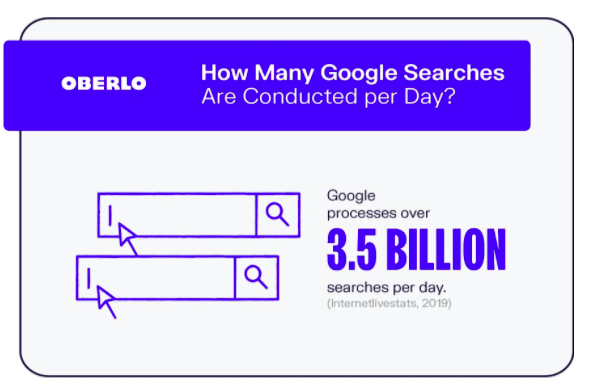
Google processes over 3.5 billion searches a day, and that number increases every year.

how google works number of searches done per day

That means the information in its database needs to be categorized correctly, rearranged, and displayed in less than a second after someone expects it.

Time is of the essence here, because speed wins, according to Marissa Mayer back when she worked for Google over a decade ago.

She reported when they were able to speed up Google Maps’ home page (by cutting down on its size), traffic leaped 10 percent within seven days and 25 percent just a few weeks later.

Google won the search engine race because it’s able to:

  1. Find and record more information
  2. Deliver more accurate results
  3. Do both of those two tasks faster than any other search engine

One of the reasons Google is the front of the pack comes down to the accuracy of its results.

The information it displays is more likely to match what users are actually looking for.

Think about it this way.

When you type something into Google, you’re expecting something. It might be a simple answer, like the weather in your city, or maybe a little more complex, like “how does Google’s search engine really work?”

Google’s results, compared to other search engines, tend to answer those queries better. The information was the best of the best.

This breakthrough came from an initial theory Google’s co-founders actually worked on in college.

Why Do Links Matter to Google?

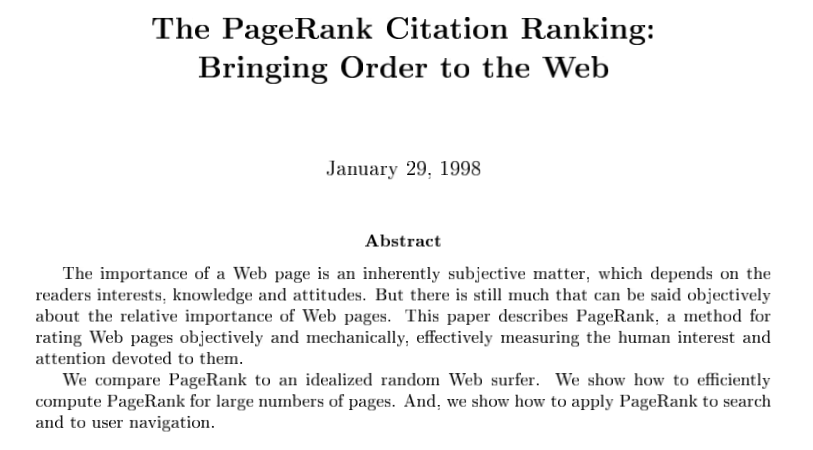
Google’s co-founders were still at Stanford in 1998 when they released a paper entitled “The PageRank Citation Ranking: Bringing Order to the Web.”

Check it out — you can read the whole thing right here!

how google words why links matter paper

The PageRank breakthrough was simple.

Academic papers were often ‘ranked’ by the number of citations a paper received. The more they received, the more authoritative they were considered on that topic.

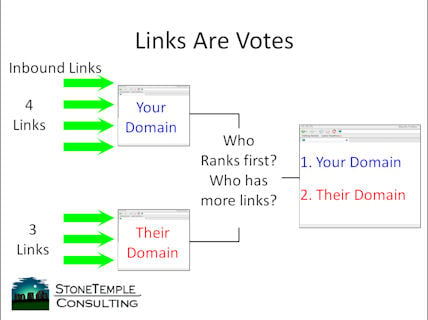
Google co-founders, Larry Page and Sergey Brin, wanted to apply the same ‘grading’ system to the web’s information. They used backlinks as a proxy for votes. The more links a page received, the more authoritative it was perceived on that particular topic.

links are votes how google works

Of course, they didn’t just look at the number of links. They also factored in quality by considering who was doing the linking.

If you received two links, for example, from two different websites, the one with the more authority on a topic would be worth more.

They also considered relevance to better gauge the ‘quality’ of a link.

For example, if your website talks about “dog food,” links from other pages or sites that talk about things related to “dogs” or “dog food” would be worth more than one talking about “truck tires.”

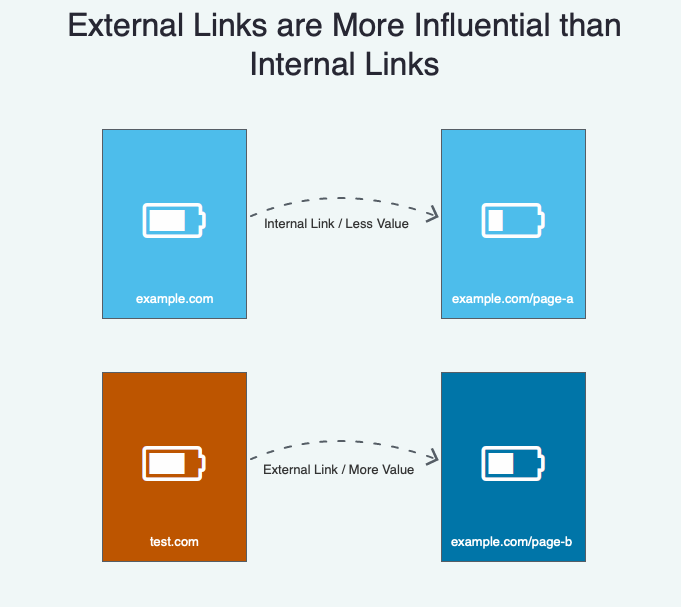
External links (links from other sites) are also more valuable than internal links (links to different pages on your own site.)

how google works external vs internal links.

Before we go any further, please understand these concepts are over two decades all.

PageRank may have mattered years ago, but it’s evolved tremendously since then. So don’t worry about it explicitly today.

One of the reasons is because of newer algorithm developments, including RankBrain.

What is ‘RankBrain’ and How Does It Work?

RankBrain was first acknowledged in 2015 by Google engineer Greg Corrado:

RankBrain has become the third-most important signal contributing to the result of a search query.

Google’s been working on this technology for years to help the search engine handle the massive increases in volume without losing accuracy.

The RankBrain secret sauce is that it uses artificial intelligence to continually learn how to improve.

rankbrain diagram how google works

So the more it processes new information or new search queries for users, it actually gets more accurate.

For example, in 2010, Google’s algorithm “might have up to 10,000 variations or sub-signals,” according to Search Engine Land. That’s a lot!

As you can imagine, somehow managing all of those on the fly would be incredibly difficult (if not impossible).

That’s where RankBrain comes in.

Generally, the two most important ranking factors are:

  1. Links (and citations)
  2. Words (content and queries)

Note: this changes over time, and these aren’t the only factors that matter. Speed plays a major factor in Google ranking, as do Core Web Vitals.

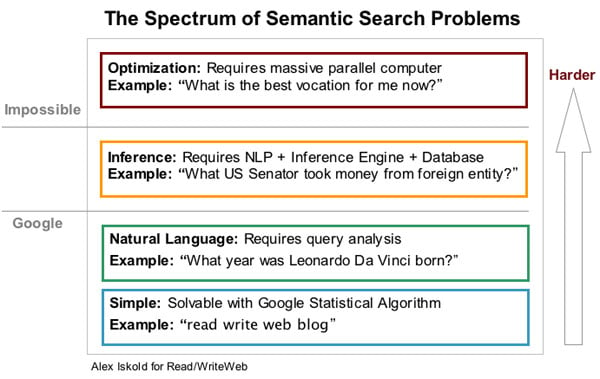
RankBrain, however, is still a main component. It helps analyze or understand the connections between those links and content so Google can understand the context behind what someone’s asking. This is often called semantic search.

rankbrain semantic search difficulty 1

For example, let’s say you type in the word “engineer salaries.”

Now think about that for a moment. What type of engineer salaries are you looking for?

It could be “civil,” “electrical,” “mechanical,” or even “software.”

That’s why Google needs to use several different factors to figure out exactly what you’re asking for.

Let’s say the following events played out over the past few years:

  • You’re getting a degree in computer science.
  • Your IP address puts you on the campus of Stanford University.
  • You follow tech journalists on Twitter.
  • You read TechCrunch almost every single day.
  • You Googled “software engineer jobs” last week.

Google’s able to piece all of these random bits of data together. It’s like a bunch of puzzle pieces suddenly coming together.

So now Google knows what type of “engineer salaries” to show you, even though you never explicitly asked for “software engineer salaries.”

That’s also how Google is now answering your questions before you even ask them.

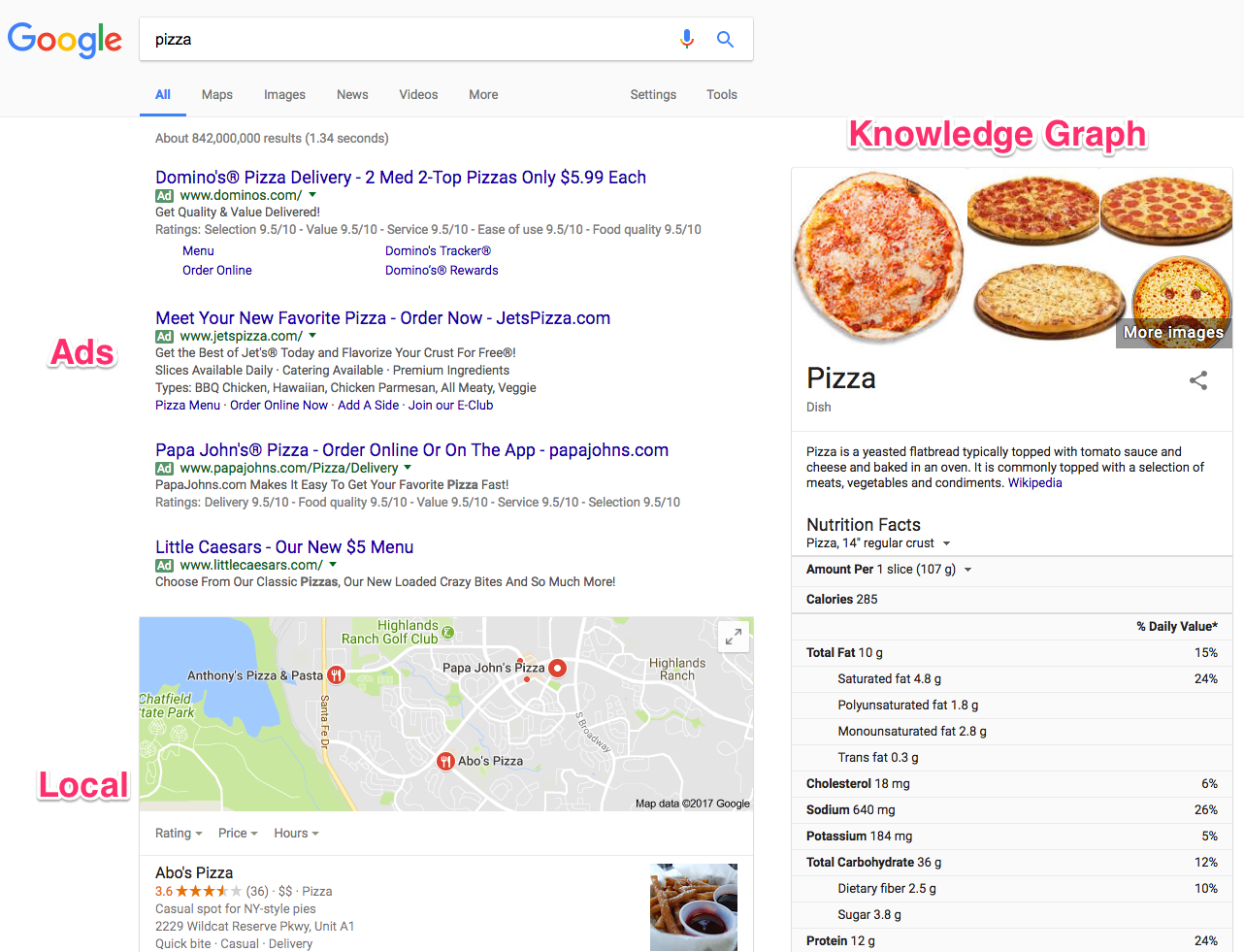
For example, do a generic search right now for anything, like “pizza.”

Now, what do you see?

how google words SERP example

You see the typical ad spaces up at the top.

However, the local results below the ads are assuming that you’re asking “where to get pizza.”

The Knowledge Graph on the far right-hand side is serving up almost every fact and figure about pizza imaginable.

RankBrain process and filters all this data to give you answers before you even ask them.

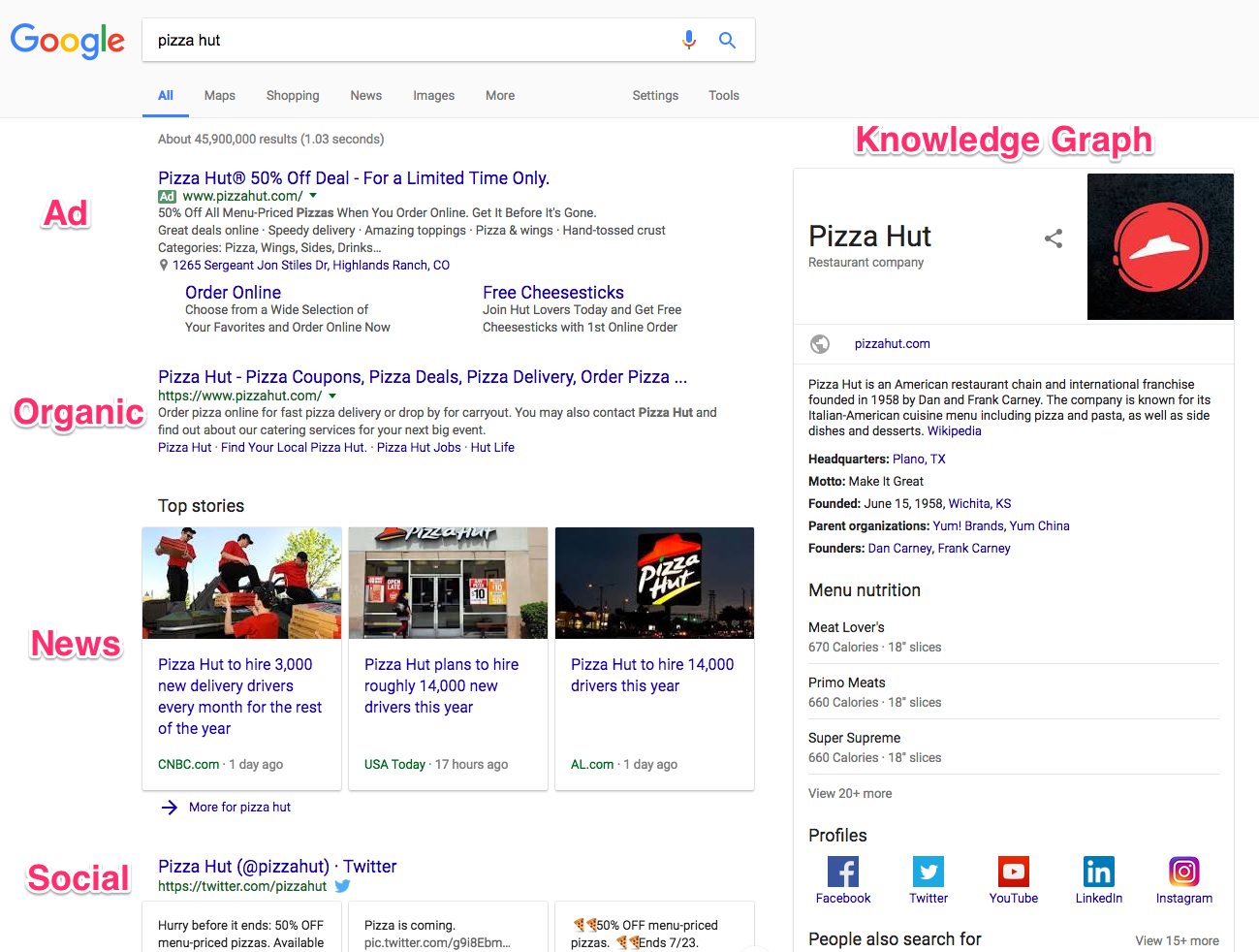
Change your search up a little (like this one for “pizza hut”) and the search engine result page (SERP) changes with new information.

how google works pizza search

Now you know how Google’s search engine really works.

While you don’t need to be an expert, understanding the basics like this can help you better figure out how to give your prospects exactly what they want (so you get better rankings and more traffic).

Here are a few of the big things to keep an eye on.

How to Rank Higher in Google: Solve People’s Problems

People type searches into Google to get an answer to whatever question they’re facing.

If they’re looking for an answer, it means they have a question.

If they have a question, it means they have a problem.

So your primary job is to solve someone’s problem.

In theory, it’s really that simple. If you solve someone’s problem better than anyone else, you’ll get better rankings and more traffic.

Let’s take a look at a few examples so you can see how this works in real life.

Someone comes home from a long day at work. All they’re looking forward to doing is grabbing something to eat fast and hanging out with their family or watching a new show on Netflix.

Before they’re able to throw a meal together, they try to run the kitchen sink and discover that it’s clogged.

Bummer.

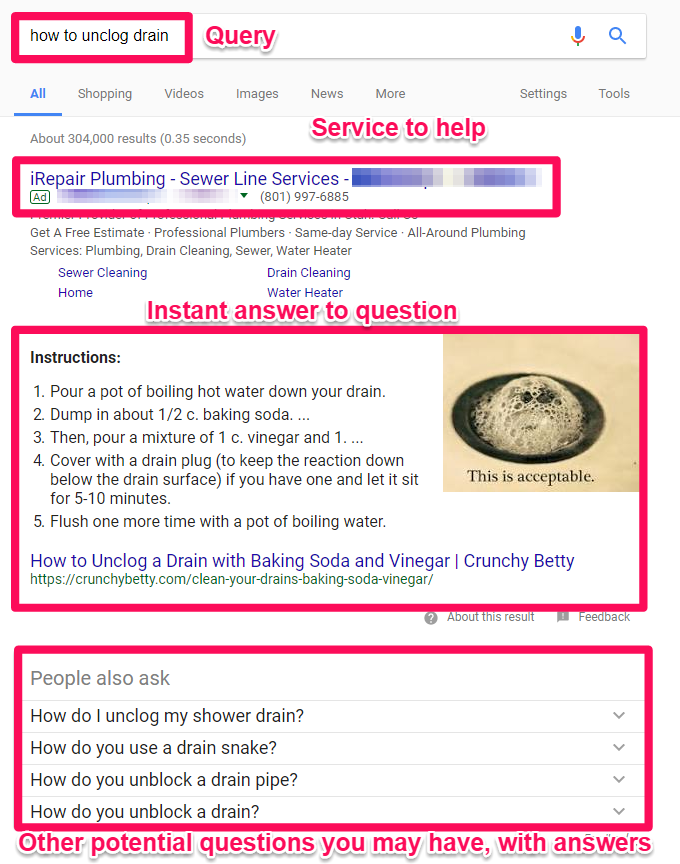
It’s already getting late, though, so they don’t want to call a plumber. Instead, they head over to Google and start typing in “how to unclog drain” as their search query.

Then here’s what they see:

how google works SERP example for how to uncolog a sink.

See?!

Way up at the top is an ad for a plumber (just in case you want to call in a professional).

Next up is an Instant Answer box that contains step-by-step instructions that Google believes has helped other people. So you might already be able to fix your sink without ever leaving this page!

Below that are related questions that other people commonly ask (along with their answers).

So all of this begs the question: How do you create something that can help solve a user’s problem?

I’ll answer that in one second, but here’s what you don’t do for the record:

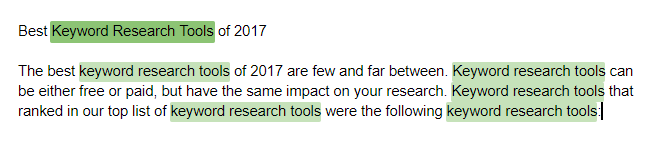
how google works example of keyword stuffing

“Keyword density” used to be an old-school tactic that was once relevant when Google’s algorithm was dumb and static. With RankBrain, Google has become a borderline genius.

So keyword stuffing like it’s 1999 will hurt you in the long run. As you can see, this is a terrible “answer” or “solution” to someone’s problem.

After saying that, there are a few places on a page that you want to pay special attention to.

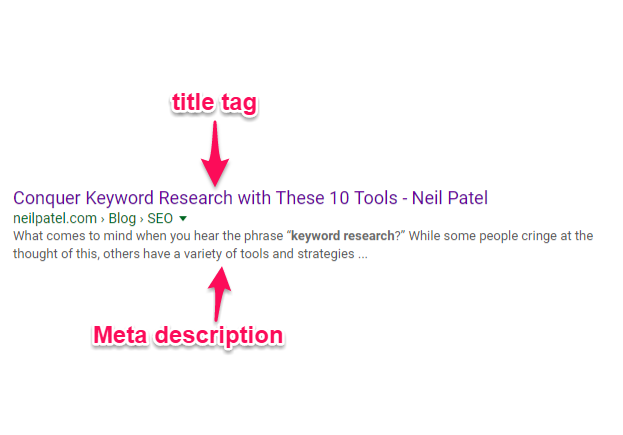
For example, the Title Tag and Meta Description are used by Google to provide an official answer for what this page is about.

Those are the two elements that will also show up on a SERP when someone types in their query.

It only makes sense, then, that you should use the main topic in those areas so that everyone knows exactly what your page is discussing.

how google works title tag and meta description

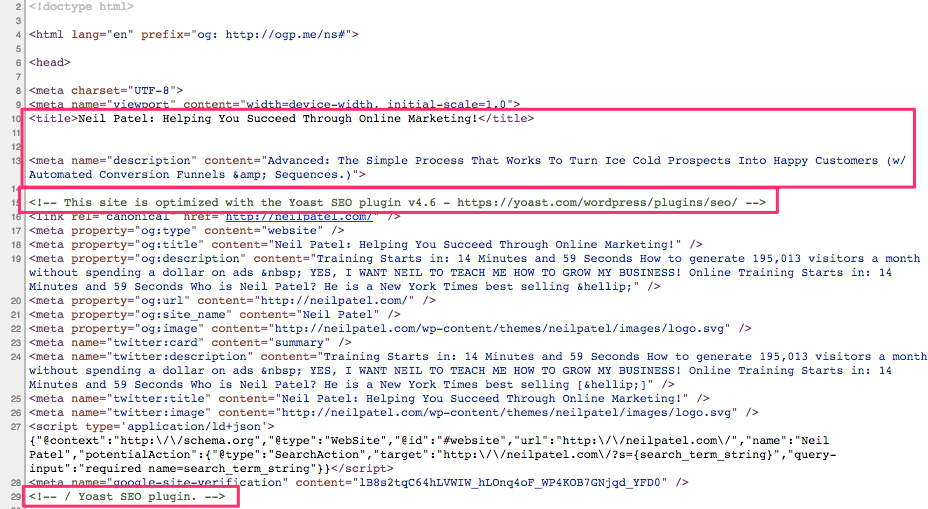
Do you want to see where that text is getting pulled from?

Simply right-click on a website to view the source code. For example, my homepage looks something like this:

where meta text is how google works

You can see the title tag and meta description at the top of the code.

I’m also using Yoast’s WordPress SEO plugin to help add these extra fields on the backside of WordPress.

That way, all you have to do is write out the specific title and description in plain text (as opposed to getting your hands dirty with code).

Otherwise, the actual page content should be written for humans (as opposed to keyword stuffing to tricks or fool the search engines).

Instead, here’s how your page content should look:

how google works example of good content

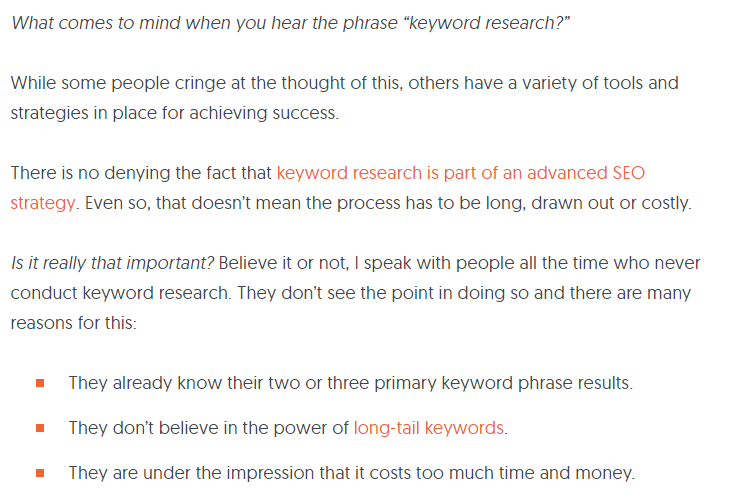
I wrote an in-depth response to help someone figure out a solution to a complex problem (keyword research).

Even though it’s a complex subject, I was trying to give them a simple, step-by-step solution so they could fix that problem ASAP.

Google even takes website usage data into account now to determine how helpful your content is.

For example, let’s say that someone clicks on your website from Google and is turned off by the poor design or hard-to-read content. So they ‘bounce back’ to Google immediately to find a different result.

That’s a bad sign! Google determines you weren’t a happy searcher. So maybe Google will try to find a few other results to swap out with that one to hopefully make everyone happy.

That’s why I also break up the paragraphs and include a lot of images. The goal is to help people quickly find what they’re looking for.

I want them to read the page faster and digest the information more easily so that they’ll stick around longer instead of bouncing away.

That’s the key to ranking well in search engines. Give the people what they want, keep them around or coming back for more, and Google will be happier as a result.

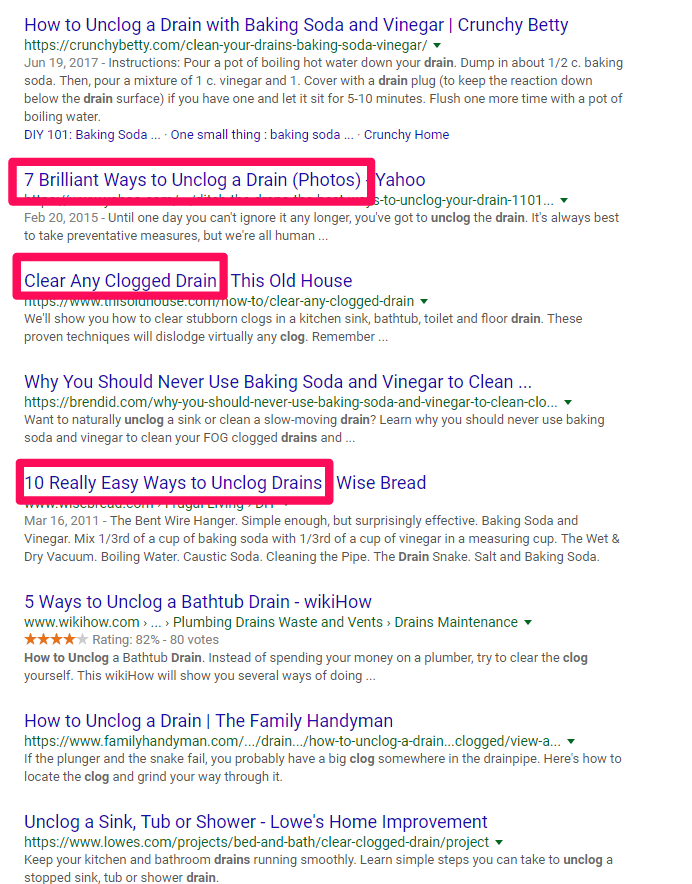
Let’s go back to our clogged drain example to see how this works in another context.

how google works example.

Those are all pretty good results!

In each case, the person who crafted each page provided a detailed answer to a common problem.

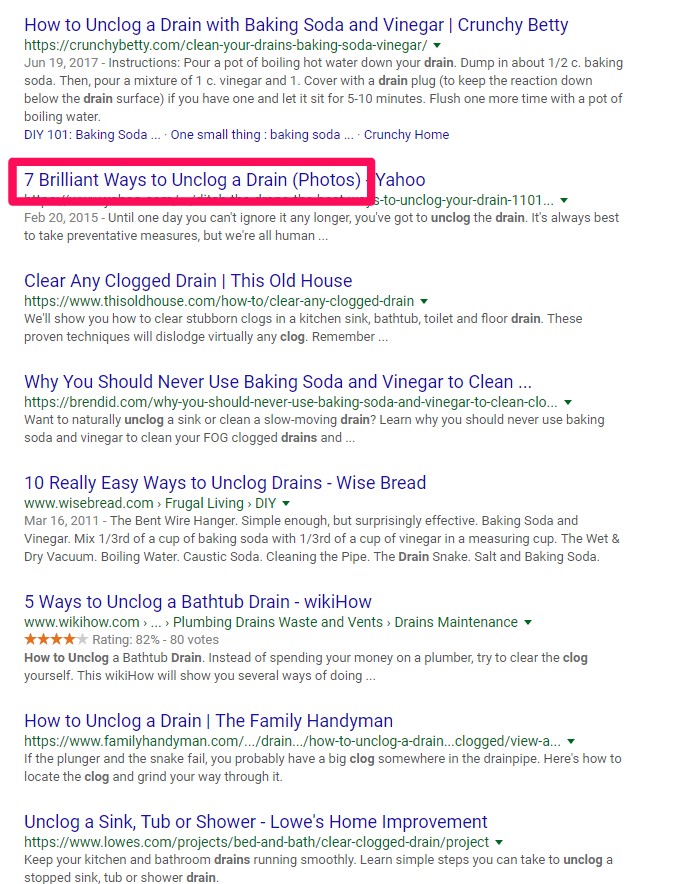
Let’s zero in on that second SERP result, “7 Brilliant Ways to Unclog a Drain (Photos)” from Yahoo, to discover what they’re doing so well to hit number two on a big, popular search query like that.

how google works drain example

This seems like it might be a good result because it gives us multiple methods to try, along with photos so we can see exactly what’s happening.

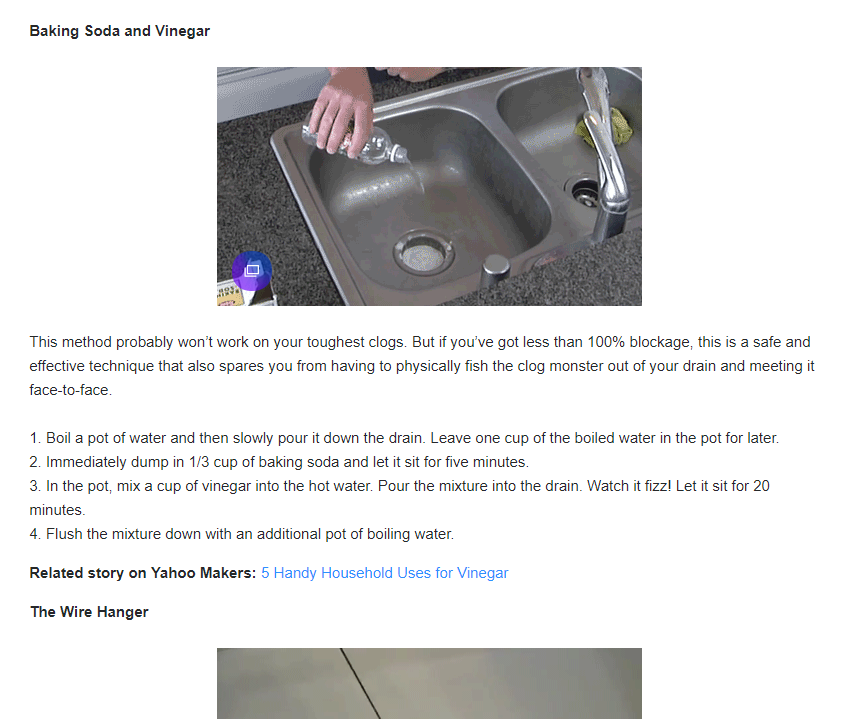
Let’s click on that to see what they provide.

how google works good content example: include images and easy to read text

Pretty good overall!

It provides the user with good, quality content to help solve a problem. The better your content does that, the more links or ‘upvotes’ it will receive when other people find it useful, too.

Links and other citations or social signals help alert Google. They tell the search engine that your page is on the rise and to start paying attention to your website for these topics.

Your page will get better treatment, move up in the rankings, be exposed to more people, get more links or votes as a result, and continue that upward trend.

That’s where the genius of Google’s process comes into play.

It makes people happy by giving them exactly what they’re looking for. When you do it right, it gives you compounding benefits that can take off all of a sudden, expanding your website traffic as a result.

How Google Search Engine Works: Conclusion

Google’s search engine is one of the most complex technologies in the world.

It crunches a mind-numbing amount of data at lightning speeds to give people exactly what they’re looking for in seconds.

When you boil it down to the basics, search engines are actually pretty easy to understand.

They want to help people find what they’re looking for.

People use Google to find answers and solutions. They have something on their minds, and they want to find an answer that helps them clear the issue to move on with their day.

How Google finds and delivers that information is the building blocks of SEO, making it crucial to growing your business online.

Now that you know how Google works, how are you going to use this information?

Establish and Maintain Rock-Solid Business Credit When You Have No Business Credit. Check Out 3 Well-Known Starter Vendors for Business Credit That Will Happily Extend Credit to New and Established Businesses

Building The Perfect Business Credit Portfolio with Starter Vendors for Business Credit

A perfect business credit portfolio means working with starter vendors for business credit. Starting with vendor credit accounts is a proven way to start building business credit. But we don’t include vendors just because they report to the business credit reporting agencies. We include them and we talk about them because they have quality products that you can use, and great customer service. They are not just a means to an end!

Vendor Credit Cards

Vendor credit cards will kick off business credit building for your business. First, add payment experiences from three vendors. Then they must report to business CRAs like Dun & Bradstreet. And then you can start qualifying for store credit, and fleet credit as well. Make sure business credit cards don’t report on your personal credit.

Every step and every credit provider works to help your business. The idea is to help you qualify for business credit cards that you will actually use. This isn’t building for the sake of building, and it isn’t just to increase a number. These credit providers are going to have what your business needs to succeed.

Business Credit with Starter Vendors for Business Credit

Keep in mind, business credit is independent of personal. Applying for it won’t harm your personal credit scores. Building this asset can only help your business. You can help your future business right now.

Business credit doesn’t just happen. You have to actively build it. It all starts with starter vendors. They will approve your business for credit with little fuss.

Use your credit. Pay on time, just like you should with personal credit. These vendors will report to the business credit reporting agencies. And you’ll build a good business credit score.

How to Build Business Credit

Having an EIN doesn’t mean you have established credit. If you go to a bank to try and get bank credit cards using your EIN with no credit established, you’ll get denials. That is unless you have good personal credit and use it to get approvals while supplying your personal guarantee. But it doesn’t have to be that way.

You can’t start with high limits. First you must build starter trade lines that report (vendor credit). Then you’ll have an established credit profile. Then you’ll get a business credit score. With an established business credit profile and score you can start getting high credit limits.

Establish business credit fast with our research-backed guide to 12 business credit cards and lines

What is Starter Vendor Credit?

These trade lines are creditors who will give you initial credit when you have none now. These vendors typically offer terms such as Net 30, instead of revolving. So if you get approval for $1,000 in vendor credit and use it all, you must pay that money back in a set term. That is, within 30 days on a Net 30 account. But there are some revolving accounts which we still consider to be starter vendors.

You must pay net 30 accounts in full within 30 days. And you must pay net 60 accounts in full within 60 days. Unlike with revolving accounts, you have a set time when you must pay back what you borrowed or the credit you used.

Getting Started

To start your business credit profile the RIGHT way, get approval for vendor accounts that report to business CRAs. Once accomplished, you can then use the credit. Pay back what you used, and the account is on report to Dun & Bradstreet, Experian, or Equifax.

Once reported, then you have trade lines, an established credit profile, and an established credit score. Using a newly established business credit profile and score, you can then get approval for more credit under your EIN. For vendor credit, you can leave your SSN off the application. Then the credit issuer then pulls your EIN credit, sees a solid profile and score. They can then approve you for more credit.

Building Business Credit – What You Really Need to Know

Not ALL retailers will approve you just because of your credit profile and score. Some sources can also have a time in business requirement. You may need to be in business 1-3 years to get credit not requiring a personal guarantee. Some sources might require you meet certain revenue requirements for as well. But many starter vendors will approve you without these requirements.

But Keep in Mind

You won’t get a Visa or a MasterCard (bank credit cards) right away. And you need to have credit to get more credit. You need to start building trade lines to get the big payoff. Getting initial credit is the hardest part. Over 97% of trade vendors who issue credit don’t report it to the business reporting agencies. So, you MUST find sources which actually report. 

Establish business credit fast with our research-backed guide to 12 business credit cards and lines.

There are Benefits to Starter Vendors for Business Credit

Vendor credit is an important step in building business credit. Vendor credit is easier to get than retail or fleet credit. It can lead to more retail and fleet credit. Establishing credit will lead to lenders approving you.  And best of all, this process is PROVEN to work! Just like for all credit, be responsible and pay on time.

More Benefits of Starter Vendors for Business Credit

You MUST have 3 or more vendor accounts reporting to move onto retail credit, and more are even better. It will take 30-90 days for those accounts to report. It’s 60 days on average. Do NOT apply for retail credit without having 3 or more accounts first.

Getting Starter Vendors for Business Credit to Pull Credit Under your EIN

There is no Social Security requirement for starter vendor credit. This is unlike bank loans and bank cards. So leave the field blank. Don’t fill in any other number, as that’s a violation of two Federal laws. A blank field will force them to pull your business credit under your EIN. Also, if there is a credit check, then it is perfectly permissible to provide the company’s EIN. You can use an EIN, rather than your Social Security Number and date of birth.

Using Business Credit

Check out FOUR of our favorite starter vendors for business credit:

  • Grainger
  • Uline
  • Marathon
  • Supply Works

Grainger Industrial Supply

They sell hardware, power tools, pumps and more. They also do fleet maintenance

Grainger will report to Dun and Bradstreet. If a business doesn’t have established credit, they will want to see more documents. These include accounts payable, income statement, balance sheets, etc. Terms are Net 30, Net 45, Net 60, or Net 90.

Qualifying for Grainger Industrial Supply

You need:

  • Entity in good standing with Secretary of State
  • EIN number with IRS
  • Business address (matching everywhere)
  • D-U-N-S number
  • Business License (if applicable)
  • Business Bank account
  • And your business must be registered to Secretary of State (SOS) for at least 60 days

Apply online or over the phone.

Uline 

They sell shipping, packing and industrial supplies. They report to Dun & Bradstreet and Experian. You MUST create an account with Uline before starting to build business credit with them. Terms are Net 30.

Qualifying for Uline 

You need:

  • Entity in good standing with Secretary of State
  • EIN number with IRS
  • Business address (matching everywhere)
  • D-U-N-S number
  • Business License (if applicable)
  • Business Bank account
  • And a business phone number listed in 411
  • You must have a D&B PAYDEX score of 80 or better

Application may get approval for net 30 at time of order. Upon final review, Credit Department may change to a few prepaid orders, before granting Net 30.

Establish business credit fast with our research-backed guide to 12 business credit cards and lines.

Marathon

Marathon Petroleum Company provides transportation fuels, asphalt, and specialty products throughout the United States. Their product line supports commercial, industrial, and retail operations. This card reports to Dun & Bradstreet and Experian. Before applying for more than one account with WEX Fleet cards, make sure to have enough time between applying. This is so they don’t red-flag your account for fraud.

Qualifying for Marathon

You need:

  • Entity in good standing with Secretary of State
  • EIN number with IRS
  • Business address- matching everywhere.
  • D-U-N-S number
  • Business license (if applicable)
  • And a business bank account
  • Business phone number listed on 411

Your SSN is necessary for informational purposes. If concerned they will pull your personal credit talk to their credit department before applying. You can give a $500 deposit instead of using a personal guarantee, if in business less than a year. Apply online or over the phone. Terms are Net 15.

Supply Works

Supply Works is a part of Home Depot. They offer integrated facility maintenance supplies. But they will not accept virtual addresses. They will report to Experian. Terms are Net 30. Apply online or over the phone.

Qualifying for Supply Works

You need:

  • Entity in good standing with Secretary of State
  • EIN number with IRS
  • Business address (matching everywhere)
  • D-U-N-S number
  • Business License (if applicable)
  • Business Bank account
  • Trade/Bank references
  • There is no minimal time in business requirement

Extra BONUS Vendor: Wex Fleet

They report to Experian and D&B. They offer universal fleet cards, heavy truck cards, and universally accepted business fleet cards. Their cards have features supporting a small business. This includes a rewards program. Before applying for more than one account with WEX Fleet cards, make sure to have enough time between applying. This is so they don’t red flag your account for fraud.

If you don’t get an approval on the basis of business credit history, or been in business 1 year, then a $500 deposit is necessary or a Personal Guarantee. You can apply online or over the phone. Terms are  Net 15 (Wex Fleet Card), Net 22, or revolving (Wex FlexCard).

Qualifying for Wex Fleet

You need:

  • Entity in good standing with Secretary of State
  • EIN number with IRS
  • Business address (matching everywhere)
  • D-U-N-S number
  • Business License (if applicable)
  • Business Bank account
  • And a Business Phone Number Listed in 411

Starter Vendors for Business Credit: Takeaways

Starter vendors are a PROVEN way to get the business credit ball rolling. They will approve you with minimal fuss. Certain requirements repeat. These include needing to have EIN and D-U-N-S numbers. And having proper licensing (if your industry requires that). Hence getting those details squared away is a smart step to take first. Want more help with building business credit? Ask us how we can help you – including our access to literally HUNDREDS of vendors. Let’s take the next steps together

The post Establish and Maintain Rock-Solid Business Credit When You Have No Business Credit. Check Out 3 Well-Known Starter Vendors for Business Credit That Will Happily Extend Credit to New and Established Businesses appeared first on Credit Suite.