Best Cheap Web Hosting

Disclosure: This content is reader-supported, which means if you click on some of our links that we may earn a commission.

Do you want to skip the read and get right to my top picks? The best cheap web hosting service for most people is Hostinger or DreamHost.

There’s no need to pay a fortune for web hosting if you’re launching a new website. A cheap web hosting solutions will work just fine.

But how cheap is too cheap? There are a lot of attractive options out there. Separating the good deals from the scams is important.

Fortunately, you won’t actually have to search through all of them. There are really only one or two dozen reputable web hosts to consider.

That list gets even smaller if you’re looking for a cheap web hosting plan that actually delivers good service.

If you want to get your site online for as little as possible, these are my top picks:

#1 – Hostinger Review — The Best Web Hosting Plan Under $1.50

Hostinger has the absolute cheapest price for hosting at $1.39 per month for the Single Shared Hosting plan. So what’s the catch?

You have to sign up for a 48-month contract, which sounds a little heavy. But, bear with me. 

Four years of Single Shared is going to cost less than a single year of hosting through other providers. 

Seriously, other low-budget hosting plans are still twice to four times as expensive. Plus, the introductory rates you get with competitors might skyrocket when you have to renew. Once the honeymoon period is over, you might be looking at $10 or more each month.

With Hostinger on the other hand, your rate for shared hosting goes from $1.39 cents to $2.99/month upon renewal. That’s still a great price.

In other words, the Hostinger full rate is still less than introductory rates from other good cheap hosting options.

Okay, great. But I know you’re thinking the low rate must mean that there are annoying domain limits and few free tools to build your business. 

Untrue. Hostinger is loaded to the brim with features and function.

Hostinger’s Single Shared Hosting plan supports one site, and includes:

  • 100 GB bandwidth
  • 30 GB storage
  • 1 email account
  • Free SSL certificate
  • 99.9% uptime guarantee
  • 24/7/365 customer support
  • Optimized for WordPress with one-click installation
  • User-friendly control panel
  • Cloudflare protected nameservers

There’s no free domain name included, which isn’t a big deal if you already have one. Bluehost and DreamHost come with a free domain name for the first year, but higher per-month rates.

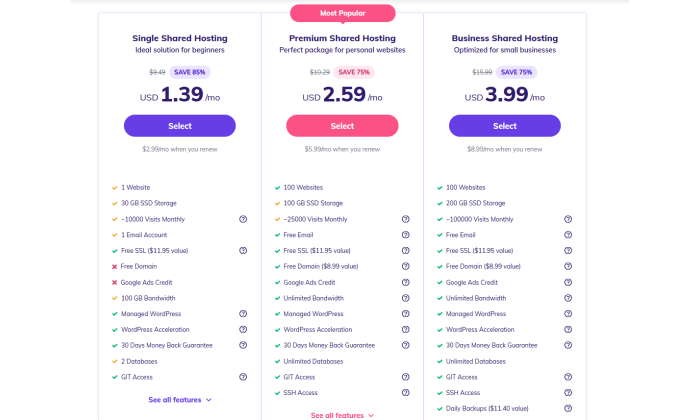
If you need a free domain name, more storage, or unlimited bandwidth, Hostinger lets you upgrade your plan while keeping costs low:
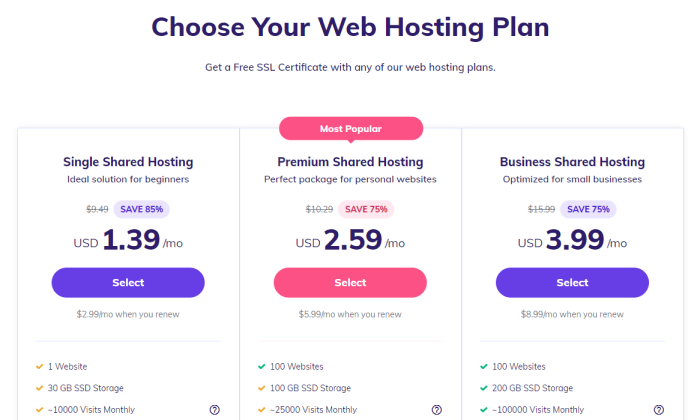
Say you need to move to Premium Shared Hosting to support another site. That will cost $2.59/month to start and $5.99/month when you renew. That’s not going to break the bank, and you can host up to 100 websites.

Hostinger does a lot to ensure that the service is easy to use. Set up takes minutes and absolutely zero technical skill.

If you ever have issues, Hostinger’s customer service is always available and has a phenomenal reputation. The company gets you in the door with budget-friendly prices, and keeps you around with quality support.

Choose Hostinger for the lowest per-month plan on the market. Try it today risk-free, as Hostinger will refund your purchase if you aren’t happy within the first 30 days.

#2 – DreamHost Review — The Lowest Spend on Day One
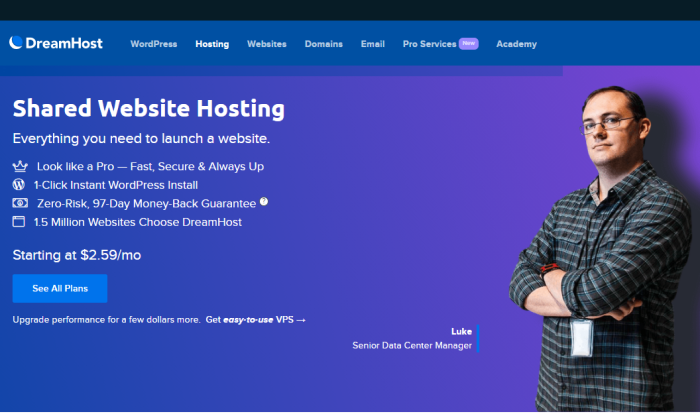
Not everyone wants to sign a long contract for hosting, but you usually have to in order to get the lowest price. Typically, you have to pay the whole amount upfront, which can get expensive even when you are looking at cheap plans.

DreamHost offers similar discounts if you want to sign a contract, but if you don’t, DreamHost’s month-to-month pricing is the lowest out there. 

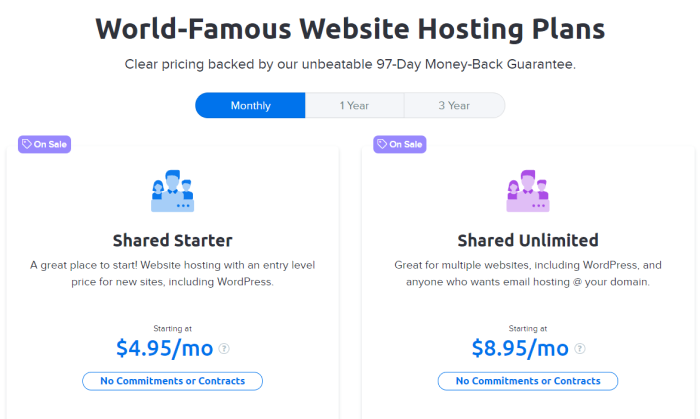
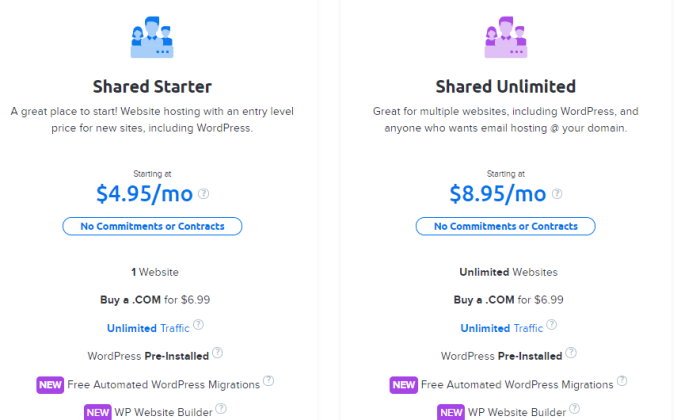
DreamHost Shared Starter is $4.95/month for one site. No contract necessary.

There’s really no way to get a lower price without a commitment. This can be really important for cash-strapped startups betting on growth. Instead of a big upfront spend, they can budget a predictable monthly hosting cost into the equation.

Freedom isn’t free, they say, and it’s especially true with hosting. Many young companies have found themselves locked into a long contract with no way out. Now they’re spending money on a service they don’t like at a time when every dollar counts.

With DreamHost, you can still get cheap hosting, but you don’t have any of the long-term risk that comes with a multi-year contract.

When you look at the month-to-month pricing for other plans on this list, there is no competition. A2 Hosting is $10.99/month, Hostgator is $10.95/month, and Hostinger is $9.99 with a $4.99 set up fee.

Bluehost and iPage don’t even offer plans without at least a year-long commitment.

All of these other plans are great, don’t get me wrong, but if you are looking for a no-contract option, DreamHost is the clear leader. Especially because you get such a solid range of features and free tools to build your site:

  • Unlimited traffic
  • 50 GB storage
  • Free SSL certificate
  • Free WordPress website builder
  • Free automated WordPress migrations
  • Automated WordPress updates
  • 24/7 live chat and ticket support

Like Bluehost, DreamHost is officially recommended by WordPress. The integration is deep and all of the updates are handled automatically. This is good for security purposes and saves you the trouble of doing it yourself.

So you can get all the benefits of tight WordPress integration without the commitment and large down payment required by Bluehost.

Now you might think that no contract would mean no money-back guarantee. The truth is DreamHost has a zero-risk 97-day money-back guarantee. That’s the longest time to try a web host that I know of.

If you need more than one site, and you want to pay month-to-month, iPage can’t help you. DreamHost offers a Shared Unlimited plan for $8.95/month that works for an unlimited number of sites:
If you just have one site, Shared Starter is all you need. 

Stop worrying about when the honeymoon period of your introductory pricing is going to end. 

Get DreamHost and pay a low, predictable rate each month. No more contracts, no more inflexible commitments. Just reliable hosting at a consistent price.

Try DreamHost today and use it risk-free for more than 3 months!

#3 – Bluehost Review — The Best for New Sites (Especially WordPress)
There’s probably no easier way to get your new website off the ground than with Bluehost. And it won’t cost you much at all, as the company offers incredibly feature-rich shared hosting starting at $2.95/month.

For most people with a new site—especially if it is their first site—Bluehost is what they want.

If you are building a WordPress site, I really recommend checking out your options at Bluehost. The company is one of only three hosting providers that is officially recommended by WordPress. The integration is amazing and installation is automatic.

We’ll talk more about why it’s so good for WordPress in a second, but I want to talk about why it’s good for just about anyone with a new site.

First off, Bluehost has some of the cheapest hosting rates around. And even the most basic plans are loaded with features and value. 

You get a free domain name for the first year. Not only do you get to skip that expense, but the convenience of registering your domain through Bluehost cuts down on the time it takes to go live.

If this is your first site ever, you will be grateful at how simple the process is. If you’ve built sites before, you will really appreciate everything that’s done for you. 

For example, you get a free SSL certificate for your site,and enabling it takes one click on the dashboard. This is critical for keeping all of the information on your site secure and lets visitors know that the site is safe to visit.

You can get free SSL certificates from other places, but they will not be this easy to install, trust me. And you will have to renew them every couple months. 

With Bluehost, it’s completely hands-off and you are always protected.

You also get a free content delivery network (CDN) through Bluehost’s partnership with Cloudflare. This is going to improve site speed and performance with near-zero work on your part.

Okay, so on top of the free domain name, SSL certificate, and CDN, Bluehost gives you:

  • 50 GB storage
  • Unmetered bandwidth
  • 24/7 customer support via phone and live chat
  • $100 Google Ads credits
  • Automatic WordPress installations and updates
  • Custom WordPress themes
  • 30-day full refund if you aren’t satisfied

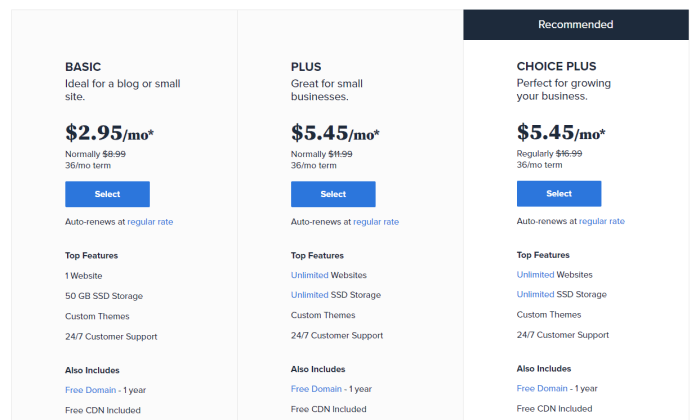
All of these features are included with the Bluehost Basic shared hosting, which starts at $2.95/month. If you have to upgrade, prices stay affordable at the higher tiers:
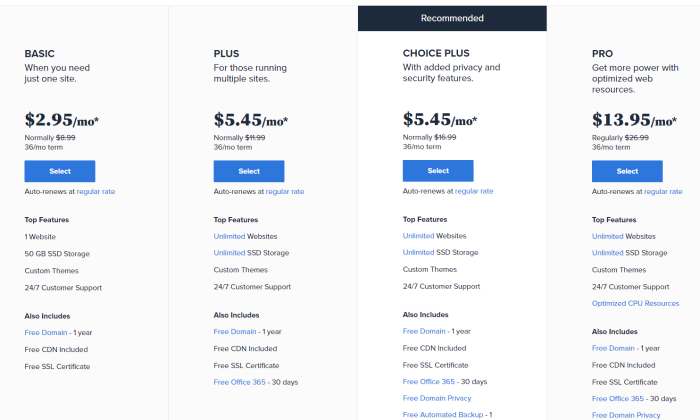
One thing to be aware of is that Bluehost renewal rates are about two to three times higher than the introductory rate. This is why I recommend signing up for a long plan to max out the discount period.

Even at full price, though, Bluehost is really competitively priced compared to the field. This is especially true when you consider the long list of features you get and the ease of getting set up.

It’s as hands-free of a hosting experience as you could ask for and when you want to develop your site, all the tools are right there. 

WordPress is automatically installed on Bluehost, for example. This means full integration and automatic WordPress updates. 

With Bluehost shared hosting, you can use another content management system (CMS) besides WordPress if you want. 

But if you know that you are only going to use WordPress, I highly recommend going with one of Bluehost’s WordPress Shared Hosting plans

These start at $2.95/month, which is the same price as regular shared hosting. The difference is that the servers that have been optimized exclusively for WordPress. There’s no other type of software on them, so servers can be better configured and more easily protected.

If you have a new site in mind, make Bluehost your one-stop-shop for getting online. Get everything set up in a single place instead of having to go through a domain registrar. Best of all, you’ll get a great deal in the process.

So if you have a new site: Get Bluehost Basic shared hosting.

And if that new site is a WordPress site: Get Bluehost Basic WordPress hosting.

There’s a reason that more than 2 million sites are hosted through Bluehost. Find out why today.

#4 – A2 Hosting Review — The Best Web Hosting Under $3 for Online Stores
If you grow your ecommerce site past a certain point, the cheapest web hosting options won’t work. But, if you are just getting your online store up and running, there is no better budget-friendly option than A2 Hosting.

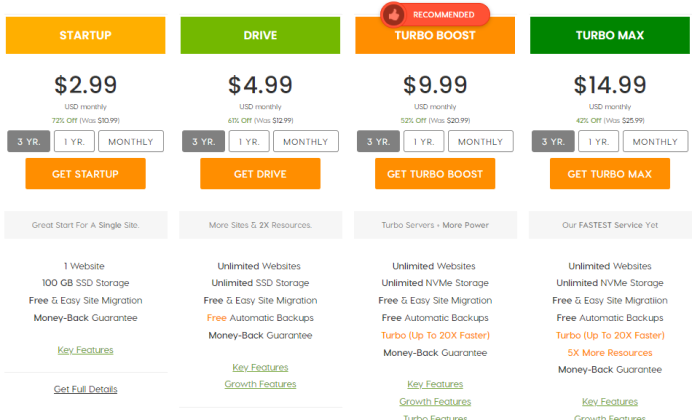
In fact, you can get everything you need to launch for $2.99/month with the A2 Startup plan. You’ll have to sign a contract to get the lowest rate, but you’ll be ready to go within minutes.

Along with PayPal integration, the cheapest A2 hosting plan comes with one-click installs for five of the top ecommerce platforms, including WooCommerce, OpenCart, and Magneto. There’s hardly any backend IT work to start selling.

A2 Hosting offers some of the best site speed and security for the price, which are really important for online stores. 

Shoppers won’t stay if your content is slow to load. A2 takes care of all the technical legwork that goes into maintaining high performance servers. It’s compatible with Cloudflare’s free content delivery network, which can boost your speed as well.

Most shoppers won’t even come if Google says your site’s not safe. That’s going to happen if you don’t have an SSL certificate. A2 includes one for free, and it’s always enabled.

This is a huge perk, because you can get free SSL certificates elsewhere, but it’s on you to configure and renew them, which can be frustrating.

Most of the other security benefits are similarly hands off. The virus scanner, firewall, and brute force defense are on autopilot—you’ll receive notification if there’s something you need to do, but A2 handles a lot on its own.

And if you have an issue you can’t solve, A2 will help. Go read reviews. The company has some of the happiest web hosting customers on the planet. If you need to move your old site to A2’s servers, they have a team that will do it for free.

Some of the other excellent benefits of A2 Startup include:

  • 100 GB storage
  • Unlimited bandwidth
  • Unlimited email addresses
  • 24/7/365 customer support via phone, live chat, email, and ticketing 
  • 99.9% uptime commitment
  • Optimized WordPress hosting
  • DNS management tools
  • Website staging

Website staging is really useful for online stores. You can test new features and buttons on a page in a development area before pushing it live. This way you can see if anything breaks before it impacts your customers.

The A2 Startup plan is aptly named—it won’t be enough once your site matures. But by the time you’ve hit that milestone, your site will be bringing in more than enough money to justify the cost of upgrading.

A2 is one of the pricier options on my list of cheap web hosting providers. I like it for online stores because of the speed, security, and generous limits on storage. 100 GB is twice as much as you get with Bluehost.

And if you aren’t happy with your service, A2 Hosting will refund your account within 30 days of purchase. It’s a true hassle-free money-back guarantee.

Your online reputation matters, so it’s a huge peace of mind to know that customer service is always there. A2 Hosting representatives are extremely knowledgeable. They will help you resolve issues quickly, before your online store takes a hit.

Sign up with A2 Hosting today for the cheapest possible way to host your online store.

#5 – HostGator Review — The Best Way to Host Your Existing Site for Cheaper
When your current host jacks up the rates or takes a customer service nose-dive, you need to switch. Whatever the cause, there is no reason to pay for substandard hosting.

Hostgator will help you migrate your old site for free. This includes the cPanel, email accounts, files, databases, scripts, etc. They also include one free domain registration transfer, which saves a few bucks, too.

All you have to do is fill out a transfer form within 30 days of signing up. Hostgator will do the rest.

You get the free migration with any of Hostgator’s shared hosting plans, including Hatchling, which starts at $2.75/month with a contract.

With Hostgator, you can lock in a really low rate and get great uptime for less than you paid before. After the zero-stress migration, you get high quality customer support available any time of day by phone and live chat.

It’s cheaper web hosting, better service, and very few limits on what you can do. Some of the highlights include:

  • Unlimited storage
  • Unlimited bandwidth
  • Free SSL certificate
  • Free email
  • Free domain (or registration transfer)
  • One-click WordPress install
  • Free website builder
  • Free Google Ads and Bing Ads credits

The good news is that Hostgator provides tons of tools to help you optimize the content on your site and keep things running at top speed. The interface is very easy to use, which gives you complete control over your site and databases.

It’s comparable to Bluehost in a lot of ways, which I like better if you have a brand new site. But if you already have a website, Bluehost won’t move it over for free. Hostgator will. If you have more than one site to migrate, Hostgator will give you a quote for the cost, but the first one is free.

This makes your transition to cheaper hosting a lot easier. Plus, Hostgator offers a 45-day money-back guarantee. If you don’t like what you see, you have more than a month to jump ship without paying a cent.

Quit spending too much on hosting and find out why so many people love Hostgator.

#6 – iPage Go Review — The Best If You Have Multiple Sites
iPage Go lets you create unlimited websites for under $2/month. Every other plan on my list requires you to purchase an upgraded plan to support more than one site.

I really like iPage Go because there is one plan. Without tiered pricing, you don’t have to worry about upgrading your plan until you need something more substantial than shared hosting.

In other words, you can build as many websites as you want without having to stress about paying more to do more.

With iPage Go it’s unlimited sites, domains, and storage. Like similar “unlimited” offerings, your service has no hard and fast limits, but there are restrictions on how much your site can demand from the shared server.

So, when iPage says they offer scalable bandwidth, it means they aren’t metering the traffic to your site. You could still hit restrictions, but there is no set cap for the number site visitors.

Most people looking for cheap hosting for their websites won’t have to worry too much about these limits. iPage is able to support 99.5% of customers without any issues at all. In fact, the company will work with you to make sure you’ve optimized your site if you start to approach restricted usage limits.

In addition to providing the cheapest multi-site hosting option, iPage gives customers access to a ton of free tools to build and nurture their site.

You get a free domain name for the first year, along with a free SSL certificate. On top of that, you get free email with autoresponders. You can use the email provided, or manage your website accounts with Microsoft Outlook and other third-party apps.

iPage hosting includes a free website builder, which can help you customize the look and feel of all your sites. WordPress is a one click installation as are other popular content management systems like Joomla and Drupal.

For less than $2 per month, all of this is yours. Other benefits include:

  • 24/7 customer service
  • Unlimited databases
  • One-click installs for OpenCart, Magneto, and PrestaShop
  • PayPal integration
  • Integration with popular email marketing software services
  • Site traffic reporting
  • 30-day money-back guarantee

There is no month-to-month pricing for iPage Go. You can sign up for one, two, or three years. The longer the contract you sign, the lower the introductory pricing and renewal rate you get:
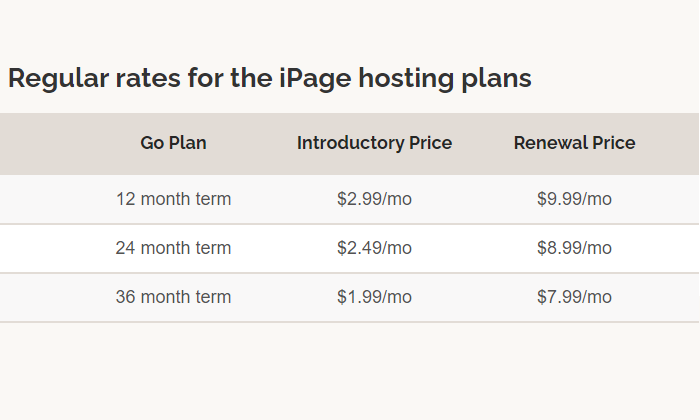
I’m not aware of another hosting provider who gives you a discount on your renewal rate for signing a long contract, so that is a unique perk.

As I mentioned, you’ll never have to upgrade to a different shared hosting plan. You get everything they offer with iPage Go. There are hardly any limits on your resources, and if your site gets too popular to be supported by shared hosting, iPage has some more powerful hosting solutions at competitive prices.

Until then, host all of your websites for one low price with iPage.

#7 – GreenGeeks Review — The Best Price for Managed WooCommerce Hosting
If you’re starting with a WordPress site (as many people do) and you’re looking to transform it into a potent online store, you ought to deploy WooCommerce. Sure, the plugin is free, but you’ll still need hosting and to manage your newly WooCommerce-enhanced site.

But, if you go with GreenGeeks, you can take care of all that in one fell swoop.

Much like A2 Hosting, you can get an affordable hosting plan that allows for an easy, one-click install of WooCommerce on your site. But, unlike A2, you get managed features like daily backups and automatic updates even at the lowest pricing tier.
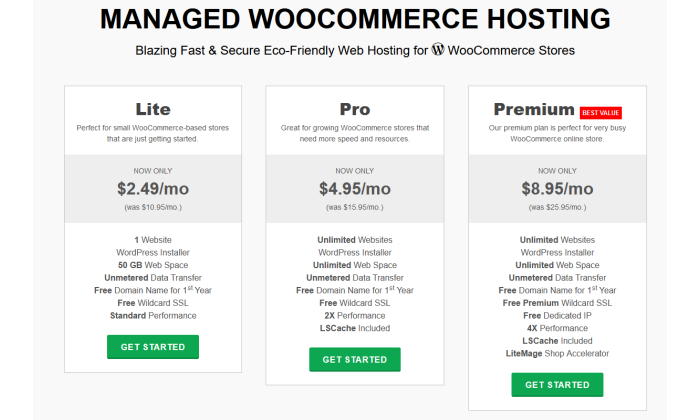
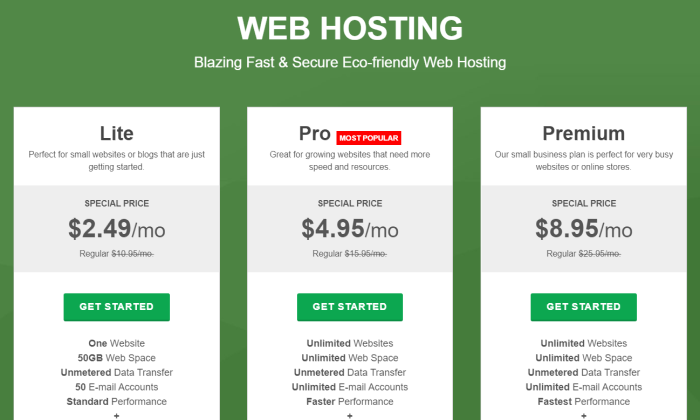
Speaking of pricing, GreenGeeks offers three levels of managed WooCommerce Hosting:

  • Lite: starting at $2.49/month
  • Pro: starting at $4.95/month
  • Premium: starting at $8.95/month

The only drawback of that pricing structure is that the starting price is for a three-year commitment.

That could be a bit too much of a commitment for someone just trying GreenGeeks on for size or worried about massive, rapid scaling over that time. But GreenGeeks’ prices don’t jump up wildly for shorter terms, unlike some other providers.

For example, with the Lite package, a two-year commitment only raises the monthly cost $1.50 to $3.95/month. For a one-year term, it’s $4.95/month. Of course, month-to-month is the most expensive, but that rate of $10.95/month is right on par with A2’s base plan rate.

I mentioned above that even the Lite plan has daily backups and automatic plugin updates, but it also includes a free Wildcard SSL, unmetered data, a free domain name for the first year, and 50 GB of space for one website.

And, if you’re worried about scalability over the long haul, GreenGeeks’ Premium plan can put those fears to bed. With it, you get everything mentioned above, plus LSCache, LiteMage shop accelerator, a free dedicated IP, capacity for unlimited websites, and more.

All of this comes backed by some of the best customer support in the category. You can browse the GreenGeeks knowledge base or reach out to a rep via live chat, phone call, or email. Their phone center is available Monday through Sunday, 9 a.m. to midnight Eastern and GreenGeeks has a great track record of responding to any email request within 20 minutes.

Get a great deal on WooCommerce hosting by starting with GreenGeeks today.

What I Looked at to Find the Best Cheap Web Hosting

You’re looking for the cheapest plan out there, but you still need a dependable host.

There’s no shortage of budget-friendly web hosting options available. Each one promises great uptime, site performance, and customer support.

It seems like anyone can get their site up for less than the cost of a cup of coffee.

What’s the catch?

If you understand your options and pick the right one, there is no catch.

I’m going to guide you through saving every dollar possible without getting scammed or locked into a plan that you’ll regret later.

Use these four criteria to cut through the advertising gimmicks, rule out plans that are “too good to be true,” and hone in on the best deal for lowest price.

Price

When looking for web hosting in general, price is pretty important. But in looking at cheap web hosting, I’ve made pricing the most important criteria by far. 

In other words, I asked myself: How can I get dependable hosting at the absolute lowest price?

Since you have to pay for hosting each month, even a few dollars’ difference between plans will add up over time.

I focused on web hosts with a rock solid reputation because their cheap hosting options don’t cut corners. These plans are no-frills hosting, for sure, but I made sure they cover all the essentials. 

With some of the less reputable hosts out there, you can get a rock-bottom price and a rock-bottom experience. 

The providers I chose have super-affordable plans that won’t cause trouble now, trap you into upgrading, or wind up costing a fortune down the road.

Contract Terms

Lots of web hosts might seem cheap at first glance, but you need to review the contract terms to truly get a sense of the actual cost. 

To lock in the lowest possible rate, you’ll likely have to commit to a two, three, or even a four-year plan. 

Importantly, these contracts are typically paid up-front and in-full. 

That means that web hosting advertised at $3 per month could actually cost you upwards of $100 today.

Along with the length of the contract, you need to check the renewal rates. It’s common practice in the web hosting industry for hosting plans to skyrocket upon renewal.

Promotional pricing might cost $3 per month, but then automatically renew at something like $10 per month.

That would more than triple your rate upon renewal. Suddenly it’s not so cheap anymore.

Domain Limits

How many sites do you want? 

If you add a site or two, you could accidentally get forced to upgrade and pay a lot more.

iPage, for example, lets people create as many websites as they want with their cheapest hosting plan. 

With Hostinger, on the other hand, you’ll have to upgrade to host more than one site. That said, Hostinger’s next plan up is still less than $3 per month and you can build up to 100 websites.

Another important limit to consider is bandwidth. This is the maximum amount of data your site can transfer to users during a set amount of time. 

Now there’s no such thing as unlimited bandwidth, but you are definitely going to see that advertised with a lot of the cheapest web hosting plans out there.

Why can they say this?

Because these are shared hosting plans where your site is on a server with a bunch of other sites. On a typical day, these sites are not going to use all of the server’s resources, so they say it’s unlimited.

The truth is that you will definitely still have limits on how much of the server’s central processing unit (CPU) your site can use. 

Getting too many visitors to your site may exceed your CPU limits, and the provider may ask you to upgrade.

Shared hosting plans with unlimited bandwidth are perfect for cheap web hosting, just don’t equate it with unlimited visitors.

Free Tools to Build and Grow Your Site

You’d be surprised, but even some of the least expensive web hosting plans are packed with free tools and capabilities. Getting these freebies as part of a bundle can help you save in other areas.

Some of the features to look out for include:

  • Ad credits: free Google or Bing advertising credits to target your audience
  • Domain name: your site’s online address at www.your-domain-name.com
  • Email account: an address @your-domain-name.com
  • SSL Certificates: protects online privacy and lets visitors know your site is secure
  • Visual website builder: an application that lets even total newbies design beautiful pages

Everything that’s included with your hosting plan is something you don’t have to spend more money on. 

It’s not hard to register your domain name, but if your hosting plan includes it, that’s going to save you $10-15 in the first year.

Getting a free professional email is another $30 in your pocket. The freebies add up.

Even Hostinger, which can be purchased for less than $1/month, comes with an email account, SSL certificate, and a website builder that requires zero coding knowledge to use.

Conclusion

You don’t have to spend very much to get your site online, but if you aren’t careful, web hosting can wind up costing a lot more than you think.

Choosing a reputable provider is the first step, but you don’t have to worry about that if you stick to my list of best cheap web hosts. These are all really well-known companies with a long history of dependable service.

  1. Hostinger — Best web hosting plan under $1.50
  2. DreamHost — Lowest spend on day one
  3. Bluehost — Best for new sites (especially WordPress)
  4. A2 Hosting —Best web hosting under $3 for online stores
  5. HostGator — Best way to host your existing site for cheaper
  6. iPage Go — Best if you have multiple sites
  7. GreenGeeks — Best price for managed WooCommerce hosting

To get the lowest per-month price, go with Hostinger. At less than a buck fifty per month, there is nothing else even close.

Of course, if you don’t want to lock into a long contract to get low rates with Hostinger, I recommend DreamHost. You can get high-quality hosting for less than $5/month without any commitment.

If you have a new site in mind and you want to get it off the ground quickly, Bluehost is the choice for you. It’s a little pricier than Hostinger, but still under $3/month. Plus Bluehost includes a free domain name for the first year (you’re going to need that for a new site), which saves another $10-15 right there.

If you have multiple sites to host, iPage should be your first and last stop. Unlimited websites for less than $2/month. Say no more.

Shortlist A2 Hosting for online stores. It’s well set up to handle the extra security and performance demands of ecommerce. If you’re running a web store on WooCommerce, think about GreenGeeks for a little extra savings for comparable performance.

And if you are tired of your current hosting situation, let Hostgator help. They will migrate your site to their servers for free. Then you can start saving money and enjoying quality customer service again.

How Google’s Search Engine Really Works (A Peek Under The Hood)

Google’s search engine is technically complex.

There are hundreds (maybe even thousands) of different factors taken into account so that the search engine can figure out what should go where.

It’s like a mysterious black box, and very few people know exactly what’s inside.

However, the good news is that search engines are actually pretty easy to understand.

We may not know every single factor (out of a hundred or thousand), but we also don’t need to.

I’ll bring it down to the basics with a simple method to please Google, rank higher, and bring in more website traffic.

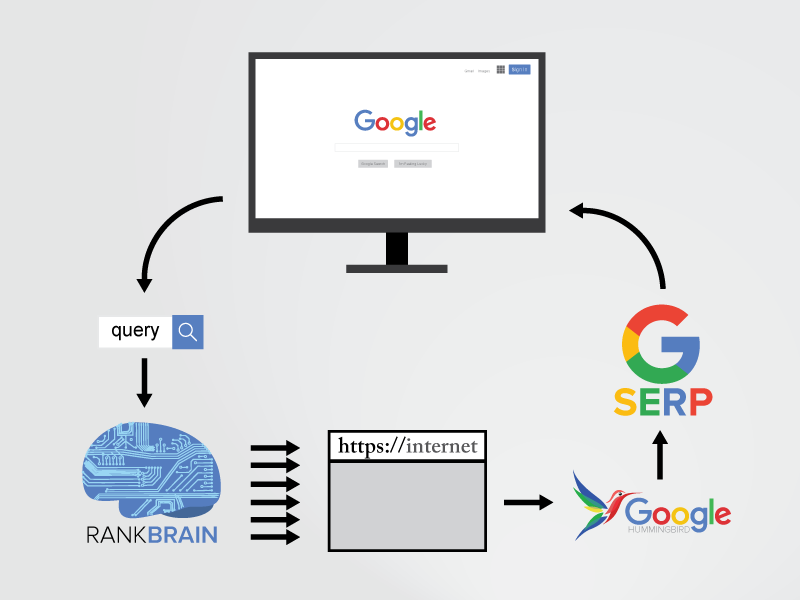
I’ll also introduce some of the latest developments, like RankBrain, that help Google guess what you’re actually looking for (even if you don’t type it in).

First, I’m going to walk you through exactly how Google’s search engine really works so that you can see that it’s not as difficult to understand as you might think.

How Do Search Engines Crawl the Web?

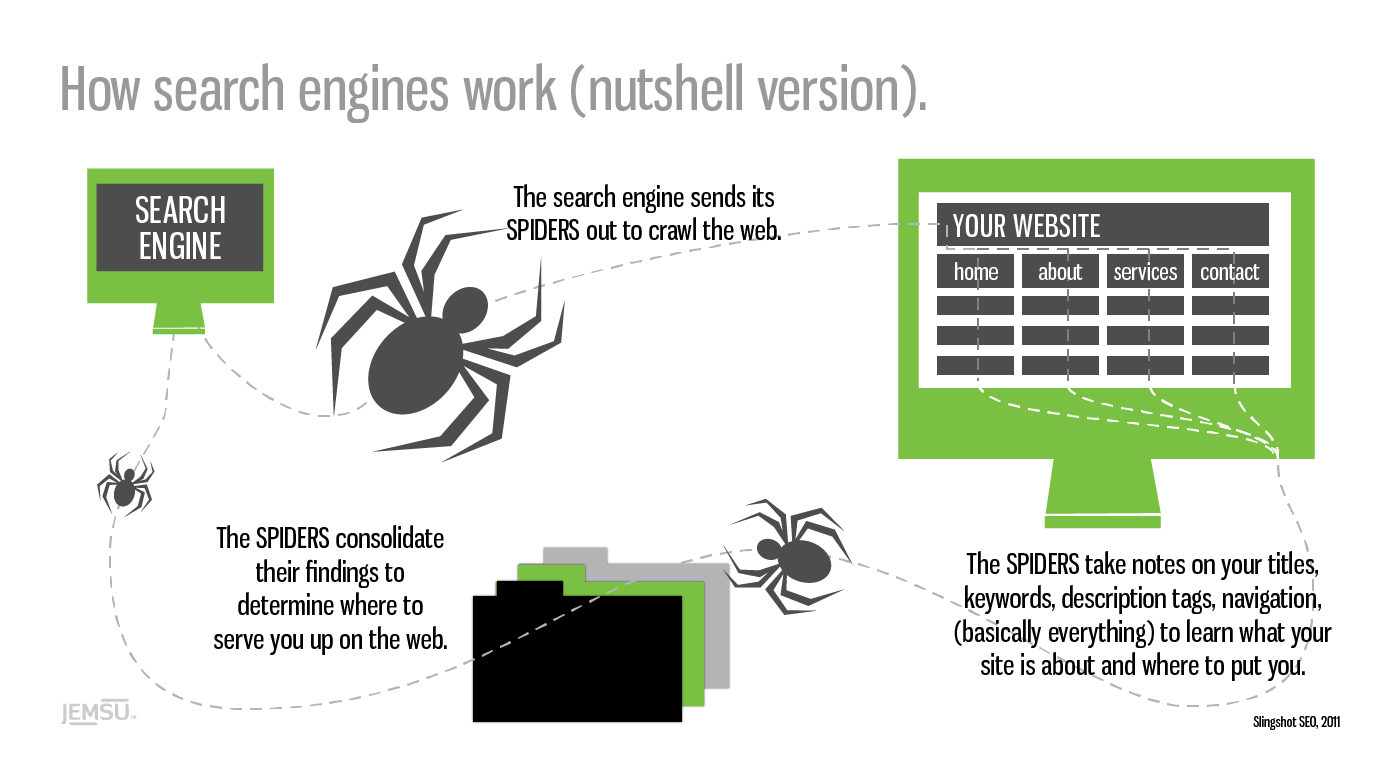
Google’s first job is to ‘crawl’ the web with ‘spiders.’

These are little automated programs or bots that scour the net for any and all new information.

The spiders take notes on your website, from the titles you use to the text on each page to learn more about who you are, what you do, and who might be interested in finding you.

how search engines work nutshell spiders

That may sound simplistic on the face of it.

Which is no small feat, considering there are more than 1.8 billion websites online today — with thousands of new sites popping up every day.

The first massive challenge is to locate new data, record what it’s about, and then store that information (with some accuracy) in a database.

Google’s next job is to figure out how to best match and display the information in its database when someone types in a search query. Scaling becomes a problem, though.

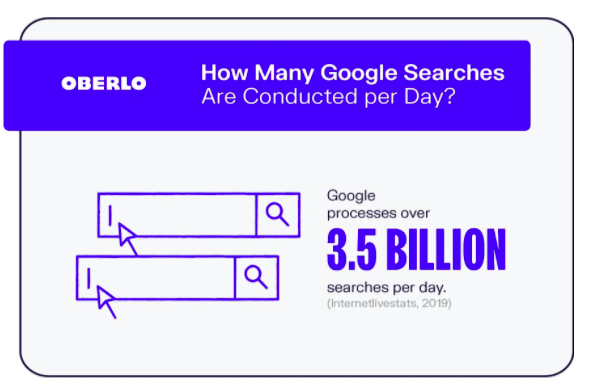
Google processes over 3.5 billion searches a day, and that number increases every year.

how google works number of searches done per day

That means the information in its database needs to be categorized correctly, rearranged, and displayed in less than a second after someone expects it.

Time is of the essence here, because speed wins, according to Marissa Mayer back when she worked for Google over a decade ago.

She reported when they were able to speed up Google Maps’ home page (by cutting down on its size), traffic leaped 10 percent within seven days and 25 percent just a few weeks later.

Google won the search engine race because it’s able to:

  1. Find and record more information
  2. Deliver more accurate results
  3. Do both of those two tasks faster than any other search engine

One of the reasons Google is the front of the pack comes down to the accuracy of its results.

The information it displays is more likely to match what users are actually looking for.

Think about it this way.

When you type something into Google, you’re expecting something. It might be a simple answer, like the weather in your city, or maybe a little more complex, like “how does Google’s search engine really work?”

Google’s results, compared to other search engines, tend to answer those queries better. The information was the best of the best.

This breakthrough came from an initial theory Google’s co-founders actually worked on in college.

Why Do Links Matter to Google?

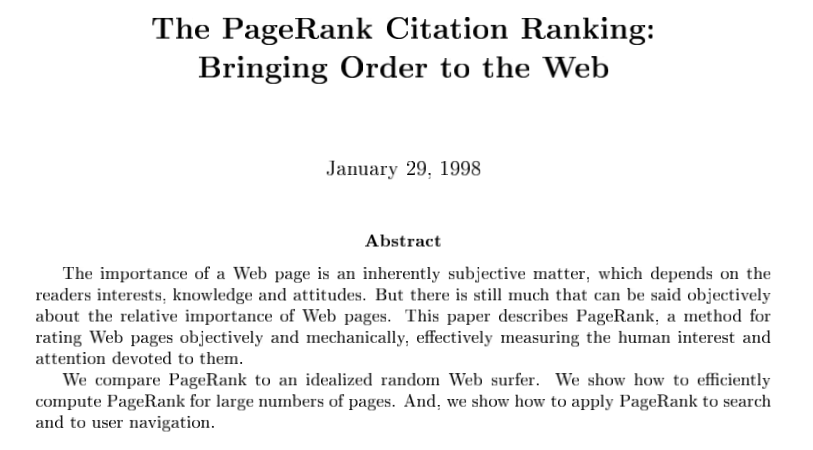
Google’s co-founders were still at Stanford in 1998 when they released a paper entitled “The PageRank Citation Ranking: Bringing Order to the Web.”

Check it out — you can read the whole thing right here!

how google words why links matter paper

The PageRank breakthrough was simple.

Academic papers were often ‘ranked’ by the number of citations a paper received. The more they received, the more authoritative they were considered on that topic.

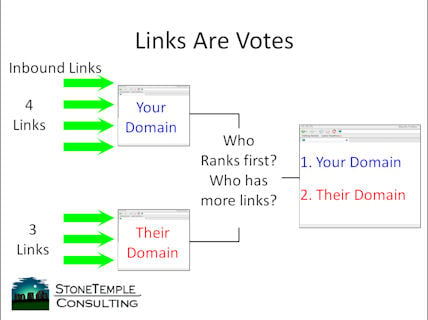
Google co-founders, Larry Page and Sergey Brin, wanted to apply the same ‘grading’ system to the web’s information. They used backlinks as a proxy for votes. The more links a page received, the more authoritative it was perceived on that particular topic.

links are votes how google works

Of course, they didn’t just look at the number of links. They also factored in quality by considering who was doing the linking.

If you received two links, for example, from two different websites, the one with the more authority on a topic would be worth more.

They also considered relevance to better gauge the ‘quality’ of a link.

For example, if your website talks about “dog food,” links from other pages or sites that talk about things related to “dogs” or “dog food” would be worth more than one talking about “truck tires.”

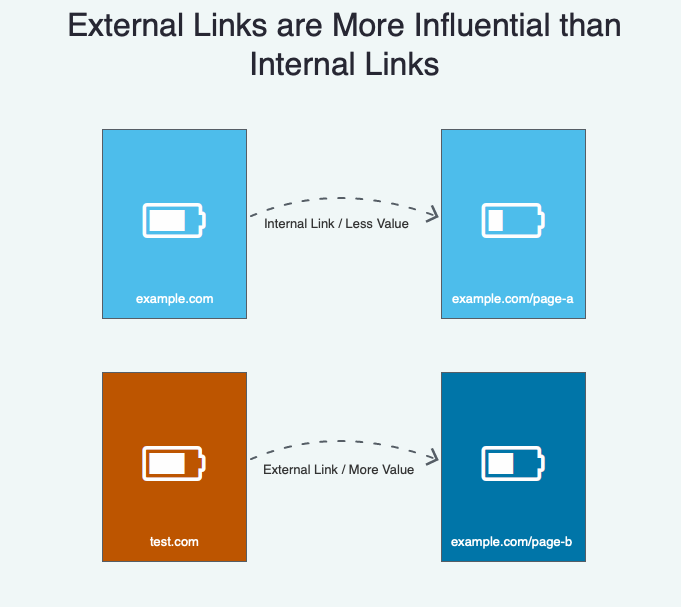
External links (links from other sites) are also more valuable than internal links (links to different pages on your own site.)

how google works external vs internal links.

Before we go any further, please understand these concepts are over two decades all.

PageRank may have mattered years ago, but it’s evolved tremendously since then. So don’t worry about it explicitly today.

One of the reasons is because of newer algorithm developments, including RankBrain.

What is ‘RankBrain’ and How Does It Work?

RankBrain was first acknowledged in 2015 by Google engineer Greg Corrado:

RankBrain has become the third-most important signal contributing to the result of a search query.

Google’s been working on this technology for years to help the search engine handle the massive increases in volume without losing accuracy.

The RankBrain secret sauce is that it uses artificial intelligence to continually learn how to improve.

rankbrain diagram how google works

So the more it processes new information or new search queries for users, it actually gets more accurate.

For example, in 2010, Google’s algorithm “might have up to 10,000 variations or sub-signals,” according to Search Engine Land. That’s a lot!

As you can imagine, somehow managing all of those on the fly would be incredibly difficult (if not impossible).

That’s where RankBrain comes in.

Generally, the two most important ranking factors are:

  1. Links (and citations)
  2. Words (content and queries)

Note: this changes over time, and these aren’t the only factors that matter. Speed plays a major factor in Google ranking, as do Core Web Vitals.

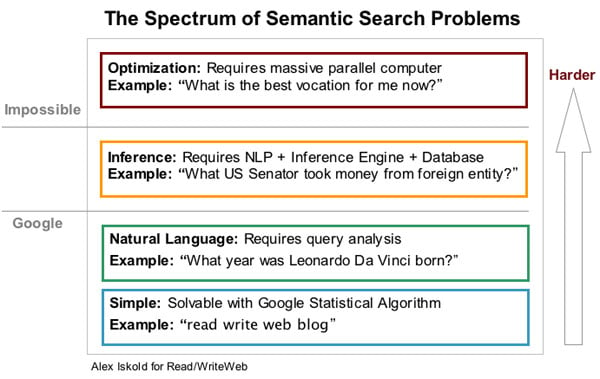
RankBrain, however, is still a main component. It helps analyze or understand the connections between those links and content so Google can understand the context behind what someone’s asking. This is often called semantic search.

rankbrain semantic search difficulty 1

For example, let’s say you type in the word “engineer salaries.”

Now think about that for a moment. What type of engineer salaries are you looking for?

It could be “civil,” “electrical,” “mechanical,” or even “software.”

That’s why Google needs to use several different factors to figure out exactly what you’re asking for.

Let’s say the following events played out over the past few years:

  • You’re getting a degree in computer science.
  • Your IP address puts you on the campus of Stanford University.
  • You follow tech journalists on Twitter.
  • You read TechCrunch almost every single day.
  • You Googled “software engineer jobs” last week.

Google’s able to piece all of these random bits of data together. It’s like a bunch of puzzle pieces suddenly coming together.

So now Google knows what type of “engineer salaries” to show you, even though you never explicitly asked for “software engineer salaries.”

That’s also how Google is now answering your questions before you even ask them.

For example, do a generic search right now for anything, like “pizza.”

Now, what do you see?

how google words SERP example

You see the typical ad spaces up at the top.

However, the local results below the ads are assuming that you’re asking “where to get pizza.”

The Knowledge Graph on the far right-hand side is serving up almost every fact and figure about pizza imaginable.

RankBrain process and filters all this data to give you answers before you even ask them.

Change your search up a little (like this one for “pizza hut”) and the search engine result page (SERP) changes with new information.

how google works pizza search

Now you know how Google’s search engine really works.

While you don’t need to be an expert, understanding the basics like this can help you better figure out how to give your prospects exactly what they want (so you get better rankings and more traffic).

Here are a few of the big things to keep an eye on.

How to Rank Higher in Google: Solve People’s Problems

People type searches into Google to get an answer to whatever question they’re facing.

If they’re looking for an answer, it means they have a question.

If they have a question, it means they have a problem.

So your primary job is to solve someone’s problem.

In theory, it’s really that simple. If you solve someone’s problem better than anyone else, you’ll get better rankings and more traffic.

Let’s take a look at a few examples so you can see how this works in real life.

Someone comes home from a long day at work. All they’re looking forward to doing is grabbing something to eat fast and hanging out with their family or watching a new show on Netflix.

Before they’re able to throw a meal together, they try to run the kitchen sink and discover that it’s clogged.

Bummer.

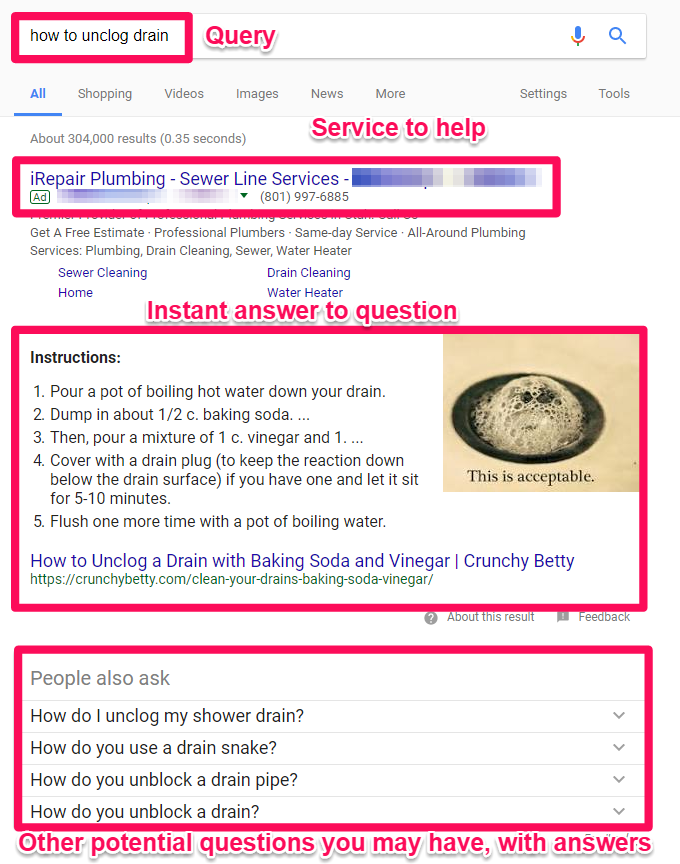
It’s already getting late, though, so they don’t want to call a plumber. Instead, they head over to Google and start typing in “how to unclog drain” as their search query.

Then here’s what they see:

how google works SERP example for how to uncolog a sink.

See?!

Way up at the top is an ad for a plumber (just in case you want to call in a professional).

Next up is an Instant Answer box that contains step-by-step instructions that Google believes has helped other people. So you might already be able to fix your sink without ever leaving this page!

Below that are related questions that other people commonly ask (along with their answers).

So all of this begs the question: How do you create something that can help solve a user’s problem?

I’ll answer that in one second, but here’s what you don’t do for the record:

how google works example of keyword stuffing

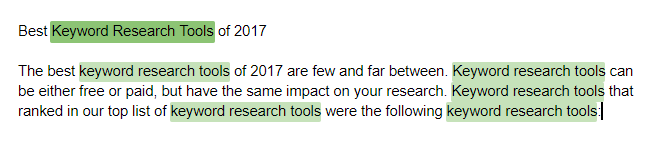
“Keyword density” used to be an old-school tactic that was once relevant when Google’s algorithm was dumb and static. With RankBrain, Google has become a borderline genius.

So keyword stuffing like it’s 1999 will hurt you in the long run. As you can see, this is a terrible “answer” or “solution” to someone’s problem.

After saying that, there are a few places on a page that you want to pay special attention to.

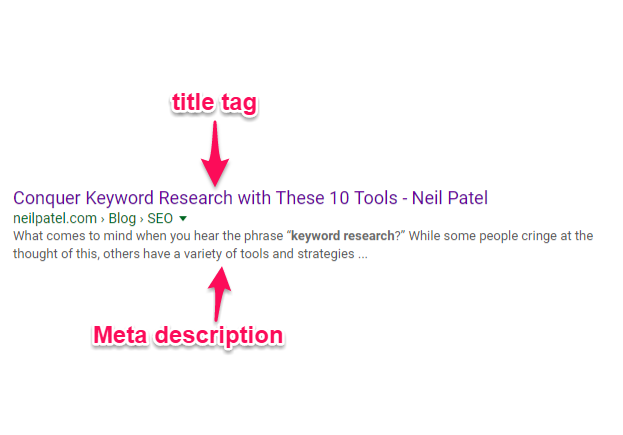
For example, the Title Tag and Meta Description are used by Google to provide an official answer for what this page is about.

Those are the two elements that will also show up on a SERP when someone types in their query.

It only makes sense, then, that you should use the main topic in those areas so that everyone knows exactly what your page is discussing.

how google works title tag and meta description

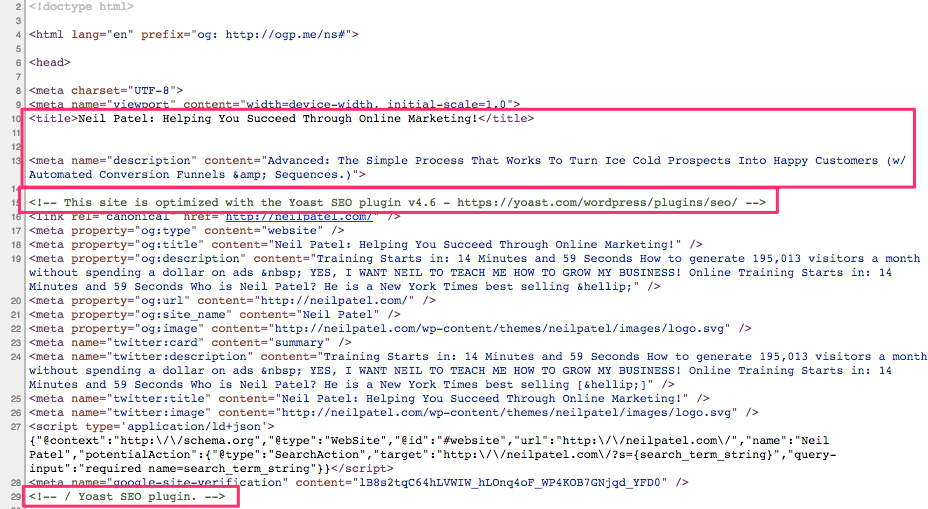
Do you want to see where that text is getting pulled from?

Simply right-click on a website to view the source code. For example, my homepage looks something like this:

where meta text is how google works

You can see the title tag and meta description at the top of the code.

I’m also using Yoast’s WordPress SEO plugin to help add these extra fields on the backside of WordPress.

That way, all you have to do is write out the specific title and description in plain text (as opposed to getting your hands dirty with code).

Otherwise, the actual page content should be written for humans (as opposed to keyword stuffing to tricks or fool the search engines).

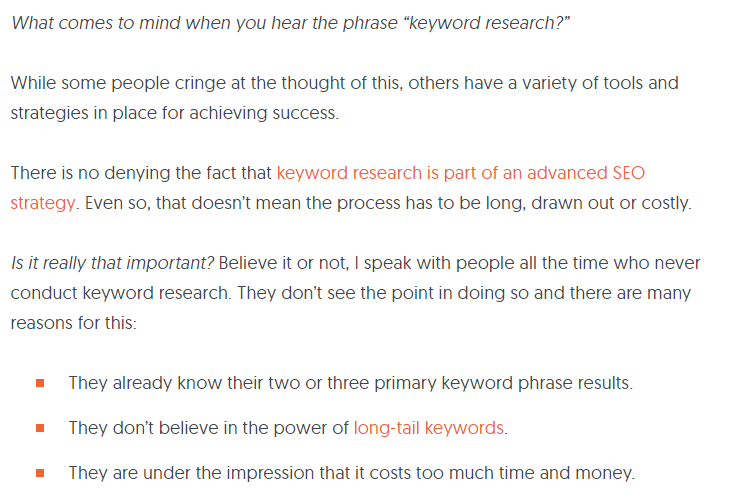
Instead, here’s how your page content should look:

how google works example of good content

I wrote an in-depth response to help someone figure out a solution to a complex problem (keyword research).

Even though it’s a complex subject, I was trying to give them a simple, step-by-step solution so they could fix that problem ASAP.

Google even takes website usage data into account now to determine how helpful your content is.

For example, let’s say that someone clicks on your website from Google and is turned off by the poor design or hard-to-read content. So they ‘bounce back’ to Google immediately to find a different result.

That’s a bad sign! Google determines you weren’t a happy searcher. So maybe Google will try to find a few other results to swap out with that one to hopefully make everyone happy.

That’s why I also break up the paragraphs and include a lot of images. The goal is to help people quickly find what they’re looking for.

I want them to read the page faster and digest the information more easily so that they’ll stick around longer instead of bouncing away.

That’s the key to ranking well in search engines. Give the people what they want, keep them around or coming back for more, and Google will be happier as a result.

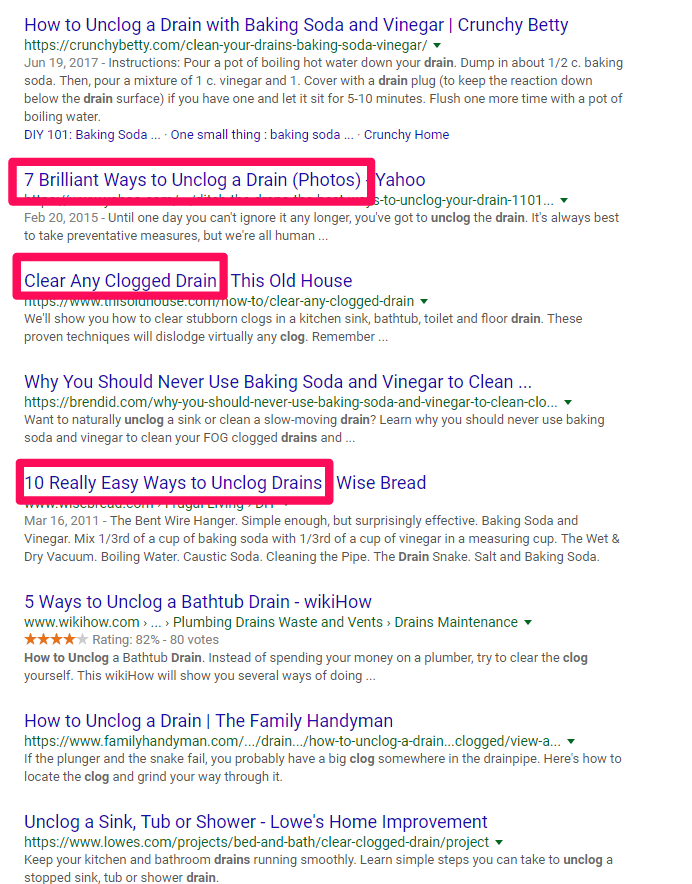
Let’s go back to our clogged drain example to see how this works in another context.

how google works example.

Those are all pretty good results!

In each case, the person who crafted each page provided a detailed answer to a common problem.

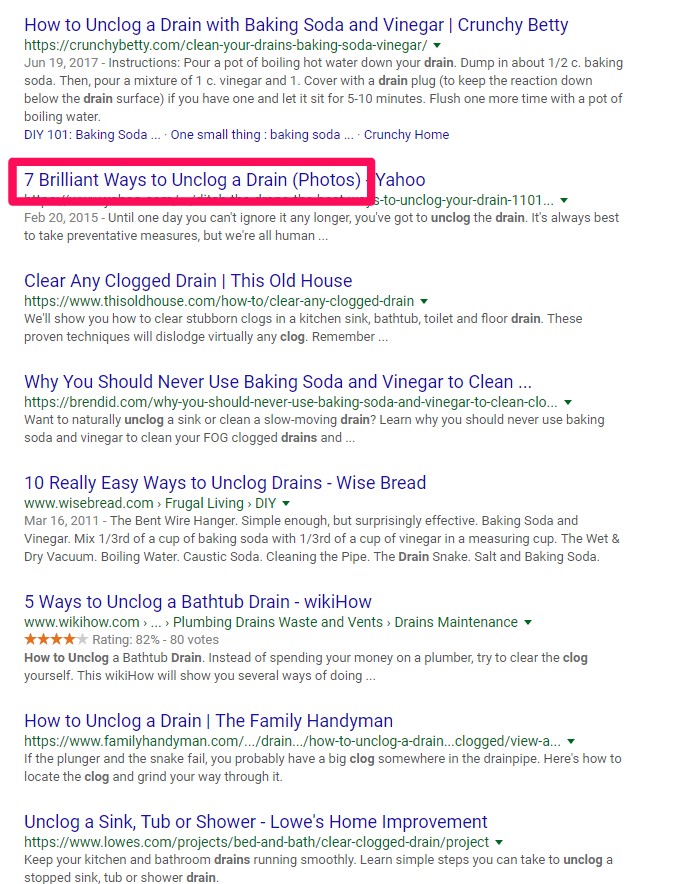
Let’s zero in on that second SERP result, “7 Brilliant Ways to Unclog a Drain (Photos)” from Yahoo, to discover what they’re doing so well to hit number two on a big, popular search query like that.

how google works drain example

This seems like it might be a good result because it gives us multiple methods to try, along with photos so we can see exactly what’s happening.

Let’s click on that to see what they provide.

how google works good content example: include images and easy to read text

Pretty good overall!

It provides the user with good, quality content to help solve a problem. The better your content does that, the more links or ‘upvotes’ it will receive when other people find it useful, too.

Links and other citations or social signals help alert Google. They tell the search engine that your page is on the rise and to start paying attention to your website for these topics.

Your page will get better treatment, move up in the rankings, be exposed to more people, get more links or votes as a result, and continue that upward trend.

That’s where the genius of Google’s process comes into play.

It makes people happy by giving them exactly what they’re looking for. When you do it right, it gives you compounding benefits that can take off all of a sudden, expanding your website traffic as a result.

How Google Search Engine Works: Conclusion

Google’s search engine is one of the most complex technologies in the world.

It crunches a mind-numbing amount of data at lightning speeds to give people exactly what they’re looking for in seconds.

When you boil it down to the basics, search engines are actually pretty easy to understand.

They want to help people find what they’re looking for.

People use Google to find answers and solutions. They have something on their minds, and they want to find an answer that helps them clear the issue to move on with their day.

How Google finds and delivers that information is the building blocks of SEO, making it crucial to growing your business online.

Now that you know how Google works, how are you going to use this information?

Establish and Maintain Rock-Solid Business Credit When You Have No Business Credit. Check Out 3 Well-Known Starter Vendors for Business Credit That Will Happily Extend Credit to New and Established Businesses

Building The Perfect Business Credit Portfolio with Starter Vendors for Business Credit

A perfect business credit portfolio means working with starter vendors for business credit. Starting with vendor credit accounts is a proven way to start building business credit. But we don’t include vendors just because they report to the business credit reporting agencies. We include them and we talk about them because they have quality products that you can use, and great customer service. They are not just a means to an end!

Vendor Credit Cards

Vendor credit cards will kick off business credit building for your business. First, add payment experiences from three vendors. Then they must report to business CRAs like Dun & Bradstreet. And then you can start qualifying for store credit, and fleet credit as well. Make sure business credit cards don’t report on your personal credit.

Every step and every credit provider works to help your business. The idea is to help you qualify for business credit cards that you will actually use. This isn’t building for the sake of building, and it isn’t just to increase a number. These credit providers are going to have what your business needs to succeed.

Business Credit with Starter Vendors for Business Credit

Keep in mind, business credit is independent of personal. Applying for it won’t harm your personal credit scores. Building this asset can only help your business. You can help your future business right now.

Business credit doesn’t just happen. You have to actively build it. It all starts with starter vendors. They will approve your business for credit with little fuss.

Use your credit. Pay on time, just like you should with personal credit. These vendors will report to the business credit reporting agencies. And you’ll build a good business credit score.

How to Build Business Credit

Having an EIN doesn’t mean you have established credit. If you go to a bank to try and get bank credit cards using your EIN with no credit established, you’ll get denials. That is unless you have good personal credit and use it to get approvals while supplying your personal guarantee. But it doesn’t have to be that way.

You can’t start with high limits. First you must build starter trade lines that report (vendor credit). Then you’ll have an established credit profile. Then you’ll get a business credit score. With an established business credit profile and score you can start getting high credit limits.

Establish business credit fast with our research-backed guide to 12 business credit cards and lines

What is Starter Vendor Credit?

These trade lines are creditors who will give you initial credit when you have none now. These vendors typically offer terms such as Net 30, instead of revolving. So if you get approval for $1,000 in vendor credit and use it all, you must pay that money back in a set term. That is, within 30 days on a Net 30 account. But there are some revolving accounts which we still consider to be starter vendors.

You must pay net 30 accounts in full within 30 days. And you must pay net 60 accounts in full within 60 days. Unlike with revolving accounts, you have a set time when you must pay back what you borrowed or the credit you used.

Getting Started

To start your business credit profile the RIGHT way, get approval for vendor accounts that report to business CRAs. Once accomplished, you can then use the credit. Pay back what you used, and the account is on report to Dun & Bradstreet, Experian, or Equifax.

Once reported, then you have trade lines, an established credit profile, and an established credit score. Using a newly established business credit profile and score, you can then get approval for more credit under your EIN. For vendor credit, you can leave your SSN off the application. Then the credit issuer then pulls your EIN credit, sees a solid profile and score. They can then approve you for more credit.

Building Business Credit – What You Really Need to Know

Not ALL retailers will approve you just because of your credit profile and score. Some sources can also have a time in business requirement. You may need to be in business 1-3 years to get credit not requiring a personal guarantee. Some sources might require you meet certain revenue requirements for as well. But many starter vendors will approve you without these requirements.

But Keep in Mind

You won’t get a Visa or a MasterCard (bank credit cards) right away. And you need to have credit to get more credit. You need to start building trade lines to get the big payoff. Getting initial credit is the hardest part. Over 97% of trade vendors who issue credit don’t report it to the business reporting agencies. So, you MUST find sources which actually report. 

Establish business credit fast with our research-backed guide to 12 business credit cards and lines.

There are Benefits to Starter Vendors for Business Credit

Vendor credit is an important step in building business credit. Vendor credit is easier to get than retail or fleet credit. It can lead to more retail and fleet credit. Establishing credit will lead to lenders approving you.  And best of all, this process is PROVEN to work! Just like for all credit, be responsible and pay on time.

More Benefits of Starter Vendors for Business Credit

You MUST have 3 or more vendor accounts reporting to move onto retail credit, and more are even better. It will take 30-90 days for those accounts to report. It’s 60 days on average. Do NOT apply for retail credit without having 3 or more accounts first.

Getting Starter Vendors for Business Credit to Pull Credit Under your EIN

There is no Social Security requirement for starter vendor credit. This is unlike bank loans and bank cards. So leave the field blank. Don’t fill in any other number, as that’s a violation of two Federal laws. A blank field will force them to pull your business credit under your EIN. Also, if there is a credit check, then it is perfectly permissible to provide the company’s EIN. You can use an EIN, rather than your Social Security Number and date of birth.

Using Business Credit

Check out FOUR of our favorite starter vendors for business credit:

  • Grainger
  • Uline
  • Marathon
  • Supply Works

Grainger Industrial Supply

They sell hardware, power tools, pumps and more. They also do fleet maintenance

Grainger will report to Dun and Bradstreet. If a business doesn’t have established credit, they will want to see more documents. These include accounts payable, income statement, balance sheets, etc. Terms are Net 30, Net 45, Net 60, or Net 90.

Qualifying for Grainger Industrial Supply

You need:

  • Entity in good standing with Secretary of State
  • EIN number with IRS
  • Business address (matching everywhere)
  • D-U-N-S number
  • Business License (if applicable)
  • Business Bank account
  • And your business must be registered to Secretary of State (SOS) for at least 60 days

Apply online or over the phone.

Uline 

They sell shipping, packing and industrial supplies. They report to Dun & Bradstreet and Experian. You MUST create an account with Uline before starting to build business credit with them. Terms are Net 30.

Qualifying for Uline 

You need:

  • Entity in good standing with Secretary of State
  • EIN number with IRS
  • Business address (matching everywhere)
  • D-U-N-S number
  • Business License (if applicable)
  • Business Bank account
  • And a business phone number listed in 411
  • You must have a D&B PAYDEX score of 80 or better

Application may get approval for net 30 at time of order. Upon final review, Credit Department may change to a few prepaid orders, before granting Net 30.

Establish business credit fast with our research-backed guide to 12 business credit cards and lines.

Marathon

Marathon Petroleum Company provides transportation fuels, asphalt, and specialty products throughout the United States. Their product line supports commercial, industrial, and retail operations. This card reports to Dun & Bradstreet and Experian. Before applying for more than one account with WEX Fleet cards, make sure to have enough time between applying. This is so they don’t red-flag your account for fraud.

Qualifying for Marathon

You need:

  • Entity in good standing with Secretary of State
  • EIN number with IRS
  • Business address- matching everywhere.
  • D-U-N-S number
  • Business license (if applicable)
  • And a business bank account
  • Business phone number listed on 411

Your SSN is necessary for informational purposes. If concerned they will pull your personal credit talk to their credit department before applying. You can give a $500 deposit instead of using a personal guarantee, if in business less than a year. Apply online or over the phone. Terms are Net 15.

Supply Works

Supply Works is a part of Home Depot. They offer integrated facility maintenance supplies. But they will not accept virtual addresses. They will report to Experian. Terms are Net 30. Apply online or over the phone.

Qualifying for Supply Works

You need:

  • Entity in good standing with Secretary of State
  • EIN number with IRS
  • Business address (matching everywhere)
  • D-U-N-S number
  • Business License (if applicable)
  • Business Bank account
  • Trade/Bank references
  • There is no minimal time in business requirement

Extra BONUS Vendor: Wex Fleet

They report to Experian and D&B. They offer universal fleet cards, heavy truck cards, and universally accepted business fleet cards. Their cards have features supporting a small business. This includes a rewards program. Before applying for more than one account with WEX Fleet cards, make sure to have enough time between applying. This is so they don’t red flag your account for fraud.

If you don’t get an approval on the basis of business credit history, or been in business 1 year, then a $500 deposit is necessary or a Personal Guarantee. You can apply online or over the phone. Terms are  Net 15 (Wex Fleet Card), Net 22, or revolving (Wex FlexCard).

Qualifying for Wex Fleet

You need:

  • Entity in good standing with Secretary of State
  • EIN number with IRS
  • Business address (matching everywhere)
  • D-U-N-S number
  • Business License (if applicable)
  • Business Bank account
  • And a Business Phone Number Listed in 411

Starter Vendors for Business Credit: Takeaways

Starter vendors are a PROVEN way to get the business credit ball rolling. They will approve you with minimal fuss. Certain requirements repeat. These include needing to have EIN and D-U-N-S numbers. And having proper licensing (if your industry requires that). Hence getting those details squared away is a smart step to take first. Want more help with building business credit? Ask us how we can help you – including our access to literally HUNDREDS of vendors. Let’s take the next steps together

The post Establish and Maintain Rock-Solid Business Credit When You Have No Business Credit. Check Out 3 Well-Known Starter Vendors for Business Credit That Will Happily Extend Credit to New and Established Businesses appeared first on Credit Suite.

Service Credit Card – Startup Funding for Your New Business

Organization Credit Card – Startup Funding for Your New Business

If you are a business owner really hoping to begin a brand-new company, a company credit history card might be simply the point you require. Organization credit scores cards have actually been around for numerous years, they have just lately began to supply motivations that are absolutely luring to those beginning a brand-new company.

Kinds Of Business Credit Cards

With the press to attract in even more cardholders, credit report card business are using a substantial variety of service credit scores cards. For this factor, it is best to take the time to contrast service credit score cards in order to establish which one is ideal for your organization. Using for every service debt card you can discover and also really hoping to obtain accepted for one will certainly show adversely on your credit rating record.

Making use of Your Business Credit Card

After you have actually located the service credit scores card that functions finest for you, it is time to begin taking complete benefit of it as well as obtain your company off the ground. A company credit history card can be a fantastic means to begin pumping cash right into your service as well as aiding it expand.

After the preliminary collection up of the company is total, you can take full benefit of your organization credit report card by paying off your organization expenses at the end of each payment cycle. If you assume it could be some time prior to you will certainly obtain sufficient profits to pay off your car loan via your company credit rating card right away, after that you require to be certain to choose one with a reduced APR

. In some cases, the size of this initial deal is identified When you contrast organization credit report cards, look for one that will certainly give you with an initial duration long sufficient to obtain you to the factor when cash begins rolling in instead than streaming out.

Expanding With You

Numerous company credit history cards do not have a pre-programmed credit scores limitation. In enhancement, some debt cards just enable for a rise when per year – this can be poor information for a company looking to broaden. When you contrast service credit report cards, be certain to discover one with lots of costs space, or look for one that can expand as you expand.

If you are a business owner wishing to begin a brand-new service, a service credit report card might be simply the point you require. Organization credit report cards have actually been around for numerous years, they have just recently began to supply rewards that are genuinely tempting to those beginning a brand-new service. After you have actually located the organization credit history card that functions finest for you, it is time to begin taking complete benefit of it as well as obtain your service off the ground. An organization credit rating card can be a wonderful method to begin pumping cash right into your organization and also assisting it expand. After the first collection up of the company is full, you can take full benefit of your service credit report card by paying off your company expenses at the end of each invoicing cycle.

Zendar (YC S17) is hiring a R&D electronics technician (part time)

Article URL: https://jobs.ashbyhq.com/zendar/56ea9fff-f961-404e-b094-5584a36c0f8c

Comments URL: https://news.ycombinator.com/item?id=27704806

Points: 1

# Comments: 0

Path (YC S19) is hiring engineers to automate paying for college

Article URL: https://www.notion.so/pathfinance/Fullstack-Engineer-Path-YC-S19-ff0fd31fa5d4410dafce77f83403ce0d

Comments URL: https://news.ycombinator.com/item?id=27714015

Points: 1

# Comments: 0

Best Shared Hosting Companies

Disclosure: This content is reader-supported, which means if you click on some of our links that we may earn a commission.

Do you want to skip the read and get right to my top pick? The best shared hosting provider for most people is Hostinger.

If you are starting a new website from scratch, shared hosting will be the best option 99% of the time.

There are other types of hosting for bigger sites with tons of traffic. But if you are just getting off the ground, shared hosting is going to be the best price with the least amount of maintenance on your end.

I’ve reviewed my top six recommendations for shared hosting. These are dependable options from well-known providers. You’re not going to get scammed or wind up with a super slow site.

After the reviews, I’ve included a short buyers guide to help you select the best option for your specific needs.

#1 – Hostinger Review — The Lowest Price for Shared Hosting

Hostinger strikes the balance between price and performance–it’s the lowest amount you can spend and still get good hosting.

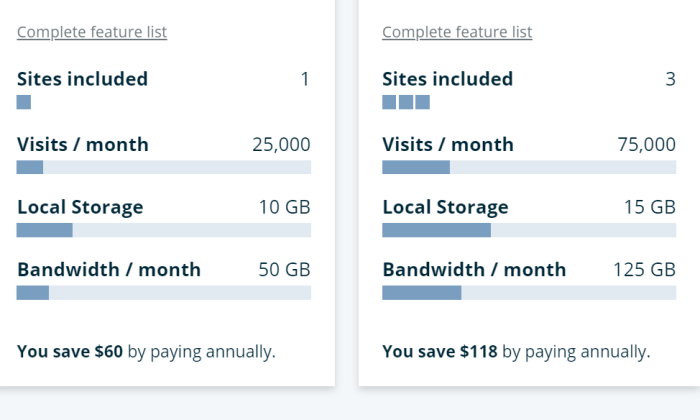
For $1.39 per month, Hostinger will set you up with one site good for up to 10,000 visitors each month. You also get 30 GB of storage, which is a hefty amount for the price.

If you’re starting out on a tight budget, this is more than enough to get your site online.

Of course you have to put the full amount down for a four-year hosting plan to get the best deal. Let’s do the math: 48 months at $1.39 per month is $66.72.

That means you are paying less than $70 for four years of hosting.

There’s simply no way to drive the price lower. You might be able to scratch out a better deal, but it’s probably not going to be with such a reputable host.

Hostinger includes 24/7/365 live chat customer service with every plan. They don’t hang you out to dry. In fact the company offers a 99.99% uptime guarantee.

There’s also a surprising amount of services and features bundled into the most affordable hosting package:

  • 1 free email account
  • Weekly backups
  • Free SSL certificate
  • 100+ one-click install apps
  • WordPress starter kit

A free email account is one less thing to buy, courtesy weekly backups are a comforting, zero-effort insurance plan.

I’m still talking about Hostinger’s entry-level plan. Literally everything I’ve mentioned up to this point is included for $1.39 per month.

If you need to create additional websites, Hostinger jumps to a whopping $2.59 per month for up to 100 sites.

Need more than 100k visitors a month? You can stick with Hostinger, but be ready to pay a tad more, at $3.99 per month, for Business Shared Hosting.

Yes, the price is going to jump upon renewal like any other host. The thing is, Hostinger’s renewal rate stays lower if you sign up for longer. With the 4-year Single Shared Deal, for example, your renewal rate is $2.99. If you only sign up for a year, the rate is $5.99.

So, you either get a really great or an incredible deal.

I recommend Hostinger for folks who know they need hosting and want the cheapest price out there. 

You get better than expected performance from a web host that’s charging you less than the price of an oil change to host your site for four years.

Current high school freshmen will have their diploma in hand before you have to pay for hosting again.
Get in touch with Hostinger and see how little you need to spend.

#2 – Bluehost Review — The Best Way to Launch Your WordPress Site Today

Looking for a one-stop-shop to get your WordPress up and running in no time flat?

Go with Bluehost for a turnkey solution absolutely anyone can use.

Normally you have to get hosting, a domain, and download WordPress. It’s not rocket science, but for a first-timer there are a lot of places to get tripped up.

With Bluehost, you can get everything in a single place for one low price.

The entire step-by-step process, from signing up to publishing your first page, is as easy as possible. There’s guidance at every turn, and should you encounter difficulties of any kind, you can reach out to customer service.

Don’t take my word for it. Bluehost has been officially recommended by WordPress since 2005. When you make contact with a service agent, you’re getting assistance from someone that resolves WordPress issues all the time.

Building a website incredibly straight-forward. There’s no code to write or hours spent Googling answers. This is true if you have never designed a website before in your life.

Choose a template to start your site and then you are off and running.

Find something that aligns with your brand or goals, and customize from there. Bluehost actually gives you custom WordPress themes that you can make your own. Use fonts, colors, and a layout that speaks to your purpose.

In addition to WordPress tools, Bluehost includes a number of features that make your site faster and more secure, with little to no work on your part:

  • Automatic WordPress updates
  • Google Business verification
  • Free CDN 
  • Free SSL certificate
  • Domain manager

Most people aren’t thinking about getting an SSL certificate when they launch a site. But it’s the only way to make sure that visitors know your site is safe. With Bluehost, you can enable a free SSL certificate across your whole site simply by turning it on. 

Same with the CDN, which you can enable with one-click to get a faster site. Both of these features are important, but not things you want to have to mess around with. Bluehost makes it effortless to get the benefits with zero work on your end.

If you need more than just WordPress on your sites, go with standard shared hosting through Bluehost. 

It’s a great deal, but if you know you are going to use only WordPress, I recommend going with one of Bluehost’s WordPress hosting plans. They are basically the same as shared hosting price-wise, but there’s better speed and security.

The difference with shared WordPress hosting is that the servers are optimized for just that. No other type of sites run on those servers, so the performance is better and it’s easier to secure.

Bluehost shared WordPress hosting is available in 3 different plans:

The Basic plan is going to work fine if you are just getting your site off the ground. 50 GB storage is more than enough for most small sites. Upgrading to Plus gives you unlimited storage, and Choice Plus comes with free automated backups.

You’ll notice that Bluehost doesn’t offer monthly pricing. You can sign up for one, two, or three-year plans. The longer your plan, the deeper the discount.

That means you are getting three years of hosting at $2.95 per month. There are enough services and resources bundled with your hosting plan to avoid having to pay for much more.

Compared to hosts that only offer discounts during your first year, Bluehost is a great way to save more money over time. 

Everything you need to get started is right there. Hosting plus free domain plus WordPress. Step-by-step instructions and 24/7 guidance. If you aren’t happy with the experience, Bluehost offers a 30-day money-back guarantee.

Jumpstart your WordPress today with Bluehost.

#3 – A2 Hosting Review — The Best Way to Escape a Nightmare Host

I have migrated sites from one host to another, and there’s nothing fun about it. Not going to name names, but I have experienced customer service airballs and been price-gouged to the point where I needed a new host that day.

If you find yourself needing to transfer your site away from a nightmare situation, A2 Hosting is your safe haven from further issues.

First things first, A2 will transfer your site for free. This is a big deal because there are a lot of little things that have to be done right in order for the process to go smooth.

A2 has a dedicated team of site migration experts that will help you make sure everything gets moved over safely. A lot of companies will give you some tools to make the process go faster, but it still amounts to a DIY migration. A2 actually does it for you.

And once you are set up, you’ll find that A2’s customer support is definitely a step up from whatever you had before. Even the cheapest plan you can get comes with 24/7 support by phone, email, and live chat.

The customer service team has an excellent reputation for resolving technical questions quickly. No more uncertainty and confusion when something goes wrong.

Your site speed will also likely improve, as A2 is constantly upgrading to the newest technologies. LiteSpeed web servers (available with Turbo plans) deliver 6-11 times faster performance than others.

A2 Hosting has been around for a long time and the platform already works with the popular tools everyone uses. There are one-click installs for WordPress, WooCommerce, Joomla, Drupal, and more. 

It’s also got bundled benefits your old host never dreamed of providing for free, like:

  • 100 GB storage
  • Unlimited email
  • Unlimited subdomains and parked domains
  • Site staging
  • Free SSL certificate
  • Malware and virus scanning

Unlimited email for free with an entry-level plan is very uncommon. Usually you have to pay extra. Site staging, too, is very rare to get with shared hosting. This allows you to test out new features on your site in a development area before pushing them live.

And 100 GB storage space? That’s two or three times as much as you are going to get for such a low price.

I like A2 for shared hosting because of the great service, generous resources, and useful bundled features.

You’ll notice that the renewal rates are good, not great. Here’s the thing. A2 has 5-star reviews from people who stick with it for years, and they all mention the high quality of the customer service. Some have even reported switching hosts upon renewal, only to run back to A2 because they didn’t know how good they had it.

This is a really good option for people who’s sites are starting to hit resource limits with their current provider. Maybe you’re running out of storage space or maybe your site is just too slow with your other host.

Solve this by moving over to A2 hosting. You’ll get a great price and A2 will move your site over for free.

A2 is the final host you’ll ever need. No more migrations. No more run-arounds from customer service. Just top speed and assistance the moment you need it. 

Let A2 rescue you from subpar hosting today.

#4 – DreamHost Review — The Best Way to Avoid an Annual Pricing Plan

If you want a website without the commitment of a long contract, DreamHost is going to give you the best price.

The company does offer very competitive rates if you are willing to sign up long-term, but unlike most competitors, DreamHost will give you a great deal month-to-month.

It works for people who just need dependable hosting, not a long-term relationship with yet another provider.

Shared hosting starts at $4.95 per month. That’s all you have to put down to get started. 

There are no hard and fast limits on bandwidth or storage, so you don’t have to worry about overage fees. 

Obviously your site can’t take more than its fair share of resources from the shared server, so if you are planning on running a lot of high-caliber website elements or an online store, you might want to spring for a Shared Unlimited plan. That’s only $8.95 per month to start, still no long-term commitment necessary.

You might think that performance or customer service would suffer if you’re not kicking a ton of money in on day one. With DreamHost, though, you get a 100% uptime guarantee. The company will actually refund you if your site goes down. 

It’s a win/win scenario. DreamHost rarely if ever has to pay people because the sites never go down. 

Another nice perk of DreamHost is that customer service is never outsourced. You can reach out any time of day by email. You can also get in touch with live chat during business hours (5:30AM–9:30PM PT), which more than covers the entire continental U.S.

DreamHost is also an officially recommended WP provider. I’d go with DreamHost for WordPress sites if you don’t want to put a lot of money down today. Bluehost is phenomenal, but you have to sign up for a year or more. 

There’s also a lot of bundled services that will save you time and money, including:

  • One-click installs for Google Workspace (formerly G Suite) and Google Analytics
  • Automated WP migrations
  • Automated WP backups
  • 200 WP templates
  • SSL Certificate
  • Free domain privacy and protection

I want to call out the free domain privacy and protection, which is free forever with DreamHost. This keeps your personal or business information out of the public record (which I recommend doing), and can cost $10-15 per year with other providers.

DreamHost will include a domain for free, but only if you sign up for a year or more. Alternatively, you can purchase a domain directly through DreamHost at a very reasonable price.

Either way it’s a good deal, but I want to focus on DreamHost’s monthly pricing plans for shared hosting. These are just much better than if you try to go month-to-month with other hosts.

The Shared Starter plan is less than $5 to get started today. No long-term commitment or large upfront cost. After three months, the price jumps up a few bucks to the new current rate, which happens to be $7.99.

This is still not a lot for hosting, considering the unlimited resources and highly available customer service.

One could forgive DreamHost for being less flexible on their refund policy, given that you don’t have to sign anything, but the reverse is in fact true.

DreamHost offers a 97-day refund, which is months longer than most.  Cancel whenever you like. There’s no fight to get your money back.

No contract? No problem with DreamHost

#5 – GreenGeeks Review Review — The Best for Socially-Conscious Companies

GreenGeeks is a solid all-around hosting company with a lot of actually useful bundled benefits. I mean it. You get fast sites and customer service that’s a cut above what you get most other places. 

But if you want an eco-friendly hosting solution, this is definitely your number one pick.

Every web host has giant server farms sucking up energy to deliver their service. There’s no way around it–the internet causes pollution. GreenGeeks matches every bit of energy it takes for hosting with three times the amount in renewable energy.

This is what GreenGeeks means by a “300% green hosting platform.” By choosing them as your host, you’re more than offsetting your carbon footprint. You’ll actually be reducing it, putting more power back into the system than you took out.

As noble as all of this is, I wouldn’t be recommending GreenGeeks if the company didn’t deliver the hosting goods. 

It does. Big time. Any plan you choose comes with some of the best performance in the shared web hosting space. 

The price is extremely competitive and you get a long list of useful services that improve your website speed, save you money, and allow you to spend less time thinking about hosting. For less than $2.50 per month, you get:

  • Nightly backups
  • 50 email accounts
  • Unlimited bandwidth
  • 50GB of storage
  • SSL Certificate
  • Domain for the first year
  • CDN
  • Website builder

With a lot of other hosts, you have to pay extra for a site builder and email. GreenGeeks includes both for free. There’s less stuff to set up, and moving forward, less maintenance on your end with courtesy nightly backups.

You also get a free domain name for the first year, which saves another $10-15 bucks right there.

Customer service is always available. You can reach out by phone, email tickets, or chat. The company has an excellent service reputation. GreenGeeks is also one of the few hosts with dedicated specialists that will help you transfer your old site for free.

I give Bluehost the edge for starting a WordPress site, though GreenGeeks makes the process very easy as well. If you’re not planning on WordPress, GreenGeeks is a good choice for Drupal and Joomla, two other popular content management systems. GreenGeeks gives you one-click installs and automatic updates for those apps and more.

GreenGeeks offers three shared hosting plans.

The Lite plan includes everything that I have mentioned so far. If you are just starting out, this is going to be all you need and more for a single site.

The Pro and Premium plans let you build an unlimited number of sites and offer more resources to help your site handle more traffic as it grows.

Regardless of the plan you choose, virtually everything you need to start running your site is bundled in. You can manage everything from a single dashboard.

The renewal rates are priced about average for the shared hosting space. Nothing great to call out there. 

But don’t forget. Every year you host with GreenGeeks is another year where you are putting in more energy than you are taking out.

Turn over a new leaf with GreenGeeks today.

#6 – WP Engine Review — The Best for High-Traffic WordPress Sites

The person behind the scenes of an amazing WordPress website knows just how much attention and maintenance went into it. 

That person doesn’t have to be you.

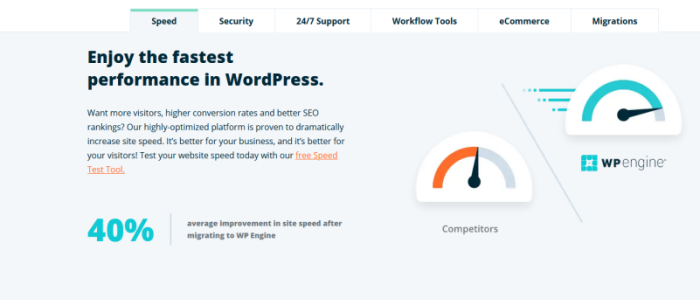
With WP Engine, you create great content, and your hosting provider takes over the technical side. This is really important if you have a high-traffic WordPress site, especially if you need to support interactive features and lots of media.

You can rest assured that everything will work and your site will be fast. That’s because WP Engine offers managed WordPress hosting plans. You still save money by sharing the server space with other WP Engine tenants, but you get much better performance and customer service because it’s a managed plan.

If you have a basic WordPress site or blog, Bluehost is going to be just fine. But once you reach a certain size, WordPress maintenance starts to become a lot more involved. With WP Engine, you don’t have to worry about the backend legwork–your sites are always blazing fast.

Think about the impression this makes on visitors. You have the latest plugins, video features, and intuitive shopping carts. Everything works in perfect harmony as potential customers make their way around your site.

This creates a positive, professional online identity for your business. And you don’t have to hire a developer to babysit your site or worry about the configuration and tedious maintenance yourself.

Even though WP Engine manages a lot of the technical stuff, there is no loss of control.  In fact, you will have more tools to build out your site than any other platform. Some of the highlights of WP Engine hosting include:

  • 30+ premium WordPress themes
  • Staging site
  • Daily backups
  • Threat detection and blocking
  • CDN
  • Automated WP migrations

The premium themes alone are worth more than $2,000 if you were to purchase them individually. 

But the real value comes from being able to create a site that stands out from the rest. With millions of WordPress sites already using the same free themes, WP Engine gives you more freedom to create something different with the more powerful premium themes.

Stand out from the crowd. Test new ideas with complete freedom as WP Engine provides an easy staging area for you to try new plugins and themes before going live.

Whether you are building sites for yourself or your customers, the staging area streamlines safe development.

And when you run into issues, you get the best WordPress customer service in the business. WP Engine customers rave about how fast and comprehensive the support is. They are more than happy to pay extra for the peace of mind.

The cost of signing up with WP Engine is higher than most other shared hosting plans, but that’s because you get a lot more. Everything from themes to support is truly premium.

And, if you sign up using my promo code, you’ll save an extra 20% off your first payment.

If you are focused on getting the most value from every dollar you spend, WP Engine is worth it. Your site just works, and you don’t have to invest additional time and resources into it.

Bear in mind that WP Engine does not increase upon renewal. You can get two months for free if you sign an annual plan, but the price never changes.

So while WP Engine is significantly more than the introductory rates from other web hosts, over time it’s a lot closer.

WP Engine offers additional managed hosting plans beyond the ones I’ve pictured here. You can get managed hosting plus, which helps with keeping plugins updated, as well as plans for ecommerce hosting.

One thing to be aware of is that WP Engine only does WordPress hosting. If you are trying to host multiple types of sites on the same host, this is not for you. Bluehost can help with whatever type of site you want, and offers managed WordPress plans if you need more than basic shared hosting.

But if you want a top-of-the-line WordPress experience, WP Engine is your best option. You’ll be able to take your sites to the next level with minimal work on your end.Grow your site and your business, not your maintenance schedule.

Get in touch with WP Engine today.

What I Looked at to Find the Best Shared Hosting Company

If you are looking at shared hosting, it’s because you’re looking for a good price with low maintenance.

Consider it entry-level hosting, a fine option for new and small sites that aren’t expecting a ton of visitors.

Other types of hosting–like VPS, cloud, and dedicated hosting–let you handle hundreds of thousands of visitors each month. The trade off is more upkeep and responsibility on your end. Plus these are going to cost five, ten, twenty times as much each month.

Still you want a fast site that’s always up and secure. You’re sharing space on a server, but you don’t want to compromise on the fundamentals. 

Done. 

All of my picks are dependable web hosts with a long track record of excellence with regards to site performance and security. This is as good as shared hosting gets.

That said, the way that each web host parcels out their services is different. 

Let’s get into the fine print and nitty-gritty to make sure that you are finding the best deal on what you really need.

Today’s Price vs Renewal Rate

Shared hosting is definitely the best way to get a low price on hosting, but you want to get something that works within your budget today, tomorrow, and next year.

Typically, to get the cheapest price on most hosting plans, you have to sign on to a multi-year contract. If you have to pay everything up front, it may wind up being several hundred dollars, even if it’s only a few bucks a month.

Is that going to work? You don’t want to get to the end of the registration process only to discover that the “cheap” plan is way more than you want to put down today.

DreamHost is a great option for people that want a low monthly rate, as some hosts won’t let you sign up for less than a year.

The other major price factor to watch out for is the renewal rate. All web hosts offer introductory deals to get you to sign up, but that honeymoon pricing only lasts for so long.

Be smart about this. Signing up for a four-year Hostinger deal locks in the lowest rate for that entire period. Yes, it’s a chunk of change upfront, but over time it’s definitely the cheapest option out there.

Resource Limits Don’t Box You In

As I mentioned, I only picked shared web hosts who offered best-in-class performance for their clients’ websites. 

That said, each provider allocates server resources differently–if you start to max out these limits, performance is going to suffer even if you’re with a solid host.

You don’t want to get stuck choosing your content or site design based on resource limits.

Start with how much storage you need. A wedding photographer with thousands of high-res pictures and video is going to blow through storage quicker than a blogger who includes an image with each post. 

A2 Hosting offers exceptionally generous storage with their entry-level plan: 100 GB for less than $3 per month. All of A2’s other plans come with unlimited storage.

You’ll see unlimited storage for a lot of upgraded shared hosting plans, and just know that it only counts toward what you use for your site. In other words, you can’t store seasons of your favorite show.

The other major resource to think about is bandwidth, which is basically the amount of data that can pass between your site and visitors. The amount you have is going to impact how fast your site is and how much lag there is between visitors arriving and page elements loading.

Everyone likes fast sites and they rank higher, but how much bandwidth do you need?

Some providers, like WP Engine, make it easy to figure out what to expect, because they list bandwidth along with an approximate number of monthly visitors on the pricing page:

New website owners especially will find this helpful. 25,000 visits a month is an easy number to wrap your head around. Some web hosts only give the bandwidth, which leaves you trying to pencil out how many visitors you can support.

When you see web hosts advertising “unlimited bandwidth,” what they mean is that there are no hard limits on what you can use. Bear in mind that it’s a shared server with finite resources, so if your site (or other people’s on that server) are using more than their fair share, it’s going to impact site performance.

For people with a basic site or blog, site resources aren’t a huge concern. You probably won’t have thousands of visitors each day, and each one will be consuming relatively little bandwidth.

But if you start adding interactive features, WordPress plugins, and other resource-intensive features on your site, I’d pay very close attention to what you get, and how much it’s going to cost if you need more.

Bundled Services You Actually Need

A lot of providers throw in more than just hosting when you sign up. These package deals that include a lot of other services that may save you time and money.

Or you wind up paying for a bunch of stuff that you don’t need.

Here’s a short list of bundled services that are actual plusses for most users:

  • Domain name: To get a site online, you have to have a domain name, which is your web address (mine’s neilpatel.com).
  • Site Backups: This is what it sounds like and means you don’t have to download a third-party app or manage site backups yourself.
  • SSL certificates: A secure sockets layer (SSL) certificate encrypts traffic when people fill out forms or enter payment info. This is important because Chrome, Safari, and other browsers will tell visitors your site is unsafe if you don’t have an SSL certificate
  • Website builder: With a good website builder, you won’t have to write a line of code to get your site looking the way you want it. Simply drag, drop, and edit page elements visually.
  • CDN: A content delivery network (CDN) stores your sites on a network of servers across the country or world. This makes your sites load faster for visitors.
  • Domain privacy: When you register your domain name, your company’s information becomes public unless you have domain privacy enabled. Some hosts charge for this, others include it for free. I recommend getting it to avoid spam.
  • Email: You want an email address associated with your domain (info@exampledomain.com), so it’s convenient if hosts include this for free.

If this is your first site, all of this is going to be helpful. 

A free domain name saves $10-15 and the time it takes you to signup with a domain registrar and point to your new host. Bluehost includes a domain name free for the first year, and you can get set up in a few steps without having to hunt down a domain registrar.

And even experienced folks will appreciate stuff like automated site backups. WP Engine takes care of that completely, which saves you from having to pay for and set up a system on your own.

Something like a website builder may be important if you want to customize the look of your site. Hostinger has an affordable site builder, but it’s an extra cost. GreenGeeks, which is a little more expensive per month, includes a site builder for free.

If you are going to run a WordPress site on Bluehost, you don’t need a separate website builder. You get templates and custom themes as part of the hosting package, so you are all set to build a sharp WordPress site immediately. 

Alternatively, it may be the case that you already have a business email and use Cloudflare for free CDN. In that case, some of these services are just going to be distractions.

Support You Can Count On

Customer service is very important when it comes to hosting. What happens when your site goes down? What happens when you can’t figure out what’s wrong?

Every minute your site is down or broken sends potential visitors to your competitor’s sites.

Customer service is a big factor in my decision to recommend this specific lineup of shared hosting providers. You can get in touch with any of them at any time day or night. I consider 24/7 support essential.

Some offer a greater range of support channels than others. A2 and GreenGeeks include phone, live chat, and email ticket support with every single plan they offer. Others only include phone service with premium tier plans.

But the number of support channels doesn’t tell the whole story. WP Engine only offers live chat with their lowest tier plan, but the company has incredible customer service reviews. People are very happy with the live chat support, because they are always talking with someone with expertise in WordPress.

Reading reviews only gets you so far, though. To get real evidence, take advantage of the free trial period. Every host I chose offers some risk-free period to try them out.

During that time, submit a bunch of customer service requests: calls, tickets, chats. Try out every avenue. It should be easy to get answers in a timely fashion. If it’s not, I’d consider that a red flag.

For people who already have a website, try to find a web host that will help you transfer your old site. That can get messy real quick. A2 and GreenGeeks will migrate your site for free, so I’d recommend looking at those two if you have a site already.

Conclusion

If you’re starting a new site from scratch or currently running a small website, shared hosting will be the best option for you. As your site grows, you can upgrade your hosting if need be, but it’s going to be more than good enough for now.

Let’s review my recommendations for the best shared hosting:

  1. Hostinger — Lowest possible price for shared hosting
  2. Bluehost — Best way to launch your WordPress site today
  3. A2 Hosting — Best way to escape a nightmare host
  4. DreamHost — Best way to avoid an annual pricing plan
  5. GreenGeeks — Best for socially-conscious companies
  6. WP Engine — Best for high-traffic WordPress sites

Hostinger is my top pick because it has the lowest price and comes with everything a new site needs to flourish.

For getting a new WordPress site off the ground, go with Bluehost. There’s no easier way to get started.

The other options are good, too, and may work even better than Hostinger or Bluehost, depending on what you are trying to do.

Say you need to leave your old host now. A2 is my top pick for you because they offer a free site transfer. This guarantees that the transition will be smooth and you won’t have to migrate everything over yourself.

Those of you looking to spend the smallest amount on day one will like DreamHost. Without signing a contract, you can get top-tier shared hosting at an affordable price.

Choose GreenGeeks if you want your hosting plan to improve the environment. Rest assured that every dollar you spend on hosting goes toward renewable energy.

If you are planning on a high-traffic WordPress site, for example, it might behoove you to go with WP Engine. While it’s overkill for small sites, it’s going to work much better for complex sites with a lot of visitors.

What’s your go-to provider for shared hosting?

How to Create an Editorial Calendar That Will Streamline Your Content Strategy

According to Bill Gates, “Content is King.” That was true in 1996, and it continues to be true today. 

As consumers become savvier, content continues to play a vital role in educating and converting consumers. 

However, not all marketers understand how to implement a content strategy correctly. When you don’t start with the basics, you could be making content production more complicated than necessary.

To be successful, your content plan must be actionable, and you need to publish content consistently.  

That’s where an editorial calendar comes in.

We’re going to cover the basics, including how to create and manage your editorial calendar, and how it can help your content strategy grow 

4 Reasons to Use an Editorial Calendar

An editorial calendar enables content publishers to plan, create, publish, and promote their content in an organized manner. Many bloggers and businesses use editorial or content calendars to streamline content production.  

In many ways, an editorial calendar is a lifesaver for creatives and business owners. Whether you’re a blogger, freelance writer, business owner, or creative director at a marketing firm, an editorial content calendar can help you stay on track and keep you sane—while ensuring a consistent flow of content.

Others use an editorial calendar to improve focus, because an organized approach can also limit writer’s block and keep content evergreen. 

There are other ways you can benefit from an editorial content calendar, including:

1. Better Organization and Delegation

With an editorial calendar, you can see articles that need writing at a glance. From there, you can delegate the articles to your writing team, ready for them to get to work. No more scrambling to send writers topics at the last minute or wondering if you’ll even get around to writing this month. 

With a calendar, it’s all right in front of you. 

Ultimately, this level of organization saves time, keeps the content coming, and ensures every member of your content creation team knows what they’re doing.

2. Improved Planning

The better you plan your articles, the better the writing tends to be. When you know what you want to write, you don’t waste time with last-minute research or trying to find the sources you need to support your article.

In fact, some consider planning to be more important than the content production itself. Planning content is essential for:

  • Creating the kind of content most suited to your audience.
  • Writing the in-depth content your audience wants—and needs 
  • Publishing exactly when and where your customers hang out. 

3. Helps Achieve Your Goals

Your editorial calendar is part of your content strategy. Ideally, you’ve developed your content strategy around the goals you’re trying to achieve with your product, your blog, or your company overall. 

An editorial content calendar assists in goal achievement by:

  • Allowing you to meet critical milestones.
  • Helping with promotional activities.
  • Reaching new leads and making fresh conversions.
  • Getting more newsletter sign-ups.
  • Building awareness of your brand.

Whatever your goals are for your business, your editorial calendar has a vital role in allowing you to achieve them.

4. Sticking to Deadlines

According to Mark Twain, “deadlines are the greatest source of inspiration.” 

However, that doesn’t mean you want to do a rush job. 

To avoid rushing content creation, every team member needs to be clear on their deadlines to keep reaching your goals and your audience engaged.

Further, keeping up with these deadlines is especially important when you’re publishing new content that’s a part of your business strategy. For example, if you are publishing blogs to support a new launch or annual sale. 

How to Create an Editorial Calendar

Don’t let the thought of creating an editorial calendar stress you out—I promise it’s not that complicated once you create a plan. This next section takes you through how to create an effective calendar, step-by-step. This is just an outline, so feel free to adjust these steps to meet the needs of your business. 

1. Determine Which Tools to Use

Your first step is deciding which tools to use. This varies from team to team, and content managers may need a combination of tools for best results. 

If you want free options for getting started, Google Docs, Excel, or Trello are popular choices. For paid tools, there are several worth considering, including:

  • Airtable
  • Asana
  • Monday
  • BrightPod

Airtable, Asana, and HubSpot offer free content calendar templates to get you started, and there are plenty of others available, too.

Whichever tool you use, make sure it meets everyone’s needs. As Buffer’s editorial director, Ash Read, told HubSpot:

“[your] editorial calendar should be a resource for your whole team, not just content creators.”

2. Create a Content Backlog

Next, you need to create a content backlog. This is just a list of content ideas for easy viewing and lets you track your ideas for posts.

You could use Google Sheets or Excel for this, or one of the free templates mentioned, like Asana.

How to Create an Editorial Calendar - Create a Content Backlog

Whichever you go with, your chosen tool should allow you to create a clear, organized list. Just remember, it’s OK to stray from your list. Not every idea will end up as an entire post, and sometimes changing your content strategy is essential for keeping up with new trends or thinking of a new angle.

Create your sheet, then start adding a few headings like: 

  • title
  • assigned author
  • project status
  • publication date

Other headings you could use are:

  • Special dates and anniversaries.
  • Themes and distribution channels.
  • Trending topics/new launches relevant to your niche.
  • Seasonal content and key sales dates. For instance, Black Friday, where you may want to ramp up content production.

3. Develop Your Content Strategy

Don’t overthink your content strategy. There’s a simple way of making sure your content strategy covers all the bases, and as long as you keep these parts in mind, you won’t go wrong. 

First, outline steps such as how much content you want to produce a month, what topics you want to cover, and your ideal customers. 

Then add strategic steps, such as managing your existing content and goal tracking. These might include: 

  1. Define your goals: For example, growing your mailing list or attracting new customers.
  2. Understand your customers: Which social media sites do your audience use? Which content types do they prefer/respond to? What are their pain points, and how can your products/services solve them?
  3. Analyze your competition: You can use a tool like Ubersuggest, which has a free and paid version to see which keywords competitors are targeting.
  4. Positioning: What makes your business unique, and how do you stand out in your marketplace? You could do this in a few ways, like specializing in a targeted niche or telling your brand’s story. Ask yourself how the content you’re creating can achieve this.
  5. Estimate your budget: How much is your content strategy going to cost you, and how can you maximize your ROI?
  6. Measure your KPIs so you know your content is getting results: For example, if you’re aiming to build brand awareness, an increase in shares and views will show you’re heading in the right direction.

4. Schedule the First Month

Many of us produce content at the last minute or create it whenever we have spare time. If you’re looking for a less stressful (and more effective) approach, schedule your content in advance.

A month is usually enough, but you could schedule up to six weeks. You can use Google Calendar for this.

How to Create an Editorial Calendar - Schedule the First Month

Add each step of your process, and make sure to give yourself plenty of time. So, you might create a due date on the first Monday to write your outlines, then schedule one article a week to be written, two days for editing, set a publish date, then schedule it into your social media sharing calendar. 

The process will vary based on how much content you produce and how many people are on your team, but I strongly recommend breaking each piece of content into more manageable steps. 

5. Move Articles Into Production

When you’re in the full swing of producing content, it’s easy to let pieces slip through the cracks, especially if you have multiple people working on the project. Creating a Trello account can keep you on track. 

The first step in using your Trello account for content production is to decide what stages each article will need to go through.

What you need is up to you, but here are some suggestions for your Trello cards:

  • assign to writer
  • writing in progress 
  • ready for edits
  • ready for uploading and scheduling

Alternatively, you could make it more complex and add additional steps like:

  • final edits
  • SEO audits
  • published

Then your Trello cards might look something like this:

How to Create an Editorial Calendar - Move Articles Into Production

6. Build Your Content Queue

If you’re just starting with an editorial calendar, you need to get a few articles ready for publication. 

Choose a schedule that suits you, but a forward-looking schedule of 4-6 weeks works well for most teams.

That sounds like a lot of work, but you can approach the task in two ways. First, you could spend a few weeks writing content until you have a volume of work to publish. However, this method isn’t suitable for everyone, unless you’ve got a team of writers to help you.

Another way is to spend a few months creating extra content every day, which is doable for most content producers. 

7. Continually Optimize Your Process 

So far, we’ve covered how to get your content production off the ground. However, you can’t set it and forget it. Over time, you might find there are bottlenecks in your process or that certain tools don’t fit your needs.  Make sure to check in with your team regularly to ensure the editorial process you’ve created is working for everyone. 

Common areas to review include: 

  • your schedule and the tools you’re using
  • the volume of content you’re storing
  • the time between stages 
  • the metrics you track 

Over time, you’ll get a better understanding of whether the tools you’re working at are suitable for your team and whether the amount of articles you’re publishing is helping your business grow. 

FAQs About Editorial Calendars

Why do I need an editorial calendar?

An organized approach to content production reduces time and helps you publish better quality content. From ideation and writing to publishing and promotion, an editorial calendar helps streamline every part of the process. 

Do I need paid tools to create an editorial calendar? 

Not unless you want to. Free tools like Trello and Google Docs are fine, but there are also paid options like Asana available. 

What headings should I include on an editorial calendar?

Not everyone’s calendar looks the same, but most marketers include titles, publication dates, and the article writer’s name. Once you’ve added in the most obvious headings, write in the titles that work for your specific needs.

What’s the difference between an editorial calendar and a content calendar? 

These terms are often used interchangeably. However, an editorial calendar generally outlines each step of the process, while a content calendar usually covers one aspect—such as when posts are published or shared to social media. 

Summary of Editorial Calendar Guide

An editorial content calendar is a must-have for any content marketer or small business looking to make the most of content production. It helps you stay focused on your goals and produce high-quality content consistently. 

Although it sounds like a lot of work, setting up a calendar isn’t difficult and allows you to seamlessly produce evergreen content while making the most of seasonal trends. 

How do you use an editorial calendar? Tell us below.

Perez: Hamilton, Verstappen battles taking me to new level

Sergio Perez says fighting seven-time world champion Lewis Hamilton and Red Bull teammate Max Verstappen on-track this season has already helped him to find a new level of performance.

The post Perez: Hamilton, Verstappen battles taking me to new level appeared first on Buy It At A Bargain – Deals And Reviews.